-
FBX to DAZ - Anyone capable?
wolf359 said:
I'm willing to pay at this point.....
You already paid $20 for the incompatible sketch fab model
if you are willing to pay even more why not invest in a similar styled mech that you know will work.
https://www.daz3d.com/pathfinder-mech
The model I'm trying to import is a recreation from an IP I'm a fan of. Imagine being a Star Wars fan and wanting to import an X-wing. Some random fighter wouldn't do.Making clothes fitI always recommend the free way... if you know a sculpting software like Blender, which can always give you quick and perfect results. Just send the pants to Blender, give it a couple of brushes to enlarge the ankle area. Then import it as a fixing morph to the pants, with Morph Loader Pro .
Sagan: A DAZ Studio to Blender Alembic ExporterI just tried it with 2 and it worked great, the hair as well as everything else imported as it should! When I tried importing it with 4, it didn't crash daz or blender. It didn't give me any error in daz either, just the blender error I mentioned, and didn't import any of the geometry.
Poser >>> DS " Article "This here might be the last test for a while that I made for some additional import adjustments. I picked this Dagon due the rigging complexity in the wings to see if the DS Port can handle this type of wings, to my surprise it worked like charm. A figure I made a few years ago with the most challenging wing rig due the attachment of the membranes on the whole torso and half way into the thail of the dragon, the secondary wing membrane that is attached from the cheek along the neck. the Tigh's of the back legs having also a influence on the membranes giving smooth natural movements. I am actually a real fan of Dragons so made quiet a few of them ....
All renders made in Daz Studio


 Daz fatal error every time when rendering in Iray
Thanks to all for your helpful responses. Yes, I know that my GTX660 is low spec and to an extent I've been getting away with it for some time. I mis-named this post in saying that I always suffer this problem when rendering - I now know that it only happens when certain products are included in the scene. Doesn't really explain why I can still Iray render very complex scenes (muliple G8 and G9 characters, all with other OOT hairs and HD clothing) without any issue, but some items (e.g Martha's Bob Hair) crash Daz when rendering even when it is the ONLY item in the scene!!; I uninstalled and re-installed this item using DIM with no effect. I've brought my Nvidia driver uptodate, (version 475.06 dated this month). I also completely uninstalled Daz Studio & DIM, including all metadata, and then re-installed. Will probably equip myself with a higher spec PC later this year, and in the meantime I can work with most of my content (but I guess not with Martha's Bob hair).
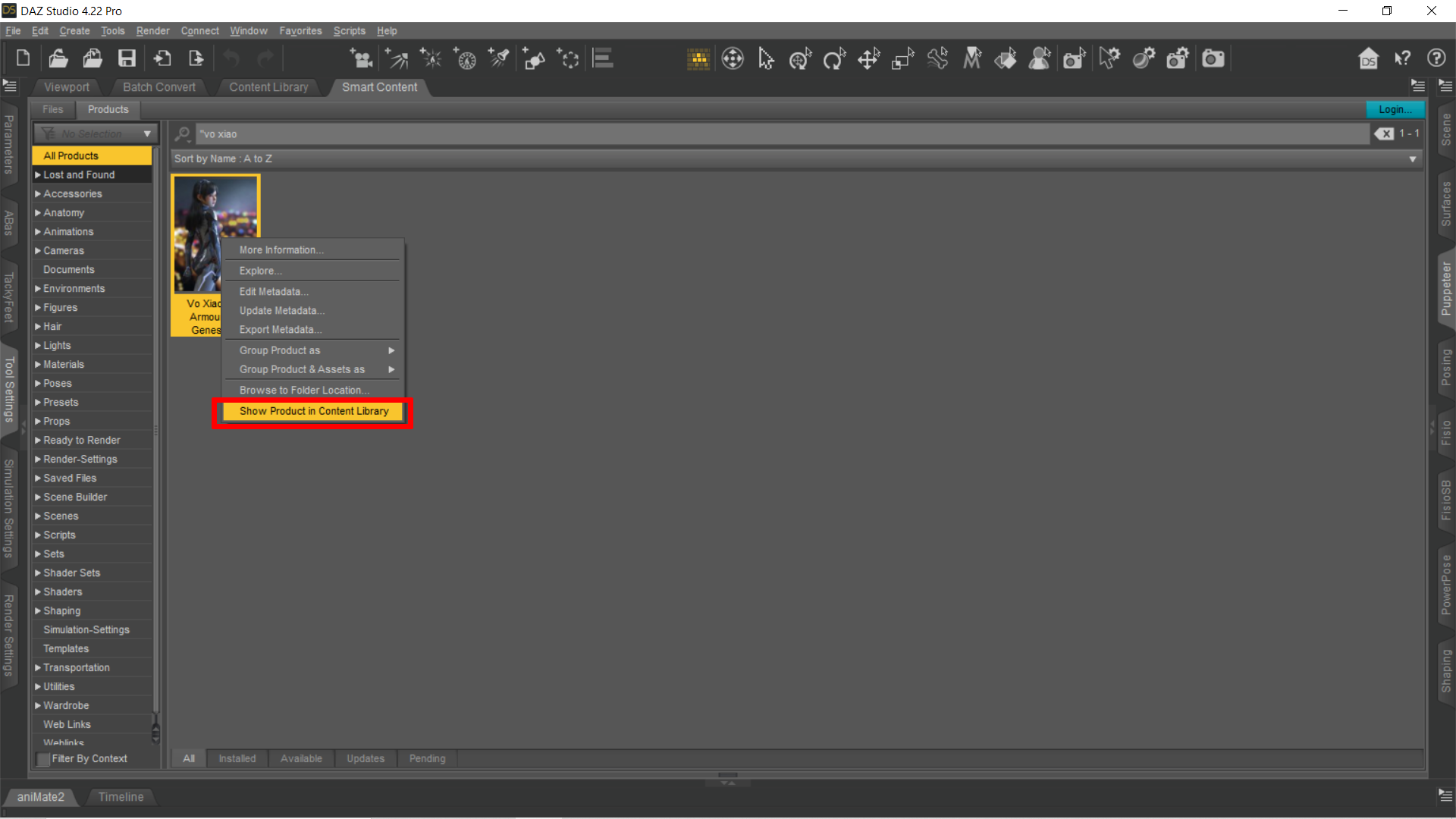
Where I can find Vo Xiao Hua HD ArmourHalcon Bluesky said:
@ suffo85 Thanks for answering my post.
I don't use the Smart Content, I am accustomed to the Content Library.
Anyway, I will try your suggestion, wish me luck.
Godspeed, soldier.
As a bonus, once you locate it in Smart Content you can right click on the product icon and then get it to show you where it is in your Content Library. This method should work for anything you have metadata for. Searching the Content Library imho sucks pretty badly using text search. I can literally type the name of something I'm looking for and Content Library can't find it, so I got used to doing it this way as a bit of a work around. Hope this helps.
 Weird skin textures!? Why is this? Is it normal like that?
I have several models like this, and the only real way I've found to fix it is to just completely customize the entire skin from top to bottom. @NorthOf45 's suggestion will also work, but then you run into issues of lines appearing everywhere else as well and not just at the neck line, they'll be everywhere where different parts of the skin meet and then like I initially said, you have to customize the entire skin of the model to get rid of all the lines.
To save time on having to make a completely custom skin, if you have other models, you can attempt to use those skins instead.
The real fix is what @SofaCitizen suggested. Problem is these types of issues rarely ever get fixed, most never do. Solution is to not provide the PA (published artist), with more money by continually buying their products, and find PA's who provide quality products "OOB" instead of doing bare minimums without ever testing before releasing. Boy I sure do like having to edit metadata with one out of an average of five purchases, fix broken dsx files, make my own Smart Product icons, or get my products out of Lost and Found, fix glowing mouths, fix shiny skins, fix unselectable hair products, etc etc etc.
Alternatively, refund the product, and buy a different one from someone who can skin correctly. Pretty sure everything I typed out here probably belongs in /r/unpopularopinion but really, this how you enact change, you hit them where it hurts, financially.
I'm sure someone will come along to tell me just how wrong I am. lol.
Best of luck, and welcome to Daz Studio.
Text to 3D or Text to Image?Is it possible that "text to 3D" is a misnomer that may lead to confusion?
If you look at the provided information:
"Millions of premium 3D assets created by experts"
This made us wonder: How long would it actually take to create billions of character variations in order to train a foundational Al model that can generate customized 3D characters based on natural language text prompts? The number is too large for us to include on this webpage.
If we had to go the traditional Al route and render that many characters for visual training, it would eat up a mind-boggling 75,000 years of compute time.
Thankfully, with Tafi's interoperable content library and metadata, we can generate them in a tiny fraction of that time.


source: https://maketafi.com/ai
Subjective interpretation of available information
- the users enter text to desribe a character
- with the help of metadata and tags the AI checks the runtime for available morphs, clothing, props and selects whatever matches the entered description
Example: Text entry old guy - AI searches the metadata for the tags "man", "old" and applies a morph that matches the description.
This is not the same as training AI to learn how to shape noise into 3D geometry based on a text prompt.
Alternative ways to phrase this could be:
- "using metadata and AI to select and combine 3D assets in a library to create a 3D scene",
- "AI assisted 3D scene assembly"
How do you interpret the available information?
Daz Bridge Support Is Here!Hi and lots of thank you's for your great work. Using DAZ to Blender bridge here with Genesis9 and it saves a lot of time and makes things work more secure.
One question...will there be a Blender 4.2 Version for your bridge? Blender 4.2 might be ready and out of Beta in or around 8th of July '24.
Two remarks >just for your information< (I can clean these things in my workflow - no problem):
- after using DtB with Blender 3.6: The models are arriving in Blender a very highly polished form...meaning...they look like being nailpolished to the brim :p
- the button to disable the skeleton sending disfunctionalized the addon's import-ability in Bender. Can't import without full rig at the present time. Have to manually clean it in Blender.
Hands and feet are crippled in UE 5.4 when imported using DTU! HEEEEELP!I'm trying to import Daz characters to unreal engine 5.4 but no matter which character I import which gender which generation the hands and feet always end up crippled! What am I doing wrong? How do I fix it? It's a problem that has been plaguing me for literally about two years now! It's driving me nuts. And the GitHub community is not particularly helpful on this issue so I'm hoping someone here has an answer. Please help me! Thanks.
Poser >>> DS " Article ":) ....
This is one I made for an Asylum in Poser, it was quied a challenge, principally it would be simple as the articulations would be rather mechanical, the tubes made the whole thing really challenging to bend as smoothly as possible with the arms keeping also some gravity. Even Blender had some issues with the autorig.
Porting it into DS these day's after a requets sure gave me some headaches as some of the arms were not zero in world space causing a loss of rigging on import. but finally found a soulution for the issue so that DS could handle this problem ( Kind of bugging DS with errors until the error fixed the import issue )


Acutually was a Perfect match for the The huge " West Park " collection here at DAZ giving a dark enough admosphere .... a time when really Dark places were released for Poser/DS
Why do I need Bryce?Hansmar said:
Hi IanTP. The Bryce/Daz bridge does no longer work, unfortunately, probably because the Bryce version is old and DAZ Studio has been updated many times. You can export to mesh and import meshes into DAZ Studio, though.
Which version of DAZ Studio you are using?
In my case it's 4.15 beta (installed it some years ago), and Bridge works. With one nuance though... You must launch Bryce first, then make a cube (or another primitive), send that to DAZ Studio via bridge option (which will automatically launch D|S in process), after that you can delete cube in both applications. And only after you've done such, sending objects from DAZ via bridge option works again.
Blown out textures?Hoping someone can help me solve an issue that I experience on and off.
I import an OBJ into DAZ Studio, and accept the default PBR Metal Roughness shader that gets applied. I assign diffuse, metal, roughness, and normal textures created in Substance Painter. Roughness gets put into Glossy Roughness, not Diffise Roughness.
Anyway, more often than not, the textures appear blown out as shown in the figure below, which compares appearance in DAZ Studio, and in Substance Painter. I'm not sure if there is something I'm doing wrong in the SP export, or if there is some other scene setting in DAZ Studio that is blowing the textures out.
Any ideas?
OT - ADOBE TOS change - access to your data and moreCheck these two clauses:
4.1 Content. “Content” means any text, information, communication, or material, such as audio files, video files, electronic documents, or images, that you upload, import into, embed for use by, or create using the Services and Software.4.2 Licenses to your Content. Solely for the purposes of operating or improving the Services and Software, you grant us a non-exclusive, worldwide, royalty-free sublicensable, license, to use, reproduce, publicly display, distribute, modify, create derivative works base on, publicly perform, and translate the Content.In 4.1 they write that anything you create with Adobe software is part of the TOS. So not only something you upload to the Adobe Cloud but anything you ever create. E.g. a Photo you edit in PS and store it locally on your disks or maybe upload to your own portfolio site, or a render edit you post in the DAZ gallery; a flyer you create with InDesing for a client, a video you edit with Premiere. Anything is affected.
In 4.2 they write "Solely for the purposes of operating or improving the Services and Software ..."
But AI image, video, text etc. generation is part of their Services and Software. That means, that Adobe can use anything you make for their AI strategy.
"you grant us a non-exclusive, worldwide, royalty-free sublicensable, license, to use, reproduce, publicly display, distribute, modify, create derivative works base on, publicly perform, and translate the Content".
You allow them to use your data for whatever they want to do with it. They can even give your data to third parties if they think think this is relevant for operating or improving their Service and Software.
Just imagine: you have a client and are making a video with Premiere or a photo with PS for him. And you signed an NDA forcing you to keep the work private and don't give it to third parties. By just using an Adobe product you already violated this NDA.
Or you make a texture set and sell it on Gumroad. They can copy that texture set, give it to third parties, use it to create another texture set, offer it in their AI tool, show it to the public.
And again - the TOS do not explicitely limit this to data you upload to the cloud - it is for anything you create, even local files on your disks.
Pure horror in my opinion.
Difference in movement of prop when moved directly or by parameters-frame slidersNo. That is not it. If I move the object by pulling on the gizmo's axes the object moves as expected. When I use the sliders in the parameters window, the object moves in strange other directions. This is completely independent of my choice of coordinate sytem that I select in the tool settings pane for the Universal tool. No difference whatsoever in the direction caused by the sliders.That does jibe with your statement that the sliders always control positions w.r.t. world coordinates. I did not know that. Thank you for the information, Felis!
Since I posted this, I looked at the object using the joint editor tool. There I see the green axes at the object's origin and the red axes that indicate the motion of the object when using the sliders. So I see why it is happening. But I don't like it. I don't want the pose that is specified by the joint editor. What I want to do is to make the object's origin (as shown by the green axes) to be at the barycenter of the object. I want those axes to align precisely with the world coordinate axes. There appears to be no way to make that happen. In the joint editor, if I pull on one of the green axes, it causes the object to move as well. Moreover, I cannot control either the exact location of the red axes nor their orientations w.r.t. the green axes. Very frustrating. It is nearly impossible to align the joints with the object itself. Undoubtedly there is some way to do that. But I do not know what that is. I do not know how to align the joints to the object's natural symmetries. Do you know how to do that? Anybody? I would appreciate knowing how to do that.
By the way, I am talking about a rigid object with no articulations stored in a .obj file that I put in the scene through the import function.
Clothing Converters G9 > G8On a basic level, yes, because RSSY description said it will also copy metadata, which is useful if you're using Smart Content. When I'm saving an autofitted / converted clothes manually, the only part of smart content that is working is getting an easy access to material settings.
Rarestone Face Morphs Merchant ResourceLooking at the archived version of the page, before Daz bought the product (at least before it was sold as a Daz Originals, I don't know when Rarestone sold her products to Daz), the description is the same as the current one:
https://www.daz3d.com/rarestone-s-face-morphs-collection-for-genesis-8-female
So it's likely the same licence requirements and opening a ticket is you best bet to get them (the requirements are likely a variation around "create the face you want, export as an OBJ and import back to create a morph" but I don't know if they are limitations around the nature of the products using the morph you just created -- some MR licences doesn't allow freebies from what I read).
Blender Bridge or Diffeomorphic MorphsAs for diffeomorphic.
HD morphs are not supported by blender. That is, the multiresolution modifier doesn't support morphs other than the base level. This complicates things when you want to load HD morphs in blender. One way is to import the full HD mesh and the morphs for that, another is to bake the HD morphs to dispalcement maps. The Xin addon can do both.
Of course the easy way is to just import the HD shape with easy import in diffeomorphic, but this will import the shape not the morphs. So you have to apply first the morphs you want in the daz viewport, as nipples for example, these will be baked in the HD shape for export.
How to save a group of material preset?James said:
How to use Content Wizard to make installation zip. I watched the officila tutorial of the product, but he didn't explain how to do it.
First, I would strongly recommend Content Wizard rather than Content Package Assitant, especially after I helped to fix some issues for a folk who used the latter.
You can check my short version tutorial in this thread, and see the problems of CPA tool... https://www.daz3d.com/forums/discussion/comment/8741736/#Comment_8741736
After clicking the button of "Install Smart Content" in Content Wizard, the button of "Export Zip Files...." next to it will be active. Click it to generate an IM package. Then install it via DIM and check if all metadata are correct before you distributing the package.
Difference in movement of prop when moved directly or by parameters-frame slidersThis is something that I have found annoying for years and I do not know how to fix it. If I import an object and move with it the local attached (object frame) coordinate axis set it moves in the direction I pull it and rotates it around the correct axis. (What is the proper name for that gadget, anyway?) But when I move the object using its parameters-pane sliders or by typing numbers directly into the number fields, It moves in a completely unexpected and, frankly, wrong direction. It matters not whether I use local coordinates or world coordinates.
Why does this happen? How can I align the parameters-pane axes with the object's attached object-frame axes? E.g. so that when I adjust the y-axis slider, it moves in the same direction as when I pull on the attached object-frame y-axis. In nearly 20 years of using this program, I have not figured that out (rather dense I am sometimes). I've tied some of mcasual's scripts, like mcjChangeOrientation and mcjZeroOrigin orientation but they do not change the behavior I am describing.
After all this time, I'd really like to understand what is happening and how I can fix it.
Thank you all in advance!
Daz 3D is part of

Connect
DAZ Productions, Inc.
7533 S Center View Ct #4664
West Jordan, UT 84084Licensing Agreement | Terms of Service | Privacy Policy | EULA
© 2026 Daz Productions Inc. All Rights Reserved.