-
Unique Smiles for Gen 9 product help
etaktrash_d29ae59121 said:
Well that is a very confusing place to put it! Thanks for helping.
Sorta.
The genesis series, at least starting with G2, removed morphs from being in each sub-node and placed them in the main node.
It not only simplifies morph creation,but reduces the number of morphs that needs to be loaded on a figure, and reduces the amount of time one had to go digging around and applying each morph to each node.
What's now present in the sub-nodes are Alias morphs, which are basically just an empty morph that's linked to the base node morph.
Edit: Me brain fart.
Unique Smiles for Gen 9 product helpWell that is a very confusing place to put it! Thanks for helping.
DrunkMonkeyProductions said:
First, it doesn't have any presets, so there's not really anything but a zero/remove script for smart content to show.
Second, there are no alias sliders, so there won't be any sliders in the head, only in main body.
Third, the morphs folder doesn't indcate anything about morph type.
You'll find the controls under Pose Controls>Head>Expressions>PFA Unique Smils HD, in the parameters or posing tab.
Questions about working with the Riversoft G2F to G8F Character ConverterIceDragonArt said:
DrunkMonkeyProductions said:
1. if the morph is deactivated in turbo loader, you'll just get an error in the converter about "Missing FIles", and it won't be converted.
If you have morphs with the same name, you're going to have problem 2.
2. Duplicate formula errrors are caused by a few things, but the most common is two morphs with the same name.
The log file will tell you exactly which files are conflicting, generally.
If the conflicting morphs are not from a previous conversion, but are base morphs or from a morph pack specific to the base figure, you're going to need to rename the morph you're converting, and make a new preset to use the renamed morph instead of the original.
For instance, if you're trying to transfer Esme(g2f), and there's an Esme(g8f) and both morphs have the Name, FBMEsme, the you'll need to rename the g2f version and modifiy the preset to use the new name.
You can either do this in studio, or by edting the DSF and DUF in a text editor.
3. That's due to a change in studio, and unless riversoft has or is going to update the script, there's nothing you can do to avoid it. Check if there's been an update.
Basically, people were messing stuff up using Zero, and complaining about their messups enough, that Daz put that error in.
For those of us that know how/when to use zero, as retore doesn't do what we need, it's annoying as bleep.
I believe Riversoft said in her thread about this product that you should always use Zero never Restore
Not as a general rule in DS, whether it is needed here or not
Unique Smiles for Gen 9 product helpFirst, it doesn't have any presets, so there's not really anything but a zero/remove script for smart content to show.
Second, there are no alias sliders, so there won't be any sliders in the head, only in main body.
Third, the morphs folder doesn't indcate anything about morph type.
You'll find the controls under Pose Controls>Head>Expressions>PFA Unique Smils HD, in the parameters or posing tab.
[Solved for G9] Strandbased Very Short Pixie hair not following the head of some charactersI have the same problem with Genesis 8 with character who are shorter than Genesis 8, some who are using scaling as part of the shortening process, other, like the first one I tested, who simply have a morph of a character smaller than Genesis 8, and I don't understand why: 'Very Short Pixie Style Hair Strands G8' doesn't fit as it should while 'Very Short Pixie Style Cap G8' fit perfectly
Here an example with Sarah by CGSerpent (which was free a couple of months ago), sold on Renderhub (no link because they are NSFW user renders on it visible by default):
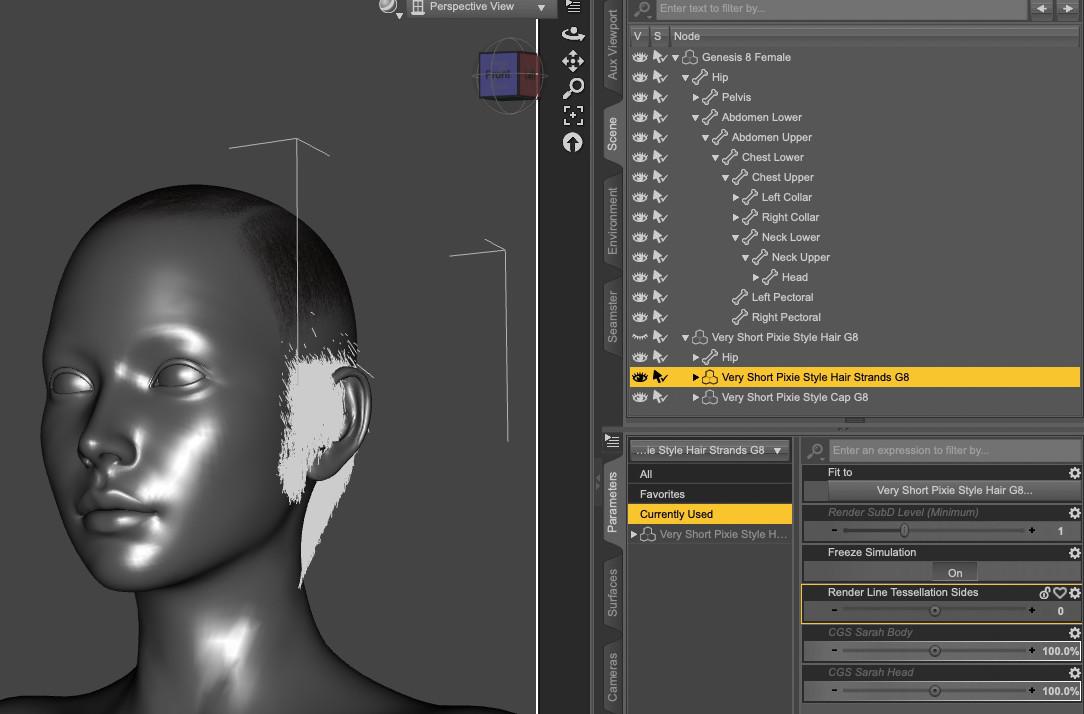
Removing the auto-generated morph on 'Very Short Pixie Style Hair Strands G8' seems to solve the problem:
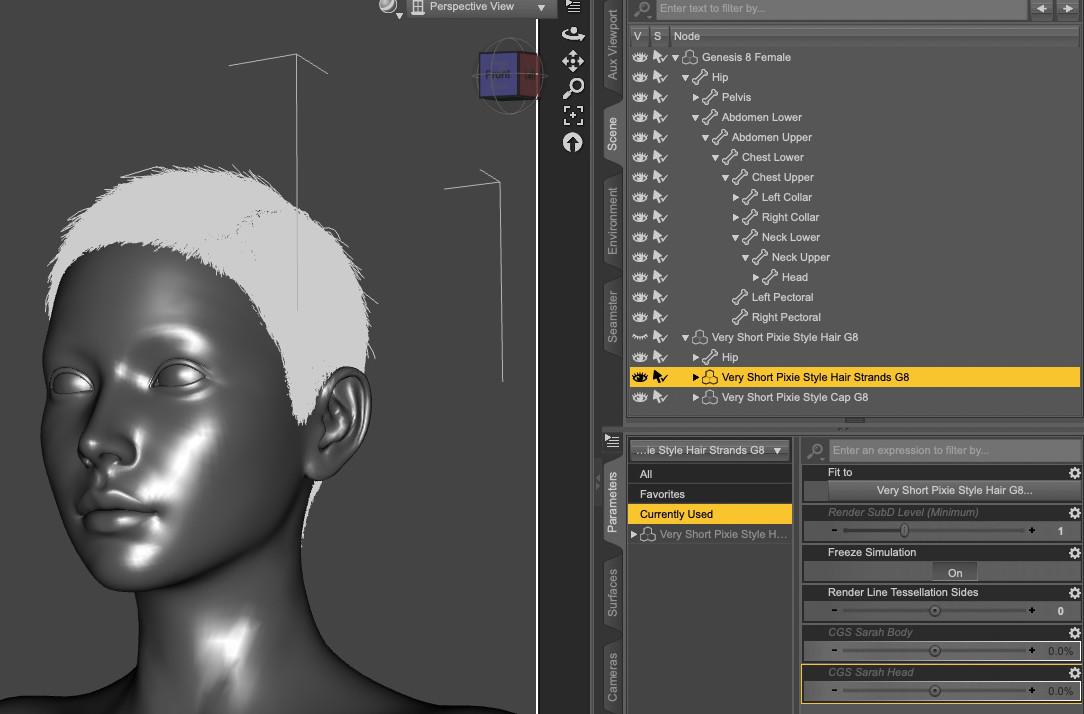
I tested with other characters, including Daz Originals like Victoria 8.1 or characters sold here to remove the possibility that CGSperpent did something wrong while creating the CGS Sarah Head and CGS Sarah Body dials, and the problem does happen with pretty much all of them to some extend.
The same problem doesn't seem to happen to another strand based hair by Out of touch:
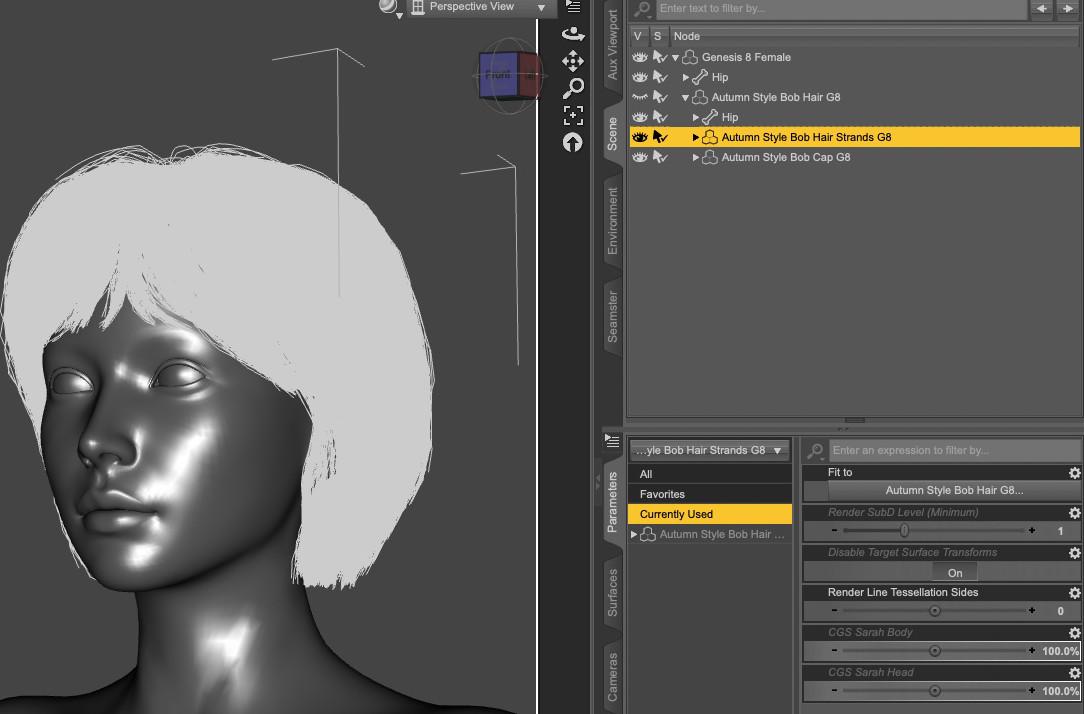
Does someone know how to solve it ?
Questions about working with the Riversoft G2F to G8F Character ConverterDrunkMonkeyProductions said:
1. if the morph is deactivated in turbo loader, you'll just get an error in the converter about "Missing FIles", and it won't be converted.
If you have morphs with the same name, you're going to have problem 2.
2. Duplicate formula errrors are caused by a few things, but the most common is two morphs with the same name.
The log file will tell you exactly which files are conflicting, generally.
If the conflicting morphs are not from a previous conversion, but are base morphs or from a morph pack specific to the base figure, you're going to need to rename the morph you're converting, and make a new preset to use the renamed morph instead of the original.
For instance, if you're trying to transfer Esme(g2f), and there's an Esme(g8f) and both morphs have the Name, FBMEsme, the you'll need to rename the g2f version and modifiy the preset to use the new name.
You can either do this in studio, or by edting the DSF and DUF in a text editor.
3. That's due to a change in studio, and unless riversoft has or is going to update the script, there's nothing you can do to avoid it. Check if there's been an update.
Basically, people were messing stuff up using Zero, and complaining about their messups enough, that Daz put that error in.
For those of us that know how/when to use zero, as retore doesn't do what we need, it's annoying as bleep.
I believe Riversoft said in her thread about this product that you should always use Zero never Restore
AIUTO...CHI CONOSCE L’ITALIANO? PARTE QUATTORDICIImago said:
menghienrico said:
Buongiorno a tutti voi e buon anno! Ho un problemino con Map Transfer, che sto utilizzando per "splittare" una texture multipla, nelle corrispettive singole per Gen 9. Ho seguito alla lettera il tutorial presente in questo video https://www.youtube.com/live/Qfa2dBJSrb0?si=LG0SBcwWQIJS_kOA ma le mappe mi escono completamente bianche. Temo che il problema sia il render 3Delight che credo di non avere mai usato, se non agli albori. Ma Map Transfer per funzionare, si serve (ahimè) di 3Delight. Ho provato a renderizzare il personaggio in 3Delight e risulta anch'esso bianco, come se non caricasse le texture. Ho provato a caricare un vecchio personaggio Gen3 e il risultato è sempre quello: texture inesistenti e bianche. Ho supposto si tratti di un problema di shader ma nel tutorial che ho seguito, non è specificato che prima del processo di baking si debba applicare un qualche shader compatibile con 3Delight. A voi è mai successo?
No, mai successo. Nel workspace le texture appaiono correttamente sul personaggio?
Si, appaiono correttamente. Ho analizzato il problema più a fondo e nei log compare ripetutamente questo errore:
2026-01-06 07:09:16.920 [WARNING] :: tdlmake failed to create tdl for image: C:/Daz 3D/Applications/Data/DAZ 3D/My DAZ 3D Library/Runtime/Textures/DAZ/Characters/Genesis9/Base/Eyebrows/NormalMap01_Thin.jpg
2026-01-06 07:09:16.921 [WARNING] :: ERROR: 3Delight Process encountered an error: "C:/Daz 3D/Applications/64-bit/DAZ 3D/DAZStudio4/bin/tdlmake.exe -mode periodic -deflate C:/Daz 3D/Applications/Data/DAZ 3D/My DAZ 3D Library/Runtime/Textures/DAZ/Characters/Genesis9/Base/Eyebrows/OpacityCutout01_Thin.jpg C:/Users/Utente/AppData/Roaming/DAZ 3D/Studio4/temp/Normal Map Fusion/d71_OpacityCutout01_Thin.tdl"
Failed to start process
L'errore si ripete per tutte le mappe (texture). Ho verificato in C:/Daz 3D/Applications/64-bit/DAZ 3D/DAZStudio4/bin/tdlmake.exe e manca proprio il file tdlmake.exe. Quindi credo che il problema sia quello! Poi leggendo sul sito di DAZ, ho letto che con la recente versione uscita dopo Natale, Daz sta abbandonando il supporto a 3Delight. Ci sta, perchè è datato, ma Map Transfer per funzionare correttamente necessita del 3Delight, diversamente utilizzando Iray, le mappe mi escono nere.
searching for an old plugin/addonHi folks, I am looking for a tool that wad available in dazstudio that projected a mesh-like figure over the picture, and you pinched/pulled/dragged it to match the picture shape. Then you repeated that from different angles and it created a custom head morph. It is not facetransfer, i remember that it worked on Gen3, maybe even 8... does someone know what i am talking about? I wish i could find a video or screenshots. Not sure if it was in daz store, but it was made for dazNew Year, New Sales Thread: Report Issues Here 3 "Reporting Only"https://www.daz3d.com/spr-hollow-out-jumpsuit-for-genesis-9
Included Morphs:
- Morph 1
- Pose Control 1
What are morph 1 and pose control 1? Bit of a bad naming.
AIUTO...CHI CONOSCE L’ITALIANO? PARTE QUATTORDICImenghienrico said:
Buongiorno a tutti voi e buon anno! Ho un problemino con Map Transfer, che sto utilizzando per "splittare" una texture multipla, nelle corrispettive singole per Gen 9. Ho seguito alla lettera il tutorial presente in questo video https://www.youtube.com/live/Qfa2dBJSrb0?si=LG0SBcwWQIJS_kOA ma le mappe mi escono completamente bianche. Temo che il problema sia il render 3Delight che credo di non avere mai usato, se non agli albori. Ma Map Transfer per funzionare, si serve (ahimè) di 3Delight. Ho provato a renderizzare il personaggio in 3Delight e risulta anch'esso bianco, come se non caricasse le texture. Ho provato a caricare un vecchio personaggio Gen3 e il risultato è sempre quello: texture inesistenti e bianche. Ho supposto si tratti di un problema di shader ma nel tutorial che ho seguito, non è specificato che prima del processo di baking si debba applicare un qualche shader compatibile con 3Delight. A voi è mai successo?
No, mai successo. Nel workspace le texture appaiono correttamente sul personaggio?
AIUTO...CHI CONOSCE L’ITALIANO? PARTE QUATTORDICIBuongiorno a tutti voi e buon anno! Ho un problemino con Map Transfer, che sto utilizzando per "splittare" una texture multipla, nelle corrispettive singole per Gen 9. Ho seguito alla lettera il tutorial presente in questo video https://www.youtube.com/live/Qfa2dBJSrb0?si=LG0SBcwWQIJS_kOA ma le mappe mi escono completamente bianche. Temo che il problema sia il render 3Delight che credo di non avere mai usato, se non agli albori. Ma Map Transfer per funzionare, si serve (ahimè) di 3Delight. Ho provato a renderizzare il personaggio in 3Delight e risulta anch'esso bianco, come se non caricasse le texture. Ho provato a caricare un vecchio personaggio Gen3 e il risultato è sempre quello: texture inesistenti e bianche. Ho supposto si tratti di un problema di shader ma nel tutorial che ho seguito, non è specificato che prima del processo di baking si debba applicare un qualche shader compatibile con 3Delight. A voi è mai successo?
Questions about working with the Riversoft G2F to G8F Character Converter1. if the morph is deactivated in turbo loader, you'll just get an error in the converter about "Missing FIles", and it won't be converted.
If you have morphs with the same name, you're going to have problem 2.
2. Duplicate formula errrors are caused by a few things, but the most common is two morphs with the same name.
The log file will tell you exactly which files are conflicting, generally.
If the conflicting morphs are not from a previous conversion, but are base morphs or from a morph pack specific to the base figure, you're going to need to rename the morph you're converting, and make a new preset to use the renamed morph instead of the original.
For instance, if you're trying to transfer Esme(g2f), and there's an Esme(g8f) and both morphs have the Name, FBMEsme, the you'll need to rename the g2f version and modifiy the preset to use the new name.
You can either do this in studio, or by edting the DSF and DUF in a text editor.
3. That's due to a change in studio, and unless riversoft has or is going to update the script, there's nothing you can do to avoid it. Check if there's been an update.
Basically, people were messing stuff up using Zero, and complaining about their messups enough, that Daz put that error in.
For those of us that know how/when to use zero, as retore doesn't do what we need, it's annoying as bleep.
Remixing your art with AIDiomede said:
I am so sorry about your Pinokio woes. I've committed to myself to spend the first half of 2026 exploring using AI to help with 3D modeling. Unfortunately, it means installing or otherwise accessing even more apps that might be problematic. Hoping you get your situation sorted out quickly.
I may take another look later, it might be the external drive type, ran into that issue with Forge
it's not wanting to see my Nvidia GPU as it's not running my main monitor for numerous reasons
I manually chose it in the control panel which mostly works but not this update
tried 3X
uninstalling, reinstalling changing stuff
given up, it won't work with the old versions either
meanwhile
am doing 3D, converted my OC Zynk Zydian to G8 using the G9 version shape to create a morph, crashed D|S a few times doing it but looks the same, all facial animations work no mouth eye weirdness as many morphloader imports have from other generations, the G9 mesh good that way for transfer utility as can just use the skin to fit the G8 mesh to before dialing in shape, converting it to a prop with base resolution for morphloader.
(yeah off topic as no Ai involved)
will try to get all the generations like I did Kimata, have her in G1,2,3,8 and 9 now
Is there a Studio release other than 2025 which is compatible with Premier?Richard Haseltine said:
Did you try the Update and Merge Menus command? If that fails, are the entries in Window>Workspace>Customise? Shape Transfer is in its own group on the left: yoiu can drag its entry to a menu or toolbar of your choice on the right of the dialogue to make it available in that place in the UI.
Ah, there ya go. Good, good. Shape Transfer is now available. Thanks greatly for the help. I think that solves every Premier issue I've been having in 4.24. Thumbs up with gusto.
New Year's DAZ-olutions?Roman_K2 said:
nonesuch00 said:
I can't bbring myself to watch the DVD movies...
Ha!
Is "FaceGen" in any way related to "Face Transfer", I wonder.
I think one of the most maddening things about A.I. is its apparent ability to copy certain painterly styles. I don't even want to go there...
No, it used to be on sale here and does a middling job that shoould be improved with Genesis 9 higher polygon count but I don't know for certain. The old vesion already did a decent job on some celebrities but nothing like a handdown sculpt by a professional. I think it would do an easily recgonizable Gollum.
Generation 3 Aiko and Hiro Appreciation ThreadRobby - Morph Preset for H3 Freebie
https://www.daz3d.com/forums/discussion/752796/robby-morph-preset-for-h3
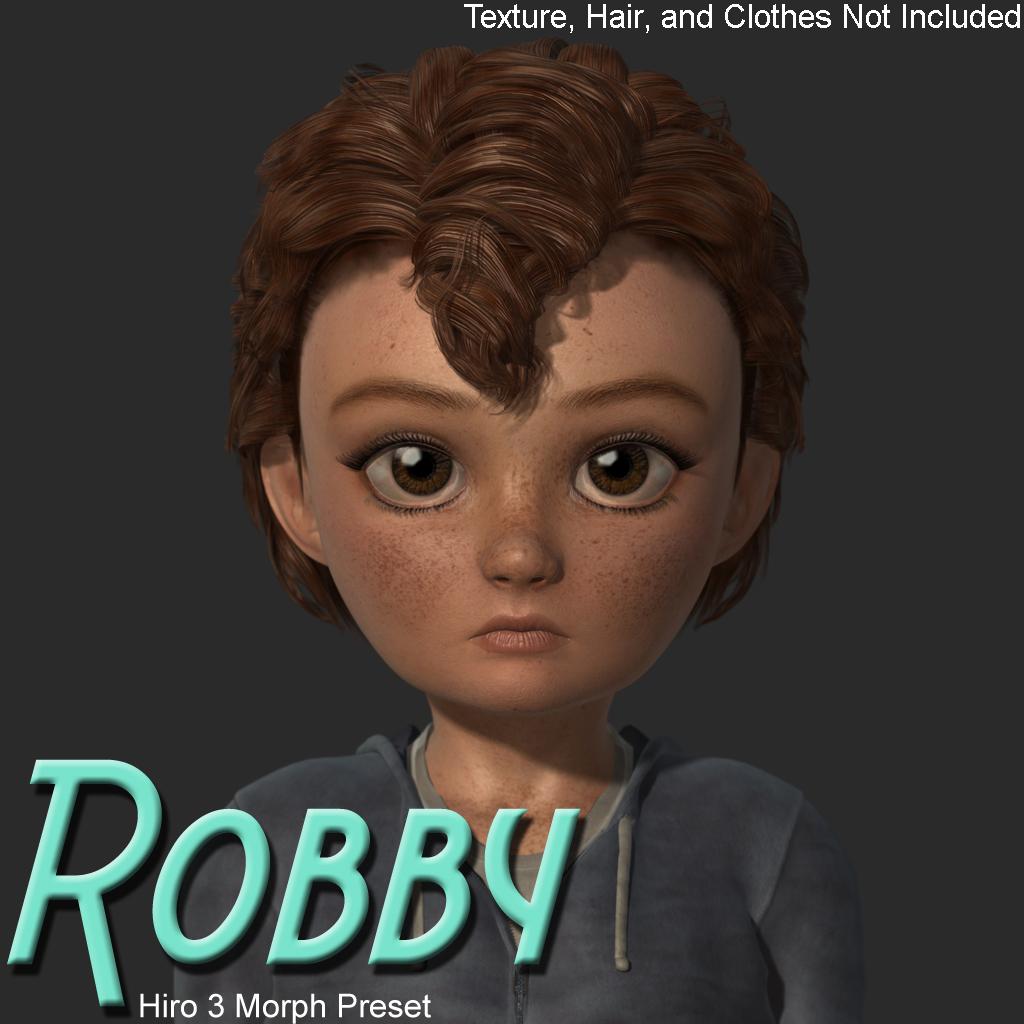 Robby - Morph Preset for H3
Robby - Morph Preset for Hiro 3
Requirements:
Hiro 3.0 https://www.daz3d.com/hiro-3-0
Hitoro https://www.daz3d.com/hitoroAiko & Hiro Morph Expansion & Horn Pack (NA) was also used, but not having it does not dramatically affect the look of the character.
https://www.daz3d.com/forums/uploads/FileUpload/6b/2e70e8333de5074f672f7817191c0a.zip
Also at rosity and renderhub.
 Is there a Studio release other than 2025 which is compatible with Premier?
So, upon reading the log file upon opening Studio 4.24 and looking for loaded plugins, I could find no indication that the Shape Transfer plugin, /Applications/DAZ 3D/DAZStudio4 64-bit/plugins/libdzshapetransfer.dylib was loaded. I read every line. No mention at all. All other Premier plugins were loaded. There was a warning message that 14 items failed to load, some of them referencing products that are in my library and I can use, so I'm not sure what the failure was. The other warning messages referenced items which were described in code that I'm unable to decipher. I scoured this pretty closely and could find no mention of "plugins/libdzshapetransfer.dylib".
Is there a Studio release other than 2025 which is compatible with Premier?Did you try the Update and Merge Menus command? If that fails, are the entries in Window>Workspace>Customise? Shape Transfer is in its own group on the left: yoiu can drag its entry to a menu or toolbar of your choice on the right of the dialogue to make it available in that place in the UI.
Licensing questionFriends,
I have read the licenses but I still don't fully understand. Will be so grateful if anyone could explain:
For example, I purchase an interactive license for Genesis 8 Starter Essentials. Then I purchase a character or a morph for genesis 8, but that product doesn't even have an option named "Interactive license" when I'm purchasing it.
If I apply a morph from that second package to my Genesis 8. Am I allowed to export and use the resulting figure in my 3d game?
Daz 3D is part of

Connect
DAZ Productions, Inc.
7533 S Center View Ct #4664
West Jordan, UT 84084Licensing Agreement | Terms of Service | Privacy Policy | EULA
© 2026 Daz Productions Inc. All Rights Reserved.