-
Render your buys! Use buys from the current month and the previous month of sales
I finally got a chance to play with DS a bit. I wanted to use the stuff I got from the STF Tribal series of products (outstanding stuff from Strangfate and Roguey). This is what I came up with.
Image Title: From the Shadows .....
Back Story:
"Queen Zarina, the revered leader of the Amazon warriors, approached the entrance of the ancient, overgrown temple. Vines cascaded down the weathered stone walls, their emerald tendrils hiding the secrets within. Zarina's heart pounded with a mix of excitement and trepidation as she ventured deeper into the shadowy corridors. Her senses heightened as every movement echoed through the silence becoming alert to every whisper of movement. Her mission was clear: retrieve the sacred artifact said to hold the power to protect her people from the encroachment of the outside world. The air grew thick with the scent of damp earth and forgotten history. As she approached the central chamber, an eerie chill ran down her spine.Without warning, a figure emerged from the shadows, cloaked in darkness and menace. The attacker moved with the stealth of a predator, striking swiftly. Zarina's reflexes kicked in, her warrior instincts honed from years of battle. She prepared to deflect the first blow with her shield. In the dim light, she caught a glimpse of her assailant's eyes—cold, calculating, and filled with malice."
Note: Please zoom to full resolution to see the great details.
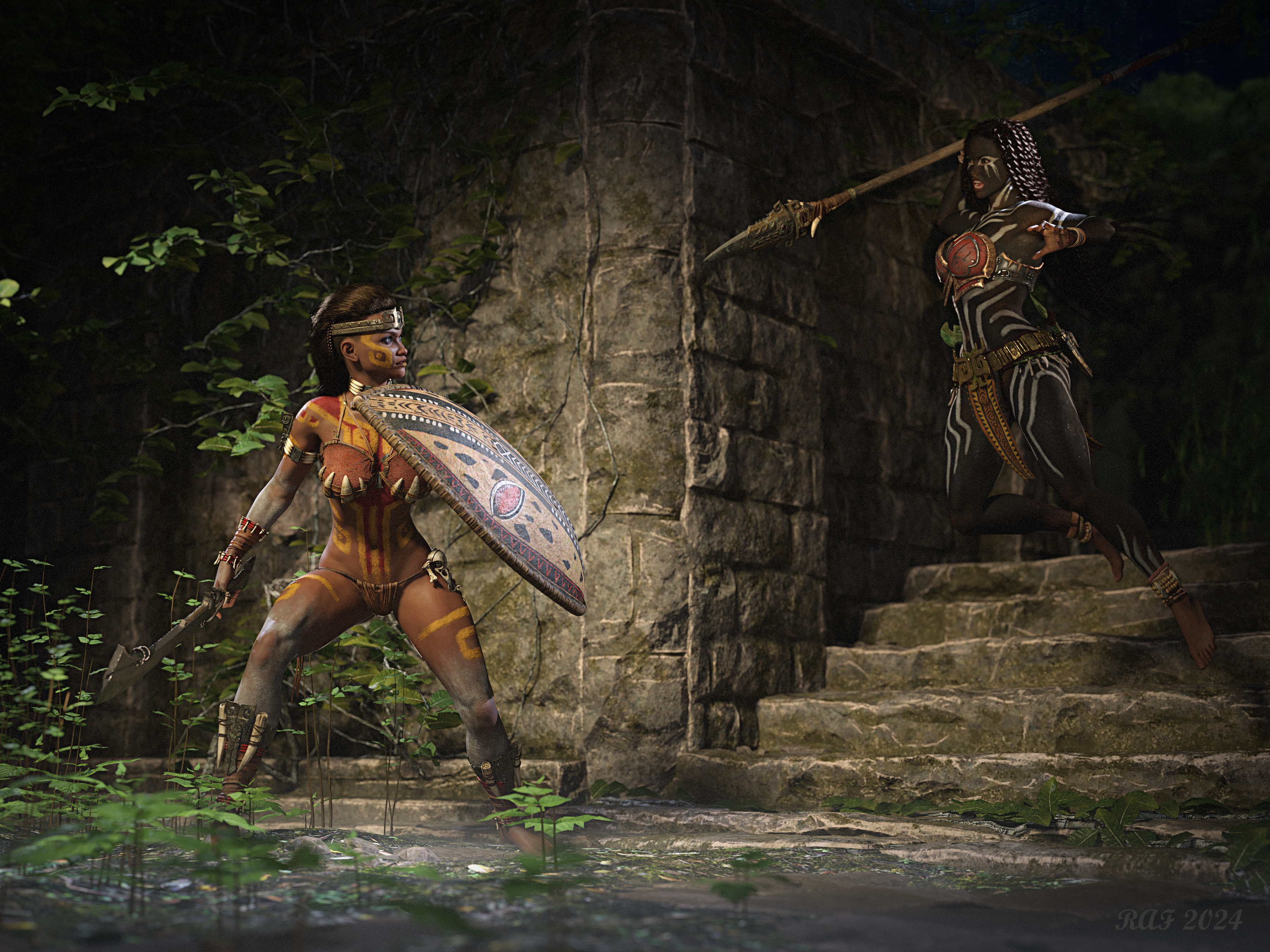
This image has been resized to fit in the page. Click to enlarge.
What highway prop is in the main picture for Traffic Patterns Script and Prop Collection?oh boy. That is a cobbled together mess.
The ground is a DS plane with concrete textures, the ground level highway is Terradome 3 roads (lots and lots and lots of them). The central divider is a cube with concrete shaders. The raised roads are GIS Skyway on some more cubes, again with concrete shaders. The concrete shaders sre by Dimidrol and I'm not sure which ones I used.
https://www.daz3d.com/road-n-rails-for-terradome-3
https://www.daz3d.com/gis-skyway
So mainly its lots of bits copied and glued together to make a nice massive highway interchange. Not old as dirt .. Terradome at least has Iray shader support lol
The road n rails road does have curve morphs, and thats what was used for the on ramp lane there.
LM
Was "Show Asset in Mapped Folder" Removed from Content Library Search Results?DoctorJellybean said:
barbult said:
Richard Haseltine said:
Virtual Folder should be the Daz Connect container (because it is an aggregation of the al the /data/cloud/1_SKU/ folders rather than a real location on disc) while mapped folders are the real content directories for content installed manually or through DIM/Daz Central. I am not sure why it would give inconsistent labels like that.
I think that inconsistency first showed up in the release (beta?) when Daz changed the File/New to that unpopular dialog with advertising. I asked about it at the time. It was not explained.It has been fixed
http://docs.daz3d.com/doku.php/public/software/dazstudio/4/change_log#4_22_1_152
Thanks! I hate inconsistency.
Was "Show Asset in Mapped Folder" Removed from Content Library Search Results?barbult said:
Richard Haseltine said:
Virtual Folder should be the Daz Connect container (because it is an aggregation of the al the /data/cloud/1_SKU/ folders rather than a real location on disc) while mapped folders are the real content directories for content installed manually or through DIM/Daz Central. I am not sure why it would give inconsistent labels like that.
I think that inconsistency first showed up in the release (beta?) when Daz changed the File/New to that unpopular dialog with advertising. I asked about it at the time. It was not explained.It has been fixed
http://docs.daz3d.com/doku.php/public/software/dazstudio/4/change_log#4_22_1_152
Was "Show Asset in Mapped Folder" Removed from Content Library Search Results?barbult said:
Richard Haseltine said:
Virtual Folder should be the Daz Connect container (because it is an aggregation of the al the /data/cloud/1_SKU/ folders rather than a real location on disc) while mapped folders are the real content directories for content installed manually or through DIM/Daz Central. I am not sure why it would give inconsistent labels like that.
I think that inconsistency first showed up in the release (beta?) when Daz changed the File/New to that unpopular dialog with advertising. I asked about it at the time. It was not explained.I'm not 100% sure but IIRC, "virtual folder" had been there for quite a while before the above-mentioned version was released.
Was "Show Asset in Mapped Folder" Removed from Content Library Search Results?
I think that inconsistency first showed up in the release (beta?) when Daz changed the File/New to that unpopular dialog with advertising. I asked about it at the time. It was not explained.Richard Haseltine said:Virtual Folder should be the Daz Connect container (because it is an aggregation of the al the /data/cloud/1_SKU/ folders rather than a real location on disc) while mapped folders are the real content directories for content installed manually or through DIM/Daz Central. I am not sure why it would give inconsistent labels like that.
Was "Show Asset in Mapped Folder" Removed from Content Library Search Results?Virtual Folder should be the Daz Connect container (because it is an aggregation of the al the /data/cloud/1_SKU/ folders rather than a real location on disc) while mapped folders are the real content directories for content installed manually or through DIM/Daz Central. I am not sure why it would give inconsistent labels like that.
No productFrom memory you can't install Bryce itself with Daz Central or DIM, you need to install it manually. Install files can be downloaded from the product library section of your account.
No productI just bought Bryce yesterday and there is no .exe! I've ben installing the Bryce pro content and there is only preset and uninstall. This is my product number order. It's not even showing up in my daz central. Did I buy the wrong one? I want the program itself. I think I founbd it lol
Bryce 7 Pro
Order: #DA24-0608-5BCB-4E08-C49E – 2024-06-07 8:20:14 PM
- Standard License
Decimator for 4.21?Daz didn't update unilaterally, you must have checked the option in DIM (or Daz Central). If you cannot use the current build you could try a support ticket, otherwise you could try using the Public Build (the beta) of 4.22.x.x and do your decimating in that.
New Year, New Sales Thread: Report Issues Here "Reporting Only"Richard Haseltine said:
Richard Haseltine said:
tsroemi said:
Hoppitty said:
I posted this earlier on the Technical Help board, and someone recommended I post it here too. So I recently bought Lilflame's Malediction Outfit for G9: https://www.daz3d.com/dforce-malediction-outfit-for-genesis-9
Although the product page lists a bunch of ways to install, there is no manual download option, it's not in DIM nor in DAZ Central; the page in my order history says it can only be downloaded by DAZ Connect, but I can't find it anywhere there. And trying to manually download the Connect files gives me this:
{
  "code": "not_found",
  "message": "File with such name does not exist.",
  "status": 404
}
Help? :'(You should put in a ticket via the help center, they usually fix stuff like this pretty quickly.
I will report this.
We are told the file has been reuploaded and should be available for download.
Thank you! It works now. :)
New Year, New Sales Thread: Report Issues Here "Reporting Only"Richard Haseltine said:
tsroemi said:
Hoppitty said:
I posted this earlier on the Technical Help board, and someone recommended I post it here too. So I recently bought Lilflame's Malediction Outfit for G9: https://www.daz3d.com/dforce-malediction-outfit-for-genesis-9
Although the product page lists a bunch of ways to install, there is no manual download option, it's not in DIM nor in DAZ Central; the page in my order history says it can only be downloaded by DAZ Connect, but I can't find it anywhere there. And trying to manually download the Connect files gives me this:
{
  "code": "not_found",
  "message": "File with such name does not exist.",
  "status": 404
}
Help? :'(You should put in a ticket via the help center, they usually fix stuff like this pretty quickly.
I will report this.
We are told the file has been reuploaded and should be available for download.
Stable Diffusion 3 in Daz AI Studio?Edited: Split into two different posts to keep the topics separate if needed...
What are currently popular SD base models in the open-source community?
My current impressions are:
- Users with limited hardware are still using SD 1.5
- Those looking for higher resolution images have upgraded to SDXL
- Pony has gained a lot of popularity - an SDXL finetune created by one developer but supported by a whole community
- A part of the SD community is in a holding pattern until the SD3 weights are released.
New base models with more parameters provide better control
The idea is to use checkpoints and LoRA to further train base models in specific areas where they lack.
In regular intervals it makes sense to release an updated version of a base model that is further improved to better understand directions and more detailed concepts.
Example - Understanding complex prompts
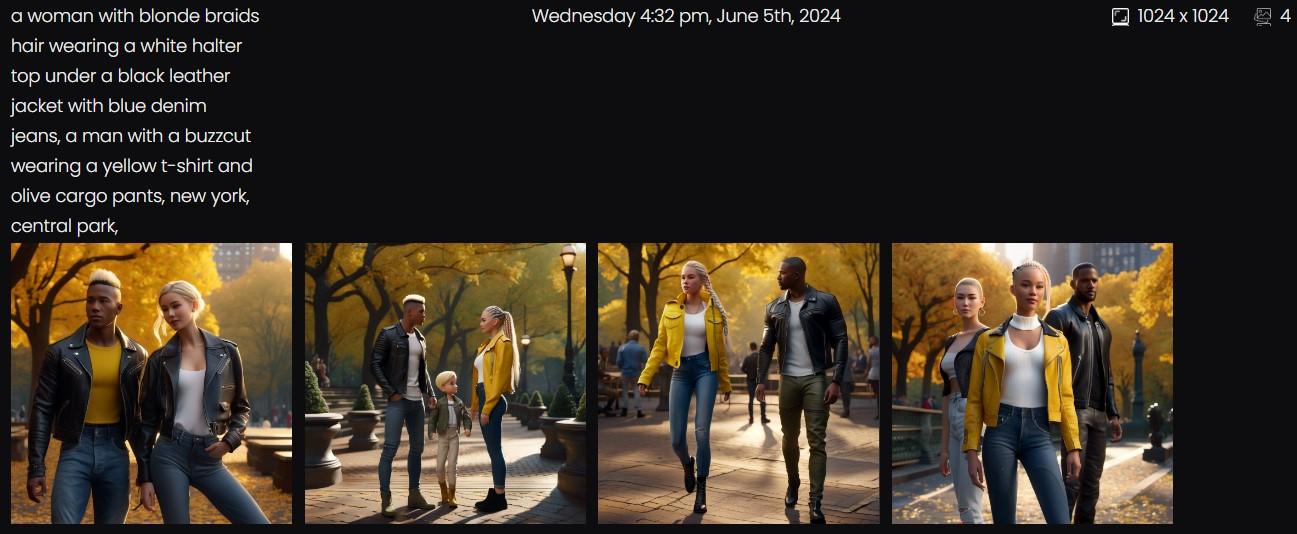
a woman with blonde braids hair wearing a white halter top under a black leather jacket with blue denim jeans,
a man with a buzzcut wearing a yellow t-shirt and olive cargo pants,
new york, central park,
SDXL 1:
Stable Diffusion 3:
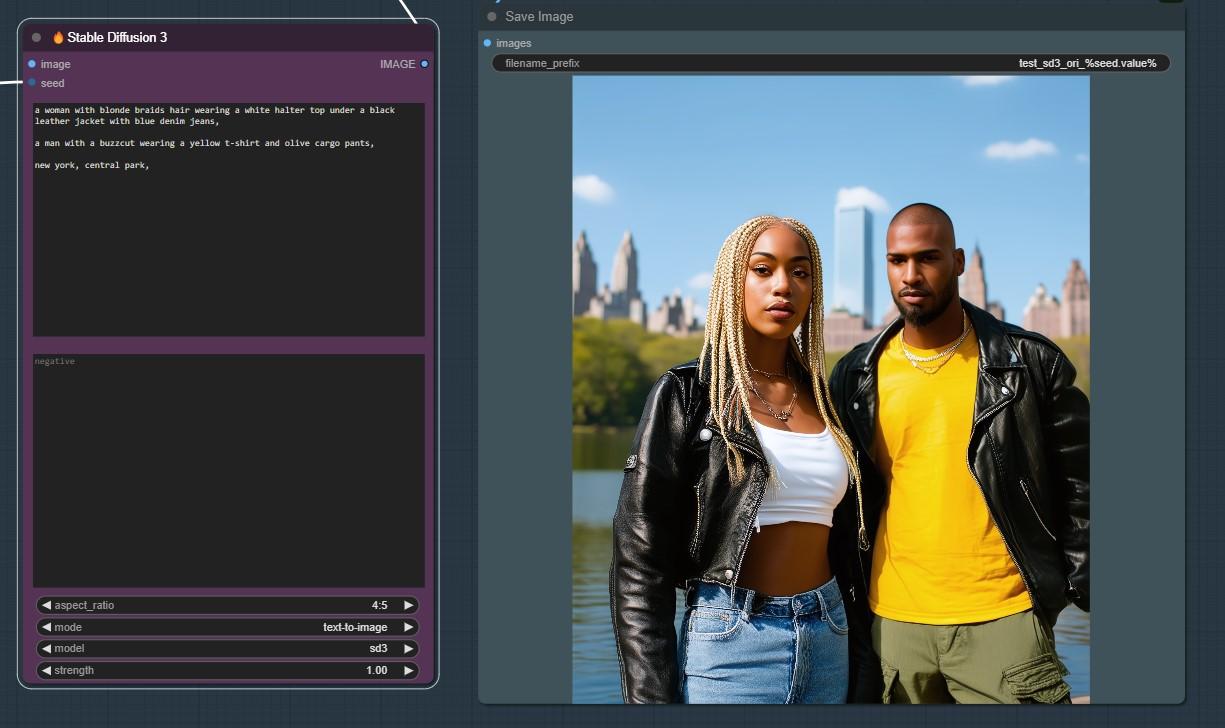
A huge limitation of SDXL is that colors, clothing and character features get mixed up all over the image.
The Stable Diffusion 3 image was generated on second try.
So I did not have to reroll xy times until I got lucky...
In theory Daz AI Studio could provide an SD 3 checkpoint and get even more control combined with LoRA.
Daz AI Studio is the user interface.
That user interface could be used to provide many different checkpoints - each offering different types of LoRA and styles...
New Year, New Sales Thread: Report Issues Here "Reporting Only"tsroemi said:
Hoppitty said:
I posted this earlier on the Technical Help board, and someone recommended I post it here too. So I recently bought Lilflame's Malediction Outfit for G9: https://www.daz3d.com/dforce-malediction-outfit-for-genesis-9
Although the product page lists a bunch of ways to install, there is no manual download option, it's not in DIM nor in DAZ Central; the page in my order history says it can only be downloaded by DAZ Connect, but I can't find it anywhere there. And trying to manually download the Connect files gives me this:
{
  "code": "not_found",
  "message": "File with such name does not exist.",
  "status": 404
}
Help? :'(You should put in a ticket via the help center, they usually fix stuff like this pretty quickly.
I will report this.
New Year, New Sales Thread: Report Issues Here "Reporting Only"Hoppitty said:
I posted this earlier on the Technical Help board, and someone recommended I post it here too. So I recently bought Lilflame's Malediction Outfit for G9: https://www.daz3d.com/dforce-malediction-outfit-for-genesis-9
Although the product page lists a bunch of ways to install, there is no manual download option, it's not in DIM nor in DAZ Central; the page in my order history says it can only be downloaded by DAZ Connect, but I can't find it anywhere there. And trying to manually download the Connect files gives me this:
{
  "code": "not_found",
  "message": "File with such name does not exist.",
  "status": 404
}
Help? :'(You should put in a ticket via the help center, they usually fix stuff like this pretty quickly.
New Year, New Sales Thread: Report Issues Here "Reporting Only"I posted this earlier on the Technical Help board, and someone recommended I post it here too. So I recently bought Lilflame's Malediction Outfit for G9: https://www.daz3d.com/dforce-malediction-outfit-for-genesis-9
Although the product page lists a bunch of ways to install, there is no manual download option, it's not in DIM nor in DAZ Central; the page in my order history says it can only be downloaded by DAZ Connect, but I can't find it anywhere there. And trying to manually download the Connect files gives me this:
{
  "code": "not_found",
  "message": "File with such name does not exist.",
  "status": 404
}
Help? :'(No way to download a recent purchase?So I recently bought Lilflame's Malediction Outfit for G9: https://www.daz3d.com/dforce-malediction-outfit-for-genesis-9
Although the product page lists a bunch of ways to install, there is no manual download option, it's not in DIM nor in DAZ Central; the page in my order history says it can only be downloaded by DAZ Connect, but I can't find it anywhere there. And trying to manually download the Connect files gives me this:
{
  "code": "not_found",
  "message": "File with such name does not exist.",
  "status": 404
}
Help? :'(measure metrics?Is this in Daz Install Manager or Daz Central? Do other plug-ins show as available? For example, you should see the Photoshop Bridge, GoZ, and the Dynamic Clothing Control from the base Daz Studio. Do you see Figure Metrics, the script that comes with Measure Metrics?
May 2024 - Daz 3D New User Challenge - Using Props and Push Modifiers/DeformersLeana said:
Pretty nice one. The cloth on the bench in the back is a nice realistic touch.
Thank you! Now, about that cloth you mention, in all fairness, the environment I picked for this scene (Condominium locker room), comes with that prop there when you load it, as you can see on the product's page. You can even see that I opted to use one of the Camera presets included with the product for my scene. My memory of my work on this scene is not very fresh now, so I might be forgetting some important detail. But basically, it consisted of:
Loading this set, reducing one point the exposure value to bring in some needed light to it, and picking this one camera preset.
Loading the figure: Genesis 9 masculine with the basic G9 hair, which I can't remember its name right now. I converted the hair to the Omnihair shader, because it is compatible with it and I really like this new shader for SBHs.
Moving the figure next to that bench he is using to place his foot on. That central piece had some rolled towels on it that I moved a bit back to make room for my figure to be able to pose his foot on the bench. It also had a pair os slippers right where I moved my figure to, so I moved these under the bench in the back.
Posing the figure was almost a breeze this time. This was my first time working with a G9 figure. I don't know if that was the reason why the posing process was so smooth this time around. Basically, I just clicked and dragged in the viewport his hands and the foot to reach his final pose. Of course, it took some time and repetitions and adjustments. But it was all in all quite the pleasant activity, not something tedious to do.
Once his final pose was set, I ran a simulation. After that, I set some DOF on the render camera, reviewed the render settings, enabled the bloom filter and adjusted it to my liking and started the render process afterwards.
Install Problem of content with DIMSince the beginning of April 24, content installed with the DIM is no longer displayed in DAZ, although the DIM installer installs the content in the correct location.
Example see attachment: Cardinal Robe is not displayed and cannot be found using any of the search functions.
Example see attachment: Cardinal Robe is not displayed and cannot be found using any of the search functions.
At the same time, the Smart Content shows that many parts actually need to be installed. However, they are installed and can be used without me having to install them again. (see 2nd picture)
I have no idea what I can do and would appreciate any tips.
DAZ Central is uninstalled, so nothing can interfere. I have uninstalled and reinstalled several times via the DIM, unfortunately also in vain.
I am working with DAZ Studio 4.22 ProBest regards, Samara Blue
Daz 3D is part of

Connect
DAZ Productions, Inc.
7533 S Center View Ct #4664
West Jordan, UT 84084Licensing Agreement | Terms of Service | Privacy Policy | EULA
© 2026 Daz Productions Inc. All Rights Reserved.