-
SereneNight's Sci-Fi Fun Thread 2
I was thinking of putting the basics, Owen, and Boyd, Michael 8, and base male, and the skins and hairs from all the guys. Then taking the whole g8m morph folder out of the DAZ data file. I'll throw that in the second DAZ runtime. When I need a monster, or a figure, I can always run the installer.
SereneNight's Sci-Fi Fun Thread 2I am thinking of creating a second base directory which I can 'turn on' and off depending on what I want to render. I'm running into a lot of slowness when I load male characters, and I admit to having a ton of morphs, most of which I don't use. So I think one of the projects I will try this week, is creating a new runtime, to activate, and deactivate which will just have boyd and Owen and their morphs. Then when I need to add the othter guys, I will load their directory.
It is sad, but I think it is strange that by now, DAZ Store, has not come up with a way to stop every possible morph from loading.
I think they haven't really needed to until now, so they didn't think about it. With Genesis 1 and 2, there just weren't that many characters or addons. With Genesis 3, by the time all that started to become an issue, Genesis 8 came along. Now with G8 in the middle of year 3 with no end in sight, weekly "major" releases, and with more G8 characters than in all the previous Genesis generations combined (and that doesn't count add-on morphs and expressions and all that), things are getting kind of dire.
I've got a computer with some serious muscle, and even so, now it takes a fairly notable amount of time to load G8M. Unfortunately, the stuff I don't use more frequently is hard to isolate, beyond a few expression sets.
beginner questionsHello again! Thanks, I will try to see more at the requirements for the downloads :)
So I am having some trouble importing some stuff. When it says "error, see the logfile for more discriptions." where is the logfile`?
Also I found a whole lot of nice stuff in renderhub. Downloaded a whole lot. But some of the things I had some issues with. for example this:
https://www.renderhub.com/emotionaldreams/alysha-for-genesis-8-female
To my understanding that is a morph of a gen 8 female, and that is everything that is required, right? So when I use the program, I load a genesis 8 female, and try to apply this morph but nothing happens. When I try to apply some of the files it says some files are missing. Am I missing something here? Is this also another character required? Or maybe I am just trying to apply the morph incorrectly? if so, how do I do it?
Same issue with this:
https://www.renderhub.com/batov3d/pop-body-morph-for-g3f
and this:
https://www.renderhub.com/bu-es/carlos-alberto-for-g3.
Does it mean I need this Carlos guy from before?
Also my generation 3 female character dissappeared. How can that happen? i tried downloading the genesis 3 starter essentials again, but still doesnt show up in daz studio.
The environments I downloaded works just fine, motel room and alley works perfect! One more thing, if I design a house in Sweet Home 3d, can I import that house in Daz3d?
Thanks again guys, you are making this alot easier for me. Have a nice day :)
Critical Reviews of DAZ Products?Some were deemed solved. Solutions varied. Some were fixed, others were not going to be fixed. Mostly texture issues.
My theory is, if there aren't enough complaints about certain issues, they stick it in bug tracker....And bug tracker is a bit of an elephant graveyard. Where products go to die.
I am curious if the Pa's are ever notified about their buggy products.
My suspicion is that PAs aren't being informed (at least not in a timely manner), based on the fact that about a month after a help request had been moved to the bug tracker, I PMed the vendor, who was unaware of the issue.
I have the same thought. I submitted a request for a muscle morph set I bought which was causing an eye to wander when certain morphs were applied. I waited a month, and no fix, I asked the pa, and it got fixed that day. They had not heard about it.
I think they sit in bug tracker, and do nothing with some tickets.
Critical Reviews of DAZ Products?I would really like to know details about the products, that sometimes aren't visible: Such as how many oustanding bug reports there are, what the texture quality is, how large the textures are etc.
I am finding that there are a number of buggy products that simply don't get fixed, such as Yvanovich Bun hair. It is wrong to sell a broken product without fixing it. That info would be useful to know
Has anyone actually sent in a ticket about it?
Request #307186 Yvanovich Bun Hair
-
Serene Night
September 03, 2019 22:02
Yvanovich bun hair doesn't follow the character, and seems affected by the morph dial height. Which makes it fly up or go down depending on which way you run the dial
- Pic
(70 KB)
-
Pic2
-
(70 KB)
-
QA:
- Pic
It was confirmed, escalted to bug tracker, where it rots. The answer I get from QA is that they haven't heard anything about repairing it.I know other people who have submitted a ticket as well. With the response that they haven't heard about repairing it.
It seems like the whole QA and bug tracker thing is just stonewalling customer's support issues... Not actually fixing them I have about 3 that are stuck permanently in bug tracker.
Only 3? I have dozens. I refer to the bug tracker as a black hole. They go in, but they don't come out.

 Critical Reviews of DAZ Products?
I would really like to know details about the products, that sometimes aren't visible: Such as how many oustanding bug reports there are, what the texture quality is, how large the textures are etc.
I am finding that there are a number of buggy products that simply don't get fixed, such as Yvanovich Bun hair. It is wrong to sell a broken product without fixing it. That info would be useful to know
Has anyone actually sent in a ticket about it?
Request #307186 Yvanovich Bun Hair
-
Serene NightSeptember 03, 2019 22:02
Yvanovich bun hair doesn't follow the character, and seems affected by the morph dial height. Which makes it fly up or go down depending on which way you run the dial
- Pic
(70 KB)
-
Pic2
-
(70 KB)
-
QA:
- Pic
It was confirmed, escalted to bug tracker, where it rots. The answer I get from QA is that they haven't heard anything about repairing it.I know other people who have submitted a ticket as well. With the response that they haven't heard about repairing it.
It seems like the whole QA and bug tracker thing is just stonewalling customer's support issues... Not actually fixing them I have about 3 that are stuck permanently in bug tracker. I know of other people with more.
SereneNight's Sci-Fi Fun Thread 2I am thinking of creating a second base directory which I can 'turn on' and off depending on what I want to render. I'm running into a lot of slowness when I load male characters, and I admit to having a ton of morphs, most of which I don't use. So I think one of the projects I will try this week, is creating a new runtime, to activate, and deactivate which will just have boyd and Owen and their morphs. Then when I need to add the othter guys, I will load their directory.
It is sad, but I think it is strange that by now, DAZ Store, has not come up with a way to stop every possible morph from loading.
I have a new laptop I was thinking of creating a 2nd DS install on for that purpose although I spend more time reading then rendering actually.
hear ye hear ye true HD characters for diffeoOnce reconstructed the High Rez geometry with rebuild subdivisions and the multires modifier with the HD information... is it possible now to load in blender HD morphs... For example, a morph with HD veins or HD scars....
thanks for all the hard work.
SereneNight's Sci-Fi Fun Thread 2I am thinking of creating a second base directory which I can 'turn on' and off depending on what I want to render. I'm running into a lot of slowness when I load male characters, and I admit to having a ton of morphs, most of which I don't use. So I think one of the projects I will try this week, is creating a new runtime, to activate, and deactivate which will just have boyd and Owen and their morphs. Then when I need to add the othter guys, I will load their directory.
It is sad, but I think it is strange that by now, DAZ Store, has not come up with a way to stop every possible morph from loading.
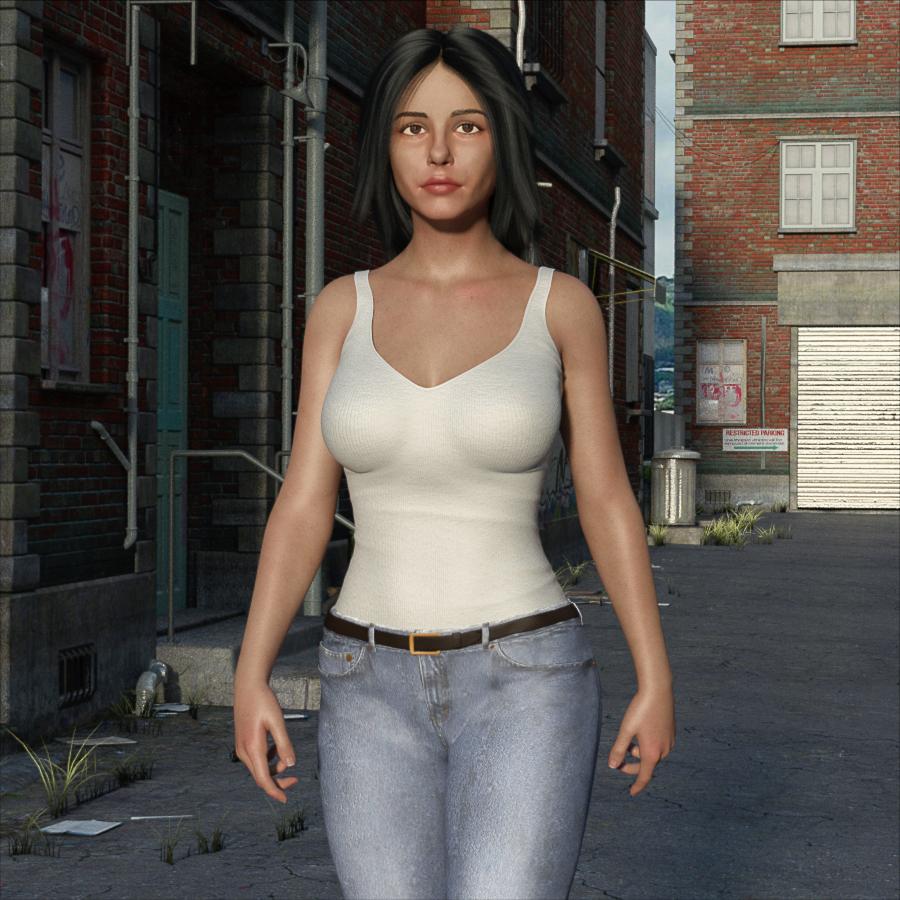
Celebrity Look-a-Likes for 3D figures Part 2I decided to see how my current Naomi Scott morph held up in a random pose and context. What do you think?
 most popular types of character?
I've made two freebies and based on the downloads from those the answer is overwhelmingly pretty women.
1) One freebie was a scene that requires the use to have some DAZ products purchased plus download and install freebies from two other people that made freebies so it's a bit of money and work to pull what you need to use the scene together. The scene is of an opening cartoon credits of a 60s television show. In 3 years it has 783 views, 141 downloads, 6 comments, and oddly only 5 ratings, one less than number of comments.
2) The other freebie is much less work as it is just a FaceGen Artist Pro morph the user unzips & places in their DAZ Content Library & restart DAZ & it's ready to go. It's a face morph, geometry only, approximating a famous female pop band singer from the late 70s through mid 80s. She is still well known and very pretty. In 2 days that freebie has 336 views, 66 downloads, 1 rating, and no comments.
So if you can model gorgeous realistic woman I think you would make a lot of money.
I guess to be fair and negate the often stated claim in the forum that if one don't offer male 3D model products how can you state that they wouldn't sell as good as they aren't given equal opportunity to sell as the female 3D models?
Anyone have suggestions on what male celebrity I should use? Should it be someone that's mascilinely handsome? Someone that's generally well known to be behaviorally a heroically known man? Should it be some unknown male I use the random function to generate in FaceGen Artist Pro until one gets generated that 'strikes me as uniquely interesting'?
Should I do the same with randomly generating a uniquely interesting female in FaceGen Artist Pro as a freebie as that's more in line with the expectations for new female characters in the DAZ 3D Store?
You can probably assume because I am not a modeler or a prolific maker of freebies and have no followers any downloads got then would be on the desirability of the morphs and for no other reason. A PA in the DAZ Store would by weight of passing the DAZ 3D QA process would immediately carry more wait regarding general product desirability, but at a monetary price.
If you noticed and did the math for the ratio of views to downloads for both the "Bewitched" scene and the "Deborah Harry" morph it's about 1 in 5 or 20% (18% and 19% respectively).
Then I will post the results here.
=====
OK, the female freebie I uploaded is a likeness of Deborah Harry. I just made a likeness of Elvis Presley with FaceGen Artist Pro and seeing as Elvis Presley is arguably the most famous man in western history his downloads relative to Deborah Harry's would be a gage as to what will sell in the DAZ Store.
As luck would have it the Genesis 8 Male Essentials that come free with DAZ Studio's G8M skin materials and Armani hair is ballpark range for Elvis' hair and complexion were in real life (although I never realized they wore so much makeup on TV, stage, & movies back then!). They are easy enough to find if you search shareCG.com but unless you actually want them you shouldn't get them or view them as the ideal is the random shareCG.com user's interests indicating what sells but us forum goers. Big collectors there are likely big collectors in the DAZ Store.
And look at the female character ratio to male characters in the DAZ Store & at shareCG. Its lopsided.
Crooked teeth due to mouth morphsthanks for the tip, but when I reopen my scene the teeth are deformed again, what do I have to do to make this permanent please?
edit : i saved the morph with shape splitter and problem solved, there is surely another method but we do as we can
Blender soft body physics for Daz charactersI actually played with cloth and pressure simulation a bit today, and it seems to work quite well. With enough pressure mesh keeps its volume quite nicely. In my test I set vertex mass to 400kg ( so that there's some bouncing when I move the mesh ), tension to 2000 ( so that mesh keeps it's form ) and pressure to 2000 ( to keep the volume ). I played around with other settings too, but those 3 seem to be the main components. For simulation I just created a vertex group to pin the back area at place. I had to set those simulation values really high, since with lower tension values mesh started to slump down and deform, and didn't keep it's form and higher pressure made it "balloon" and strected the mesh. With high tension I needed higher mass also. I'm sure there's some perfect settings, but these worked with this little experiment decently.
My mesh from front and back, and cloth sim settings
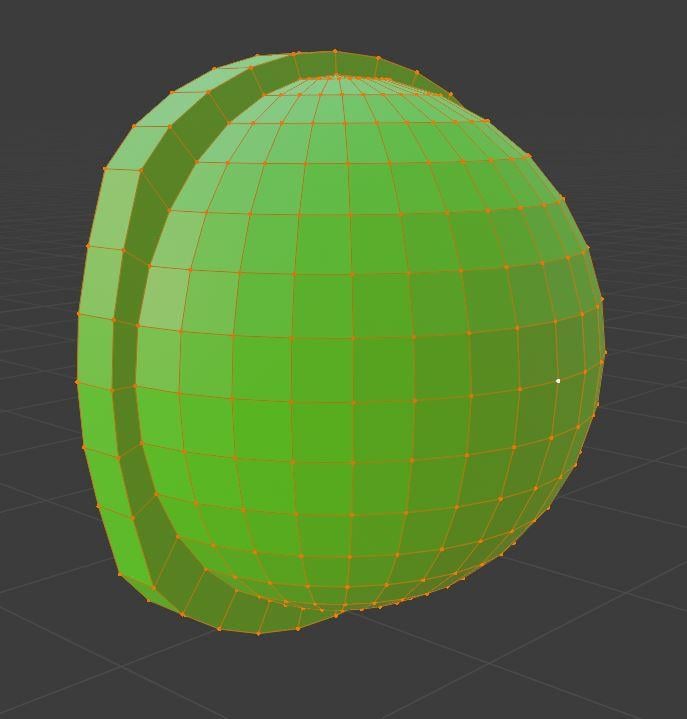

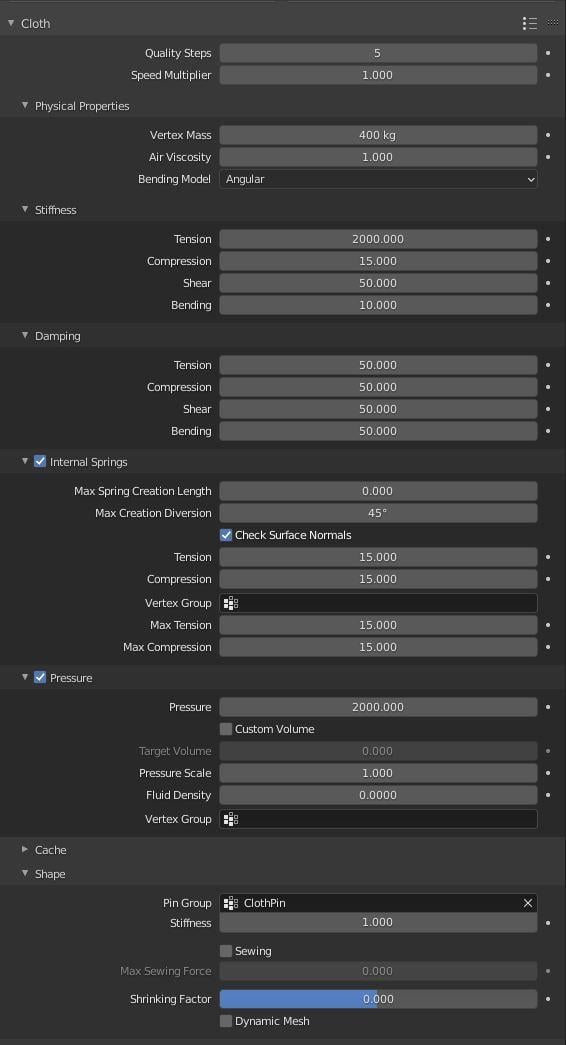
I quickly tested how it reacts to moving the mesh around, and there's bouncing and and it reacts to velocity. Sim seems to be really fast, just like Padone said. Here's some pics how gravity affects the mesh. Damping values influence how jiggly/soft the mesh is.
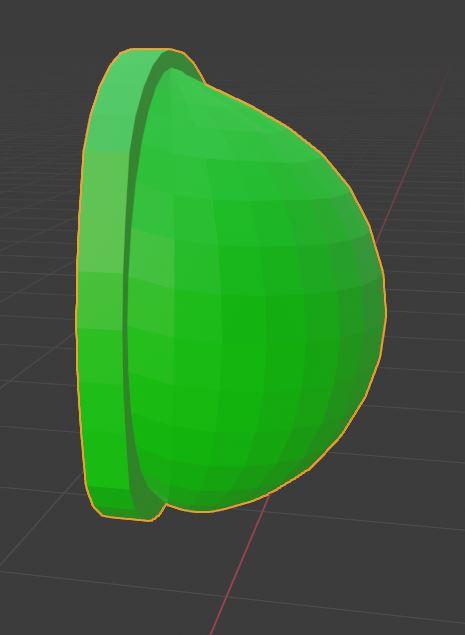
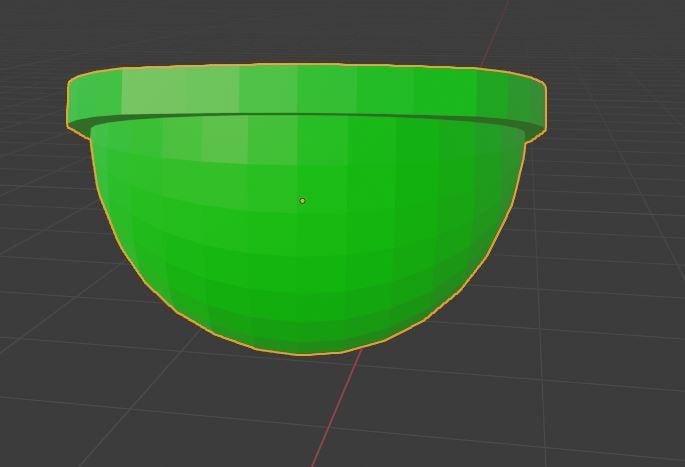
Next I tested a little with collision object, and that too seemed to work pretty well. Also mesh kept it's volume quite well.
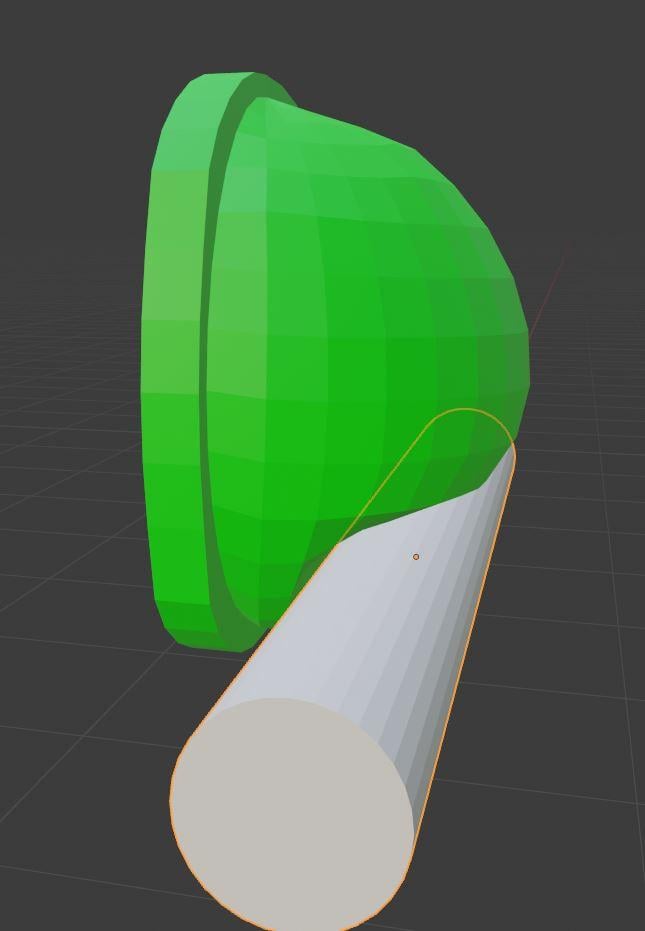
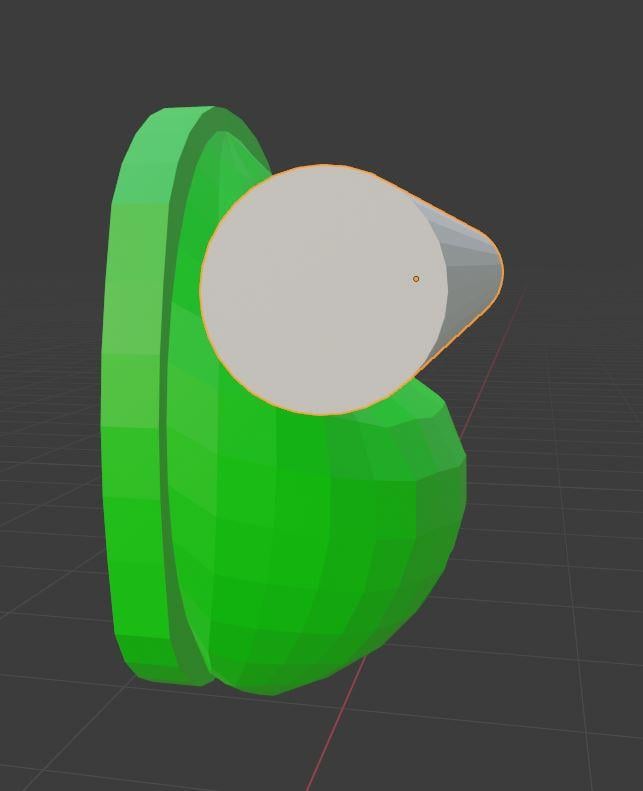
Next I suppose I have to test if I can transfer this to Genesis figure. I think genesis figure needs to have real silicon boobs in DS, and then simulation in Blender sets them look more natural. I think my earlier mesh deform/proxy will work for this. Basically I was thinking that I I'll copy part of the original Genesis mesh, and then "close" it. Then set that to cloth and set mesh deform modifier to original genesis mesh to follow that new mesh. That way I get to keep drivers etc that genesis mesh has ( like move shoulder etc. changes the mesh ) and I can pinpoint the mesh deform to a vertex group that I want ( faster sim ). I don't have much more time today to play with this, but if somebody else wants to try it, this seems like a better solution than real soft body modifier in my opinion.
EDIT: Added a zip file as an attachment that contains the .blend file. I still use 2.9 beta ( too lazy to upgrade ) but I suppose normal 2.9 should be able to open it just fine. Just press play and it should be ready to test.
Novica & Forum Members Tips & Product Reviews Pt 13I found this thread, but you know what, screw all that. I think I'll just save her as a scene subset and put a folder under that which says G3F to G8F. I can load her in any scene I want then. Any reason that wouldn't work?
No, I do that for characters I dial in & make a mish-mash of different shader settings even using four to six different material sets for a character's skin. E.G.: one material set for diffuse, one material set for normals, bumps, displacements, one material set for glossy/specularity, one material set for transparent color, one material set for eyes, one material set for teeth and mouth. Likewise mixing morphs from different products. That's a lot of work so then I save that all as a scene subset because it saves the hair, clothing, pose, expression and props parented to the character that I check. I uncheck the sets, lights, and cameras although that's not strictly required if keeps the subset to the character (I consider hair & clothing essential to a character).
No Pose Controls on Import [SOLVED]I think you can do it easly, using morph on Cinema 4D or from. Im doing my own morphs movement in C4D.
Bug Report: Animators Beware, DS 4.12.1.117 deletes values keyframes en masseAny news on the bug fix for this issue from DAZ?
There is a new entry in the Change Log http://docs.daz3d.com/doku.php/public/software/dazstudio/4/change_log#4_12_2_40
Thank you for pointing it out, Richard. It is encouraging to see some action on timeline bug fixes.
Well, this is of course the fruit of action that had been going on for a while - but nothing appears in the change log until there is a change to report.
... And the change says "fixed". So the burning question now is how long before we get a new beta? I don't remember such a long gap between beta releases.
I swear, I'm going to get the Daz logo tattooed on my forehead if they really did fix the Timeline / IK bugs

you will look like a face transfer character
 Facial Motion Capture in Daz Studio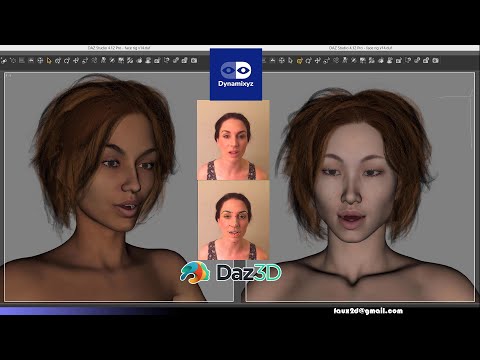
Performance captured through Dynamixyz.
More information about the tool I used to transfer the mocap animation to a Genesis 8 figure here: https://www.daz3d.com/forums/discussion/comment/5994712
Feedback always appreciated.
Novica & Forum Members Tips & Product Reviews Pt 13I found this thread, but you know what, forget all that. I think I'll just save her as a scene subset and put a folder under that which says G3F to G8F. I can load her in any scene I want then. Any reason that wouldn't work?
Edit- works like a charm. And she loads in the scene quickly. Good enough for me, I'll know my converted characters are scene subsets. I've had enough with fiddling with this program other than using that convert scene option. It works fast, other than the eyes not being exact it's good at what it does.
I have the male G2M-G8M version, and I'm surprised that saving as a scene subset works. Studio must somehow save the morph as part of the scene, the way it can do with Fit Control. Otherwise, without the morph being saved as a support asset, it wouldn't be there to be found when you reload the scene.
I do find XTransfer a bit easier to use than Character Converter. That said, Riversoft Art provides excellent service. (Zev0 generally does as well, but I haven't had to work with him as intensively as I wound up working with RA.) He worked with me on a transfer that was very very painful. The one thing he did note, as we worked through it, is that characters from Renderosity may need special handling, because Character Converter relies in part on metadata, and characters from Rendo frequently don't have much.(The main slider for the character I transfered was originally transferred as "Unknown Genesis 2 Male" and had to be redone. Because of that, he said that "for renderosity characters, I would use the Custom Character conversion script.")
XTransfer is better (and easier) at eyes, I've found, while Character Converter is better at handling bodies that may be slightly wonky. If needed, I'd probably use XTransfer first with Character Converter as the backup for a failed XTransfer. (which is what I did, in fact.)
So after I created her using the scene method, there's no sliders, no nada in Content Library (remember I don't have much loaded in my studio, so it's easy to find.) There's no morphs main category, no morphs under Genesis 8 Female, nothing. There's no character preset, and the vendor said there wouldn't be so that's not an error. But here's the thing- when I select the G8F with those morphs now on her, I can't save as a Character preset (which when doing a Google search, I should be able to do.) It says I must save as a Support Asset first. Not sure where THAT shows up, and how I use THAT to go to a Character Preset.
UGH.
You can't save as a Character Preset without saving as a Support Asset first because in that case, Studio doesn't save the morph at all, either as an asset or as part of the scene. It's just stuck in the temp directory somewhere, and when you close the scene, it disappears. If you then try to use the Character preset, Studio will start throwing missing files messages -- and the file will actually be missing, because it's no longer in the temp directory.
To save as a support asset: File menu - Support Asset (at the bottom of the menu) - Morph Assets - then scroll through, find, select the specific morph you need to save. That said, I'm not sure how that would work if there's no slider for the character visible in the Currently Used part after you transfer the character to G8. I don't remember if I used the Scene method or not -- I'm not entirely sure what you mean there.
I own the competing product from another PA but if this PA's 2 G3F to G8F / G3M to G8M products are expanded to include G2 to G8 than it's well worth the price if they do a good job and are easy to use.
Have you this product? Is it easy to use? Do you like the results?
Ahem:
https://www.daz3d.com/character-converter-from-genesis-2-male-to-genesis-8-male-
https://www.daz3d.com/character-converter-from-genesis-2-female-to-genesis-8-female-As I say, XTransfer struck me as easier to use, but then, I specifically picked up Character Converter to deal with a GenX G2-G3-G8 transfer that went south on me, on the principle that a direct G2-G8 transfer ought to work better (GenX G2-G3 had a problem with the mouth area that XTransfer made worse, but XTransfer had no problem with the rest of the body or the eyes. Character Converter handled the worst issues with the mouth and made it easy to deal with the rest, but the eyes went impressively weird.)
Looking for Sport Products: Uniforms, poses, fieldsYes, many sports products can be found at Renderosity, from outfits to sports arenas, etc. Beach volleyball pits are nicer there than here, for instance. Beach soccer, also.
Renderosity is fine. The storefront is reliable. It's not a scam site, especially now that they own Poser. (G*d help them.)
If you buy from there, you will need to get acquainted with the Content Library tab since most products there do not come with metadata for Smart Content.
Quality varies everywhere. Just because it's from Renderosity doesn't mean it's lower or higher quality. It all depends on what you're looking at. Renderosity has everything from new Genesis 8 to old, old Poser stuff. They have less strict standards for naughty outfits than Daz (but still more strict than Renderotica, which is a separate site)... so there's one reason to shop there - to find things you can't find here.
As for Poser stuff... some of that sports stuff will be made for Poser, but it mostly works fine for Daz. Older Poser products will generally not have the resolution of a brand new thingy, with full Iray 4K maps etc. This varies, however, and modern dforce everything Iray products are not necessarily better than every older Poser product. Renderosity is not immune to dForce-only/no-morph clothing (i.e. sheets with a hole or two).
You'll also see vendors there that are familiar to you from the Daz store, like OOT, for instance.
Renderosity has a ratings system, unlike here. Ratings can be helpful once in a while.
Novica & Forum Members Tips & Product Reviews Pt 13I found this thread, but you know what, forget all that. I think I'll just save her as a scene subset and put a folder under that which says G3F to G8F. I can load her in any scene I want then. Any reason that wouldn't work?
Edit- works like a charm. And she loads in the scene quickly. Good enough for me, I'll know my converted characters are scene subsets. I've had enough with fiddling with this program other than using that convert scene option. It works fast, other than the eyes not being exact it's good at what it does.
Daz 3D is part of

Connect
DAZ Productions, Inc.
7533 S Center View Ct #4664
West Jordan, UT 84084Licensing Agreement | Terms of Service | Privacy Policy | EULA
© 2026 Daz Productions Inc. All Rights Reserved.











