-
It's Here! First Live Product! [Commercial]
Congrats - you just sold it to me! Checking out as soon as I finalize my selections for the $1.99 items.I think the outfit would be more fashionable if the waist of the pants sat a bit lower and the legs of the pants came down to just above the shoe. But regardless - nice work. Looking forward to your future creations.I figure someone would say this so I had morphs that can do just both that you said. There is a morph for lowering the waist and lowering the pants to the ankles.


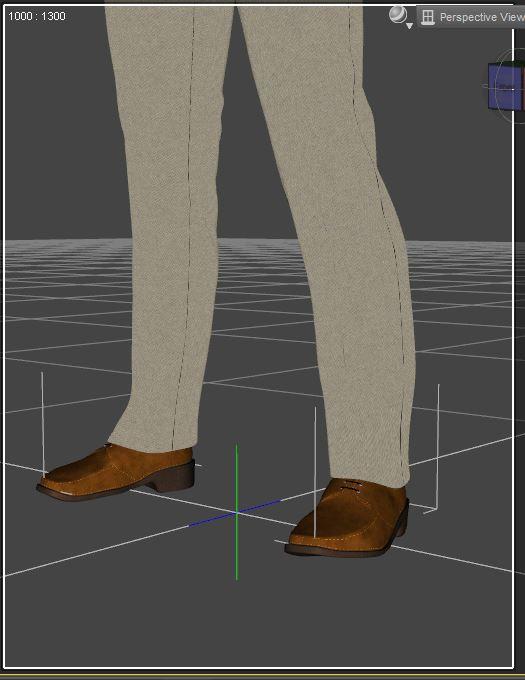 It's Here! First Live Product! [Commercial]I think the outfit would be more fashionable if the waist of the pants sat a bit lower and the legs of the pants came down to just above the shoe. But regardless - nice work. Looking forward to your future creations.
I figure someone would say this so I had morphs that can do just both that you said. There is a morph for lowering the waist and lowering the pants to the ankles.
Egyptian Oasis BundleTHIS AIN'T Akhenaten. I've been trying to FaceGen and dial morph a convincing Akhenaten for two years (maybe 3 weeks total)---I even reached out to Josh Crockett to no avail. I guess I'll have to keep trying. But Mstene's new male IS handsome and does evoke the androgyny associated with the son of Aten, father of Tutankhamun.
Khemsit 'normal' G8 female with improvements?I purchased Khemsit8 and I like 'her' very much. Bending, muscle contraction for G8 are things I like a lot.
Being not that technical, I do have a question:
as this is G8, would it be possible to set all parameters to zero and get a basic g8 female, To which I could then apply other settings myself, or via a purchased character, and this without losing said bending improvements, muscle contraction etc etc?
thanks for your answer.G8F is the base figure; all female figures that are part of G8 are a morph of G8F. They all share the properties that G8 has.
V4 is a base figure. V8 is a morph of G8F
Daz Studio Pro BETA - version 4.12.2.60! (*UPDATED*)Favorites saving were not working 2 versions before, that was also a problem as rendered favorittes nearly useless. One version ago they were fixed, and was possible to do something in animation. Now the current version breaks a basic animation feature, save morphs.No sure a new key editor should have been added when breaks a core feature that makes impossible many types of animation, specially when the version before was working fine. Feels rather a downgrade.
I have spend several hours tryign to figure out why was not saving the morphs . At least I know now.
I feel you. I spent a lot of time trying to see why it wasn't saving the morph animations and ended up giving up. it wasn't anything wrong from what I was doing, it was the recent daz version that has a bug of not saving custom morph animations. Which for now makes it impossible for me to use it for character animation. I have to downgrade to older version which is fine in that regard. oh well.. we will just wait. : )
Any recent builds with fix for morph not saving available yet? (I'm not checking every new build)
Is it correct that there is still no change to the animation issue even in the private beta? http://docs.daz3d.com/doku.php/public/software/dazstudio/4/change_log
It kinda feels like they don't really care about it.
"Working on it" is not something that will appear in the change log.
and that's not what I was saying. After such a long time with several updates in between I would've expected to see a fix at least in the private build. There's some nice new stuff in the current version, nice new features and improvements, but a lot of ppl can't use any of it because we're stuck on .86 because of the animation problems.
I can imagine that you must be sick of reading such comments over and over again, and I understand that you probably can't do anything about it, but reading the changelog you can see how much other stuff has been improved, changed, implemented, etc, pp, and yet the biggest problem still persists, so you might understand that we're sick of it as well after months with no solution.
and you might also understand that for us it feels like it has absolutely no priority for Daz/Daz devs after such a long time.
If you check the change log http://docs.daz3d.com/doku.php/public/software/dazstudio/4/change_log#4_12_2_40 there is a fix for the saving issue listed
Now THAT'S some good news, finally! Thx a lot, hope I'll be able to switch soon.
HairI'd still like to see this made , and actually have the sides all the same length instead of the front of them being a little shorter then the rest and maybe with a morph that lets you cover the eye even more.
see how some the sides are shorter
Are these merchant resource kits or not?
Hi WendyLuvsCatz, thanks for the info!sometimes it means you can redistribute your own character using them but buying the morph set is a listed prerequisite in your product
Hi Catherine, may I know the user name of Dogz so that I could ask him/her?Well that would hardly constitute a merchant resource {if the next user has to buy all the materials used to make a product}.
For best clarification of what the PA intended, it would be best to ask them.
Shapeshifting / TransformationIf you created a morph that transforms a figure as you have described and have created a slider for it, did you save that slider as a morph asset? That is the only way it will "show up" when you go to use it again.
Was the V4 Era the Golden Age of Creativity?...like McGuyver, I got my start in this just after Vicky 4 appeared.
As Calliope23 mentions, my treason for becoming interested in this also stemmed from involvements in RPG gaming (cyber future) for doing illustrations of characters and scenes from the game particularly as worsening arthritis was making it more and more difficult to draw and paint One of the game's related froum sites had a thread where artists linked to various 3D sites like here and galleries like DA and a number of the images I saw were, for that time, incredible. One of the artists who regularly posted links to his works turned me on to Daz, and as the old cliché' goes, well the rest is history. One of the campaign arcs I GM'd years ago ended up becoming the basis for an extended story I plan to illustrate.
I found that a good amount of the "creativity" involved was also on the individual artist's part as well. One of the drawbacks of Gen4 was thye had no teen or child characters (K4 came rather late). I didn't care much for the Gen3 teens as they looked too much like small adults while Mil Kids had very limited support (clothing/hair) and unlike Genesis, you couldn't simply autofit between different figures but needed third party conversion software like Cross Dresser or Wardrobe Wizard (which were often hit or miss). So, along with a couple others back then, I embarked on a project known as "Lil' Vicky" to create a viable teen and child character from tall rather well endowed Vicky 4 which was quite a task. Long story short it took over a year buying characters and morphs that would work as a base, along with various utilities, before I was reasonably satisfied with the results (the release of Steph 4 and the NPMs were a blessing). With the Unimesh concept and "morph follower" in 3.1 clothing fits were also a bit easier to manage. I feel this experience more than anything pushed my skills to, and even past the limits. The Genesis concept almost made things seem too easy.
Today I rarely buy ready made characters, unless they add something unique to the Genesis "gene pool", and instead, snap up morph, shaping, and skin resources as "dial spinning" characters has become sort of second nature to me (which I credit to my experiences with Gen4).
Oh, I still find myself going back to Aiko3 more than occasionally because she's just so cute and can have so many different looks. I still find her excellent for creating fae characters as she is more stylised. I also base fae off of the various toon and stylised characters for Genesis as well.
Can I copy shape morph properties from one point on timeline to another by using Edit Mode?My job is about to morph a G8M from a character to another ie; human to devil, young to old etc. Sometimes I've tried to find a way to copy a group of shape parameters at frame 34 to frame 15. I enter Edit Mode on parameter tab and select/copy/paste but fail. Nothing happen after pasting. Did I miss anything?
Are these merchant resource kits or not?sometimes it means you can redistribute your own character using them but buying the morph set is a listed prerequisite in your product
Khemsit 8...She's got a really unique morph, and she seems to take expressions pretty well.
 beginner questions
Thanks Gordig, that helped alot. I was able to use several of the Characters\Models I downloaded, now that I finally understood how to unzip the files correctly. I was sure the folder would be replaced when one put a folder with the same name over another folder, but cleverly it merged them. Still a few issues here and there, but atleast now I feel like I can do somethin with the program. Thanks a whole lot :)
There was a couple other I downloaded that I didnt get to work, but they were not entire characters, just morphs, if I understand correctly. And when I "install\unzip" them in the same way, put them in the correct folder, I can't find it in the program. Can you tell if this is different?
I just downloaded that, and it worked for me. Try searching for "pop" in the parameters pane if you're having trouble finding it. It should be under Full Body.
Gordig, is Content Wizard really good? I watched the video about it, and it seems really nice. I was thinking about doing most of this for free, since it is not work related for me, but if it saves me alot of time and it is really good, I will buy it.
I think it's definitely worth it. I got it after I'd largely stopped using free content, and I still consider it worthwhile.
A measurement featureIt is pure horror
They make plenty of Doctors offices with all kinds of details
and NEVER the Measure rod.
Asked for it since 2003.
it just does not happen
But there is a free one here: https://www.renderosity.com/mod/freestuff/z-doctors-measuring-device-including-morph-/74468
It should be in Install Manager Ready
I messed something up and now Genesis 8 always loads with preapplied morphs.Looking at the screenshot it seems that Gou Luk character is applied automatically. Reinstalling Gou Luk character should fix the default value of the Gou Luk character morph.
No dice!
I did however figure it out by searching through similar threads. Namely this thread: https://www.daz3d.com/forums/discussion/comment/2579591/
The problem was that I saved the morph as an asset file, which is found in the data folder ( \data\Daz 3D\Genesis 8\Female\morphs\authorname\productname)
I must have mashed the "save as asset" button at some point while experimenting with custom morphs because I recogizned the "author name" I left on the morph asset folder as my own.
So it wasn't Gou Luk directly but a morph you saved which used it?
Glad you found what caused the problem.
I must have had Gou Luk's sliders turned up when trying to create a custom morph slider.
I messed something up and now Genesis 8 always loads with preapplied morphs.Looking at the screenshot it seems that Gou Luk character is applied automatically. Reinstalling Gou Luk character should fix the default value of the Gou Luk character morph.
No dice!
I did however figure it out by searching through similar threads. Namely this thread: https://www.daz3d.com/forums/discussion/comment/2579591/
The problem was that I saved the morph as an asset file, which is found in the data folder ( \data\Daz 3D\Genesis 8\Female\morphs\authorname\productname)
I must have mashed the "save as asset" button at some point while experimenting with custom morphs because I recogizned the "author name" I left on the morph asset folder as my own.
So it wasn't Gou Luk directly but a morph you saved which used it?
Glad you found what caused the problem.
Bug in animationI wonder if a work-around is to save as pose-preset on the character in question, all frames and load it back that way.
Having same issues!!!! - That might work, will have to try. In the meantime I had to revert to studio .86 for all animations (it saves morphs). Also reduced the G8 character and morph content to just what I am using for the scene. Without the additional characters/morphs overhead - I can preview animations in almost real time - makes a world of difference !!!
beginner questionsThanks Gordig, that helped alot. I was able to use several of the Characters\Models I downloaded, now that I finally understood how to unzip the files correctly. I was sure the folder would be replaced when one put a folder with the same name over another folder, but cleverly it merged them. Still a few issues here and there, but atleast now I feel like I can do somethin with the program. Thanks a whole lot :)
There was a couple other I downloaded that I didnt get to work, but they were not entire characters, just morphs, if I understand correctly. And when I "install\unzip" them in the same way, put them in the correct folder, I can't find it in the program. Can you tell if this is different?
https://www.renderhub.com/batov3d/pop-body-morph-for-g3f
Zilvergrafix, Thanks for the advice, I will check it out. I have been alittle uncertain where to begin, just watched a bunch of tutorials on youtube, some of those from daz3d also. I feel it is more motivating to make a scene that "looks like something", rather then posing or scaling a lifeless doll in the middle of nowhere. If you know what I mean <3 atleast that is how I feel. So now when I finally have some characters and houses and props to work with, it will be alot of fun. Renderhub has alot of awesome stuff, and so much for free :D
Gordig, is Content Wizard really good? I watched the video about it, and it seems really nice. I was thinking about doing most of this for free, since it is not work related for me, but if it saves me alot of time and it is really good, I will buy it.
Richard, you think the download issue was only on my side? Or was it something other people experienced as well? Thank you also for your help :)
good night people :)
I messed something up and now Genesis 8 always loads with preapplied morphs.Looking at the screenshot it seems that Gou Luk character is applied automatically. Reinstalling Gou Luk character should fix the default value of the Gou Luk character morph.
No dice!
I did however figure it out by searching through similar threads. Namely this thread: https://www.daz3d.com/forums/discussion/comment/2579591/
The problem was that I saved the morph as an asset file, which is found in the data folder ( \data\Daz 3D\Genesis 8\Female\morphs\authorname\productname)
I must have mashed the "save as asset" button at some point while experimenting with custom morphs because I recogizned the "author name" I left on the morph asset folder as my own.
I messed something up and now Genesis 8 always loads with preapplied morphs.Looking at the screenshot it seems that Gou Luk character is applied automatically. Reinstalling Gou Luk character should fix the default value of the Gou Luk character morph.
Daz 3D is part of

Connect
DAZ Productions, Inc.
7533 S Center View Ct #4664
West Jordan, UT 84084Licensing Agreement | Terms of Service | Privacy Policy | EULA
© 2026 Daz Productions Inc. All Rights Reserved.