-
Face Transfer
Can you save the face out as a morph and apply it to a figure already posed in the scene? I don't want to add it to anything other than the base genesis 8 as a morph, it's just I created it for a scene I already have that is dressed, posed etc, and I don't want to start over with the new figure. I thought maybe I needed to save scene subset as shape, but that didn't seem to load anything. Also, is there a way to save just the face texture? I'm really not great at the surface tabs knowing what to change, but I'd in the end like to load whatever body texture I want and then use just the face texture I created.
SereneNight's Sci-Fi Fun Thread 2I picked up X-Transfer, Genesis 3 to genesis 8 morph converter. Now that I purged my runtime of morphs, of course I seem to want to fill it back up again. Don't ask me why, I don't know, it is a compulsion

But anyway, the Cairo Gifts coupon still seems to be working so I picked up Xtansfer-Genesis 7 to Genesis 8 Male converter.
For kicks, I loaded up some Genesis 3 Male expressions: https://www.daz3d.com/grimaces-dialable-one-click-expressions-for-genesis-3-male
These are somewhat goofy set of male expressions, but I thought some of them were cute, so I'd see how they transferred.
The utility seemed to freeze up at 72 percent, but transferred the expressions mostly anyway.
It's Here! First Live Product! [Commercial]
Oh. See, I was REALLY confused! Thanks for the explanation."Levator Scapulae" isn't a morph in this product, that's a morph applied to the figure. I do agree about making sure "Extend Ankle" being added to the product page, it looks like that's the only one that was left off? Maybe it was added late in the process.
It's Here! First Live Product! [Commercial]So I been seeing people saying the waist is too wide or the polo looks kinda funny.
Please understand it was design liked this so you use on a wide range of characters size. PLEASE use the morphs that were provided.
If it wasn't built like this you'll get really clingy look.
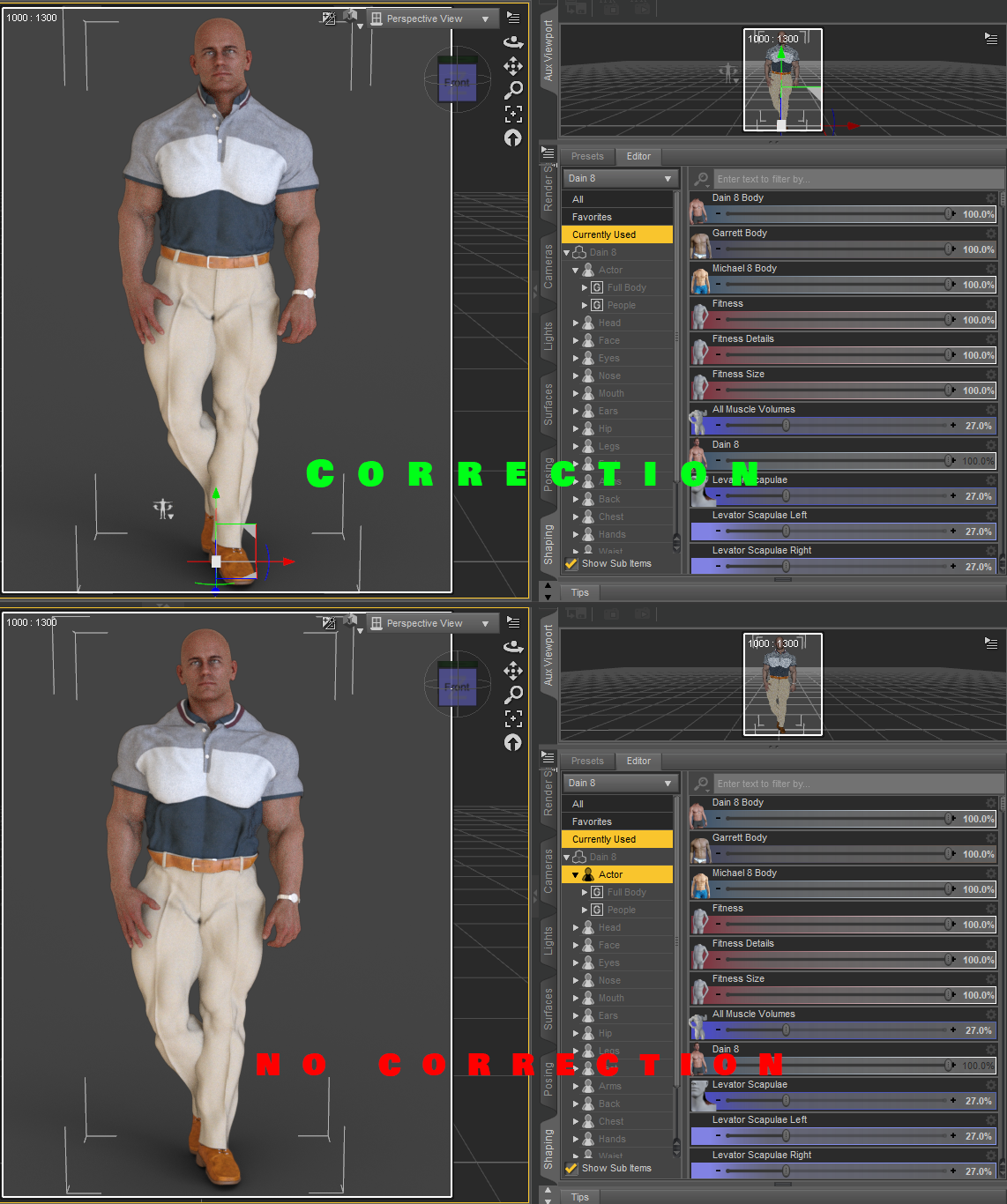
I'm confused by the morph names shown in your example. "Levator Scapulae??? I had to Google that one. I see now how it corresponds to the little image you have next to the slider. That image is helpful. This morph is not listed on the product page, though, just like the morph to lengthen the pants is not listed. There seems to be a disconnect between what is advertised on the product page and what is actually provided. I think if you update the product page to accurately represent everything you are providing, it could help sales. For example, I saw the short "high water" pants in the promos and decided I wasn't interested. It may be a modern style, but did not appeal to me. If I hadn't stumbled upon the forum post, I never would have known about the option to make the pants longer.
The image is just to show the character morphs not the outfit morphs. I'm just demonstrating in the image that if you use really fine detail morphs / HD it causes nasty distortion without the proper design choice I decided upon.
I agree with you on the disconnect of what was not advertised on the product page 100%. I must have overlooked it when I was writing the description up, so that's on me. That's why I created this post just incase stuff like this happens so I can see what I can approve on since this was my first release. I expected bumps on the way, so this is a good learning experience for me so I can get a better understanding and better plan next time on the next attire. I appreciate the criticism.
It's Here! First Live Product! [Commercial]"Levator Scapulae" isn't a morph in this product, that's a morph applied to the figure. I do agree about making sure "Extend Ankle" being added to the product page, it looks like that's the only one that was left off? Maybe it was added late in the process.
Unique issue ?Kind of depends.
If the issue is only appearing at render, but doesn't appear in the preview, it's more than likely a Smoothing modifier error.
Try turning off Smoothing modifier in the parameters tab and see if the issue is there in the preview.
If so, as perttia points out, turn on Show Hidden in the preferences section of the parameters tab, and adjust the Nipple, or other associated morph to bring the mesh of the clothing out to cover the issue, then reenable the smoothing modifier.
If that modifier, nipple, isn't present when Show Hidden is enabled, try adjusting the slider for the nipple on the base mesh, this will create the modifier in the blouse and you'll be able to adjust it then.
As an alternative, you can alway turn the nipple area off. Select the left or right pectoral(g8f) and simply click the eyeball in the scene tab for them.
Unless you're dealing with shear fabrics, or clothing that doesn't cover the entire pectoral area, this shouldn't cause an issue.
Be aware that not all morphs transfer correctly from character to clothing and some more extreme morphs will require the use of something like Fit control, or d-formers to fix.
It's Here! First Live Product! [Commercial]So I been seeing people saying the waist is too wide or the polo looks kinda funny.
Please understand it was design liked this so you use on a wide range of characters size. PLEASE use the morphs that were provided.
If it wasn't built like this you'll get really clingy look.
I'm confused by the morph names shown in your example. "Levator Scapulae??? I had to Google that one. I see now how it corresponds to the little image you have next to the slider. That image is helpful. This morph is not listed on the product page, though, just like the morph to lengthen the pants is not listed. There seems to be a disconnect between what is advertised on the product page and what is actually provided. I think if you update the product page to accurately represent everything you are providing, it could help sales. For example, I saw the short "high water" pants in the promos and decided I wasn't interested. It may be a modern style, but did not appeal to me. If I hadn't stumbled upon the forum post, I never would have known about the option to make the pants longer.
Deepsea Adam HD for Genesis through Genesis 8?"M4 Elite body shapes" is a set of morphs for M4. "M4 Elite" is simply M4 with those morphs.
A character "for M4 Elite" is a M4 character which uses those morphs.
Clothes labeled as "for M4 Elite" are simply clothes for M4 which include custom fit morphs for the M4 Elite body shapes. At the time they were created automatic morph following wasn't a thing, so custom fit morphs were a major selling point.
Imported Obj - tri to quadsI've made some progress - it seems the template I used was causing the de-tragulation error. My new problem is I load the obj and it loads just behind G8M - I can move the top forward or G8M backward and it fits, can run the transfer utility, save it as an asset. And it loads next time the same 3.0+ back. I'm guessing this was the position G8M was in whatever software it was created in.
Anyone have any suggestion how to work around this?
Re-save it after you reposition it, so the object actually has the position data you want.
Introducing the all-new Daz to Unreal Bridge & native Unreal File FormatsDid you set the retarget source on the animations?
David, about 'morph', can you do a tutorial about it on Unreal IF possible, of corse? Ty.
Khemsit 8...Khemsit's texture/hd morphs are REALLY nice! I like her morph, too, but I also really like to do my own, so I slapped on Khemsit's texture and just went to town.
She's on the right of the image, Twosret is on the left - both have custom morphs. And thanks @jakiblue for making me buy the Egyptian Fabrics shaders (I don't regret it lol)

What an adorable image! You really captured the feeling of two close friends posing for a photo. And you morphed the Khemsit 8-skinned character prettier than Twosret? She's very cute. But it looks like they have too much fluoride in their water.
Well, truth be told, the Khemsit one was a slightly altered version of a character I had already dial-spun a while ago for kind of an arabic shape, so there's significantly more work gone into that one, and honestly this whole scene came about when I loaded the Khemsit texture onto her and saw the results. Then I thought "I wonder what Twosret looks like...", so I quickly dial spun a head using the arabic/arabic-ish heads that I had. So yes, I agree, Khemsit ended up with the prettier one haha.
And yeah, lots of flouride there lol. This scene was so heavy on my machine that by the time I dialed in the expressions I didn't get a chance to do any test renders, as I'm pretty sure everything was hanging on by a thread.
Thanks for the comment! I really tried to hammer in those kinds of expressions like they were 'besties' (major props to Bluejaunte's morphs for that).
Khemsit 8...Khemsit's texture/hd morphs are REALLY nice! I like her morph, too, but I also really like to do my own, so I slapped on Khemsit's texture and just went to town.
She's on the right of the image, Twosret is on the left - both have custom morphs. And thanks @jakiblue for making me buy the Egyptian Fabrics shaders (I don't regret it lol)
What an adorable image! You really captured the feeling of two close friends posing for a photo. And you morphed the Khemsit 8-skinned character prettier than Twosret? She's very cute. But it looks like they have too much fluoride in their water.
Imported Obj - tri to quadsI've made some progress - it seems the template I used was causing the de-tragulation error. My new problem is I load the obj and it loads just behind G8M - I can move the top forward or G8M backward and it fits, can run the transfer utility, save it as an asset. And it loads next time the same 3.0+ back. I'm guessing this was the position G8M was in whatever software it was created in.
Anyone have any suggestion how to work around this?
GenX2 and Genesis 2 AddOn released! [Commercial]Open M4 in Daz Studio. Load all the morphs you want but dialed to zero. Export from Daz Studio as a Poser cr2 into your Runtime/Libraries/Character folder. Then load that M4 cr2 into GenX2. You should have the body morphs. I had a similar issue recently.@andolaurina THANK YOU! Your tip worked to "reveal" the body morphs and after further fudging the transfer options I think that I managed to get GenX2 to create an M4-G1 morph (I found that it wasn't a 100% clone but more like 92%... the eye-area and cheekbones are a tad different and more beautiful on original M4). I had to select options: Transfer All-On, Smooth and Shape: M4 Clone in order for the transfer to work, as opposed to the options recommended in the GenX2 user guide. Had I selected Shape: M4 and Edges, I would have gotten a morph which did absolutely nothing to the Genesis figure when dialed up to the max. Now I am so inspired to purchase the G2 add-on after which I would attempt to transfer G2 to G8 using the other script I had purchased in the Daz store. Fingers crossed! And THANK YOU so much for the tip!!
 Hair Makers - in what you create?
I'm interested which software (and methods) use those, who create hair (currently, i ask more about non-dforce, non-strand).
Is that polymodelling? Or you sculpt in zbrush?
-
On a side note, i m also interested what is optimal approach to do a morph for an existing hair, idk, some very hard pose (pre-dforce, you have to do it manually? like if char lying on the floor)
dForce RN Kids Outfit(s) and Poses for Genesis 8 Female(s)This is the outfit on Monique 8, one of the listed characters. Well, at least the hat fits...
There are separate icons for simulation settings for the pants and top. I hid the top, clicked the pants icon and ran the simulation, then likewise with the top. I'm far from a dForce expert, but this doesn't look right. Unless there are clothes moths in her wardrobe.
Thank you for that post. Does it have a slider to adjust for body Monique?
No, the top has sliders for Robyn, Mika, Sakura and Rynne. The pants have no character specific sliders.
When fitted? Morph that match morphs you have on the figure will not usually show, only those that do not have a corresponding morph on the fitted-to figure.
No, not when fitted. I was doing something else and just fitted the outfit to a character I was using at the time (Angharad I think) so I could see the sliders. I've got a render cooking at the moment, but when that's done I'll reload Monique and have another look.
I meant you'd see fewer sliders if the item was fitted than if not. If you are not seeing the sliders for the supported characters when the item is not fitted to another figure, even with Preferences>Show Hidden Properties enabled in the parameter pane option menu, then I think that needs a ticket.
How to replace Head form Blender FaceBuilder dataFirst I'd suggest you make sure you have the right import/export settings to and from Daz Studio to correctly create morph in Daz for the base figure. Otherwise you may do a lot of work and then find you can't import it into Daz. Just try and create a morph that gives a character a big nose or something to check it is all working. There must be tutorials out there for creating morphs in Daz.
As for facebuilder to Daz. I've done what you are trying to do with some manual effort, the shrink-wrap modifier and a little trial and error. In blender size the head from facebuilder to be the same size as the Daz head, and place the facebuilder head over the Daz figure's head. Use blender tools to scale the Daz head to better match. Try and match up the position of the main parts of the face, eyes, nose ears and mouth, trying not to distort the eyeballs or teeth inside the head but moving them If you move the mouth or eyes.
In the Daz figure create a vertex group of the Daz face but without the ears, lips and remove any faces that go inside the nostril from this group (they shink wrap to the wrong places), and some that are around the eyes. Apply a shrinkwrap modifier to the daz figure, targeting the facebuiler head and selecting your new vertex group. You might find you need to do a little more manual work after to get a good result, moving the facebuilder head or scaling it to line up the eyes and mouth and ears correctly. I found the area under the nose to be problematic. Then I'd use smooth tool in sculpting mode to clean up any lumps and bumps in the neck or around the ears.
Softwrap looks like an interesting tool.
Genesis 8 MorphsHello
I used Morph Loader Pro on hair, clothing, etc. using Zbrush's Standard Brush. They all worked perfectly. However, when I try to morph Genesis 8 Male, I get a geometry errror. What am I doing wrong?
GUIDE - What To Buy On The Daz Store?How about what not to buy.
... Or to be more accurate, what to be careful buying.
Add-on texture sets for clothes - and even hair.
HD morphs that are paid extra when there are tons of characters that come with HD included. Two reasons, rediculously expensive imo; they are not split (seriously!) into head and body.
Character morph packs that only provide a character morph (especially when made up using morph sliders).
I absolutely agree with you nicstt! :D
I had originally written that, but I've changed it to respect other ways of thinking.
I'd like this to be the best possible guide to help new and old users.
But I'm also having the feeling that listening to everybody may lead to just say you can't say anything. Sometimes it's better to trust your gut and to stand for what you think and what you've experienced.GUIDE - What To Buy On The Daz Store?How about what not to buy.
... Or to be more accurate, what to be careful buying.
Add-on texture sets for clothes - and even hair.
HD morphs that are paid extra when there are tons of characters that come with HD included. Two reasons, rediculously expensive imo; they are not split (seriously!) into head and body.
Character morph packs that only provide a character morph (especially when made up using morph sliders).
Daz 3D is part of

Connect
DAZ Productions, Inc.
7533 S Center View Ct #4664
West Jordan, UT 84084Licensing Agreement | Terms of Service | Privacy Policy | EULA
© 2026 Daz Productions Inc. All Rights Reserved.