-
Huge Opportunity for the Future of DAZ if they are bold enough to embrace it.
Honestly, what I want most from Daz is a system where you have access to your entire Daz library to assemble whatever character you want and import that directly to whatever program you want, whether that's a separate program like Kitbash3D's Cargo or a plugin you can use in the host program. To be able not only to get Daz content into other programs easily, but to have Daz's ease-of-use for editing morphs, changing clothing etc without having to completely re-export it.
Daz Studio 4.23(.0.x) - Highlights4.22.1.161 (June 26, 2024)
- Content Library pane
- Added support for an "Advanced" Search Type
- Allows a subset of the Advanced Filtering syntax previously only supported by the Smart Content pane (and Presets pages of several property-centric panes) to be used in the Search Field
- Keyword -
key:: - Name -
name:: - Group -
group:: - Date Created -
date::crd:: - Date Updated -
date::upd::
- Keyword -
- A Custom Action can be created for search results from the context menu for the Search DB+ container
- Allows a subset of the Advanced Filtering syntax previously only supported by the Smart Content pane (and Presets pages of several property-centric panes) to be used in the Search Field
- Added a clear ("X") button to the Search Bar when there is a value in the Search Field
- Clicking a tag on the Content Library > Information Panel > Tags Page now populates the Search Field, if the Search Type is set to Database or Advanced, and starts a search
- Search containers now provide a tooltip (includes the search string)
- Added a "Clear Search Results" action to the context menu for Search containers
- Added common convienece actions to the context menu for tree-based container views (i.e., View as Tree, View Side By Side)
- Added an "Expand" submenu for containers that have children
- Added "Expand Selected", and "Expand from Selected" actions
- Added a "Collapse" submenu for containers that have children
- Added "Collapse All", "Collapse Selected", and "Collapse from Selected" actions
- Added an "Expand" submenu for containers that have children
- Added support for an "Advanced" Search Type
- New Scene dialog
- Added an "Add License Tag(s)" action to the context menu for assets that can be identified as being from the Daz 3D store on the Templates and Favorites pages
- Requires login
- Does not require the "Update Metadata" option to be checked
- Creates user-owned tags (keywords), per license type, based on data retrieved from the Daz 3D store
dzLicense_standarddzLicense_3dprintingdzLicense_interactivedzLicense_editorial
- When triggered for an asset, all user-facing assets in the product that the asset belongs to are each automatically tagged
- Each license keyword (above) can entered into the Filter Field, prefixed by key:: to filter the respective view
- Filters can be saved and/or managed from the Filter Menu Button (magnifying glass icon, left of Filter Field)
- Any filter saved here is available when viewing: (and vice versa)
- Smart Content > Files page
- The Presets page of the following panes:
- Posing
- Shaping
- Surfaces
- Lights
- Cameras
- Render Settings
- Simulation Settings
- Any filter saved here is available when viewing: (and vice versa)
- Requires login
- Added an "Add License Tag(s)" action to the context menu for assets that can be identified as being from the Daz 3D store on the Templates and Favorites pages
- Documentation
- Added a "Show Documentation..." action to the Option Menu for various panes
- Install
- Smart Content
- Content Library
- Draw Settings
- Render Settings
- Shader Mixer
- Measure Metrics
- ...
- Added a "Show Documentation..." action to the Option Menu for various panes
- Message Boxes
- ...
- ...
- Scripting API
- Made additions in various areas; see the Change Log for more detail
- Fixed bugs and/or made improvements in various areas; see the Change Log for details
Any way to get these to merge/render?crosswind said:
You better directly export with OBJ format other than a DAE. And if you want to use FBX format, you better use an add-on of Blender: Better FBX Import / Export, and also use the latest DS Public Build, otherwise you won't get the correct result.
As for the texture maps, as Godig mentioned, you have to check them one by one.
update 1; more of a edit, just adding a screenshot as to why i didnt use the .obj file. I can't edit the file or change textures
Any way to get these to merge/render?crosswind said:
You better directly export with OBJ format other than a DAE. And if you want to use FBX format, you better use an add-on of Blender: Better FBX Import / Export, and also use the latest DS Public Build, otherwise you won't get the correct result.
As for the texture maps, as Godig mentioned, you have to check them one by one.
I posted picture a few Screenshots from Daz with the files. First image is from Blender(4.1) second image is Daz using the .obj file(4.22). That's the result without touching anything and how it imported. The images i upload on my post had the .dae file, without touching anything(expect messing with the tree surface properties)
Import problem from BlenderBoth daz studio and blender can import/export polylines as obj and preserve the vertex order. So I guess this is a issue with morph loader pro which can't handle polylines ?
Import problem from Blendercrosswind said:
2. ..but, if there's any geo-graft on the figure, you must at least unfit the geo-graft attachment firstly...or just simply switch to Geometry Editor mode to make the geo-graft's geometry floating before export... otherwise the whole merged geometry will be exported...then you'll get "mismatched error" when import. (screenshot 2).
I think the problem might be here, as I don't quite understand this step. My main idea is to edit the characters' hair and clothes in Blender, but I've seen people export the entire character with hair and clothes, edit them, and then export just the clothes or hair... but it's not working for me.
I've tried editing only the character with what you've suggested, and I've been able to do that, but the hair... the hair gives me an error no matter what I do.
Any way to get these to merge/render?You better directly export with OBJ format other than a DAE. And if you want to use FBX format, you better use an add-on of Blender: Better FBX Import / Export, and also use the latest DS Public Build, otherwise you won't get the correct result.
As for the texture maps, as Godig mentioned, you have to check them one by one.
Blender VDM Brushes for Genesis CharachtersNo... it'll be not that easy to make a geograft, especially in your case that you want more HD details on whatever wound, bruise, welt...
Generically, you have to cut and export partial body geometry to OBJ with Base resolution, import OBJ into Blender, mark the edge of it, remesh or retop the area on which you want to sculpt so as to have denser mesh there before sculpting. Then no matter what type of brushes you use, just sculpt what you want ot have. Unwrap and optimize UV. Export to OBJ and import to DS. Rig it on the figure with Transfer Utility. Then make corrective morphs on it and make textures as needed.
However, personally, I would suggest you not go for this way, especially when you just want to make the wond effects or something rather than a rigged attachemt like genitals, wings, tentacle arms etc. For a typical instance, if you want to make multiple wounds, bruises and scars on differt body parts, how many geo-grafts are you going to make ? or make a very big one to cover them all ? Frankly speaking, if you just want to make one or two wounds for experimenting HD sculpts, you can just do it as you wish, but if for multiple wonuds etc.... using geo-grafts in your case would not be a wise choice...
Instead, you just need to sculp on the figure directly, make and bake necessary texture maps (diffuse, spec, normal, bump, displacement, etc.) to get these results. Like the one in the attached ss... The point is that good VE comes from both sculpted morphs as well as hight quality texture maps.
Import problem from BlenderCheck this short video firstly that I recorded for a folk to resolve the similar issue. This is standard procedure. https://www.daz3d.com/forums/discussion/comment/8594276/#Comment_8594276
Again, a comprehensive workflow for: DS > Blender > DS
1. When export figure to OBJ, set figure's Resolution Level to Base. You don't have to delete any attachement under the figure. Just export it with Filter Objects option... shown in (screenshot 1).2. ...but, if there's any geo-graft on the figure, you must at least unfit the geo-graft attachment firstly...or just simply switch to Geometry Editor mode to make the geo-graft's geometry floating before export... otherwise the whole merged geometry will be exported...then you'll get "mismatched error" when import. (screenshot 2).
3. If Blender version you use is < 4.0, never use OBJ import/export (Legacy), always use "Wavefront (.obj)" in the menus of Import / Export (screenshot 3).
4. Import OBJ into Blender with the settings in (screenshot 4).
5. In Blender, DO NOT add or delete any geometry (vertex / face / edge ); DO NOT retop or remesh; DO NOT apply any Modifier that'll result in the formers. The safest way is to just SCULPT ! if you make morphs.
6. After your sculpting job is done, export the figure to OBJ with the settings in (screenshot 5). Better save a Preset then.
7. In DS, import OBJ with Morph Loader Pro, with the settings in (screenshot 6). Better save a Preset then.
If you correctly process these in each step, you won't get the error of geometry mismatch...
Collision and Poke Through Question...mding said:
Silent Winter said:
You can only set one collision item per object though, so you can't have a shirt collide with a figure AND with the pants they're wearing.
@Silent Winter:
I found this free script at sharecg, but never downloaded or used it, so i can't rate it, but it seems to address the problem you describe.
https://sharecg.com/v/98933/related/21/DAZ-Studio/Collision-target-creation-script%21
Cool, thanks :)
Looks like this is a workaround by exporting multiple objects and importing them as a single object (so you'd collide skirt with shirt, and then collide skirt-shirt with figure). Only this does the export/import with one click - Neat!
Blender VDM Brushes for Genesis CharachtersHi all, I wanted to create custom VDM brushes, in Blender, to use on my Genesis 8 charaters. I wnt to add realistic wounds, cuts, welts, whip lashes, bullet holes, etc... You know, all the things people use vdm brushes for. Is it practical to do this? I'm well aware of the L.I.E and packages of the like; that's not what I'm looking for. I'm not going to purchase Z-Brush either because I don't make any money with my art; I'm just a hobbiest. I'm thinking I would have to import the Genesis character into Blender, and duplicate the geometry on the part of the body I want to apply the vdm brush to, say the chest or back, makeing a geo shell I guess? Would this be the way to do it? Once the new geomertry is applied to the geoshell with the vdm, does it need to be retopologized, or would it work as is, like in all the VDM tutorial Videos I've seen? Is it even posssible to use VDM Brushes on Genesis models sucessfully?
Import problem from BlenderFor morphs you can only "move vertices", not delete or create new geometry. Also be sure the vertex order is preserved when you export/import.
any ways to let cloth mesh less affected by parented figure?crosswind said:
Since you don't like work around, here's a solid way to fix the issue.
- Cause of this issue: the generated morph on the panties which comes from the FBM or PBM you dialed on your character.
- How to fix:
1. Firstly use Rigidity Groups to Clear the generated morph. You may find my tutorial in here - https://www.daz3d.com/forums/discussion/comment/8765141/#Comment_8765141 This is for fixing a hair with Rigidity Groups, but the method is almost the same when fixing this panties.
2. In the example, I give the figure a big ass to simulate the case like what you have.... Then the panties is distorted. (ss 1 - 2)
3. Follow the tutorial ! Select the vertices as per (ss 3) for the group of Participants, (ss4) for the group of References. The distortion on your side may vary..., but the principle is similar: select distored area for Participants, select a couple of vertices in the area with no distortion, for References.
4. Configure parameters in Rigidity Group Editor, then Clear Generated Morphs !
5. If there's still tiny issue on the partial area of the panties, export it to OBJ file, fix it in Blender ! (ss5)
6. Import OBJ to the panties via Morph Loader Pro to create a fix morph. Dial it ! (ss 6 -7)Done ~ (ss8)
thx for ur detailed explanation, yet im not confident with the results . sadly in my experiment for over 2 hrs perhaps this could be a failure :(
btw the mesh i first put as an example ive noticed the number of vertices were TOO dense for me to try
so instead for the experimental sequence i tried this one : X-Fashion String Bikini for Genesis 8 Female(s) (X-Fashion String Bikini for Genesis 8 Female(s) | Daz 3D)
it also contains the same issue as well
ill post every steps i put in. Each procedures are :
1. previous mesh right after i applied the panty preset to my figure
2. in tool settings, change active tool to geometry editor, and create a rigidy group naming ramdomly
3. assigned troulesome vertices to participant group
4. assigned good-looking vertices to ref group
5. geometry assignment->rigidity group editor -> add modifier/shape/generated
6. edit -> figure -> clear generated morphs
after 2 spending two hrs this seems the best i can do , hope blender could help it more if its good to go
Import problem from BlenderHello everyone, I hope you can help me because I'm going crazy. The thing is, exporting something from Daz to Blender works fine for me, without any issues either using the bridge or exporting an obj file. The problem arises when I try to go back to Daz to create a morph, because I always get the same error: "Geometry did not match."
I've looked at about 10 different tutorials, I've tried deleting the eyelashes, lowering the model level to base, various options... and nothing works. It doesn't work either exporting from Blender as an obj, or using Daz to Blender to create the morph directly there.
I don't know what else to do, I've already spent 3 hours browsing the internet and I only find tutorials that don't work, partly because almost all of them are outdated.
Any ideas? Thanks
 any ways to let cloth mesh less affected by parented figure?
Since you don't like work around, here's a solid way to fix the issue.
- Cause of this issue: the generated morph on the panties which comes from the FBM or PBM you dialed on your character.
- How to fix:
1. Firstly use Rigidity Groups to Clear the generated morph. You may find my tutorial in here - https://www.daz3d.com/forums/discussion/comment/8765141/#Comment_8765141 This is for fixing a hair with Rigidity Groups, but the method is almost the same when fixing this panties.
2. In the example, I give the figure a big ass to simulate the case like what you have.... Then the panties is distorted. (ss 1 - 2)
3. Follow the tutorial ! Select the vertices as per (ss 3) for the group of Participants, (ss4) for the group of References. The distortion on your side may vary..., but the principle is similar: select distored area for Participants, select a couple of vertices in the area with no distortion, for References.
4. Configure parameters in Rigidity Group Editor, then Clear Generated Morphs !
5. If there's still tiny issue on the partial area of the panties, export it to OBJ file, fix it in Blender ! (ss5)
6. Import OBJ to the panties via Morph Loader Pro to create a fix morph. Dial it ! (ss 6 -7)Done ~ (ss8)
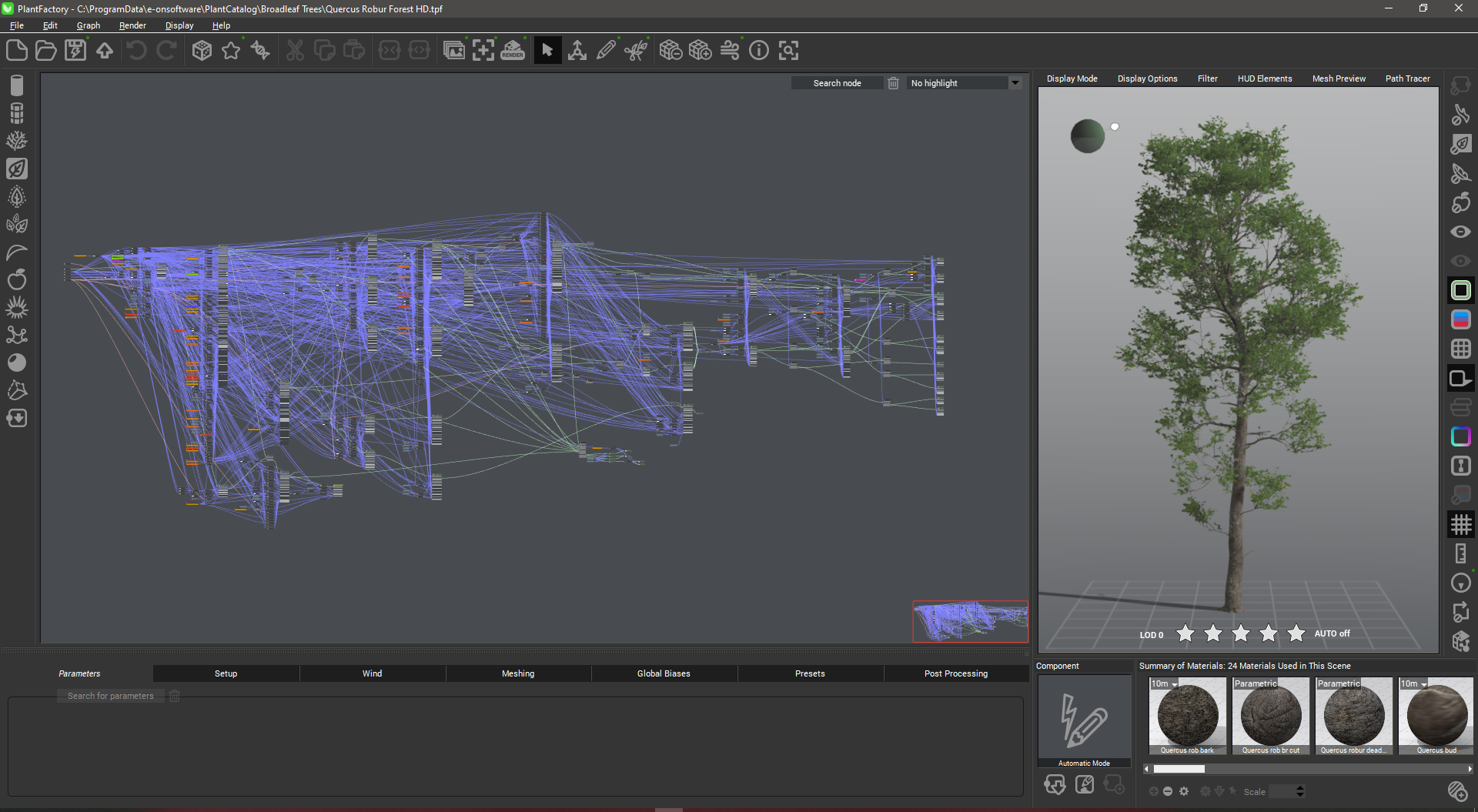
Plant FactoryHoro said:
Fettbemme - when I saw that Vue (Vue d'Ésprit was the original name) and Plant Factory became freely available, I thought a bit about it and then decided to skip that generous offer. I have Carrara from version 3 up to 8.1 but hardly use it. Bryce has a Tree Lab, which is quite versatile but not very obvious to use. I have no experience with the one that comes with Carrara. I experimented with Arbaro a bit with quite nice results. I started Studio with version 0.82 and updated up to 4.8., and had experimented with Blender as well. Which is the best program? Answer: the one you know best.
I used to have Vue 8 I think it was (Pioneer with Render Module and Import ) Than they dashed the Cornucopia site and I had no more access to the old Email. So that was the end for me using Vue.
Glad it's free now. I don't use Plant factory. The nodes scare the crap out of me. I try to keep sane by using the Plants only, and they are a lot. Actually Plantfactory is something for nerds that need their daily challenge. Wanna see what Plantfactory looks under the hood? I'm doing fine with the trees that come with the Plant catalog. I like Vue but I'm not crazy to ruine my spare time with understanding Plantfactory. LOL
Bryce has a good scattering tool like in Carrara. But with tree creation I look rather out of the window. It's way to hard for me to understand. I even shy away from the Material Editor in Bryce.
 UltraScenery - new(er) territory [Commercial]
Thanks for the comments. Here are some pics to help put things in perspective: the circled object is the US2 environment compared to the imported mesh from gaea. The imported terrain is 8.02 GB in size with a water mask, normal map and color map. My workflow for creating my own VDBs for daz is export a high quality, detailed vdbs from embergen to blender. In blender I create the mesh container for the vdb then export as fbx. Import the mesh into daz and apply the vdb. The mesh must be low resolution because high resolution meshes do not work well.
JMR dForce Summer Town Outfit 2 for G3F and G8FProducts transferred from Renderosity has not got metadata, when put into Daz store, and will therefore not be present in Smart Content.
They might get metadata later, but I doubt it.
In order to use it, you have to go to the Content Library, and under Daz Studio formats, select the library DIM installs in, and then drill down asdescribed in step 2.
Having trouble with Golden Palace materials transferring over with DiffeoToday it just randomly created those materials upon import with Merge Uv Layers selected ¯\_(ツ)_/¯
Having trouble with Golden Palace materials transferring over with DiffeoHard to tell without more information. You could check if there's any difference in the uv maps of the two figures, or try not to merge materials in easy import, or try not to prune node trees in the global settings. Of course also check the blender console for errors. If nothing comes out then you could upload a test scene as simple as possible and I may be able to give it a look.
Daz 3D is part of

Connect
DAZ Productions, Inc.
7533 S Center View Ct #4664
West Jordan, UT 84084Licensing Agreement | Terms of Service | Privacy Policy | EULA
© 2026 Daz Productions Inc. All Rights Reserved.