-
Attaching an ERCFreeze to an Existing Morph [Solved]
ERC Freeze is creating the links. If you want to have chnages (in this case to joint centres) for a morph you need the morph (in this case you need to create a morph for Tika 8 Head with exactly the same name as the base figure's morph), then (with the rigging of the antennae memorised) you adjust their centres using either Adjust Rigging to Shape or manually, then with the morph set and the adjustments in place you do an ERC Freeze with the morph as the controller - ERC Freeze thens ets up the links so that when the morph is set the joints are adjusted.
ERC Freeze is a process that adds links, it isn't a thing you add. In order for a morph on a fitted figure to follow a morph on the base figure it has to have exactly the same name. In order to use ERC Freeze you need to have the base rigging memorised as the freeze process is looking at the difference between the memorised state of the centres and their state when the command is run (so in order to have a script run the ERC Freeze it would already need to have all the offsets applied).
Yes, the Offsets are done through Align Rigging to Shape. But, ERC Freeze will always create an extra property, not a morph. Skipping through and doing it's job for it performs exactly as I was wanting. Adding the Delta Links to the generated morph, just like would happen if you'd done it maually.
New Parameter PropertyOK, merged. If you look at the links in Property Hierarchy do theya ll have the same setting for what they save with (not literally the same, but are they saving with the property itself or with the other end of the link)?
I think I understand the question and I think the answer is Yes. All of the Morph files were saved using the same settings. I not sure what the "other end of the link" means....
CC#54 WiPs ~ What is it that you truly desire? after party Chit ChatTerrific modeling and render. Love the shaders. Goya never looked like this.

What is a depth matte?
Thanks for the nice words UnifiedBrain.
A depth matte is a grayscale image of your scene where objects closest to the camera are dark and as objects recede in the scene, they become lighter in value. Carrara can create one automatically using the MultiPass options in the Render room:
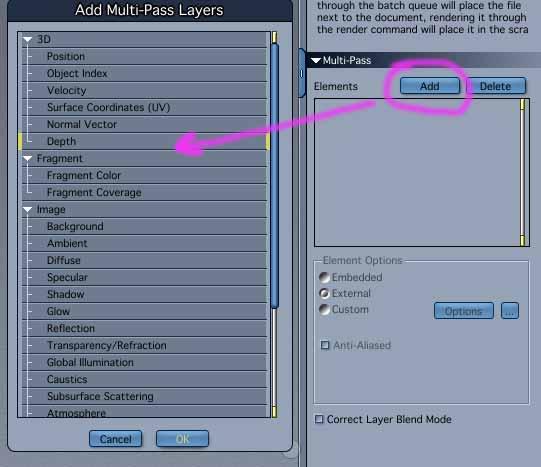

You can then take that and use it to drive other effects in post. Here is a screengrab from After Effects using an Adjustment Layer and the Depth Matte as a Luma Matte. Darker values receive less effects and lighter values receive more. You could also invert the matte if you want effects on the closer objects and less on distant objects. And of course, you can adjust/ fine tune the matte itself or totally crush the values depending on whatever 'look' you are after.

Here is the 'Beauty' pass unaltered for comparrison:

Another use is you can drop it on top of your image and set the Layer Transfer Mode to 'Screen' and adjust the tranparency to taste and it will create a sort of 'foggy' effect (see same screengrab where the top layer is set to Screen with the Opacity adjusted.
Lastly you can even cook your own matte using the Distance Fog in Carrara which will allow you to have more hands on control to dial in the values of the matte using the Start Radius and Extent Radius. Just turn off your lights.
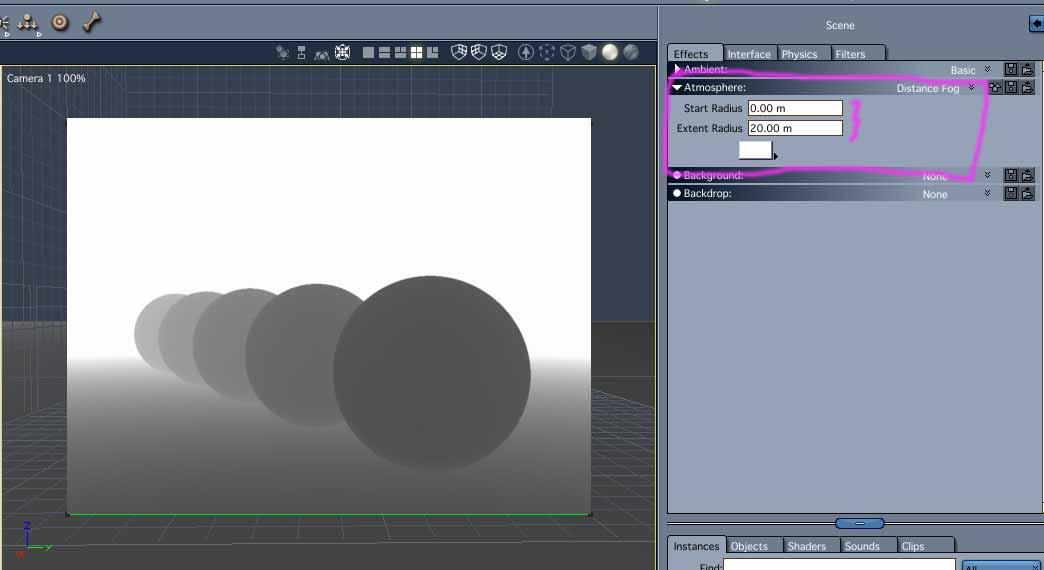
Oh, and of course you can use it to add Depth of Field in post. I used Carrara's native DOF, but for animations or if you want more control or don't want to add such expensive render options it can easier to apply in post.
Those are just a few examples for which I use a depth matte. Hope that makes some sense.
edited: to add Beauty pass and some more clarifications
Thanks for the clear and detailed answer. I followed it pretty well. For sure, you know a lot more about postwork than I do.:)
[Released! HD Face Burns for G8F + Add-On] FenixPhoenix's Commercial ProductsYour move.
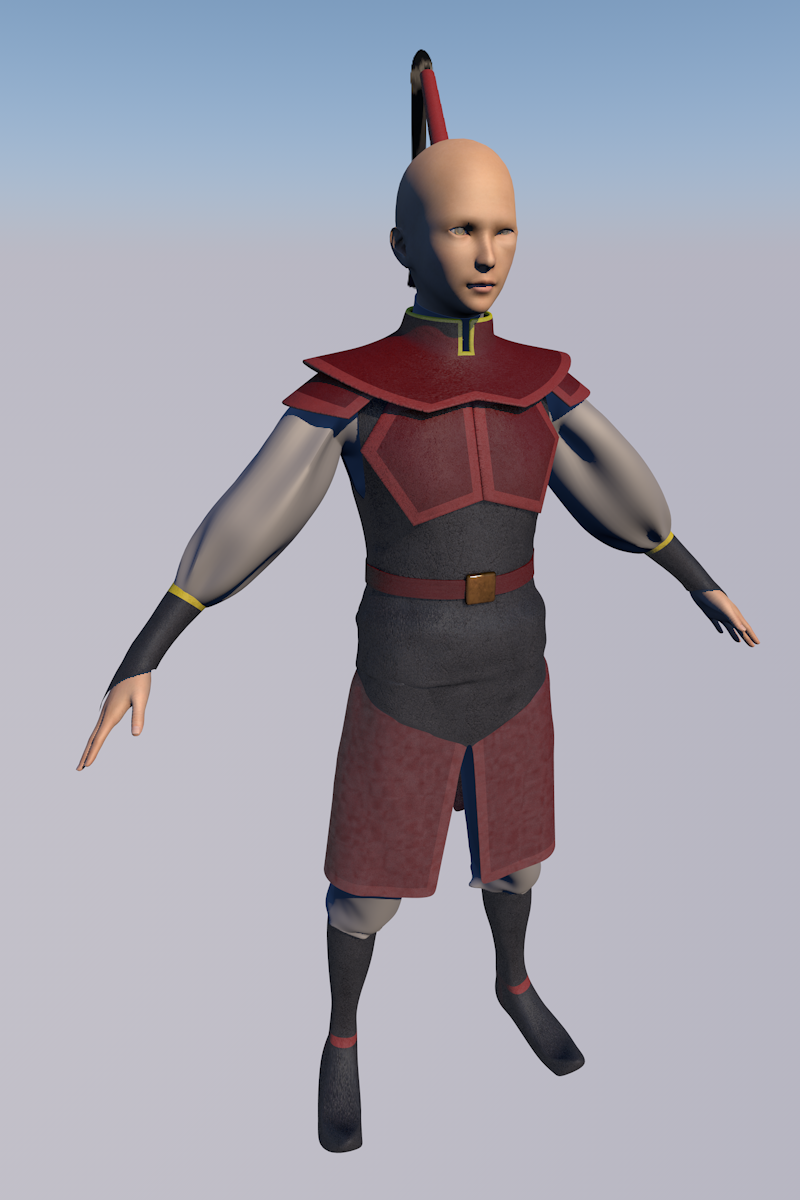
The clothing looks spot on! I'm hoping the product launches later this month. HD Face Burns for Genesis 8 Male(s) just finished testing and it's moved on to the next phase. However, the add-on still needs to be tested and they need to launch together, so hopefully it'll also pass the test without issues.
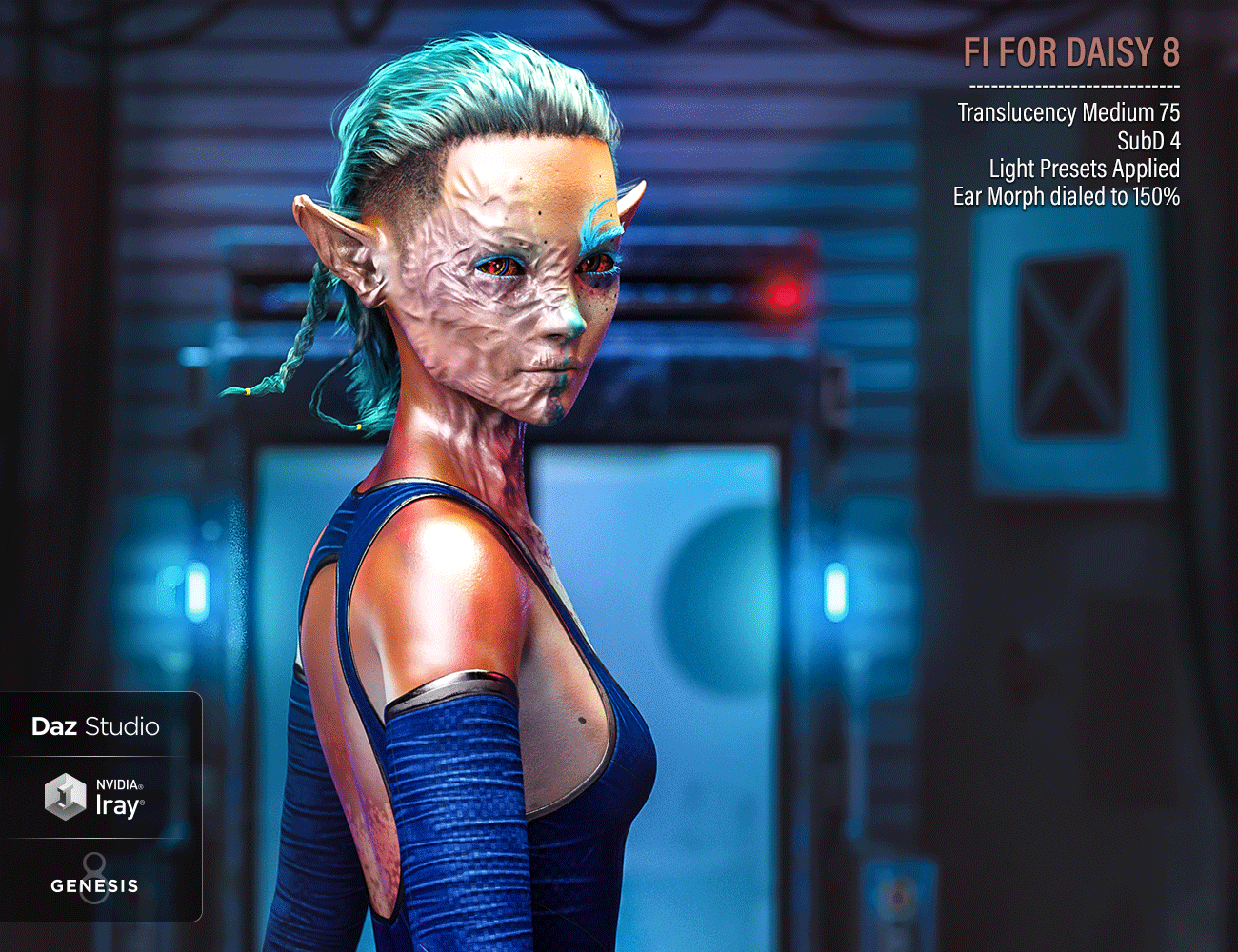
In the meantime, we're currently finishing the promos for the female version so we can upload it onto pass and then proceed to work on it's add-on as well. Here's a sneak peak. While we mostly did the same type of burn placement, the morph is still different from the male version.
 Freja 8 Viking maiden Bundle
The Freja shape creates a bit of a wave on the front of tight tops. The tops are actually intended to form a straight line at the bottom.
(I noticed this with a few other character morphs, too. So Freja is not alone.)
Does anyone know an easy workaround for this?
I have the "Fit Control for Genesis 8" product but that does not seem to have any fitting morph for this particular case.
Edit:
Image 1 = Velocity Outfit for Genesis 8 Female(s)
Image 2 = dForce Muay Thai Outfit for Genesis 8 Female(s)
Image 3 = Jogging Bodysuit for Genesis 8 Female(s) by Lilflame --> this one seems to conform perfectly.
That scalloping affect happens on muscular men as well. The only thing I found that can work, is to show hidden properties on the clothing items, and remove certain morphs. of course it is hit or miss, but a lot of clothing does not handle muscular shapes that well.
Thanks - good to know it's a rather general problem.
I was able to fix this to a certain extent with the Meshgrabber. It's a bit tricky to hit the right polygons for moving around but I liked the result here.
Attaching an ERCFreeze to an Existing Morph [Solved]ERC Freeze is creating the links. If you want to have chnages (in this case to joint centres) for a morph you need the morph (in this case you need to create a morph for Tika 8 Head with exactly the same name as the base figure's morph), then (with the rigging of the antennae memorised) you adjust their centres using either Adjust Rigging to Shape or manually, then with the morph set and the adjustments in place you do an ERC Freeze with the morph as the controller - ERC Freeze thens ets up the links so that when the morph is set the joints are adjusted.
ERC Freeze is a process that adds links, it isn't a thing you add. In order for a morph on a fitted figure to follow a morph on the base figure it has to have exactly the same name. In order to use ERC Freeze you need to have the base rigging memorised as the freeze process is looking at the difference between the memorised state of the centres and their state when the command is run (so in order to have a script run the ERC Freeze it would already need to have all the offsets applied).
This gives a nice conceptual picture - thanks for taking the time to post this. It's exactly the kind of thing that would be oh-so-helpful to have in a manual ;)
Cheers!
- Greg
Vampire Morphs - Before G8 ends...!These are the products being referenced:
https://www.daz3d.com/fwsa-vampire-expansion-and-jewelry-for-genesis-3-female-s
https://www.daz3d.com/fwsa-vampire-expansion-and-hunter-kit-for-genesis-3-male-s
(The OP did not include the male product link.)
These are the most similar that I've seen for G8:
https://www.daz3d.com/vampyre-for-genesis-8-female
https://www.daz3d.com/vampyre-for-genesis-8-male-s
but the heads do not seem to be separate morphs from the stylized bodies (I haven't bought them yet and can't verify). Shape Splitter should be able to isolate the head morphs, or specific parts of them.Shape Splitter won't split the HD elements, though, only the SD morph.
However, you can use Shape Splitter to SUBTRACT the body morph from the head morph, thus preserving the HD of the head, and vice versa.
Vampire Morphs - Before G8 ends...!These are the products being referenced:
https://www.daz3d.com/fwsa-vampire-expansion-and-jewelry-for-genesis-3-female-s
https://www.daz3d.com/fwsa-vampire-expansion-and-hunter-kit-for-genesis-3-male-s
(The OP did not include the male product link.)
These are the most similar that I've seen for G8:
https://www.daz3d.com/vampyre-for-genesis-8-female
https://www.daz3d.com/vampyre-for-genesis-8-male-s
but the heads do not seem to be separate morphs from the stylized bodies (I haven't bought them yet and can't verify). Shape Splitter should be able to isolate the head morphs, or specific parts of them.Shape Splitter won't split the HD elements, though, only the SD morph.
That might produce acceptable results, but I agree that ready-made products for both G8F and G8M that look closer to the FWSA morphs would be great - I'd buy both.Attaching an ERCFreeze to an Existing Morph [Solved]ERC Freeze is creating the links. If you want to have chnages (in this case to joint centres) for a morph you need the morph (in this case you need to create a morph for Tika 8 Head with exactly the same name as the base figure's morph), then (with the rigging of the antennae memorised) you adjust their centres using either Adjust Rigging to Shape or manually, then with the morph set and the adjustments in place you do an ERC Freeze with the morph as the controller - ERC Freeze thens ets up the links so that when the morph is set the joints are adjusted.
ERC Freeze is a process that adds links, it isn't a thing you add. In order for a morph on a fitted figure to follow a morph on the base figure it has to have exactly the same name. In order to use ERC Freeze you need to have the base rigging memorised as the freeze process is looking at the difference between the memorised state of the centres and their state when the command is run (so in order to have a script run the ERC Freeze it would already need to have all the offsets applied).
Freja 8 Viking maiden BundleThe Freja shape creates a bit of a wave on the front of tight tops. The tops are actually intended to form a straight line at the bottom.
(I noticed this with a few other character morphs, too. So Freja is not alone.)
Does anyone know an easy workaround for this?
I have the "Fit Control for Genesis 8" product but that does not seem to have any fitting morph for this particular case.
Edit:
Image 1 = Velocity Outfit for Genesis 8 Female(s)
Image 2 = dForce Muay Thai Outfit for Genesis 8 Female(s)
Image 3 = Jogging Bodysuit for Genesis 8 Female(s) by Lilflame --> this one seems to conform perfectly.
That scalloping affect happens on muscular men as well. The only thing I found that can work, is to show hidden properties on the clothing items, and remove certain morphs. of course it is hit or miss, but a lot of clothing does not handle muscular shapes that well.
Freja 8 Viking maiden BundleThe Freja shape creates a bit of a wave on the front of tight tops. The tops are actually intended to form a straight line at the bottom.
(I noticed this with a few other character morphs, too. So Freja is not alone.)
Does anyone know an easy workaround for this?
I have the "Fit Control for Genesis 8" product but that does not seem to have any fitting morph for this particular case.
Edit:
Image 1 = Velocity Outfit for Genesis 8 Female(s)
Image 2 = dForce Muay Thai Outfit for Genesis 8 Female(s)
Image 3 = Jogging Bodysuit for Genesis 8 Female(s) by Lilflame --> this one seems to conform perfectly.
Yes, if you don't use gigantic boobies, the clothing deforms due to smaller boobs.
Sternum Height/general sternum and center chest dials can help.
Sickleyield's breast helper can also sometimes help, as a general helper with breast shape oddities in the bust.
https://www.daz3d.com/sy-clothing-breast-helper-genesis-8-female
I think the breast size is not the issue. It seems that there is a particular line which decides whether the front/sternum of a cloth will look okay or not so nice on Freja.
The Isla Bikini for example looks perfect without any modifications. Longer tops seem to not cause any issues, either.
Try selecting the clothing piece in question and check under currently used on the parameters tab. Dial out the character shape (on the garment)...many times that will fix odd boob and I use that tweak religiously. Clothing as of late only seems to properly fit the base G8F and any other shape results in really wonky breastages.
Freja 8 Viking maiden BundleThe Freja shape creates a bit of a wave on the front of tight tops. The tops are actually intended to form a straight line at the bottom.
(I noticed this with a few other character morphs, too. So Freja is not alone.)
Does anyone know an easy workaround for this?
I have the "Fit Control for Genesis 8" product but that does not seem to have any fitting morph for this particular case.
Edit:
Image 1 = Velocity Outfit for Genesis 8 Female(s)
Image 2 = dForce Muay Thai Outfit for Genesis 8 Female(s)
Image 3 = Jogging Bodysuit for Genesis 8 Female(s) by Lilflame --> this one seems to conform perfectly.
Yes, if you don't use gigantic boobies, the clothing deforms due to smaller boobs.
Sternum Height/general sternum and center chest dials can help.
Sickleyield's breast helper can also sometimes help, as a general helper with breast shape oddities in the bust.
https://www.daz3d.com/sy-clothing-breast-helper-genesis-8-female
I think the breast size is not the issue. It seems that there is a particular line which decides whether the front/sternum of a cloth will look okay or not so nice on Freja.
The Isla Bikini for example looks perfect without any modifications. Longer tops seem to not cause any issues, either.
Freja 8 Viking maiden BundleThe Freja shape creates a bit of a wave on the front of tight tops. The tops are actually intended to form a straight line at the bottom.
(I noticed this with a few other character morphs, too. So Freja is not alone.)
Does anyone know an easy workaround for this?
I have the "Fit Control for Genesis 8" product but that does not seem to have any fitting morph for this particular case.
Edit:
Image 1 = Velocity Outfit for Genesis 8 Female(s)
Image 2 = dForce Muay Thai Outfit for Genesis 8 Female(s)
Image 3 = Jogging Bodysuit for Genesis 8 Female(s) by Lilflame --> this one seems to conform perfectly.
Yes, if you don't use gigantic boobies, the clothing deforms due to smaller boobs.
Sternum Height/general sternum and center chest dials can help.
Sickleyield's breast helper can also sometimes help, as a general helper with breast shape oddities in the bust.
https://www.daz3d.com/sy-clothing-breast-helper-genesis-8-female
Freja 8 Viking maiden BundleThe Freja shape creates a bit of a wave on the front of tight tops. The tops are actually intended to form a straight line at the bottom.
(I noticed this with a few other character morphs, too. So Freja is not alone.)
Does anyone know an easy workaround for this?
I have the "Fit Control for Genesis 8" product but that does not seem to have any fitting morph for this particular case.
Edit:
Image 1 = Velocity Outfit for Genesis 8 Female(s)
Image 2 = dForce Muay Thai Outfit for Genesis 8 Female(s)
Image 3 = Jogging Bodysuit for Genesis 8 Female(s) by Lilflame --> this one seems to conform perfectly.
Try using the Sternum Height under Breast Adjusters on Fit Control. Should help a bit.
Thanks. It did actually help to remove that "peak" on the Muay Thai Top (image 2). It looks like the top in image 1 then.
Parameters pannel, pictures and slidersI would like to know if there a ways to change the layout of the parameters pannel:
I remember some times ago that in the pannel, in the specific the "Full Body" sub section you could visualize every single morph side by side with big picture and the slider in vertical mode.
Now for some reason ( and I've no idea if I did touch something to mess it up) it's a giant ass list with the slide horizonal.
It's not a big problem but using a 1440p monitor the pictures are much much smaller and not always the search function give me reasult cause I myself, don't know what I'm looking for :DSpeaking of search: Does anybody knows if there is a better Content Library script/app/addon?
Freja 8There's no materials, nothing. Just the shape morph.
How did this get past quality control and onto the store in such a broken state?
Freja 8 Viking maiden BundleThe Freja shape creates a bit of a wave on the front of tight tops. The tops are actually intended to form a straight line at the bottom.
(I noticed this with a few other character morphs, too. So Freja is not alone.)
Does anyone know an easy workaround for this?
I have the "Fit Control for Genesis 8" product but that does not seem to have any fitting morph for this particular case.
Edit:
Image 1 = Velocity Outfit for Genesis 8 Female(s)
Image 2 = dForce Muay Thai Outfit for Genesis 8 Female(s)
Image 3 = Jogging Bodysuit for Genesis 8 Female(s) by Lilflame --> this one seems to conform perfectly.
Try using the Sternum Height under Breast Adjusters on Fit Control. Should help a bit.
Freja 8 Viking maiden BundleThe Freja shape creates a bit of a wave on the front of tight tops. The tops are actually intended to form a straight line at the bottom.
(I noticed this with a few other character morphs, too. So Freja is not alone.)
Does anyone know an easy workaround for this?
I have the "Fit Control for Genesis 8" product but that does not seem to have any fitting morph for this particular case.
Edit:
Image 1 = Velocity Outfit for Genesis 8 Female(s)
Image 2 = dForce Muay Thai Outfit for Genesis 8 Female(s)
Image 3 = Jogging Bodysuit for Genesis 8 Female(s) by Lilflame --> this one seems to conform perfectly.
Attaching an ERCFreeze to an Existing Morph [Solved]OK!! Finally got it!
I think using ErcFreeze will always create a new property, or overwrite that precious "Value" property erasing the Morph Deltas if you use the Generated Morphs Property as the ControllerProperty.
Turns out I was barking up the wrong tree. The solution was to use DzERCLink. I cycled through all the nodes (bones) of the Antenna, and created an ErcLink for each X,Y,Z Origin and End Point Delta, and BOOM!
This link was a great help: https://www.daz3d.com/forums/discussion/342486/creating-a-simple-dzerclink-between-two-new-parameters
Now to figure out how to Save Morph File. =)
Freja 8 Viking maiden BundleToo manly imo - I'd have preferred a build closer to Zuzka Light, muscled and athletic but feminine.
Still, it seems a unique morph - I don't recall seeing one quite like it - that adds versatility to G8.
But as others have said, the introductory cost of the bundle is greater than usual, and it includes fewer items.Eva 8 is their Zuzka.


Daz 3D is part of

Connect
DAZ Productions, Inc.
7533 S Center View Ct #4664
West Jordan, UT 84084Licensing Agreement | Terms of Service | Privacy Policy | EULA
© 2026 Daz Productions Inc. All Rights Reserved.