-
[Released] ManFriday's Mesh Grabber [Commercial]
Thank you for the Mac version!! :)
Better thank US Windows user for testing it and finding the bugs, before it got to you Apple guys and girls :P
I hope you Mac users will now test the Morph Addon first and good :P
Cross converted Morphs sharing allowed?@RichardHaseltine Quick question.
workflow: (Dev G8F mesh)
pose using sliders dials. to get proper alignment and shape to work out a sculpt on G8F in blender. Export as Daz collada, import to blender, sculpt out the shape I want which is unrecognizable to the initial shape of the dials of the G8F I exported,save as obj in blender, load as morph in morph loader on a zeroed out fresh dev G8F mesh, change the detail names in editor, like location of People/Real World/ Morph character name/ directory, limits, and tab colors, save as morph asset.
Distribution:
Only the morphs I created this way in a data folder structure. Like data/vendor/product name/morph I created from morph loader add.duf
Shaping preset dufs that increase the dial value to the morph I made this way.
Is this ok to distribute.
ID of face/morph?Not certain it's her, but it is reminiscent of Michelle: https://www.daz3d.com/michelle-hd-for-genesis-8-female
Oh that's a good guess! She's on a great sale so I did what any totally sane person that is not addicted to DS content would do and bought her morph. Sadly both the manual download link and IM are failing to download the files, so I can't check how she would look for myself.
Geo-Graft head QuestionIf it's rigged to match the base figure at the join (even if you then have custom bones beyond that) it should follow.automatically. However, for any custom bones you will have to do your own adjusting rigging to shape - I suspect that may be the issue with the jaw bone, at least in part - and if the shape is very different from the default then the projected morphs - where you don't have a custom morph - may be odd. A Rigidity Map may help, but that stops the mesh from responding to projected morphs other than the effect on a few selected polygons - for soemthign like a replacement head picking a workable set of reference polygons on the base figure might be challenging.
Sloshwerks French Quarter..that is often the case with many urban environment sets. Yes it is a bother but there are worksrounds and you can save the changes as a morph asset.
[Mesh Grabber] Where is the Morph Editor?I'm confused. Is the Morph Editor already included in the original Mesh Grabber for Winows, or does it still need to be released for Windows?
It's an add-on, and the Windows version is not available yet. It should be there in a few days according to the vendor's commercial thread.
A couple of things.OK so are all genesis models compatible with each other and by that I mean can say a G8 and a G2 model be used together in the same project for instance, an animation, movie or game?
If you meant "can I use a product for <one version of genesis> with <another version of genesis>" then the answer is "yes and no" ;)
Products made for one version of genesis can only be used directly on that version of genesis. There are however ways to convert products between versions, some included directly with the base figure and some not.
For example, G8 comes with autofit clones which enables you to convert clothes from G1, G2 and G3 automatically. If you want to go back from G8 to an earlier figures you'll need to buy additional clones. There are also batch converters available in the store to make that easier.
G8 can also use textures made for G3 directly, and vice versa. However for textures from earlier figures you'll need to purchase conversion products.
Morphs also require purchasing conversion programs.
Also am I correct in saying that models cannot be created from scratch as one would do with Blender?
DS is indeed not a modeling application. It includes a few primitives that you can edit with deformers or geometry editor tool, but that's very basic. You can model items in blender and import them in DS, though.
Is it the case that you buy them pre-made and manipulate them to suit your need aesthetically and fuctionally?
You can use tools in DS or external programs (like an image editor to edit textures, or a modeling app to morph the mesh) to modify products you buy. You can also combine products from various sets (what we call "kitbashing").
Also If one bought a model does this come with a license giving right to use it independently on your own project elsewhere?
What do you mean by that exactly?
The licence you get with a product allows you to create images and videos using that product (whether they've been rendered in DS or in another program), and to sell those images and videos. For games, it depends if it uses pre-rendered sprites and animations (which is covered by the standard license), or if it needs to include the 3D mesh itself (in which case you'll need to buy the additional interactive license for the products used).
None of the licenses allow you to take a product, modify it and then distribute or sell your modified version.
Perfect, many thanks. Very thorough answer & exactly what I was looking for. Appreciate your time. :)
Investigating Character Load Timewell actually there is a way to check how much time conflicts waste. not 100% accurate because it's based only on daz studio log and I'm not sure everything is logged..
I am sure everything is not logged.
When I had problems with loading times, I first eliminated the warnings and then started removing characters and morphs that I wasn't using.
Every now and then I got a new warning that wasn't related to anything that was removed, for example typing errors inside the remaining morph files.
yea but that may also be related to the fact you loaded a different character with different requisites (and so different derivated morphs allowed) like G3 or G8 or V7, Darius 8 and so on..
Geo-Graft head QuestionEither cover up your human model or switch to smooth shaded view.
Have you set the head geograft's base compatibility to G8F? With the head selected, go either to Edit -> (Figure or Object) -> Scene Identification, or click on the "hamburger" icon at the top left of the Scene pane and Edit -> Scene Identification, then set "Preferred Base" to G8F. This will tell DS that the figure is supposed to work with G8F and thus won't try to autofit it in the normal way.
This was actually one of the things I had to do. Once I did that I could "fit" it to Genesis 8 and the geograft wouldn't autofit which was great.It stopped me from losing my riggnig. At least in this way.
Does the head actually share vertices along its edge with the base figure? If not it won't actually graft.
As for rigging, you really need to set it up with the Transfer Utility and then add custom bones/edit the weight maps
This I also had missed. I did do the vertices things, but I had not done the transfer utility in the later step to merge the hierarchys. Although I'm not sure how much it helped since I have some problems regarding the geograft still.
Now my newest problems are in regards to the geo-graft a seam still being quite visible when the geograft replaces the head (as in I can see between the graft and the body when it's set) and the geograft now gets quite affected by height morphs. It will either cause the chin to distort from the pull in either direction/leave the geograft in place while the body changes shape. I haven't test all my morphs but it seems a majority don't affect it. Sickleyield suggested a Rigidity map which I'll be trying to learn to do.
On a minor note I also have constantly reparent the geograft to like the G8 neck bone in order to have it follow the body correctly. Is there a way to make it stay parented to the bone I want when I load it in? Thank you for the replies.
Oh and how do I do one of those material copy scripts? It'd probably help in regards to making the seam less visible.
AIUTO...CHI CONOSCE L’ITALIANO? PARTE DODICINon cpaisco come si fanno a vendere degi shape preset a questi prezzi
Body By Sublime Series 8 Female | 3D Models and 3D Software by Daz 3D (daz3d.com)
"Con 10.000 lire il mio falegname la faceva meglio" cit.
Perché $3.26 ti sembra molto?
Io ho finito (tranne rare eccezioni) di installare morph, per non rallentare Daz, ma altrimenti mi sembrerebbe anche molto conveniente!
Non sono morph quelli ma shape preset. In pratica sono delle "ricette pronte" per dei personaggi creati con i morph base e altri morph già esistenti, ti basta leggere la lista dei prodotti necessari.
E sono solo le "forme", non include nessuna texture per i personaggi.
Eh sì l'avevo capito ma non sono preciso coi nomi, rallentano la libreria anche quelli!
[Released] ManFriday's Mesh Grabber [Commercial]The only reason I haven't used the breast control is because the product is going to be redistributed. So using only what I shaped in grabber and from blender. Is it viable to be able to use some control dials like so.
like say move left up 24 units in the control pack for g8f export as collada smooth out in blender, save obj, zero out g8f in Daz, then load morph with morph loader and save as morph asset? I thought you couldn't do that, so I am clarifying if it can be done.I always thought that would be a distribution issue since it is using the product and not part of a merch resource pack. I have sent in a ticket asking about this like a month ago, and Daz hasn't answered it.
[Released] ManFriday's Mesh Grabber [Commercial]Oh well, I never tryd to morph a person :O.... I only morph clothes and objects :(
For breasts I would recommend just use one of the 300 breast morph products :P
https://www.daz3d.com/breast-control-genesis-8-female-s
(I use the Glute controls much times from it).
https://www.daz3d.com/breast-utilities-for-genesis-8-female-s
[Released] ManFriday's Mesh Grabber [Commercial]@loony, they are breast morphs, so the change that occurs, is it flattens when moved up or down, after limits turn off. Limits have to be off for it to move naturally. I have used mesh grabber to try and fix the morphs to add as an extra saved morph that would be hidden that works with the up and down translations, even taking the collada to blender and sculpted out the morph after using mesh grabber to get the basic shaping smoothing it out in blender. Then saving out obj and loading back into morph loader. So far I've had to shelf the project, to get some more products out, but this product is something I am interested in getting finished.New Parameter PropertyAh, base just means the morphs that are part of the base product rather than an add-on, morph expansion product - if anything I'd be surprised at those which don't have the sub-folder.
Ah! So those are nothing to worry about? And as long as the morphs are functioning, I can just ignore??
If that's the case, I'll just tell my OCD meter to sit down?New Parameter PropertyAh, base just means the morphs that are part of the base product rather than an add-on, morph expansion product - if anything I'd be surprised at those which don't have the sub-folder.
Anne for Caryn 8 (clothing costume added by elleque sep 27)I made a mini cat morph to use as Anne companion,perhaps will try the same for a puppy
http://mininessie-art-gallery.blogspot.com/2020/10/minicats.html
[Mesh Grabber] Where is the Morph Editor?I'm confused. Is the Morph Editor already included in the original Mesh Grabber for Winows, or does it still need to be released for Windows?
[Released] ManFriday's Mesh Grabber [Commercial]@manfriday I've made some morphs with mesh grabber, they look good as static morphs but when you add others like move up or down, it deforms in a bad way, will the morph addon help with this and adding correcting morphs.Well, every morph should get its slider and when you try out some pillows with morphs you will realize when you move 2 sliders (which arent made to work together) they will not work correct.
It depends on how big the changes are, I am not sure if Meshgrabber will improve that...
but what can help then with meshgrabber but also without, move the morph from like slider 1 to 50% then make the meshmovement and add it then, instead of zeroing the last morph.
But... I am still new to making morphs (but getting better!).
So Slider 2 can maybe work better when it starts at the start position from slide 1 at 50%.
I have created for one product 2-3 morphs which will stretch, rotate up down and I think something other, that works all fine
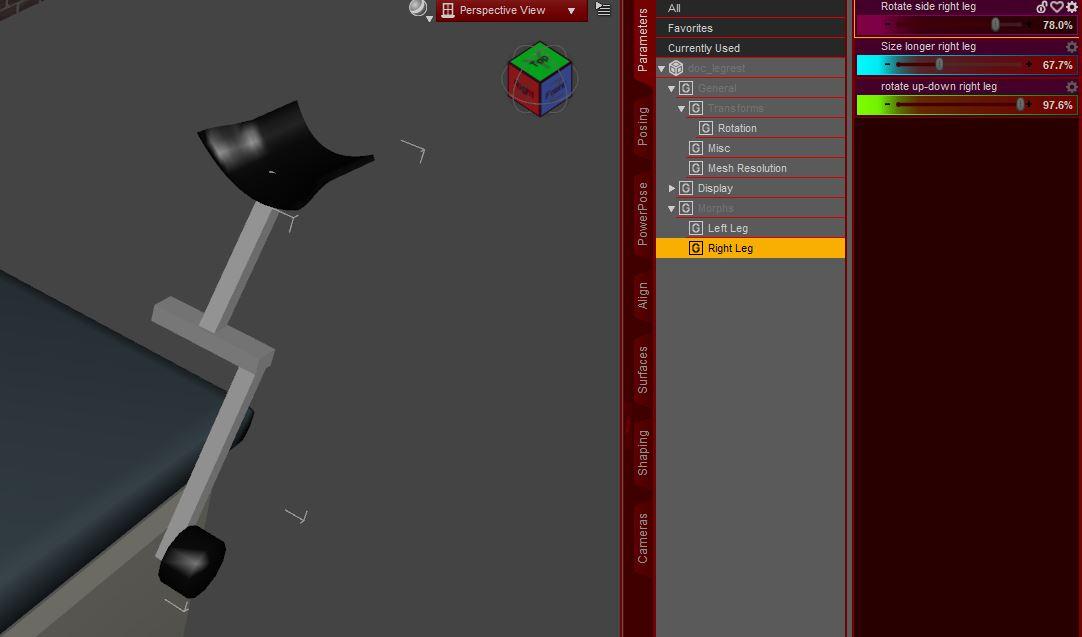
The product didnt had any morphs initial. Its very important to zero things correct and export correct to let them work good together.
That is 1 prop, not different elements, everything done by meshgrabber.
[Released] ManFriday's Mesh Grabber [Commercial]@manfriday I've made some morphs with mesh grabber, they look good as static morphs but when you add others like move up or down, it deforms in a bad way, will the morph addon help with this and adding correcting morphs.Mesh grabber morphs windows versionJust curious if it was an oversight. Very interested in this. I've used the mesh grabber to make some morphs. But when working with other movement sliders it alters the morph in a undesirable way. I have a product on hold because of this and very interested in seeing if the morph addon will help the process of correcting other morphs working with the one I made.Daz 3D is part of

Connect
DAZ Productions, Inc.
7533 S Center View Ct #4664
West Jordan, UT 84084Licensing Agreement | Terms of Service | Privacy Policy | EULA
© 2026 Daz Productions Inc. All Rights Reserved.