-
Lost and Found growing! Is that right?
memcneil70 said:
While I am limiting my purchases of the transferred items from Rendo, I accept that the ones I buy will entail my adding metadata to them, just as the ones from RuntimeDNA did. On the positive side, it makes me really learn the contents of the products. I only get frustrated with complex packages that have shaders labled as materials, lights, and of course dForce and simulation items that don't quite match the older Smart Content categories.
Sets are easy, it is the accessories, lighting, shaders, and clothing that often takes hours per product. The PAs pack a lot into them, and why I would buy from them at Rendo.
I'm pretty sure the Lully sets I did (ones I purchased from Renderosity) didn't take that long, more like ten minutes (possibly twice if I forgot a step due to rustiness). Don't forget that one you have created the product you can use the right-click Edit Metadata option in a folder of items to simplify, for example, setting the content ttype on Iray or 3delight materials without having to try to select them individiually in the editing window. Also, compatibility and type can be handled by drag-and-drop to Smart Content with the base item selected in the scene. Those can save a lot of fiddling with long lists. I would also suggest installing the product to its own content directory, so files are easier to find initially, and then move it/reinstall it to the real content directory later - the CMS stores only relative paths, where possible.
Lost and Found growing! Is that right?While I am limiting my purchases of the transferred items from Rendo, I accept that the ones I buy will entail my adding metadata to them, just as the ones from RuntimeDNA did. On the positive side, it makes me really learn the contents of the products. I only get frustrated with complex packages that have shaders labled as materials, lights, and of course dForce and simulation items that don't quite match the older Smart Content categories.
Sets are easy, it is the accessories, lighting, shaders, and clothing that often takes hours per product. The PAs pack a lot into them, and why I would buy from them at Rendo.
Extremely bad performance with DAZ charactersradego01 said:
If you import a character into Blender and use something from the morphs, like Eyes Blink, and set a keyframe, the FPS drops.
Of course some drop is expected in animation as blender has to compute the dependency graph for each frame, but here with my basic hardware it runs pretty smooth. However I suppose we have to set some common ground to do comparisons, otherwise it may obviously depend on the used figure. With the Victoria 8 defender above everything is fine.
Of course the more morphs you load the more the dependency graph is busy. If you look at the console when loading a figure you can tell how many morphs are loaded, the full V8 figure takes about 250 morphs. Other figures especially G9 may take much more. Plus if you use custom morphs packages.
steps for V8 defender, with simplify:
- easy import with the G8 preset plus "final optimizations"
- use solid mode for the viewport, so to avoid textures and shaders
- check fps without animation, I get 30 fps
- do some animation with the armature and the morphs
- check fps with animation, I get 24 fps
p.s. Apart the dep graph, animation also has to compute shaders and shadows for each frame, using solid mode with matcap avoids that. That's what solid mode is for in blender, so you can use solid mode for animation with a simplified preview, then eevee for rendering. Or cycles for phorealistic images.
p.p.s. In general in blender we can expect eevee to take some seconds to render a scene, then cyles to take some minutes. Of course it depends on the scene and the hardware but these are the common expectations. Eevee is designed for animation, it is not a game engine so not tailored for real time rendering, and personally I'm grateful for that. In game engines as Unreal there's many limitations on materials and rigging that blender doesn't have.
update. normal maps in eevee. This is a known issue, still bugging blender 4.2, and not going to be fixed by the blender team. Eevee is slow computing normal maps, so it is better to use bump maps instead when possible. In the link below you also find two addons, to toggle normal maps, or to replace the standard normal maps with a much faster custom group.
With the defender figure in material preview I go from 7 fps with normal maps to 30 fps with bump maps. The solid mode works fine and always goes 30 fps.
https://projects.blender.org/blender/blender/issues/64458
Reported to Thomas, to implement a toggle for normal maps directly in diffeomorphic.
https://bitbucket.org/Diffeomorphic/import_daz/issues/2244/
I'm also attaching a material preset to remove the normal maps in daz studio from the uber shader before exporting. That you can use when the figure provides both normal maps and bump maps, so to only keep the bump maps in blender. Of course backup the scene first.
Extremely bad performance with DAZ charactersPadone said:
TheMysteryIsThePoint said:
Why are you not using a decimated proxy while working in the viewport?
Yes proxies can help when dealing with heavy meshes, diffeomorphic also has tools to help with that. Personally I tend to avoid heavy meshes in the first place.
https://bitbucket.org/Diffeomorphic/import_daz/wiki/Advanced/Low-poly
update. finalize.
We can get rid of the rigidity by finalizing the scene with the tools in the finishing panel. So finalizing the scene before animation is mandatory. To get the finalized scene working we also have to restart blender.
Be sure to backup the scene before finalizing, since it not possible to add morphs after.
steps to finalize and get rid of the rigidity:
- finalize meshes
- finalize armature
- save the scene
- close blender and reload the scene, otherwise it doesn’t work
p.s. The "final optimizations" option in easy import does the same, and it works without restarting blender. Unfortunately in this case we can't backup the scene before finalizing.
Actually, I’ve got one more question. It feels like a bug to me because I know it's happening to other creators too, but...
If you import a character into Blender and use something from the morphs, like Eyes Blink, and set a keyframe, the FPS drops. It’s not that bad, but it’s definitely weird
Am I doing something wrong, or is this just how it is? Thanks
Lost and Found growing! Is that right?Lully said:
Hi Lully here
I'm sorry this is a problem. :(
I attempted to do the metadata for my old items, but due to the size of each pack (which have a large number of duf files) it would have been a ridiculously massive task.
My more recent DAZ only store items (from my sconces pack onwards ) all should have metadata files as they have gone through the same process as any other vendor selling here.
Over time, this shouldn't be a problem as the older stuff will eventually fade into the background.Thanks for joining the discussion.The lack of metadata is not your fault. Metadata is the responsibility of Daz. not the PA. I don't place any blame on you or the other vendors for this situation.
Lost and Found growing! Is that right?Hi Lully here
I'm sorry this is a problem. :(
I attempted to do the metadata for my old items, but due to the size of each pack (which have a large number of duf files) it would have been a ridiculously massive task.
My more recent DAZ only store items (from my sconces pack onwards ) all should have metadata files as they have gone through the same process as any other vendor selling here.
Over time, this shouldn't be a problem as the older stuff will eventually fade into the background.SY dForce Roman Clothing Collection - texture parents incorrectThat is a metadata problem. You can edit the metadata in the Content Library pane. You want to select the texture asset and change the Compatibilty setting. There are various tutorials around. Try a Google search.
Poser 13 - anyone using it?Poser 13 was mostly a big upgrade for 3D photoreal animators. At 13.3 it's now pretty mature and bug-fixed. But note that Poser 14 is apparently around the corner, possibly (my guess) before Black Friday / Christmas? Which will likely mean discounts on Poser 13.
The “Windows 10” system spec is only to cover their backs. 13 runs fine back to Windows 7, with the only drawback being you can't use Ken's paid-for scripts from the Renderosity Store (since only a later Windows OS has the required decryption module).
12 and 13 still interface fairly painlessly with Vue (now wholly free, incidentally), importing scenes nicely once the software is told where things are. Just make sure you keep your old Poser 11 installed and with its runtime - the Vue SDK will expect to find that. Some Poser 12-only characters (Pink 2.0) and new complex Blender Cycles X shaders may not convert well, but nearly all older content will. Vue also serves to replace all the old PoserFusion plugins, since it exports your Poser imports to the latest versions of big-beast 3D software packages and also to game engines and VR etc.
12 and 13 switched up to using Python 3, so many of your old Poser 11 / Python 2 scripts won't work. But by now there are plenty of free replacements for nearly everything. See here for a directory.
Lots of changes in 13 due to the new Blender Cycles X (aka SuperFly in Poser) render engine in Poser 13. There's a lot to get your head around, in terms of a new approach to render settings. But once mastered, you get much faster rendering - especially on animations and complex scenes.
Improved Intel Open Image Denoise (OIDN), now a key feature in speeding up render times. You can now also denoise the Raytrace Preview.
Updated Walk Designer and Talk Designer. Also default Viseme mappings for "all Cartoon Characters", though I assume that means only the characters in the free 13gb content bundle. So far, as I know, no Visemes for the Nursoda toon fantasy characters.
Maximum Undo limitation increased to 200.
Slight improvements to Comic Book Preview real-time rendering. Less 'chips' in the line-art, seemingly due to a double-pass with slightly different settings and then an insta-composite of the two versions of the same line-art?
Import and Export for Render Presets.
Also a number of changes only of interest to clothing and content developers.
The UI is much the same, thankfully there was no disastrous UI makeover by Kevin the Tea-boy! Also, of course there's the usual long backwards compatibility with older saved scenes.
If adding 13 alongside Poser 11, you'll also want to consider what was added in Poser 12. Adaptive sampling for faster renders. Superfly rendering into a layered .PSD including depth passes etc. Superfly making PNGs with background transparency. Funky Cycles nodes inc. 'hair' and PBR materials. Dual graphics-card support. NVIDIA 30 series cards support. Many Materials Room improvements. Python Pillow support.
Hope that helps!
Lost and Found growing! Is that right?Richard Haseltine said:
barbult said:
Richard Haseltine said:
geekydad123 said:
I just purchased a product that went straight to Lost and Found. It's got over 300+ files associated with it (it's a complex environment), I really don't want to have to sort that myself. Hopefully a support ticket will get things straightened out.
If it is part of a bulk transfer from Renderosity then it probably won't get official metadata - but if someone, using the default install locations, created metadata for it that could be shared.
Users are probably not eager to do Daz's work for them for free. Even packaging up the metadata for sharing after creating it takes time. That is followed by the requests for help because people don't know how to install it, or they don't know how to import it, or they don't have their product installed in the same hierarchy, or... I volunteer you, if you are interested.

I don't have all, or most, of the trasnfers but I do have some (mostly Lully outfits) and it is my intention to do and share metadata for those. When is another matter.
I only bought a couple items, to discount other things. When I saw that there was no metadata, I quit buying them. One of the first things I bought was a Lully outfit. Creating metadata for that was a huge job and pretty confusing. That effort was what soured me on these transferred products without metadata. They dilute the value of shopping in the Daz Store. Metadata had been a discriminator, but we can't count on it anymore. We can't even count on getting a readme or proper listing of required products. High SKU numbers no longer mean recent products; they could just as well be old stuff brought over, with old tech and materials. Shopping has now become "buyer beware" in the Daz store, sadly.
Lost and Found growing! Is that right?barbult said:
Richard Haseltine said:
geekydad123 said:
I just purchased a product that went straight to Lost and Found. It's got over 300+ files associated with it (it's a complex environment), I really don't want to have to sort that myself. Hopefully a support ticket will get things straightened out.
If it is part of a bulk transfer from Renderosity then it probably won't get official metadata - but if someone, using the default install locations, created metadata for it that could be shared.
Users are probably not eager to do Daz's work for them for free. Even packaging up the metadata for sharing after creating it takes time. That is followed by the requests for help because people don't know how to install it, or they don't know how to import it, or they don't have their product installed in the same hierarchy, or... I volunteer you, if you are interested.
I don't have all, or most, of the trasnfers but I do have some (mostly Lully outfits) and it is my intention to do and share metadata for those. When is another matter.
Extremely bad performance with DAZ charactersTheMysteryIsThePoint said:
Why are you not using a decimated proxy while working in the viewport?
Yes proxies can help when dealing with heavy meshes, diffeomorphic also has tools to help with that. Personally I tend to avoid heavy meshes in the first place.
https://bitbucket.org/Diffeomorphic/import_daz/wiki/Advanced/Low-poly
update. finalize.
We can get rid of the rigidity by finalizing the scene with the tools in the finishing panel. So finalizing the scene before animation is mandatory. To get the finalized scene working we also have to restart blender.
Be sure to backup the scene before finalizing, since it not possible to add morphs after.
steps to finalize and get rid of the rigidity:
- finalize meshes
- finalize armature
- save the scene
- close blender and reload the scene, otherwise it doesn’t work
p.s. The "final optimizations" option in easy import does the same, and it works without restarting blender. Unfortunately in this case we can't backup the scene before finalizing.
Neither update nor uninstallRichard Haseltine said:
That isn't the update icon, it the available to install through Connect icon (presumably you installed through DIM). Daz Studio can't uninstall content installed through DIM.
In 4.23.0.1 you will not get that marker.
Really? I'm away from my system till tomorrow, but I've seen that marker on items where there seems to be two copies. The one installed by DIM and the one not installed but waiting to be installed through Connect, even though those are the same item. It seems to happen when DIM sys there's no metadata for a package.
Extremely bad performance with DAZ charactersPadone said:
Yes, as noted above some daz assets are very heavy and don't fit animation, so we should always check what we're using and don't just import everything blind. However, it turns out there's issues with the daz rigidity, which greatly affects the animation speed in blender. Now reported to Thomas.
Interesting .... In this case, I also believe Rigidity Group is the culprit ~~
I removed the Rigidity Groups before exporting to DBZ file. With 50 FPS preset, live FPS could reach 27 with a bare figure.
Extremely bad performance with DAZ charactersYes, as noted above some daz assets are very heavy and don't fit animation, so we should always check what we're using and don't just import everything blind. However, it turns out there's issues with the daz rigidity, which greatly affects the animation speed in blender. Now reported to Thomas.
HELP - custom morphs causes mesh explosioncrosswind said:
Legacy way of import / export OBJ file in Blender older versions may bring the above issues. After Blender 4.0, Legacy way is discontinued, so it turns much safer.
That would be good news moving forward.
Lost and Found growing! Is that right?Richard Haseltine said:
geekydad123 said:
I just purchased a product that went straight to Lost and Found. It's got over 300+ files associated with it (it's a complex environment), I really don't want to have to sort that myself. Hopefully a support ticket will get things straightened out.
If it is part of a bulk transfer from Renderosity then it probably won't get official metadata - but if someone, using the default install locations, created metadata for it that could be shared.
Users are probably not eager to do Daz's work for them for free. Even packaging up the metadata for sharing after creating it takes time. That is followed by the requests for help because people don't know how to install it, or they don't know how to import it, or they don't have their product installed in the same hierarchy, or... I volunteer you, if you are interested.
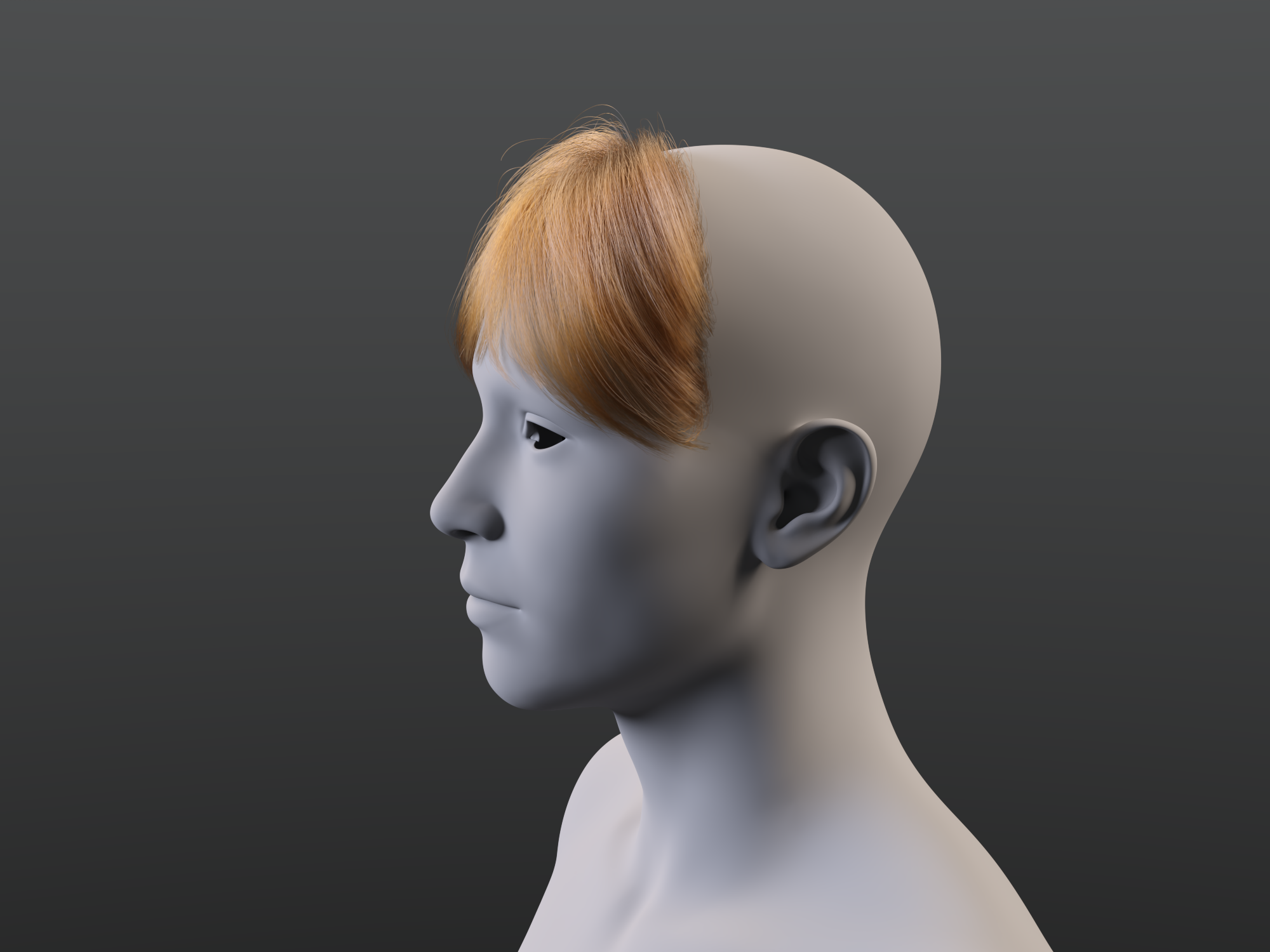
really like the look of the bangs in the promo for dForce Strand-Based Autumn Style Bob Hair for GenIt is not difficult to morph a dForce root radius hair. I made this quick morph to scale the back of the hair down and move it inside the G9 head, as an example. I wrote up these instructions a couple years ago and posted in some forum thread. These reference G8, but the technique still worked today in DS 4.23.0.4 with G9 and the Autumn Style Bob hair strands.
I don't know if all these settings are critical or not, but this is what works for me:
- Load G8F
- Select G8F and a load dForce hair (I'm using dForce Neroli Hair).
- In the Scene pane, select dForce hair object (not the cap).
- In Parameters pane, make sure Generate PS Hairs, Generate PR Hairs and Preview PR Hairs are On. Make sure Line Tessellation is >0? It is 3 on the hair I am using.
- Zero out any morphs in the dForce hair that are set when the hair is loaded.
- Select the Geometry Editor Tool.
- Hide everything except dForce hair object in the Scene pane.
- Export to OBJ.
- Import OBJ to modeler (Blender, etc.) modify and export modified OBJ.
- Back in DS with dForce hair object still selected and Geometry Editor tool still selected, run Morph Loader Pro.
- In Morph Loader Pro, load the modified hair OBJ and create the morph.
- Save the morph as a morph asset.
Instead of editing an OBJ in a modeler, you can drape the hair with dForce and export that as an OBJ. Clear the simulation, and import the OBJ with Morph Loader Pro. Save the morph as a morph asset.
Remember to select a tool other than Geometry Editor or Mesh Grabber before rendering.
 Lost and Found growing! Is that right?
geekydad123 said:
I just purchased a product that went straight to Lost and Found. It's got over 300+ files associated with it (it's a complex environment), I really don't want to have to sort that myself. Hopefully a support ticket will get things straightened out.
If it is part of a bulk transfer from Renderosity then it probably won't get official metadata - but if someone, using the default install locations, created metadata for it that could be shared.
Extremely bad performance with DAZ charactersPadone said:
In general it certainly depends on the figure and assets you load of course. It is also true that some daz assets are extremely heavy so to be avoided for animation. However, here I have a very basic hardware with a old GTX 1060, and with "normal" figures I don't experience much lag in the viewport. Using the Victoria 8 pro bundle I loaded Victoria 8 with Voss hair and the Defender armor. It runs at 30 fps both in solid mode and material preview.
I just use easy import with the preset for G8 so everything is included from jcms to correctives to morphs. Of course with simplify enabled, I woldn't dare anything without.
p.s. For heavy items, using the hide icon in the outliner doesn't affect the viewport performances. You have to use the disable icon instead, which will hide and disable the item so viewport performances are affected. There's no need to delete the item from the scene, just disable it.
Thank you for your response. I’ve already found the reason and managed to fix the issue
Actually, I was really surprised to find out it’s the brows. The character with the worst performance had brows from the 'Echo HD for Genesis 8.1 Female' model, and they have over 480,000 faces. When I checked about 10 other brows from my assets, they were all somewhere between 40,000 and 80,000 faces. I have no idea what went wrong when someone created this model, but that’s just insane
After using 'unsubdivide' on the brows, the face count dropped from 480,000 to 120,000, and now there's no more lag. A lot of my characters are based on Mousso models (the creator of Echo HD), and it seems like the high face count issue is common with many of their brows (at least for me)
However, problem solved! Thanks :)
Extremely bad performance with DAZ charactersIn general it certainly depends on the figure and assets you load of course. It is also true that some daz assets are extremely heavy so to be avoided for animation. However, here I have a very basic hardware with a old GTX 1060, and with "normal" figures I don't experience much lag in the viewport. Using the Victoria 8 pro bundle I loaded Victoria 8 with Voss hair and the Defender armor. It runs at 30 fps both in solid mode and material preview.
I just use easy import with the preset for G8 so everything is included from jcms to correctives to morphs. Of course with simplify enabled, I woldn't dare anything without.
p.s. For heavy items, using the hide icon in the outliner doesn't affect the viewport performances. You have to use the disable icon instead, which will hide and disable the item so viewport performances are affected. There's no need to delete the item from the scene, just disable it.
p.p.s. shaders. Also shaders and textures can slow down the viewport, so using solid mode for animation is generally faster, especially for complex scenes.
Daz 3D is part of

Connect
DAZ Productions, Inc.
7533 S Center View Ct #4664
West Jordan, UT 84084Licensing Agreement | Terms of Service | Privacy Policy | EULA
© 2026 Daz Productions Inc. All Rights Reserved.