-
Do I still have access to free bundle after Premier expires?
Richard Haseltine said:
N-RArts said:
The only items that I can find in my Smart Content pane, are the items that I have already installed on my computer. Plus, I can't find the tools (e.g. Character converter) that are also included with the Premier membership. :/
I will admit that I'm new to the Smart Content pane. However I did manage to update metadata (and something else, but I can't remember what ^^')
Thenplug-ins have, like all plug-ins, to be isntalled through DIM (they need elevated privileges to write to the application folder, which isn't possible for DS itself). Then you log-in to activate them after a restart.
Ah. Okay. Thanks ^^ I typed "Premier" into DIM's search and found them.
The only issue I have now is getting everything (especially the Premier Characters) to appear in my Smart Content Pane.
Do I still have access to free bundle after Premier expires?N-RArts said:
The only items that I can find in my Smart Content pane, are the items that I have already installed on my computer. Plus, I can't find the tools (e.g. Character converter) that are also included with the Premier membership. :/
I will admit that I'm new to the Smart Content pane. However I did manage to update metadata (and something else, but I can't remember what ^^')
Thenplug-ins have, like all plug-ins, to be isntalled through DIM (they need elevated privileges to write to the application folder, which isn't possible for DS itself). Then you log-in to activate them after a restart.
Do I still have access to free bundle after Premier expires?The only items that I can find in my Smart Content pane, are the items that I have already installed on my computer. Plus, I can't find the tools (e.g. Character converter) that are also included with the Premier membership. :/
I will admit that I'm new to the Smart Content pane. However I did manage to update metadata (and something else, but I can't remember what ^^')
Blender to Dazca would be great, I would love to retouch the weightpaint of my morph in Blender instead of "adjusting rigging to shape" and ERC freeze, I also tried weight painting in daz studio but I find it really atrocious, it just seems unusable. If anyone to news since I do not think something so bad can be by default in daz studio. This must be coming from me on this point that I do not know this feature well.
Another thing, since you can not import a figure Genesis 8 from Blender to daz by concervant are weight paint modify I also tried to transfer the weight of a figure export but so far I never succeeded.
Sci Fi Space Ship by David Brinnen is currently a freebieSo...
I've checked "UNREAL" option and found Unreal Engine specific file formats there. So, skip that one.
However, I also tried "FBX" and - to my surprise - it worked for Bryce! For some reason it didn't load textures. But, what's more important, the resulting object in scene, indeed, has subgrpoups. So you can assign materials or textures as you want.


Tl;dr
1) Use "DS" via DAZ Studio to Bryce Bridge if you want to import model with subgroups and fully textured (I recommend to resize textures into smaller dimensions first).
2) Use "OBJ" right into Bryce for a simple import - however it will come out as single object only, so you'll have to use just one material for it.
3) Use "FBX" right into Bryce - it won't load textures but you'll get model subgroups and that gives you flexibility.
Other download options might be ignored. "PS" is for Poser format (I think it can be opened in DAZ Studio as well), and "UNREAL" is intended for Unreal Engine.
Hope this helps.
The Mac FAQTotte said:
memcneil70 said:
After 50 odd hours the back up finished, but only copied the oldest drive. Regardless, I installed the Daz Beta and except for the first crash (of course) the program was polite as I registered a plug-in and did metadata on new products. So, it seems both systems working fine for me. But I wish I could get Time Machine to back up the correct external drives.
I think the problem is that the new drive needs the same name as the old one or smart content have problems finding the items when they are restored to a drive with a new name, that is at least my experience.
The Content Management System uses relative paths (for files in mapped directories) so that certainly shouldn't be an issue. Hoever, backing up and restoring a database can be tricky - and PostgtreSQL is fussy about folder permissions.
The Mac FAQmemcneil70 said:
After 50 odd hours the back up finished, but only copied the oldest drive. Regardless, I installed the Daz Beta and except for the first crash (of course) the program was polite as I registered a plug-in and did metadata on new products. So, it seems both systems working fine for me. But I wish I could get Time Machine to back up the correct external drives.
I think the problem is that the new drive needs the same name as the old one or smart content have problems finding the items when they are restored to a drive with a new name, that is at least my experience.
The Mac FAQAfter 50 odd hours the back up finished, but only copied the oldest drive. Regardless, I installed the Daz Beta and except for the first crash (of course) the program was polite as I registered a plug-in and did metadata on new products. So, it seems both systems working fine for me. But I wish I could get Time Machine to back up the correct external drives.
Do I still have access to free bundle after Premier expires?also make sure that you Update metadata, checkbox in the login dialogue or in the Connect menu - it is off by default now.
Carrara Community Art Gallery - Show us your Renders!!!Steve K said:
WendyLuvsCatz said:
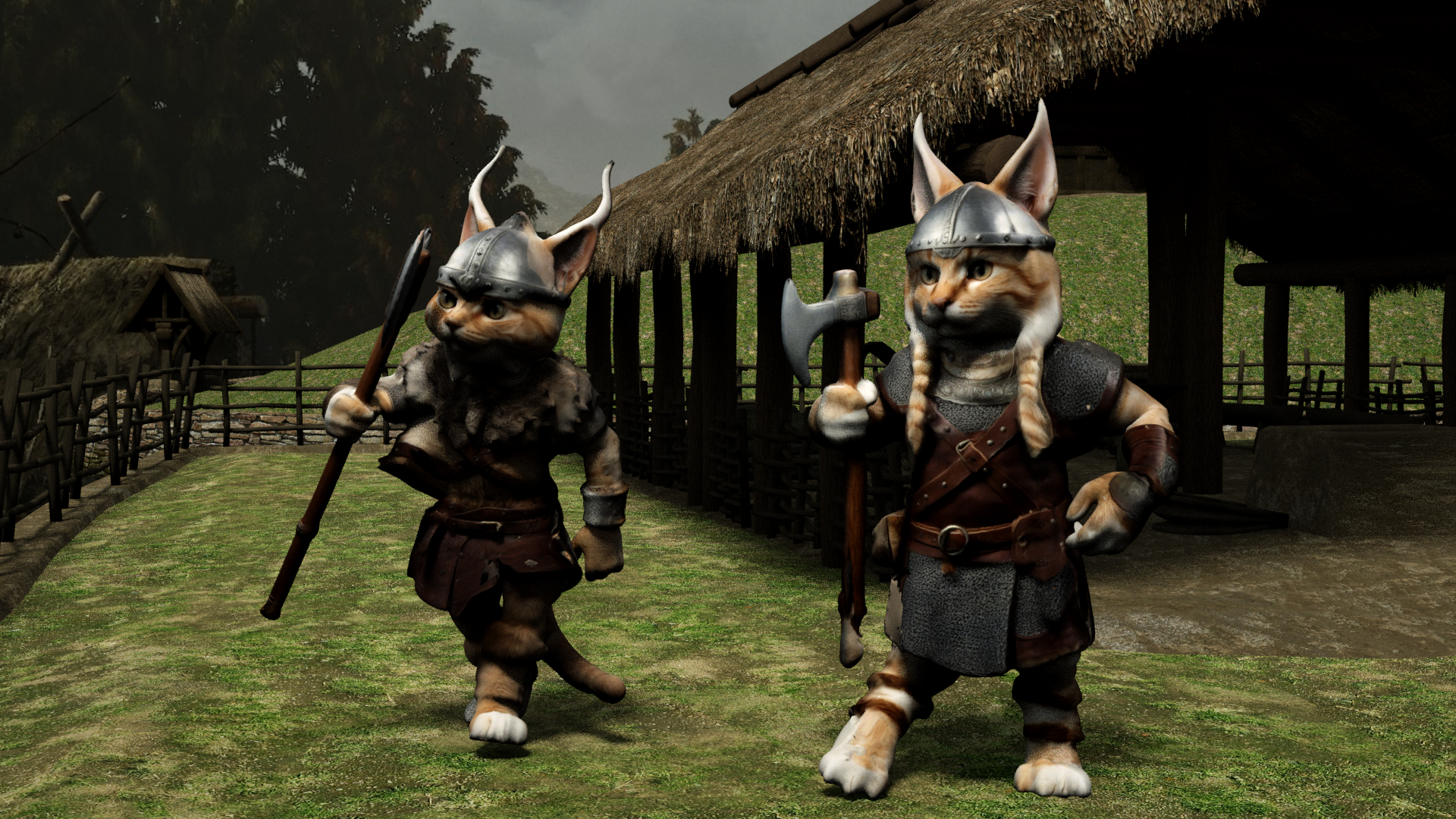
Meshy AI 3D Viking Cats
rigged with Mixamo but had to import into DAZ Studio Carrara plugin as FBX throws an error in Carrara
duf converted to blended weight saved as support asset works
Very good. I don't understand most of the maneuvers, but I think an animation is next for these guys.
it is animated but I haven't uploaded the video yet
Mixamo no longer exports an FBX compatable with Carrara but DAZ studio will import it now
so I had to save it from there
Carrara Community Art Gallery - Show us your Renders!!!WendyLuvsCatz said:
Meshy AI 3D Viking Cats
rigged with Mixamo but had to import into DAZ Studio Carrara plugin as FBX throws an error in Carrara
duf converted to blended weight saved as support asset works
Very good. I don't understand most of the maneuvers, but I think an animation is next for these guys.
Carrara Community Art Gallery - Show us your Renders!!!Meshy AI 3D Viking Cats
rigged with Mixamo but had to import into DAZ Studio Carrara plugin as FBX throws an error in Carrara
duf converted to blended weight saved as support asset works
 Question about Bend values in Parameters tab
Because you didn't create the body morph on a G9 Base with zeroed pose ~ You have to re-create the body morph based on the gesture on the 2nd screenshot.
- export the figure in ss2 to OBJ
- load a G9 Base, and import OBJ via MLP to create Head Morph and Body Morph by using G9 HeadSplit DFormer
- Adjust rigging to shape and ERC Freezehttps://youtu.be/nEFI6keXU2c?si=h83g84fKFxvqhXak
There's Always Another Sale Thread -- Discussions Only Pt 3barbult said:
memcneil70 said:
After reading the posts for https://www.daz3d.com/dforce-louis-hair-for-genesis-9 by AprilYSH and https://www.daz3d.com/touchable-louis by Wolfie both seem to be DAZ products, not Rendo imports. So the texture add-on should have metadata. I did look at it this morning and yes, it didn't list the Required Product then, but it does now.
Could this be a case of the new PAs not being aware of the location for the required product for DAZ on the submission form? I know that on Rendo I often found the Required Product listed, even if it was a DAZ released product
I also found listed products used in the promos, which I welcomed. It would be nice if DAZ would do that again here as a rule, instead of offering products that have no relation by type, era, style, or apparent interest for the user instead, especially lower SKU ones.
And yeah, I miss the finding the deals I did in my previous years. But I have bought so much stuff from Generation 3 & 4 and from G1 to G8.1 that it is hard for me to find anything I haven't turned down or have no use for. And my library, only partially installed needs an 18TB external backup drive now. Including freebies, and two other stores' items.
I am glad I bought my Pro Bundles when I could.
Mary
How much of the stuff included in Pro bundles did you acually use (or want)?
@barbult, I always (at least in the past 4 years) did a count of the items that I wanted/would use vs what I had no use for. If it raised to at least 60% of the bundle or higher I had no issue to buy it. For example, I like Thomas 9 but that ratio didn't work out, so Thomas stays in the store. I have the items on wishlist I want but I haven't bought any, they just haven't come up for a decent sale yet. I was also put off by the comic hero outfit that I didn't even have knowledge of (and I collected comics!).
There are about 6000 - 8000 products I have not downloaded now because they were fillers for those bundles: characters of little 'character', skimpwear, hairs, and products that are broken sadly. Also, I have no wish to clogged up my runtime with excessive characters again.
That uninstalled count also includes landscapes full of items that have little bearing with plants; vehicles I never used, and V4 and M4 because I loath trying to add the metadata for the upteenth time for all the files that are required to use their characters and then I never used them. I can use their outfits and hair with clones without them.
That said, there are items going back to Generation 3 or 4 or older that I was able to buy, or freebies that I installed because I have used them and they have details I love.
Mary
There's Always Another Sale Thread -- Discussions Only Pt 3memcneil70 said:
After reading the posts for https://www.daz3d.com/dforce-louis-hair-for-genesis-9 by AprilYSH and https://www.daz3d.com/touchable-louis by Wolfie both seem to be DAZ products, not Rendo imports. So the texture add-on should have metadata. I did look at it this morning and yes, it didn't list the Required Product then, but it does now.
Could this be a case of the new PAs not being aware of the location for the required product for DAZ on the submission form? I know that on Rendo I often found the Required Product listed, even if it was a DAZ released product
I also found listed products used in the promos, which I welcomed. It would be nice if DAZ would do that again here as a rule, instead of offering products that have no relation by type, era, style, or apparent interest for the user instead, especially lower SKU ones.
And yeah, I miss the finding the deals I did in my previous years. But I have bought so much stuff from Generation 3 & 4 and from G1 to G8.1 that it is hard for me to find anything I haven't turned down or have no use for. And my library, only partially installed needs an 18TB external backup drive now. Including freebies, and two other stores' items.
I am glad I bought my Pro Bundles when I could.
Mary
How much of the stuff included in Pro bundles did you acually use (or want)?
There's Always Another Sale Thread -- Discussions Only Pt 3After reading the posts for https://www.daz3d.com/dforce-louis-hair-for-genesis-9 by AprilYSH and https://www.daz3d.com/touchable-louis by Wolfie both seem to be DAZ products, not Rendo imports. So the texture add-on should have metadata. I did look at it this morning and yes, it didn't list the Required Product then, but it does now.
Could this be a case of the new PAs not being aware of the location for the required product for DAZ on the submission form? I know that on Rendo I often found the Required Product listed, even if it was a DAZ released product
I also found listed products used in the promos, which I welcomed. It would be nice if DAZ would do that again here as a rule, instead of offering products that have no relation by type, era, style, or apparent interest for the user instead, especially lower SKU ones.
And yeah, I miss the finding the deals I did in my previous years. But I have bought so much stuff from Generation 3 & 4 and from G1 to G8.1 that it is hard for me to find anything I haven't turned down or have no use for. And my library, only partially installed needs an 18TB external backup drive now. Including freebies, and two other stores' items.
I am glad I bought my Pro Bundles when I could.
Mary
Lost and Found growing! Is that right?Richard Haseltine said:
memcneil70 said:
While I am limiting my purchases of the transferred items from Rendo, I accept that the ones I buy will entail my adding metadata to them, just as the ones from RuntimeDNA did. On the positive side, it makes me really learn the contents of the products. I only get frustrated with complex packages that have shaders labled as materials, lights, and of course dForce and simulation items that don't quite match the older Smart Content categories.
Sets are easy, it is the accessories, lighting, shaders, and clothing that often takes hours per product. The PAs pack a lot into them, and why I would buy from them at Rendo.
I'm pretty sure the Lully sets I did (ones I purchased from Renderosity) didn't take that long, more like ten minutes (possibly twice if I forgot a step due to rustiness). Don't forget that one you have created the product you can use the right-click Edit Metadata option in a folder of items to simplify, for example, setting the content ttype on Iray or 3delight materials without having to try to select them individiually in the editing window. Also, compatibility and type can be handled by drag-and-drop to Smart Content with the base item selected in the scene. Those can save a lot of fiddling with long lists. I would also suggest installing the product to its own content directory, so files are easier to find initially, and then move it/reinstall it to the real content directory later - the CMS stores only relative paths, where possible.
The product installs by DIM okay, but items are shunted to Lost and Found in Smart Content. Lully's outfits do install quite nicely in the Content Library and can be used there. So do Fabiana's accessories and shaders, just as other artists' products do. It is just that I am 'anal retentive' about my Smart Content. I learned a lot adding the metadata for the PAs' products. And many times I will use the Content Library's file structure for their products because I can see the usage logic better. This is also true for some of the items sold by DAZ PAs in the past. I have not tried to use Content Wizard for this issue, but if I buy another imported item, I might try it. I had no issues for the most part when I bought from them at Rendo installing by Content Wizard.
When I am working on this issue my time may be broken up by other work at home, cats wanting You Tube changed, creating thumbnails for the product that didn't get included, grabbing the product sheet from Rendo if it is available and studying it for the details the PA took the time to include to give the consumer the knowledge they need to make the best use of their work. I appreciate that when any PA here and there does it. So my work time is homework, working, fixing my mistakes, and double-checking my work a third time.
Lost and Found growing! Is that right?memcneil70 said:
While I am limiting my purchases of the transferred items from Rendo, I accept that the ones I buy will entail my adding metadata to them, just as the ones from RuntimeDNA did. On the positive side, it makes me really learn the contents of the products. I only get frustrated with complex packages that have shaders labled as materials, lights, and of course dForce and simulation items that don't quite match the older Smart Content categories.
Sets are easy, it is the accessories, lighting, shaders, and clothing that often takes hours per product. The PAs pack a lot into them, and why I would buy from them at Rendo.
I'm pretty sure the Lully sets I did (ones I purchased from Renderosity) didn't take that long, more like ten minutes (possibly twice if I forgot a step due to rustiness). Don't forget that one you have created the product you can use the right-click Edit Metadata option in a folder of items to simplify, for example, setting the content ttype on Iray or 3delight materials without having to try to select them individiually in the editing window. Also, compatibility and type can be handled by drag-and-drop to Smart Content with the base item selected in the scene. Those can save a lot of fiddling with long lists. I would also suggest installing the product to its own content directory, so files are easier to find initially, and then move it/reinstall it to the real content directory later - the CMS stores only relative paths, where possible.
Lost and Found growing! Is that right?While I am limiting my purchases of the transferred items from Rendo, I accept that the ones I buy will entail my adding metadata to them, just as the ones from RuntimeDNA did. On the positive side, it makes me really learn the contents of the products. I only get frustrated with complex packages that have shaders labled as materials, lights, and of course dForce and simulation items that don't quite match the older Smart Content categories.
Sets are easy, it is the accessories, lighting, shaders, and clothing that often takes hours per product. The PAs pack a lot into them, and why I would buy from them at Rendo.
Extremely bad performance with DAZ charactersradego01 said:
If you import a character into Blender and use something from the morphs, like Eyes Blink, and set a keyframe, the FPS drops.
Of course some drop is expected in animation as blender has to compute the dependency graph for each frame, but here with my basic hardware it runs pretty smooth. However I suppose we have to set some common ground to do comparisons, otherwise it may obviously depend on the used figure. With the Victoria 8 defender above everything is fine.
Of course the more morphs you load the more the dependency graph is busy. If you look at the console when loading a figure you can tell how many morphs are loaded, the full V8 figure takes about 250 morphs. Other figures especially G9 may take much more. Plus if you use custom morphs packages.
steps for V8 defender, with simplify:
- easy import with the G8 preset plus "final optimizations"
- use solid mode for the viewport, so to avoid textures and shaders
- check fps without animation, I get 30 fps
- do some animation with the armature and the morphs
- check fps with animation, I get 24 fps
p.s. Apart the dep graph, animation also has to compute shaders and shadows for each frame, using solid mode with matcap avoids that. That's what solid mode is for in blender, so you can use solid mode for animation with a simplified preview, then eevee for rendering. Or cycles for phorealistic images.
p.p.s. In general in blender we can expect eevee to take some seconds to render a scene, then cyles to take some minutes. Of course it depends on the scene and the hardware but these are the common expectations. Eevee is designed for animation, it is not a game engine so not tailored for real time rendering, and personally I'm grateful for that. In game engines as Unreal there's many limitations on materials and rigging that blender doesn't have.
update. normal maps in eevee. This is a known issue, still bugging blender 4.2, and not going to be fixed by the blender team. Eevee is slow computing normal maps, so it is better to use bump maps instead when possible. In the link below you also find two addons, to toggle normal maps, or to replace the standard normal maps with a much faster custom group.
With the defender figure in material preview I go from 7 fps with normal maps to 30 fps with bump maps. The solid mode works fine and always goes 30 fps.
https://projects.blender.org/blender/blender/issues/64458
Reported to Thomas, to implement a toggle for normal maps directly in diffeomorphic.
https://bitbucket.org/Diffeomorphic/import_daz/issues/2244/
I'm also attaching a material preset to remove the normal maps in daz studio from the uber shader before exporting. That you can use when the figure provides both normal maps and bump maps, so to only keep the bump maps in blender. Of course backup the scene first.
Daz 3D is part of

Connect
DAZ Productions, Inc.
7533 S Center View Ct #4664
West Jordan, UT 84084Licensing Agreement | Terms of Service | Privacy Policy | EULA
© 2026 Daz Productions Inc. All Rights Reserved.











