-
Why is this happening to all of my Genesis 8 male models
Please put the Viewport n Smooth Sahded mode, put some trunks on the figure, or zoom in to show only the upper figure.
I doubt this is an issue with a non-zero default, more likely it is a morph that's meant to apply a correction when a figure is posed with a specific shape dialed in that is isntead applying whenever the figure is posed. The method nemesis10 gave should reveal the culprit - it will be one of the properties that turns on when you lift the arm - but you may need to turn Preferences>Show Hidden Properties on in the Parameters pane option menu (the lined button in the top corner, or right-click the pane's tab).
Reset morphs?Okay I went and checked that what I describe above was right and yes it indeed it resets the morphs .
It clears the figure morph shape by those steps i described above. select just the head and highlighting the head bones in the scene tab and then clear the shape will just restore the head back to the default character shape that is why I said you would need to reapply the morphs once you cleared them because it pretty much clears it back to default .. here a screen shot .

edited for spelling sorry I am very dyslexic
Reset morphs?If you are wanting to restore or zero only certain morphs on the figure node, no. It would, however, be possible to write a script that allowed the user to select a group and restore/zero only the properties in that group - but that of course depends on the head morphs all being a group separate from the others, which isn't always the case. It would probably be possible, in principle, to write a script that would check to see which vertices were affected by any given morph and zero/restore it only if it affected the ehad or only if it didn't affect other ares, but I suspect performance would be abysmal and I'm not sure how it would handle HD morphs.
The older generation: Victoria 2/3, Michael 2/3 and their children rendersOK, I'll see what I can do. Won't be immediatly available, the V3->G8F script I'll be amending is 2100 lines of code, and over half the lines of code will need to be edited.
It'll be worth being aware that, because how many bones are quite different between the two figures, the resultant V3 pose will be a fairly close, but not perfect, copy of the G8 one. I have a suspicion (no more than that) that some of the G8F bone freedoms of movement do not operate on planes perpendicular to each other. I get the feeling that the shoulder bend plane is something like 88 degrees to the front-back plane of action rather than 90 degrees, that sort of thing. I'm also coming to the conclusion that a G8F one degree bend of the forearm is about the same as a 1.1 degree bend of the V3 forearm. Anyway regardless of the exact numbers, these things slightly throw the pose transfer off being a perfect one and it may require tweaking afterwards. Also, I'm sorry, but at the moment I cannot look at converting animation poses, my knowledge of the scripting language is too rudimentary.
Regards,
Richard.
The older generation: Victoria 2/3, Michael 2/3 and their children rendersI wonder, would anyone find a script to transfer a pose from G8F to V3 useful?
May be of use to someone, despite there being rafts of V3 poses available if you know where to look. I am tempted to do it anyway for my own use, just not sure if anyone else might find it useful.
Regards,
Richard.
it could come in handy

I do use legacy extras
The older generation: Victoria 2/3, Michael 2/3 and their children rendersI wonder, would anyone find a script to transfer a pose from G8F to V3 useful?
May be of use to someone, despite there being rafts of V3 poses available if you know where to look. I am tempted to do it anyway for my own use, just not sure if anyone else might find it useful.
Regards,
Richard.
Reset morphs?there is a couple of ways ,
1 click the character head. then take these set to reset the character back to orginal
2 on top of daz studio go to edit then scroll down to Figure , scroll down to either "restore" or "Zero" click and scroll to reset or zero character shape that should clear the morph from the character to base shape. then just reply your new morph once you cleared the old one out . I hope that helps
Model Used?She's a custom one made by the promo artist. She uses the skin of a character named Osuine (maybe a bit of the morph), made by an artist called Sangriart at Renderosity. So no, she's not sold here or would likely be made for sale.Celebrity Look-a-Likes for 3D figures part 3Morph only but a really good Rami Malek by ElSinestroUno, and it's free
https://www.deviantart.com/elsinestrouno/art/Rami-Malek-859077663
How to install mesh grabber rotations add-on?So how do I download it to install manually?
It's not available as manual download.
You will have to use DIM to donwload it on a computer which can access internet, then transfer the zip to your offline computer.
[Released] Clothing Converter from Genesis 3 Female to Genesis 8 Female [Commercial]Hey riversoft, Thanks for making this product it's something that is really good to have in this sale. I don't know why but Ive bought a few of your products before including the vic 4 to gen 8 and had to refund because no clothing was playing ball, I thought it was just because of how old the products were so I left it. I bought this product just now, Ive heard that it would sort the smaller issues autofit has. I have no experience with previous gens so I have no clue if im doing something wrong. I Followed your manual to a T and lucid dreams dress is just not playing ball. My character has a few genesis models mixed together and I heard that the height slider messes with converting so I got rid of it. Heres what the converted file looks like:
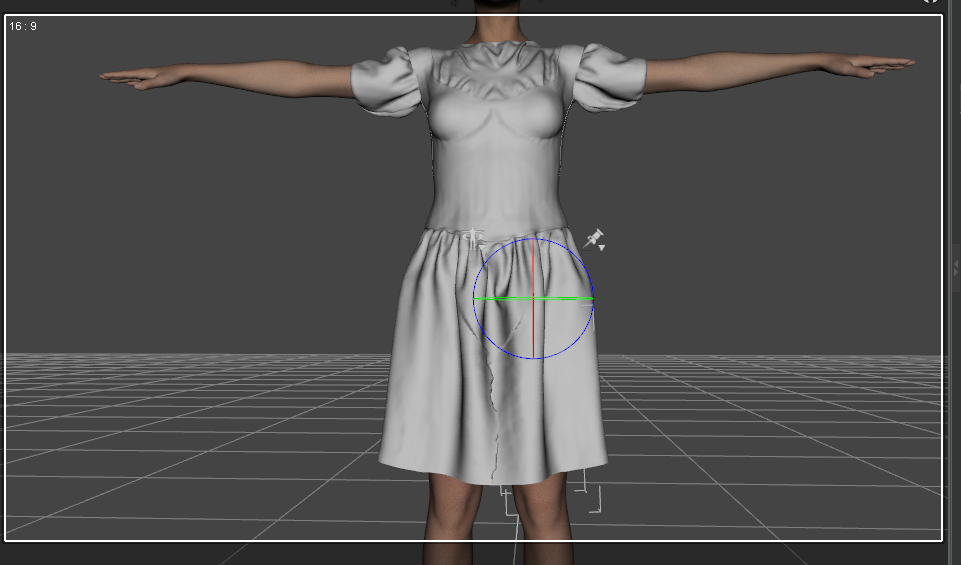
There is a massive seam running down the dress. With older genesis models I have no clue if you need to manually morph the dress when moving the legs or something because when I move the leg it goes straight through it and distorts the dress. Many thanks , OP.
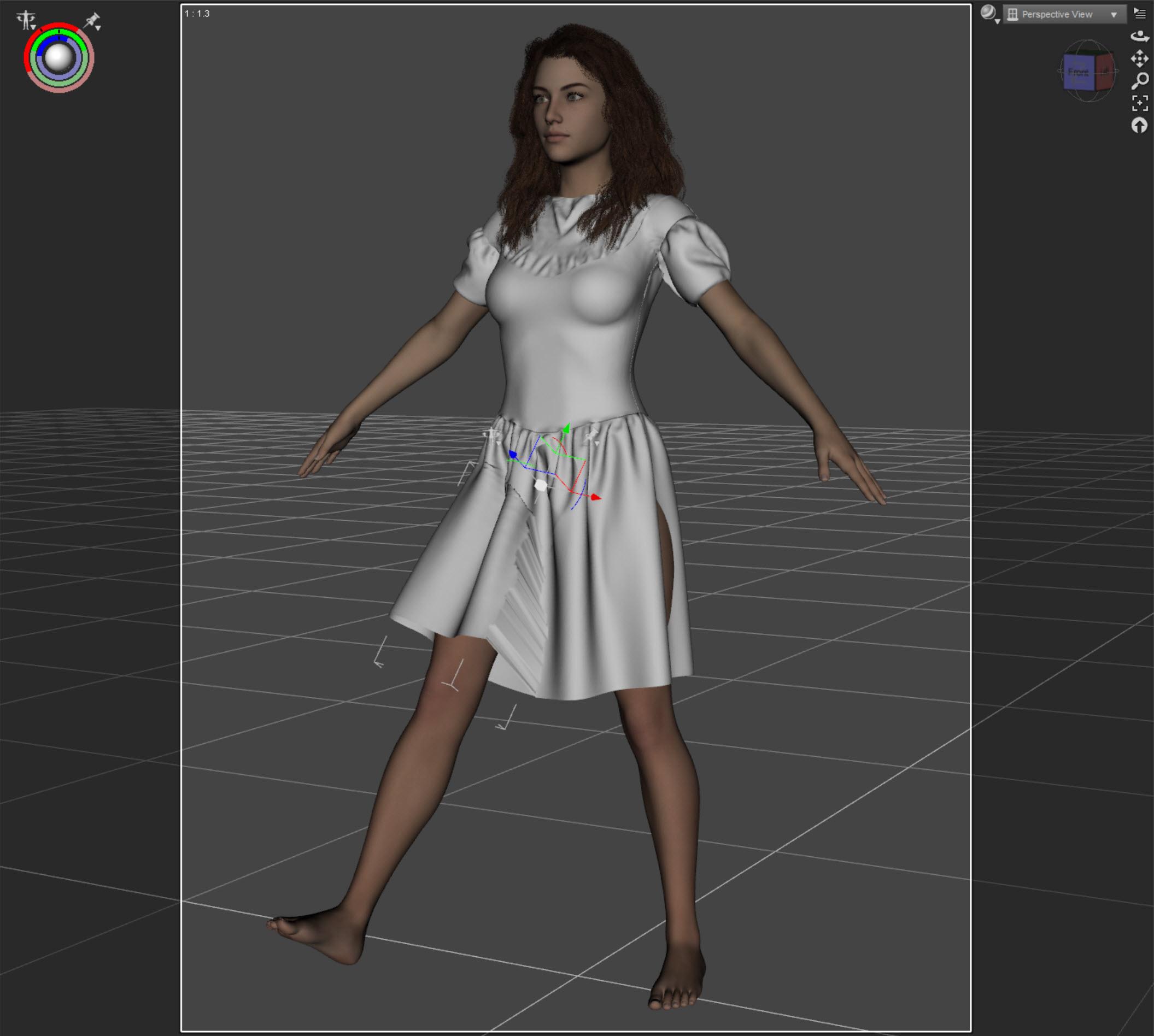
I have lucid dreams too. What you are describing is more the behavior of the auto-fitted dress like so:
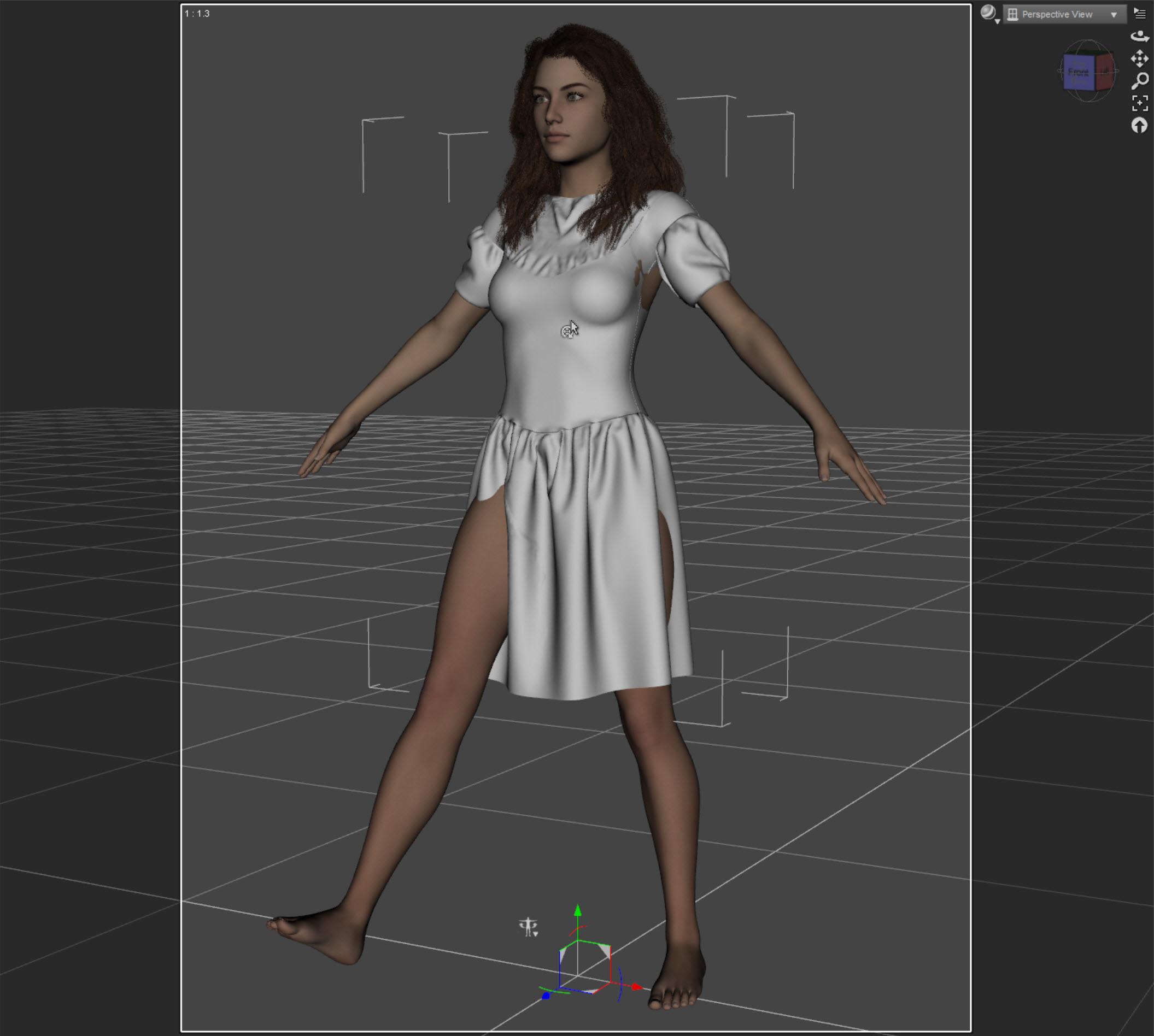
The CC for G3F to G8F gives you this (with Smoothing off):
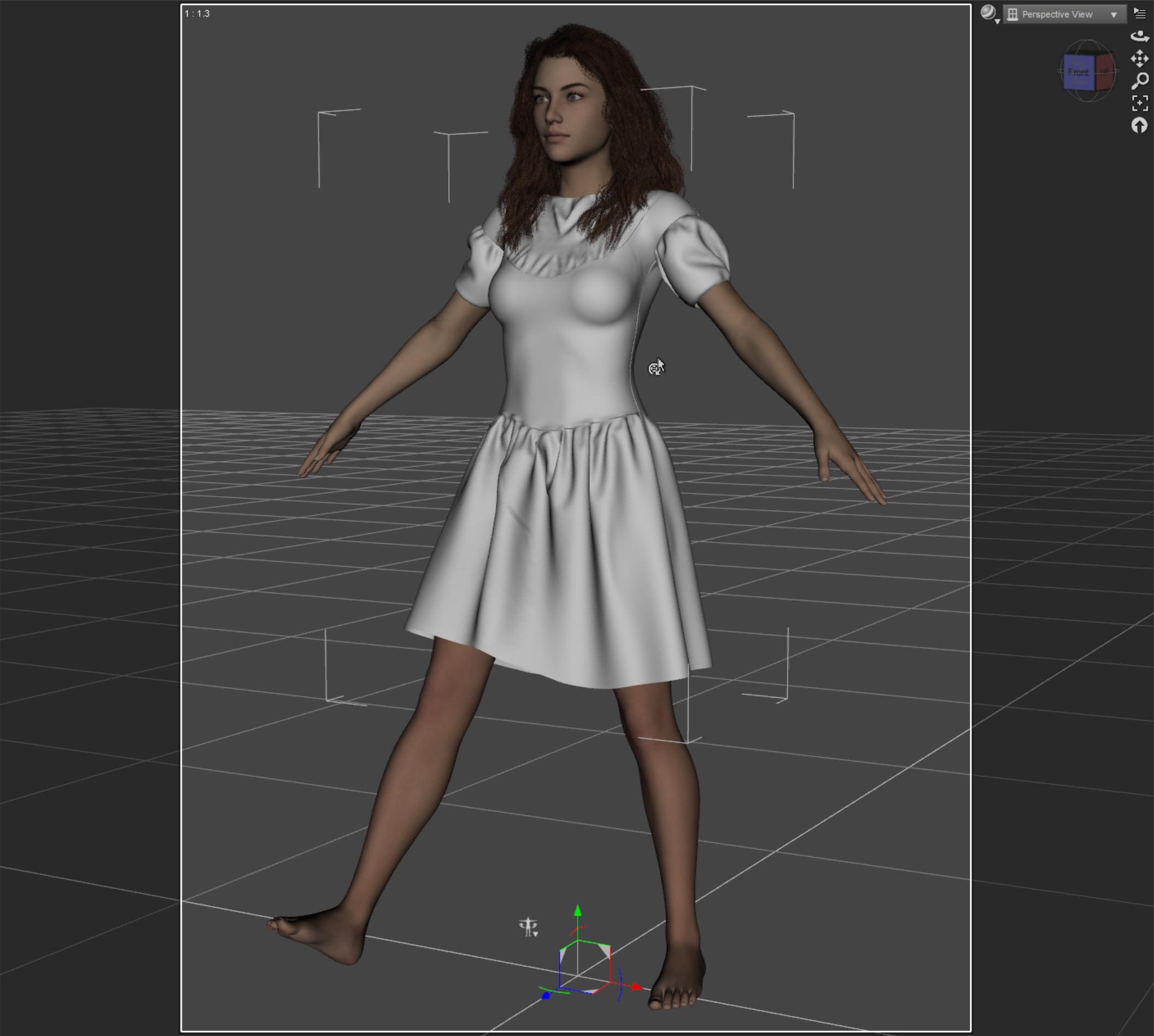
And then finally the converted dress with smoothing on and moving the bones of the dress leg:
The only thing I can recommend is redoing the conversion, make sure the scene is empty except for the vanilla Genesis 8 Female (which is unmoved), and trying again. You should also make sure you have the latest version. If you still have a problem, please post the Daz log for the conversion and maybe I can see what is happening.
I' searching for a character ....That character gets promo'ed so much that people think she's another base character like Victoria 8, when she's not. She's a custom character by the promo artist that uses Osuine's skin and maybe the morph, like Paintbox mentioned.Why is this happening to all of my Genesis 8 male modelsTo fix any ill-behaving morphs, do as follows;
1. Load your base figure or the developer version.
2. Select "Show Hidden" in the Parameters-Tab, drop down menu (right-click)
3. Zero the figure (Found in Parameters-Tab, drop down menu)
4. Memorize the figure (Found in Parameters-Tab, drop down menu)
5. File->Save As->Support Asset->Save Modified AssetsThis procedure will zero the default value in the ill-behaving morph/morphs, and while saving DS also shows you a list of the morphs it is changing.
Why is this happening to all of my Genesis 8 male modelsIt sounds like a character morph is causing the distortion. Do you have any recent purchases that might be responsible?
yes but the same models are on my old pc no problem with them i do have lot of models
Load the default G8M, look in the Parameter Tab to see what parameters are being used. If there i anything oher than minimal generic settings, you should be able to see what is interferin.
how to do tired face for G3F?There's a "tired" morph dail that comes wih a number of packs. I have a HD tired expression that came with... I'm not really sure which one. But she looks more sad than tired when dialed in at 100%.
You'll probably get the best results with combinations of dials. And how well they work depends on that combination, how strongly you apply each and the face morphs of the character you're using.
well do you think you could give me some rough pointers on what to dial to start to get the basic effect? am just not sure where to start.
You could try something like:
Posing Tab >> Pose Controls >> Head >> Eyes >> Eyes Relax 100% + Eyes Closed around 28%
Posing Tab >> Pose Controls >> Head >> Mouth >> Mouth Frown around 12% + Mouth Open around 7%
Something like that should give you a good start. :)
Why is this happening to all of my Genesis 8 male modelsIt sounds like a character morph is causing the distortion. Do you have any recent purchases that might be responsible?
yes but the same models are on my old pc no problem with them i do have lot of models
how to do tired face for G3F?There's a "tired" morph dail that comes wih a number of packs. I have a HD tired expression that came with... I'm not really sure which one. But she looks more sad than tired when dialed in at 100%.
You'll probably get the best results with combinations of dials. And how well they work depends on that combination, how strongly you apply each and the face morphs of the character you're using.
well do you think you could give me some rough pointers on what to dial to start to get the basic effect? am just not sure where to start.
how to do tired face for G3F?There's a "tired" morph dail that comes wih a number of packs. I have a HD tired expression that came with... I'm not really sure which one. But she looks more sad than tired when dialed in at 100%.
You'll probably get the best results with combinations of dials. And how well they work depends on that combination, how strongly you apply each and the face morphs of the character you're using.
how to do tired face for G3F?Any tips on this procedure from anyone who knows the best, preferbly simpliest way? for the messy hair I guess i'll just have to d-morph it in random weird directions to make it look roughed up.
Why is this happening to all of my Genesis 8 male modelsIt sounds like a character morph is causing the distortion. Do you have any recent purchases that might be responsible?
Daz 3D is part of

Connect
DAZ Productions, Inc.
7533 S Center View Ct #4664
West Jordan, UT 84084Licensing Agreement | Terms of Service | Privacy Policy | EULA
© 2026 Daz Productions Inc. All Rights Reserved.















