-
Where can I find a custom morph I made?
If you know what you named your morph, do a search on your hard drive for the file by that name.
Are you sure you actually SAVED the morph. It is easy to forget the File/Save As/Support Assed/ Morph Asset step sometimes.I did. I can reopen the save file and the morph is still applied.
Oh wait I didn't read the second part. I'll try that thanks.
Mousso's Warrin and RedzStudio's Stefon AppreciationTo my eyes Warrin looks older in promos 1, 5, and 6 (I'm counting the main promo).
Is that the alt morph? I know Vernon has an alt morph that ages him up a little.
The alt morph gives him a bit more chin mainly... Here are the older alt morph for vernon and the alt morph for Warrin:

Oh, they look awfully similar. I already have Vernon, now I have to think about whether I really need Warrin...
exporting a camera moveYou might try using a primitive as a proxy for the camera (use a Pose Preset to transfer the movement), then you can parent a camaera to the primitive in the destintation aplication.
[Released] Skull Hound HD for Daz Dog 8 [Commercial]Here are some samples of what skull hound looks like without the base morph/skull.
New Updates: the Daz to Blender Bridge 2.0!Having problems persuading G8F not to snap back to default A pose. Could you please help me maintain a pose during the transfer to Blender process?
In the first picture, you can see what options I have when I go to use the script. There's no HD version, if that's relevant. It made me suspect I was still stuck on the first version of the Bridge.
Having said that, in the second picture, you can see that I can select both the prop and the figure, which I believe is evidence that I have the latest (2.0?) version of the bridge.
However, in the third picture, GF8 is still snapping back to A-pose, when I get to the stage of the process indicated just to the left of her. I thought this had been dealt with in the transition to the latest version of the bridge.Thanks for your time
EDIT: Fourth picture! I thought I was imagining it, but at some point I'd managed to get things working on both ends: Daz and Blender. Here, the pose (just some random limb tweaks as a test) did go across. Wish I could remember what I did! I haven't been able to repeat the success sinceRenedering QueryWhen loading a figure DS needs to parse all morphs to create the dials you can use in the parameters and shaping tabs, which is why you see the message even if you don't use Julia.
That message tells you that Julia includes a corrective morph meant to be applied automatically when you use the "CTRLFaceAngle" dial, but it can't find the "CTRLFaceAngle" morph data in your install (probably because you don't have the morph pack it is from installed. That one is part of the G8F head morphs I think).
That's just a warning, it won't prevent your figure from working well
thanks, just checked, have the body morphs but not the head next in line for a purchase
3D Art Freebie Challenge-October 2020-"Winners Announced Annual Monster Mash" -Entries Thread OnlyMonster Ball
Looks like the monsters are having a great Halloween party!
Happy Halloween!

Freebies:
Industrial Goth Stage - https://www.deviantart.com/mcasual/art/The-Free-mcjIndustrialGothStage-Prop-is-online-857037106
AllenArt Jewelry Shaders - https://sharecg.com/v/95893/favorite/21/DAZ-Studio/Iray-Jewelry-Shaders
Autumn Hockey HDRI - Autumn Hockey HDRI - https://hdrihaven.com/hdri/?c=nature&h=autumn_hockey
Yeti - http://www.threednd.com/yeti.html
Thri-Keen - http://www.threednd.com/thri-kreen.html
Goblin - https://sharecg.com/v/26101/favorite/11/Poser/Goblin
Venus Man-Trap - https://www.renderosity.com/mod/freestuff/plant-monster-venus-man-trap-/72739
Chameleon ROse 2 for G8F - https://www.renderosity.com/mod/freestuff/chameleon-rose2-for-genesis-8-female/85859
High Front Skirt Dress - https://www.wilmapsdigitalcreations.co.uk/view_product.php?id=472
Lace Choker - https://www.most-digital-creations.com/g8f_lace_choker.htm
Pretty Look (Shoes and Stockings) - https://www.renderosity.com/mod/freestuff/pretty-look-for-genesis-8-female-s-/83823
Tifa FF7 (Hair, Earrings) - https://www.deviantart.com/checkertoo/art/Freebie-Tifa-For-G8F-DL-847909854
Vampire Teeth G8M - https://www.renderosity.com/mod/freestuff/vampire-teeth-for-g8m/79102
G8M Strong Shape - https://www.renderosity.com/mod/freestuff/strong-for-g8m-character-morph-amp-pose/82833
Vampire G8 (Skin) - https://www.renderosity.com/mod/freestuff/bloody-vampires/83774
Charming for G8M - https://www.renderosity.com/mod/freestuff/charming-for-g8m/83939
Mr. Gibbs Set (Shoes) - https://www.renderosity.com/mod/freestuff/dazstudio-iray-mister-gibbs-clothing-set-g8male/85450
V DMC5 Hair G8M - https://www.renderhub.com/intheflesh/v-dmc5-hair-for-genesis-8-male
Wonder Woman Cape (Used on Vampire G8M) - https://sharecg.com/v/95602/favorite/21/DAZ-Studio/WONDER-WOMAN-dFORCE-CAPE-AND-SKIRT-FOR-G8F-G3F
WTP Shaders - https://sharecg.com/v/86001/favorite/7/Material-and-Shader/WTP2-Will-Timmins-Perlin-Shaders-for-Iray and https://sharecg.com/v/87095/favorite/7/Material-and-Shader/WTP3-Will-Timmins-Procedural-Shaders-for-Iray
G3F G8F Pose Adjust Script (Used on both genders) - https://sharecg.com/v/88527/favorite/21/DAZ-Studio/G3F-G8F-pose-adjust-script
Daz Studio Posing Scripts (Mirror Pose Script) - https://sharecg.com/v/76667/favorite/8/Script/Updated-Daz-Studio-Posing-Scripts-now-for-G3F
Paid:
Rama Drums - https://www.daz3d.com/rama-drums
The Monster Bride HD for Genesis 8 Female(s) - https://www.daz3d.com/the-monster-bride-hd-for-genesis-8-females
The Monster HD for Genesis 8 Male - https://www.daz3d.com/the-monster-hd-for-genesis-8-male
Enchanted Dance Poses for Michael 7 and Victoria 7 - https://www.daz3d.com/enchanted-dance-poses-for-michael-7-and-victoria-7
I tweaked some materials, the light and the poses, and made the poses for the Bigfoot and Yeti. Set up and rendered within Daz Studio Iray. Postwork done in Pixelmator, mainly color and light correction and watermark. I’ve attached before post (the one that says Render) and finished image files.
3D Art Freebie Challenge-October 2020-"Annual Monster Mash" -Main Thread Only3D Art Freebie Challenge October 2020 "Annual Monster Mash"
[Best watched at full size for details.]
"Horror movie scene: The Return of the Zombie"
Starring: Cheryl (Heather) Mason and Jill Valentine by CheckerTooThe tale:
And action! "Aahhhh, I love the smell of brain in the morning!" the young zombie gasped...Soundtrack:
Michael Jackson - Thriller (Official Video - Shortened Version) (© 1984)
https://www.youtube.com/watch?v=4V90AmXnguw
COUNTABLE FREEBIES: (Alphabetic order)#01! 4 Blood/Gore PNG Overlays for Horror, Zombie, Vampire Facial Textures by ModernWiz
https://www.renderosity.com/mod/freestuff/4-blood-gore-png-overlays-for-horror-zombie-vampire-facial-textures/76697 **#02! A Thousand Reasons To Cry by MysticArtDesign
https://sharecg.com/v/95817/browse/21/DAZ-Studio/A-Thousand-Reasons-to-cry **#03! AMC Matador Police car by Marsupi 3d
http://www.dmi-3d.net/rescue1.html (item 19)#04! AND ACTION! - 10 Movie set props by fober1
https://www.renderosity.com/mod/freestuff/and-action---10-movie-set-props/56818 **
[Clapper used]#05! Aviator Sunglasses by SquarePeg3D
https://drive.google.com/drive/folders/0BwixlTkaWzFMQWFiNk9zVXh0aXM#06! Brain by Adam Thwaites (Most-Digital-Creations)
https://www.most-digital-creations.com/brain.htm#07! Cheryl (Heather) Mason for G8F by CheckerToo
https://www.deviantart.com/checkertoo/art/Freebie-Cheryl-Heather-Mason-For-G8F-Download-847214743 **#08! Denim Shorts for G8F by AdamThwaites (Most-Digital-Creations)
https://www.most-digital-creations.com/g8f_denim_shorts.htm#09! Dirt & Abrasions by MysticArtDesign
https://sharecg.com/v/93837/gallery/21/DAZ-Studio/%F0%9F%93%8CDirt-Abrasions%F0%9F%93%8C **#10! Dirty Skin Textures for G3F AND G8F by Noone102000
https://www.deviantart.com/noone102000/art/UPDATE-FREEBIE-Dirty-Skin-Textures-G3F-AND-G8F-801889979 **#11! ED's Brick Shader (Iray) by Edheldil3D
https://www.deviantart.com/edheldil3d/art/Freebie-ED-s-Brick-Shader-Iray-788871766 **#12! Heavy Hitters for G8F by squarepeg3d
https://www.renderosity.com/mod/freestuff/heavy-hitters-for-g8f/82812&ca **
[Fluid prop and Blood shader used]#13! Henna Tattoo by SquarePeg3D
https://sharecg.com/v/92182/gallery/21/DAZ-Studio/Henna-Tattoo **#14! Henna Scars by SquarePeg3D
https://sharecg.com/v/92176/gallery/21/DAZ-Studio/Henna-Scars **#15! Hitomi Tanaka Head Morph for G8F by TritiumCG
https://www.deviantart.com/tritiumcg/art/Hitomi-Tanaka-Head-Morph-for-G8F-819861473 **
[Head 50%]#16! Iray car related shader presets 'megapack' by Tom2099
https://www.deviantart.com/tom2099/art/Iray-car-related-shader-presets-megapack-539622361 **#17! Iray Jewelry Shaders by AllenArt
https://sharecg.com/v/95893/gallery/21/DAZ-Studio/Iray-Jewelry-Shaders **#18! Jill Valentine for G8F by CheckerToo
https://www.deviantart.com/checkertoo/art/Jill-For-G8F-DL-852699253 **#19! Liquids - DS Shaders & Poser MT5s by Fisty
http://www.sharecg.com/v/82337/gallery/7/Material-and-Shader/Fistys-Liquids-DS-Shaders-Poser-MT5s **
[Puddle used]#20! Megumi - Head and Body Morphs for G8F by TritiumCG
https://www.deviantart.com/tritiumcg/art/Megumi-Head-and-Body-Morphs-for-G8F-842318536 **
[Head 50%]#21! Modular Madness - Special Toys by SquarePeg3D
https://drive.google.com/drive/folders/1lXCqY3GZtHRqfrSuE-QXePG1_gr9zdFZ
[Shaders used]#22! Morphing Flame for Iray by SquarePeg3D
https://www.renderosity.com/mod/freestuff/morphing-flame-for-iray---100-free/76201 **
[Flame shader used]#23! Morphing Kiseru Pipe + Bonus Bell Hat by SquarePeg3D
https://drive.google.com/drive/folders/18Q4Su0-j_RZ7A0mRMwy6Mjyr2rzZjea7#24! Noggin's EasyPose Worm by noggin
https://www.renderosity.com/mod/freestuff/noggins-easypose-worm/14105 **#25! Police Hat by Noone102000
https://www.deviantart.com/noone102000/art/FREEBIE-Police-Hat-767374632 **#26! Potsdamer Platz by Greg Zaal on HDRIHaven
https://hdrihaven.com/hdri/?c=outdoor&h=potsdamer_platz#27! Retro Heroine 8 Outfit by Fredel
https://www.renderosity.com/mod/freestuff/retro-heroine-8-outfit/77959 **
[Shirt used]#28! Rough Textures for G3F and G8F by Noone102000 (NSFW)
https://www.deviantart.com/noone102000/art/FREEBIE-Rough-Textures-for-G3F-and-G8F-804353596 **#29! Rons Sampler Brushes by deviney
https://www.brusheezy.com/brushes/12896-rons-sampler-brushes
[Suds brushes used to create the gore overlay]#30! Soul Calibur 6 Seong Mina's Head Morph for G8F by TritiumCG
https://www.deviantart.com/tritiumcg/art/Soul-Calibur-6-Seong-Mina-s-Head-Morph-for-G8F-813924805 **
[Head 25%]#31! Sticky and Stickier Messes - 100% FREE by SquarePeg3D
https://www.renderosity.com/mod/freestuff/sticky-and-stickier-messes---100-free/76360 **#32! SY 200 Morphs for Genesis 8 Head and Body by SickleYield
https://sharecg.com/v/91888/view/21/DAZ-Studio/SY-200-Morphs-for-Genesis-8-Head-and-Body **#33! Terror Eyes for G3F and Iray by Sabby
https://issuu.com/philatdsc/docs/ds_creative_16 (page 49)#34! Tifa For G8F by CheckerToo
https://www.deviantart.com/checkertoo/art/Freebie-Tifa-For-G8F-DL-847909854 **
[Used the boot(s)]
NO-COUNT ITEMS:--- Free Iray Outdoor Lights by Dreamlight
PURCHASED/PAID FOR ITEMS: None 100% Freebies
*1 E-mail address required
** Registration and login required
#x! Countable Items (Bold ones are used by me for the first time I think.)
--- No longer available freebies
++ Free with DAZ Studio (or the Essentials)
$x. Purchased/Paid For Item
Rendered with DAZ Studio 4.10.0.123 (nVidia Iray)Other free software used: GIMP v2.10.20 and Irfanview 4.54
Postwork: used the AltaLux Image Enhancement Filter (Effect) by Stefano Tommesani that comes with Irfanview. Also used mcjDenoise by mcasual. (https://sites.google.com/site/mcasualsdazscripts9/mcjdenoise)
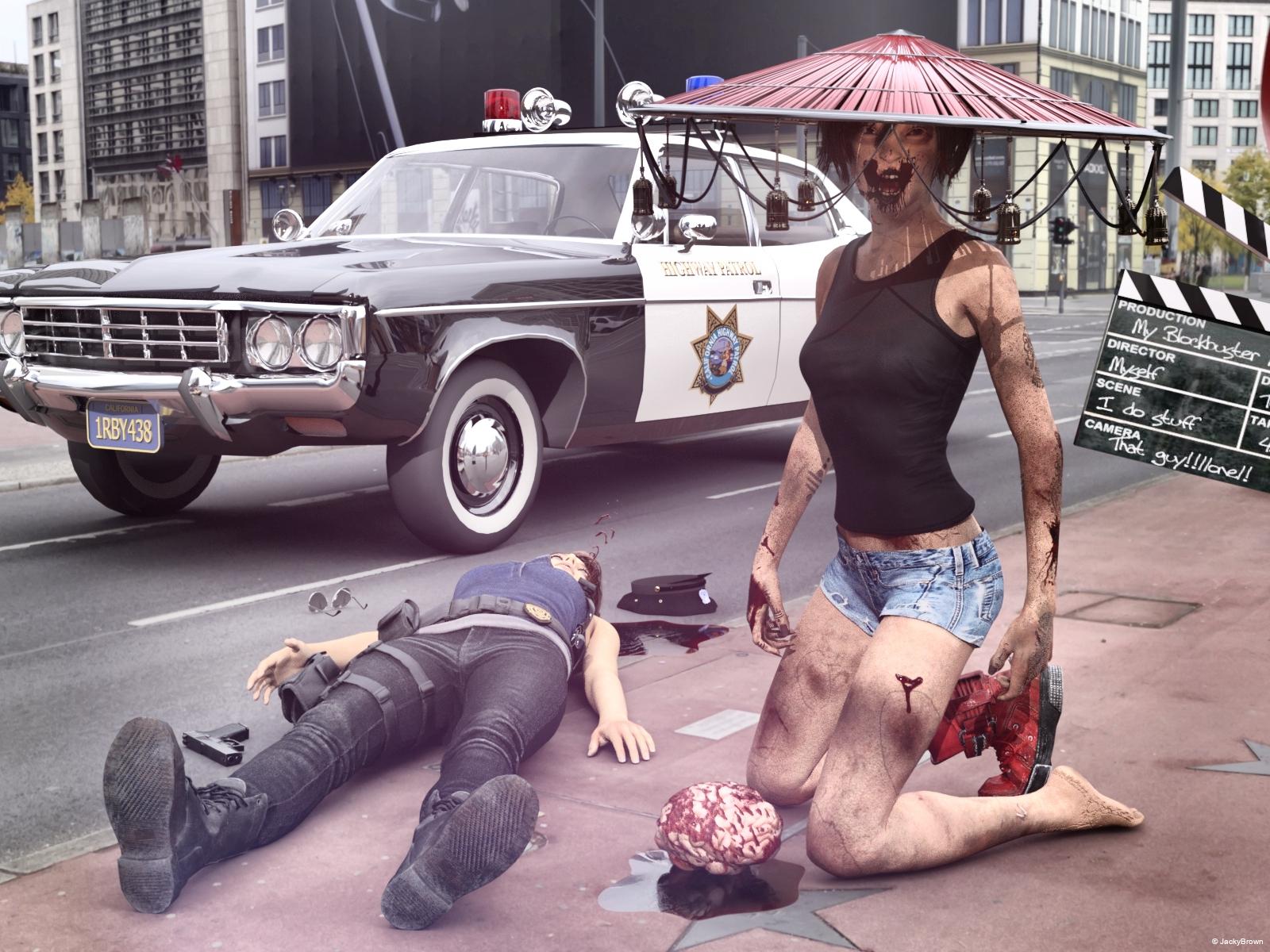
"Horror movie scene: The Return of the Zombie"
All The Links Check Out Plz Post To The Entries Thread Now
3D Art Freebie Challenge-October 2020-"Annual Monster Mash" -Main Thread OnlyFinally finished mine!
Monster Ball
Looks like the monsters are having a great Halloween party!
Happy Halloween!Freebies:
Industrial Goth Stage - https://www.deviantart.com/mcasual/art/The-Free-mcjIndustrialGothStage-Prop-is-online-857037106
AllenArt Jewelry Shaders - https://sharecg.com/v/95893/favorite/21/DAZ-Studio/Iray-Jewelry-Shaders
Autumn Hockey HDRI - Autumn Hockey HDRI - https://hdrihaven.com/hdri/?c=nature&h=autumn_hockey
Yeti - http://www.threednd.com/yeti.html
Thri-Keen - http://www.threednd.com/thri-kreen.html
Goblin - https://sharecg.com/v/26101/favorite/11/Poser/Goblin
Venus Man-Trap - https://www.renderosity.com/mod/freestuff/plant-monster-venus-man-trap-/72739
Chameleon ROse 2 for G8F - https://www.renderosity.com/mod/freestuff/chameleon-rose2-for-genesis-8-female/85859
High Front Skirt Dress - https://www.wilmapsdigitalcreations.co.uk/view_product.php?id=472
Lace Choker - https://www.most-digital-creations.com/g8f_lace_choker.htm
Pretty Look (Shoes and Stockings) - https://www.renderosity.com/mod/freestuff/pretty-look-for-genesis-8-female-s-/83823
Tifa FF7 (Hair, Earrings) - https://www.deviantart.com/checkertoo/art/Freebie-Tifa-For-G8F-DL-847909854
Vampire Teeth G8M - https://www.renderosity.com/mod/freestuff/vampire-teeth-for-g8m/79102
G8M Strong Shape - https://www.renderosity.com/mod/freestuff/strong-for-g8m-character-morph-amp-pose/82833
Vampire G8 (Skin) - https://www.renderosity.com/mod/freestuff/bloody-vampires/83774
Charming for G8M - https://www.renderosity.com/mod/freestuff/charming-for-g8m/83939
Mr. Gibbs Set (Shoes) - https://www.renderosity.com/mod/freestuff/dazstudio-iray-mister-gibbs-clothing-set-g8male/85450
V DMC5 Hair G8M - https://www.renderhub.com/intheflesh/v-dmc5-hair-for-genesis-8-male
Wonder Woman Cape (Used on Vampire G8M) - https://sharecg.com/v/95602/favorite/21/DAZ-Studio/WONDER-WOMAN-dFORCE-CAPE-AND-SKIRT-FOR-G8F-G3F
WTP Shaders - https://sharecg.com/v/86001/favorite/7/Material-and-Shader/WTP2-Will-Timmins-Perlin-Shaders-for-Iray and https://sharecg.com/v/87095/favorite/7/Material-and-Shader/WTP3-Will-Timmins-Procedural-Shaders-for-Iray
G3F G8F Pose Adjust Script (Used on both genders) - https://sharecg.com/v/88527/favorite/21/DAZ-Studio/G3F-G8F-pose-adjust-script
Daz Studio Posing Scripts (Mirror Pose Script) - https://sharecg.com/v/76667/favorite/8/Script/Updated-Daz-Studio-Posing-Scripts-now-for-G3F
Paid:
Rama Drums - https://www.daz3d.com/rama-drums
The Monster Bride HD for Genesis 8 Female(s) - https://www.daz3d.com/the-monster-bride-hd-for-genesis-8-females
The Monster HD for Genesis 8 Male - https://www.daz3d.com/the-monster-hd-for-genesis-8-male
Enchanted Dance Poses for Michael 7 and Victoria 7 - https://www.daz3d.com/enchanted-dance-poses-for-michael-7-and-victoria-7
I tweaked some materials, the light and the poses, and made the poses for the Bigfoot and Yeti. Set up and rendered within Daz Studio Iray. Postwork done in Pixelmator, mainly color and light correction and watermark. I’ve attached before post (the one that says Render) and finished image files.
All The Links Check Out Plz Post To The Entries Thread Now
Genesis Morphs Eraser pluginI don't know what "many" is. I posted my list on the previous page, so maybe you can tell me if I have many or few?
Hi!
It seems to me that you have few Genesis 2 morphs,at least in comparation with the list the plugin shows me: three or four times the list you posted. Still, I also get considerably smaller memory reductions with Genesis 2 than with Genesis when apply the plugin.
Thanks Alberto! Glad to know that I may be doing it correctly, but am not getting the same reductions as with G1.
Can you answer a question? If on the final step I don't select any morphs from the list to preserve, will the Morph Eraser simply delete the entire list?
Not the entire list, only the morphs the figure is not using at all in the scene. And the plugin does it by group. E.g, if the figure is using a morph of the Daz 3D Evolution Body, no one of these morphs will be deleted.
Genesis Morphs Eraser pluginI don't know what "many" is. I posted my list on the previous page, so maybe you can tell me if I have many or few?
Hi!
It seems to me that you have few Genesis 2 morphs,at least in comparation with the list the plugin shows me: three or four times the list you posted. Still, I also get considerably smaller memory reductions with Genesis 2 than with Genesis when apply the plugin.
Thanks Alberto! Glad to know that I may be doing it correctly, but am not getting the same reductions as with G1.
Can you answer a question? If on the final step I don't select any morphs from the list to preserve, will the Morph Eraser simply delete the entire list?
Not the entire list, only the morphs the figure is not using at all.
dForce Hair (as well as strand based hair and the strand based hair editor) in public betaIs there a way to save a SBH simulation as a morph? I have tried to use Morph Loader Pro but it says that the geometry does not match everytime no matter what I do. I was using the dforce clothing morph saving tutorial and this maybe the wrong way to go about it but I tried searching for tutorials for sbh and didn't find any.
Where can I find a custom morph I made?If you know what you named your morph, do a search on your hard drive for the file by that name.
Are you sure you actually SAVED the morph. It is easy to forget the File/Save As/Support Assed/ Morph Asset step sometimes.Mousso's Warrin and RedzStudio's Stefon AppreciationTo my eyes Warrin looks older in promos 1, 5, and 6 (I'm counting the main promo).
Is that the alt morph? I know Vernon has an alt morph that ages him up a little.
The alt morph gives him a bit more chin mainly... Here are the older alt morph for vernon and the alt morph for Warrin:
Cute render! Thanks for sharing.
Thicc Thighs Problems....Well I'm not really worried about the top. I'm concerned about the leg itself. If this character was nude I wouldn't be able to use Dforce to solve the problem. It's some kind a bend morph fixer I'm looking for that will smooth the thigh and waist I need.
Is there anything anyone actually use to smooth legs and waist so it looks realistic and not weird?
I've notice that bending legs and waist never look good. I can never good good sitting on floor pose because of it.
DAZ Studio and creating a secure PC environmentI've had some issues with PC security and it occurred to me that the following might offer a solution. Buying an inexpensive laptop and a wireless router and using them for my email and my connection to the internet. Meanwhile, my desktop would remain unconnected and safe from the hackers. What I've read of routers suggests that I would be able to transfer files between the two PCs whenever necessary and I suppose it would be occasionally necessary to briefly connect my desktop to update and upgrade my OS and my programs. Most of the time, however, my precious desktop and its precious files would remain offline and inaccessible to even the most zealous of hackers, and I would still have email and a connection to the web sites I like to visit through the laptop.
It sounds promising, but it occurs to me that DAZ Studio seems to require a direct connection to the internet. A user doesn't have to connect (you can choose to work offline), but when launched DAZ Studio prompts the user to connect DAZ3D. Which raises the question: Can I successfully install and run DAZ Studio on a PC that is not connected to the internet?
I'd really appreciate some input on this issue. Thanks to one and all.
If you're really serious about security, don't use WiFi at all. Look on the CERT site for how many alerts concern WiFi. In every Incident Response course I've ever taken, one of the first attacks analyzed is always tricking the WiFi router into connecting the wrong physical address. It is so easy that specialized Linux distros have canned apps that do it automatically. Once an attacker is connected, there are lots of other techniques to spoof a bonafide TCP connection, and at that point, the only thing between a hacker and your system is the quality of your individual internet apps, a losing proposition.
Seriously, if you don't absolutely need WiFi, shrink your attack surface by just using plain Ethernet.
3D Art Freebie Challenge-October 2020-"Annual Monster Mash" -Main Thread Only3D Art Freebie Challenge October 2020 "Annual Monster Mash"
[Best watched at full size for details.]
"Horror movie scene: The Return of the Zombie"
Starring: Cheryl (Heather) Mason and Jill Valentine by CheckerTooThe tale:
And action! "Aahhhh, I love the smell of brain in the morning!" the young zombie gasped...Soundtrack:
Michael Jackson - Thriller (Official Video - Shortened Version) (© 1984)
https://www.youtube.com/watch?v=4V90AmXnguw
COUNTABLE FREEBIES: (Alphabetic order)#01! 4 Blood/Gore PNG Overlays for Horror, Zombie, Vampire Facial Textures by ModernWiz
https://www.renderosity.com/mod/freestuff/4-blood-gore-png-overlays-for-horror-zombie-vampire-facial-textures/76697 **#02! A Thousand Reasons To Cry by MysticArtDesign
https://sharecg.com/v/95817/browse/21/DAZ-Studio/A-Thousand-Reasons-to-cry **#03! AMC Matador Police car by Marsupi 3d
http://www.dmi-3d.net/rescue1.html (item 19)#04! AND ACTION! - 10 Movie set props by fober1
https://www.renderosity.com/mod/freestuff/and-action---10-movie-set-props/56818 **
[Clapper used]#05! Aviator Sunglasses by SquarePeg3D
https://drive.google.com/drive/folders/0BwixlTkaWzFMQWFiNk9zVXh0aXM#06! Brain by Adam Thwaites (Most-Digital-Creations)
https://www.most-digital-creations.com/brain.htm#07! Cheryl (Heather) Mason for G8F by CheckerToo
https://www.deviantart.com/checkertoo/art/Freebie-Cheryl-Heather-Mason-For-G8F-Download-847214743 **#08! Denim Shorts for G8F by AdamThwaites (Most-Digital-Creations)
https://www.most-digital-creations.com/g8f_denim_shorts.htm#09! Dirt & Abrasions by MysticArtDesign
https://sharecg.com/v/93837/gallery/21/DAZ-Studio/%F0%9F%93%8CDirt-Abrasions%F0%9F%93%8C **#10! Dirty Skin Textures for G3F AND G8F by Noone102000
https://www.deviantart.com/noone102000/art/UPDATE-FREEBIE-Dirty-Skin-Textures-G3F-AND-G8F-801889979 **#11! ED's Brick Shader (Iray) by Edheldil3D
https://www.deviantart.com/edheldil3d/art/Freebie-ED-s-Brick-Shader-Iray-788871766 **#12! Heavy Hitters for G8F by squarepeg3d
https://www.renderosity.com/mod/freestuff/heavy-hitters-for-g8f/82812&ca **
[Fluid prop and Blood shader used]#13! Henna Tattoo by SquarePeg3D
https://sharecg.com/v/92182/gallery/21/DAZ-Studio/Henna-Tattoo **#14! Henna Scars by SquarePeg3D
https://sharecg.com/v/92176/gallery/21/DAZ-Studio/Henna-Scars **#15! Hitomi Tanaka Head Morph for G8F by TritiumCG
https://www.deviantart.com/tritiumcg/art/Hitomi-Tanaka-Head-Morph-for-G8F-819861473 **
[Head 50%]#16! Iray car related shader presets 'megapack' by Tom2099
https://www.deviantart.com/tom2099/art/Iray-car-related-shader-presets-megapack-539622361 **#17! Iray Jewelry Shaders by AllenArt
https://sharecg.com/v/95893/gallery/21/DAZ-Studio/Iray-Jewelry-Shaders **#18! Jill Valentine for G8F by CheckerToo
https://www.deviantart.com/checkertoo/art/Jill-For-G8F-DL-852699253 **#19! Liquids - DS Shaders & Poser MT5s by Fisty
http://www.sharecg.com/v/82337/gallery/7/Material-and-Shader/Fistys-Liquids-DS-Shaders-Poser-MT5s **
[Puddle used]#20! Megumi - Head and Body Morphs for G8F by TritiumCG
https://www.deviantart.com/tritiumcg/art/Megumi-Head-and-Body-Morphs-for-G8F-842318536 **
[Head 50%]#21! Modular Madness - Special Toys by SquarePeg3D
https://drive.google.com/drive/folders/1lXCqY3GZtHRqfrSuE-QXePG1_gr9zdFZ
[Shaders used]#22! Morphing Flame for Iray by SquarePeg3D
https://www.renderosity.com/mod/freestuff/morphing-flame-for-iray---100-free/76201 **
[Flame shader used]#23! Morphing Kiseru Pipe + Bonus Bell Hat by SquarePeg3D
https://drive.google.com/drive/folders/18Q4Su0-j_RZ7A0mRMwy6Mjyr2rzZjea7#24! Noggin's EasyPose Worm by noggin
https://www.renderosity.com/mod/freestuff/noggins-easypose-worm/14105 **#25! Police Hat by Noone102000
https://www.deviantart.com/noone102000/art/FREEBIE-Police-Hat-767374632 **#26! Potsdamer Platz by Greg Zaal on HDRIHaven
https://hdrihaven.com/hdri/?c=outdoor&h=potsdamer_platz#27! Retro Heroine 8 Outfit by Fredel
https://www.renderosity.com/mod/freestuff/retro-heroine-8-outfit/77959 **
[Shirt used]#28! Rough Textures for G3F and G8F by Noone102000 (NSFW)
https://www.deviantart.com/noone102000/art/FREEBIE-Rough-Textures-for-G3F-and-G8F-804353596 **#29! Rons Sampler Brushes by deviney
https://www.brusheezy.com/brushes/12896-rons-sampler-brushes
[Suds brushes used to create the gore overlay]#30! Soul Calibur 6 Seong Mina's Head Morph for G8F by TritiumCG
https://www.deviantart.com/tritiumcg/art/Soul-Calibur-6-Seong-Mina-s-Head-Morph-for-G8F-813924805 **
[Head 25%]#31! Sticky and Stickier Messes - 100% FREE by SquarePeg3D
https://www.renderosity.com/mod/freestuff/sticky-and-stickier-messes---100-free/76360 **#32! SY 200 Morphs for Genesis 8 Head and Body by SickleYield
https://sharecg.com/v/91888/view/21/DAZ-Studio/SY-200-Morphs-for-Genesis-8-Head-and-Body **#33! Terror Eyes for G3F and Iray by Sabby
https://issuu.com/philatdsc/docs/ds_creative_16 (page 49)#34! Tifa For G8F by CheckerToo
https://www.deviantart.com/checkertoo/art/Freebie-Tifa-For-G8F-DL-847909854 **
[Used the boot(s)]
NO-COUNT ITEMS:--- Free Iray Outdoor Lights by Dreamlight
PURCHASED/PAID FOR ITEMS: None 100% Freebies
*1 E-mail address required
** Registration and login required
#x! Countable Items (Bold ones are used by me for the first time I think.)
--- No longer available freebies
++ Free with DAZ Studio (or the Essentials)
$x. Purchased/Paid For Item
Rendered with DAZ Studio 4.10.0.123 (nVidia Iray)Other free software used: GIMP v2.10.20 and Irfanview 4.54
Postwork: used the AltaLux Image Enhancement Filter (Effect) by Stefano Tommesani that comes with Irfanview. Also used mcjDenoise by mcasual. (https://sites.google.com/site/mcasualsdazscripts9/mcjdenoise)
"Horror movie scene: The Return of the Zombie"
Mousso's Warrin and RedzStudio's Stefon AppreciationTo my eyes Warrin looks older in promos 1, 5, and 6 (I'm counting the main promo).
Is that the alt morph? I know Vernon has an alt morph that ages him up a little.
The alt morph gives him a bit more chin mainly... Here are the older alt morph for vernon and the alt morph for Warrin:
Where can I find a custom morph I made?I made a custom morph for the morphing python. But I don't know where to find the file for it in my folders. Anyone know where the morphing python morphs are kept?
When you save items in D/S the Vendor and Product fields are the names of the containing folders for whatever is being saved. It is a good idea to close D/S before digging through its working folders.
Morphs are located in the same main subfolder under data as the original creation. So under the name for whoever created the Morphing Python ... look for your subfolders.
I've tried looking but I can't find the daz originals subfolder. Even through searching.
And it might have been from cold blooded instead. But I can't find the morphs folder for that either.
Genesis Morphs Eraser pluginThanks, Dart. That was some good information. However, I don't think it directly answered any of my questions.
Hmmm...
1. Why was the file still 775 mb after deleting the G2 character and clothing from the scene?
Because 'deleting' doesn't actually flush the scene. You already mentioned that the file size greatly diminished after performing the "Remove Unused Masters" trio
2. Why does Carrara bloat so much on Genesis in general? (is it really the morphs, or something else)
Yep. Think of Morphs as the same model (obj) but with a different shape applied to it. On page 411 of the revision G manual, Morpher is a morphing modifier that allows us to add as may morphs as we wnant to an object. Each of these morphs is an actual copy of the original object that has been changed into the new morphed shape. SO in that case, each morph is like having another version of the same object in the scene using up the same amount of resources. For a morph to work, it has to be the same (polygons).
3. Did the morph eraser actually work, but not until after I deleted all the common and unused shaders?
It's hard to say. But it's not just shaders that got removed, it's also the figure which got removed during Remove Unused Objects. Before tht, G2M was hanging around using up resources. Not sure why. It's not lke we can bring him back. Must be to help with the Undo Delete option. But it's always a good idea to remove unused shaders and objects as well as consolidating duplicates. There's absolutelt no good reason not to since we can, at any time open a new shader and drag an existing shader into it if we need a duplicate. Otherwise we've got a lot of addd weight for no good reason.
Nowadays, even the smallest texture map willl come in at 4K. It's like somebody pushed the 'efficiency no longer matter' button in the art world. Further, I've seen some of these 4K texture maps that only have a solid color applied to them. This is a harsh example, but that 4k image is more weight than an entire model for a game back when I first started, and we were forced to make tiny dds compressed texture maps to get them down under 16mb ro some such.
4. Is saving the Genesis stuff in the Carrara object file the best way to lower the bloat?
Well, the article I linked to removes bloat before Genesis ever makes it into Carrara. It's a process of analyzing which morphs are not important to a particular copy of Genesis and temporarily (or not) and effectively uninstalling the extra files from the figure - which will also affect Daz Studio, Poser or any other software we might use.
The "Magic" I mentioned about saving as a CAR file, is that we can now put the removed morphs back into the data folder, effectively reinstalling what one figure would consider bloat, without affecting the saved CAR file.
Genesis being Unisex is a major advantage for me. I can use auto-fit to put Freak 3 clothing onto an Aiko shape, Kids 4 clothing to Freak 5 or even a Monstrosity. But even better, I can use any generation 4 or 5 texture maps - and I have a Lot of them!
This does come with a cost, however. Each of those shapes... well... think you know where I'm going with this.
Lets go back to:
2. Why does Carrara bloat so much on Genesis in general? (is it really the morphs, or something else)
Something strange that really bugs me: Genesis hair takes absolutely f o r e v e r to load, and often the same applies with their poses. I think there's something with the DUF format that still isn't quite right with Carrara. An example, I have "Love Me Hair" in both Genesis and V4 versions. V4's loads right in like I'm used to whereas the Genesis version... well, I have to make a trip to town, so I might as well begin oading the hair in.
I absolutley love that Misty gave us G3 and 8 support, so I made Rosie 7, a Janette based figure. Wendy reported that aniBlocks won't work properly and that we must use duf poses instead. So I converted a lot of my aniBlocks to animated duf poses. The amount of time it takes to load those pose files into Carrara was the game changer for me. So I ran to the Daz 3D store down the street and bought the Genesis 3 addon pack for Genesis Generation X2, added my Genesis 3 morph shapes to Genesis, and rmain happy with my aniBlock Importer once again.
I just did a further experiment. Instead of saving M6 and clothing to the Carrara objects folder, then deleting him from the instances tray, and then reinstalling him from the objects folder, I instead went directly to Edit>Remove Unused Masters, and did all the actions under that tab. The result was the same - a file of 328 mb. So it appears that saving the character in Carrara doesn't make a size difference, but that the Remove Unused Masters stuff does. If so, the answer to question 4 above is clearly NO.
I did this with a file that already had the Morph eraser applied. Next, I will try it with an earlier file, before the Morph Eraser was applied.
Experimenting is a Blast! I love it! These times, when we're trying to troubleshoot issues, it might not be as fun.
I work in a different way. I build my characters entirely on their own, in their own special Carrara scene file. I builld my scenes entirely on their own, in their own special Carrara scene file. I both cases I make a 'bare bones' version which has no additional content added to the scene. I name this file the name of the subject followed by "Base".
In each of these cases, I optimize the shaders and apply lighting and get the instances tray organized to my liking. That last bit is important to me because I have a special flow that I follow.
Then as I need new version of the character or scene, I make my changes and save a new file.
So I open Rosie 5 Artemis Knight and animate her to rising from her seat to check an alert that's sounding on an interface on the wall. As her concerning face checks the message she almost gets thrown from her feet... her vessel's been hit!
So I have her standard array of lights and add some to show the flashing alarm on her face and uniform. Everything I need to do to Rosie - just Rosie, I do now and then save as a new file.
Now I open my Marcoor Control Room scene on its own, bring it the robot figure and give him some simple animated tasks around the room and save that as a new file.
Open the new Rosie file and then load the new Control Room scene into this one. Orient the room to fit Rosie's animation and save as yet another new file.
This might seem like a lot of monkey business but, trust me - this flow works quite quickly compared to the days when I used to try and do everything with a scene, as if I was constrained to do so - as in real life. It took me a while to get to grips with it, but working digitally with digital assets is not really cheating - because it's all a cheat from the start!
Daz 3D is part of

Connect
DAZ Productions, Inc.
7533 S Center View Ct #4664
West Jordan, UT 84084Licensing Agreement | Terms of Service | Privacy Policy | EULA
© 2026 Daz Productions Inc. All Rights Reserved.