-
The older generation: Victoria 2/3, Michael 2/3 and their children renders
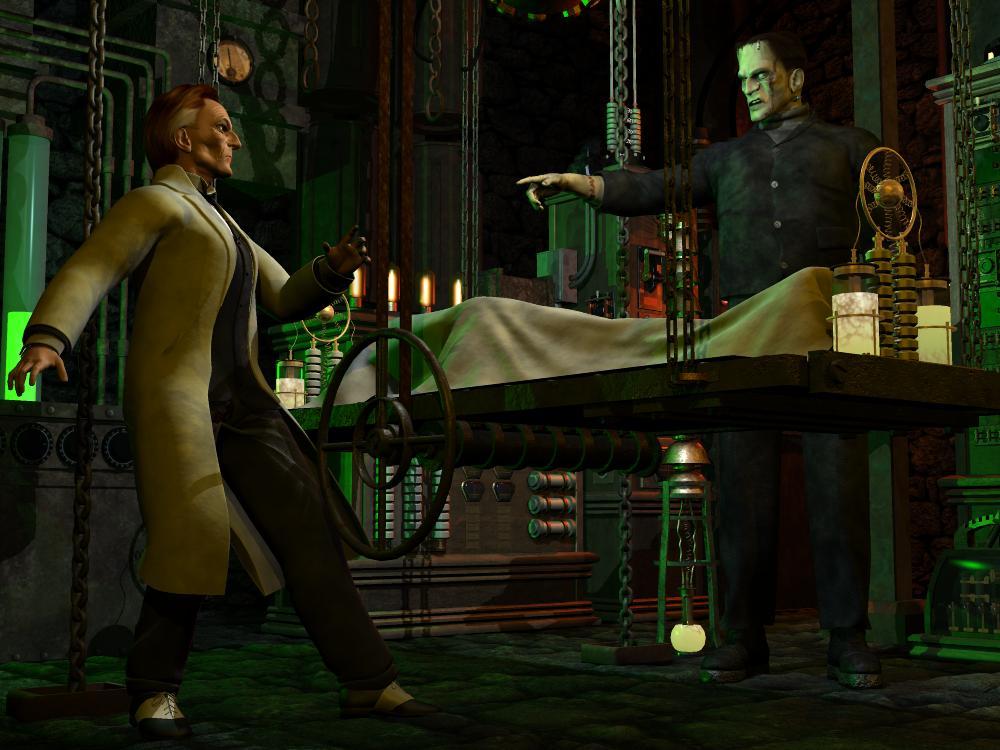
Just in time for Halloween, here are two examples of Michael 2. "Victor Frankenstein'" is using the M2P4 hybrid mesh, Mike's geometry and mapping with the body shaped and rigged to accept the Poser 4 Nude Male's clothing, in this case a Victorian styled suit PhilC used to sell. I changed the shaders so that the outer coat has become a lab coat. The "Monster" (though I personally like to use the name "Adam" which Mary Shelley used in her notes though not the published manuscript) uses a set called "Frankenstein Character (for Michael)" (long since removed from the store). While it can't be seen at this resolution, I played with the original maps to create "displacement" textures so that the sutures possess "height". The outfit was an item from PoserWorld during its earliest days. I opted for procedural nodes instead of the supplied textures which used the most basic of "planar" UVs. I also used the morph at only 67 perceent because at full strength, his features turn into farcical caricature. Even at that partial setting the distinctive forehead is very defined. Closer to ful, strength and it becomes razor sharp, a parody of "the look".
The motif is a bit of "mix and match". The "Monster" is obviously inspired by the Jack Pierce makeup designs from Universal Pictures. But "Victor" is a custom selection of dial spins from Capsces' "Boris for Michael" making him look somewhat like Peter Cushing from "Hammer Films" of Great Britain.
In this composition, "Adam" demands Victor hurry his efforts to create a mate or him, a "bride".
Sincerely,
Bill
Aniblocks and Animations Export - DazToBlender BridgeCheck out the diffeomorphic plug-in, you can import animated sequences in as a pose preset. Just have to go to poses and then import action, have your animation saved as a pose preset and it'll be brought in. And there's sliders for viseme and expressions in diffeomorphic as well. Right now facial expressions do not transfer over, but in another thread it was mentioned Thomas is working on that right now, so hopefully soon. The materials have some differences between Daz to Blender Bridge and Diffeomorphic, if you prefer the DTB Bridge, just save the character as it's own file, bring it in with diffeomorphic and then append the materials from the other file and just switch the materials out. That's still way faster than importing pose by pose. For me it's really hit or miss, some characters look fantastic in diffeo and meh in DTB and vice versa, so it's just a matter of playing around with it.
Diffeomorphic DAZ Importer Version 1.5.1@PixelReaper Actually Thomas is working on poses so unfortunately the latest commits are not stable yet for importing poses and animations.
Good to hear, can't wait to see the updates on the animationss being imported in! I've always had the expressions not importing as well. I don't know if it'll work with what he's doing, but I have Face Motion 8 which does facial mocap, fingers crossed that falls into the problems that the expressions are having so those can be imported in as well. I can import them all in as custom morphs, but the keys just don't transfer over. I'll keep my eyes open for the next update!
Fit Control for Genesis 8 (Commercial)"its because of the amount of morphs I have loaded from various characters- and I'm sure there are others that have more morphs than I do. I would have to take out a third of my models for it not to crash anymore."
There is nothing we can do about that if that is the case unfortunately. I see you on windows 7. I will need somebody with win10 to see if this happens as well.
I kind of find that hard to believe, but whatever. And there was someone with Windows 10, getting the crash because of number of morphs. back on page 10.
I'm seeing exactly the same crash as Mathias. I'm running 4.12 on Windows 10.
The issue seems to be related to the set of installed g8f character morphs. If I go into data\DAZ 3D\Genesis 8\Female\Morphs and move all the folders to another directory, except DAZ 3D and Zev0, then I can successfully add the fit control morphs. I then start moving the folders back into the morphs folder in small groups. It continues to work for the first few groups of folders that I add back, but eventually it reaches a point where it starts failing again.
If I then move all the folders out again, but keep the group that caused it to start failing (and DAZ 3D and Zev0), then everything works ok. So that suggests that the problem isn't specific to those morph folders.
I guess it's either an issue with the number of morphs, or some problem with certain combination of morphs.
I haven't dug into this any further because it would require extremely tedious and intensive testing. Plus i don't have that kind of time.
All things The Witcher...It is not important'or needed, but playing the 1st games gives a better insight in the 'witcher game universe'. You can play all 3 separately. (I did play them in reverse order the 1st time around
 ). It is posssible though to 'load' a savegame from W1 into W2 and from W2 into W3. This does have a little effect on the storyline in the latter games. However it does not transfer any skil points or equipment from one version to the next; just a nice gimmick. (W3 also allow you to 'emulate' a W2 savegame.)
Personally I would advice to buy the full W3 game (including the DLC's) as those DLC's are IMO a good extension to the main game.
Thanks. I went with W3 with two DLCs.
All things The Witcher...It is not important'or needed, but playing the 1st games gives a better insight in the 'witcher game universe'. You can play all 3 separately. (I did play them in reverse order the 1st time around
). It is posssible though to 'load' a savegame from W1 into W2 and from W2 into W3. This does have a little effect on the storyline in the latter games. However it does not transfer any skil points or equipment from one version to the next; just a nice gimmick. (W3 also allow you to 'emulate' a W2 savegame.)Personally I would advice to buy the full W3 game (including the DLC's) as those DLC's are IMO a good extension to the main game.
Celebrity Look-a-Likes for 3D figures part 3Now for download:
Sophie Turner Head morph: https://www.deviantart.com/tritiumcg/art/Sophie-Turner-Head-Morph-for-G8F-858988269
Emilia Clarke Head and Body morphs: https://www.deviantart.com/tritiumcg/art/Emilia-Clarke-Full-Head-and-Body-Morphs-for-G8F-859718895
Very nice (as usual
 )DForm not spawning morphs
I'm doing trying to morph a door that was exported in as an obj. I've attached the door with a D-Former, moved the base to be a hinge, and increased the field so everything is influenced. The D-Former itself works just fine It's just DAZ Studio not adding the morph onto the door. I've selected the actual object parenting the D-Former stuff (which is what I've always done) and well, nothing. No Morph Parameter appeared.
So I was wondering if there was a way to reset the DForm tool. I think the D-Form tool itself is bugged.
3D Art Freebie Challenge-October 2020-"Winners Announced Annual Monster Mash" -Entries Thread Only3D Art Freebie Challenge October 2020 "Annual Monster Mash"
[Best watched at full size for details.]
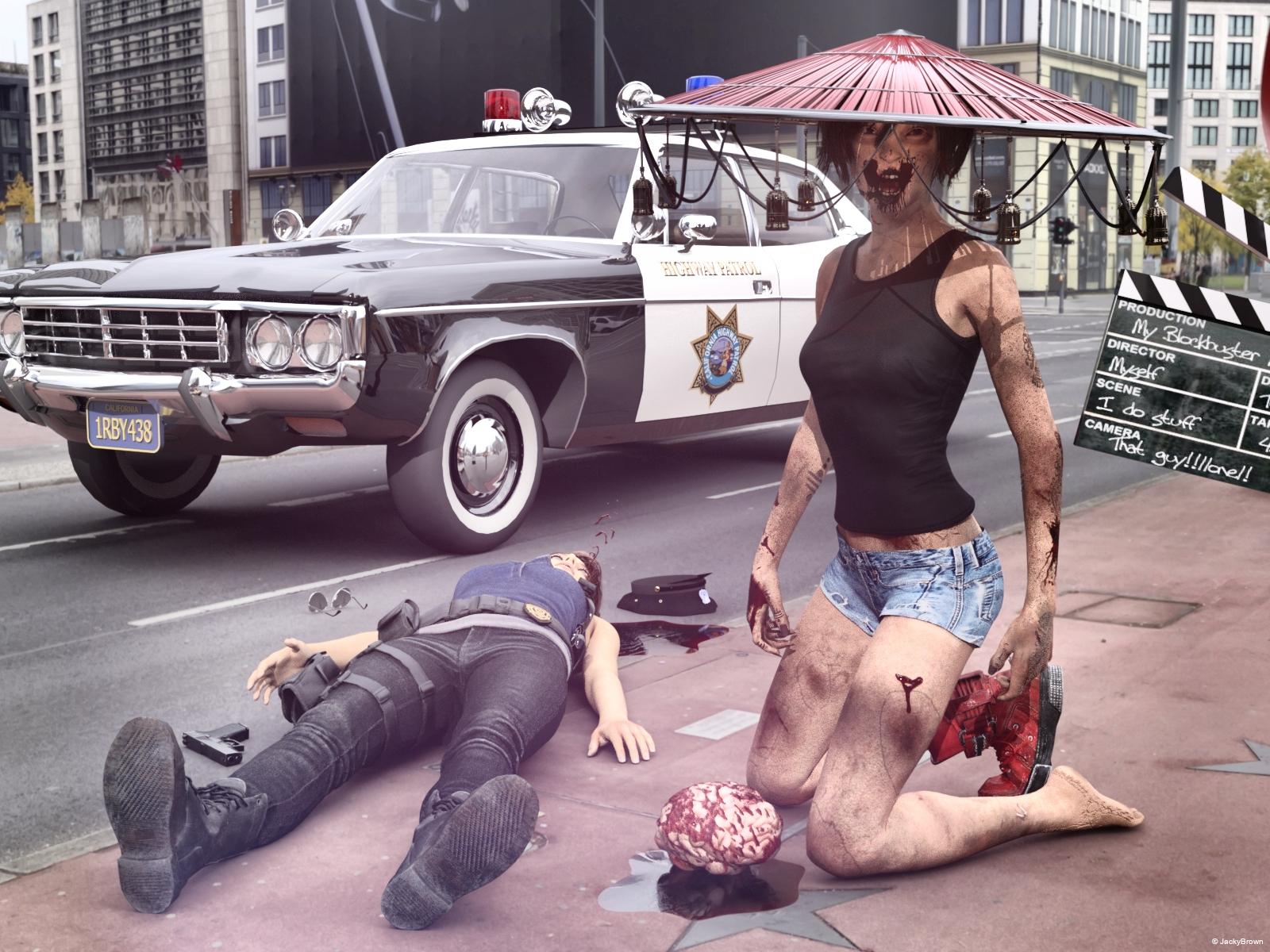
"Horror movie scene: The Return of the Zombie"
Starring: Cheryl (Heather) Mason and Jill Valentine by CheckerTooThe tale:
And action! "Aahhhh, I love the smell of brain in the morning!" the young zombie gasped...Soundtrack:
Michael Jackson - Thriller (Official Video - Shortened Version) (© 1984)
https://www.youtube.com/watch?v=4V90AmXnguw
COUNTABLE FREEBIES: (Alphabetic order)#01! 4 Blood/Gore PNG Overlays for Horror, Zombie, Vampire Facial Textures by ModernWiz
https://www.renderosity.com/mod/freestuff/4-blood-gore-png-overlays-for-horror-zombie-vampire-facial-textures/76697 **#02! A Thousand Reasons To Cry by MysticArtDesign
https://sharecg.com/v/95817/browse/21/DAZ-Studio/A-Thousand-Reasons-to-cry **#03! AMC Matador Police car by Marsupi 3d
http://www.dmi-3d.net/rescue1.html (item 19)#04! AND ACTION! - 10 Movie set props by fober1
https://www.renderosity.com/mod/freestuff/and-action---10-movie-set-props/56818 **
[Clapper used]#05! Aviator Sunglasses by SquarePeg3D
https://drive.google.com/drive/folders/0BwixlTkaWzFMQWFiNk9zVXh0aXM#06! Brain by Adam Thwaites (Most-Digital-Creations)
https://www.most-digital-creations.com/brain.htm#07! Cheryl (Heather) Mason for G8F by CheckerToo
https://www.deviantart.com/checkertoo/art/Freebie-Cheryl-Heather-Mason-For-G8F-Download-847214743 **#08! Denim Shorts for G8F by AdamThwaites (Most-Digital-Creations)
https://www.most-digital-creations.com/g8f_denim_shorts.htm#09! Dirt & Abrasions by MysticArtDesign
https://sharecg.com/v/93837/gallery/21/DAZ-Studio/%F0%9F%93%8CDirt-Abrasions%F0%9F%93%8C **#10! Dirty Skin Textures for G3F AND G8F by Noone102000
https://www.deviantart.com/noone102000/art/UPDATE-FREEBIE-Dirty-Skin-Textures-G3F-AND-G8F-801889979 **#11! ED's Brick Shader (Iray) by Edheldil3D
https://www.deviantart.com/edheldil3d/art/Freebie-ED-s-Brick-Shader-Iray-788871766 **#12! Heavy Hitters for G8F by squarepeg3d
https://www.renderosity.com/mod/freestuff/heavy-hitters-for-g8f/82812&ca **
[Fluid prop and Blood shader used]#13! Henna Tattoo by SquarePeg3D
https://sharecg.com/v/92182/gallery/21/DAZ-Studio/Henna-Tattoo **#14! Henna Scars by SquarePeg3D
https://sharecg.com/v/92176/gallery/21/DAZ-Studio/Henna-Scars **#15! Hitomi Tanaka Head Morph for G8F by TritiumCG
https://www.deviantart.com/tritiumcg/art/Hitomi-Tanaka-Head-Morph-for-G8F-819861473 **
[Head 50%]#16! Iray car related shader presets 'megapack' by Tom2099
https://www.deviantart.com/tom2099/art/Iray-car-related-shader-presets-megapack-539622361 **#17! Iray Jewelry Shaders by AllenArt
https://sharecg.com/v/95893/gallery/21/DAZ-Studio/Iray-Jewelry-Shaders **#18! Jill Valentine for G8F by CheckerToo
https://www.deviantart.com/checkertoo/art/Jill-For-G8F-DL-852699253 **#19! Liquids - DS Shaders & Poser MT5s by Fisty
http://www.sharecg.com/v/82337/gallery/7/Material-and-Shader/Fistys-Liquids-DS-Shaders-Poser-MT5s **
[Puddle used]#20! Megumi - Head and Body Morphs for G8F by TritiumCG
https://www.deviantart.com/tritiumcg/art/Megumi-Head-and-Body-Morphs-for-G8F-842318536 **
[Head 50%]#21! Modular Madness - Special Toys by SquarePeg3D
https://drive.google.com/drive/folders/1lXCqY3GZtHRqfrSuE-QXePG1_gr9zdFZ
[Shaders used]#22! Morphing Flame for Iray by SquarePeg3D
https://www.renderosity.com/mod/freestuff/morphing-flame-for-iray---100-free/76201 **
[Flame shader used]#23! Morphing Kiseru Pipe + Bonus Bell Hat by SquarePeg3D
https://drive.google.com/drive/folders/18Q4Su0-j_RZ7A0mRMwy6Mjyr2rzZjea7#24! Noggin's EasyPose Worm by noggin
https://www.renderosity.com/mod/freestuff/noggins-easypose-worm/14105 **#25! Police Hat by Noone102000
https://www.deviantart.com/noone102000/art/FREEBIE-Police-Hat-767374632 **#26! Potsdamer Platz by Greg Zaal on HDRIHaven
https://hdrihaven.com/hdri/?c=outdoor&h=potsdamer_platz#27! Retro Heroine 8 Outfit by Fredel
https://www.renderosity.com/mod/freestuff/retro-heroine-8-outfit/77959 **
[Shirt used]#28! Rough Textures for G3F and G8F by Noone102000 (NSFW)
https://www.deviantart.com/noone102000/art/FREEBIE-Rough-Textures-for-G3F-and-G8F-804353596 **#29! Rons Sampler Brushes by deviney
https://www.brusheezy.com/brushes/12896-rons-sampler-brushes
[Suds brushes used to create the gore overlay]#30! Soul Calibur 6 Seong Mina's Head Morph for G8F by TritiumCG
https://www.deviantart.com/tritiumcg/art/Soul-Calibur-6-Seong-Mina-s-Head-Morph-for-G8F-813924805 **
[Head 25%]#31! Sticky and Stickier Messes - 100% FREE by SquarePeg3D
https://www.renderosity.com/mod/freestuff/sticky-and-stickier-messes---100-free/76360 **#32! SY 200 Morphs for Genesis 8 Head and Body by SickleYield
https://sharecg.com/v/91888/view/21/DAZ-Studio/SY-200-Morphs-for-Genesis-8-Head-and-Body **#33! Terror Eyes for G3F and Iray by Sabby
https://issuu.com/philatdsc/docs/ds_creative_16 (page 49)#34! Tifa For G8F by CheckerToo
https://www.deviantart.com/checkertoo/art/Freebie-Tifa-For-G8F-DL-847909854 **
[Used the boot(s)]
NO-COUNT ITEMS:--- Free Iray Outdoor Lights by Dreamlight
PURCHASED/PAID FOR ITEMS: None 100% Freebies
*1 E-mail address required
** Registration and login required
#x! Countable Items (Bold ones are used by me for the first time I think.)
--- No longer available freebies
++ Free with DAZ Studio (or the Essentials)
$x. Purchased/Paid For Item
Rendered with DAZ Studio 4.10.0.123 (nVidia Iray)Other free software used: GIMP v2.10.20 and Irfanview 4.54
Postwork: used the AltaLux Image Enhancement Filter (Effect) by Stefano Tommesani that comes with Irfanview. Also used mcjDenoise by mcasual. (https://sites.google.com/site/mcasualsdazscripts9/mcjdenoise)
"Horror movie scene: The Return of the Zombie"
DForm not spawning morphsNot knowing the specifics, here's a quick run through of the steps to spawn a morph from a D-Former:
Ensure the D-Former Base and Field are parented to the proper location. Set up your field (sphere or weight-mapped), then set the D-Former to the maximum effect that you want to use. Select the object to which the D-Former is attached, then spawn the morph from the DForm tab. A new controller should appear on the object with the name you specify. Reset your D-Former to zero, and try the new controller. You should get the same full effect at 100%.
Apply new scale and make it 100%? why do you have to make the smaller size to be 100%? Save out either a character preset or a shaping preset and it will [should] load just fine.
In Daz - sure. If you export to some other software though, non-1 scale will bite you eventually.
Okay then I understand why you want to change that.
I have a few ideas on how to make the change:
... In D/S simply change the size setting on the morph from 92% to 100% and resave the morph to exactly the same place as it is now, OR remake the morph at the 100% scale, give it a new name and save it to whichever subfolder locations you want the new morph at, or dig through the data folders {preferably with D/S closed}, find the morph that puts the figure to 92% and edit the file [text editor such as Notepad or Notetab Light] to keep it at 100% {whether it reads as percentages though or as numbers I don't know} ...
If you remake the morph you'll lose any special joint corrections that may have been made for the original morph(s).
Celebrity Look-a-Likes for 3D figures part 3Now for download:
Sophie Turner Head morph: https://www.deviantart.com/tritiumcg/art/Sophie-Turner-Head-Morph-for-G8F-858988269
Emilia Clarke Head and Body morphs: https://www.deviantart.com/tritiumcg/art/Emilia-Clarke-Full-Head-and-Body-Morphs-for-G8F-859718895
Transferring Raiya's Genesis 2 Characters to G8So, I'm working on converting Amon, and while I have been able to transfer the genital maps through Texture Transformer (there is a special setting just for gen maps)...what is up with the G8M gens attachment? Never worked with it before until now. Even with the G8M base shape and G8M Gens base shape, part of the gens mats is sitting behind the G8M figure, so its mats aren't showing. I've also tested lots of G8M character mats that come with gen mats, and the gens look very much like an attachment that does not belong. Am I doing something wrong? Is this an issue that anyone else has experienced?
It's driving me bonkers! I'm foregoing the gen mats for now.
Do you have a deviantart account where you could maybe put things in Stash, if you don't want them showing, or somewhere you could show what you're talking about? I've not generally had that issue with G8M and his gens.
I do know that with some characters, Texture Transformer working with the gens can be a bit wonky. That seems to depend on whether or not the character might have a dedicated genital UV torso texture, or if they've got heavily burned-in pubic hair, or the state of the moon and stars and whether or not they're aligned with Jupiter. (Seriously, TT can just be ... odd. It persistently leaves behind the bump map when I do transfers, but never ever has an issue transferring the specular maps. Oh, also, it will always ALWAYS have issues transferring the bump and specular maps for the gens figure itself -- I don't know why or how to fix it. I corresponded with the Blacksmith people about that and some other issues way back when TT first came out, and they were able to make things a tiny bit better, but not to get rid of the issues.)
As a geograft, the anatomical elements attachment does just cut out part of the figure that it attaches to. If you use the eyeball in the scene menu to turn off the gens after it's attached, you should see just a hole where they were. If you're seeing the torso texture, then they're somehow not properly attached.
I've got Amon, but I can't remember offhand if I moved him to the G3G8 UV. If I didn't, it was probably because I didn't want to do the two-stage M6-to-G2M-to-G3G8M UV thing, but I can check when I'm at that computer.
EDIT: So I checked, and I did move Amon to G3G8M UV and his morphs to G8M, and he's fine. His genital map came over pretty well, actually -- the G2 to G8 transfer generally works better than M4 to G8 because the genital texture itself is so much larger. Both the regular texture and the genital hip texture looked fine.
DForm not spawning morphsHello,
How do I reset my DForm tool? It seems to be bugged. I tried to spawn a morph but despite all efforts it doesn't generate the Morph at all.
Mousso's Warrin and RedzStudio's Stefon AppreciationTo my eyes Warrin looks older in promos 1, 5, and 6 (I'm counting the main promo).
Is that the alt morph? I know Vernon has an alt morph that ages him up a little.
The alt morph gives him a bit more chin mainly... Here are the older alt morph for vernon and the alt morph for Warrin:

Oh, they look awfully similar. I already have Vernon, now I have to think about whether I really need Warrin...
Having rendered with them... they only vaguely look similar. Vernon has a narrow "foxy" shaped face while Warrin has a head that one of the roundest I have seen in the Daz universe. They look similar as Mousso characters do; I should have done a 3/4 face render so you can see them better.
Where can I find a custom morph I made?If you know what you named your morph, do a search on your hard drive for the file by that name.
Are you sure you actually SAVED the morph. It is easy to forget the File/Save As/Support Assed/ Morph Asset step sometimes.I did. I can reopen the save file and the morph is still applied.
Oh wait I didn't read the second part. I'll try that thanks.
Mousso's Warrin and RedzStudio's Stefon AppreciationTo my eyes Warrin looks older in promos 1, 5, and 6 (I'm counting the main promo).
Is that the alt morph? I know Vernon has an alt morph that ages him up a little.
The alt morph gives him a bit more chin mainly... Here are the older alt morph for vernon and the alt morph for Warrin:
Oh, they look awfully similar. I already have Vernon, now I have to think about whether I really need Warrin...
exporting a camera moveYou might try using a primitive as a proxy for the camera (use a Pose Preset to transfer the movement), then you can parent a camaera to the primitive in the destintation aplication.
[Released] Skull Hound HD for Daz Dog 8 [Commercial]Here are some samples of what skull hound looks like without the base morph/skull.
New Updates: the Daz to Blender Bridge 2.0!Having problems persuading G8F not to snap back to default A pose. Could you please help me maintain a pose during the transfer to Blender process?
In the first picture, you can see what options I have when I go to use the script. There's no HD version, if that's relevant. It made me suspect I was still stuck on the first version of the Bridge.
Having said that, in the second picture, you can see that I can select both the prop and the figure, which I believe is evidence that I have the latest (2.0?) version of the bridge.
However, in the third picture, GF8 is still snapping back to A-pose, when I get to the stage of the process indicated just to the left of her. I thought this had been dealt with in the transition to the latest version of the bridge.Thanks for your time
EDIT: Fourth picture! I thought I was imagining it, but at some point I'd managed to get things working on both ends: Daz and Blender. Here, the pose (just some random limb tweaks as a test) did go across. Wish I could remember what I did! I haven't been able to repeat the success sinceDaz 3D is part of

Connect
DAZ Productions, Inc.
7533 S Center View Ct #4664
West Jordan, UT 84084Licensing Agreement | Terms of Service | Privacy Policy | EULA
© 2026 Daz Productions Inc. All Rights Reserved.