-
Ultimate Pose Master [Commercial]
Hi. I have just bought Pose Master but although it works on some characters, most fail as the initial script loads with "An error occurred while reading the file, see log file for more details."
This happens even when an official G8 character (eg Honni 8) is the only thing loaded onto a blank scene.
The log file is filled with lines like this;
2020-11-07 16:12:11.142 WARNING: ..\..\..\..\..\src\sdksource\fileinput\dzassetdaz.cpp(6615): Could not find output property for formula: Genesis8Female:/data/DAZ%203D/Genesis%208/Female/Morphs/DAZ%203D/Base%20Pose%20Head/eCTRLEyelidsUpperUp-Down.dsf#eCTRLEyelidsUpperUp-Down?value in file : /data/DAZ%203D/Genesis%208/Female/Morphs/Valery3D/V%20100%20Expressions%20The%20Gold%20Collection/VGC%20Cute%2004%20Top.dsf
Is there perhaps an issue with the fact that my Daz app (including default G8 and other required basics) is on C drive but all other Daz content is on the D drive?
Any idea what I can do?
Thanks.
Wow this is weird because my script never reads the morphs, and here your log file mentions morph issues, and there is no reason that this is triggered by my script, it seems to come from your morphs, for which something must be corrupted.
One thing is that when it is launched, the script saves an initial pose when you launch it, zeroes the figure, and reload the pose, and maybe this is at this step that some morphs could eventually be called by Daz. This step is obligatory to place the helpers. The only moment where an expression value can be written/read is this moment. But as you see in the log file, this comes from the sdk source so the bug is not in some lines of my script, but the apparition of this issue is triggered by my script.
Here in your case, from your log file, it seems that the "100 expression Gold Collection" (I suppose reading what you wrote) of expression is corrupted, maybe can you try to uninstall that product, just to see if it makes a difference... Normally it has nothing to do with your content being on D whereas your app is on C, this should not matter. But something is corrupeted in your content, so we have to find out what it is. The best thing is to uninstall this morph package first (you can always re-install later on), and to find out if it is the only cause of your issues.
1. Can you post me the log file (if too big, send me only the corresponding part, with some lines before and after the fact that the script does not launch)?
2. In the "work" folder of Daz Studio (where the log file is), you have a "temp\V3D\Pose Tools" folder where you can find the initial pose. Can you try just to reload this pose (drag and drop it on a figure) to see if it comes from the step where the script loads the pose?
I think we'll find a solution but we need to make more tests and I need more information, essentially the log file first.
edit: It seems that some people already met your "formula" property, and that this is not a warning, which should not imply any issue. Such as in this thread.
This is why I'd like to see your log file, so that I can have a look at what is the reasons for your fails on some of your figures. Because if there is an error coming from the script, there should be an indication in the log file saying in which line of my script there is an issue for your system configuration. I and many people have been using the script for more that one year now, so I guess there has been hundreds of thousands if not millions of launch of the script, and this is the first time someone reports a launch failure, so it is very interesting for me to know what can trigger this, even more interesting because some figures seem to work for you and others not (whereas my script ignores which figure it works on, it just looks at the names of the bones, which is the same for everybody)... Otherwise, make sure your content is up to date...
I'm really expecting your log file.
EDIT 2:
The pose master comes with a mini debug in the log file showing the initial essential step for interface creation. Here is what I have in my log when it works:
2020-11-07 21:15:07.577 Loading script: G:/DAZ 3D Libraries/DazCloudProducts/data/cloud/1_62917/scripts/ultimate pose master/ultimate pose master.dse
2020-11-07 21:15:07.600 DEBUG: V3DPose Tool: Check figure type
2020-11-07 21:15:07.657 DEBUG: V3DPose Tool: Initialize Dialog
2020-11-07 21:15:07.663 DEBUG: V3DPose Tool: Set Up Limits
2020-11-07 21:15:08.846 Saved image: C:\Users\Virginie\AppData\Roaming\DAZ 3D\Studio4\temp\V3D\Pose Tools\\InitialPose.png
2020-11-07 21:15:08.860 DEBUG: V3DPose Tool: Loading Helpers
2020-11-07 21:15:08.861 DEBUG: V3DPose Tool: Zero Figure Pose
2020-11-07 21:15:09.006 DEBUG: V3DPose Tool: Restore Original Pose2020-11-07 21:15:11.991 File loaded in 0 min 2.8 sec.
2020-11-07 21:15:11.992 Loaded file: InitialPose.dufAnd here is what I have when I make it on purpose not to select a figure (to trigger an error):
2020-11-07 21:16:05.165 DEBUG: V3DPose Tool: Check figure type
2020-11-07 21:16:06.163 WARNING: Script Error: Line 10411
2020-11-07 21:16:06.163 WARNING: TypeError: Result of expression 'oInitialNode' [null] is not an object.Allowing me to read where the error is.
This is why I need this log file....
need helpWhat you need is the Figure Setup pane - theer should be quite a few guides to using it, but unlike the Transfer Utility it requires a fair bit of set up. As with the TU the mesh needs to match the base figure shape, and unlike the TU it needs to be split up into groups that match the bones of the figure (and obey the Poser grouping rules - each group may touch only one parent group and its own child groups, not others, which can require fiddling at crotch and arm-pits). Once you have the OBJ correct you import the Victoria 4 figure into the Relationships area of the pane, the OBJ into the groups area, then drag the OBJ across into relationships, delete unneeded bones, chnage the name, and create a new figure. Then you will almost certainly need to use the Joint Editor to adjust the joint paramaters to make sure they are affecting only the desired areas (the legacy rigging doesn't use weight maps but a series of pre-defined guides that determine whicha reas ar affected by the joint, which are immune, and which ar transitional). Legacy rigging is, in most respects, less flaexible than weight mapping and there are quite a few things that it really can't do.
Can someone please identify this Character (SC Solo High TShirt)?Do any of you know if the shirt itself is good? Like, if you have a character morph other than the default Genesis 8 then does the inside of the shirt get pulled inward instead of how it looks in the picture?
AIUTO...CHI CONOSCE L’ITALIANO? PARTE DODICIQuello è un costume DForce, è studiato per funzionare con le simulazioni. E ti conviene partire da una nuova base, non usare la banana.

In pratica, dopo averlo modellato e adattato alla base Genesis devi applicare un DForce dinamico e regolare le varie opzioni in modo che abbia l'elasticità e la flessibilità che servono a te, tenendo presente che avrai anche bisogno di Morph correttivi per le ascelle, i gomiti e i polsi del costume nel caso siano molto ampi.
L'esempio del Gabibbo è perfetto: Quel costume ha al suo interno alcune strutture rigide nella "cassa toracica" e nel "girovita" che ne mantengono la forma in quelle zone mentre nella parte bassa dipende tutto dalla zona superiore. Se osservi bene, le braccia hanno poco "gioco" per essere quanto più vicine possibile alle spalle e alle braccia del "operatore", se parti da questo presupposto puoi realizzare un costume da "panzone" molto facilmente, ti basta creare delle zone differenziate per i vari livelli di Dforce.
Blender animation back to Daz with Blender BridgeYeah, I know the bridge itself is one way.
OI guess what I would like to know is if it also makes it impossible to get BVH data I can use in Daz or am I just importing it wrong

I have been trying to sort out. Similar work flow. I've had some luck exporting BVHs from Daz and retargeting them in Blender to DazToBlender bridge but it's def not 100% acurate. The Diffeomorphic importer apparently does a great job of it however and the BVHs made out of Blender with that rig may transfer back to Daz ok? Daz is sooo close to being able to do most of what iClone does but for free..it is frustrating that it's not quite there... just out of reach.
V4 clothing is a nightmareAs a Carrara user I actually use Dimension 3D's Morphing clothes to add every morph and Carrara "crosstalks" with the results
I never did use it in DS as it has the transfer active morphs but back in the day that was DSA3 and up not the free version
I bought it from the now defunct Content Paradise but I do believe Renderosity still sells it.
V4 clothing is a nightmareAge old problem with using Poser content in DS and Poser, no idea if Cross Talk is still an issue in newer versions of Poser, but back then Cross Talk was the bane of every content maker, so much so that many went out of their way to avoid it, and came up with some hair brained ways of doing it too.
This pretty much breaks the morphs for use in DS as "super conformers", some can still be dialed up manually as the valueParms in the BODY have the wrong internal ID, but others will have to be dialed up in each body part as the valueParms are correct but the ERC in each targetGeom is broken.
DS does have "Transfer Active Morphs" for use with Poser content, but this can be very hit or miss depending on how big a mess was made of the morphs. The systems checks the figure for any active valueParms, checks their internal ID, and then copies the valueParms and targetGeoms then pushes the morph deltas into the clothing. The problem with this system is when it finds a valueParm in the clothing with the correct internal ID, it's basically aborts the morph transfer and refuses to overwrite the existing morph.
V4 clothing is a nightmareyou can use Blender
I use either Ultimate Unwrap3d repaint or Zprojection in Zbrush to transfer textures myself
actually I find a combination of both programs best as Ultimate Unwrap3d can convert to vertex colours and Zbrush can project vertex colour from one UV mapped mesh occupying the same 3D space to another at much higher resolutions than UUW3D
in DAZ studio Caymans geografted solutions work well too
V4 clothing is a nightmareAFAIK, clones are the easiest way to transfer textures. https://www.daz3d.com/sy-victoria-4-and-michael-4-clones-for-genesis-8
And Leana actually provided the answer in this thread, which has a discussion of converting V4/M4 to G8.
https://www.daz3d.com/forums/discussion/comment/6077842/#Comment_6077842
There are also links to Cayman Studios' legacy UVs for G8.
RELEASED!! CC Beard Boss for Genesis 8 Male(s) [Commercial]Sorry, I removed the beard that I have so it was more obvious what I was talking about. Usually I'm using the goatees (circle beard and deertail I think), so yea, not a full beard.
What character morph are you using with them? Those shouldn't have neck stubble on them. It may be HD morphs too. I know those can cause trouble with followers.
V4 clothing is a nightmareV4 is still my favourite. She's not hard to fit clothes once you understand her First, load the clothes onto an unmodified V4. Then make invisible any skin that is covered by clothing. Next, add character morph. Then pose clothed figure. Lastly, adjust clothing and/or character until clothes fit properly. It's really easy once you do it.!! Store Issues - Known Problems - Please Read !!I know. I am trying to be patient but this is getting to be ridiculous. I'm sure we all feel that way. They are working their tails off, I'm sure. I work in IT and I know the nightmare that can happen. I know the time and patience involved. We always fix the people that are broken as fast as we can or offer a workaround until the cause is found and worked out. To this degree? No, I've never seen it before. but each prob is different when it happens. If my stuff stayed and I had to wait to buy more I'd be a little more understanding. It downloaded and went away.
Good customer service would be to take the order and refresh (refund them and let us reorder them) on the new platform using the new system, but the prices won't match if that were even possible. That would also be a nightmare for them too. Of course, I have no choice but to wait. I waited on and off a bit for a failed download on the free item today, but it did eventually work. That is not the case with the big orders where all my money is tied up in. People are buying stuff including me, but none of the stuff from the day this started is accessible still. So I can wait for them to download even if they fail and eventually work. That's the difference because they are not at all. I had the items in my content, then they went away.
Some issues are in the store are still there but there is progress. Normally with patience, refreshing, or another browser, you can still get stuff working to a degree or downloaded. This is not the case and has not for a week now on orders/downloads for some of us. the platform makes me nervous now. I do understand where you are coming from. I kinda regret buying so much at once. Its good people's gift cards are somewhat working, DIM is working mostly, I just hope we get the word about the transfer over for the orders, I want to at least know my purchased items will show up so I don't buy them again too. Each page of the item does not show purchased either. I literally have no way to be able to access it (manual download or not), or something else. I'm newer and dropped over $1200 into daz this month. That's prob nothing to some people, but for me a little scary. It just makes me feel uneasy that stuff goes missing in their software after it was there, you know? I already feel like a donkey butt for saying anything in the first place.
This response was for the "be patient" response I got first, not to Laurie's below post. Not trying to flame anyone, but I'm at day 7 so I am gonna stop buying until my previous ordered items come through. I don't want free items anymore. I just want the stuff I ordered even if it takes a while and even if it's a little at a time. I can be satisfied with something, but not nothing.Still missing purchases from 10/31. I have several tickets in already. The purchases do not recognize in Daz DIM, cannot manually download, and cannot be seen in my daz central. Even the manual download shows the below error. Even the purchase page is not showing purchased, but they show in orders and in the Product Library. Can we get another way to at least download the content we paid for (can it be enabled some other way)? It's been almost a week now, but this was about $400 worth of product. If it's an issue with the date and order when the conversion happened, can they be moved to a newer date on the new system? Or a credit in out type of thing.
Here is an example of just one item from several separate orders and how it looks in central. when using download content it flashes for a second but does not download anything. I tried manual options from the first screen and none worked. I know ya'll are working hard and I don't want to sound ungrateful. I'd have felt a little better if even some items started to work, but none have.You need to be patient. Below is the response, I got from Daz3D support about a similar issue, like yours.
"I apologize for the recent inconveniences following our back-end system migrations. This is among a number of bugs that we are currently working to solve. Once there is a new updated solution for this I will gladly notify you."
I wouldn't be very patient - 7 days is a long time to wait for items you paid for. This whole store thing has been a nightmare from the beginning. I appreciate the coders are putting out fires everywhere, but someone should have made double sure the store was working BEFORE migration by having beta testers pushing it to its limits before rollout. For an online store that's been in business for over 20 years, this is one of the most unprofessional things I've EVER seen. Nothing personal against any of the staff. I'm sure you're all working hard, but unfortunately your efforts are ineffectual. :( I can feel bad for you and yet still be appalled at this mess.
Laurie
Genesis 8 female figure loads in muscularPlease put the Viewport in Smooth Shaded mode or apply some clothes to the figure.
This is likely to be a morph that was saved with a non-zero default value, so that it loads set on every Genesis 8 Female figure that doesn't have it explicitly set to 0. If you look at the Currently Used group in the parameters pane you may be able to see it - from the name you should be able to figure out the culprit and ask for a fix, from the artist or from Daz support if it came from here. You can fix it yourself in the meantime - load the Developer Build version of the Genesis 8 Figure, Edit>Figure>Zero>Zero Figure, then File>Save As>Support Assets>Save Modified Assets (though this will not work if it was a Daz character that you installed through Daz Studio itself).
need helpfernfairy73_bb8ec3d37c said:
riched for some resion transfer ultilty will not pick up victora 4
Transfer utility is for weightmapped figures. V4 and earlier figures are not weightmapped, they use parametric rigging. So you can't use transfer utility to rig items for V4, you need to use the figure setup tools.
need helpriched for some resion transfer ultilty will not pick up victora 4
need helpThat's probably Poser dynamic clothing - you may find it works with dForce, if you apply a dForce Modifier : Dynamic Surface to it from Edit>Object>Geometry. You could also, if it lines up with the Genesis figure you want to use it on in the zero pose, use Edit>Object>Transfer Ultity, set the Source to the figure and the Target to the OBJ, and click Accept to get basic rigging. Those are not mutually exclusive.
Looking for Artist to Make Custom Lizard Head Morph for G8F [Commission]Yes, I have. The snout of the snake head morph isn't long enough and the mouth is too human. I've tried repeatedly to modify it with other morphs as well as Mesh Grabber, but I've been unable to get anything that looks good enough. :(
!! Store Issues - Known Problems - Please Read !!I'm sitting on $300.- in gift card but can't use it because at the check out screen there is nowhere to put the code. There is one for coupons but not gift card.
I don't know if anyone has answered you yet (this thread moves so fast, hundreds of new posts a day so I can't keep up), but if not: You have to redeem the Gift Card code and transfer it to Store Credit to be able to use it. You can enter the code here: https://www.daz3d.com/giftcard/customer
V4/A4 Pose Transfer to G8FFor anyone who has a nice V4 Pose languishing unused in a corner, please consider my humble offering to enable you to use them.
To use the pose, apply it to V4, load in a G8F character and the run the script. Due to my rudimentary scripting knowledge, you will need to identify V4's hip and G8F's hip in the two drop down combo boxes. Then press the 'ACCEPT' button. The pose will then be transferred by the 2100 line script.
Below is the V4 zero pose transferred to G8F:
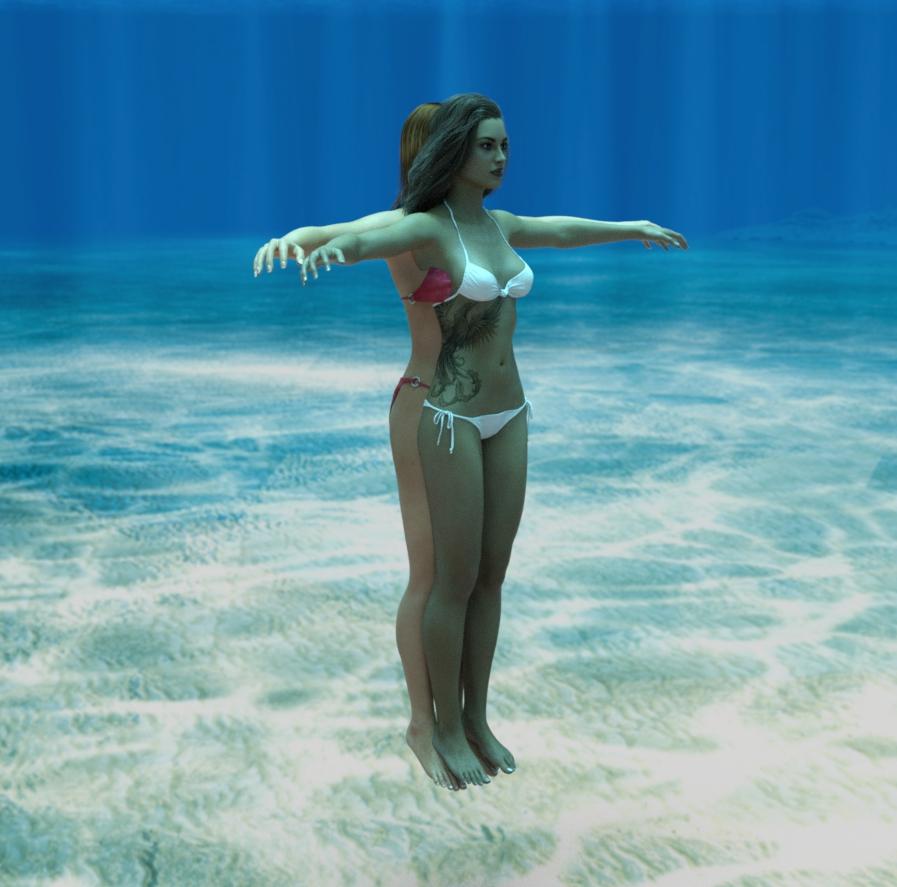
The two images below show a pose applied to V4, and G8F in the zero pose. Then the effect of the script applying the pose to G8F.
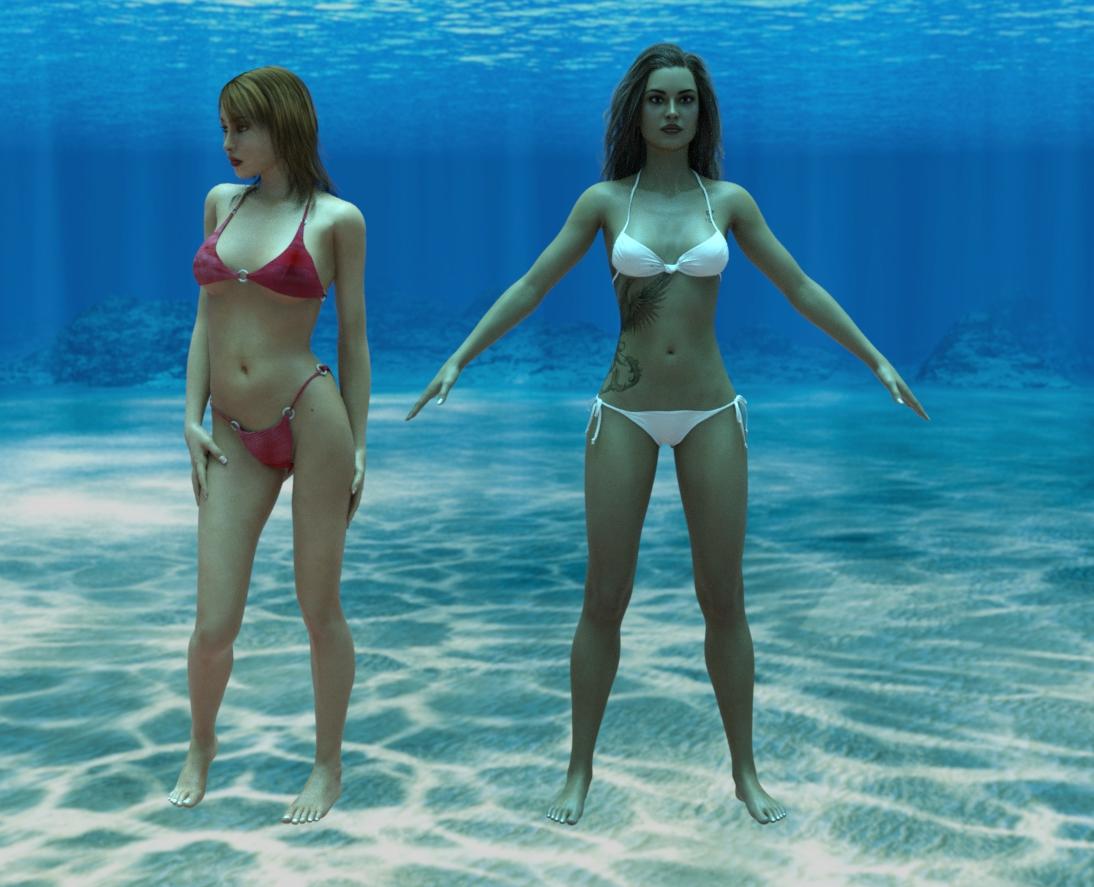
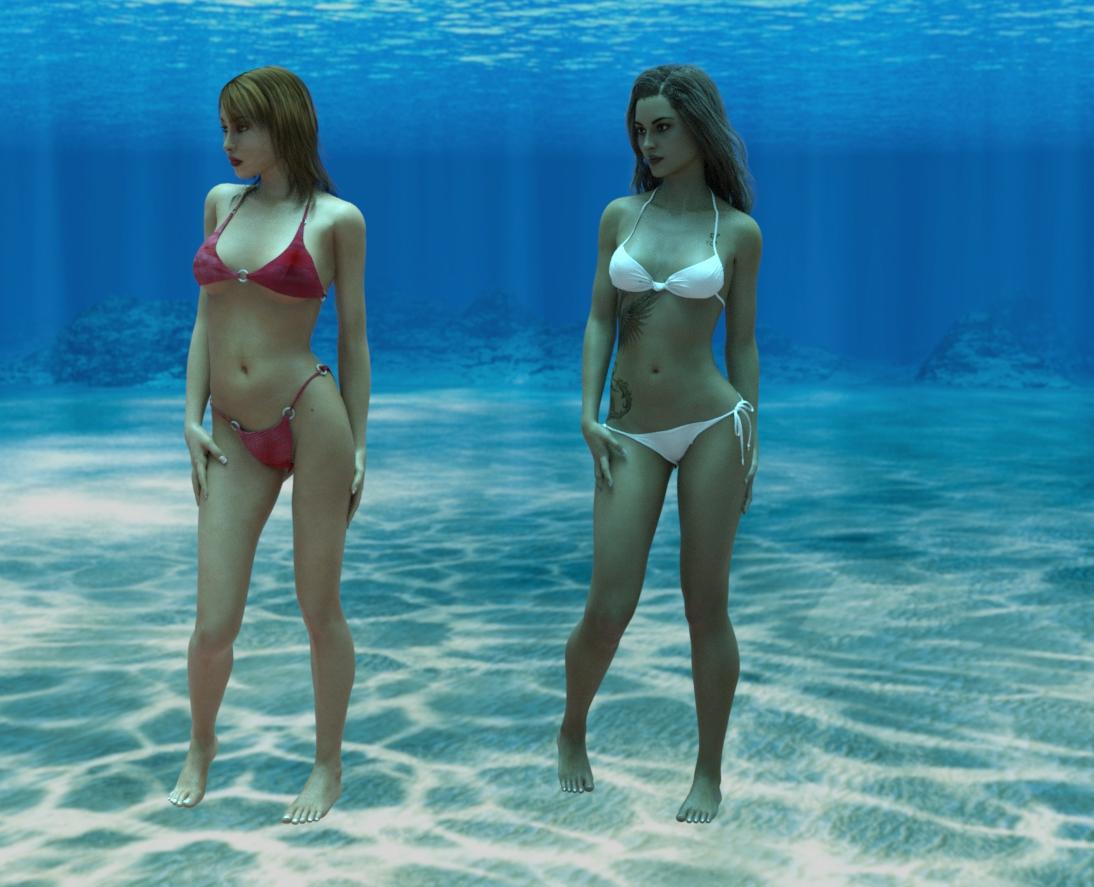
You may well need to modify the pose after transfer, but probably not a lot more than you'd need when applying a base pose to a character. I do hope will be useful to someone.
Regards,
Richard
Edited to add: Seems to work in the same way with Aiko 4 substituting for V4, and anywhere in the script I say V4, then A4 could be used.
Hair converter add-on for Blenderj cade, this may be asking a lot but is there any way you could share a blend file of your eye shaders? I cannot get mine to look anywhere near as good!
Its the same setup I posted the nodes in the other thread but here you go
Sclera/Iris and Cornea/EyeMoisture + bonus real simple skin
Things will be purple as all actual maps are stripped out
also worth oting a big part of how the cornea looks is using the cornea bulge morph - since refraction bends light relative to the surface, if the shape is wrong the light bends wrong. Using an iris depth morph (or, if you're going all out to the nth degree, some actual physical displacement on the eye) can also make a difference on the interaction with the light
Thanks so much!!!
Daz 3D is part of

Connect
DAZ Productions, Inc.
7533 S Center View Ct #4664
West Jordan, UT 84084Licensing Agreement | Terms of Service | Privacy Policy | EULA
© 2026 Daz Productions Inc. All Rights Reserved.