-
face transfer pane disapeard from panes tab and DLL not loading
After windows 10 update the face transfer tab was disapeard and the dzfacetransfer.dll plugin could not load
try to install again the daz studio 4.11 and 4.12 but the problem stayed the same
so installed the new DAZ Studio 4.12 (Win 64-bit) Public Build +BETA+ but didnot help either
but in the install map there was also a map temp 64bit and in this map you can find file vcredist_x64_vc14_15_16.exe
So close all programs and execute that file + restart pc again
on the pluginlist activate the face transfer box and restart Daz studio
the face transfer pane will be visible andselectable again between the other panes
Maybe it will work for you too
to get the files download and install manualy
unknown morph sliderHi, I found some morph sliders, which I dont recognize. I have no idea where their are from. Is there a way to backtrack them to their respective data/runtime destination?
btw their slider settings path isnt useful either.thx
Generation 3 Aiko and Hiro Appreciation ThreadJust a little note: The pose transfer scripts I wrote to transfer poses V3->G8F and G8F->V3 also seem to work with A3 substituting for V3. These scripts are available in the freebie forum. It may help to widen the range of poses available to A3.
Regards,
Richard
M4/H4/F4-G8M Bi-directional Pose Transfer@Faeryl Womyn asked if I could do an M4 to G8M Pose Transfer script, so I have attempted to fulfil the request. Edited to add: This post concerns M4/H4/F4->G8M pose transfer. Lower down this thread is the G8M->M4/H4/F4 script.
As with my other transfer scripts, you need to open a copy of M4/H4/F4, apply the pose you wish to transfer to M4/H4/F4, load a model of G8M to the scene and run the script. I have had insufficient time to look at how to automatically identify the characters, so as with the other transfer scripts I have offered, you'll need to identify the hip of M4/H4/F4 and G8M in their respective dropdown combo boxes, then press the 'Accept' button.
I have not tested this as thorougly as I did with V3/V4 because I only have the 10 or so base poses that came with M4, and I had to install M4 before I could start. Also, he has no clothing other than the shorts that are part of the base image, because I don't actially have any for him - hope this complies with the forum TOS, I think it does, but I have a concern and apologise if it's on the wrong side of the acceptable line. So, if there are problems with the script due to lack of testing, please let me know. As before, I have three images to show the script in use. The first is with M4 in the zero pose and G8M modified from his zero pose by the script.

Now a 'Before & After' pose image for G8M with M4 in a [rather peculiar] pose as the reference. I think M4's supposed to be leaning 'seductively' (or as anyone else would say 'loutishly') on a door frame, but the pose just looks silly with no door frame..


I think you will probably need to tweak the pose after applying it to G8M, to take clothing etc into account, same way as if you were applying a base pose to a G8M character. If there are any problems, please let me know. And I hope one or two people will find it of use.
Throuout the script, where I mention 'M4', then H4/F4 could be used instead of M4.
If there are no serious problems with this script I hope to be starting on a G8F->V4 transfer script this evening, which may be ready by next week. In time I want to make a G8M->M4 script, because I think single direction transfers are infuriating.
Regards,
Richard
Edited to change the title & text to include Hiro 4 & The Freak 4 as it appears they both work as well.
Fibermesh eyebrowsActually I think you are over-complicating it - why are you using Figure Setup before using the Transfer Utility?
Change one part of a characterThere is no way of doing that in DAZ Studio. But instead of photoshopping the finished image I would photoshop the characters face map before rendering.
I would but I am already applying skin tone morphs in DAZ. I might just have to do the whole Map of the character.
Not sure what you mean by "skin tone morph". Whatever you're doing, to change the colour of only the tip of the ears you only have to photoshop the diffuse and translucency maps of the face.
Fibermesh eyebrowsI'm using Figure Setup to make a rigging to G8F then transfer utility. Seems to work perfectly. If there's a different technique it's good as well!
 RELEASED!! CC Beard Boss for Genesis 8 Male(s) [Commercial]
The morph's I'm using on him are... extreme haha. I've changed almost everything. Michael and Quinton are two of the main ones, but I had to remove almost every morph to get it to 0, so that's definitely why. I tried setting a geoshell up to set the offset to go in a bit, but that didn't work for me.
Thanks for your help! I'll just leave it be as is. I love the shape and style of the beard, and it's a lovely product! But this was one of my first characters so I went crazy on morphs and I'm sure that's why it's behaving erratically haha.
If it's custom has it been rerigged to the new shape? If not, that could be causing your problem.
[Released] ManFriday's Mesh Grabber [Commercial]2 Questions about morphing:
(1) If I make a long tube morph, and I find too much of an object it's attached to is affected, is there a way to freeze part of the object so that it is excluded from the pulling to make a tube?
(2) If I wish to reduce the size of the opening of a tube, on one end, or even to close one end of the tube, is there a way to do this with Mesh Grabber, or maybe with the Geometry Editor?
RELEASED!! CC Beard Boss for Genesis 8 Male(s) [Commercial]The morph's I'm using on him are... extreme haha. I've changed almost everything. Michael and Quinton are two of the main ones, but I had to remove almost every morph to get it to 0, so that's definitely why. I tried setting a geoshell up to set the offset to go in a bit, but that didn't work for me.
Thanks for your help! I'll just leave it be as is. I love the shape and style of the beard, and it's a lovely product! But this was one of my first characters so I went crazy on morphs and I'm sure that's why it's behaving erratically haha.
Sales thread: Report Issues Here. & "There's Always Another Sale™"https://www.daz3d.com/aprilysh
Price: Low to High
Items both on top
I could not visit over the sale site, so i went to the profile myself. Was just a visit to see if it works, then i saw this, addet the items and began to wonder. I mean these are lovely items, there are scripts out there that transfer everything to gf8/gm8, so it would be very interesting for people to know if these items would be excludet. Or even if they maybe are the reason for the mistakes in the shop. I really don't know how you add the items, so i can just "guess" that there are scripts and functions in place that create these strange conflicts in the end.
Still the bug in place, where the link goes to all of the vendors, instead of the vendor i choose. https://www.daz3d.com/Sunday-Friends-of-Sale should be https://www.daz3d.com/aprilysh i guess?!

Just noticed something down below: PC+ Items and Fast Grab Items
Was this really there the whole time?! Then again we cannot just visit a vendor to grab something. That is really confusing the heck out of a customer...


But i still wonder if there is the bug happening, that strangely shrinks even "New" items to cents. Because i also noticed that somehow, someone must have had big luck ordering https://www.daz3d.com/spooky-hollow-bundle for 2.44 $ at the 3.11.2020. That seems very odd, but my guess would be that someone in the bundle list was also at the time a special "Friend of the Sale" or something like that?I still didn't find it on the https://www.daz3d.com/Sunday-Friends-of-Sale#index=0&filter_vendor=AprilYSH&filtered=1 page, but I did find it if I went to the artist's store page and did that. However, this contains items not on sale in the Friends of Sale.
Sales thread: Report Issues Here. & "There's Always Another Sale™"https://www.daz3d.com/aprilysh
Price: Low to High
Items both on top
I could not visit over the sale site, so i went to the profile myself. Was just a visit to see if it works, then i saw this, addet the items and began to wonder. I mean these are lovely items, there are scripts out there that transfer everything to gf8/gm8, so it would be very interesting for people to know if these items would be excludet. Or even if they maybe are the reason for the mistakes in the shop. I really don't know how you add the items, so i can just "guess" that there are scripts and functions in place that create these strange conflicts in the end.
Still the bug in place, where the link goes to all of the vendors, instead of the vendor i choose. https://www.daz3d.com/Sunday-Friends-of-Sale should be https://www.daz3d.com/aprilysh i guess?!
Just noticed something down below: PC+ Items and Fast Grab Items
Was this really there the whole time?! Then again we cannot just visit a vendor to grab something. That is really confusing the heck out of a customer...
But i still wonder if there is the bug happening, that strangely shrinks even "New" items to cents. Because i also noticed that somehow, someone must have had big luck ordering https://www.daz3d.com/spooky-hollow-bundle for 2.44 $ at the 3.11.2020. That seems very odd, but my guess would be that someone in the bundle list was also at the time a special "Friend of the Sale" or something like that?Weird figure inversion. [solved myself]It's not a "stab in the dark", it is just basic trouble shooting. What was the problem?
Well, [Solved] means no further discussion is needed. However as you've asked me to explain why I said what I said I will try to.I won't reply again.
- I asked for help from someone who knew. A wild stab in the dark, by definition, is from someone who doesn't know, so it's just wasting everyone's time
- The material settings are the default settings so, again confirmation of stabbing in the dark,
- I'm very capable of randomly selecting things to change, however that is not very efficient and, as I said, I didn't have time for blindly fumbling around.
- Those setting were actually right. Someone who knew would have known that and actually been able to help. The actual problem was with the import settings to Blender, so no amount of blindly changing export settings would ever have solved the problem. I, myself solved the problem, later when I had more time, by starting from scratch by exporting a cylinder to Blender and making a simple morph from that.
I've been using Blender for 2 years. I'm not an expert since I only use it occasionally and 2 years does not an expert make. 2.9 is very, very different to 2.79 so, I'd overlooked an import setting since they are on a different side of the screen and the one I needed to change was hidden.
Does that explain it as you asked me to?
GENERAL FREEBIE REQUESTS part 3Hi to all, there is a Genesis morph who hide nose and ears?
Hi, I think this should be what you're looking for if you're using Genesis 1
https://sharecg.com/v/57901/browse/21/DAZ-Studio/SickleYields-Mutations-For-Genesis
From the description: This is a set of ten free and totally custom morphs for Genesis in DAZ Studio 4. There are morphs to remove lips, ears, and nose, to add claws, for three-fingered and two-toed looks, and to add catlike facial proportions
Patient X (Commercial) Now releasedThanks, guys! The model is a morph I did for the promos. She looks a bit like Barbra Streisand, don't you think:)
Ultimate Pose Master [Commercial]Ok – Once again thanks so much for your help.
I have discovered that the problem actually starts when I load a G8 figure. The figure loads fine and no error messages show – but when I check the log file I see a massive pile of fails – literally thousands! See LOG (A) below.
When I try to load PoseMaster it fails to load and the Log shows an error in script execution – See LOG (B)
So it seems that, as you suspected, the main issue is with the failure to load morphs – not mainly with Pose Master itself.
I’ve no idea what is actually wrong or how to correct it. I have tried uninstalling the 100 Gold expressions – but this doesn’t help. I wonder if all poses are somehow corrupted.
LOG (A)
Excerpts – (I have edited out thousands of entries)
2020-11-08 09:47:36.658 *** Scene Cleared ***
2020-11-08 09:47:42.081 WARNING: ..\..\..\..\..\src\sdksource\fileinput\dzassetdaz.cpp(9005): Could not find reference: Genesis8Female:/data/DAZ%203D/Genesis%208/Female/Morphs/Zeddicuss/Z%20Hurt%20and%20Injured%20Expressions/Z%20HI%20Yelping.dsf#Z%20HI%20Yelping?value
2020-11-08 09:47:42.081 WARNING: ..\..\..\..\..\src\sdksource\fileinput\dzassetdaz.cpp(1552): Failed to create alias!
2020-11-08 09:47:42.081 WARNING: ..\..\..\..\..\src\sdksource\fileinput\dzassetdaz.cpp(9005): Could not find reference: Genesis8Female:/data/DAZ%203D/Genesis%208/Female/Morphs/Zeddicuss/Z%20Hurt%20and%20Injured%20Expressions/Z%20HI%20Wounded.dsf#Z%20HI%20Wounded?value
(Edit) …
2020-11-08 09:47:42.133 WARNING: ..\..\..\..\..\src\sdksource\fileinput\dzassetdaz.cpp(6681): Could not find target property for formula: Genesis8Female:/data/DAZ%203D/Genesis%208/Female/Morphs/DAZ%203D/Base%20Correctives/pJCMCollarUp_55_R.dsf#pJCMCollarUp_55_R?value in file : /data/DAZ%203D/Genesis%208/Female/Morphs/Zev0/Aging%20Morphs%208/NeckDetail4RCollarUp.dsf
2020-11-08 09:47:42.134 WARNING: ..\..\..\..\..\src\sdksource\fileinput\dzassetdaz.cpp(6681): Could not find target property for formula: Genesis8Female:/data/DAZ%203D/Genesis%208/Female/Morphs/DAZ%203D/Base%20Correctives/pJCMCollarUp_55_L.dsf#pJCMCollarUp_55_L?value in file : /data/DAZ%203D/Genesis%208/Female/Morphs/Zev0/Aging%20Morphs%208/NeckDetail4LCollarUp.dsf
2020-11-08 09:47:42.134 WARNING: ..\..\..\..\..\src\sdksource\fileinput\dzassetdaz.cpp(6681): Could not find target property for formula: Genesis8Female:/data/DAZ%203D/Genesis%208/Female/Morphs/DAZ%203D/Base%20Correctives/pJCMCollarUp_55_R.dsf#pJCMCollarUp_55_R?value in file : /data/DAZ%203D/Genesis%208/Female/Morphs/Zev0/Aging%20Morphs%208/NeckDetail3RCollarUp.dsf
(Edit)
2020-11-08 09:47:44.642 WARNING: ..\..\..\..\..\src\sdksource\fileinput\dzassetdaz.cpp(6681): Could not find target property for formula: Genesis8Female:/data/DAZ%203D/Genesis%208/Female/Morphs/DAZ%203D/Base%20Pose%20Head/eCTRLEyesClosedR.dsf#ECTRLEyesClosedR?value in file : /data/DAZ%203D/Genesis%208/Female/Morphs/DAZ%203D/Teen%20Jane%208/eJCMTeenJane8_EyesClosedR.dsf
2020-11-08 09:47:44.642 WARNING: ..\..\..\..\..\src\sdksource\fileinput\dzassetdaz.cpp(6681): Could not find target property for formula: Genesis8Female:/data/DAZ%203D/Genesis%208/Female/Morphs/DAZ%203D/Base%20Pose%20Head/eCTRLEyesClosedL.dsf#ECTRLEyesClosedL?value in file : /data/DAZ%203D/Genesis%208/Female/Morphs/DAZ%203D/Teen%20Jane%208/eJCMTeenJane8_EyesClosedL.dsf
(Edit)
2020-11-08 09:53:57.724 WARNING: ..\..\..\..\..\src\sdksource\fileinput\dzassetdaz.cpp(6615): Could not find output property for formula: Genesis8Female:/data/DAZ%203D/Genesis%208/Female/Morphs/DAZ%203D/Base%20Pose%20Head/eCTRLEyelidsUpperUp-Down.dsf#eCTRLEyelidsUpperUp-Down?value in file : /data/DAZ%203D/Genesis%208/Female/Morphs/Valery3D/V%20100%20Expressions%20The%20Gold%20Collection/VGC%20Distrust%2005%20Top.dsf
2020-11-08 09:53:57.724 WARNING: ..\..\..\..\..\src\sdksource\fileinput\dzassetdaz.cpp(6615): Could not find output property for formula: Genesis8Female:/data/DAZ%203D/Genesis%208/Female/Morphs/DAZ%203D/Base%20Pose%20Head/eCTRLEyelidsLowerUpDown.dsf#ECTRLEyelidsLowerUpDown?value in file : /data/DAZ%203D/Genesis%208/Female/Morphs/Valery3D/V%20100%20Expressions%20The%20Gold%20Collection/VGC%20Distrust%2005%20Top.dsf
(Edit)
2020-11-08 09:53:58.658 WARNING: ..\..\..\..\..\src\sdksource\fileinput\dzassetdaz.cpp(6615): Could not find output property for formula: Genesis8Female:/data/DAZ%203D/Genesis%208/Female/Morphs/DAZ%203D/Base%20Pose%20Head/eCTRLLipsPart.dsf#eCTRLLipsPart?value in file : /data/DAZ%203D/Genesis%208/Female/Morphs/Gustef/101%20EL/G%20101%20EL%20Mouth%20Smile%20D.dsf
2020-11-08 09:53:58.658 WARNING: ..\..\..\..\..\src\sdksource\fileinput\dzassetdaz.cpp(6615): Could not find output property for formula: Genesis8Female:/data/DAZ%203D/Genesis%208/Female/Morphs/DAZ%203D/Base%20Pose%20Head/eCTRLMouthSmileSimple.dsf#eCTRLMouthSmileSimple?value in file : /data/DAZ%203D/Genesis%208/Female/Morphs/Gustef/101%20EL/G%20101%20EL%20Mouth%20Smile%20C.dsf
Edit
2020-11-08 09:54:00.400 WARNING: ..\..\..\..\..\src\sdksource\fileinput\dzassetdaz.cpp(6615): Could not find output property for formula: Genesis8Female:/data/DAZ%203D/Genesis%208/Female/Morphs/DAZ%203D/Base%20Pose%20Head/eCTRLMouthOpen.dsf#eCTRLMouthOpen?value in file : /data/DAZ%203D/Genesis%208/Female/Morphs/Cris%20Palomino/Ebil%20Baby%20for%20Genesis%208%20Female/eCTRL_Disgusted.dsf
2020-11-08 09:54:00.401 WARNING: ..\..\..\..\..\src\sdksource\fileinput\dzassetdaz.cpp(6615): Could not find output property for formula: Genesis8Female:/data/DAZ%203D/Genesis%208/Female/Morphs/DAZ%203D/Base%20Pose%20Head/eCTRLEyelidsLowerUpDownL.dsf#ECTRLEyelidsLowerUpDownL?value in file : /data/DAZ%203D/Genesis%208/Female/Morphs/Cris%20Palomino/Ebil%20Baby%20for%20Genesis%208%20Female/eCTRL_AngryBrows.dsf
Edit
2020-11-08 09:54:00.930 WARNING: ..\..\..\..\..\src\sdksource\fileinput\dzassetdaz.cpp(6681): Could not find target property for formula: Genesis8Female:/data/DAZ%203D/Genesis%208/Female/Morphs/DAZ%203D/Base%20Pose%20Head/eCTRLEyesClosedL.dsf#ECTRLEyesClosedL?value in file : /data/DAZ%203D/Genesis%208/Female/Morphs/Crocodile/Ruo%20Xi/eCTRLRuoXiEyesClosedL.dsf
2020-11-08 09:54:00.930 WARNING: ..\..\..\..\..\src\sdksource\fileinput\dzassetdaz.cpp(6681): Could not find target property for formula: Genesis8Female:/data/DAZ%203D/Genesis%208/Female/Morphs/DAZ%203D/Base%20Pose%20Head/eCTRLMouthSmileSimpleR.dsf#eCTRLMouthSmileSimpleR?value in file : /data/DAZ%203D/Genesis%208/Female/Morphs/Crocodile/Ruo%20Xi/eCTRLMouthRuoXiSmileSimpleR.dsf
2020-11-08 09:54:00.930 WARNING: ..\..\..\..\..\src\sdksource\fileinput\dzassetdaz.cpp(6681): Could not find target property for formula: Genesis8Female:/data/DAZ%203D/Genesis%208/Female/Morphs/DAZ%203D/Base%20Pose%20Head/eCTRLMouthSmileSimpleL.dsf#eCTRLMouthSmileSimpleL?value in file : /data/DAZ%203D/Genesis%208/Female/Morphs/Crocodile/Ruo%20Xi/eCTRLMouthRuoXiSmileSimpleL.dsf
2020-11-08 09:54:00.943 Begin Loading Character Addons...
2020-11-08 09:54:01.031 File loaded in 0 min 0.0 sec.
2020-11-08 09:54:01.032 Loaded file: Genesis 8 Female Eyelashes.duf
2020-11-08 09:54:01.035 Loaded Morph Deltas in 0 min 0.0 sec.
2020-11-08 09:54:01.036 Loaded file: PHMMouthRealism_HD_Div2.dsf
2020-11-08 09:54:01.037 Loaded Morph Deltas in 0 min 0.0 sec.
2020-11-08 09:54:01.038 Loaded file: MCMHonni8_Navel_HDLv4.dsf
2020-11-08 09:54:01.049 Loaded Morph Deltas in 0 min 0.0 sec.
2020-11-08 09:54:01.050 Loaded file: FHMHonni8.dsf
2020-11-08 09:54:01.061 Loaded Morph Deltas in 0 min 0.0 sec.
2020-11-08 09:54:01.063 Loaded Morph Deltas in 0 min 0.0 sec.
2020-11-08 09:54:01.063 Loaded file: MCMHonni8_Navel_HDLv4_proj.dsf
2020-11-08 09:54:01.064 Loaded Morph Deltas in 0 min 0.0 sec.
2020-11-08 09:54:01.064 Loaded file: PHMEyelashesLengthUpper.dsf
2020-11-08 09:54:01.065 Loaded Morph Deltas in 0 min 0.0 sec.
2020-11-08 09:54:01.065 Loaded file: PHMEyelashesLengthLower.dsf
2020-11-08 09:54:01.066 Loaded Morph Deltas in 0 min 0.0 sec.
2020-11-08 09:54:01.066 Loaded file: PHMEyelashesCurl.dsf
2020-11-08 09:54:01.067 Loaded file: FBMHonni8.dsf
2020-11-08 09:54:01.067 Loaded Morph Deltas in 0 min 0.0 sec.
2020-11-08 09:54:01.069 Loaded file: PBMNavel.dsf
2020-11-08 09:54:01.079 Loaded Morph Deltas in 0 min 0.0 sec.
2020-11-08 09:54:01.079 Loaded file: FHMHonni8.dsf
2020-11-08 09:54:01.080 Loaded Morph Deltas in 0 min 0.0 sec.
2020-11-08 09:54:01.081 Loaded file: PHMEyelashesExpand.dsf
2020-11-08 09:54:01.492 File loaded in 0 min 0.3 sec.
2020-11-08 09:54:01.494 Loaded file: Honni8AllMaps.duf
2020-11-08 09:54:01.499 Finished Loading Character Addons
2020-11-08 09:54:01.518 File loaded in 0 min 9.9 sec.
2020-11-08 09:54:01.518 Loaded file: honni 8.duf
2020-11-08 09:54:02.269 Loaded image Honni8LegsD_1003.jpg
2020-11-08 09:54:02.334 Loaded image Honni8Eyes02D_1006.jpg
2020-11-08 09:54:02.592 Loaded image Honni8ArmsD_1004.jpg
2020-11-08 09:54:02.659 Loaded image Honni8MouthD_1005.jpg
2020-11-08 09:54:02.933 Loaded image Honni8FaceD01_1001.jpg
2020-11-08 09:54:03.176 Loaded image Honni8TorsoD_1002.jpg
2020-11-08 09:54:03.205 Loaded image Honni8Eyelashes.jpg
LOG (B)
2020-11-08 10:00:31.086 Loading script: D:/Daz 3D/Studio/DazContentDriveD/scripts/ultimate pose master/ultimate pose master.dse
2020-11-08 10:00:31.107 DEBUG: V3DPose Tool: Check figure type
2020-11-08 10:00:31.147 DEBUG: V3DPose Tool: Initialize Dialog
2020-11-08 10:00:31.152 DEBUG: V3DPose Tool: Set Up Limits
2020-11-08 10:00:32.112 Saved image: C:\Users\jimsc\AppData\Roaming\DAZ 3D\Studio4\temp\V3D\Pose Tools\\InitialPose.png
2020-11-08 10:00:32.118 DEBUG: V3DPose Tool: Loading Helpers
2020-11-08 10:00:32.224 File loaded in 0 min 0.0 sec.
2020-11-08 10:00:32.226 Loaded file: Right Foot V3DPose Helper.duf
2020-11-08 10:00:32.487 File loaded in 0 min 0.0 sec.
2020-11-08 10:00:32.490 Loaded file: Left Foot V3DPose Helper.duf
2020-11-08 10:00:32.736 File loaded in 0 min 0.0 sec.
2020-11-08 10:00:32.737 Loaded file: Right Hand V3DPose Helper.duf
2020-11-08 10:00:32.990 File loaded in 0 min 0.0 sec.
2020-11-08 10:00:32.992 Loaded file: Left Hand V3DPose Helper.duf
2020-11-08 10:00:33.097 DEBUG: V3DPose Tool: Zero Figure Pose
2020-11-08 10:00:33.204 DEBUG: V3DPose Tool: Restore Original Pose
2020-11-08 10:00:33.415 File loaded in 0 min 0.0 sec.
2020-11-08 10:00:33.419 Loaded file: InitialPose.duf
2020-11-08 10:00:33.552 DEBUG: V3DPose Tool: Checking Helpers
2020-11-08 10:00:33.579 WARNING: Script Error: Line 976
2020-11-08 10:00:33.579 WARNING: TypeError: Result of expression 'oProperty' [null] is not an object.
2020-11-08 10:00:33.579 WARNING: Stack Trace:
<anonymous>()@D:/Daz 3D/Studio/DazContentDriveD/scripts/ultimate pose master/ultimate pose master.dse:976
2020-11-08 10:00:33.650 Error in script execution: D:/Daz 3D/Studio/DazContentDriveD/scripts/ultimate pose master/ultimate pose master.dse
!! Store Issues - Known Problems - Please Read !!well I am furious
just got charged $70 PC+ renewal in spite of having cancelled it
on Paypal too
I have to now transfer funds from my emergency account hopefully in time that I don't get a overdrawn fee from my bank on top of it
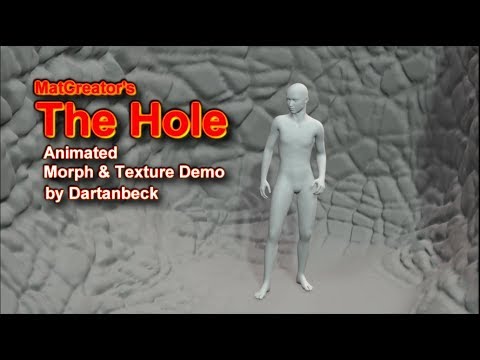
Dartanbeck's Journey - CG FilmmakingDigging through stuff... it's been a while since I've seen this one. I should explain first:
MATcreator and I were discussing a bunch of possibilities and such and, on a totally unrelated note, he was putting the finishing touches on a really cool product and asked if I could help make a promo video showing off the various morphs and texture capabilities of this thing - it's really quite awesome - I wish he would have put it in the store!
Anyway, I was editing the animated renders together but when I started to add subtitles to explain what was going on... what morph and what texture was being applied, it was obscuring the render too much. Hmmm... Maybe I should turn on a mic and talk through it? Hmmm...
In the end I decided to write a song with spoken lyrics. So for the first voice (morph... xxx) I lowered the pitch of my voice way down. For the second voice (Texture Preset...xxx) I just whispered into the mic. For both voices I added a really strange Chorus setting to make it feel... strange - and it does, I think :)
With that I introduce a really cool unpublished product: The Hole
 MimicMolly's Renders & WIPs
I decided to grab this freebie, Lady Noir v2 for G3F, except I converted her for G8F. Her skin is Osuine's...what people say the "godtassel girl" has. Hair is by Catherine3678ab.
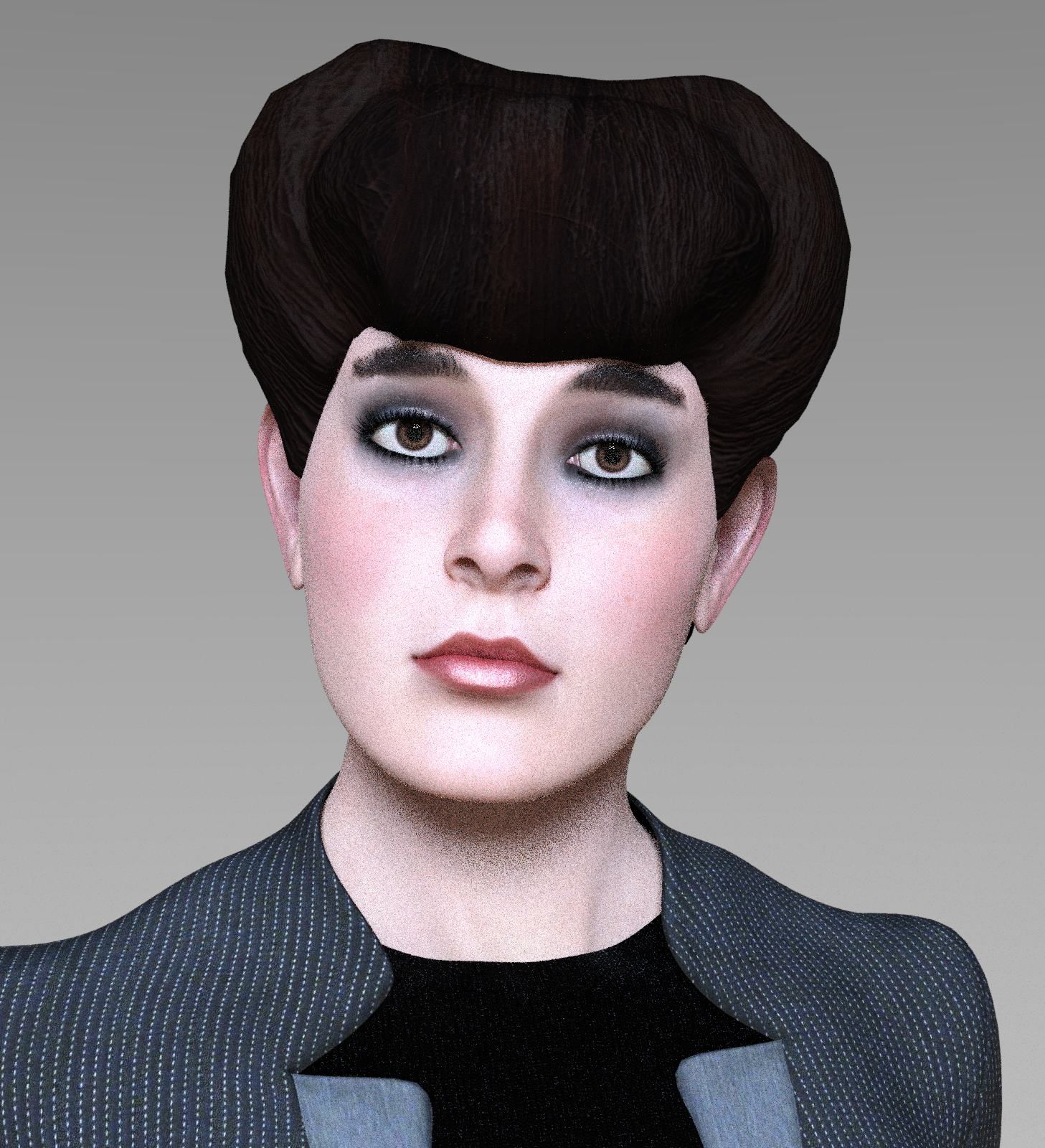
I have been having some problems with DS lately. It crashed multiple times and shut down my laptop with it. Then, for some reason, my DS layout got reverted to some weird default, but I managed to fix that. I like this character, as a "Stephanie 5" look to her. Maybe I should render them together some day.
V4/A4 Pose Transfer to G8FMy pleasure. Just hope it's useful.
@takezo_3001: Sorry but I am so rudimentary in my scripting knowledge that I don't even know where to begin with animations at the moment.
I have installed Aiko 4 on my machine, and found the script works in the same way as with V4, so can use that to.
I am going to see about the male figures now and see how that goes, but it's possible I may divert myself into a G8F to V4 pose transfer at some point too.
Regards,
Richard
Not at all, your scripting prowess far exceeds my own, I even struggled with Auto Hotkey, I'm just overjoyed that you would share your scripts with us; but don't concern yourself too much as practice make perfect!
Thanks again!

Daz 3D is part of

Connect
DAZ Productions, Inc.
7533 S Center View Ct #4664
West Jordan, UT 84084Licensing Agreement | Terms of Service | Privacy Policy | EULA
© 2026 Daz Productions Inc. All Rights Reserved.