-
Daz Studio 4.14 Pro, General Release!
Looks very nice, and so fast rendering too.
Would be ever better if G8F characters didn't take SOOOOOOOOOOOO long to load... By the way, if any trick to reduce loading time exists anywhere else on this forum, i would love to see it.
Load time depends on how many G8F characters and morph packages you have installed, because it loads all the morphs from these.
New DS Filament Render EngineI dunno what the big deal is. If you want to use it, do. If you don't, don't. You still have everything you had before. I'm sure it'll improve over time.
Laurie
What could be the deal here?!
Paying money again for some materials, just to make something look right in a new "engine" may be a point (...not to mention new texture packs for the new hot filament shape, character whatever...)
Losing time (again) because of the lack of references, tutorials and so on (biggest community = biggest possibility to SOLVE problems we run into and if you ask me, Blender is the way to go...)
Losing maybe even ressources to the real problems many different features have, that should be solved (...the bridges are also new but still not there yet and they are a real improvement, when they work)
I mean they could have maybe cleaned up the library, writing a script that tells us if we have all our content, fixing missing texture paths, improving rendertimes, by adding a free feature for "best rendering results", because it is possible to render faster and if this is possible, even the iray viewport can be improved by a lot. They also could have changed the database structure, adding features like "Environment, Cars, Motorcycles, Kitchens, Roofs, Socks... whatever...) The library like it is, is a mess. And it seems materials for clothes, hairs, whatever can be here and there... nobody cares it seems. Setting up a scene could be so much faster, just by reorganizing everything there is. I mean i have nothing against vendors, that have their small link in the product, but why does daz allows to have items all over the place with nearly NO real system to it?!
There is so much that could be improved in the program, that it's even hard to tell where to start...
If i look at Blender: The crowd works for them, creating addons, materials, features and so on... If something is used really often and is helpful, they add it to their standart and push further with nearly every update there was in the past. Evee can now render real time alike photorealism and it does not make to much of a difference to render then again with cycles. There are differences yes, but you can rely on the fact that if it looks good in evee, it will work in cycles even better, just by tweaking some little things for the shaders.The complexity is also a big point here. It's still far from easy to create skins, arrange a scene, setup lights, rendering settings and so on... In blender you learn one time how things work and you can be sure of the fact that will not change in years! Also on the SHB changes broke the shaders of the hair in general. I cannot use the materials - one click - like i set them up a while ago... Things like that is like messing with the user. Do it to often and the user will say: "You know what, i transfer the model, environment and so on and use my shaders of my faforite render engine, because there everything works properly scince day one!"
And animation and posing is not worth the pain... Sorry but that would only be the case if daz would have features like "no wrong bending", free partial animation sets and so on. So to speak: Features that nobody has an would make it easier to do realistic animations, without breaking a sweat. If daz would have realized a few years ago, that animating features like a closing hand, a bending arm, a scratching on the head, would be powerful it would have been a lot more crowded here, since it was hard to transfer the animations into another program. Right now even that is possible. But now it's way to late, since nearly every bigger 3D editing program has them already in a good quality and even realistic ones are totally free to get and easy to transfer.
So in the end, Daz is still slower when it comes to rendering - even if they know how to improve it for sure - but they don't share it for free, same with the shaders, lights, camera settings, same with the poses, same with scripts and so on... just the wrong way to go, when nearly everyone arround them rushes into open source. Everyone should think of content creating more in a manner of "time saving". Someone build a pirate, someone a dog, someone a unicorn, dragon... whatever. That's what someone pays for, not for some textures, some shaders, some scripts... because everything is already out there and most things are out there for free too. You cannot even tell the difference anymore, this much content is out there. But who needs 500 wood textures, shaders... who needs 100 - similar - hands, that close to a fist, winks, smiles?! Right, nobody. But our whole texture, pose, shader or material database is full of those similiar things. What do you think is the reason the library is so extreme big?! Because it's a mess... And everyone claims to have "the wood texture...", creates a folder for themselves ... yeah slightly changed, often not even noticable but still probably from somewhere else.
I mean look at the hairs... just take a look at the textures of the hairs... do you notice something?! A few blurry lines all over again and again and again... mostly only black and white. Why do we need hundreds of them, if 10 would be enough?! And you wonder why a scene gets too big... i tell you, no wonder if you use 20 different hair textures in 2-4K and could not even tell the real difference, when you would just choose to take one of these blurried line textures on all the hairs... same goes with wood, metal, glas, fabrics of any kind...
Daz would be amazing if they would realize what they are really doing wrong! And would become faster on it's own in the process...Hi, im new to Daz. Need help with manual installations.Hi there i was wondering what file path should i be using installing the fallowing items, I'll show a list as well as some dropbox hosted screen shots below of what the contents are.
1. Folder and paths reads as....
Data-DAZ 3D-(folder 1) Genesis 3 (Folder 2) Genesis 8-Female-Morphs-Batov3D-(morph title)! for Gensis 8 female
screen shot below
https://www.dropbox.com/s/ds1bn2e83xk74vx/Screenshot (239).png?dl=0
2.My 3d Library-(folder 1) data (folder 2)- DAZ 3d-genesis 8- female- Morphs-Ion- real feet 2
https://www.dropbox.com/s/g8q1hvlfuwm6khc/Screenshot (239).png?dl=0
https://www.dropbox.com/s/glyk6dbp5qxvdrg/Screenshot (240).png?dl=0
test
AIUTO...CHI CONOSCE L’ITALIANO? PARTE DODICIcioeSalve spero qualcuno possa aiutarmi ...ho installato headshop 11 per mac, tutto ok...ma volevo sapere come si fa ad uniformare i colori del viso col resto del corpo. voglio dire il risultato non è così esaltante...vorrei eliminare l effetto mascheraCredo che quella sia la texture presa drettamente dalla foto, devi usare una skin del character che stai usando
cioè devo mantenere la skin originale del character mi stai dicendo? per esempio se uso genesi 3 female dovrei mantenere quella skin?Io usavo una versione ottaugenario dello stesso, e con l'unico character che creai all'epoca, usai una skin di base. In pratica creai un character con un morph per V4, da una foto di mia moglie, però la foto naturalmente non combaciava con l resto della texture, e usai una skin per V4. Non l'avessi mai fatto, mia moglie inizio a provarsi tutti i vestiti di V4 che avevo, trane naturalmente quelli troppo eccessivi.
E magari ti ha chiesto di comprarle nel mondo reale uno dei modelli DAZ per andare al cinema!
 Mi immaguiono già a entrare in una boutique e domandare "Vorrei Blinded by the Light per V4, insieme agli UniMesh Fit per mia moglie. Ah, e non dimentichi la Interactive License, non si sa mai..."
Parlando di "casa nostra", assolutamente impensabile fare acquisti i questi giorni... Perderò anche queste offerte.
 Ci sono un paio di nuove uscite per Filament e alcuni plugin che meritano, peccato!Daz Studio 4.14 Pro, General Release!
Still not possible to save a character with all the morphs in the new Daz 4.14. Great....

What do you mean?
I created a character, with my own morphs and saved that as a character preset, morphs not showing up. Have several problems. Materials not changing, crashes, sometimes it simply doesn't start.....
 . Last 7 minutes it starts, then shuts down with no error report....
You need to save those morphs first as an morph asset to the base figure.
If you just import OBJ:s as a morph, you can save the figure as Scene Subset or Scene, but saving as a character preset dosesn't save any external assets like the hair, clothes or any imported OBJ:s
Daz Studio 4.14 Pro, General Release!Still not possible to save a character with all the morphs in the new Daz 4.14. Great....
What do you mean?
I created a character, with my own morphs and saved that as a character preset, morphs not showing up. Have several problems. Materials not changing, crashes, sometimes it simply doesn't start.....
. Last 7 minutes it starts, then shuts down with no error report....FYI, The thread you were previously posting in that i linked above was alot about animation timeline and lost morphs for whatever is not on the timeline slot where you saved.
If you go save as> support asset> morph asset then your new morph will work 100% of time and be callable for any new characters.
I will try that, if i get it to stay open. Because right now, it just shuts down.
Daz Studio 4.14 Pro, General Release!Still not possible to save a character with all the morphs in the new Daz 4.14. Great....
What do you mean?
I created a character, with my own morphs and saved that as a character preset, morphs not showing up. Have several problems. Materials not changing, crashes, sometimes it simply doesn't start.....
. Last 7 minutes it starts, then shuts down with no error report....FYI, The thread you were previously posting in that i linked above was alot about animation timeline and lost morphs for whatever is not on the timeline slot where you saved.
If you go save as> support asset> morph asset then your new morph will work 100% of time and be callable for any new characters.
AIUTO...CHI CONOSCE L’ITALIANO? PARTE DODICIcioeSalve spero qualcuno possa aiutarmi ...ho installato headshop 11 per mac, tutto ok...ma volevo sapere come si fa ad uniformare i colori del viso col resto del corpo. voglio dire il risultato non è così esaltante...vorrei eliminare l effetto mascheraCredo che quella sia la texture presa drettamente dalla foto, devi usare una skin del character che stai usando
cioè devo mantenere la skin originale del character mi stai dicendo? per esempio se uso genesi 3 female dovrei mantenere quella skin?Io usavo una versione ottaugenario dello stesso, e con l'unico character che creai all'epoca, usai una skin di base. In pratica creai un character con un morph per V4, da una foto di mia moglie, però la foto naturalmente non combaciava con l resto della texture, e usai una skin per V4. Non l'avessi mai fatto, mia moglie inizio a provarsi tutti i vestiti di V4 che avevo, trane naturalmente quelli troppo eccessivi.
Mesh Grabber (not in tools)From the "About Installed Plugins" info (i.e. I read a post where the .dll was installed to the wrong directory, I checked that)
Filename :
C:/Program Files/DAZ 3D/DAZStudio4/plugins/MF_meshmorph.dll
Name :
ManFriday's Mesh Grabber Morph Editor
Author :
ManFriday
Version :
3.0.0.0
Help with Genesis 8 maleiv have been noticing that i have a problem with Genesis 8 figure does not matter what morph I apply I still get this ugly morph that messed up my animation/pose on the right arm can anyone help? it's getting really annoying now i don't have that many male models and most of them are creatures/monsters, if you know how to fix it please let me know thank you
thanks ^^
[Released] Character Converter from Genesis 2 Female to Genesis 8 Female [Commercial]Okay.... As promised, I kept trying. There is a Genesis 2 Female head morph called Sunehri. Once it is dialed past 15%, then it starts to mess up the G8F Teeth. I thought that you would like to know in case anyone else asks. This issue is now solved.
Thanks for your help and patience.
-DrDrk
Instancify looks pretty greatSo, if there are too many people for the scene to fit into the graphics card memory, could this turn the human figures into instances and make them fit? Would they have to all have the exact same morph and texture?
Well in the third image down on this page:
http://www.redhen-publications.com/hoggywarty2019.html
Six of the kitchen elves are instances, just posed in different places at different rotations. So, yes, you can instance people. But I don't think a script could do it. You'd have to do it manually.
Daz3d - Armor creation workflow - Blender - Transfer UtilityHowdy all.
I have been trying to make armor and clothing for my Daz characters in Blender and then using the transfer utility to have them conform to the model. I have done it the past but with the new version I can't seem to get it to work correctly, as the blender OBJ clips through or behaves oddly when using the transfer utility to assign it to the character model. The Blender OBJ imports correctly and is placed where it should be so I don't think it's a scaling or geometry issue?
Is there a documented workflow for creating armor and clothing and then using transfer utility? I have tied Youtube but not much luck.
Frustrating as I know it can be done lol, just feel like I am going in circles ;]
Morph Loader Pro: Geometry did not match.Using the non-default sahpe for the figure wouldn't cause an actual error, though the results might be undesirable (without using Reverse Deformations to strip the shape out of the morph)..
Instancify looks pretty greatSo, if there are too many people for the scene to fit into the graphics card memory, could this turn the human figures into instances and make them fit? Would they have to all have the exact same morph and texture?
Instances need to be identical in all respects apart from their root translation, rotation and scale. This means identical posing, but in a large enough crowd, having a few different versions to choose from usually isn't too obvious.
It really does look very usefull for those of us who use the older products, or stuff that was built cross-platform. I'm mildly concerned about it stalling out if there are already instances in the scene, though. Quite a lot of my built and saved scenes have already instances, although I suspect that duplicates could still be further reduced.
Still, I can definitely see running this whenever loading an older set as a preparitory step before starting with the new scene build.
If the scene has instances it will cowardly refuse to touch anything
Hmm. That's a bit of a hassle if for whatever reason you need to swap out parts of the environment later on in a build. I'll often set up the core of the scene and then load/fit in the background environment later, and sometimes that "core scene" does involve instances.
(For example, I've been recently experimenting with using UltraScatter to generate instanced raindrops, which has surprisingly turned out to be less demanding on my low end machine than rain "cards" are. There might be 100,000 rain drops, but most light rays only hit one or two on average, as opposed to having to be calculated each time they hit a card. And, of course, it just looks so much better, with proper detail and depth to the cloud of droplets).
... but, nonetheless, I've been waiting for something like this for a good while, so I'm nonetheless very pleased to see it hit the store!
Instancify looks pretty greatSo, if there are too many people for the scene to fit into the graphics card memory, could this turn the human figures into instances and make them fit? Would they have to all have the exact same morph and texture?
Trying to save reduced morph version of G8F - missing data morphs subfoldersI uninstalled and reinstalled all of my Gen 8 content including starter essentials. Same outcome. Some of the morphs can be written out with a new figure/prop asset, but not others. In the attached, the Victoria morph is recognized by the loaded figure, but the morphs have not been written out to the data file. Other Gen 8 morphs have.
Mysterious
SOLVED: Trying to get R3DS Wrap to work on G3M - Rigging problemsTL:DR
Hi guys,
has anyone managed to succesfully use Russian3DScanner's Wrap program on a Genesis figure (I've been testing on G3M) and got the rigging to work properly? I seem to end up with a wrapped mesh that somehow differs in exact geometry and thus prevents me from using morph loader pro, leaving me to use transfer utiliy instead (as per the tutorial actually). Any links, experience, frustrations or advice much appreciated. I'll post a detailed process below.
Thanks!
[pre-publishing edit: I seem to have stumbled on a workaround along the way, but I'd still like anyone's input]
Long Read:
1 - I load a G3M in Daz (The one in Content Library - People- Genesis 3 Male, don't know if that matters, the one that doesn't load with iRay textures) it loads in at High Resolution, with SubD level 1. Then load my 3D scanned mesh. I tried posing G3M to match the scan loosely. (I moved the scan to the side for the screenshot, but exported them both at zero)
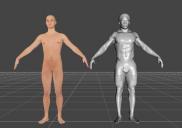
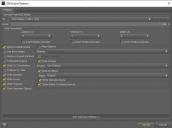
2 - Export both as OBJ with these settings
3- In Wrap (2020 in my case) I'm following this tutorial
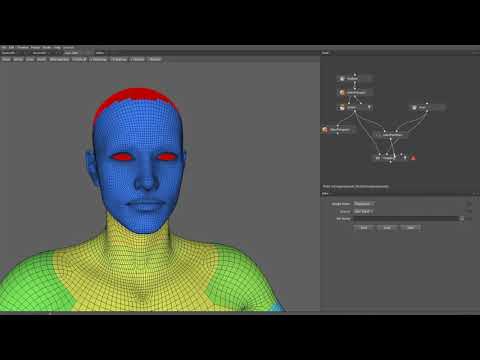
at 0.25 speed 'cause whoaw! I create a LoadGeom node for each, then off the G3M node, I create a SelectPolygons node, double click G3M and from the " - Polygroup " tab I select UpperJaw, LowerJaw & Tongue. I do not load in a .txt file (possible suspect right there!)
4 - I create a subset linking G3M and the SelectPolygons node, and then a SelectPointPairs node between the subset and the scan node.
5 - Before wrapping I create another SelectPolygons node from the subset and hide everything behind the eyelids, everything up the nostrils, everything inside the eard drums and everything behind the lips; then Invert, Unhide All, Invert to have what was hidden selected in red. What isn't red should now be computed to wrap.
6 - I then wrap with these settings (subdivisions 3, another suspect right there!)
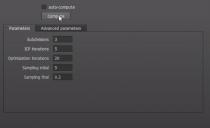
7 - After wrapping, some Brush work. Then a Lattice node connecting G3M, its subset and the Brush node we just created and edited.
8 - A second Brush node to clean up the eyes. Then a SaveGeom node from that last brush node with these settings:
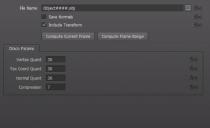
9 - Back to Daz, importing the wrapped mesh with these settings
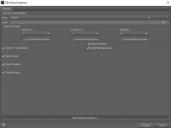
10 - The wrapped mesh loads in with a similar wireframe resolution (unless I'm completely blind) but it does load in at Base Resolution, SubD level 1 (G3M exported at High Resolution, SubD level 1, remember). It also loads in with iRay textures, I honestly cannot imagine that being pertinent in any way.
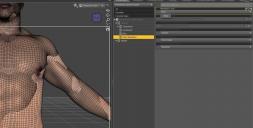
11 - Deviating from the tutorial, I try using Morph Loader Pro but there's a geometry mismatch:
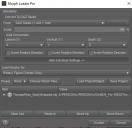

12 - Back to the tutorial then, with Genesis 3 Male selected (and the wrapped mesh also loaded in the scene, not selected) I launch Transfer Utilty with these settings:
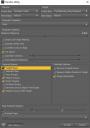
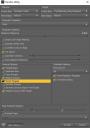
13 - The resulting mess is a sum of the pose data, but when I zero figure pose it returns to the shape of the wrapped mesh (only with zero-ed bones)
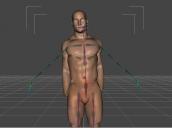
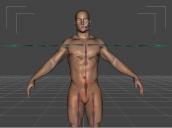
14 - Adjust Rigging to Shape, then? I don't know what any of these checkmarks mean, so I just press Accept. The result seems to only mutilate his hands
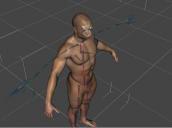
15 - Well this is awkward. I'm documenting this while I'm doing it to illustrate my struggles but seem to have stumbled onto a possible way forward, I'm not holding my breath for it being a solution though, it can't be, anyway... So: UNDO Adjust Rigging to Shape (I think this is what I didn't do yesterday??) and try that other rigging option "Transfer Rigging (Figure Space)" by clicking on the source in the scene tab first, G3M then ctrl-click/cmd-click the traget second "our Transfer Utilitied thingy"; then from the scene tab hamburger menu: Edit-Rigging-Transfer Rigging (Figure Space). I don't know why this is working today and not yesterday, I must have done something stupid yesterday. Anyhow, let's keep going, I'm sure there'll be problems down the line.
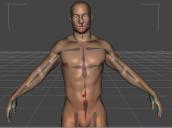
16 - The figure is now rigged somewhat more accurately but its pose is zero-ed in all parameters. So I counter this by comparing the posed G3M and basically doing the opposite on our new figure. (i.e.: Left Shoulder Bend - Twist : -2.56 becomes 2.56 on the new figure). That gets us here, The rig looks off-center and hands and feet and face are a mess
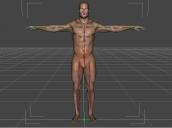
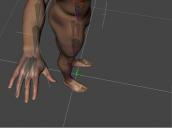
17- So in theory we could now zero our posed G3M and meticulously pose our new figure to match its placement to the zero-ed G3M, then export OBJ again and Transfer Utility. I'm making it up as I'm going along here, I didn't get this far yesterday.
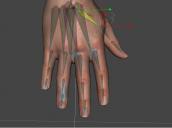
18 - Okay, that's done. I had to do it twice 'cause like an idiot I had also started posing the zero-ed G3M, leaving it unzero-ed obviously. Seems I can now animate the character, shape it, give it an expression... So this does seem to be a workaround.

Still, the real problem here is the geometry mismatch. I'm glad I fumbled my way into something other than a dead end but working with Morph Loader would be immensely better. That way I can save it as a morph, dial it in when I need to, save the head and body as two different morphs (You'll have noticed I hadn't wrapped the head in my examples, thinking exactly that). Hell I could even morph from one head scan into another (if you're thinking 'bout my baby, it don't matter if you're black or white...) But all this isn't working because I don't know what I'm doing. So my asking for help still stands. And let's be honest, the method I tripped into can't be all that precise. Unless that's exactly how we're supposed to do it, for... reasons... Dunno...
Thanks
xx mom
Skin Builder 8 for Genesis 8 MaleThe Genesis 8 UV Swap product has special UV sets that allow you to use G8F skins on G8M and vice versa. It's very handy, and would definitely solve your problem of the female skin not fitting the male figure properly, denisnormandin. Also, if you ever try again to make an androgynous character on G8F and your main difficulty is getting the chest area flatter, you might want to check out either Growing Up for Genesis 8 Female, Breast Utilities for Genesis 8 Female, or even the Transgender Shapes product. They all have morphs that would help with that. There's also a free set of morph dials called Transgender Genesis 8 by AgentUnawares on DeviantArt, which are morphs that affect the entire body as a whole, rather than certain areas.
Skin Builder 8 for Genesis 8 MaleThis product allows you to use G8F textures on G8M, and vice-versa, by providing alternate UVs for each figure.
So if you have it you can use skin builder to create a texture for G8F then apply the result to G8M using G8F UVs.
Another thing you can do if you have that product is to use Map Transfer feature in DS to convert textures made for G8M into textures made for G8F, and vice-versa. So if you want to add features to a G8M texture using Skin Builder you could use Map Transfer to convert is to a G8F texture, apply it on G8F, then use Skin Builder to modify it. Then you can apply the result to G8M using G8F UVs.
Daz 3D is part of

Connect
DAZ Productions, Inc.
7533 S Center View Ct #4664
West Jordan, UT 84084Licensing Agreement | Terms of Service | Privacy Policy | EULA
© 2026 Daz Productions Inc. All Rights Reserved.