-
Anyone know this hair?
Any idea how to fit Ali's hair effectively to Genesis 8? A lot of the hair products come with a pose for "Victoria 8," but I can't get that to work in Daz on a Genesis 8 figure.
Who are these models?That first one is a Rarestone character, not sure if it's Kayla or Fredda. Both are unavailable. The second one is Victoria 8.1.No one asked me - Diomede screenshots on whatever - Warning AI Discussion OKModeling for a Targeted Shape of Genesis 9 - Marvelous Designer
I posted another screenshot tutorial in the Art Studio Forum. Before the release of Genesis 9, I went through an example of creating a skirt for Genesis 1 because G9 was rumored to be like G1 in a unified shape. Rumour turned out to be true. In this screenshot turoial, I use Marvelous Designer to create a simple loose skirt with many folds designed for the Victoria 9 shape. The resulting figure might be optimized for Victoria 9, but it can also be used with any G9 shape, such as a kilt for Michael 9, or a battle dress for a male demon. The tutorial also includes creating shader domains and UV Mapping in Marvelous Designer. I then export the OBJ to Studio where I rig from the V9 shape back to the base shape. Demonstrate a couple DForce posing and morph shape examples.
Might be useful for Carrara users intending to make G9 items for use in Carrara as conformers or with VWD.
https://www.daz3d.com/forums/discussion/comment/7884426/#Comment_7884426
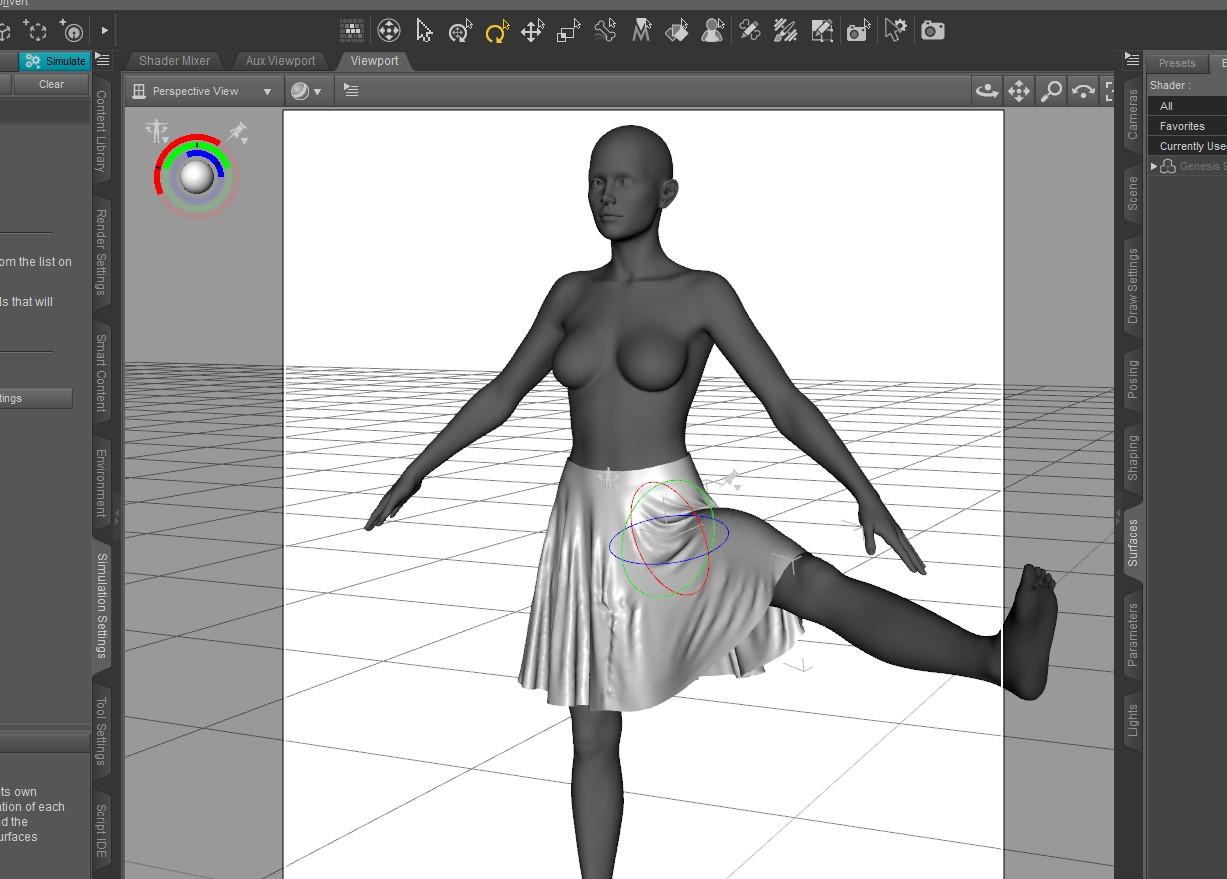
 Making Clothes to Victoria 9 Shape - Marvelous Designer to Daz - Screenshot Tutorial
Greetings. I have posted a series of screenshots demonstrating one method to make a simple loose skirt designed for Victoria 9 and rigged for Genesis 9 more generally. Intended to be DForced. Used Marvelous Designer to make the skirt OBJ.
First post in the screenshot series begins here. https://www.daz3d.com/forums/discussion/comment/7884426/#Comment_7884426
My screenshot tutorials are designed to be supplements for the various videos available, not substitutes. I recommend threads by Mada, Bohemian3, and Jay Versluis for links to videos for this topic.
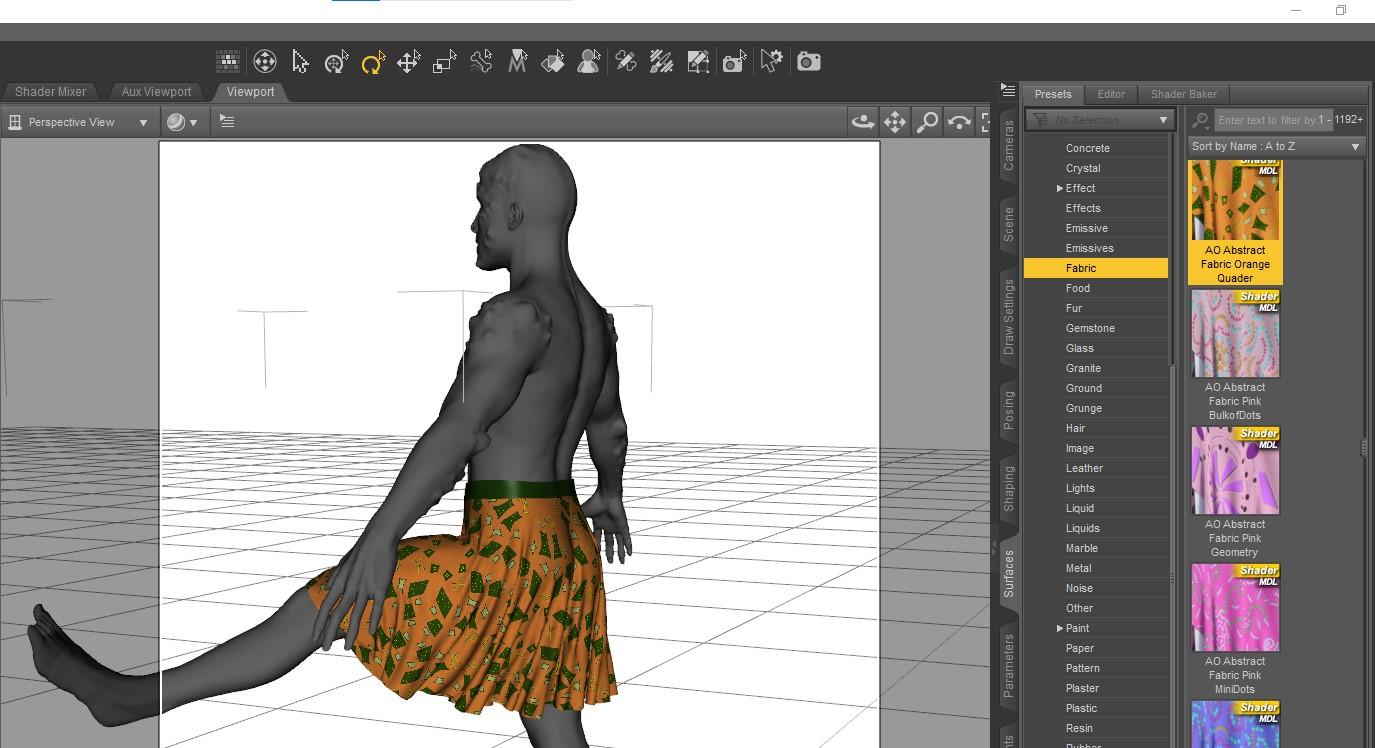
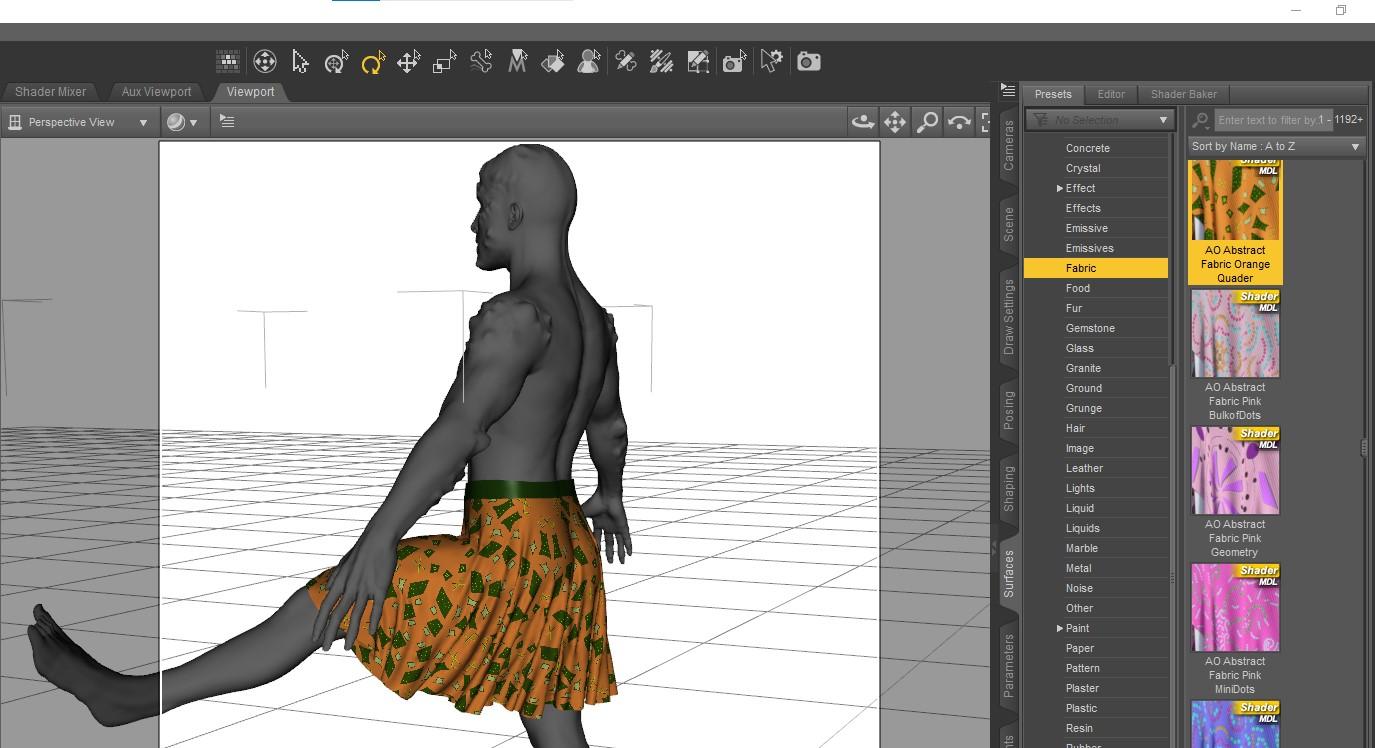
Even though this skirt was designed for Victoria 9's shape, here is the result for a G9 morphed as a mix of a male and demon without any V9 dialed up. Reasonably happy with the drape result and with pattern not distorting too much during drape and pose.
 Diomede's Notepad, Sketchpad, and Chilling Pad
Testing with Poses and Morphs
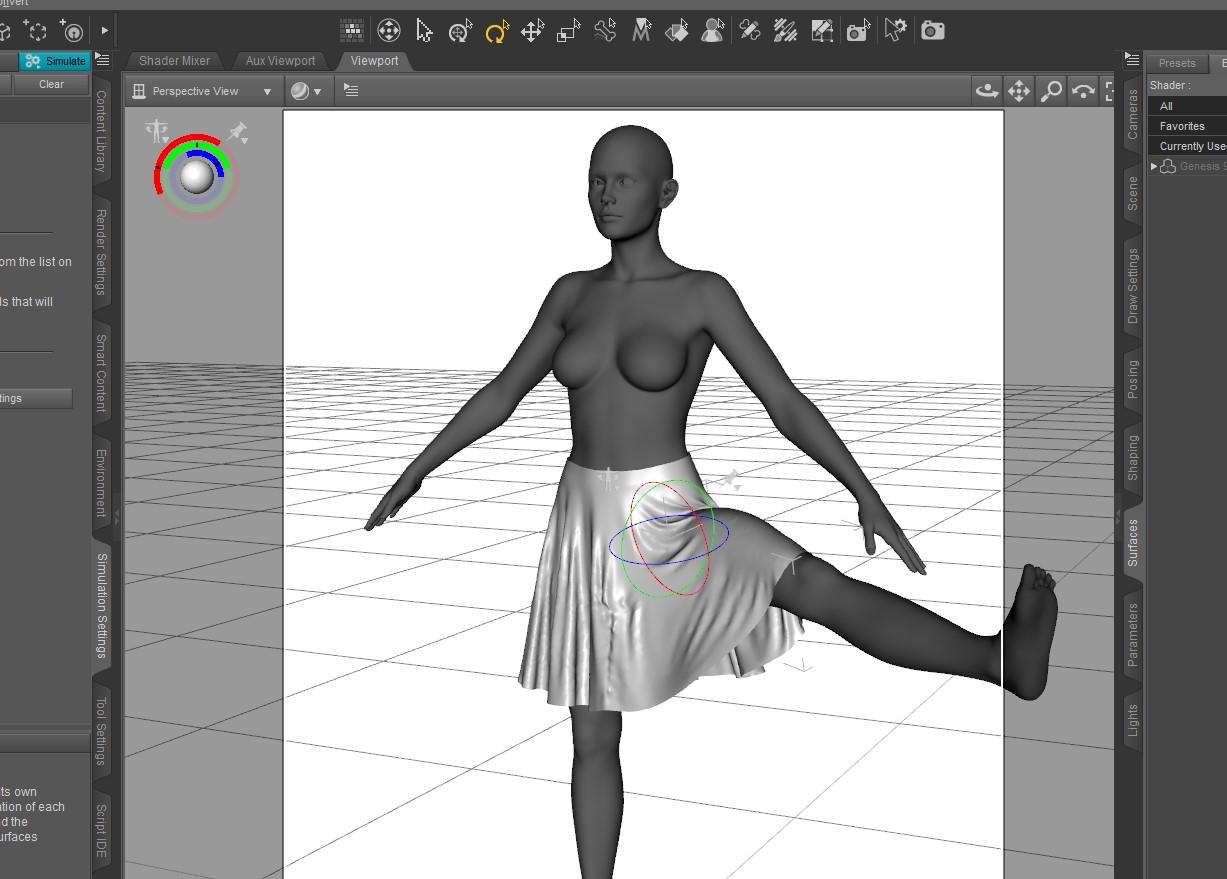
- Here are some DForce tests with the figure posed and morphed and a pattern applied to the skirt
- Test with Victoria raise leg
- Test with a V9 at 0, then dial up mix of male and monster raise leg and new DForce
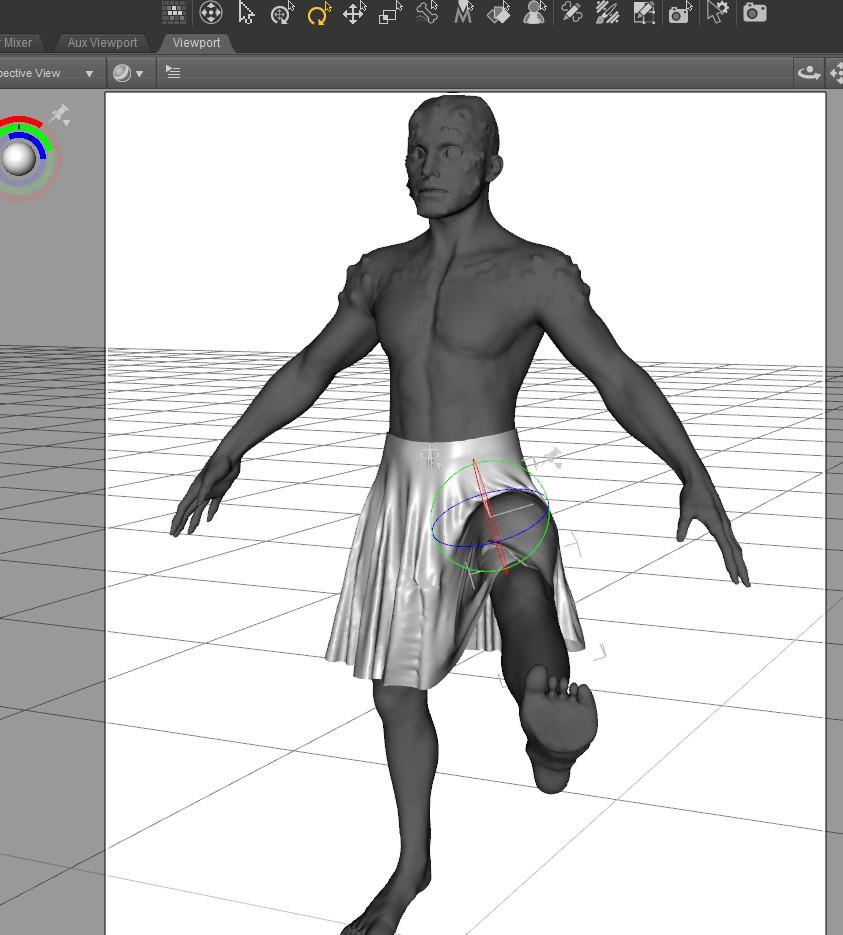
- test of quality of UVMap by applying a pattern texture, pretty good, the pattern does not seem distorted by the folds or the pose
Diomede's Notepad, Sketchpad, and Chilling PadImport Skirt OBJ to Daz Studio
- Open Daz Studio, load the G9 Development Figure, and Dial to Victoria 9 (don't change V9 proportion dial)
- Import the saved skirt OBJ exported from Marvelous Designer
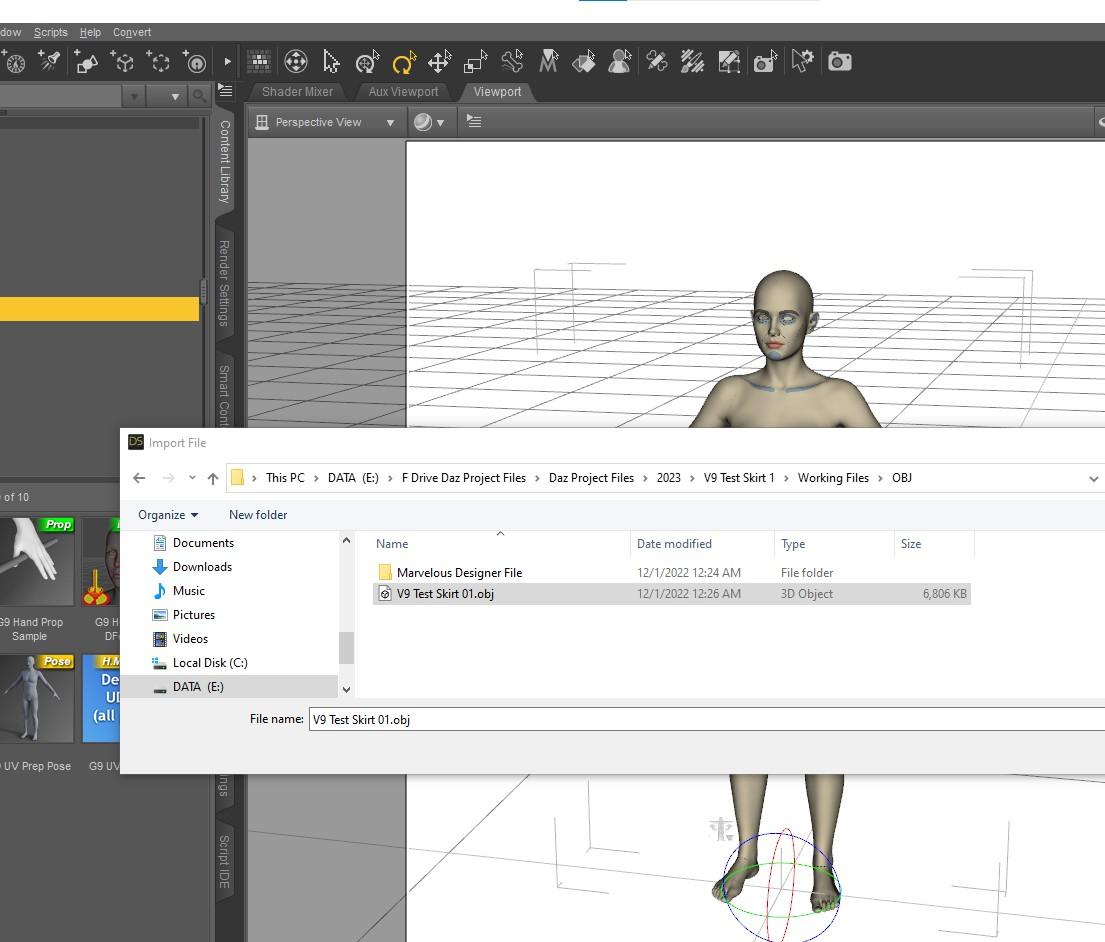
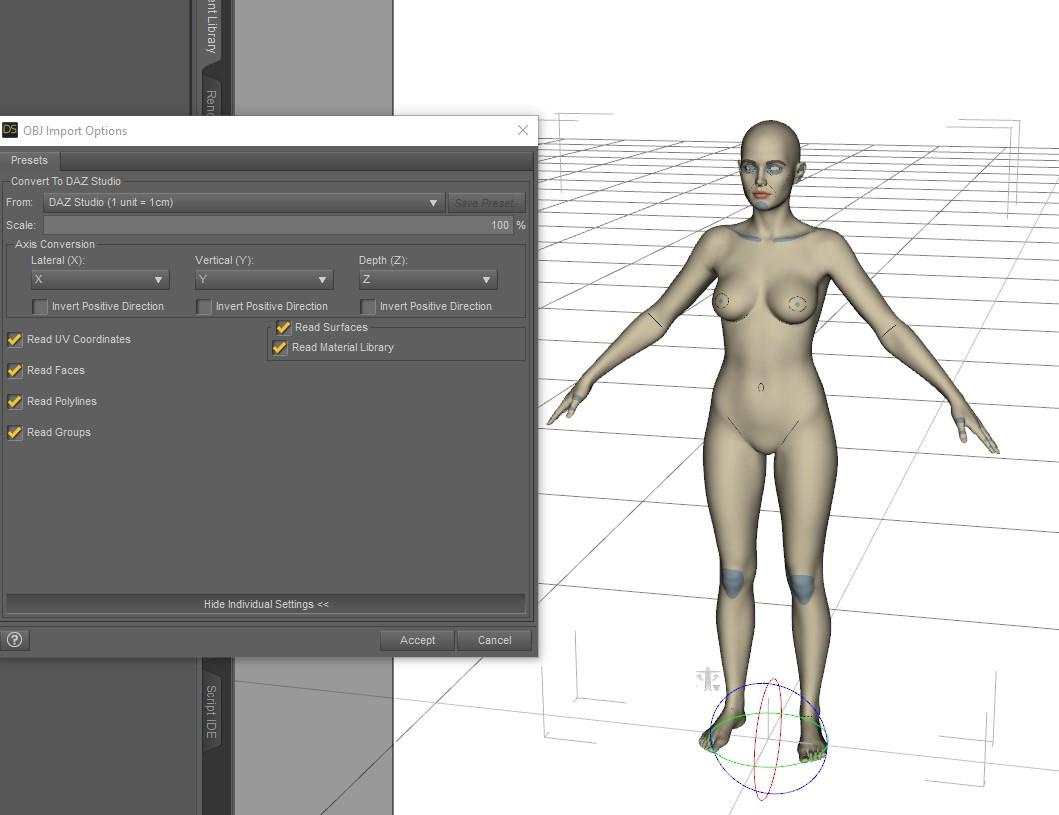
- In import settings, make sure scale is Daz Studio (or consistent with whatever you used exporting from MD)
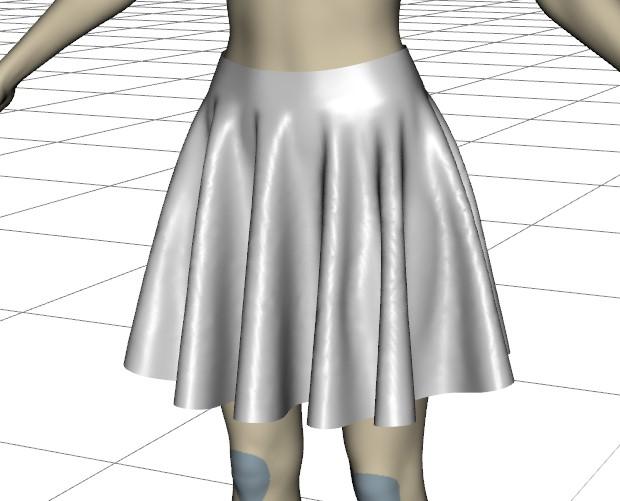
- Yay, my skirt OBJ loads to fit the G9 shape for Victoria 9 (not proportion changed)
 Diomede's Notepad, Sketchpad, and Chilling Pad
Victoria 9 Loose Folds Skirt Marvelous Designer to Daz Studio Workflow
Create an Victoria 9 Avatar for Use in Marvelous Designer (note, my version of MD is not the most current)
- Start a Daz Studio Scene and Load the Genesis 9 Development Rig (not Victoria 9 character because that has some scaling). I applied the material for body references but not necessary.
-- Mods! This is not a naked Genesis 9. This is a textureless G9 weariong a bodysuit with detail references.
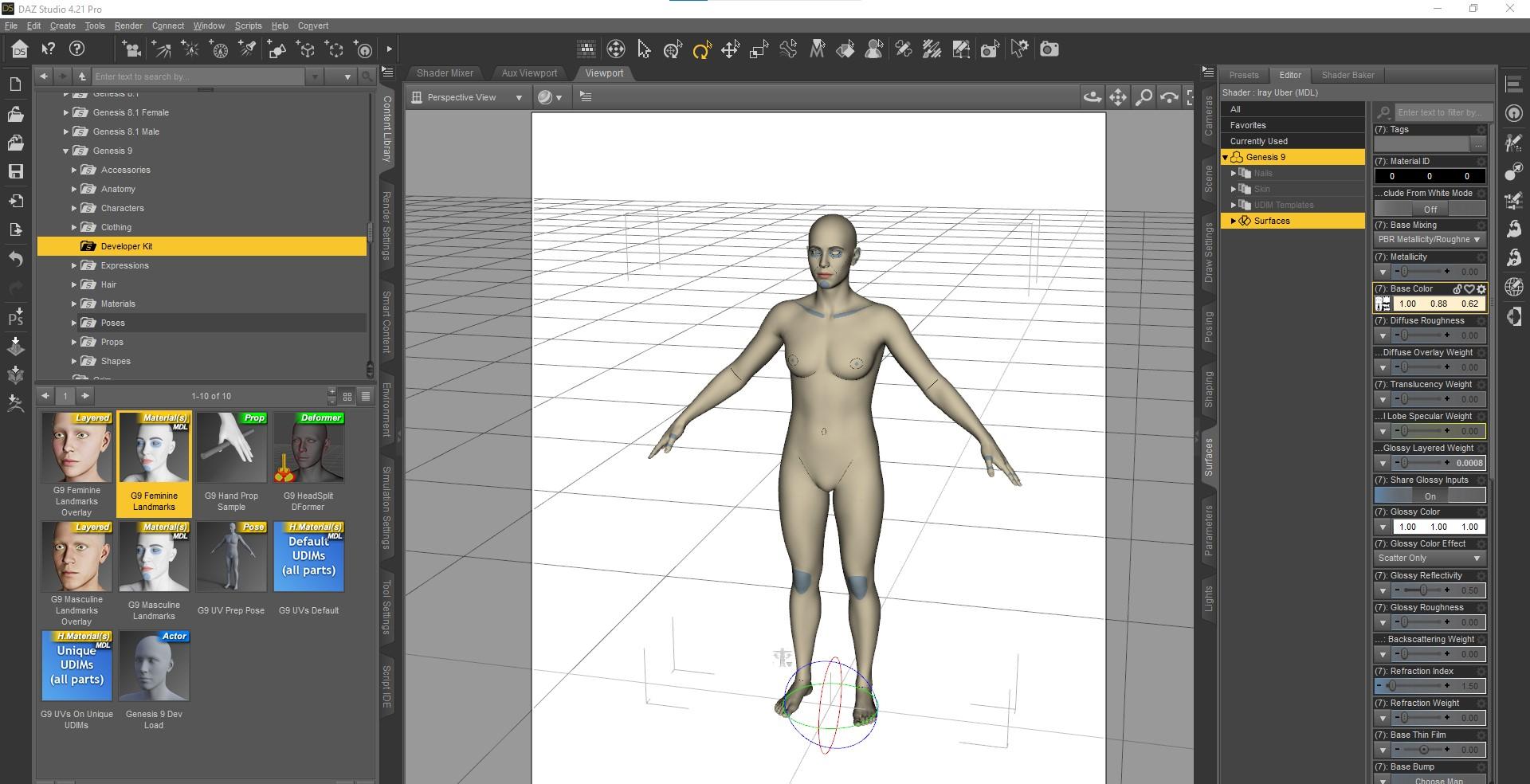
- In parameters tab, dial the Victoria 9 morph to 100, but do not touch the Victoria 9 proportion dial.
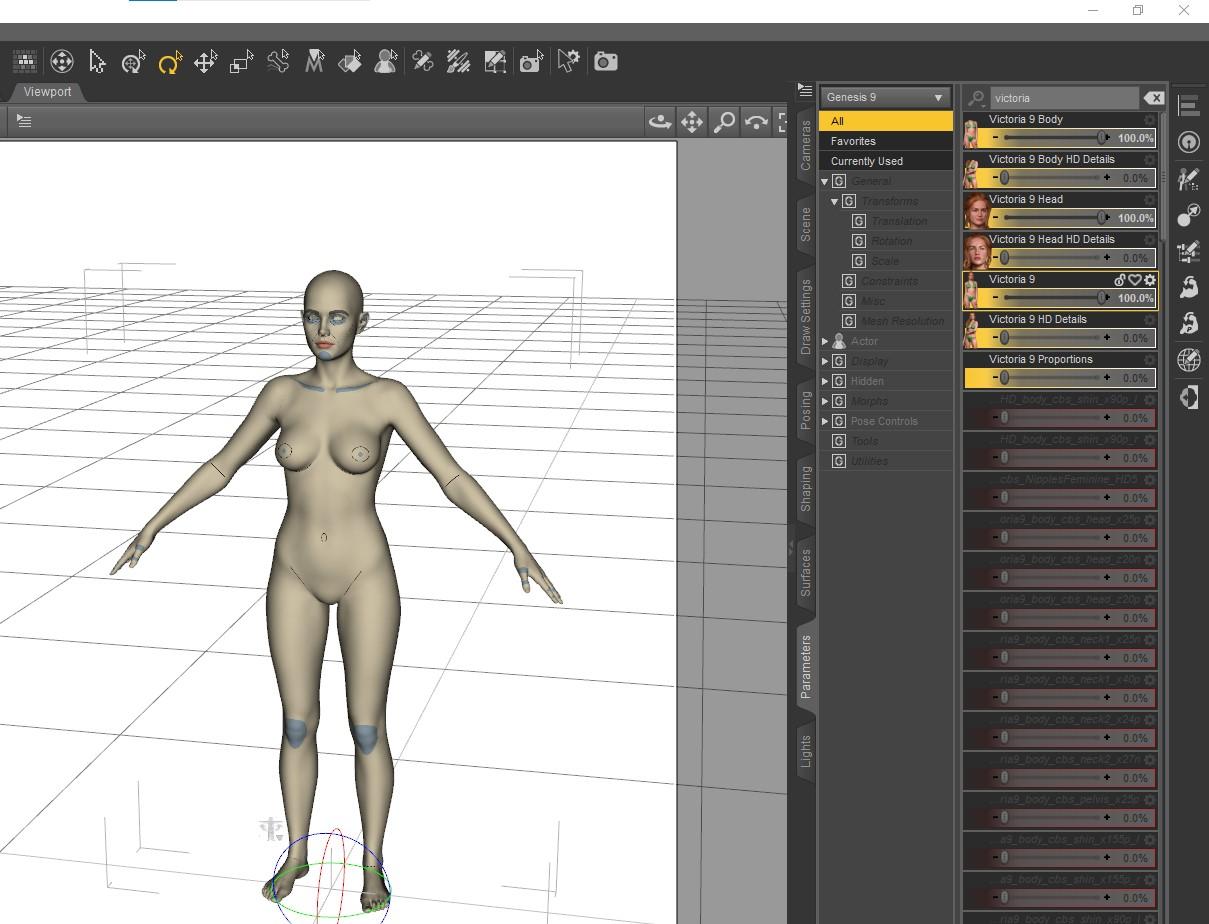
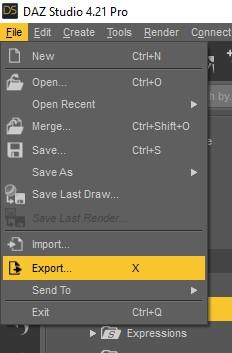
- Use File Export to save out the obj. I am using the daz Studio scale because Marvelous Designer has an option for the same scale. Just be consistent.
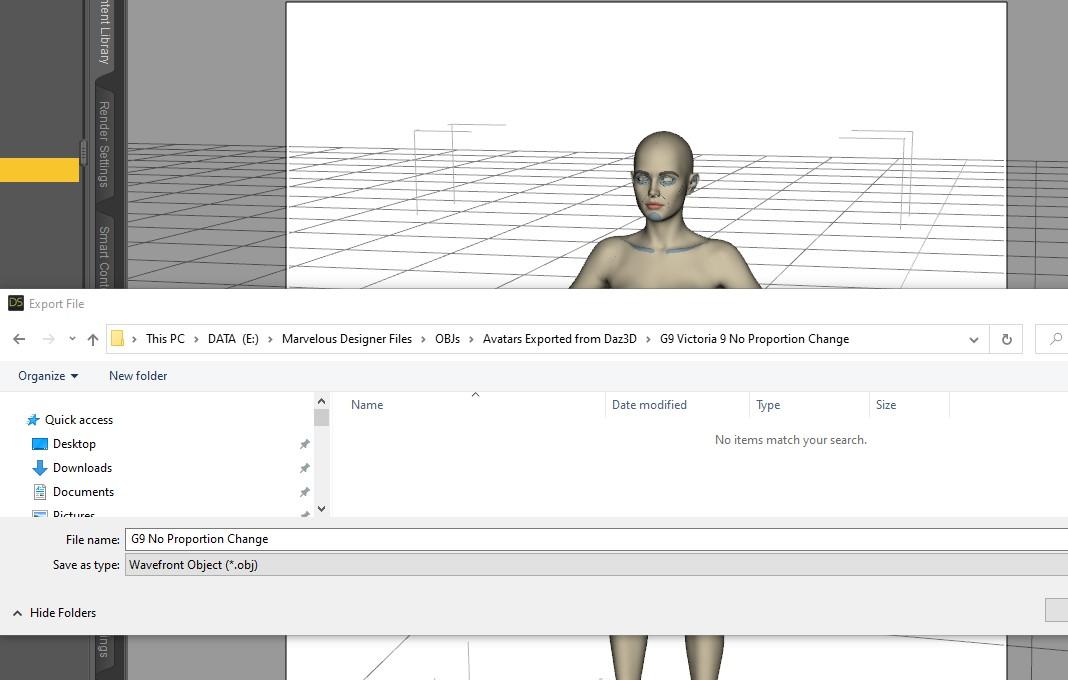
- Save to a place where you can find your Marvelous Designer Avatars. I save to my MD dedicated Avatars folder where MD looks by default but just make sure wherever you save you don't forget.
 Diomede's Notepad, Sketchpad, and Chilling Pad
Diomede said:
Practice Workflow for Upcoming Genesis 9
Return to Genesis 1
Genesis 9 and Genesis 1 each uses the same base for both the female and the male figures. This is different from Gensis 2-8 which had separate figures for male and female. In anticipation of release of Genesis 9, I am revisiting the original unimesh genesis 1. I have an old copy of Marveous Designer before they went subscription so I don't have all the tools, but I can use it to make a quick loose skirt for the Genesis 1 Basic Female shape morph. Will then use reverse deformation in the transfer utility when rigging the for Daz.
I am loosely following the very generous Jay Versluis and John Holden (Fugazzi) who held a webinar shortly after the announcement of G9 release. I will provide a link to their video with an edit. But for my own memory aid, I will be posting a series of screenshots on a Marvelous Designer to Daz Studio unimesh workflow. So here we go.
Update - they did release Genesis 9 (obviously), it is Gender-bob-ulous, the aforementioned Genesis 1 workflow did indeed have lots of useful info. I went ahead and created similar loosely folded skirt in Marvelous Designer designed for the Victoria 9 shape, turned it into a conforming figure, and applied DForce for Victoria 9 and for a mixed up G9 Male+Monster shape. I think the results are a good starting point. The steps are outlined below.
Results Victoria 9 Shaped Textureless G9 Dummy and Male Mix Monster Wearing Skirt
Note that UVMap allow 3rd party pattern applied
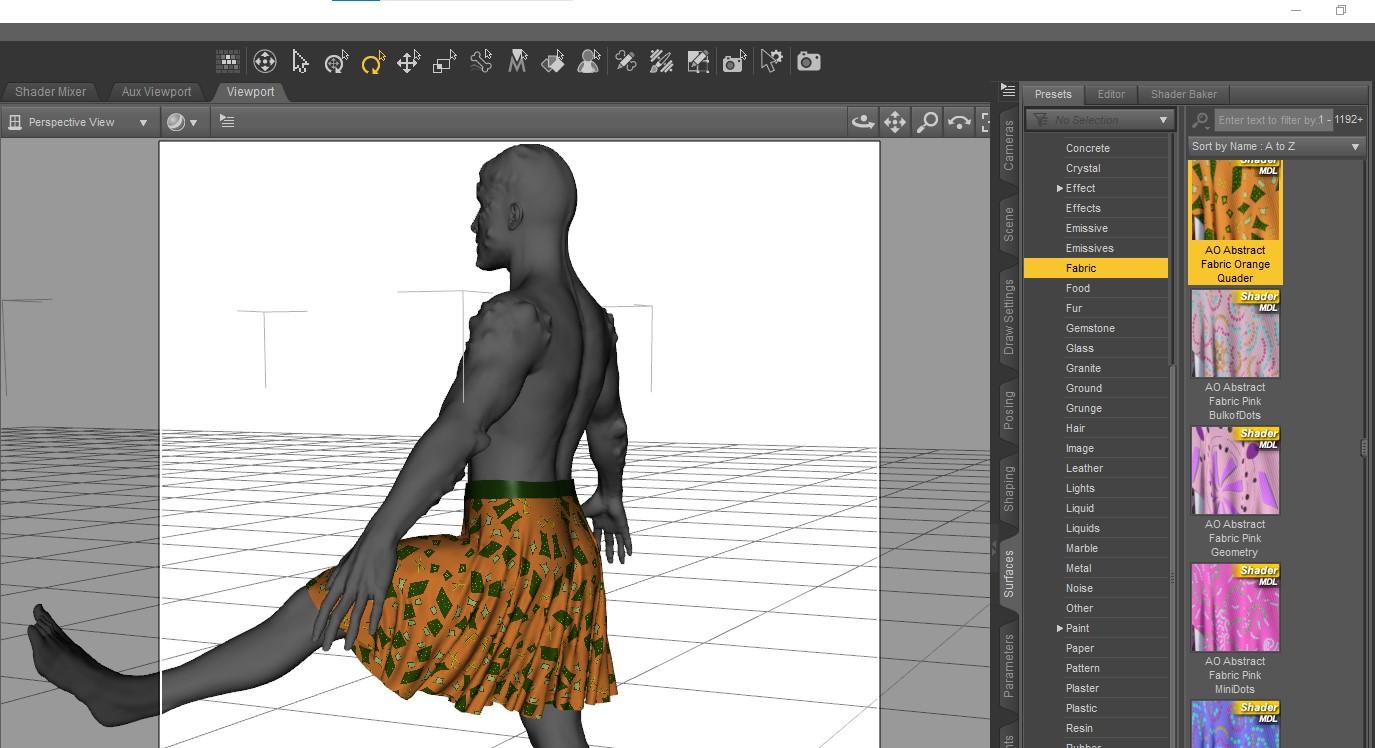 Genesis 9 PowerPose Template
So will G9 powerpose and the facs rig ever come out ? I mean there's Victoria 9 and Michael 9 out already and no sign of powerpose or the facs rig. Not that I care since I doubt I'll ever use G9 myself, I'm just wandering what are the daz priorities here since this is basic functionality that should be there from the start when you release the figure.
Josie 9kervala said:
I just checked her normal maps and they have micro details included :( So with the other micro details they are added twice and I'm not sure it's what was intended...
For Victoria 9, the normal maps were missing micro details.
That would explain the awful textures on her face.
It looks like a generic noise map was used and the amplitude of the effect was turned up so high it ruined her skin.Here's one of the promo renders that shows it. There are several more.
Why is her mouth so big in some of the promos, then so much smaller in others?
---
I've decided to wait for others to get any new G9 characters and post about them before I decide to get them or not. The cost is too high and I just don't want to go through the hassle of asking for refunds.
I've purchased the last three Josie characters(6,7, and 8). This one I'll be skipping.
Josie 9I just checked her normal maps and they have micro details included :( So with the other micro details they are added twice and I'm not sure it's what was intended...
For Victoria 9, the normal maps were missing micro details.
Josie 9Catherine3678ab said:
MelanieL said:
DustRider said:
Wonderland said:
MelanieL said:
Wonderland said:
I really loved Thorne characters back in the A3/A4/V4 days but I feel the characters are all starting to look the same since G1. I already have a ton of Thorne characters for previous generations and really don't need another one, especially for G9 which I thought was supposed to be about realism. So I look at today's sale in reverse. I got 3 G8 megabundles for $65 total and got a free G9 bundle and Z G9 poses. I never would have purchased the bundle without the 3 free G8 bundles and I'm glad DAZ is going back to the older sales model. I guess they really have to bribe us to get into G9 lol. As far as I'm concerned, I'm happy that I could get 3 large megabundles for under $22 each and a bonus of a free G9 bundle & pose set.
How are you getting that $65 total? Best price I can get is $79.37 (10% off with the Z Poses and 10% with free first punch).
I had previous punches from Monday & Tuesday and when I added the Z poses, the total of the two was less than the bundle alone. It came out to $64.57 for the two combined, $57.32 for the bundle and $7.35 for the poses. I got two mega bundles and one larger normal bundle free.
Interesting, I supposedly (i.e. I "should" have) have the same discount. I bought "punch" items both Monday and Tuesday (actually i kept the punches going starting on Friday) and have DAZ+. My discount is $66.14 for the Mega Bundle and $8.48 for the Z poses

Is there another discount your getting??

Oh this is mad! I made punch-eligible purchases every day of the Black Friday sale period including Monday so I still had the 20%/40% thing going on Tuesday, but I didn't buy anything because the net prices were worse than Monday (when I had gone totally crazy and bought loads of stuff).
I assumed that the punches would expire at the end of the Black Friday sale period (otherwise I might have made a random cheap purchase on Tuesday). Today I got a banner offer for one "free" punch (10% off) but looks like my Monday punch now means nothing.
And everyone seems to have a different price - I've seen at least 4 different ones posted - so I give up. Oh well, I didn't really want the Josie 9 bundle, I was only tempted by the three free bundles. I can live without them.
I was feeling the same way ... but then I read of another bundle {lot to browse through} which is one I've been waiting for a sale on, so I bought the Josie maga bundle and got 3 of the big bundles: Bonnie 8.1 mega bundle, Victoria 8.1 University bundle and the Ghosts of Christmas Bundle.
Basically because I know myself too ... if nothing better comes along I will be very ticked that I passed on this {having waited a long time for 2 of those bundles}.NOW the price is what others were reporting, so it's "ticket time" ... hopefully they're in a good mood.
Genesis 9 we are back in the game Carrara usersDartanbeck said:
Diomede said:
Yup. You can use the method in the tutorial to create any neckline you want. Just download the above starter mesh. Delete the existing collar. Delete further down the neckline to taste. Then select the edges of the hole and extrude a collar inward to taste.
This comment demonstrates with screenshots.
No one asked me - Diomede posts screenshots on whatever - Page 40 - Daz 3D Forums
That was the first thing I saw when I got back to the forums. You do such excellent tutorials! Brilliant, Diomede!
Thanks. I am on the Genesis 9 train at the moment. There are several forum regulars providing in depth instruction on how to create content for conforming and draping clothing. Mada and Bohemian3 in particular, and there are others as well. Thank you, Mada! Thank you, Bohemian3! They post videos, which is great. I like written manuals or similar. Therefore, I have been documenting for myself the steps I take to try to follow along. The conformers should work in Carrara using the 'blended' rigging, and saving as character presets. I think VWD should be able to substitute for DForce. Unfortunately, my VWD has been broken since my hard drive failure. I had backups of all the files but the drive references are screwed up somehow. Bottom line, I will be posting another screenshot tutorial on using Marvelous Designer to make clothing for a specific Genesis 9 full body morph, and then conforming and draping in Studio. The result should also work as a conformer and VWD item in Carrara.
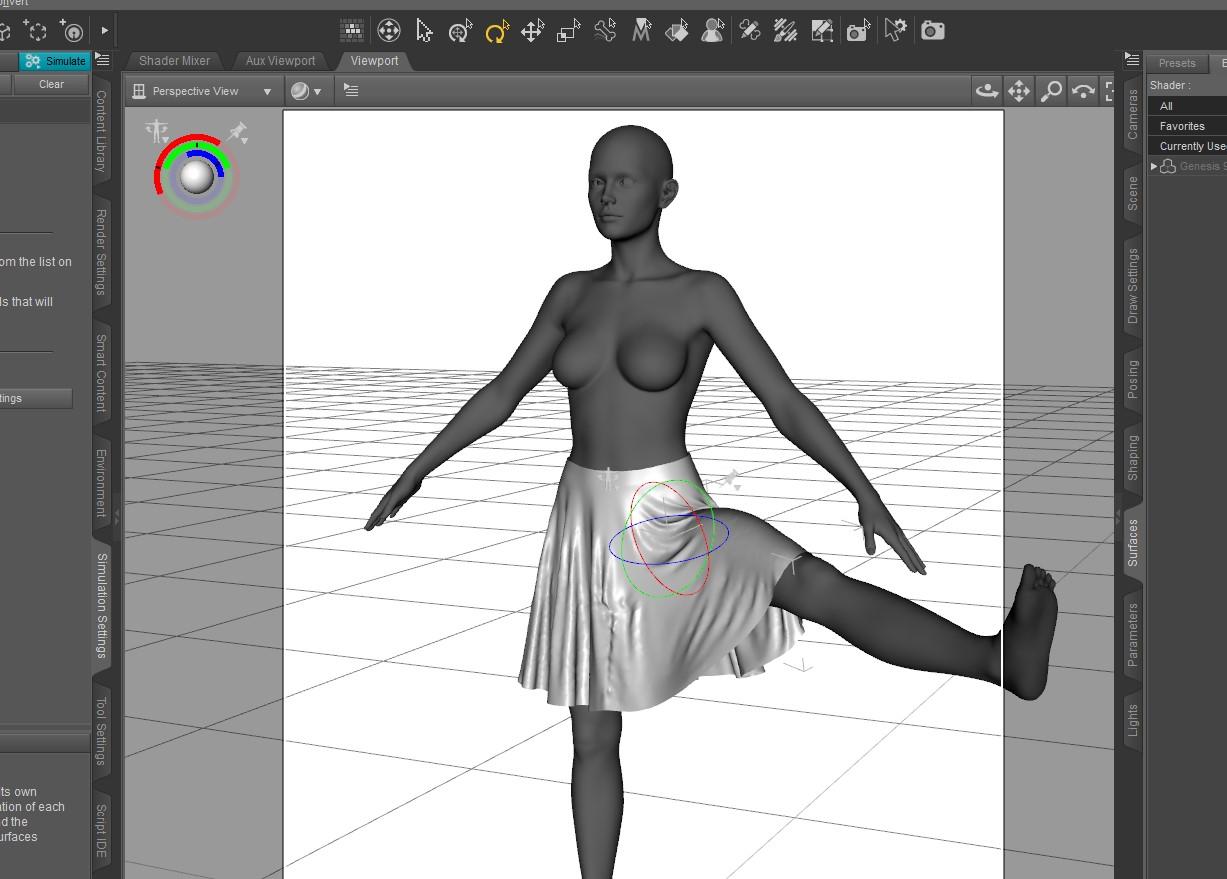
Here is a basic loose skirt that I made specifically for the shape of Victoria 9.
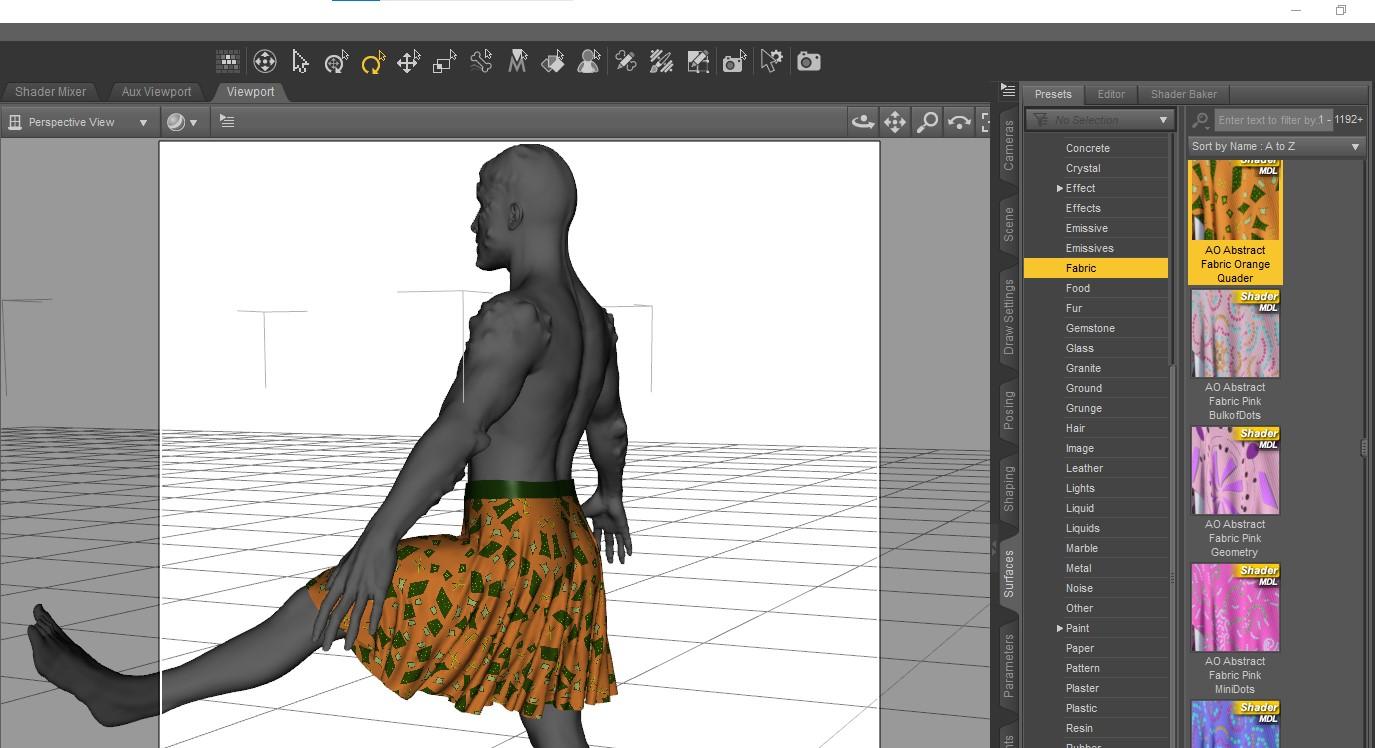
Here is the same skirt with a pattern applied the G9 morphed to a mix of a demon, Michael 9, and Toon. I am particularly happy with the UVs. It needs some additional work, such as creating a DForce Add-On for thickness.
 Josie 9
MelanieL said:
DustRider said:
Wonderland said:
MelanieL said:
Wonderland said:
I really loved Thorne characters back in the A3/A4/V4 days but I feel the characters are all starting to look the same since G1. I already have a ton of Thorne characters for previous generations and really don't need another one, especially for G9 which I thought was supposed to be about realism. So I look at today's sale in reverse. I got 3 G8 megabundles for $65 total and got a free G9 bundle and Z G9 poses. I never would have purchased the bundle without the 3 free G8 bundles and I'm glad DAZ is going back to the older sales model. I guess they really have to bribe us to get into G9 lol. As far as I'm concerned, I'm happy that I could get 3 large megabundles for under $22 each and a bonus of a free G9 bundle & pose set.
How are you getting that $65 total? Best price I can get is $79.37 (10% off with the Z Poses and 10% with free first punch).
I had previous punches from Monday & Tuesday and when I added the Z poses, the total of the two was less than the bundle alone. It came out to $64.57 for the two combined, $57.32 for the bundle and $7.35 for the poses. I got two mega bundles and one larger normal bundle free.
Interesting, I supposedly (i.e. I "should" have) have the same discount. I bought "punch" items both Monday and Tuesday (actually i kept the punches going starting on Friday) and have DAZ+. My discount is $66.14 for the Mega Bundle and $8.48 for the Z poses
Is there another discount your getting??
Oh this is mad! I made punch-eligible purchases every day of the Black Friday sale period including Monday so I still had the 20%/40% thing going on Tuesday, but I didn't buy anything because the net prices were worse than Monday (when I had gone totally crazy and bought loads of stuff).
I assumed that the punches would expire at the end of the Black Friday sale period (otherwise I might have made a random cheap purchase on Tuesday). Today I got a banner offer for one "free" punch (10% off) but looks like my Monday punch now means nothing.
And everyone seems to have a different price - I've seen at least 4 different ones posted - so I give up. Oh well, I didn't really want the Josie 9 bundle, I was only tempted by the three free bundles. I can live without them.
I was feeling the same way ... but then I read of another bundle {lot to browse through} which is one I've been waiting for a sale on, so I bought the Josie maga bundle and got 3 of the big bundles: Bonnie 8.1 mega bundle, Victoria 8.1 University bundle and the Ghosts of Christmas Bundle.
Basically because I know myself too ... if nothing better comes along I will be very ticked that I passed on this {having waited a long time for 2 of those bundles}.Victoria 9 head normal maps mistake or am I confused?Hi, are the head HD and default normal maps for Victoria 9 mislabeled/switched? The one labeled 'HD' appears much less detailed and is 72 pixels/inch whereas the default one is more detailed and is at 96 pixels/inch. Or am I confused?
Why are Genesis 9 characters so small?Genesis 9 is not really smaller per se, just real world average. G9 is at the average female height of about 5'7". G8F was 5' 10 & 1/2 inches and G8M is 5; 11 & 1/4". Victoria 8 was 6' 1" I have noticed tha twith the body morph sioze sliders you can make dwarves and faries to Giants with ease. To get a 6 foot tall G9 male, try 107 to 109% on the scale slider.
Missing textures in anatomical elementsBought the Victoria 9 HD, and it does come with textures for the anatomical elements for both genders, however, it seems only for the Victoria 9 skin material. Does this mean that it is not possible to get anatomical element materials for the base Genesis 9 skins (black, asian, etc)?
Getting on the 9 train, or notWell, this sale just killed G9 for me. I purchased so much new G8/8.1 stuff at great prices that I don't see myself trying to struggle through making G9 look decent with all the issues it has with facial surfaces, navels and bends. I got Cayman's texture converter and will get a pose converter when on a good sale but just can't see myself buying much more. I have the morphs, some small intro bundles with a few hairs and clothes, but really doubt I'll buy much more.
Through the sale I discovered a bunch of great G8/1 stuff I missed or put in my wishlist and scooped them up at great prices. I think I now own every Mousso character ever made lol. I really don't see a need for G9. I even have those trans morphs and UV swap so I can already make females male and vice versa and auto fit clones for clothes. I often put male fantasy clothes on G8 F already. I wish they had just given us new eyes for G8.
I saw some complicated ways we can get G9 eyes to work on G8 but I really hope a PA comes up with a one click solution. Literally the only thing I like about G9 is the eyes. Victoria 9 is great but like V7 is so recognizable that it's basically unusable commercially unless dialed in at the smallest increments. I wish they had used that morph and skin on G8.1, called it the new Stephanie 8.1 or something and given us new eyes for G8/G8.1
New! Novica & Forum Members Tips & Product Reviews Pt 14barbult said:
MelanieL said:
@barbult - ah, that's interesting! I must admit that I didn't look below the neckline when I used that sweater. I'll try and take a look tomorrow (it's past bedtime here).
I also changed the eye colour before I even started the render, so I didn't notice anything unusual about the brown eye texture. I used the makeup and noticed it was not LIE (actually I liked that because it loaded much quicker) - I don't expect to use Biddie all that often to be honest, the cheap buy-in was just an incentive for me to put my toes into the Gen9 water..
Victoria 9 is 100 times better. I recommend her if you are looking for a photogenic G9 female. Catch her on sale sometime.
Oh yes, she's on my wishlist - well actually that Fantasy Megabundle wich included her is in the wishlist, because I didn't have the budget when it came out but I'm hopeful it may turn up at a good price before the end of the Holiday sale.
Sales - Not everyone uses Genesis 9 characters!!!!frank0314 said:
My current system can't handle the new features either. I'm looking at upgrading but that takes a lot of money that we just don't have atm. I'm still working with a GTX 960 4gb. The rest of my system is fine still. I just really need to upgrade the GPU but that is even way to expensive than we have atm. I just came back to my desktop after being down fro 2 yrs for medical reasons and now I have to play catch-up.
Frank, I needed to upograde my GPU too and went with a RTX 960 12GB and financed it through Affirm to repalcve a GTX 1070 8GB. Only way I could get it with my current financial situration. I know there are several companies out ther like Affirm that are doing this right now. During the Pandemcs when I had some stimulous money, I built a box that can run a 3090 but by the time the 3090's were readily available, all I could afford was a RTX 3060 12GB. Find a way to jump on the 3060 bandwagon and you won't regret it.
On Genesis 9, I dove in hard on VIctoria 9 after the $10.00 coupon came out. Have been buying a few select items but staying away from the bundles for the most part. I did by the Michael 9 HD Action bundle but I wanted everything in it and I picked up the Bachelor and Bacheloredde bundle for like $16.00 after discounmts. Right now waiting on items from other vendors and creating characters by dialspinning. I need a lot of more esoteric clothing and geografts because I do a lot of pinup art with a lot of it portrait type rendors so G9 has reawakened my my interest in digitAL and has become my muse. I have rendered more images in the last two months than in the last 2 years before that.
Daz 3D is part of

Connect
DAZ Productions, Inc.
7533 S Center View Ct #4664
West Jordan, UT 84084Licensing Agreement | Terms of Service | Privacy Policy | EULA
© 2026 Daz Productions Inc. All Rights Reserved.