-
Why is deleting a character so long?
Here are some informations
Hardware is recent with 8 proc and 16G of RAM. System is win10.
Used memory by DS after loading a char 2.3G
No errors in the log file. When I launch DS, I have a bunch of warnings. Most concern daz connect (that I do not use). Some concern morphs or expression packages. When I delete the char, only the usual daz connect warnings.
Here is an example of the daz connect message
2020-11-22 01:14:38.235 WARNING: ..\..\..\..\..\src\sdksource\cloud\dzcloudtasknotifier.cpp(178): Got an unknown command from the persistent connection: HTTP/1.1 400 Bad Request
and of the morph loading warning
2020-11-22 01:08:20.843 WARNING: ..\..\..\..\..\src\sdksource\fileinput\dzassetdaz.cpp(6615): Could not find output property for formula: Genesis8Female:/data/DAZ%203D/Genesis%208/Female/Morphs/SickleYield2018/SY200/PBMSY200WristsThickness.dsf#PHMSY200WristsThickness?value in file : /data/DAZ%203D/Genesis%208/Female/Morphs/SickleYield2018/SY200/CTRLSY200Skinny.dsf
But as I said, this happens with a bare char without any morph dialed.
It also hapens with g8M, but g3 or older are OK. And of course, it concerns all g8F chars, not only the generic one.
Other item deletion (including primitives and even very large envs) is reasonnably fast (1-20s).
This really seems to be related to g8, and is probably caused by an asset. I really do not understand how there can be an interaction between an asset (even a morph package) and deletion problems for a generic char, but I will try to uninstall my assets.
A script to fit newer clothing to older Genesis and Legacy figures?FSMC Designs:
I have tried that(and as of this time, still trying)but the M4 figure I use is important to what I use him for, and he is the first morph I did and got hit with a massive dose of beginner's luck. He's perfect just as he is, face wise anyway. Unfortunately for me, after a couple of computer crashes and adding "The Freak" morphs to the figure, I have lost the original morph files for this figure and would like to change some body morphs, but the controls are gone from the figure, making it just about impossible to change him. I have tried the Legacy to newer figures stuff, and for some reason, I can't seem to get it to work. so kinda stuck. The only reason I still have him(and a few other morphs), is because I keep them on a flash drive in my purse.
pwiecek:
a lot of what Richard said is Greek to me, but I get the gist. I may look into Crossdresser 4, as I have spent soooo much money on all of this other stuff, so why not?I am determined to find a way, or find someone who knows more about what they are doing to fix this problem.
DAZ to C4D bridge for 4.14 ProThat's interesting, I'm running C4D R21 and when I use auto-import in the bridge plugin, there are no pose morph tags on the model.
Is this what you are experiencing?
Artists of G3 products please update them to G8 & 2 other suggestionsMost G3 items will work fine on G8, either with autofit or changing the scene identifier to the target figure ot G8 (see image). There are also converters for this from Riversoftart in the store
https://www.daz3d.com/riversoft-art
As for pokethru with fat/big models, that can usually be fixed with adding a smoothing modifier with collision set to the figure. Also dforce items should work fine if you change the morph during a tineline animation
Thank you Mike, bookamrked for future reference.
Artists of G3 products please update them to G8 & 2 other suggestionsMost G3 items will work fine on G8, either with autofit or changing the scene identifier to the target figure ot G8 (see image). There are also converters for this from Riversoftart in the store
https://www.daz3d.com/riversoft-art
As for pokethru with fat/big models, that can usually be fixed with adding a smoothing modifier with collision set to the figure. Also dforce items should work fine if you change the morph during a tineline animation
Thank you Mike, bookamrked for future reference.
SereneNight's Sci-Fi Fun Thread 2Owen and Boyd take to the town with their Dog Bitty. Bitty of course has an agenda of her own. Refueling- And Boyds ice cream looks pretty good.
I wanted to have Bitty LICK the ice cream, however the dog or the morph for her tongue is just too attached to the lower half of her jaw, so it didn't extend enough to lick the cone well.
You may ask why a robot dog actually eats, but Bitty does consume glucose. The nannites which help her run her robotic body require it. Her preferred drink is flat soda. However, any other sugar source will do. Also, grandad has programmed her to behave like any other dog, so she has cravings.
 Knittingmommy's Laboratory
Nice smile ,I've found if I parent Face Control to the figures head before I begin morphing it's easier to get it in the right place after I morph ....
How many people are still using Genesis 2?this is Ripley.. her body is G8 with an invisible head, her head is G1 with an invisible body parented on to the G8 neck.
---
None of the large head morphs transfer via genX or riversofts stuff
---
So this is my temporary work around to use my old characters (actually about 20 cats) have been converted this way.
Gives me access to the new posing and outfits and let's me keep their heads together.
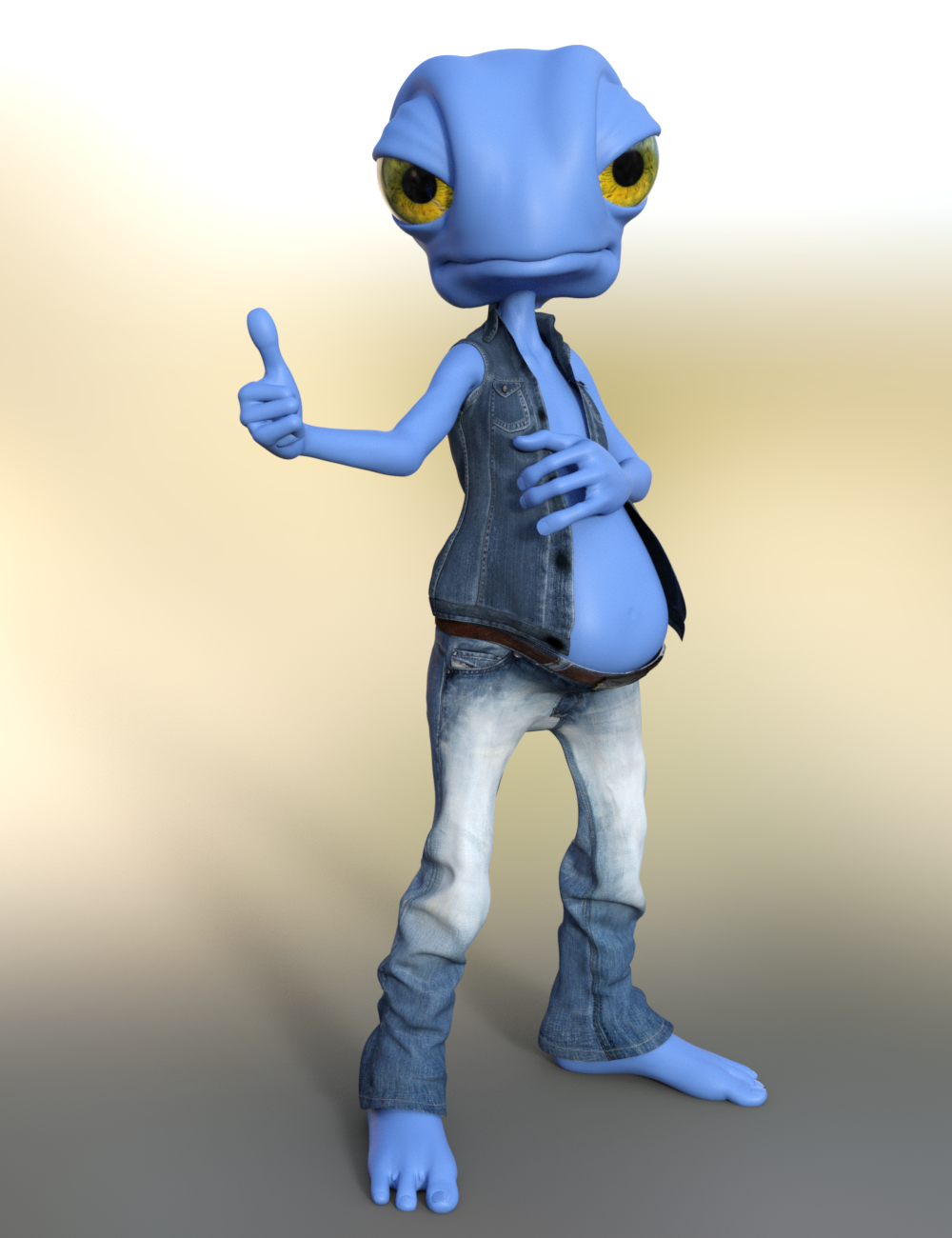
Yeah, that's a good option for those older heads that aren't really transferable, also a good option for stand-alone figures. I did that there with Blue 2.0's head on Genesis 8 Female:
I'm going to try that with Cookie one of these days. It would be cool to use the adorable Cookie with my G8F wardrobe.
Oh, now that's an interesting idea! I might have to borrow that idea myself. I love Cookie! I never thought about parenting heads from earlier figures like that. I'm definitely trying that in the near future. :)
Here's my attempt (G8F on the left, Cookie on the Right):
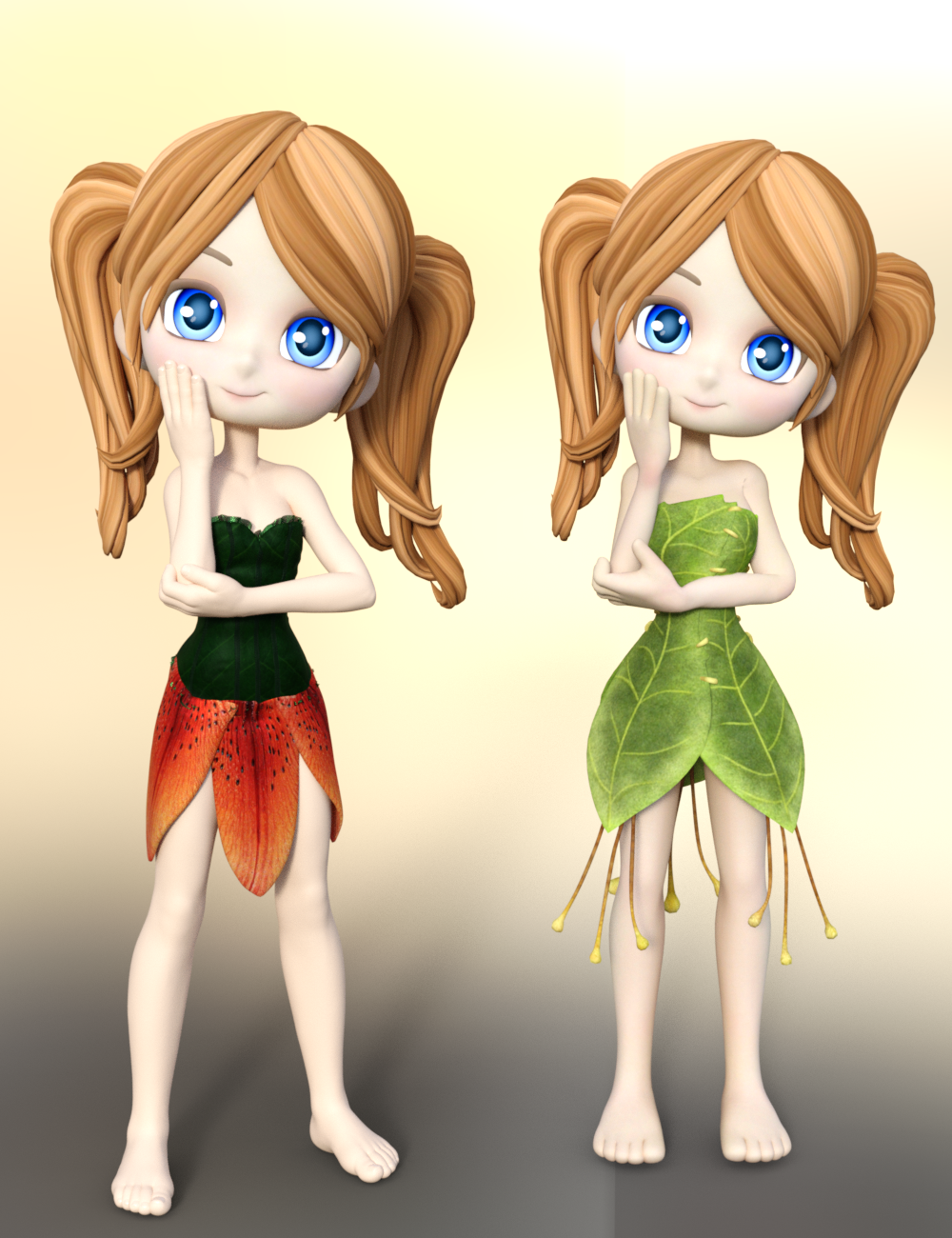
Cookie comes with just a head that you can load so that made it super easy to just parent that to G8F's head.
Here are the morphs I used if you're interested:
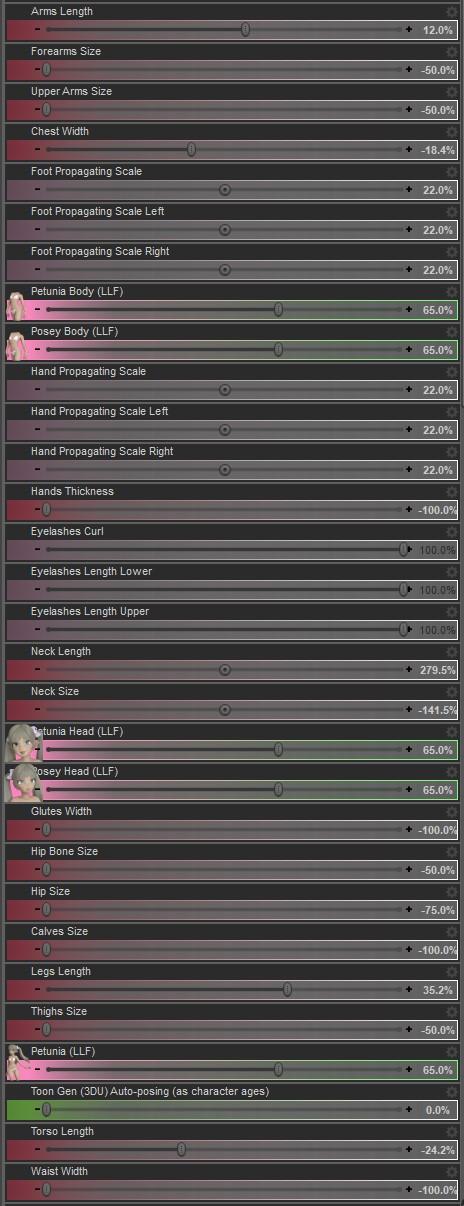
I also added a Push Modifier to G8F and a Diffuse Overlay to the base G8F's skin:
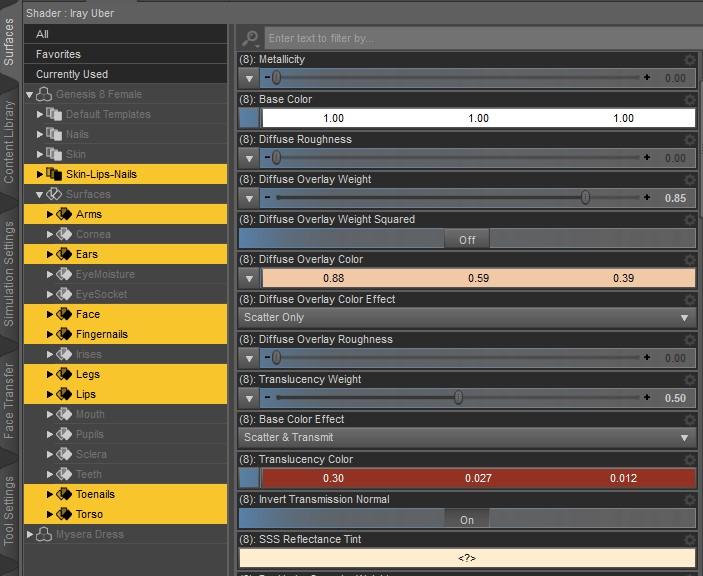

If you add a Push Modifier to the character you might need to add a push modifier to clothing too.
I think she came out pretty well! I can see me using "G8F Cookie" more since I have so much more clothing and poses for G8F.
Oh! Super nice! Those morphs will come in handy. Thanks. I like your Cookie on G8F. I'm definitely going to have to play with that. :)
Oh, now that's an interesting idea! I might have to borrow that idea myself. I love Cookie! I never thought about parenting heads from earlier figures like that. I'm definitely trying that in the near future. :)
Cookie heads on G8 good idea...
but a cookie body clone for genesis would be nice to allow all the cartoon wardrobe to work will all the poses and bodies availableYeah, that would be nice. I have a lot of Cookie clothes and I have plans to pick up more. Cookie will never get old. I wonder if Lady Littlefox has ever considered upgrading Cookie? She did with Star so I guess anything's possible. 'Twould be nice. :)
How do you create custom hair?There are several types of hair. Transmapp (transparancy mapped), fibermesh, and strand-based hair. Transmapped hair would be modeled as polygon strips or cards in a 3rd party modeling program (Blender, 3DS Max, Maya, Houdini, Hexagon, Carrara, etc.). A transparancy map and texture map is applied to the polygon strips to give the illusion of hair. If you look at a hair model in wireframe view or with the geometry editor you can get an idea of how they are constructed. There is usually a skullcap that the polygons are attached to so that the morphs of the figure project into the skullcap, like conforming clothing. Some 3d modeling packages have a native hair system that understands things like gravity/collisions and can be used to create a groom and then bake the groom into polygons and transparancy maps that could then be imported into DAZ Studio. Once imported you would use the transfer tool to rig the hair and make it a conforming item for the figure.
Fibermesh hair, is hair that is similar to transmapped hair, but it is instead many polygon tubes exported from zBrush. Fibermesh, due to it's reliance on geometry is more "heavy" and requires more resources to be loaded in the viewport and to render than traditional transparancy mapped hair.
A strand-based hair tutorial is here: https://www.daz3d.com/forums/discussion/335676/strand-based-hair-mini-tutorial/p1
Daz Studio 4.14 Pro, General Release!This post in there seems to have a clue to the answer, but how did it happen in the first place? I used the actual File > Save As > Character Preset option!
I'll dig through my data folder and see if I can find culprits. The tough part is that I don't really know which Controler files are actually supposed to be there!
I've quickly made a test with my Genesis 8 Female and created a character shape controller called CTRL_Aiko8_ElfCharacter that was saved as Morphs Asset intentonaly with a default value of 100%.
Then I've loaded my default base genesis 8 female figure from the Content Library and the Elf Character shape was applied by default. The next thing I did was making screenshots how I found the CTRL_Aiko8_ElfCharacter with the Parameter Settings and the Parameters pane even though it is not showing up in the Currently Used list.
In the first screenshot I was selecting the figure and the "Currently Used" property group where I found the morphs that are now applied by default if I load the default genesis figure from the library. Next I was clicking the gear icon on the Ears Elf Long morph to show the Parameter Settings and I found the CTRL_Aiko8_ElfCharacter in the Controllers tab.
In the second screenshot you see I've selected the "All" property group and entered "elfchar" into the search filter box at top of the Parameters pane and the CTRL_Aiko8_ElfCharacter was showing up. Then I clicked the gear icon on this morph and in the Parameter Settings I saw that this morph is set to 100% at default.
[Edit]: To add information on how to ged rid of the corrupted morph.
To delete the corrupted morph you have to open up your file browser navigate to your Content Directory and search for the CTRL_Aiko8_ElfCharacter file. My morph with the fielname "CTRL_Aiko8_ElfCharacter.dsf" was saved into this path: My Library\data\DAZ 3D\Genesis 8\Female\Morphs\Syrus_Dante\Test Morphs
I've deleted the CTRL_Aiko8_ElfCharacter.dsf file closed the scene and loaded my default genesis 8 female figure from the Content Library again into the scene and as suspected the figure loaded with the default base shape again.
Saving a character as a morph asset is different from saving a character preset, the first one will appear in every character/figure if saved with a non-zero value, character preset essentially just stores the values of the different dials needed in creating the character.
To fix any ill-behaving morphs, do as follows;
1. Load your base figure or the developer version.
2. Select "Show Hidden" in the Parameters-Tab, drop down menu (right-click)
3. Zero the figure (Found in Parameters-Tab, drop down menu)
4. Memorize the figure (Found in Parameters-Tab, drop down menu)
5. File->Save As->Support Asset->Save Modified AssetsThis procedure will zero the default value in the ill-behaving morph/morphs, and while saving DS also shows you a list of the morphs it is changing.
Thank you for this! I think I did save a morph asset on some custom hair I made while my default Genesis 8 Female was wearing it, so I probably botched that somehow. Argh!
Thanks for the resolution to the problem!!! Now, if I delete my Genesis 8 Female file from the directory, would reinstalling Daz Studio bring her back? I'd love to be able to bring the original icon back to bear. Otherwise I'll just copy over the png from my laptop if you think that would be better.
Hey, thanks for this and many other solutions I see you posting in this thread. Incredibly valuable info here!
Devs - thanks for catering more to animation friendliness!
Artists of G3 products please update them to G8 & 2 other suggestionsMost G3 items will work fine on G8, either with autofit or changing the scene identifier to the target figure ot G8 (see image). There are also converters for this from Riversoftart in the store
https://www.daz3d.com/riversoft-art
As for pokethru with fat/big models, that can usually be fixed with adding a smoothing modifier with collision set to the figure. Also dforce items should work fine if you change the morph during a tineline animation
Shape Splitter - Divide, Combine and Save (The new version is already available. 1.2.1)[Commercial]Your figure (Angellina) is a mix of morphs and not a single morph. If you wanted to use it you would have to create a new morph (Tab Combine), for that you could check page 8 or 16 of the included manual. And once the new morph is created you could divide like any other morph.
You can see that in this part of the video(at 28 sec )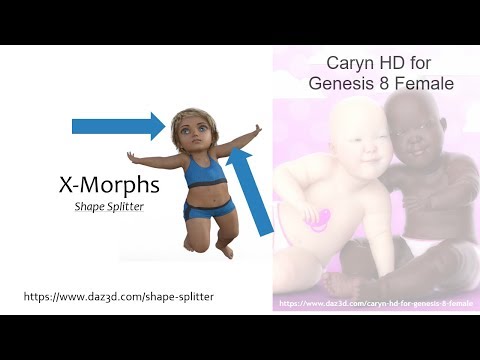
And for the problem of the head is to perform the correction of the position, this is done by pressing the "Calculate" button.
You can see that in this part of the video (at 29 sec )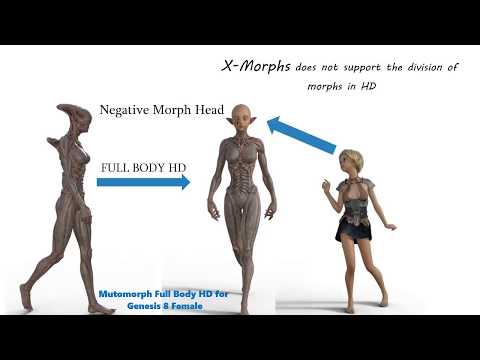 Shape Splitter - Divide, Combine and Save (The new version is already available. 1.2.1)[Commercial]
This is the head morph I'm trying to save. It's a modeled character with Growing Up applied.

These are the currently used sliders. None are locked.

I start here

Apply the character to just the head, and get this
 Niko 8 -Cyber Funk Bundle
I think Niko's morph is pretty good. I actually like the arms better than some of the more recent males. If you have Altern8, try some of those presets to really make Niko's skin pop.
The new "Break the Binary" releasesI got some interesting results with Genesis 1, and still have a couple of characters I drag out to play with from time to time. Heck, my forum avie is a Genesis 1.
For me, the big pain point was always the chest area. I know the unisex morph was a marvel of engineering, but it seemed to stump the modelers to come up with a mesh that could be realistically morphed both into breasts and developed pectorals.
No matter what I tried, the G1 male chests always just looked a little weird to me.
- 3W
Deleting Content?Partially uninstalling a product is not supported, so you'd have to do it manually. A character preset would error if the needed morph was missing, as woukld shaping presets, but you could still use mateials on another character from the same base figure.
Huge increase in G8F load times since circa 4.14 upgrade (morph option overload?); steps to resolve?That's what it does. It still needs to know which morph is connected to which other morphs, though, and it's establishing all those links which takes much of the time.
It doesn't cache them?
There is a cache (DSON cache, set in Preferences) but the links still need to be established in memory, as far as I know.
How To Transfer Morph From Blender to Daz3dWhat do you mean? You have a non-Daz human figure and want to project that shape into a Daz figure, for use as a morph?
IRAY Photorealism?That is amazing I would definatly buy that just saying

I haven't popped back here in a while, but I ave been doing some stuff in Iray as well as cycles
So way way back I posted this reference
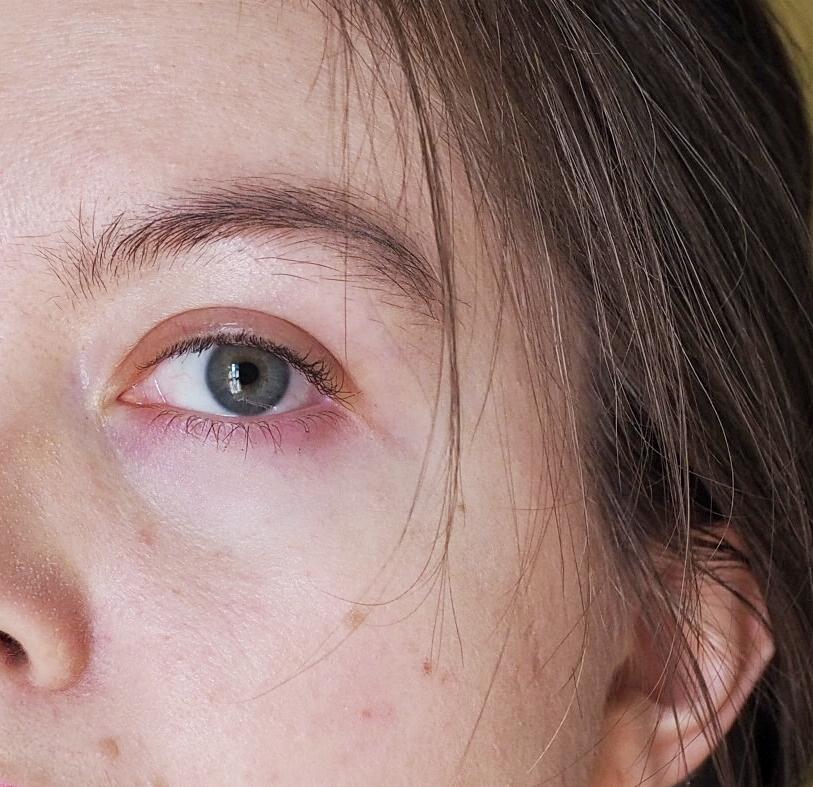
And at some point after decided hey lets see how exactingly we can recreate this
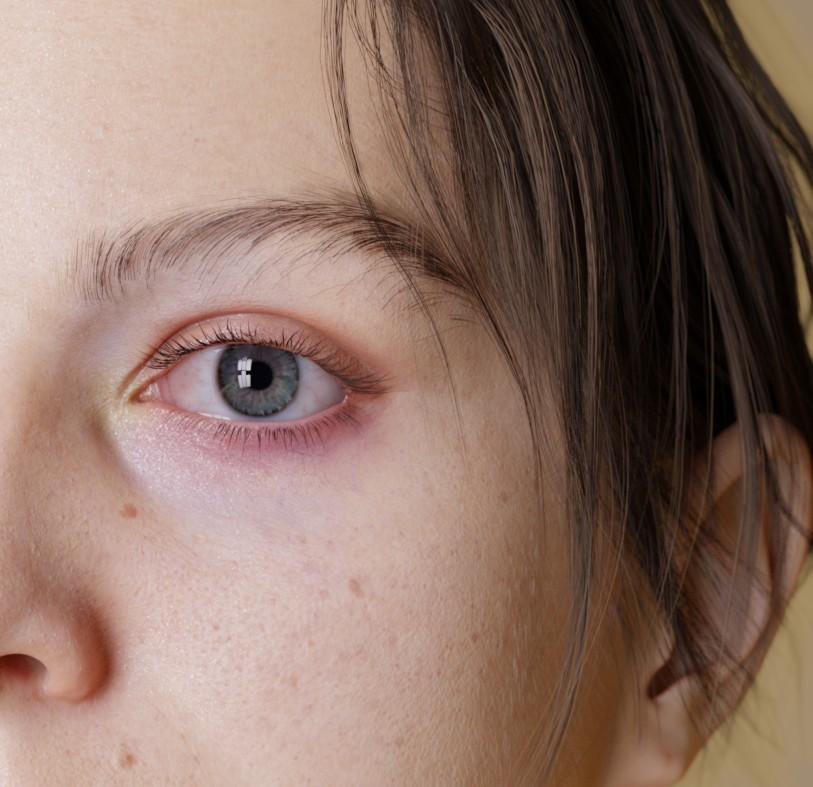
By which I mean lets create a custom morph and heavily edit some textures and just to be extra set up photomectric lights in a pattern that matches the window of the room the photo was taken in so the eye reflections even match
And then I completely forgot to ever post it. A couple months go by - I make another morph completely unrelated, but I look at it and go "hey this is sort of similar to my face" so I tweak it and make a morph matching my face again and then I remember: Oh yeah have a texture that matches the freckles and moles on my face pretty well (actually it only really matches 1/2 my face because I never bothered with finishing the other side)
So I stick them in some nice lighting and
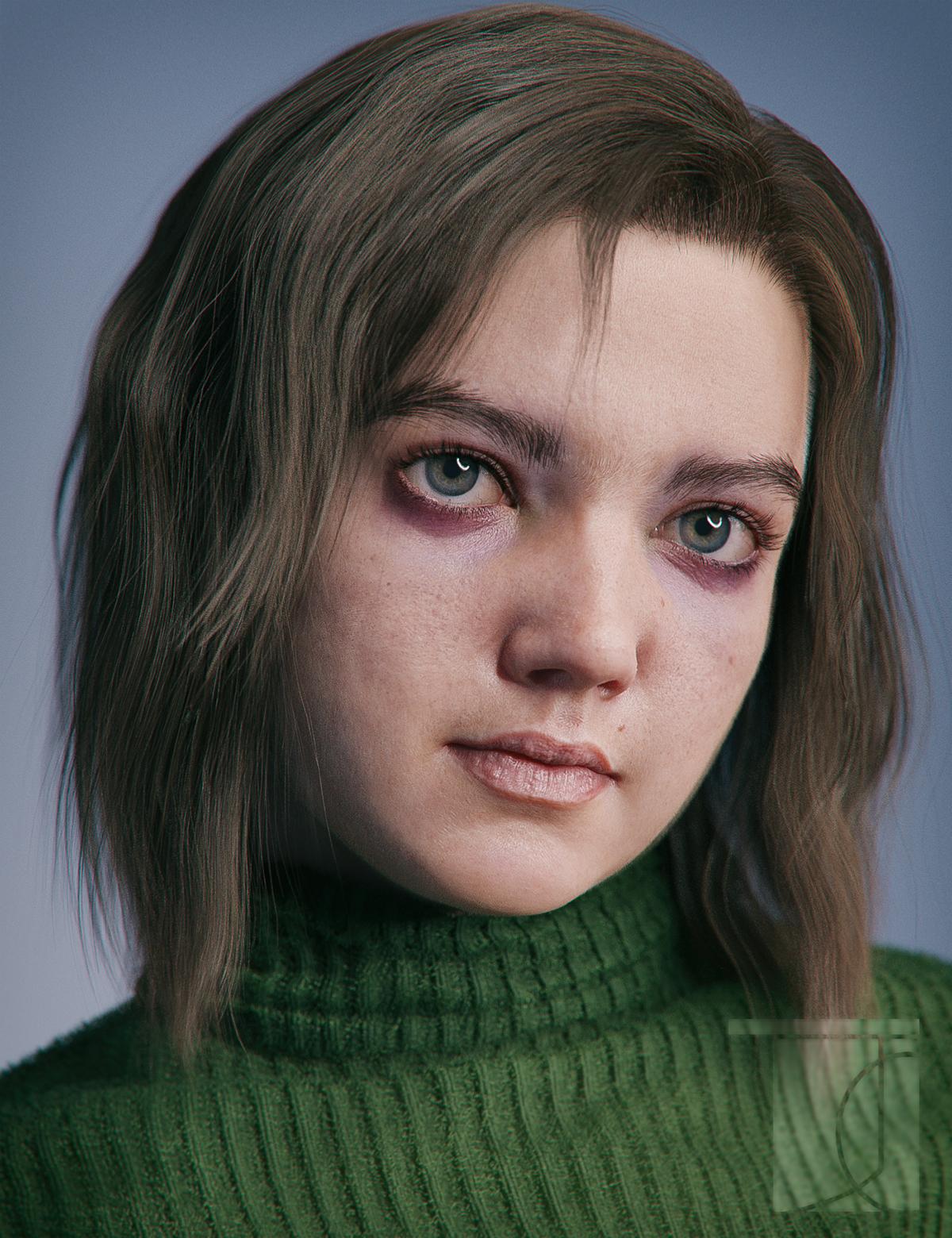
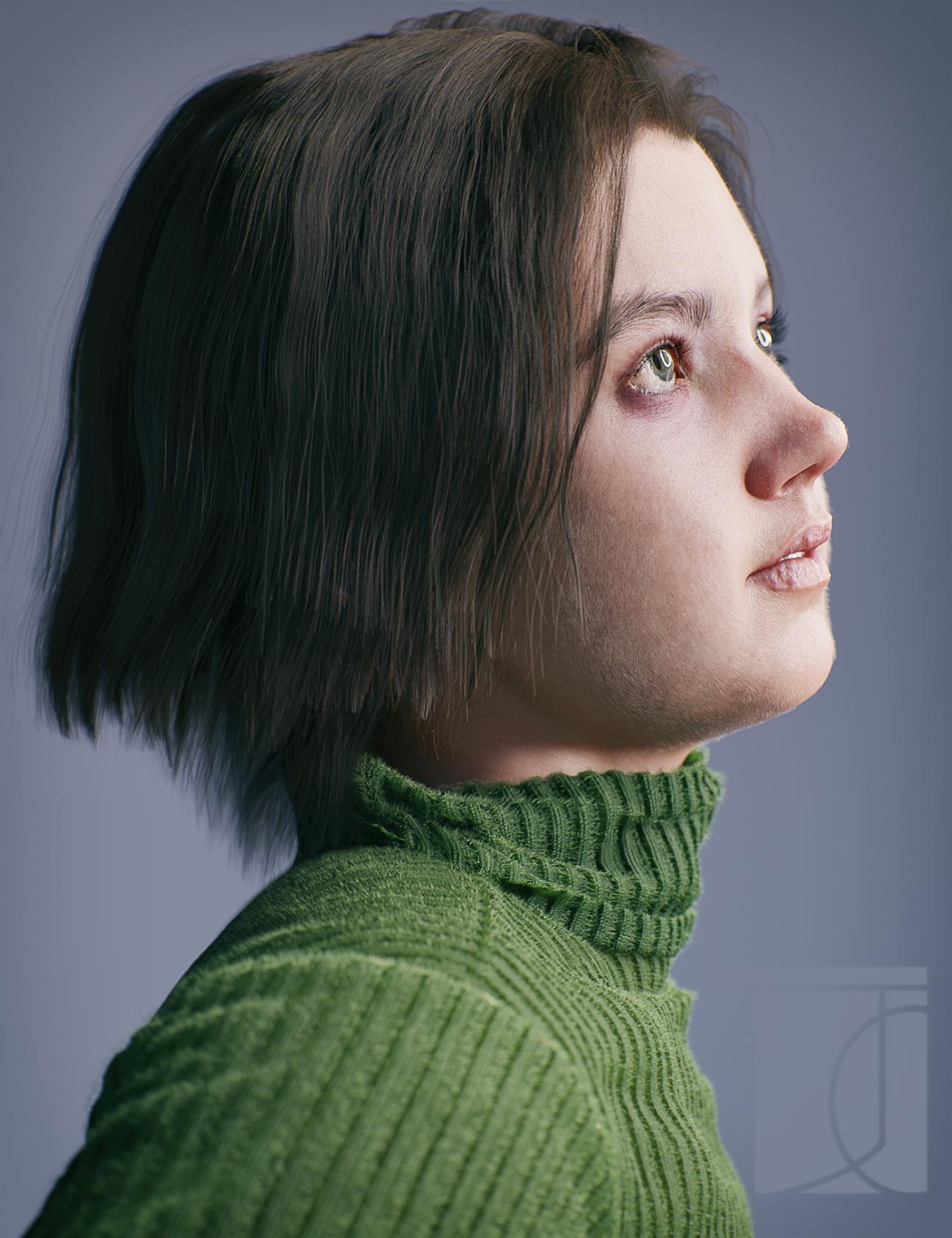
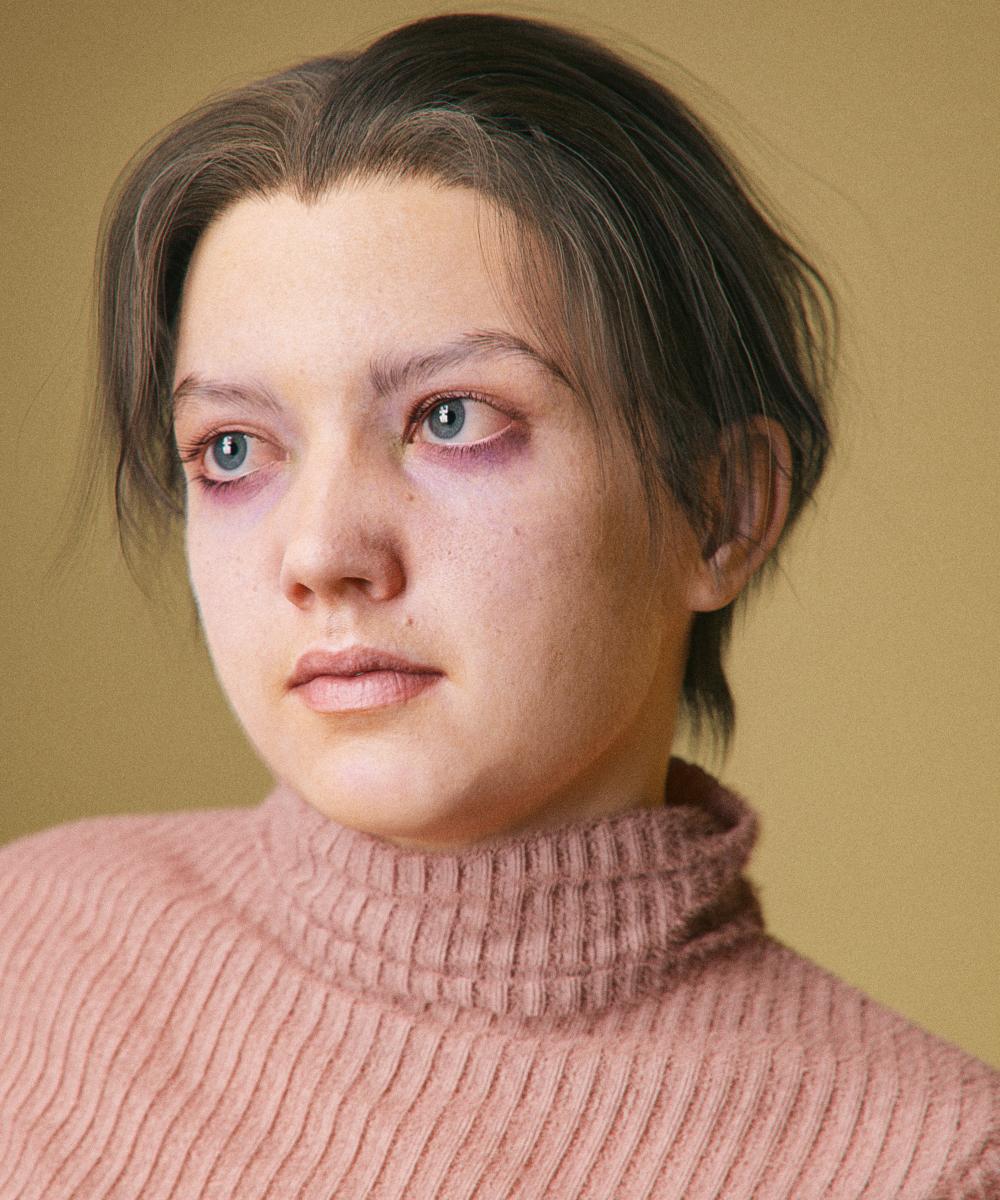
And I made a new icon!
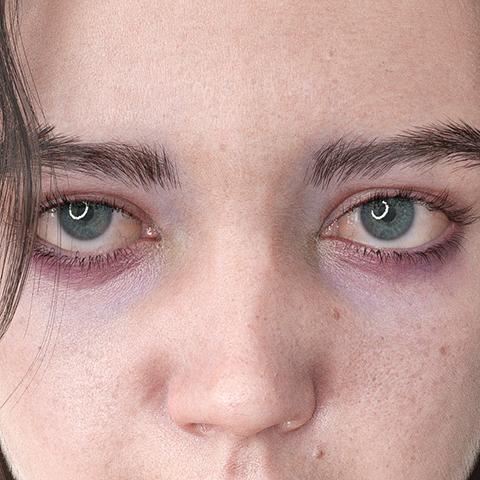
Technical notes
the textures are actually customized V8. Extra details were painted onto the diffuse and bump maps. For the bump map the lips were completely painted over. (I have some feelings about lip bump). Skin settings are pretty similar to the isadorekeegan method - main takeaway transmitted color of .98/.98/.98 so that it works well in spectral
just an obscene amout of strands: the hair is strands, the eyebrows are strands (the more recent renders with a new and better shape) the lashes are strands from blender converted to mesh, the sweater is covered in strands. There aren't strands on the eyes or teeth, although I'm sure I'll figure out a reason to one of these days. For the vellus hair for instance the max hair density is a truly gross 350 strands per cm^2 (though controlled with a density map so there are less in some areas) and a base thickness of .015mm. So that my computer doesn't explode, all hairs have their tesalation set to 2 rather than 3 - although either DS has gotten a bit better with strand memory or I've gotten better at picking my settings, because I swear its been way less memory intensive and freezy.
The morph itself is also even more different from the default than it looks - I mean the general proportions and over all skull shape are just completely different - though that may have as much to do with my head as the relative realisticness of the base G8. Some G8 sameyness really comes down to a lot of characters - even if they have different features - having very similar proprtions: thie lip might curve differently but its width relative to the face stays the same; the eyeshape is tweaked but its height and depth remain unchanged. I think I've said it before, but I am really starting to think that things like morphs and hair are at far more important than the minute details of material settings when it comes to realism. Also even when it does come to materials a large part of how our skin looks is effected by the fact that we are indeed covered in hair - In some of these renders you can't really see the idividual vellus hairs, but, were I to hide them, the skin would look completely different
How To Transfer Morph From Blender to Daz3dI Have the .obj formet Human Model and i want to transfer to daz3d Base model, How can I transfer it ?
Daz 3D is part of

Connect
DAZ Productions, Inc.
7533 S Center View Ct #4664
West Jordan, UT 84084Licensing Agreement | Terms of Service | Privacy Policy | EULA
© 2026 Daz Productions Inc. All Rights Reserved.