-
more....Wacky Modelling ~ In Carrara ~

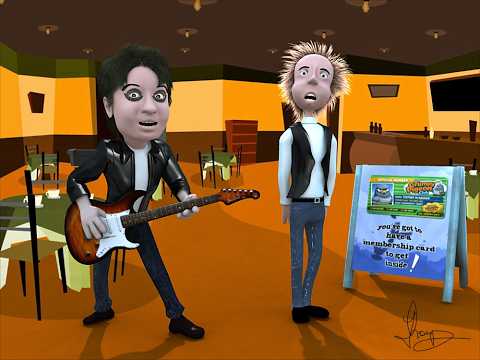
@wsterdan I've been checking out some stuff after reading your other posts in that other board and ended up with this music video I created from the Wacky Carrara links

 Off Topic Thread #2
Getting more and more into DS 4.24 for backgrounds for Carrara images/animations. And really liking the one item per day for ~$2, my recent monthly credit card statement had 26 DAZ charges, most for a couple of dollars, items with a retail price of 10x that +/-.
 Off Topic Thread #2
been a bit quiet here
I admit I only briefly opened Carrara the other day to load a DAZ Studio set that needed too much work
[WIP] BOEING B-17G FLYING FORTRESSkickajet said:
Glad you like it and agreed about old software!
The AI stuff is scary, because they don't even need to do 3D anymore, they have jumped straight to "life-like" animation... video-generation (SORA/etc) will do more to harm artist (traditional/2D/3D/etc) than any level of AI mesh generation ever will.
That being said, the amount of 3D mesh slop out there is ridiculous and should be banned/blocked from legitamate art communities like DAZ, Blender, CGSociety, ArtStation, etc, and "creators" should be blocked from monetizing their generated "content".
its a mess of triangular polygons with awful UV mapping too
I use Hunyuan 3D AI myself on my own computer, to get the general shapes of some things I photograph but then remesh it in Zbrush and Zproject the textures and UV map it in Ultimate Unwrap 3D
its AI I know but I treat it as a form of Photogrammetry because a 3D scanner is somewhat expensive or one needs an iPhone at the very least for that
Hunyuan can use front, back, left and right side images
that said, it won't replace 3D modelling in any way and I would never buy an AI generated mesh
I myself only use it for incidental background fillers based on my real life people and surroundings
things like my house, selfies, pets and family members so far
I prefer buying proper models from DAZ and plenty of them!
and you are a Carrara user too

I model very simple things only, admire people like you and Stezza.
[WIP] BOEING B-17G FLYING FORTRESSkickajet said:
Started this project back in October and have been picking away at it every couple of days, posting to Military-Meshes, however the site is not very active anymore, so I finally decided to start posting here...
End goal, if Carrara will cooperate is to eventually create a multi-ship formation animation similar to this one I did with a C-130J Super Hercules... of course then I'll have to make either a P-51D Mustang or P-47 Thunderbolt to escort it.
Tools of Choice: DAZ3D Carrara 8.5 Pro | Photoshop CS 6
ART STATION | IMAGESHACK | MILITARY-MESHESI wanted to voice my interest in your project. I'm an on-and-off Blender user, and never found the time to put enough effort to learn 3D modeling. I've always felt there was a dearth of examples here in the Daz Forum that showcase 3D work. And now with GenAI ... does this mean that hand-crafted 3D modeling is on its last leg?

To the best of my knowledge, the Hex Gallery thread is the only one that's going strong. Excellent work there! The takeaway for me is that a software tool being "old" doesn't really matter as much as the vision and the skill the 3D modeler brings to the task.
So, please, by all means, keep posting your progress.
Cheers!
[WIP] BOEING B-17G FLYING FORTRESSCheek guns added!... and they are posable too!
@kenmo - Yeah, my brother and I started using Carrara all the way back around version 4.5, when we had to replace an old copy of Truespace we found on our 1st computer (early 2000's) and then just kept upgrading periodically, so I've been using Carrara now in one version or another for 25 years give or take. It doesn't have the best shader, lighting, or rendering engine, but you tweak it right and it can get pretty dang good results, and the vertex modeller is probably one of the best for just straight up power/easy of use. Has some serious limitations, but none of my work has really ever pushed up against those too hard, so I've been happy staying with it.
Off Topic Thread #2C:\Users\Wendy your name\AppData\Local\Temp fills up and it's contents worth deleting regulary
your Carrara tmp folder too
often C:\Users\your name\Documents\DAZ 3D\DazTmp but you can choose somewhere else in preferences
Off Topic Thread #2I use MS PC Manager and have it running in the backgrund when Carrara'ing etc...
 [WIP] BOEING B-17G FLYING FORTRESS
kickajet said:
Thanks!
@kenmo - Carrara... I've tried to switch to Blender a couple of times, but I'm too entrenched in Carrara and just haven't had the time to really make a concentrated effort (active duty military, so long days and unstable schedules are the norm for me)
I can fully understand. Besides why change if Carrara still works for you. I know some artists who still use Wings3D!
Cheers
Ken
Remixing your art with AIWendyLuvsCatz said:
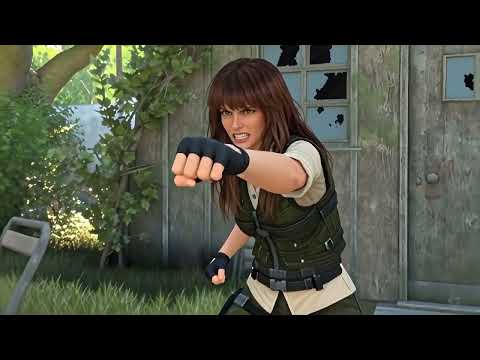
lots of different computer media
DAZ Studio, Twinmotion, Carrara, iClone and AI Animation and music
Wow WendyLuvsCatz great job, thanks for sharing.
[WIP] BOEING B-17G FLYING FORTRESSThanks!
@kenmo - Carrara... I've tried to switch to Blender a couple of times, but I'm too entrenched in Carrara and just haven't had the time to really make a concentrated effort (active duty military, so long days and unstable schedules are the norm for me)
Remixing your art with AIWendyLuvsCatz said:
lots of different computer media
DAZ Studio, Twinmotion, Carrara, iClone and AI Animation and music
Fun stuff I particularlyl liked the fire and streetlights, very cool.
Remixing your art with AIStezza said:
just wow!
I'm now wondering what the Carrara Cube could do if I used any of these.... mind blown!

Now *my* mind is blown! Any one of your myriad of original Carrara Crew would be a blast so see you play with with AI, not that they're not already mind-blowing...
[WIP] BOEING B-17G FLYING FORTRESSNice work. Are you modeling this in Carrara or Blender?
Remixing your art with AIlots of different computer media
DAZ Studio, Twinmotion, Carrara, iClone and AI Animation and music
Remixing your art with AIwsterdan said:
At the moment I'm using Nano Banana Pro via Openart.ai for most of my better images. I used Flux Pro last year to create my custom toon style for taking DAZ character renders and making custom toon characters. I use Meshy to convert the 2D characters into 3D mesh for 3D printing and 3D animated characters for game programming.
I've found that the latest version of NB Pro does an excellent job of maintaining consistent characters; you have the option in OpenArt of creating a custom character model, but with NB Pro I find just using the single reference image of a character (or 5) results in very consistent renders. The images used in the comic test page only had one image of the female and one of the male but managed to generate a dozen consistent frames with only one very slight change (not seen, but one shot of the male character had a couple of small flaps or lights on his back).
just wow!
I'm now wondering what the Carrara Cube could do if I used any of these.... mind blown!
[WIP] BOEING B-17G FLYING FORTRESSStarted this project back in October and have been picking away at it every couple of days, posting to Military-Meshes, however the site is not very active anymore, so I finally decided to start posting here...
Currently have the exterior about 90-95% complete... all the major components are there, but I've still got to add some of the smaller details, primarily the non-symmetric details similar to the cheek and waist gunner positions.
The control surfaces, landing gear, and the turrets are all rigged so they can be posed, however this has to be done manually, due to Carrara's poor mechanical linkage rigging and not being able to use pose-sliders with multiple vertex object structures (at least as far as I've been able to figure out).
Next I've got to rig the bomb-bay doors and add the crew access hatches. Last thing I'll have to add will be things like antennas, wires, and other small details, before I move to the interior.
Interior-wise, not sure how detailed I will make it, at minimum there will be basic structure/detail sufficient for medium-to-far range renders, however, I might take this farther and attempt to go for a medium-high detail interior that would be more than sufficient for close-up exterior renders, so we will just have to wait and see.
Color-scheme wise, I'm definitely going to try and do a bare-metal/polished-chrome version, using some of the techniques I figured out with my B-58 project from a couple years back... but I'll probably do a fully painted version as well.
End goal, if Carrara will cooperate is to eventually create a multi-ship formation animation similar to this one I did with a C-130J Super Hercules... of course then I'll have to make either a P-51D Mustang or P-47 Thunderbolt to escort it.
Tools of Choice: DAZ3D Carrara 8.5 Pro | Photoshop CS 6
ART STATION | IMAGESHACK | MILITARY-MESHESDAZ3D Promo Text Artif not Ai, it could be 3D
any software that has fonts and modifiers and vertex modeling such as Carrara
I bet Stezza could make it
 more....Wacky Modelling ~ In Carrara ~
Stezza said:
got my wacky Carrara song up and running
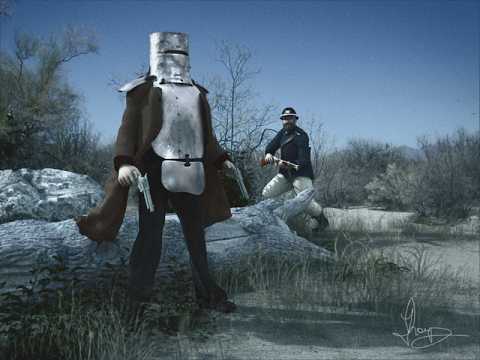
Awesome song, loved it and gave it a thumbs up!
What a great way to finish off a week, thanks!
more....Wacky Modelling ~ In Carrara ~got my wacky Carrara song up and running
Daz 3D is part of

Connect
DAZ Productions, Inc.
7533 S Center View Ct #4664
West Jordan, UT 84084Licensing Agreement | Terms of Service | Privacy Policy | EULA
© 2026 Daz Productions Inc. All Rights Reserved.