-
Genesis female smile problem
Might want to provide some specifics as to what you're talking about.
What mesh, g8f/m, v/m4, etc. are you working with?
are you using a preset or a morph dial?
Could you provide images of what you mean, render vs real world?
If a particular morph or preset isn't producing the results you want, you may want to try some adjustment morphs.
Try adjusting the various morphs under Pose>Head>Mouth>Lips. this is for g8f and may vary for other figures.
Pivot Point export probDavid Vodhanel said:
I'm actually having trouble finding a door where the pivot isn't at center for testing. A lot of them have the mesh pivot at center, then use a bone to offset them. What you want to do is move the door in Daz Studio so the origin in the viewport is at the pivot point you want, then it should transfer over with the correct pivot.
thats what i did
but unreal changes that back to the center
HELP!!!!OrionPax09 said:
I've got a major problem and I have no idea how to fix it!
Some of my older assets have become unresponsive! DAZ3D can't make them work, and when I uninstall and reinstall them, the thumbnails are all gone and I get an error message when I try and use them!
I have no idea what to do! I've tried reimporting the metadata, uninstalling and reinstalling! Does anybody have any ideas what the problem could be?! I did transfer all of my assets from my computer to an external hard drive; could that have had any effect?
I have nothing to offer but empathy. I wish had some useful suggestions. I will just say that you're not alone in finding Daz baffling and frustrating at times. I've just come through a meltdown, have uninstalled Daz and won't be reinstalling and touching it again for a few days at least. I've had some stuff become weird and broken when I use the exact same processes that worked perfectly just recently.
Frustrated RantWendy - Accepting user error is an absolute doddle when the user can clearly see where they've gone wrong. Assuming that someone lives their life blaming others is easy when all you see is an emotional and immature explosion (many thanks to whichever moderator deleted that one!) and don't see the hours and hours they've spent trying to get to solve a problem. I will be very happy to admit user error on my part when I know what my error is.
Mada - If I widen the shoulders a bit they burst through the garment sideways. If I lengthen the torso a bit, the shoulders burst through the top of the garment. If I get a bit experimental and lengthen the torso a lot, the top garment (actually more of a tanktop than a shirt) disappears into the body except where it blouses out a bit from the waistband of the trousers.
Cris - When it worked my process was this:
1. Make garment in MD.
2. Export as OBJ (Selected).
3. Open Daz.
4. Bring Genesis 3 Base Male into the Daz window. The Scale and Pose and everything are ZEROED. It is totally the Basic Figure.
5. Import the garment.
6. Click on EDIT then OBJECT then TRANSFER UTILITY.
7. Select Genesis 3 Base Figure as source. Select garment as target.
8. Let the transfer utility do its thing.
9. Pose the figure and marvel at the transfer utilitiy working and the garment conforming to the figure. THEN - Zero the Pose again so it's ready.
10. Make sure Genesis Base Male is selected in Scene Window.
11. Merge customized boy figure into scene and APPLY IT to the base male.
12. Marvel at the fact that it works and enjoy the idea of being able to use Daz and Blender to do illustrations for a Dieselpunk Boys' Own Adventure I'm editing.
13. Merge Secret Base or Streets of London etc into scene, add other characters, learn to pose them, play and learn a bit while having some fun.
14. Work on book, work through Blender tutes or go and do a night shift or whatever.
Today my process has been this: (I'm not being repetitious to be sarcastic. I'm simply wanting to be absolutely clear)
1. Open MD and select the same garment that worked.
2. Export it as an OBJ again with all of the little things checked that worked before.
3. Open Daz.
4. Bring Genesis 3 Base Male into the Daz window.
5. Import the garment.
6. Click on EDIT then OBJECT then TRANSFER UTILITY.
7. Select Genesis 3 Base Figure as source. Select garment as target.
8. Let the transfer utility do its thing.
9. Pose the figure and marvel at the transfer utilitiy working and the garment conforming to the figure.
10. Make sure Genesis Base Male is selected.
11. Merge customized boy figure into scene and APPLY IT to the base male.
12. Feel moderately hopeful that it will work.
13. Sigh with frustration when the customized boy figure explodes the garment.
14. Try again.
15. Try again with the uncustomized basic boy figure.
16. Apply customized boy figure to uncustomized boy figure.
17. Watch it explode. Sigh and growl.
18. Go out onto the back porch and have a ciggy.
19. Repeat the above steps.
20. Feel a bit huffy that it's not working.
21. Ask about it on this forum.
22. Try again.
23. Have another ciggy while racking my brains about what I might be doing wrong.
24. Rinse and repeat.
25. Rinse and repeat again.
26. And again.
27. And again.
28. Have another ciggy.
29. Try again.
30. Reinstall Daz and try again.
31. Have a screaming meltdown and totally blow my top.
32. Have another ciggy.
33. Uninstall Daz.
34. Decide that I never want to use Daz again because damn it!
35. Decide that maybe I do.
36. Write this reply while feeling a bit despondent.
Frustrated RantRufus Coppertop said:
And I could apply a different figure - a customized version of Chase or Peter or Donovan to that base figure and the clothes conformed even if I had to reapply a figure with the morphs.
Now CONFORMING CLOTHES DON'T CONFORM. THE TOP OF THE SHIRT IS DOWN BELOW THE SHOULDERS.
Is it happening with all bodymorphs or just a specific body morph.
HELP!!!!I've got a major problem and I have no idea how to fix it!
Some of my older assets have become unresponsive! DAZ3D can't make them work, and when I uninstall and reinstall them, the thumbnails are all gone and I get an error message when I try and use them!
I have no idea what to do! I've tried reimporting the metadata, uninstalling and reinstalling! Does anybody have any ideas what the problem could be?! I did transfer all of my assets from my computer to an external hard drive; could that have had any effect?
Will we ever be able to fit clothing to geoshells?You can make an item collide with a geoshell. I do it all the time, for pretty much precisely the reason you're stating. You can add collisions to items that don't normally have them as well to help get around this, which I'll also often do because the way I shape and morph characters tend to break a lot of the autofits anyways.
So while you can't fit an item to a geoshell, you can still use a geoshell to get a more cohesive figure to set collisions and smoothing to.
Pivot Point export probI'm actually having trouble finding a door where the pivot isn't at center for testing. A lot of them have the mesh pivot at center, then use a bone to offset them. What you want to do is move the door in Daz Studio so the origin in the viewport is at the pivot point you want, then it should transfer over with the correct pivot.
Frustrated Rantthe clothes have to exactly fit the base figure on import in the exact position no translating or rotating, scaling etc
if they do you need to look if your base has become corrupted somehow by saving a dialed in morph or character over it
this can happen if you accidently save the character instead of the clothes as a support asset
look under used in parameters for your base figure, if something is dialed in uninstall that and reinstall it and uninstall and reinstall your starter essentials
Frustrated RantLast week and even just a few days ago - the base genesis figure could have clothes made in MD applied with the transfer utility and it worked.
And I could apply a different figure - a customized version of Chase or Peter or Donovan to that base figure and the clothes conformed even if I had to reapply a figure with the morphs.
(Ranty bit deleted)
Using G8 shape and material on G8.1?Expressions between G8 and G8.1 are problamatic, as discussed in other threads here. But applying G8 shapes to G8.1 seems OK. I've saved G8M body shapes (including head) and applied them to 8.1 with no problems. The G8 head shape was actually a transfer from G3M and it still worked.
Can't find "Daz to Blender" Add on in blendernonesuch00 said:
Oh the newest DAZToBlender plugin you just downloadf & install via DIM & it's 99% of the way there but you need to before you do that:
1) Upgrade Blender to the latest if you care too.
2) If you didn't do 1 but have the DAZToBlender plugin addon installed open Blender Preference, search for DAZ in the addons, & install the DAZToBlender addon (don't confuse it with Diffeomorphic & such). Exit Blender
3) In DIM, download the newest update of DAZToBlender & install.
4) Start Blender, go to Edit - Preferences to the addons, search for DAZ & you'll see the new plugin listed but unchecked. Check it to activate it & exit Blender.
5) Start DAZ Studio & the script to create the Menu in Scripts Menu for the new DAZToBlender plugin should run once, if not try Window - Workspace - Update and Merge Menus (and hmmm, that didn't update to what is claimed to be the new menu)
Help Please:
I've upgraded the D2B plugin via DIM & started DAZ (as in step 5) but the menu is not matching the menu on this tutorial image from the DAZ Store for the product.
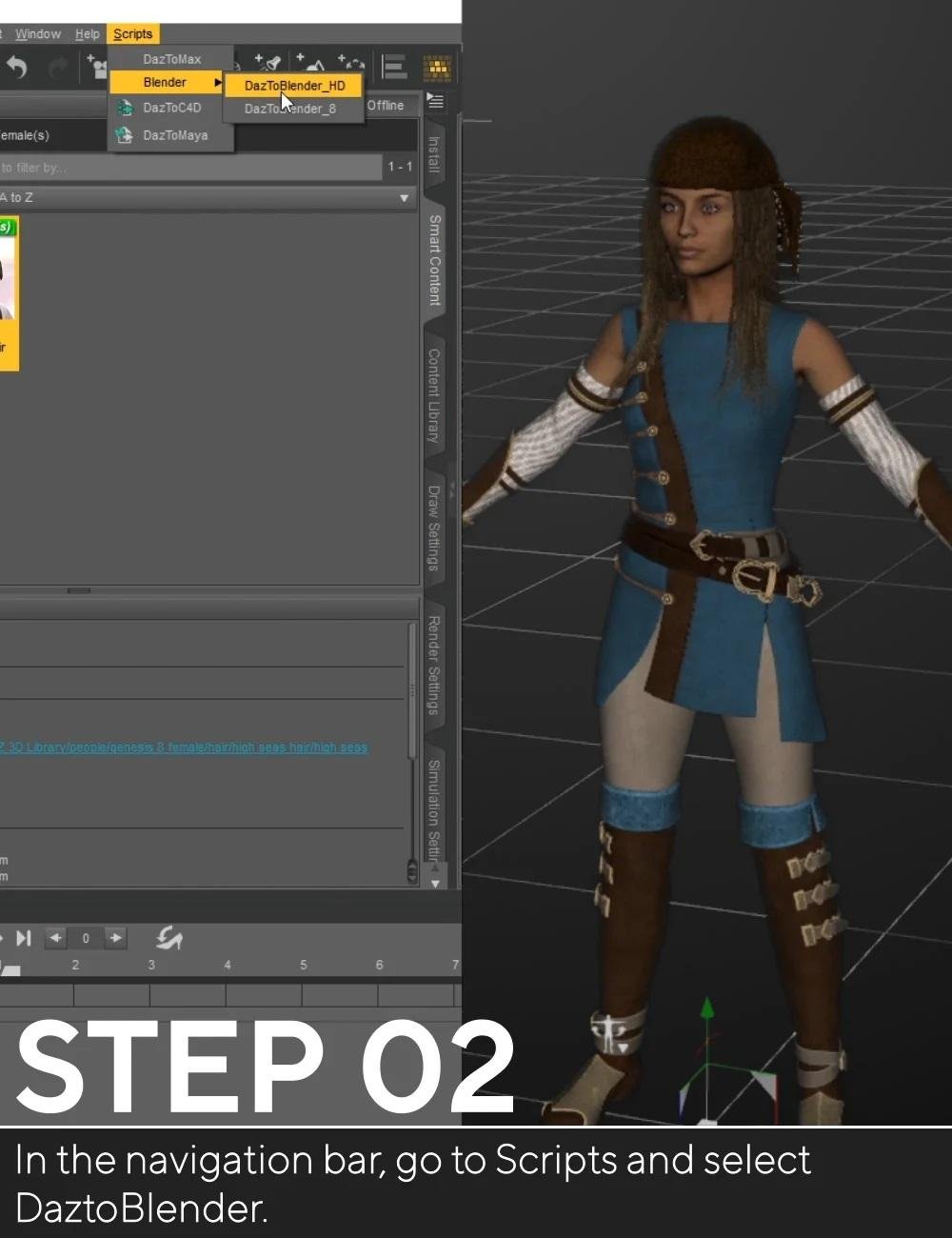
Mine says: Scripts - Bridges - DAZ to Blender
DAZ to Blender : Genital
DAZ to Blender : Morph Exporter
So how do I know that the menu in DS I have is the correct for the latest DAZToBlender plugin?
Sorry about that looks like we need to update the info on our site I will let the team in charge of that know!
You have the correct names DazToBlender_8 and DaztoBlenderHD were combined to one script named DaztoBlender you would need to use that one.Biguana 8.1 Rumor MillShocked and amazed at Poser support. For a minute there I got all excited, thinking I might finally have a reason to dust off Poser 11 or maybe even upgrade to version 12. But then I noticed there's no unflatable morph listed. Sorry, Daz_Whomever, no matter how good it looks, if it doesn't unflat I'm gonna have to pass.
 Biguana 8.1 Rumor Mill
After more than ten years of development, multiple unverified sources are reporting the alleged imminent arrival of the much anticipated Biguana 8.1
The figure includes out-of-box support for the following platforms:
-
DAZ Studio
-
Blender
-
Unreal
-
Unity
-
Maya
-
3DS Max
-
IRAY
-
3Delight
-
Poser
-
Minecraft
-
Pac-Man
-
Frogger
-
Damn well does not support Carrera.
Standard Features Include:
-
Individual 4K textures for each scale
-
Discrete tear material to produce the most realistic eyes of any DAZ reptile
-
4500 Poses plus mirrors
-
Low memory version with only 1.5 million polygons
-
Face rigged for ultimate adorability
The product is expected to be released in the following packages:
-
Standalone Figure
-
Starter bundle including Biguana HD morphs, additional Biguana textures, Biguana vellus hair… and Lilguana HD
-
Pro bundle including Biguana HD morphs, additional Biguana textures, Biguana vellus hair, Lilguana HD, Mediumguana HD, Cyberguana 2077 HDRI set, Guanalulu Hawaii Vacation set, and skinny G8 female character inexplicably included
Add-on products will include:
-
Guana Make You Sweat 90’s hip hop soundtrack
-
Two more skinny female characters inexplicably included
-
Face morph expansion pack for ultimate adorability in HD
The release date is expected to be DAZ soon.
Are there any actually good face cloning tools out there? (E.g. not Facegen or Headshop)i understand its genesis female 8.1 is new, but i can get the free face transfer to work with 8.1. i wonder will headshop support genesis 8.1? so far i only use headshop and face transfer free for cloning. i think headshop is good as it gets but the textures can screw up, so i just reskin with other character mats
Selling and/or sharing charactersjestmart said:
You can save as a Shape or Character preset and sell that with notice that buyer needs to own/have all the morph packages you used to dial in the character.
What would be the point? I don't think you can copyright something like that for yourself as it would amount to forbidding anyone owning all of the products from using that specific combination of those products if they don't purchase your character recipe. Once the recipe gets sold and gets out in the "wild", its out there free of charge with no copyright, so its not something I would be expecting to sell for enough $$ for very long to make it worth the time. If someone is going to bother with that, they should at least make some unique components for the character that can be copyrighted and would actually encourage customers to buy it(i.e. particularly skin and/or hair).
Scene now switches to mesh at every alterationdo anything in scene and it switches to mesh view making it damn near impossible to manipulate characters with any acuracy add makeup touch a morph select in the scene all switch it to mesh view.
can't seem to find any setting which stops this behavior
Daz3D to Unreal Engine 4.26 Issue with Genesis 8Tsuba said:
Where did you get the Daz to Unreal 4.26 plugin ?
My Real Question is how in the worl did you get the 4.26 update to work at all unless you are useing the one from unreal marketplace?
The update:
1. Environment Support -Daz to Unreal Environment Transfer
2. Added a new animation blueprint to deal with conversion from Quaternion to Euler rotations.
3. Fix Bone Rotations -Daz to 4. Unreal Fix Bone Rotations
5. Basic Support for Genesis 8.1
6. Basic PBRSkin Material
7. Fixed the morph list when exporting clothing items separate from the character. This is done by generating the morph list from the character down, rather than just from the clothing item.
8. Support for 4.26
9. Fix morph preset in Daz Exporter
10. Allow morph curves to be exported in animationsbridge does not work anymoreSame here after installing with daz central the plugin does not show up in Unreal 4.26 which the update was intended....
I also installed with install Manager and also does not show up in unreal.
UPDATE
in the daz central i had the correct directory mapped ( IE - Unreal 4.26 ) however the plug in did not go to the plugin folder - it went to the root folder I did not think it had to specificially map to the plugin folder.( because in the past it was not a problem and it got installed correctly ) so after moving the files to the correct folder it is now showing up in Unreal 4.26
OK after much confusion daz central shows a new version 4 which is supposed to be compatable with 4.26 but daz central is still installing the 4.25 version so I am not sure what is correct anymore - I am just going to buy the version on the unreal market place that currently supports 4.26 and let daz play catchup when and if they do
This is from the daz plugin update page:
Daz to Unreal Update
- Environment Support
- Fix Bone Rotations
- Basic Support for Genesis 8.1
- Basic PBRSkin Material
- Fixed the morph list when exporting clothing items separate from the character. This is done by generating the morph list from the character down, rather than just from the clothing item.
- Support for 4.26
- View full list in FAQ
- FAQ:
- 1. Environment Support -Daz to Unreal Environment Transfer
2. Added a new animation blueprint to deal with conversion from Quaternion to Euler rotations.
3. Fix Bone Rotations -Daz to 4. Unreal Fix Bone Rotations
5. Basic Support for Genesis 8.1
6. Basic PBRSkin Material
7. Fixed the morph list when exporting clothing items separate from the character. This is done by generating the morph list from the character down, rather than just from the clothing item.
8. Support for 4.26
9. Fix morph preset in Daz Exporter
10. Allow morph curves to be exported in animations
AIUTO...CHI CONOSCE L’ITALIANO? PARTE TREDICIImago said:
Tiziano said:
Mi sapete dire come si può rimediare al disallineamento delle bones nei capelli messi su personaggi non supportati?
Puoi annullare uno dei morph "Hidden" che lo causano, ma di solito deforma anche il resto, devi fare una prova. Seleziona i capelli e poi vai nelle impostazioni del tab Parameters e attiva la visualizzazione degli elementi nascosti, poi spulcia un poco e vedi quale è la causa, se il risultato è soddisfacente per te, hai risolto.

Se non va ci sono un pò di tecniche un pò più avanzate per risolvere, facci sapere.
No, non riesco ad ottenere risultati soddisfacenti ^_^;
Daz 3D is part of

Connect
DAZ Productions, Inc.
7533 S Center View Ct #4664
West Jordan, UT 84084Licensing Agreement | Terms of Service | Privacy Policy | EULA
© 2026 Daz Productions Inc. All Rights Reserved.