-
HH Gnasher [Commercial]
It's going to be a year of prehistoric fantasy from me this year. Creatures, characters, outfits, props, and environments. I have six products headed your way during the first quarter and possibly more before the end of the quarter. Let's begin with the Gnasher and two expansive products (textures and poses).
Behold the Gnasher...


The HH Gnasher is a fully rigged, fantasy-based dinosaur. This ferocious carnivore comes with different variations (Head Crest/Horn/Basic), and the horn's length can be adjusted. The Quill Spikes and Saliva are also included add-ons but can be removed if you prefer without. The eyes can be closed too.
Multiple levels of detail can be changed by adjusting the subdivision levels (0-2) and the differences are shown in one of the store images. Included is a base hierarchical material set that applies to the figure and all add-ons. A bonus preset is also included, adding scars to the figure, which changes the skin texture and turns on the scars morph for extra 3D details.
4 full-body poses are included, as well as their flipped versions (8 total).
All images were rendered inside Daz Studio using NVIDIA Iray.
Add a prehistoric flair to your renders with the HH Gnasher!
--------------------
Textures & Poses products are releasing with this one at the same time. Here's a look at the additional textures.


-------------------------------
and soon the the Gnasher will have a worthy opponent... the Colossadon.
 Auto Face Enhancer [Commercial]
Mart1n71 said:
I have Zbrush, but I'm just a beginner. Is there a tutorial you could recommend to show how to do this? Or would you be able to do a quick tutorial?
+1 on quick tutorial. Just record your screen while doing those adjustments add some basic commentary and upload to youtube. That of course would be super helpful.
Here's a quick video then. https://youtu.be/5Dm0cc0FtDA I have no mic so no commentary unfortunately. Sorry.
So step 1, Load your G8 Character, delete any attchmets, hair/eyelashes/brows/anatomical elements etc. Add any morphs you want included. I use D.Masters Auto Shape Enhancer and Zevos Skin Crease Controller so have included both. (this would also be a good time to set a material preset if you havn't already) Set mesh resolution base resolution and open the figures mouth to 50% (following D.Masters recommendation below) and export as on OBJ using Daz default settings.
Step 2, Add AFE attachment so it follows the shape of your charcter. Loads of mesh artifacts as the higher res AFE is following the base resolution of G8. Turn off the visiblity of G8, set the resolution of AFE to 0 and export as OBJ, again using Daz default settings. (DO NOT CLOSE HER MOUTH)
Step 3, In Zbrush import the G8 obj you saved first. Open the 'Geometry tab in the tools menu and click 'Divide' 2 times to get SubD level 3. Open the subdivision tool tab and click copy.
Step 4, import the AFE OBJ.
Step 5, In the subtool tab click paste. The G8 mesh should be visible in the layer below the AFE mesh.
Step 6, Scroll down the Subtool tab and open the 'Project' tool. I used the settings in the video, not sure if they are the best, but the worked ok enough for me, Click 'ProjectAll'
Step 7, In the subtool tab, turn off the visibility of the G8 subtool and inspect the resulting AFE Mesh. If you encounter any issues with the ears or eye sockets defroming, CTRL-Z and adjust the Project settings by making SMALL adjustments to the Distance/Mean/PABlur sliders until you are happy.
Step 8, Export AFE mesh as OBJ.
Step 9, Back in DAZ, select AFE, Edit>Figure>Morph Loader Pro. Select the AFE mesh you've just exportd from ZBrush. In the advanced options set Reverse Deformations to 'Yes' and Accept.
Step 10, In the properties tab, select Morphs and dial the morph in to see how it works.
Step 11, (optional) Click the properties gear icon and open the Parameter Settings tab. Set the minimum limit to zero, change the morph location. I used Actor>People.
Step 12, File>Save as>Support Assets>Morph Assets. Expand the selction tree until you find your new morph, and tick the check box to save the morph to AFE so you can dial it in manually whenever needed.
Step 13, Add meterials and enjoy.
DMaster said:
Thank you, Mart. That's about how I do it. Update to above.
1.export AFE + G8 out at base level. Do have the mouth open and eye closed at 50 percent. (Hold this pose in Daz3d, save it, because you will need to bring AFE back at this same pose)
2. In ZBrush add sub_d to G8 div by 2 to 3 times.
3. Import AFE and add the projection on the AFE. Doing it this way helps the inner mouth from messing up and move away from the base shape.
Note: see image for import and export object out. remember to hide G8 or AFE mesh on export. else you have 2 objects. Not a good idea to separate them in the 3D App.
You can also smooth it out using blender's shrinkwrap. it basically does the same thing as zbrush's projection.
steps:
1. load g8. close eyes 50% and open mouth 50%. turn off AFE powerpose. export to an obj on base resolution
2. wear AFE attachment, export that only (by hiding everything else) on base resolution
3. in blender, import both with keep vertex order checked
4. apply subdivision surface modifier level 3 on g8 obj, then apply shrinkwrap modifier to AFE obj with default settings and target set to g8 obj
5. export AFE obj with apply modifiers and keep vertex orders checked
6. in DAZ, select AFE attachment and import AFE obj from advanced morph loader with reverse deformations checked. the morph will appear in the AFE attachment as the filename
before:

after:


 all fixed
thanks again dmaster this is still my favorite product in the whole store
Bugga Boo Hair Fits Freebies!... and other stuff.The grafts are just there to keep her body rendering a smoothly as possible under all conditions... the neck especially had some weird geometry that just wouldn't smooth out reliably for some poses, and the limbs and torso had a lot of compression artifacts that would show up now and then in renders from the mesh being forced so tiny.... That said the graft should auto follow any morph you put in the body underneath it, so additional morphs shouldn't be a problem, just build them on G8 and go ;)
Genesis 8.1 presets(8.5.1.19) & other presetsDiomede said:
Finally got enough sustained access to download and install the 'essentials' files necessary for the presets to work on my laptop. Thanks again for all your hard work on these.
Bunyip, to get the morphs working properly, are you first using the free plugin, Daz Studio, to shape the figure and then save as a scene subset? Or are you directly loading in Carrara?
I will reserve some time to do some more experimenting.
First of all I still have DAZ Studio 4.10 loaded on my computer, someone with 4.15 needs to check to see if the character morphs are loading in Carrara.
https://www.daz3d.com/forums/discussion/comment/6430491/#Comment_6430491
My workflow is to do the character morph on Misty's preset in DAZ Studio, once done save it as a Character Preset. Clothes and hair converted to blended weight are saved as a Scene Subset.
Next I open the Character Preset in Carrara. I have found with my workflow that body morphs that are larger/smaller than the default figure have skeleton/bone problems when posing in Carrara.
Ten Years After - The Making of Dartanbeck.comI'm putting that ERC post in here so I can review what I wrote! LOL
WendyLuvsCatz said:
ATLPR said:
Yes, I understand, and numerous aspects of don't products don't work. My recent gripe (voiced for the first time here), is: As far as I can tell, the new "8.1 Face Controls" cannot be used on my e.g. V4,Gen,Gen2,Gen3 characters. I thought it was just the mesh being bent in various ways. Why can't it be used for all of them (just like my mesh grabber)?
it is actually a conformer that fits to the facial bones on G8.1
Yes. Wendy's right. It's taking leaps into higher-end technology, like that used in Alita Battle Angel.
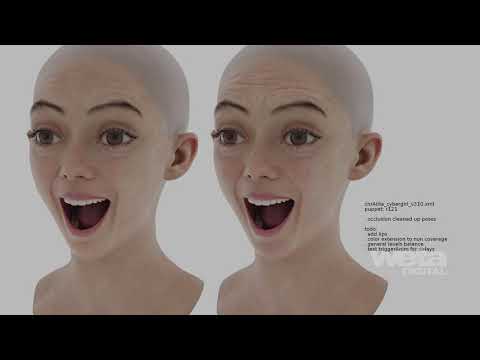
While 8.1 is Not made using all of the advanced tech of Alita, it Is leveraging a lot of the philosophies used. Daz 3D has always been on the forefront of delivering some (some) of the utmost latest tech in their CG Characters.
That said, we Carrara users also have a huge boon of this same nature that was gifted to us by a high-end amazing animator collaborating with one of our brilliant plugin designers. Her Carrara call sign then was "Faba" and she worked with Fenric to help him produce a plugin that's so powerful that few of us truly understand how to put it to full use - besides Faba, that is.
But she tried to teach us all with amazing details that are still available today.
In Carrara, we could use Fenric's Carrara Enhanced Remote Control to create an interface almost exactly like the 8.1 FACS interface, or we could customize it however we want. With a free ShareCG account, we can download some really cool tutorials and addons for this amazing (and now free) plugin via Faba's gallery: fabaone, and in particular regarding this, her Carrara Custom Helpers, which she made when I was asking her how she made them in the older Daz forums of the time. I'm glad that she moved it all to ShareCG when Daz shifted to a new forum software!
In the examples she did for the Carrara ERC, she demonstrated using helpers like these to control hand gestures. But with Carrara ERC, we can connect any morph or joint to any control, so we could use this to make our own facial control rig just like what we see on 8.1, but we can also have it as a simple controls sytem that stays with our view rather that sticking in to the head of the figure, so as we rotate the character around, our controls remain in the same place in our working view - if we wanted.
Edit for clarification - we can attach any Morph(s) to any control - even if that control happens to be a morph dial or joint rotation, and if more than one morph is attached they ca each be set up to behave completely independant of the others attached - if you follow. It sounds complicated because it certainly can be if we let it. It's Incredibly powerful tech here!
If we use Carrara ERC on Genesis 2 and earlier figures, we can use it to control the many facial morphs in ways that it would 'feel' like we're controlling facial bones in a way. If we used it on Misty's Genesis 3, 8 or 8.1 presets in Carrara, we could actually control the movements of those facial bones and/or use it to control morph dials. Quite powerful!
That's what Faba thought that Carrara was missing all along - being the incredible animator that she is. So I was very grateful to her and Fenric for making this a possibility - even though it was waaay over my newbie head.
I was just saying in another thread that, for a "Legacy Software" Carrara sure is ahead of its time in a Lot of ways! It was fun to see that some of the new features in LightWave a couple years back were things that Carrara's had for quite some time! No... I'm not saing that Carrara's better than LW! Please don't misinterpret! LOL
It's the people using Carrara that make it so advanced. The Daz 3D devs that were working on it were pumped about it. Spooky had a great team and they had a lot on their plate. It was truly inspiring and amazing to see what all they got done in the time they did it in - especially when they rewrote it to bring it to 64 bit!!!
Our plugin makers never cease to amaze me - the things they create. have a look for yourself in my Carrara Plugins section!
BUGGA BOO!!!!! Genesis 8 Female Cutie from Littlefox and Friends.https://www.daz3d.com/forums/discussion/467821/bugga-boo-hair-fits-freebies-and-other-stuff/p1
Also we have some morph fits for what hair I had, and a couple of helpers and Thistle's tail and earsBUGGA BOO!!!!! Genesis 8 Female Cutie from Littlefox and Friends.Pendraia said:
Love Bugga Boo but I'm wondering how people are getting the hair to fit? I'm most likely having a senior moment and would really like some advice on how best to do this.
Thanks
Pen
I had issues applying the dForce hair to Bugga Boo as is so I applied the hair to a G8 model then used the Bugga Boo morph. Others might have other ways to making hair work.
Animation in Carrara - Let's Animate - Q&A - Come One & AllMindsond and I are DEEP into fine tuning our animation processes - it's really fun, and my whole reason for getting into all of this in the first place.
Lip Sync is a big one. For me it's never been the biggest - but then again, the biggest thing I've been working on over the years was experimenting and testing other animation tools in Carrara, like the Ocean, fog, lighting tricks, animated textures, vehicle motions, animated background characters and as much of that stuff as I could - all while having fun with different variations of the tips I mention in AniMating in Carrara
Later I started getting more into particles and then VWD, which I agree is an Amazing simulation tool. I love it!
Rosie 5 came along and I finally got Carrara dynamic hair working better in that long, big and curly style, but it's still quite glitchy and unpredictable at that size. I'm still trying more and more variations with that - Physical forces against parented collision objects vs hair shaders. It's the shaders that cause my biggest source of unpredictability and glitchiness because the curls push the shape away from the guide hairs which then is simulated - so after thinking it through, it's easier to understnad that these shader morphings are following a string, not really minding if it rotates around and makes things look funny. So I think if it was straight (it can't) it might have much smoother results.
Part of my thinking now:
I've been playing with Linday's Classic Long and Curly Hair with dForce for Genesis 8 Females, which looks fantastic, I think. The actual simulations from dForce, which wasn't intended to be used this way for hair, often gives a much more 'boring' simulation than that of Carrara's dynamic hair.
So I've created Rosie 5.5 from the ground up in Daz Studio so that she works with all of the tools that Studio has to offer, and she just opens right up in Carrara.
With the two great softwares, I'm going to be trying a bit of experimentatation - currently getting accustomed to a consistent way of running Linday's hair in VWD, which is not an easy task - it has a Lot of vertices and is a (beautifully) tangled collection of mesh tubes. I haven't been successful yet, but my inexperience with 'actual control' of VWD is disappearing with Mindsong's assistance, which is geting me closer and closer - now the biggest obstacle being time to spend at the computer.
Another experiment on my mind is to try and liven up dForce results using Carrara's dynamic hair.
Without actually testing my theory, I saved a dForce animation in Daz Studio and loaded it into Carrara. It took a l o n g time to load, but in the end, I had the camera and Rosie 5.5 in motion. The VWD in DS and dForce elements just get deleted (in practice, I'll save a version in DS without these elements - perhaps it'll load easier).
Now I'd need to load in my Carrara-optimized Rosie 5.5 and either NLA the animation to her, or transfer the collision objects and hair to the one imported from Daz Studio. Either is simple. I feel so 'at home' in Carrara!
So now I'd simulate the Carrara hair and render that. Since Rosie is the same in both apps, I'm thinking that rotoscoping the results together will be fairly simple. If not, I'd likely try turning one of the Rosies green and using green screen to blend the hair results together.
Now this may sound like a lot of work - because it is. But it's amazing how much of a workflow like this, and even much more encompassing goes on in movie productions CG houses. Besides, one of the jobs in a VFX house that most peole dread doing - rotoscoping - happens to be something I really don't mind doing.
Diffeomorphic DAZ Importer Version 1.5.1benniewoodell said:
tricky30de said:
benniewoodell said:
tricky30de said:
Problems with facial expressions
Is there a way to import custom made facial expresions into Diffeomorphic.
Importing the .duf file doesn't work.
So I tried to make my own morph in Daz 3D. After import as custom morph in Diffeomorphic the morph funktions.
Transfering it as shape key to the mesh didn't work.
Has someone an idear how to solve this problem?
Are you posing it with powerpose? If so, those keys won't transfer for some reason but if you're using an expression from a pack, just save it as a pose preset, then in Blender click import pose and it'll work.
Thank you for that idear. But can I make a shapekey from a pose?
No I didn't used powerpose. I created a new property with min 0 and max 1. I set it to 1 and used an expression from a pack. Afterwards I freezed it with ERC Freez and removed all the ectls I diddn't need. Then set it to 0 and used a neutral expression. Again freeze with ERC Freez and remove all ectl not used. This morph I could save as support asset / morph asset. At least I loaded it in deffeo with import custom morph.
The Morph works in diffeo. The funktion convert custom morph to shapekey is my problem. After the convert the shapekey on the mesh in blender didn't work. But I need it there for exporting it into unity.
Sadly I have not been able to get shape keys to transfer with diffeo. If you try the newest update of the Daz to Blender Bridge, it will probably work. I can't get anything from Face Motion to transfer with diffeo since those are shape keys (at least I think they are, they have shape. in the names), but they transfer when I export it with the new D2B update.
Face expressions works different as the normal morphs. But you can import every other morph with diffeo and the transfer to shapekey works. The manual from Thomas Larsson is realy very good. The real problem is the bad fbx export of Daz. It seams for me that the normal fbx exporter difn't export the morphs from the genitals and misses some other morphs. The Daz to Unity Brige has bugs, the Daz to Unreal Bridge has the same problems as the normal fbx exporter.
I tried also the Daz to Blender Bridge, also no gen morphs and lost a lot of other morphs.
Diffeomorphic DAZ Importer Version 1.5.1tricky30de said:
The funktion convert custom morph to shapekey is my problem. After the convert the shapekey on the mesh in blender didn't work.
Some "morphs" in daz studio are not morphs, they are bone poses, so they need to be imported as poses. As for the shapekey conversion you can file a bug report at diffeomorphic. Please provide a test scene with the bug.
Please note that diffeomorphic is not so good to import modified assets stored in the scene file. If you did your own morphs then save them as support assets to be imported with diffeo: file > save as > support asset. This will work fine.
Diffeomorphic DAZ Importer Version 1.5.1tricky30de said:
benniewoodell said:
tricky30de said:
Problems with facial expressions
Is there a way to import custom made facial expresions into Diffeomorphic.
Importing the .duf file doesn't work.
So I tried to make my own morph in Daz 3D. After import as custom morph in Diffeomorphic the morph funktions.
Transfering it as shape key to the mesh didn't work.
Has someone an idear how to solve this problem?
Are you posing it with powerpose? If so, those keys won't transfer for some reason but if you're using an expression from a pack, just save it as a pose preset, then in Blender click import pose and it'll work.
Thank you for that idear. But can I make a shapekey from a pose?
No I didn't used powerpose. I created a new property with min 0 and max 1. I set it to 1 and used an expression from a pack. Afterwards I freezed it with ERC Freez and removed all the ectls I diddn't need. Then set it to 0 and used a neutral expression. Again freeze with ERC Freez and remove all ectl not used. This morph I could save as support asset / morph asset. At least I loaded it in deffeo with import custom morph.
The Morph works in diffeo. The funktion convert custom morph to shapekey is my problem. After the convert the shapekey on the mesh in blender didn't work. But I need it there for exporting it into unity.
Sadly I have not been able to get shape keys to transfer with diffeo. If you try the newest update of the Daz to Blender Bridge, it will probably work. I can't get anything from Face Motion to transfer with diffeo since those are shape keys (at least I think they are, they have shape. in the names), but they transfer when I export it with the new D2B update.
Nix8 and some other male faces has slightly distortedIt's a "rookie" mistake by the creator of the character/morph - When saving a morph or a character-morph, the dials should be set at zero, otherwise they will automatically be applied to each and every character using the same base figure, no matter if it's a new character or one in a scene saved a year ago and never since opened.
What to do for some content that you install from third sitesI have got a 3th party morph content i cant use it in daz 3d 4.12. Is there someway to explain how to do it manually?
Also i tried a few things to do it.
Like crating a " My Content " file inside " C:\Users\ -User Name- \Documents\DAZ 3D\Studio " and pasting folders wich is inside of content folder.
Than opening daz => right clicking smart content => Content DB Maintence => Checking Process Metadata queue and Reimport Metadata.
Diffeomorphic DAZ Importer Version 1.5.1benniewoodell said:
tricky30de said:
Problems with facial expressions
Is there a way to import custom made facial expresions into Diffeomorphic.
Importing the .duf file doesn't work.
So I tried to make my own morph in Daz 3D. After import as custom morph in Diffeomorphic the morph funktions.
Transfering it as shape key to the mesh didn't work.
Has someone an idear how to solve this problem?
Are you posing it with powerpose? If so, those keys won't transfer for some reason but if you're using an expression from a pack, just save it as a pose preset, then in Blender click import pose and it'll work.
Thank you for that idear. But can I make a shapekey from a pose?
No I didn't used powerpose. I created a new property with min 0 and max 1. I set it to 1 and used an expression from a pack. Afterwards I freezed it with ERC Freez and removed all the ectls I diddn't need. Then set it to 0 and used a neutral expression. Again freeze with ERC Freez and remove all ectl not used. This morph I could save as support asset / morph asset. At least I loaded it in deffeo with import custom morph.
The Morph works in diffeo. The funktion convert custom morph to shapekey is my problem. After the convert the shapekey on the mesh in blender didn't work. But I need it there for exporting it into unity.
Diffeomorphic DAZ Importer Version 1.5.1tricky30de said:
Problems with facial expressions
Is there a way to import custom made facial expresions into Diffeomorphic.
Importing the .duf file doesn't work.
So I tried to make my own morph in Daz 3D. After import as custom morph in Diffeomorphic the morph funktions.
Transfering it as shape key to the mesh didn't work.
Has someone an idear how to solve this problem?
Are you posing it with powerpose? If so, those keys won't transfer for some reason but if you're using an expression from a pack, just save it as a pose preset, then in Blender click import pose and it'll work.
Nix8 and some other male faces has slightly distortedTo fix any ill-behaving morphs, do as follows;
1. Load your base figure or the developer version.
2. Select "Show Hidden" in the Parameters-Tab, drop down menu (right-click) or Pane Options (Four horizontal lines) -> Preferences -> Show Hidden Properties
3. Zero the figure (Found in Parameters-Tab, drop down menu)
4. Memorize the figure (Found in Parameters-Tab, drop down menu)
5. File->Save As->Support Asset->Save Modified AssetsThis procedure will zero the default value in the ill-behaving morph/morphs, and while saving DS also shows you a list of the morphs it is changing.
Michael 8.1
This is pretty cutexyer0 said:Artini said:
Now, I am debating, if I will be able to get the similar look, like j cade.
YOU probably could, but I tried my go-to hdr's (PRO-Studio, UltraHD Sunny Beaches), and I was disappointed with the results. I'll try the one j cade suggested now. His skin is better than I thought, by far, but he's still kind of plain compared to the last two years of Genesis 8. He's more in Lucas' league as a morph. Here's the best of the lot, done with Click-n-Render (I made the eyes and irises smaller):
 Natural Eyes for Genesis 8 [Commercial]
Ok I will trychevybabe25 said:For the best results with these eyes:
dial in the cornea
dial in the hd iris morph
use the default settings on the eyes
make sure your render settings are set super high. I believe the render settings are on page 1 of this thread.
They take longer to render but the little ring is barely visible and doesn't stand out.
Michael 8.1Silas3D said:
Inspired by j.cade with the same HDRI, here's my first Michael 8.1 render (beefed up with 50% Alistair body):

Also used Edward HD details and an Auto Face Enhancer smile morph to make him appear a bit older. Some postwork with Nik Collection Photoshop plugin.
Did you use the AFE geoshell or whatever that's called? I have not tried that. I did find that the AFE Expressions work even without applying the shell.
Natural Eyes for Genesis 8 [Commercial]Before I tweaked the eye UV (that was before the G8.1 update) I experimented a lot and the grey ring thing is definitely more pronounced if you don't use the HD Iris morph. For me the ring does not disappear entirely with the morph but it is a lot less noticeable.I tweaked the iris and sclera UV and merged them into one UV shell and created a new Map but using Natural Eyes assets and the ring would disappear entirely even without the HD iris morph. So yeah the fact that iris and sclera are on separate UV shells is definitively an issue for these grey rings.
(Edit) Sry Chevybabe, I just saw your thread in the PA products forum. I was stupid. Great you're coming up with a new version for G8.1. I will use my own UV set instead of G8.1 one and already converted all I need but hope it works out well with your new version!
Daz 3D is part of

Connect
DAZ Productions, Inc.
7533 S Center View Ct #4664
West Jordan, UT 84084Licensing Agreement | Terms of Service | Privacy Policy | EULA
© 2026 Daz Productions Inc. All Rights Reserved.