-
The Official aweSurface Test Track
Sven Dullah said:
I might have desaturated the SS a bit too much?
I like the way it looks as-is, but if you want to check transmission, you might want to use an elf ear morph with backlighting... elf ear, cat ear, dragon ear - because all DAZ figures have way too thick ears by default; you gotta stretch it till you get 1...2 mm thickness, max. We all have ears this thin IRL.
It's why there are so many characters out there with jelly glowing noses - people are gauging their SSS settings trying to get ears to glow from backlighting, but since the DAZ human ears are like three times too thick... you get the drift.
Scene File Size BALLOONSRichard Haseltine said:
Mesh Grabber will also, I think, add a lot of data - especially if you use a weight map with it or spawn a morph.
I haven't - just used it for on-the-fly geometry adjustments.
Scene File Size BALLOONSMesh Grabber will also, I think, add a lot of data - especially if you use a weight map with it or spawn a morph.
Making morphs available for all characters.I recently created a character using the face transfer function, which I liked but I was wondering if/how I could make that same morph available for other characters.
GenX2 and Genesis 2 AddOn released! [Commercial]...one of the reasons I never fully adopted G8 as there no longer was a way to smoothly transfer morphs and shapes from Older generations. GneX/GenX2 is an important tool in my custom character creation.
Character Changed in 4.15I think a major problem was that I had the character installed on one drive and the G3 male morphs on a different drive. I didn't get Abel back, but I can modify him with the morph sliders now. So that helps a lot. I didn't have the Aging for G3 males because my other old guys, Wise Sensei and Old Chap still work. I'll get those G3 aging morphs, soon. Thank you, Richard, for your help.
Strand Based Hair Surface Parameterslilweep said:
speaking of SBH, have you been able to transfer to G8.1?
SBH i made on G8 dont seem to be fitting to G8.1. The style lines show that they are fitted and follow G8.1, but when I render/Preview PR hairs, it doesnt follow G8.1
I have tried:
- toggling apply transformations
- toggling preview PR hairs
- Fitting/unfitting
- going into SBH editor and resaving
I have not :( my guess is because the sbh editor relies on material zones and g8.1 adds a new material zone
I really wish I'd done more of my hairs on skullcaps I did some that way, but a couple of my favs need recreating
though this def seems like something daz might be able to fix given that, as you mention, the preview lines display correctly
What can we do to improve the long load times of characters?grimulkan_9cfbd329bc said:
Interesting. My G8F morphs aren't that much bigger (19GB), but it still takes 5+ minutes to load. Maybe I should dig into it more and find out if there are specific offending morphs. The log file never told me where the time was being spent.
DAZStudio was taking between 2 and 3 minutes with my DAZ content to merge the "Base G8 Female" actor into an empty scene (i.e. start DAZStudio then just "merge..." the character). I separated my DAZ content into 38 installation directories based on figure, props vs wardrobe vs pose etc and, by excluding those directories from the "current" CMS settings, managed to establish that pretty much all that time comes from the characters I have bought. Even with the various morph packages included the basic G8F loads in 10-15 seconds; about 12 times faster.
At present I've taken the 38 separate directories and come up with a base set that supports the scenes I have. It turns out that I've bought quite a lot of stuff I don't use... The basic insert is now down to 3-4 seconds. I just need to go through the scenes I have moving characters from my various "Figures" folders to the "Figures in use" folders and catching any of the morph packages I actually use (I know the principle ones and those are already loaded by default.)
It's quite a bit of work; I had to start by de-installing all of my DAZ content and it took me several days to a week to sort through it and install it by what are sort-of DAZ categories... However the benefits of loading a DAZ actor in a few seconds rather than a few minutes seem really worthwhile.
The way DAZ could fix this is by not having those morph dials; maybe someone out there wants 50% Victoria and 50% Edie, but surely it isn't worth slowing every load down by a factor of 10 or more to accomodate mix'n'match of character shapes. Maybe better to put that in a multi-morph loader tool.
Strand Based Hair Surface Parametersspeaking of SBH, have you been able to transfer to G8.1?
SBH i made on G8 dont seem to be fitting to G8.1. The style lines show that they are fitted and follow G8.1, but when I render/Preview PR hairs, it doesnt follow G8.1
I have tried:
- toggling apply transformations
- toggling preview PR hairs
- Fitting/unfitting
- going into SBH editor and resaving
Looking for this modelj cade said:
oh man thats a throwback! IDK about the morph but the texture is 100% London by danae which was created for good ole V4
LOL, well that explains why i couldn't find the texture. i was looking at all the good G8 and G3 redheads I knew of and none matched the image.
MimicMolly's Renders & WIPsI tried to make my own pug with Baxter. This is my recipe:
- 40% English Bulldog HD
- 60% French Bulldog HD
- 20% Pitbull by AM
- 50% Pitbull Massive Body
- 50% Husky Fur HD
- 83.5% !Ears Floppy (Base Only)
- 100% Head Details HD
- 100% Head Wrinkles
- 100% Forepaws Wrinkles
- 96.4% Paws Thick
- -100% Tail Length
This first render was with the French Bulldog's materials. The coat colors aren't "correct" but this is the closest skin I have in my Runtime.
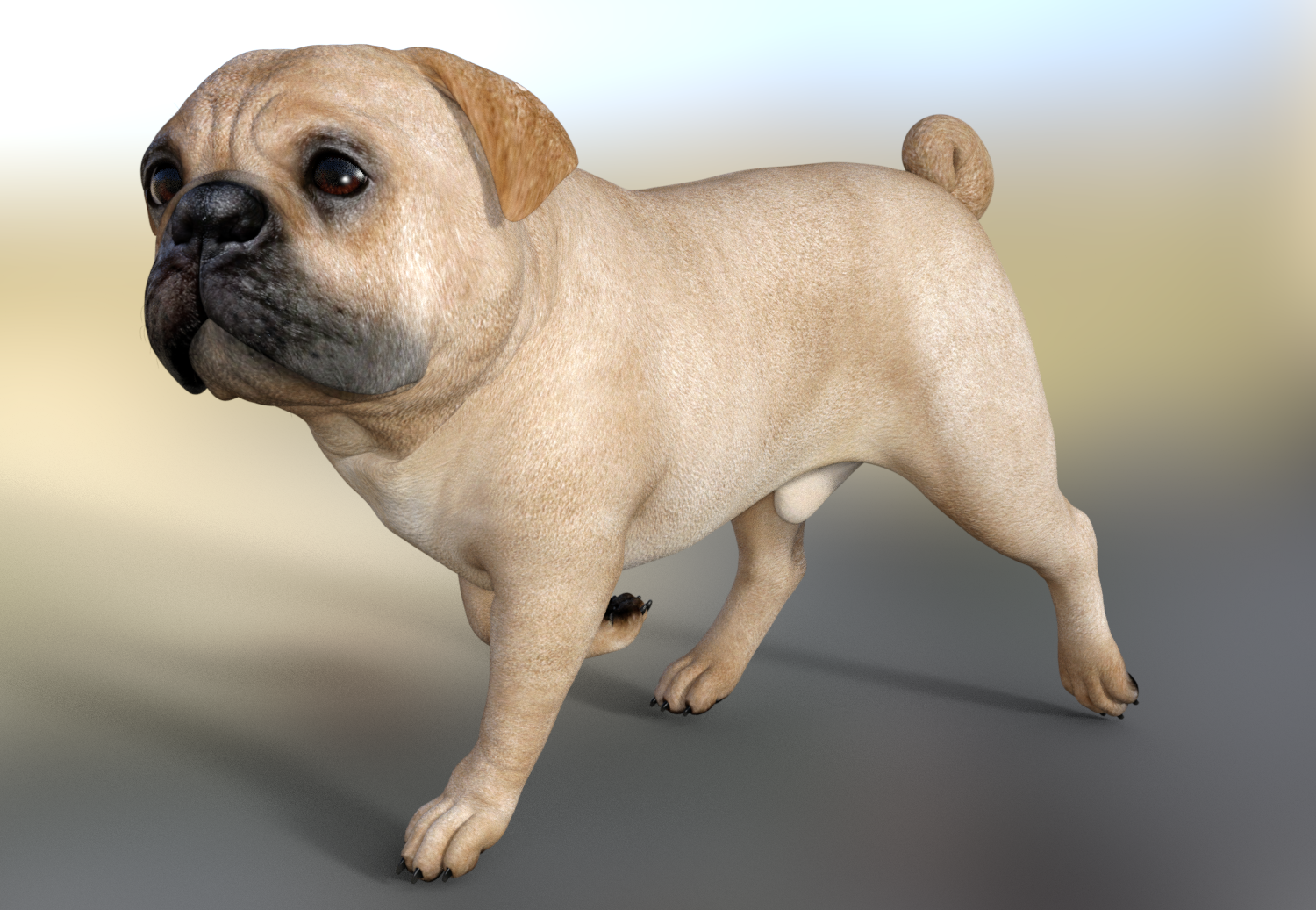
This second render is with Baxter the English Bulldog HD's "Fawn" coat and dForce fur. I wanted to apply the fur with the French Bulldog skin, but it never worked out.
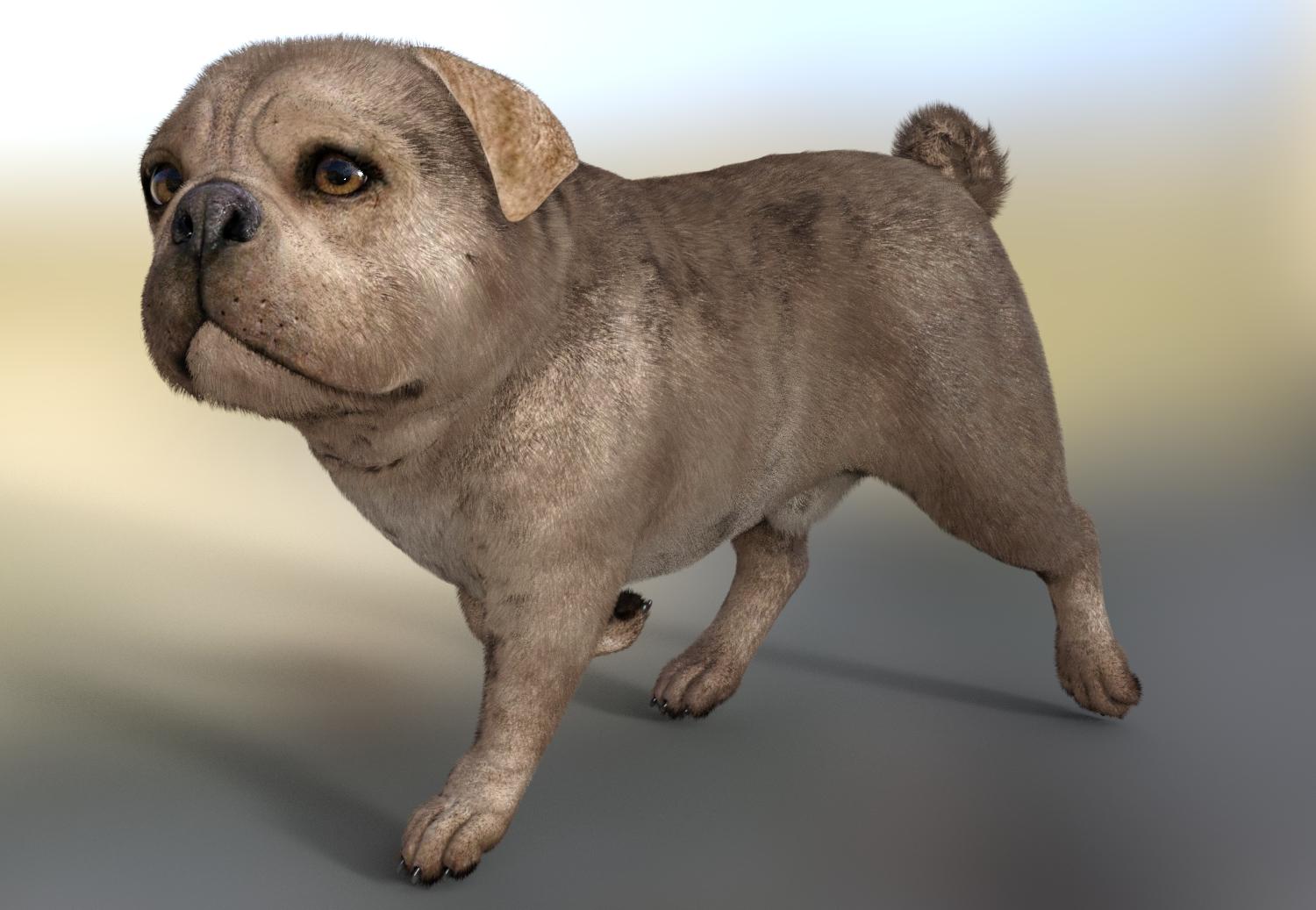
It would've been more believable with the proper coat color and to have a morph which curls the tail.
Looking for this modelFirstBastion said:
While we're at it, do you guys know which character model this is? Its from a daz3d video on youtuB

oh man thats a throwback! IDK about the morph but the texture is 100% London by danae which was created for good ole V4
how to transfer DAZ to a new PCI have the same issue. I have a 3 year old HP Pavillion , I just bought an Acer Nitro as an upgrade. Is there a simple step by step method to transfer Daz3d? This is all very confusing. I am a very novice user. I installed Daz directly to the C drive on the Pavillion. I have never purchased anything but content from the Daz store and used DIM to install it. What is the most "this is a screwdriver, you hold the plastic end" way to move to the new pc? Thank you everyone in advance.
how to export weapon's parameter to blender use DiffeomorphicMy best guess is the bow one is a morph, but the sliders on the shotgun is just transforming pieces around.
if you are getting crummy looking meshes for cloth sim, read on...For the past few weeks, I've been struggling to get a good cloth sim in UE with meshitup's Kaftan, when exporting thru the daz to unreal plugin, no matter what settings I tried to use, it would export like this (seen in Studio) which when imported into UE and converted to tri's, would result in a really ugly mesh for cloth sim
I went and tested a few things, and came upon the conclusion that a combination of the character morphs was probably causing this, because when looking at the Kaftan by itself and exporting it out by itself, it didn't exhibit this issue. So after tooling around in the forums, I found this post https://www.daz3d.com/forums/discussion/51343/baking-smoothed-clothing-into-figure, where Richard Haseltine gives a little response on how to bake in smoothing by exporting the piece as an obj, and bringing it back as a morph. (Thank you Richard!) The post was about Blender, but hmm.. could it work with UE? It does! Make sure you read the response afterwards too, because that is important.
So I did this, cranked up the smoothing, hid everthing but the kaftan, exported it out as an obj and brought back in as a morph I set it to 100, then used the Unreal plugin to export the clothed character (I checked the box to open the fbx dialog to make sure that the morph was being baked)
the result? this nice tri mesh for cloth sim I'm still struggling with the sleeves, but the rest looks fantastic.
This might help someone else, which is why I'm posting this
Thanks!
dForce Toga for G8M - footlong?I suspect that the outfit is so short than it wouldn't morph to be long enough to reach the feet (but I don't own it so I can't be sure).
The only other I can think of is this set: dForce Roman Clothing Pack for G8M - it has a long as well as the short tunic - unfortunately at full price, not on sale right now. (There's also a female version if you wanted it)
ETA: Oops, looks like we all replled at once!
G8M Base loading incorrectly [Solved]The problem is not with DS and not with Starter Essentials, therefore reinstallation of those does not help. You have a morph installed that was distributed with a non-zero default value, which makes the morph to be activated every time you load any figure that uses G8M as a base, no matter if the figure is inside a scene that was saved way before the said morph was installed into your system.
To fix any ill-behaving morphs, do as follows;
1. Load your base figure or the developer version.
2. Select "Show Hidden" in the Parameters-Tab, drop down menu (right-click) or Pane Options (Four horizontal lines) -> Preferences -> Show Hidden Properties
3. Zero the figure (Found in Parameters-Tab, drop down menu)
4. Memorize the figure (Found in Parameters-Tab, drop down menu)
5. File->Save As->Support Asset->Save Modified AssetsThis procedure will zero the default value in the ill-behaving morph/morphs, and while saving DS also shows you a list of the morphs it is changing.
G8M Base loading incorrectly [Solved]Hello,
As of this evening, I have been having an issue where my base G8M is loading as if he is has already had a morph/pose applied. A picture is attached.
I have already tried reinstalling the G8M starter essentials, and have tried two different installations of Daz, as well as two different (parallel) libraries (working library and backup). I have no idea what file would create this issue, given that I've replaced all that I can think of.
Any help would be greatly appreciated. I am at my wit's end.
G8/8.1F Breast/Pec In MorphsThanks! Good morph!
Looking for this modelVanilla Victoria, yep, pretty generical.
looks like 65% dialed Kherrington face morph with another skin, your avatar is more interesting, btw.
Daz 3D is part of

Connect
DAZ Productions, Inc.
7533 S Center View Ct #4664
West Jordan, UT 84084Licensing Agreement | Terms of Service | Privacy Policy | EULA
© 2026 Daz Productions Inc. All Rights Reserved.