-
Show us your Blender Renders
Krampus said:
Skin and eyes turned out really well. What's your secret for skin? Are you using the principled BSDF?
Thanks. It's really no secret. I always use Principled BSDF for just about everything. The reason being, it can transfer to both Eevee and Cycles reasonably well if needed, and there isn't much about it that isn't better than the old nodes for diffuse, glossy, etc. Anyway, the secrets are just in the scale and the texture maps. Things like SSS and lights always work better when the objects in the renders are scaled to real world units and as accurately as possible. In other words, SSS might not look correct for human beings if your character's model scale is 6 mm tall or, alternatively, 30 meters tall. Especially in Cycles this is important. Other than that, making quality detailed texture maps based on PBR principles is key with Principled Shader. Good quality maps for everything, including SSS, roughness, normals, and even displacement if necessary. The small details matter. I'll always try to incorporate some peachfuzz using particle hair, just because it helps catch the light and add more details in closeups without adding too much to render time. For stills, I really don't care about render time, but I'm trying to learn animation now so it's becoming more important. That's why Eevee is so interesting to me now.
Bloated dForce file sizesI guess it depends a little on what you want to do with it, I cannot see any reason why you could not save it out as an OBJ and make a morph from it, that should work.
Genesis 8 Basic female loads with Mafalda morph at 100%hellborn said:
Thank's all for helping out.
I thought everything was installed to C:\DAZ Library\....
Thats the structure all info I found in DAZ pointed to and where files where removed when unistalling using DIM.
However, when searching trough the disks I also found Mafalda in C:\Users\Name\Documents\DAZ 3D\Studio.
Head and Body morph found both had value set to 0 but the CTRL file had value set to 1.
Changing that to 0 fixed the problem.
Why do I have files in two places?
As an example.
Except for som thumbnails I seem to have the same subfolder and morphs under
C:\DAZ Library\data\DAZ 3D\Genesis 8\Female\Morphs\
and
C:\Users\Name\Documents\DAZ 3D\Studio\My Library\data\DAZ 3D\Genesis 8\Female\Morphs\The first path seems to be where DIM downloads to and thats also where the thumpnails resides so it feels as that it is the more correct place for my files. Can i remove the duplicates in user path?
Did you ever try Daz Central? That messed up library paths for many people.
Did you get Xiao Xin?It looks like a new vendor (VOOTW) as well. Looks pretty, but I have the same feeling about the price.
They also mention Full Body Apply, so I do not know, if head and body morph are separated.
Best way to save an expression?Hello everyone and happy new year!
Just wondering if there is a easy way to save the expression?
At the beginning I would select the head and then choose save pose. But it didnt seems to save any changes from morph sliding bar related properties.
Then I tried save properties. It somehow works but that also doesnt seems to save any additional minor adjustment inside face control, such as top right lips, center brow, etc.
So I'm just wondering if you guys have some tips or tricks to save the expression in an effective way?
Many thanks in advance :)
Cheers
IRAY Photorealism?
Well the top two are literally just twosret's textures on millawa's morph. So they kind of are. Normally I do massively tweak figure morphs, but I really like millawalilweep said:j cade said:


Whee! not dramatic lighting, but as ralistic as I've yet managed, I really like the studio hdris from hdri haven this one is studio 5.
Also I've gone down a rabbithole. Technically I'm now using my own custom skin shader - I got annoyed coppying the bump it displacement and the base color to translucency and glossy color (for backscattering) so I have connected them up with nodes. I also added a node so I can tweak the color of the translucency to lighten it it has some annoyances but its faster than manually switching maps around
(I also did do renders with dramatic lighting, obviously)

I think it looks more cg though
They look very good. This is how all those supermodel characters that Daz vendors constantly churn out should look.
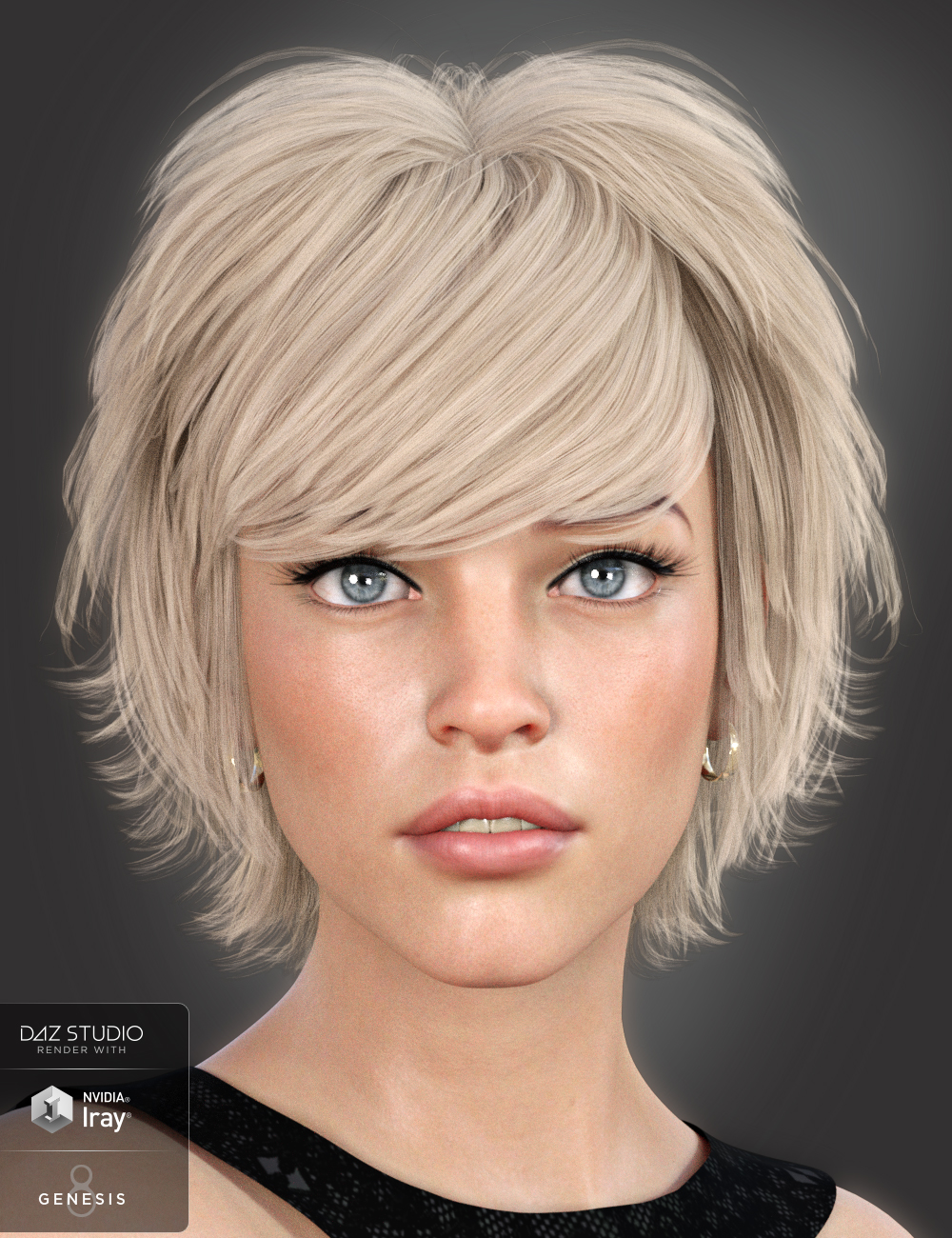
Identify Model in this hair bundleHi ;)
The vendor SWAM used this model a few times to display hairs he's selling on the daz store.
I think this morph, and especially her eyes and skin, look quiet stunning. Does someone please know where is this model coming from ?
Thanks for your help ! :)
https://www.daz3d.com/lissa-hair-for-genesis-8-females
 3D Print Questions - Differences in slicer software, cost of printer.
Melamkish said:
I've done some morph creating using Hexagon and the Daz to Hex bridge. Will look thru my tutorials and see if I may find some "freebies" from way back. I think I got some from the Daz tutorial section, but don't know if still available.
Finally got my printer back on line after about 3 years of inactiviy. Most time consuming part was going thru 10 versions of Marlin to see what changed in the controls sections. First calibration cube was as good as I remember!
Now the real work begins.
Nah, dont bother looking for those tutorials... I probably have them.
Im going to try to find the time to print the test figure this week. Im also giving alot of of consideration on how to cut down waste on things like gloves and such. I dont particularly want to fill my trash can with latex gloves for the purpose of my hobby. Id like to get some really good thick laboratory gloves that I can re-use, but, those are probably pretty expensive and in short supply these days.
3D Print Questions - Differences in slicer software, cost of printer.I've done some morph creating using Hexagon and the Daz to Hex bridge. Will look thru my tutorials and see if I may find some "freebies" from way back. I think I got some from the Daz tutorial section, but don't know if still available.
Finally got my printer back on line after about 3 years of inactiviy. Most time consuming part was going thru 10 versions of Marlin to see what changed in the controls sections. First calibration cube was as good as I remember!
Now the real work begins.
Material Disappears After Changing Morph Value in Unreal EngineI should probably just check that box on all the materials. Normally when you use it with a morph the first time it checks the box for you and just goes gray for a minute until it rebuilds it. Not sure why that one didn't work.
Combining addonsdjangoo said:
Wow, I looked all over the forums and couldnt find my post! Eventually I found it thru google...
Anyway thanks for the replay. So for example, if I have this morph addon -
https://www.daz3d.com/natural-women-and-morphs-addons-for-genesis-8-female
will I be able to combine it with this? https://www.daz3d.com/porefectionist-hd-skin-details-for-genesis-8-females
Yes
Or for example, I have this face morph addon - https://www.daz3d.com/rarestone-s-face-morphs-collection-for-genesis-8-female
Can I apply it on any female G8 character I have?
Yes
Also I want to buy this skin builder - https://www.daz3d.com/skin-builder-8-for-genesis-8-females
Will I be able to use it on any female G8 character? Will I be able to combine it with this - https://www.daz3d.com/natural-women-and-morphs-addons-for-genesis-8-female
Yes
Also, I want to get this Marcus guy - https://www.daz3d.com/fw-marcus-hd-for-darius-8
But do I HAVE to first purchase the basic Darius character? - https://www.daz3d.com/darius-8
No, but the the morphs for Marcus build upon what is provided in Darius. If you don't have Darius, the morphs win Marcus should load, but the result will not look the same as they would look if you had Darius. You may or may not like the result. It almost certainly will not look exactly like the promo images, because those will have used Darius morphs with Marcus morphs.
Edit: The Marcus product does not even list Darius as a requirement. It says it is a character for Genesis 8 Male. Based on that (if the product description is accurate), you shouldn't need Darius at all.
Again, thanks for anyone replying. I try to thoroughly read the descriptions of each product and some do a better job explaining but most just don't. I'm sure it's because I still haven't wrapped my head around the whole workflow yet.
Remember that if you make a mistake and buy something that does not work, you can submit a help request to customer service and ask to return the product for a refund.
Genesis 8 Basic female loads with Mafalda morph at 100%Thank's all for helping out.
I thought everything was installed to C:\DAZ Library\....
Thats the structure all info I found in DAZ pointed to and where files where removed when unistalling using DIM.
However, when searching trough the disks I also found Mafalda in C:\Users\Name\Documents\DAZ 3D\Studio.
Head and Body morph found both had value set to 0 but the CTRL file had value set to 1.
Changing that to 0 fixed the problem.
Why do I have files in two places?
As an example.
Except for som thumbnails I seem to have the same subfolder and morphs under
C:\DAZ Library\data\DAZ 3D\Genesis 8\Female\Morphs\
and
C:\Users\Name\Documents\DAZ 3D\Studio\My Library\data\DAZ 3D\Genesis 8\Female\Morphs\The first path seems to be where DIM downloads to and thats also where the thumpnails resides so it feels as that it is the more correct place for my files. Can i remove the duplicates in user path?
Combining addonsWow, I looked all over the forums and couldnt find my post! Eventually I found it thru google...
Anyway thanks for the replay. So for example, if I have this morph addon -
https://www.daz3d.com/natural-women-and-morphs-addons-for-genesis-8-female
will I be able to combine it with this? https://www.daz3d.com/porefectionist-hd-skin-details-for-genesis-8-females
Or for example, I have this face morph addon - https://www.daz3d.com/rarestone-s-face-morphs-collection-for-genesis-8-female
Can I apply it on any female G8 character I have?
Also I want to buy this skin builder - https://www.daz3d.com/skin-builder-8-for-genesis-8-females
Will I be able to use it on any female G8 character? Will I be able to combine it with this - https://www.daz3d.com/natural-women-and-morphs-addons-for-genesis-8-female
Also, I want to get this Marcus guy - https://www.daz3d.com/fw-marcus-hd-for-darius-8
But do I HAVE to first purchase the basic Darius character? - https://www.daz3d.com/darius-8
Again, thanks for anyone replying. I try to thoroughly read the descriptions of each product and some do a better job explaining but most just don't. I'm sure it's because I still haven't wrapped my head around the whole workflow yet.
Morph already posed clothing?lilweep said:
i dont think this is a question that should be in blender subforum, since it's just a question about how to use Daz Studio's morph loader pro.
If you have Reverse Deformations set to 'Yes' in Morph Loader Pro, then it should only add the changes from the current shape. It will work for both posed garments and unposed garments (i.e., A pose, T pose).
Maybe you should import the .obj file directly into Daz Studio and see if it lines up with the current posed figure you have.
also, posting an image of what the garment looked like with the new morph set to 100% wouldnt have hurt diagnosing the problem.
Don't you just love being lectured?
I posted it here because I am using Blender to create the morph. I don't know whether it is a problem with the morph itself or the workflow I described or Morph Loader itself - if I did, I might not need to ask the question. After it didn't work, I scrapped the whole scene and the Blender file so I didn't have the screen shots to post. If I need to, I can recreate the scene but the responses seem to indicate that the description was understood. It was only an afterthought to post the question because I figured that others might hit the same issue sometime.
Daz animation to Blenderwolf359 said:
@Donald(MITP) Apologies for seeming like a troll!!
I have a long history of BVH usage from my many years as poser user and have a bit of a bias due to its limitations I have encountered over the years.
ditto - but probably without as many callouses and scars as you've probably earned there...
You are indeed a true innovator willing to step in and fill gaps that others ignore.
Keep it up!!
now we're talkin'
@Mindsong.. Do you have CC3 pipeline? If you are using Blender for rendering ( and other native VFX features) are you using a direct CC3 FBX to Blender pipeline ??
I don't have the CC3 Pipeline, but I have CC3, 3DXpipe, Ic7 - all current. My export plan is either via alembic to blender, *or* to get the ic animation 'controls' back to DS for alembic. I'm not going to the IC CC3 figure-base (yet).
I am curious if you are taking advantage of the action editor to store and re-use multiple motion imported from Iclone.
not yet... as per above. Migrating my mocap library would be a serious (painful) task too. But Blender's native mocap support is fleshing out nicely too, so the advantages held by the other platforms are quickly losing weight in my book.
Also for those are willing to use Genesis 1-2, a direct Daz FBX to Blender work flow will allow you to use the Blender action editor for appending new motions after inital import as well including facial animation from Daz mimic etc. Blenders FBX importer will also import facial animation
Have you been able to get IC7 facial or body morph animations back to DS in any useful (reusable) way (fbx, etc.)? I always feel like each iteration of these transfers degrades the results, but its not a scientific conclusion, just a sense, based on how these conversions work.
To be sure @wolf359, you've been a powerful influence and inspiration to my own thinking and many of my key decisions - based on both your shared experiences and your animated productions. I see TMITP's work as a wonderful addition to our options, at a good time, brought with a wonderful attitude and generous spirit. I'm ever-curious what avenues you're exploring and what choices you'll make as we go forward.
And FWIW, a candid, critical, and experienced eye is a useful influence in any ongoing explorations.
best,
--ms
Morph already posed clothing?i dont think this is a question that should be in blender subforum, since it's just a question about how to use Daz Studio's morph loader pro.
If you have Reverse Deformations set to 'Yes' in Morph Loader Pro, then it should only add the changes from the current shape. It will work for both posed garments and unposed garments (i.e., A pose, T pose).
Maybe you should import the .obj file directly into Daz Studio and see if it lines up with the current posed figure you have.
also, posting an image of what the garment looked like with the new morph set to 100% wouldnt have hurt diagnosing the problem.
Genesis 8 Basic female loads with Mafalda morph at 100%Tried to search disks for the SKU number and found 2 files in C:\Users\Christer\Documents\DAZ 3D\Studio\My Daz Connect Library\data\cloud\meta
There is a thumbnail and a json file but I cant find any morph files or similar.
Json file only seems to reference so how can it overide if there are no files?
Or, are the files loaded directly from a cloud and not in my computer at all.
In that case i cant edit them.If so is the solution to delete the json file and download again using DIM?
Show us your Blender Rendersgregsgraphics_cafd0962a0 said:
nicstt said:
Installed my new graphics card and been doing some tests. I can get the results I like quicker in Blender, but it's hard to say which is a faster renderer. Blender image 22 seconds and the Studio image about a minute; it took 1m 18s to reach convergence, but it was about right at approximately the minute stage. The renders look different, and getting them to match up would be a waste of time imo; with my new card, I'll be at least enjoy rendering in studio where the results are fine for my needs.
Diffeo does a nice job of converting particle hair now; had to tweak some though.
I didn't pose in Blender, just exported as is; I changed the materials to my own, instead of using the default ones.
The character, for those interested, is P3D Harper textures (customised) with some Ava and Tika morphs and some tweakage.
One of the majoy things for me is tweaking the little things: thickness on cloth when it needs it; adjust props, such as bracelts (especially when a solid object with no bones as the case here. Then there is adding body to hair, or tweaking how it rests on the figure.
Looks like the big difference between the two renders in your example is the light bounces and also the materials. Also, your iRay render took longer, but it has a smoother result because of that extra time.. Did you use the denoising node on the Cycles results? If you tweak the hair shader, it's possible to get it much more like the iRay result, but you definitely should increase bounces in Cycles if you want to duplicate iRay. Cycles is a path tracing engine, but unlike iray, the light bounces can be limited not only by time but also by material.
I think, by default, Cycles limits the number of light bounces per material to around 16. This is not the same as overall samples. In order for Cycles to emulate the light transfer that iray does, you need to really crank up the bounces. In most cases, it's not necessary to go over 16 bounces, but to be physically correct, 128 is around the sweet spot.
I have messed with light paths previously and also have done since your post and am not seeing any difference, so im missing something; guess it's time to trying google.
Genesis 8 Basic female loads with Mafalda morph at 100%Morph is still there after uninstalling Mafalda.
Dont know if i ever used DAZ connect.
How can I find path to my Daz Connect content library?
Morph already posed clothing?Richard Haseltine said:
marble said:
gregsgraphics_cafd0962a0 said:
Does that dForce thing change the subdivisions when you do a drape? If so, then morphs will not work when you export it in draped form. I don't know if it does or not, I don't use it. But might be something to check.
I'm pretty sure it is not a vertex count problem because that usually results in a failed import with Morph Loader Pro. I think it has something to do with Reverse Deformations but I'm not very clued up on that kind of thing.
I did check the subdiv before exporting from DAZ Studio and reset it to 0 on the skirt. I always do that with exporting to Blender to make morphs.
Was the simulation still applied when you imported the morph with Reverse Deformations on?
As far as I know, yes. I posed the figure, draped the skirt and exported each (posed figure then draped skirt) to OBJ files.
I imported to Blender as I normally would for morphs, created a shape key and made the adjustment before exporting back to OBJ. I then used MLP to import - first with Reverse Deformations set to "Yes" and second time to "No".
The effect is that it tries to morph the skirt into the adjusted shape as though it were starting from a un-posed position (I think). So you get the pose plus the pose, as it were.
Daz 3D is part of

Connect
DAZ Productions, Inc.
7533 S Center View Ct #4664
West Jordan, UT 84084Licensing Agreement | Terms of Service | Privacy Policy | EULA
© 2026 Daz Productions Inc. All Rights Reserved.