-
Daz Studio 5 development update
Daz Central still will not complete the installtion of DAZ3D on my iMac running Big Sur.
Daz Studio and Linuxbingchilling43 said:
GafftheHorse said:
Oddest thing, just got round to running update and a reboot (first time in a couple of weeks running update and a reboot).
Noticed some status feedback I don't usually see (in the terminal) when launching Studio, to do with postgresql. Then when the UI launched I was presented with a login dialog, and it worked.
Well, Smart Content is now working (without the linux postgres backend setup). Just like it does on Pop-OS....
Wine 6.21-1 on Archlinux (and I launched Studio 4.12)
Never posted on here before but came here just to confirm, just installed Daz Studio on Manjaro KDE without any Postgresql setup and it just worked out of the box when it never used to. I'm using Daz Studio 4.15 installed through Daz Central with Wine-Staging 6.16. I'm not really an advanced Linux user so this is pretty nice.
Edit: Just moved to EndeavourOS, using Daz 4.15 installed with Daz Central as before, with Wine-Staging 6.21. CMS is just working out of the box now it seems. NIce.
Nice to have some confirmation that it's not just my system or Archlinux in general.
I've been using Linux since 1999, but even I found it a nice surprise. Still not exactly sure what changes have happened that it now works, I'd just assumed it was better Wine integration with the OS in Pop-OS.
Still don't use Smart Content much though, I'm too used to and know where everything is in the Content Library.
Daz Install Manager (DIM) Download Failedstem_athome said:
amysparkles said:
........I forgot to re-import the metadata in Daz Studio.
So, DS installation is now a prerequisite to downloading purchased content via DIM. It does explain why I was getting the same error after my last forced DIM update.
I use an old PC for internet stuff, so have my programs on another PC that is not networked. I had to use dim to download a plugin for DS, Daz do not allow downloading plugins manually. But all I got was the error you show above.
I did put in a ticket for the problem, but when my 30 days to return purchase was running out, I put in a ticket for refund. They gave me the refund, but then merged my 2 tickets and declared it resolved.
Reimporting metadata has nothing to do with installing through DS. If you lose the database for any reason then it is a way to recover the metadata that was initially added to the database by the Daz Central/Install Manager, and it's also a way to add the metadata for manual installations.
Missing Files - Runtime - Can't use a content I just bought :(Hey there!
I'm new to Daz, I just bought two items today: hair and a dress, but the hair it's not working because it says that some files are missing. I actually installed directly to the download option here in the website wich installs automatic, then I decided to do it own my on to see if the problem was that (manually). This is the error I receive for the hair: (the dress is working fine)
Then after it says the error this is how it looks like (It does have compabilitie to G3 too, but I clicked on the normal one):

I did read a couple of articles about how to install manually but unfortunetly I wasn't able to success :( I did open one of Daz content like a default hair for example and check where it was located and then added my bought hair to similar folder, but still not able to success.
I've read the two content before buying and they're both for Genesis 8, you can check them here: Dress & Hair
So I ended up uninstalling the whole program and also using a software that searches for files that the uninstall still leaves there, called Revo, and then I've installed all over again and still not working. I did install from DIM, I did try to install from Daz Central too.
The We Will Miss You, Chohole Complaint Threadfrank0314 said:
We are in a town in NE Ohio. Once referred to as murder town USA because of the mob presence. Our current county prosecutor cleaned the town up in the early 80's and pretty much gave the boot to the mob. Granted, the mob put a hit on him and was nearly shot to death in his home but he recovered and came out in full force and either got them out of here or behind bars. Now the violence is contributed to gang violence and drugs, which there is a lot of.
...yep, I know where that is, but I've been done with "real winter" for years now so no leaving where i am anytime soon for mopre congenial rental climates. Scary about the gang violence being so prevalent . We have that here but most of it is in the outer environs because it just got too expensive to live in the inner neighbourhoods after all eh gentrification and upscale development.
I'm only in the central area because I cleared a wait list for a low income studio on the edge of a new high rent neighbourhood that is built in an area of abandoned freight terminals and rail yards over the last two decades (my building is where a roundhouse used to be)..Yeah, "low income" which is only 200$ less per month than the 2 BR townhouse you mentioned about.
As I'm on the edge that separates expensive condos, apartments, restaurants, and bistros from our town's "tenderloin district", it's not unusual to hear people drunk or strung out on who knows what walking outside my window (from five floors up) shouting, sometimes screaming, or having loud arguments with someone else. I've heard gunshots over the last few months and recently there were two shooting incidents close by that were both gang related (fortunately no one was hurt but in one a number of parked carrs ended up with bullet holes in them). Aside from that it is nice having a lot of places like shops, markets, cafes, and pubs within walking distance (I rarely even ride transit unless I need to go across town or need to make a big market trip.
Oh, and winter usually means just more rain and maybe an occasional "dusting" of snow for a day or so that sends the city into "snowmageddon" panic mode with day long non-stop coverage (OK, a "dusting" by Wisconsin standards which is a couple five inches)..
Increased times when working with Gen8,lots of morphs installedPerttiA said:
alex86fire said:
I have problems I think with all my genesis 8 characters, as I said, there were 500000 lines in the log, most of them similar to the ones I copied here.
I think somehow, DSz is looking in the wrong path for data/DAZ 3D/Genesis 8/Female/Morphs/DAZ 3D/Base Pose Head and the Male counterpart.
the path in my computer where these are is : M:\Daz 3D Library\Studio\My Daz Connect Library\data\cloud\1_42071\data\daz 3d\genesis 8\female\morphs\daz 3d\base pose head, I am unsure where DS is looking for them. Wish I could check.
Massive amounts of warnings and conflicts have a major effect on loading times, those can make your Genesis 8 Basic Female take 15minutes to an hour to load, where it would take less than 5 minutes without them.
Mixing DAZ Connect installations (the ones in Cloud folder) with DIM/DAZ Central/Manual Installations is not a good idea, because the DAZ Connect installations will always take priority over any other installation methods, even when the DAZ Connect installed ones were corrupted (not unusual), and there is no benefit using DAZ Connect over DIM, just potential for problems.
Don't use DAZ Connect, so sorry, cannot help in getting the load order fixed.
Ok, I thought that maybe the installation was corrupt so I reinstalled starter essentials.
Tested the Genesis 8 female, everything fine. Thought to myself problem solved.
Tested the Genesis 8.1 female (all my characters G8.1), the problem came back.
I got all the warning I did before.
So apparently, this is a problem for trying to find the Genesis 8 controls for a Genesis 8.1 character. Is this a common issue, is there a fix for it?
Increased times when working with Gen8,lots of morphs installedalex86fire said:
I have problems I think with all my genesis 8 characters, as I said, there were 500000 lines in the log, most of them similar to the ones I copied here.
I think somehow, DSz is looking in the wrong path for data/DAZ 3D/Genesis 8/Female/Morphs/DAZ 3D/Base Pose Head and the Male counterpart.
the path in my computer where these are is : M:\Daz 3D Library\Studio\My Daz Connect Library\data\cloud\1_42071\data\daz 3d\genesis 8\female\morphs\daz 3d\base pose head, I am unsure where DS is looking for them. Wish I could check.
Massive amounts of warnings and conflicts have a major effect on loading times, those can make your Genesis 8 Basic Female take 15minutes to an hour to load, where it would take less than 5 minutes without them.
Mixing DAZ Connect installations (the ones in Cloud folder) with DIM/DAZ Central/Manual Installations is not a good idea, because the DAZ Connect installations will always take priority over any other installation methods, even when the DAZ Connect installed ones were corrupted (not unusual), and there is no benefit using DAZ Connect over DIM, just potential for problems.
Don't use DAZ Connect, so sorry, cannot help in getting the load order fixed.
Increased times when working with Gen8,lots of morphs installedPerttiA said:
How do you normally install your content, do you use DAZ Central or DIM, or have you only used DAZ Connect (within DS/'Smart' Content)?
I install about 90-95% of my stuff through Connect.
The rest usually with DIM.
Havos said:
alex86fire said:
Wow, very good suggestion, to check the log, don't know why I didn't think about it.
I have a lot of : 2021-11-18 14:56:33.175 WARNING: ..\..\..\..\..\src\sdksource\fileinput\dzassetdaz.cpp(6843): Could not find target property for formula: Genesis8Female:/data/DAZ%203D/Genesis%208/Female/Morphs/DAZ%203D/Base%20Pose%20Head/eCTRLLipsPart.dsf#eCTRLLipsPart?value in file : /data/DAZ%203D/Genesis%208/Female/Morphs/Crocodile/CO%20Ichigo/eJCMCO_IchigoLipsPart.dsf#eJCMCO_IchigoLipsPart
and Genesis8Male:/data/DAZ%203D/Genesis%208/Male/Morphs/DAZ%203D/Base%20Pose%20Head/eCTRLBrowOuterUp-DownL.dsf#eCTRLBrowOuterUp-DownL?value in file : /data/DAZ%203D/Genesis%208/Male/Morphs/DAZ%203D/Jonathan%208/pJCM_Jonathan8_BrowOuterDownL.dsf#pJCM_Jonathan8_BrowOuterDownL
somehow, along the way, the mapping to this got screwed.
They are present, in the cloud folder, installed through smart content.
I think that daz is looking for them somewhere else.
Any idea how to fix the mapping?
Do you own Jonathan 8? If not, there is your problem. Looks like you have installed a character that need Jonathan 8, yet he can not be found. Uninstall that character and the error should go away.
I should add that I have fixed issues highlighted in the log, and the speed up in load times was minimal, so I would be surprised if fixing this one issue will significanly improve your load times, but you have nothing to lose by trying.
Yes, I own Jonathan8. I looked at a few of the errors, and I have all those characters.
All of these errors are for the base morphs missing (which btw is also blocking me from properly using expressions, I noticed afterwards).
I also don't think all the load time problem is from there but... When I opened the log, it was something like 500.000 lines +. So I imagine that it does contribute to the problem. The more stuff I open, the bigger the log gets, and the longer it even takes to write to it. It even took me a couple of minutes just to open it.
DAZ Central doesn't see installed assetsThat sounds as if the manifest files that tell it what it has installed have gone astray (Daz Central has been given another location to use, or the actual files or folder have been removed).
Increased times when working with Gen8,lots of morphs installedHow do you normally install your content, do you use DAZ Central or DIM, or have you only used DAZ Connect (within DS/'Smart' Content)?
Moving Everything to the D Drive -The only reason for uninstaling/reinstalling is for Daz Central/Install maanger, and even then it matters only for the odd occasion when an update actually removes a file. As far as DS itself goes it deals only with relative paths, the location of files within the content directory, so as long as it knows where the content directory is it's happy. Install Manager has a right-click option to reset paths, I don't think Daz Studio does (at least in the current General Release).
DAZ Central doesn't see installed assetsI didn't start [Daz Central] it for months, now it wants to re-download everything. I obviously don't want that, how to fix it?
Edited for Please put your question in the post body and the title - Daz 3D Forums
Daz content to a different driver then defaultFIrst of all, how are you installing your products? What method? DIM, manual, or Central? We need to know this so we can better guide you through the process.
Resource error !!someone please help.
I'm a Daz user for some years. I never had any problem. but since I changed my windows , I ran into some problems with Daz.
Daz Central cannot be launched and the previous Daz I still have in my laptop faces this error.
screenshot is attached
What are the black & white product tabs?Most content can be isntalled through Daz Central, Daz Instal manager, or through Daz Studio itself - each has its benefits and drawbacks, though Install manager is the most flexible and can install the widest range of content (Daz central can't handly non-Daz Studio, or beta versions of Daz Studio; plug-ins cannot be isntalled through Daz Studio, and some scripts have not been written in a way that works when installed through daz Studio). as long as the content is isntalled in some way (coloured thumbnail) it should work.
Moving Everything to the D Drive -Daz Central doesn't keep the downloaded zipsd, as far as I know, so reinstaling the content to fix the paths would require a full redownload.
Happy 50th, Intel 4004“The Intel 4004 is a 4-bit central processing unit (CPU) released by Intel Corporation in 1971. Sold for US$60, it was the first commercially produced microprocessor, and the first in a long line of Intel CPUs … The first public mention of 4004 was an advertisement in the 15 November 1971 edition of Electronic News.” (Wikipedia) My first PC a decade later was an IBM Brand with an 8088 CPU @ 4.77 MhZ, dual floppies, and a monochrome monitor with a Hercules Monochrome Graphics card that ran Flight Simulator (not yet Microsoft), and Lotus 1-2-3. $3,000 at Sears Business Center, and worth every penny.
Where are My Download LinksI've done all that, and installed my files at Daz Central and the only place any of them show up is in the "All Files" tab.
Is there a way to move them to the appropriate folders?
And that's IF I can figure out how to get out of the "All Files" tab. Right now, I'm stuck in that tab and can't figure out a way to get out of it other than to shut the whole bloody thing down and start over
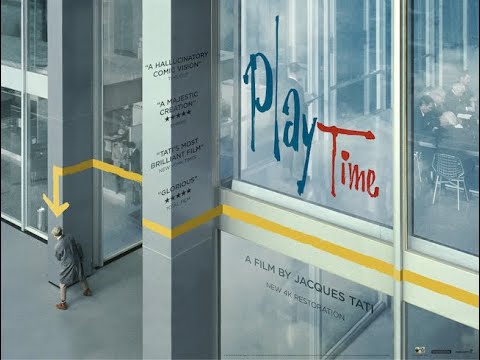
Shows That Inspire AnimationsI recently got the trial version of the Criterion Channel, they have some great classic movies there. One I got a kick out of is "Playtime" (1967), might inspire an animation - little if any dialogue, cool use of chrome and glass reflections, furniture with funny morphs, slapstick comedy a la Chaplin/Keaton, etc. I sometimes have dreams along these lines, ~lost in a big city, wandering around ...

" Jacques Tati's 'Playtime,' like '2001: A Space Odyssey' or 'The Blair Witch Project' or 'Russian Ark', is one of a kind, complete in itself, a species already extinct at the moment of its birth. Even Mr. Hulot, Tati's alter ego, seems to be wandering through it by accident. Instead of plot it has a cascade of incidents, instead of central characters it has a cast of hundreds, instead of being a comedy it is a wondrous act of observation. It occupies no genre and does not create a new one. It is a filmmaker showing us how his mind processes the world around him ... 'Playtime' is a peculiar, mysterious, magical film." (Roger Ebert, Four Stars Out Of Four)
 Daz Studio and Linux
GafftheHorse said:
Oddest thing, just got round to running update and a reboot (first time in a couple of weeks running update and a reboot).
Noticed some status feedback I don't usually see (in the terminal) when launching Studio, to do with postgresql. Then when the UI launched I was presented with a login dialog, and it worked.
Well, Smart Content is now working (without the linux postgres backend setup). Just like it does on Pop-OS....
Wine 6.21-1 on Archlinux (and I launched Studio 4.12)
Never posted on here before but came here just to confirm, just installed Daz Studio on Manjaro KDE without any Postgresql setup and it just worked out of the box when it never used to. I'm using Daz Studio 4.15 installed through Daz Central with Wine-Staging 6.16. I'm not really an advanced Linux user so this is pretty nice.
Edit: Just moved to EndeavourOS, using Daz 4.15 installed with Daz Central as before, with Wine-Staging 6.21. CMS is just working out of the box now it seems. NIce.
Daz 3D is part of

Connect
DAZ Productions, Inc.
7533 S Center View Ct #4664
West Jordan, UT 84084Licensing Agreement | Terms of Service | Privacy Policy | EULA
© 2026 Daz Productions Inc. All Rights Reserved.