-
MetaHuman Creator - an Insane Level of Competition...
The MetaHuman hair is a blend of dynamic hair strands and hair cards (aka transmapped polygon hair for DAZ Studio users). The Unreal Engine can then blend between the two, dropping to just hair cards for lower performance PCs which technologically seems way more sophisticated than DAZ Studios dynamic hair system. I somehow doubt Epic will limit the creation of dynamic hair to their "PAs" seeing as how they open sourced their aquisition of Shave and a Haircut back in 2019. You can tell by their aquistions (Shave and a Haircut, 3Lateral, and Cubic Motion) they are serious about building cinematic level human capabilities and technology.
If Epic builds a tool designed specifically for posing, animating, final frame rendering digital actors (or maybe adding this functionality to Twinmotion), they could have something that might be a disruptor to the DAZ Studio/Poser ecosystem. If someone develops a system to transfer existing DAZ/Poser assets (morphing and re-weightmapping) clothes and hair from Genesis characters to retarget MetaHuman, that disruption might even be accelerated. Epic probably doesn't care at all about the small 3D still pinup render market segment that DAZ/Poser operate in, going after serious TV and filmakers instead, however if there is software and content that is of professional quality at the free price point and at the current DAZ price points, there could be a stunting of the future growth of the DAZ/Poser ecosystems as new users would be unlikely to get started doing 3D with DAZ Studio or Poser.
Daz3d to Unreal Engine BridgeI have a problem.
I'm importing a G8 Figure shaped with youth morph into ue4 (morph is not exported).
The mesh is fine, BUT when im creating an animation asset -> the face becomes distorted (see attachment)
Exporting the youthmorph with the figure instead is fine in the animation, BUT its useless, since the whole figure gets distorted with the morph applied because the skeleton isnt rescaling.
Is there is something i am doing wrong ? Ive tried anything possible on my mind so far.
Novica & Forum Members Tips & Product Reviews Pt 13Richard Haseltine said:
Novica said:
barbult said:
Just run Mirror Geometry and market as new?
So it's not just me LOL
I'd say there were differences, look at the hair resting on the shoulders in both and the way the bangs meet the long hair:
https://gcdn.daz3d.com/p/80476/i/202103hairforgenesis8and81females00maindaz3d.jpg
https://gcdn.daz3d.com/p/77142/i/sweptbangshairforgenesis3and8females03daz3d.jpg
The promos are not identical, but dial the longer morph on one and the shorter morph on the other and they would look even closer. To me, one is essentially the mirror of the other, and since I own Mirror Geometry, I would never buy both. Other people may have a use for both or may prefer one over the other and buy only that one. I have so many hair products already, I look for something more unique these days.
[Released] Character Converter from Genesis 3 Female to Genesis 8 Female(Now Conv JCMs) [Commercial]ShadowSkillz said:
How exactly do I "accept" the morph, first time hearing about this?
Find the morph, click the gear, Parameter Settings..., click Accept
[Released] Character Converter from Genesis 3 Female to Genesis 8 Female(Now Conv JCMs) [Commercial]How exactly do I "accept" the morph, first time hearing about this?
[Released] Character Converter from Genesis 3 Female to Genesis 8 Female(Now Conv JCMs) [Commercial]ShadowSkillz said:
The morphs only show under the parameters tab, not under the shaping tab like so many other character morphs, but I guess everything works.
Yeah, I don't know why that is. It seems that DS will struggle to show them in Shaping unless you go in and "Accept" the morph, then it seems to find it and put it in its correct path for shaping.
Creating Josiahludickes said:
nonesuch00 said:
Yes, I agree with Novica on the nose. Have you even red the 'Dennis the Menace' cartoon strip or seen the old TV show of it? Try for a vampire like that which vampire skin and normal skin with morphable ears & fangs.
Or Bela Lugosi.
Cartoon vampires seem to tend more toward Dennis the Menace's father's look than Bela Lugosi's look though. One wouldn't expect a vampire looking like say, a WWE pro wrestler.
Don't forget: Werewolf, Mummy, Frankenstein, & Bride of Frankenstein from the 30s classics.
I decided to not go with the vampire route, but the original character idea I had. The character itself is comparable to a vampire, but if I head right for vampire I might lose sight of my original goal. Now that I'm heading towards realistic, I will be shaping the mesh based off of some real figures. I'm going to make a skin that's realistic and nicely detailed, but I might also create a scarier skin to add.
If this character becomes of high enough quality for the Daz store, I will upload an additional morph (more cartoon) as a freebie.
I do absolutely love the Wolfman and werewolves in general. If I can figure out some other things like fibermesh hair, I'll definitely try to create something reminiscent of old fashioned werewolves. I'm also still learning how to use Maya so I intend on making some fun props later on. (I need a traditional casket!)
Sounds cool. Have fun.
DELETEBecause the eyes are so much more awesome in the Genesis 8.1 I just followed the directions in this thread:
HowTo: Create missing Genesis 8.1 Head skin maps from Genesis 8/3 skin maps - Daz 3D Forums
but did so for every surface listed in the Surfaces tab for Genesis 8.1 so that the Genesis 8 material sets I was map transfering would be 100% Genesis 8.1 in the UV dropdown (well except the Genitalia as they are actually still Genesis 8 in Genesis 8.1).
When I did that I created a folder in the DAZ Library/runtime/textures/<my initials>/Genesis 8.1/<Gender>/<character name> and saved all the images from the map transfer process there.
I then, surface by surface, changed the images to the new map transfer images, but before doing that I have to change the prepend "Template1" for the images to: <character name> <surface name> while leaving the rest of the image name the same. I then change the UV from Base (Fe)male to Base 8.1 (Fe(male).
Because of the way I did the map transfers and because I didn't create atlas for groups of surfaces I do have more images for the material set because I have seperate images for each surface. I sort of like that better really because should I ever one to edit one surface's images it's already highlighted to my exact what I need to edit being in a seperacte image for the surface already & all.
It took about an hour to do one character but might take longer for some characters compared to others.
Big, chunky gloves for Genesis 8 MaleAnother way with thin gloves might to be to use a geoshell around the figure and parent gloves to the geoshell rather than the figure. Then to alter the thickness you just change the geoshell offset. Will obviously need to make the Geoshell transparent in the render. [Then if it looks useful, could export the gloves in the new position with zero'd pose as an obj and re-import as a morph for the gloves for future use without the need for the geoshell.]
Just another way to achieve a similar result to Wendy's suggestion.
Richard
Creating JosiahThe chin and lips need work, and there's a weird lighting issue on the nose. Exporting the normals meant I had to lower the divisions on the model so it mucked up some features.
I'm adding pores and stuff via Zbrush, but even with exporting normal maps, they don't seem to appear too much. I'll export the higher definition model into Substance Painter and hopefully things will become clearer. I've had better luck getting HD details to show when using Substance Painter.
I've updated the morph to make it more realistic. I was hoping to better convey pores and other facial details, so any tips on how to make HD details using the normal and bump maps would be appreciated. I'm iffy on dividing the mesh even more.
I think I'm done with the main morph. There's only so much I can do. Turning a cartoon character into realistic is difficult hehe.
All this aside, how is it looking?
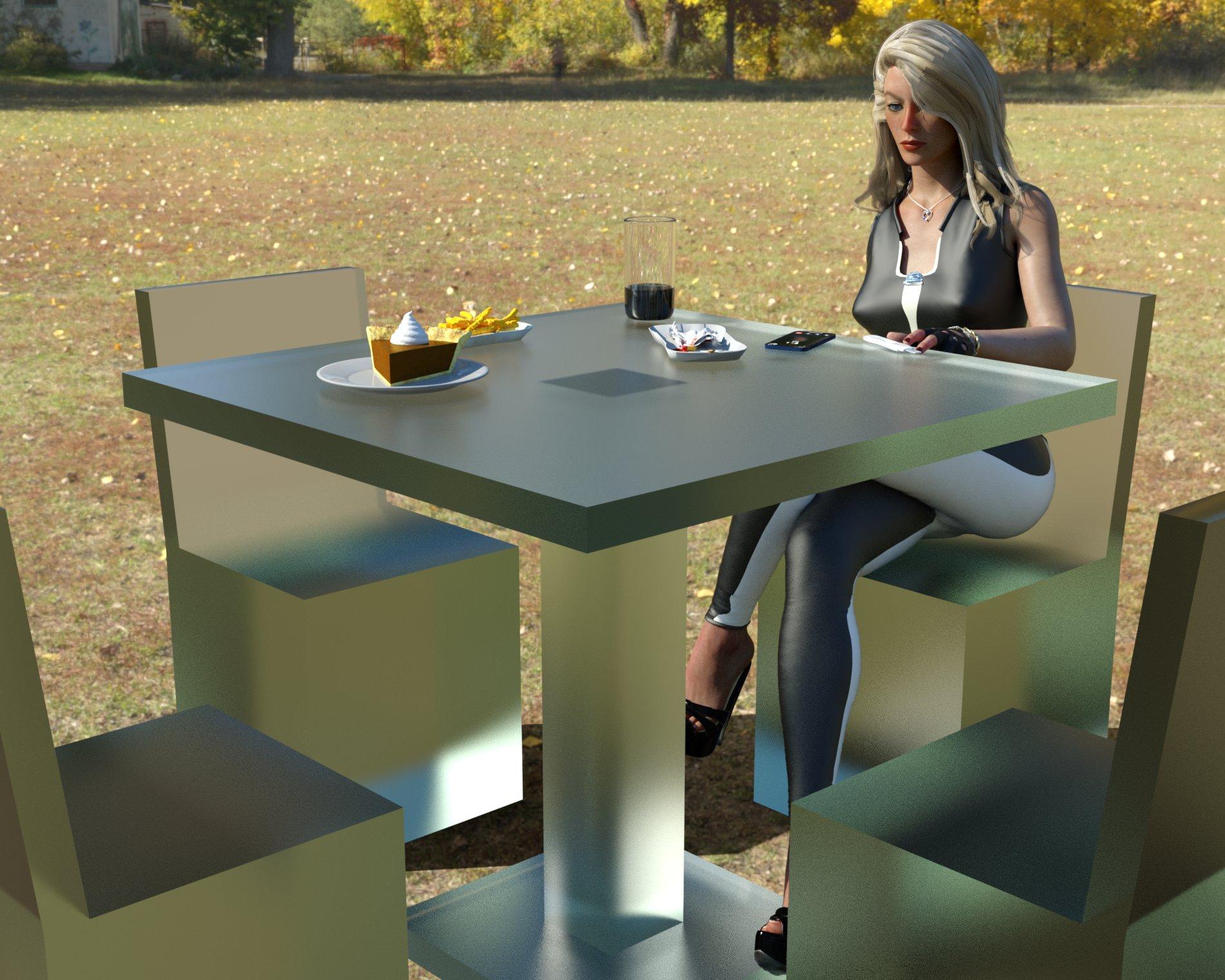
3D Art Freebie Challenge-February 2021-Winners Announced"Love Is Different Now" -Entries Thread OnlyI call this image
"One is the loneliest number".
I offer a possible story for this image.
"Vickie has recently lost her love during the pandemic. It was just so sudden. He was only 29 and as fit as a fiddle. He got sick, feeling awful and looking blue-grey. That evening he was rushed to hospital, and she was told he'd be lucky to survive the night. That was Saturday, by Thursday they were talking about releasing him on the next Saturday. Friday, he got worse at an astonishing rate and died of multi-organ failure on Saturday, the intended day of release. She'd never even got the chance to hold his hand and say goodbye. Now today, absorbing the news the pregnancy test has just given her, Vickie went to where they had first met and she felt closest to him, ordering the same as they had eaten on their first meeting in the park. Chips and frankfurter, with coke. What a meagre meal for the weight of meaning now attached. He had Gypsy Tart to follow, a revolting local delicacy consisting mostly of sugar cooked in condensed milk. Sitting in her chair, the tears gently rolled down her face as his chair remained empty next to her. But it was the closest she'd felt to him since.. since that awful day.It was not the way she'd expected to celebrate their first child, celebrate their love for each other...
Celebrate being together...How can anyone bear it?"
Free Items.hdri background.
https://hdrihaven.com/hdri/?h=autumn_parkTable and chairs.
Not sure if these count. I modelled the furniture last Friday (12th), put them into an image, and then realized that the image could be a candidate for the competition. I had always planned them as freebies, and offered them for approval by Rendo as soon as possible. I accept they are not available for the whole month, but will be available as long into the future as Rendo decides to host them. If they don't count, ah well, no problems.
Basic Garden Furniture by richardandtracy.
https://www.renderosity.com/rr/mod/freestuff/basic-garden-furniture/87801
Membership registration required.Figure pose modified from:
G8F Free Pose 024 by richardandtracy.
https://www.renderosity.com/rr/mod/freestuff/g8f-free-pose-024/85896
Membership registration required.Top and Trousers
G8F Action by Adam Thwaites.
https://www.most-digital-creations.com/g8f_action.php
Free subscription download.Leather Shaders for G8F Action.
Car related shaders by Tom2099. Black & white leather shaders used.
https://www.deviantart.com/tom2099/art/Iray-car-related-shader-presets-megapack-539622361
Membership registration required.Shoes
Olympia HH by rudy_studio
https://www.renderosity.com/rr/mod/freestuff/hh-olympia-starter-kit/85584
Membership registration required.Waist and wrist rope
Odalisque Outfit by Noone102000.
https://www.deviantart.com/noone102000/art/FREEBIE-Sexy-Odalisque-798199404
Mature Content, none of which are visible without the Free Registration and login that is required. I'm happy to deactivate the link if needed to comply with the TOS. The wrist & waist ropes are entirely innocuous and rather nice, shame about some of the freebie.Driving Gloves
Driving Gloves by zoro_d
https://www.renderosity.com/rr/mod/freestuff/driving-gloves-for-genesis-8-female-s-/80439
Membership registration required.Heart Necklace
Heart Necklace by Amyamei
https://www.deviantart.com/amyaimei/art/My-Heart-Necklace-for-Genesis-8-Female-729010047
Membership registration required.Tears
Tears for Fears by Kalhh
https://www.renderosity.com/rr/mod/freestuff/tears-for-fears-for-genesis-8-iray/85360
Membership registration required.Chips and drink
French Fries for Dazstudio Iray by kalhh
https://www.renderosity.com/rr/mod/freestuff/french-fries-for-dazstudio-iray/87453
Membership registration required.Pregnancy Test
Pregnancy Test Morphing Prop by Foxclaw
https://www.renderosity.com/rr/mod/freestuff/pregnancy-test-morphing-prop/86859
Membership registration required.Mobile Phone
Smartphone Prop by Foxclaw
https://www.renderosity.com/rr/mod/freestuff/smartphone-prop/87343
Membership registration required.Gypsy Tart.
Pumpkin Pie by Erock3D. Colour of filling changed to 'cowpat' for gypsy tart.
https://www.renderosity.com/rr/mod/freestuff/pumpkin-pie/80447
Membership registration required.
No Count Items:
G8F Base figure.
Possibly the table and chairs.
Paid For Items:
1) Tritium CG custom G8F morph for character.
2) Hair, Jim Burton's Las Vegas Hair, V3 version to which I added a skull cap and rigged as a native G8F hair. Hair no longer available in the DAZ store.
3) Character texture: Hue mapped CB Guilia texture.[As an aside, my wife & I know/knew a couple where one of an inseparable pair died in the exact chronology I described. In their case it was 'Trish' of 'Trish and Arnie' who died. She was only 42, and was as fit & well as someone born without legs can be. She competed in Paralympic events and was incredibly athletic. Arnie, 7 months on, is still bereft with the other half of himself missing. We also know of 11 other families eviscerated by this awful disease.]
Regards,
Richard.
Creating Josiahnonesuch00 said:
Yes, I agree with Novica on the nose. Have you even red the 'Dennis the Menace' cartoon strip or seen the old TV show of it? Try for a vampire like that which vampire skin and normal skin with morphable ears & fangs.
Or Bela Lugosi.
Cartoon vampires seem to tend more toward Dennis the Menace's father's look than Bela Lugosi's look though. One wouldn't expect a vampire looking like say, a WWE pro wrestler.
Don't forget: Werewolf, Mummy, Frankenstein, & Bride of Frankenstein from the 30s classics.
I decided to not go with the vampire route, but the original character idea I had. The character itself is comparable to a vampire, but if I head right for vampire I might lose sight of my original goal. Now that I'm heading towards realistic, I will be shaping the mesh based off of some real figures. I'm going to make a skin that's realistic and nicely detailed, but I might also create a scarier skin to add.
If this character becomes of high enough quality for the Daz store, I will upload an additional morph (more cartoon) as a freebie.
I do absolutely love the Wolfman and werewolves in general. If I can figure out some other things like fibermesh hair, I'll definitely try to create something reminiscent of old fashioned werewolves. I'm also still learning how to use Maya so I intend on making some fun props later on. (I need a traditional casket!)
I started a thread. It's garbage apparently, but it might turn into something else.I put this information here, and like this on purpose. There's no trick to it. I tried it and it works. I imported a G8F obj into blender to work on a morph, and on a whim just decided to try painting directly on the surfaces just for fun instead. I assumed that it would only let me paint on one surface at a time like everyone says, but nope. It just lets you paint right across the seams as though the whole figure is one surface. It's a little complicated to get each separate surface to have all the texture layers you want, but there's tons of tutorials already showing how to do that for single surface models. You just repeat those same steps for each individual surface and off you go.
I haven't got anything good enough to bother with showing anyone anything yet. I literally just discovered it and then wrote this post. Only thing other than you can do it I could say is that I'm using v2.81a which I think is from last year.
Maybe tomorrow or the next day when I've actually got something to show for my discovery I'll make a post in the blender part of the forum. For now I put this here because it's the most active and maybe even amateurish part of the forum other than the new user page. I'm half expecting someone to tell me that everyone already knows this and it's supposed to a secret. Every tutorial I've seen says you can't do it.
DELETEThe new UV map seems a bit weird.
I get they wanted to add another region between the face and the body, but with it they've added another seam in a pretty visible place. Collar bones are visible in loads of clothing, so it's probably not where you want to hide a seam. As it is, it seems to add slightly higher resolution for the neck and back of head at the cost of another texture (worse for memory use, worse for game engines) and more seams to hide (worse for vendors) so perhaps isn't the best trade.
The main thing i'd wish though would be for DAZ to sort out all the morph and pose weirdness so 8.1 feels more finished. The lack of visemes and other things without playing around. The partially working powerpose (while being listed as "improved"). Those kind of little things. Until those kind of things are fixed it's basically just a more annoying to use 8 with different anatomy options.
Pale skin for men comparable to Mousso's beauties?Thanks, everyone! This has all been really helpful.
I already own Prince Albane for G3 and was planning to use him for some of the bad guys in my project. But for my Love Interest, I wanted something a little more human. To that end, I think I will experiment with Altern8, since I already own that, and Dante from InTheFlesh, since he is free and does look pretty good. After that, I may pick up some of the figures you all have linked. A lot of them look *really* nice.
Spacious said:
The first is her default, next with 15% white additive blend in LIE on the translucency, and last with 15% additive also on the base mat.
I will definitely try this at some point as it sounds like a good idea.
I hope you all have a great week!
Edit: So it was only the morph of Dante that was free. Also, it seems like I can't use these InTheFlesh characters commercially, and since I do want to put my game on Steam when it's finished, I will have to go another route. (We need more emoji in the forums. The poop emoji would be perfect right now.)
Animation issues - hand and fingersLike I said its functioning they way it always has on my end. .I meant to ask is this happening using a regular genesis8 or the Genesis 8.1 I think there is some minor differences between the 2 genesis's but i thought it only effect facial expressions.
So the issue your having is If you start on keyframe zero and scroll the scrubber down 60 keyframes and create a keyframe by applying the fist dial morph . that when you scrub the dial agian it reset the hand dial?
That sure sounds like a reactions to a baked animation. .. You prolly have tried this but i have to ask. Did you try loading a new character thats different to test it maybe a gm3 and see if you have the same issue?
RetiredCatherine3678ab said:
I think you have to have the German Shepherd morph for Dog 8 for this to work.
Discovered that in applying my GSD larger ear preset it did not make larger ears - it made a smaller bulldog!!!
So I made a new icon for it and here you go.
If somebody does not have the GSD - please let us know if this works or not, if it does anything - thank you.

Cute!
Female characters not loadingRichard Haseltine said:
babybuick2691 said:
ShelLuser said:
Sounds like something could have gone wrong with your moving of the library. I mean... if you remove the external drive with the library and then still load your character then it doesn't look like you really moved the library at all. Where is that character data coming from?
I created all my characters using Daz Studio Genesis 3 and 8 characters. Daz Studio loads up from my C: drive and it has a copy of My Library located under users-public-public documents-My DAZ 3D Library. On my F; drive I have a My DAZ 3D Library with all my content. I copied the whole My DAZ 3D Library to the external hard drive. This is a fresh installation of Daz3D 4.15, so the only content is from the Daz Central installation. I installed default resources for Daz3D 4.15, character essentials, dforce essentials, face transfer, Octane render kit, and required PostgresSQL CMS and PostgresSQL CMS from Valentina CMS conversion. I did not have this issue with the 4.14 version, but 4.15 and the new 8.1 have cause these problems.
"it has a copy of My Library located under users-public-public documents-My DAZ 3D Library." - do you mean that literally?Having nested cotnent directories is highly likely to cause problems.
Yes, I have My DAZ 3D Library file under users-public-public documents-My DAZ 3D Library on the C: drive and a copy of the My DAZ 3D Library from my old system F: drive was not a problem in the past until I upgraded to Daz Studio 4.15. Please let me explain what occurred. My Windows operating system was having issues, and the hard drive was filling up (3TB) and had only 168GB space left. While my created characters were saved to an external hard drive, all the new content I purchased was going onto the C: drive. Since my Windows had to be replaced anyway, I made a copy of the My DAZ 3D Library before having Windows replaced on the computer. I only installed the necessary files using the DAZ DIMM installer and used the Content Directory Manager to connect the external My DAZ 3D Library. Again I did not have any problems until I upgraded to Daz Studio 4.15. Not sure why it is a problem now. I am trying to figure out how to keep from re-installing all 15,982 content over and end up with the same issue of only 168GB of space left. I just never could not figure out how to install the new content to another drive.
Auto Muscle Enhancer HD [Commercial]Nice inspirational work there Lee!!
So this is the G8.1F platform with the full Victoria 8.1 HD textures applied along with the full body vellus hair. This is Kitty Pryde converted from an X-Men video game. I thought if she works out with Wolverine, she naturally would need some AME/ASE treatment. This is D.Masters AME body (at 40%) with his Bicep and Bicep Flex morphs ported onto the G8.1F. I used the Musculature HD Alt Flex tools at 16%, with D.Masters bicep morphs, carefully ERC scaled. The AME body details are provided by the Massive HD, and an additional fine tuned bicep morph by yours truly! The trick is in the hand flex like D.Master does it. Full hand flex in tunes the bicep head only, and hand flex'd out adds Tricep morphs and tunes out about 1/2 of the D.Master bicep morphs. A little tricky, as I have been working on iterations like this for a while, and this is as close I have gotten to simulating AME on the G8.1 and G8F platforms (arms only) the rest of the muscle flexing is provided by the other product. There was no touchup to any morph or body part required after changing the poses, that, makes me Happy !! This makes clothes and costume fitting Soooooooo much easier! TD
Female characters not loadingSpacious said:
Is this maybe a problem with the new DAZ Connect not liking the official purchased content having just been copied to an external drive sometime in the past? Or the Connect reinstalling the content back to his C drive? It sounds like everything was working perfectly for "a long time" until he likely used the new Connect to get the new version to try the new figures and that's when his trouble started. Almost 1500 Daz characters probably would slow loading times down quite a bit, but shouldn't stop them entirely. It doesn't sound like there's nested content folders, I had to read through that description twice, but it sounds like maybe there are duplicate copies of an entire library of almost 1500 characters on two differnt drives and I'm sure that would cause all sorts of problems.
Did you delete the content out of the daz library on your C drive when you copied the whole folder to the external drive? If you didn't, absolutely DO NOT do that now because sounds like that's the only copy you've got working at the moment.
If I'm reading what you wrote wrong then just disregard my entire post here probably. If what I'm suggesting happens to be correct, hopefully Richard revisits this thread because he always seems to know exactly how to handle pretty much anything, in three sentences, once he really understands what's really going on.
I do not have 1500 characters on the C: drive just external. It seems that the data file on the external hard drive is the problem. While loading up slow is fine because along with the 1500 characters I have other content such as clothes, props, morph, etc from 2007. I was able to get it to work by making copies of the folders I used the most and putting them onto a 3rd drive but I am still having an issue with the data file. For some reason if I copy that folder the Daz female characters will not load.
Daz 3D is part of

Connect
DAZ Productions, Inc.
7533 S Center View Ct #4664
West Jordan, UT 84084Licensing Agreement | Terms of Service | Privacy Policy | EULA
© 2026 Daz Productions Inc. All Rights Reserved.