-
Daz Studio Iray - Rendering Hardware Benchmarking
That doesn't sound right. It loads in about 30 seconds to a minute at most for me. You may have errors or you G8F morph library is huge. The data is helpful, so it is much appreciated that you take the time to fill out the information.Sevrin said:outrider42 said:
Sevrin said:
System Configuration
System/Motherboard: ASUS Prime Z270-K
CPU: Intel Core i7 7700K 4.2 Ghz
GPU: MSI Ventus 2080ti
System Memory: Kingston&Patriot 32 Gb DDR4 2400
OS Drive: Samsung 850 EVO 256 Gb
Asset Drive: WD WB20EZRZ 2 Tb
Operating System: Windows 10 Pro Build 19042
Nvidia Drivers Version: 461.72
Daz Studio Version: 4.15.0.2 64bit
Optix Prime Acceleration:
Benchmark Results
2021-02-26 21:16:47.729 Finished Rendering2021-02-26 21:16:47.766 Total Rendering Time: 3 minutes 30.61 seconds
2021-02-26 21:17:45.677 Iray [INFO] - IRAY:RENDER :: 1.0 IRAY rend info : Device statistics:
2021-02-26 21:17:45.677 Iray [INFO] - IRAY:RENDER :: 1.0 IRAY rend info : CUDA device 0 (GeForce RTX 2080 Ti): 1800 iterations, 3.001s init, 205.535s render
Iteration Rate: 8.75 iterations per second
Loading Time: 5.26 secondsRendering was the quickest thing about this whole exercise.
Thanks!
So the 3060 does NOT beat a 2080ti, but it is in the ballpark. It certainly isn't bad considering the original MSRPs of these two items, and the 3060 uses about 90 Watts less, or more depending on the overclocks.
And to think this is slowest Ampere card to date.
BTW, what do you mean? Did you have an issue?
It takes longer to load the scene than to do the render. Also longer to write up the results.
 3D Art Freebie Challenge-February 2021-"Love Is Different Now" -Main Thread Only
JackyBrown said:
3D Art Freebie Challenge February 2021 "Love Is Different Now"
I just had to make a second entry, I think it's due to the full moon tonight ... ; )
[Best watched at full size for details.]
"And then suddenly ..."
Starring: Alysha, Ellie and Nico
The tale:
At the end of September 2021 (Covid-19 measures had almost all been lifted), Alysha had already noticed that Ellie was not doing so well. Nico had been gone for almost 10 months and Ellie hadn't heard from her in the last 4 weeks. Ellie was very pleased that Alysha had asked her to go for a jog, even though she found it very tiring. Suddenly her phone rang, it was Nico who told her that she had met a very nice Dutch girl, Eileen, and that she had fallen in love with her. "I still love you Ellie, but it's not like before ..." It seemed as if the whole world was disappearing around her and Ellie broke down in tears...
Soundtrack:
The Beatles - With A Little Help From My Friends (© 1967)
https://www.youtube.com/watch?v=0C58ttB2-QgRoy Orbison - Crying (© 1961)
https://www.youtube.com/watch?v=tNdBLBleO90
COUNTABLE FREEBIES: (Alphabetic order)#01! A Thousand Reasons To Cry (udate) by MysticArtDesign
https://sharecg.com/v/95817/gallery/21/DAZ-Studio/A-Thousand-Reasons-to-cry%F0%9F%93%8Cupdate-%F0%9F%93%8C%F0%9F%93%8C%F0%9F%93%8C **#02! Alternative Sig Suit Piercings for G8F by SWTrium
https://www.renderosity.com/rr/mod/freestuff/alternative-sig-suit-piercings-for-g8f/82573&ca **#03! Alysha For G8 by EmotionalDreams
https://www.renderosity.com/rr/mod/freestuff/alysha-for-genesis-8-female/83613 **#04! Ashley Browns for G8F by Shinteo

https://www.patreon.com/posts/ashley-browns-46096967#05! Autumn Hockey by HDRIHaven
https://hdrihaven.com/hdri/?c=outdoor&h=autumn_hockey#06! Bracelet for genesis 8 female by Valmont59
https://www.renderosity.com/rr/mod/freestuff/bracelet-for-genesis-8-female/86004 **#07! Classy Sweaters for Genesis 8 Couple by Dingo
https://www.renderosity.com/rr/mod/freestuff/classy-sweaters-for-genesis-8-couple/87321 **#08! Cute Rainbow Tattoos by MysticArtDesign
https://sharecg.com/v/92233/gallery/21/DAZ-Studio/Cute-Rainbow-Tattoos **#09! dForce Tshirt & Pants for G3M&G8M by cabcab
https://www.renderosity.com/mod/freestuff/dforce-tshirt-amp-pants-for-g3m-amp-g8m/78865 **#10! Drinks by klausdbg
https://www.sharecg.com/v/74240/gallery/5/3D-Model/Summer-IV-Drinks **#11! EA Sidecut Hair for Genesis 3 & 8 Female(s) by EichhornArt
https://www.renderosity.com/mod/freestuff/ea-sidecut-hait-for-genesis-3-amp-8-femela-s-/82972 **#12! Easy Tears G8F by yomiuri
https://sharecg.com/v/96064/browse/21/DAZ-Studio/Easy-Tears-G8F **#13! ED's Brick Shader (Iray) by Edheldil3D
https://www.deviantart.com/edheldil3d/art/Freebie-ED-s-Brick-Shader-Iray-788871766 **#14! Everyday Outfit Genesis 8 by Teknology3D
https://www.renderosity.com/mod/freestuff/everyday-outfit-genesis-8/83138 **#15! Eyes Dilate for Genesis 8 Female by felldude
https://www.renderosity.com/mod/freestuff/eyes-dilate-for-genesis-8-female/82869 **#16! Free Tears for Genesis 8 Female by Sangriart
https://www.renderosity.com/rr/mod/freestuff/free-tears-for-genesis-8-female/79570 **#17! iPhone X by klausdbg
https://www.sharecg.com/v/89747/gallery/5/3D-Model/iPhone-X **#18! Iray Jewelry Shaders by AllenArt
https://sharecg.com/v/95893/gallery/21/DAZ-Studio/Iray-Jewelry-Shaders **#19! Kiara Interior by HDRIHaven
https://hdrihaven.com/hdri/?h=kiara_interior#20! Linda - Character for G3F with texture maps by Edelzwicker
https://www.sharecg.com/v/89731/related/21/DAZ-Studio/Linda-Character-for-G3F-with-texture-maps **
[Used her as a start for the Ellie textures by ElSinestroUno]#21! Morphing Leaf by Adam Thwaites (Most Digital Creations)
https://www.most-digital-creations.com/free_poser_poses_textures_morphs_props_50.htm (item 5)#22! Nico DMC5 for G8F by TaliDesade
https://www.deviantart.com/talidesade/art/Nico-DMC5-Genesis-8-DOWNLOAD-866641918 **#23! Nike Air Zoom for G1 by Tranquil
https://sharecg.com/v/97066/browse/21/DAZ-Studio/Nike-Air-Zoom-for-G1 **#24! OnFleek for Genesis 3 & 8 Female(s) by AprilYSH
https://aprilsvanity.com/shop/onfleek-for-genesis-3-8-female-s.html#25! RE5 Sheva Alomar Head Morph for G8F by TritiumCG
https://www.deviantart.com/tritiumcg/art/RE5-Sheva-Alomar-Head-Morph-for-G8F-822643742 **#26! Real Tears for V4 by katanas
https://www.sharecg.com/v/34449/gallery/21/DAZ-Studio/Real-Tears-for-V4 **#27! RGB HDRi Soft Lights for Daz Studio - Iray by VAlzheimer
https://gumroad.com/valzheimer (4th item)#28! Simple Glasses for Genesis 8 Male/Female by GEOmetalics
https://www.renderosity.com/rr/mod/freestuff/simple-glasses-for-genesis-8-male-female/85459 **#29! Sports Jacket for GF3 by Serzart
https://www.deviantart.com/serzart/art/Daz3d-freebie-Sports-Jacket-for-GF3-594372670 **#30! SY 200 Morphs for Genesis 8 Head and Body by SickleYield
https://sharecg.com/v/91888/view/21/DAZ-Studio/SY-200-Morphs-for-Genesis-8-Head-and-Body **#31! Tears for Fears for Genesis 8 iray by kalhh
https://www.renderosity.com/rr/mod/freestuff/tears-for-fears-for-genesis-8-iray/85360 **#32! The Last of Us Part II: Ellie Morph by ElSinestroUno
https://www.deviantart.com/elsinestrouno/art/The-Last-of-Us-Part-II-Ellie-Morph-855234510 **#33! Wireless Earbuds by Peggy's Resources (SquarePeg3D)
https://drive.google.com/drive/folders/1lgcz6HelqxkxI2uuC3KXmpv40bYpmRRtAnd again forgot the poses:
#34! Everyday Poses 04, 05, and 06 by Foxclaw
https://www.renderosity.com/rr/mod/freestuff/everyday-poses-04-05-and-06/86824 **#35! G8F Warm-up 1-5 by richardandtracy
https://www.renderosity.com/rr/mod/freestuff/g8f-warm-up-1-5/87721 **
NO-COUNT ITEMS:--- Background by AllenArt
++ Basic Wear for Genesis 8 Female by DAZ Originals
--- MMX Fantasy Eyes Mini by Mattymanx (The Holiday Loyalty Sale 2020 Free Item)
--- Nose Ring 01 for G2F, G3F and/or G8F by AllenArt
++ Surf's Up Outfit and Board by Sarsa [Surf's Up Hat, customized texture]
PURCHASED/PAID FOR ITEMS: None 100% Freebies
*1 E-mail address required
** Registration required
#x! Countable Items (Bold ones are used by me for the first time I think.)
--- No longer available freebies
++ Free with DAZ Studio (or the Essentials)
$x. Purchased/Paid For Item
Rendered with DAZ Studio 4.10.0.123 (nVidia Iray)Other free software used: GIMP v2.10.22 and Irfanview 4.57
Postwork: used the AltaLux Image Enhancement Filter (Effect) by Stefano Tommesani that comes with Irfanview and some filters (oa) that come with GIMP. Also used mcjDenoise by mcasual. (https://sites.google.com/site/mcasualsdazscripts9/mcjdenoise)
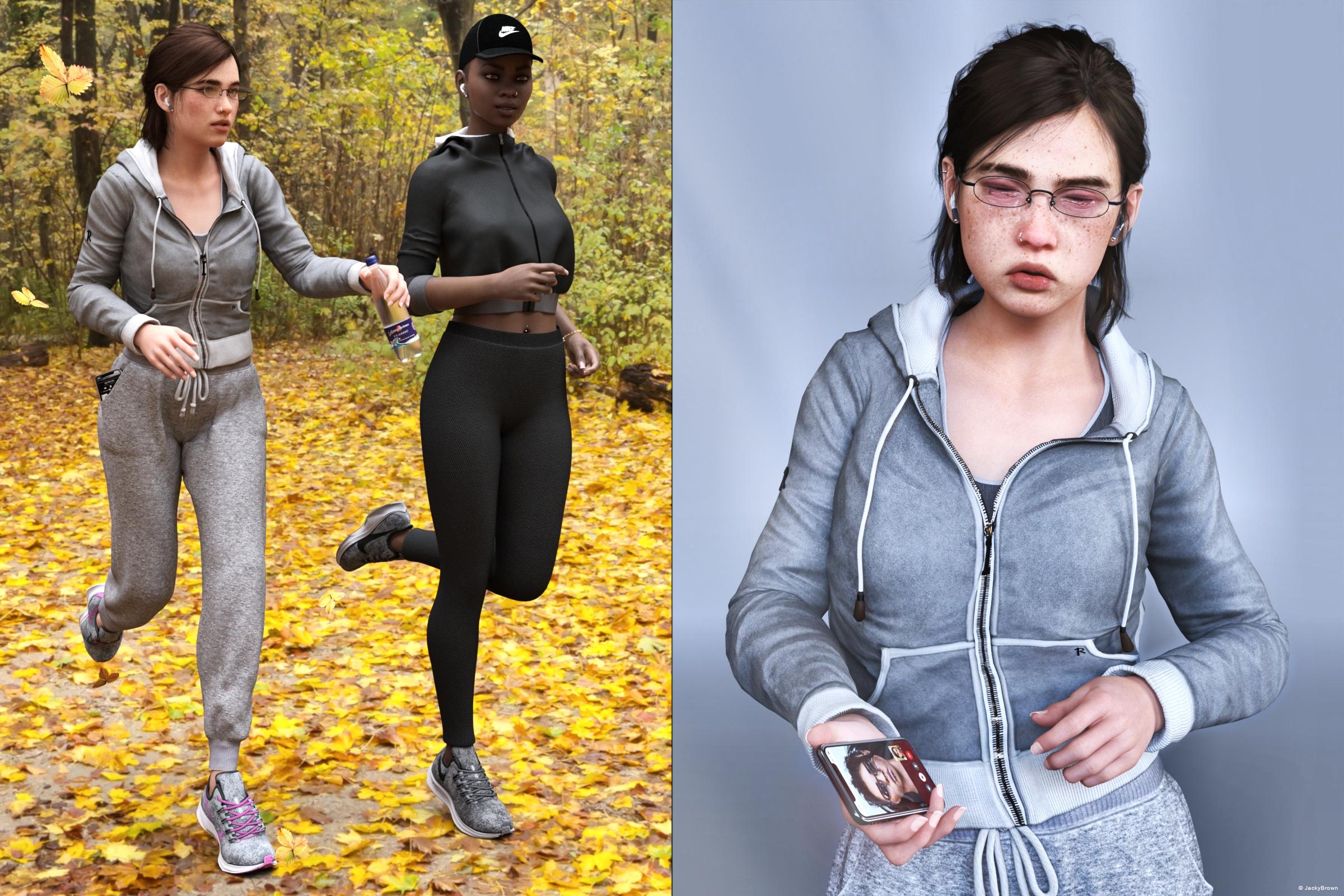
"And then suddenly ..."
All The Links Check Out Plz Post To The Entries Thread
3D Art Freebie Challenge-February 2021-"Love Is Different Now" -Main Thread Only3D Art Freebie Challenge February 2021 "Love Is Different Now"
I just had to make a second entry, I think it's due to the full moon tonight ... ; )
[Best watched at full size for details.]
"And then suddenly ..."
Starring: Alysha, Ellie and Nico
The tale:
At the end of September 2021 (Covid-19 measures had almost all been lifted), Alysha had already noticed that Ellie was not doing so well. Nico had been gone for almost 10 months and Ellie hadn't heard from her in the last 4 weeks. Ellie was very pleased that Alysha had asked her to go for a jog, even though she found it very tiring. Suddenly her phone rang, it was Nico who told her that she had met a very nice Dutch girl, Eileen, and that she had fallen in love with her. "I still love you Ellie, but it's not like before ..." It seemed as if the whole world was disappearing around her and Ellie broke down in tears...
Soundtrack:
The Beatles - With A Little Help From My Friends (© 1967)
https://www.youtube.com/watch?v=0C58ttB2-QgRoy Orbison - Crying (© 1961)
https://www.youtube.com/watch?v=tNdBLBleO90
COUNTABLE FREEBIES: (Alphabetic order)#01! A Thousand Reasons To Cry (udate) by MysticArtDesign
https://sharecg.com/v/95817/gallery/21/DAZ-Studio/A-Thousand-Reasons-to-cry%F0%9F%93%8Cupdate-%F0%9F%93%8C%F0%9F%93%8C%F0%9F%93%8C **#02! Alternative Sig Suit Piercings for G8F by SWTrium
https://www.renderosity.com/rr/mod/freestuff/alternative-sig-suit-piercings-for-g8f/82573&ca **#03! Alysha For G8 by EmotionalDreams
https://www.renderosity.com/rr/mod/freestuff/alysha-for-genesis-8-female/83613 **#04! Ashley Browns for G8F by Shinteo
https://www.patreon.com/posts/ashley-browns-46096967#05! Autumn Hockey by HDRIHaven
https://hdrihaven.com/hdri/?c=outdoor&h=autumn_hockey#06! Bracelet for genesis 8 female by Valmont59
https://www.renderosity.com/rr/mod/freestuff/bracelet-for-genesis-8-female/86004 **#07! Classy Sweaters for Genesis 8 Couple by Dingo
https://www.renderosity.com/rr/mod/freestuff/classy-sweaters-for-genesis-8-couple/87321 **#08! Cute Rainbow Tattoos by MysticArtDesign
https://sharecg.com/v/92233/gallery/21/DAZ-Studio/Cute-Rainbow-Tattoos **#09! dForce Tshirt & Pants for G3M&G8M by cabcab
https://www.renderosity.com/mod/freestuff/dforce-tshirt-amp-pants-for-g3m-amp-g8m/78865 **#10! Drinks by klausdbg
https://www.sharecg.com/v/74240/gallery/5/3D-Model/Summer-IV-Drinks **#11! EA Sidecut Hair for Genesis 3 & 8 Female(s) by EichhornArt
https://www.renderosity.com/mod/freestuff/ea-sidecut-hait-for-genesis-3-amp-8-femela-s-/82972 **#12! Easy Tears G8F by yomiuri
https://sharecg.com/v/96064/browse/21/DAZ-Studio/Easy-Tears-G8F **#13! ED's Brick Shader (Iray) by Edheldil3D
https://www.deviantart.com/edheldil3d/art/Freebie-ED-s-Brick-Shader-Iray-788871766 **#14! Everyday Outfit Genesis 8 by Teknology3D
https://www.renderosity.com/mod/freestuff/everyday-outfit-genesis-8/83138 **#15! Eyes Dilate for Genesis 8 Female by felldude
https://www.renderosity.com/mod/freestuff/eyes-dilate-for-genesis-8-female/82869 **#16! Free Tears for Genesis 8 Female by Sangriart
https://www.renderosity.com/rr/mod/freestuff/free-tears-for-genesis-8-female/79570 **#17! iPhone X by klausdbg
https://www.sharecg.com/v/89747/gallery/5/3D-Model/iPhone-X **#18! Iray Jewelry Shaders by AllenArt
https://sharecg.com/v/95893/gallery/21/DAZ-Studio/Iray-Jewelry-Shaders **#19! Kiara Interior by HDRIHaven
https://hdrihaven.com/hdri/?h=kiara_interior#20! Linda - Character for G3F with texture maps by Edelzwicker
https://www.sharecg.com/v/89731/related/21/DAZ-Studio/Linda-Character-for-G3F-with-texture-maps **
[Used her as a start for the Ellie textures by ElSinestroUno]#21! Morphing Leaf by Adam Thwaites (Most Digital Creations)
https://www.most-digital-creations.com/free_poser_poses_textures_morphs_props_50.htm (item 5)#22! Nico DMC5 for G8F by TaliDesade
https://www.deviantart.com/talidesade/art/Nico-DMC5-Genesis-8-DOWNLOAD-866641918 **#23! Nike Air Zoom for G1 by Tranquil
https://sharecg.com/v/97066/browse/21/DAZ-Studio/Nike-Air-Zoom-for-G1 **#24! OnFleek for Genesis 3 & 8 Female(s) by AprilYSH
https://aprilsvanity.com/shop/onfleek-for-genesis-3-8-female-s.html#25! RE5 Sheva Alomar Head Morph for G8F by TritiumCG
https://www.deviantart.com/tritiumcg/art/RE5-Sheva-Alomar-Head-Morph-for-G8F-822643742 **#26! Real Tears for V4 by katanas
https://www.sharecg.com/v/34449/gallery/21/DAZ-Studio/Real-Tears-for-V4 **#27! RGB HDRi Soft Lights for Daz Studio - Iray by VAlzheimer
https://gumroad.com/valzheimer (4th item)#28! Simple Glasses for Genesis 8 Male/Female by GEOmetalics
https://www.renderosity.com/rr/mod/freestuff/simple-glasses-for-genesis-8-male-female/85459 **#29! Sports Jacket for GF3 by Serzart
https://www.deviantart.com/serzart/art/Daz3d-freebie-Sports-Jacket-for-GF3-594372670 **#30! SY 200 Morphs for Genesis 8 Head and Body by SickleYield
https://sharecg.com/v/91888/view/21/DAZ-Studio/SY-200-Morphs-for-Genesis-8-Head-and-Body **#31! Tears for Fears for Genesis 8 iray by kalhh
https://www.renderosity.com/rr/mod/freestuff/tears-for-fears-for-genesis-8-iray/85360 **#32! The Last of Us Part II: Ellie Morph by ElSinestroUno
https://www.deviantart.com/elsinestrouno/art/The-Last-of-Us-Part-II-Ellie-Morph-855234510 **#33! Wireless Earbuds by Peggy's Resources (SquarePeg3D)
https://drive.google.com/drive/folders/1lgcz6HelqxkxI2uuC3KXmpv40bYpmRRtAnd again forgot the poses:
#34! Everyday Poses 04, 05, and 06 by Foxclaw
https://www.renderosity.com/rr/mod/freestuff/everyday-poses-04-05-and-06/86824 **#35! G8F Warm-up 1-5 by richardandtracy
https://www.renderosity.com/rr/mod/freestuff/g8f-warm-up-1-5/87721 **
NO-COUNT ITEMS:--- Background by AllenArt
++ Basic Wear for Genesis 8 Female by DAZ Originals
--- MMX Fantasy Eyes Mini by Mattymanx (The Holiday Loyalty Sale 2020 Free Item)
--- Nose Ring 01 for G2F, G3F and/or G8F by AllenArt
++ Surf's Up Outfit and Board by Sarsa [Surf's Up Hat, customized texture]
PURCHASED/PAID FOR ITEMS: None 100% Freebies
*1 E-mail address required
** Registration required
#x! Countable Items (Bold ones are used by me for the first time I think.)
--- No longer available freebies
++ Free with DAZ Studio (or the Essentials)
$x. Purchased/Paid For Item
Rendered with DAZ Studio 4.10.0.123 (nVidia Iray)Other free software used: GIMP v2.10.22 and Irfanview 4.57
Postwork: used the AltaLux Image Enhancement Filter (Effect) by Stefano Tommesani that comes with Irfanview and some filters (oa) that come with GIMP. Also used mcjDenoise by mcasual. (https://sites.google.com/site/mcasualsdazscripts9/mcjdenoise)
"And then suddenly ..."
file won't openI finished and saved a file last night that won't open today. Luckily, I do save files in chronological order, so I could go two steps back and can resume from there, but the client really liked what I had done and I know it's near impossible for me to repeat exactly what I had in that file and the one before it. So I looked at the log file and I'm seeing this ...
2021-02-26 17:14:23.862 WARNING: ..\..\..\..\..\src\sdksource\fileoutput\dzassetoutfile.cpp(11229): No geometries match the vertex count of morph "M-fixParm0_rShin"
Is that line, which is repeated a lot, why those two files won't open?
What's the difference between genesis 8.1 and genesis 8.0?Honestly, nothing that I can tell. It's the exact same geometry, otherwise the 8 morphs wouldn't work on 8.1.
A couple of minutes in notepad++ and copying the files to the Genesis 8 Male morph directory and the 8.1 character is now an 8 character. See torment 8.1 below on both an g8.1m and g8m. That's with hd morphs and jcm's.
As far as the new uv goes, just copy and paste it from the 8.1 to the 8 uv directory. You can quickly make the "new" head surface pretty quickly in geometry editor.
G8F T-Pose?I have tried, particularly those numbers, and they didn't work quite as well as the numbers I give below. The numbers above are the generally accepted and seem to work well. I have used them myself.
My method of getting the numbers was to load Victoria 7 in the zero pose. Then I loaded a version of G8F with the V7 morph applied to G8F via RiverSoftArt's G3F to G8F morph transfer. I left the right side alone, showing the zero pose for each and the left side I tried to match as well as possible. It is possible all I have found is the figures used in RSA's pose transfer script, but it's as good as I can get.
The images attached show the front and back views. G3F is in cream, G8F in green.
Left Thigh Bend: Side-Side = -6
Left Collar: Bend = 2.50
Left Shoulder Bend: Bend = 43.50
Left Forearm Bend: Bend = 0.20
Mirror these for the right side.The differences in pose and final finger positions from the SY quoted numbers are small, but I think this set of numbers is very slightly closer. You may disagree, but if you do, it would be helpful for your argument if you could show the evidence supporting why you disagree. Force of personality, personal charm, being or quoting an authority, unfortunately doesn't affect numbers - which is just as well for me sometimes, lacking charm, forceful personality and any pretention to being an authority on anything.
Regards,
Richard.
Growing Up for Genesis 8 (Commercial)What do you mean by 'dial out the projected youth morph'?
If you enable show hidden dials, click on hair item, you will see all used morphs on the figure copied/projected onto it, You can dial those down to lower distortion. It's a bit of trial and error but can be done.
Saving pose controls in a pose file for an attachable figure (G8M)GRFK DSGN Unlimited said:
I'm using RAWArt's cat tail for Genesis 8 Male and I'm trying to save poses for the tail. The pose file manages to save things that are under the General tab (Translate, Rotate, Scale) but the things under the Pose Controls tab in the figure (BendAll, SideAll, TwistAll, Hang_Down). How do I get those elements to save in the pose file so that I don't have to dial them up every time? I think I've tried every Save As option and nothing seems to work. Any ideas, please???
Select one of the pose controls and go to parametersettings and set type to modifyer/pose. Repeat for the other pose controls. When done, save as support asset/morph assets. Now the pose controls should show in the pose preset save options window.
Growing Up for Genesis 8 (Commercial)Zev0 said:
It is up to hair developers to add Growing Up support. What you can do is dial out the projected youth morph or other growing up morphs on the hair once fitted, which will set it more to the default shape.
What do you mean by 'dial out the projected youth morph'? I am assuming this refers to how Daz Studio fits hair to characters, but I have not seen anything like this in the hair shaping parameters. Is this something that's hidden by default, and if so, how do I view and change them?
Hair distorts a lot for me too, often to the point a lot of hair is unusable. Which is annoying since I mostly render child characters. First there's finding a hairstyle which I feel is appropriate for my character, then there's hoping it does not distort too much with the growing up morph. If I can minimize the distortions that would be great.
I wish hair content creators would add growing up support for their hair models too.
I would also like to thank you for creating the growing up products for Genesis 3 and Genesis 8. They are an invaluable asset for me. I use them all the time in my character creations.
Animators - before the pending QT-libraries update...Richard Haseltine said:
Ivy said:
Its pure speculation on my part. But if history has taught us from the last time daz upgraded the qt and SDK which was about 10 years ago. I would imagine if its anything like when they upgraded from daz 3 to daz 4 That most of the genesis content will still work with out any more issues then thay have now.. ( can't say about generation3 or 4 though). & I would say the plugins & scripts will all be broken & you will properly need to buy a whole lot of converter scripts for this and that.
On the positive side. If daz is changing the SDK & up dating the QT software , then it should be like last time,. . Because like the daz3 to daz 4 upgrade there will be no reason why should not be able to use both versions, they should be there own folders(Hoepfully) I still use my Daz3a quite often for thing I have that won't run in daz 4. But i still use daz 4 as my main 3d app . The new daz 5 may require a new build of assets. which I can do ovr the next 10 years. but my biggest fear will be the hardware requirements . If i have to morgage my house to have super computer to run daz stutio. then I will properly be looking for a new 3d platform like blender. or go back to poser. I already been spending a lot of time watching blender how-to videos and been learning a new few things about the improved UI. I have not bought anything for blender yet. I have been book marking them just incase though .
Scripts may or may not break with a version update - the engine actually chnaged from DS 2 to DS 3, but many scripts still worked through auto-conversion (some that took syntactical short-cuts did fail badly). DS 3 to 4 didn't involve engine chnages and many scripts did carry over, especially if they were cautions (checking that an object inherited an object type rather than was an object type, for example)
I had to go back through and look to see which scripts and plugins that were effected.. There were a lot of mine did go the way of the Dodo I was not complaining about the upgrade. All things must change. But most third party plugins and scripts such as Particle FX completely stop working , and never got updated. Texture Atlas was broke until it got a update ,Dimmision-theory had to update her Texture animator that when She released Animated Textures pro for ds3 & ds4. same for send in the clones , Dreamlight IDL skydomes never worked properly once daz moved from 3 to 4 even if you tried to use them with 3dl. today they still are not right dreamlight Stage FX had to be reworked so it would load and so did his movie maker plugin
The Animator Plugin lost its use for adding ds3 scripts to the timeline even though everything is still working today the scripts panel part.is broke.
Most of my poser compatibility was lost. you needed to have DSON to use Genesis with my poser 7 and up Alyson and Miki and a lot of other poser characters can not be loaded into daz 4 but can be in daz 3 and whats even worst no bridge was ever made for daz to poser.
I have a few light 3dl rigs that would not transfer over to daz 4. they stop loading. in fact a lot of my file formats that were .daz or ds had stop working. So that is is why I still kept daz 3a .. Mostly for the particle FX plugin which can do Bullet case ejections Beautiful Animated dragon fire. super awesome jet and rocket tail fire, gun muzzle flash. etc.
Mimic pro is pretty much useless.and hit or miss if it works in daz 4.12.0.,86 depending on the character you use.
Though you are right not all content was broken. V4/M4 still worked. Daz did offer a 1 click script for 3dl to iray. & people did develop new tools. But useful 3rd party scripts and plugins seem most effected and most of them never got updated. So I always tell people to keep a back up of you latest Daz Studio and plugins
Edit. I also want to recommend that people should download the 32, & 64 byte versions of daz4.5 SDK kit now before it changes for back up in case you need to later because it still comes with the installer and all the daz 4.5 plus versions are all based of this SDK so once it changes.
Duplicate formulas found issues main issue with embedded questions (long)The file eCTRLSmileOpenFullFace_HD.dsf is part of the Starter Essentials, so if you can load G8F then you should have that file.
"Genesis8Female:/data/DAZ%203D/Genesis%208/Female/Morphs/DAZ%203D/Expressions/eCTRLSmileOpenFullFace_HD.dsf#eCTRLSmileOpenFullFace?value
is the correct pathway/property ID for it, so I'm starting to wonder WTF is going on in your data folder to cause this.
Duplicate Formula -{"output" : "lowerJaw:/data/DAZ%203D/Genesis%208/Female/Genesis8Female.dsf#lowerJaw?translation/z",
"operations" : [
{ "op" : "push", "url" : "Genesis8Female:#eJCMVictoria8SmileOpenFullFace_HDLv2?value" },
{ "op" : "push", "val" : -0.1 },
{ "op" : "mult" }]}{"output" : "Genesis8Female:#eJCMVictoria8SmileOpenFullFace_HDLv2?value",
"operations" : [
{ "op" : "push", "url" :"Genesis8Female:/data/DAZ%203D/Genesis%208/Female/Morphs/DAZ%203D/Expressions/eCTRLSmileOpenFullFace_HD.dsf#eCTRLSmileOpenFullFace?value" },
{ "op" : "push", "val" : 1 },
{ "op" : "mult" }]}^^^ These are what formula look like, it's also called ERC (Enhanced Remote Control).
The first one controls bone movement when you dial up the specified morph (adjust rigging to shape for those that are wondering), the second connects one morph dial to another morph dial.
Duplicate formula errors normally happen with the second type of formula, with this type the "output" line needs to be unique to the figure, basically you have two or more DSF files with identical "output" lines.Now looking at your partial log I'm wondering if you use any of the character converters, that would explain the mess that Cheetah character has caused in the log, and would probably explain the Duplicate Formula errors.
Dial Fusion for Genesis 2 to 8.1 (Commercial)Yes you need them. This does not bake the used morphs. Doing so would break a lot of functionality. For example, a used morph that links to jcms etc. The minute you bake it all links get broken.
at some point I may want to uninstall some
Don't uninstall. Just move the product files in data to a folder on desktop or something. Thats what I do.
 I just move them back when needed.MetaMorpher for Daz Studio (work in progress)
Faeryl Womyn said:
This might be along the same lines, however I am not as savvy as I use to be about computers, most of what I read now makes my head spin...lol
There has been maybe 2 threads I know for sure where the person was asking about loading a genesis 8 into Daz and how long it takes. The answer given is that all the morphs from all the characters they have installed is what might be doing it. I think there is a fix for this, but can't remember clearly and it's late, so too tired to find it now, will see about doing so tomorrow.
It was because of those threads that I asked about the morphs you're talking about possibly bogging down the program.
I know what you're talking about. This is why I want to make it so that when not in use, all the morphs the tool creates are deleted from the Genesis figure but leaving only the one morph the user chooses to save.
G8F T-Pose?May I make a suggestion?
If you have RiverSoftArt's G3F-G8F morph transfer script, then take a character and transfer it to G8F. Then put the G3F version into the zero T pose. Having done that, take the G8F version, put it into the zero pose. Then slowly but surely work through the body parts working outwards from the hip posing them until there is no difference to be seen between the versions. The resulting pose bone rotations is then the offset value you must add to a G3 pose to make G8F work with it. There are the two obvious differences, Thigh Side-Side at 6 degrees and Shoulder Bend at 45 degrees, but there may be a couple of others with small values.
I have to confess a quick & dirty pose transfer between the two generations just covers those and seems to work pretty well.
Think I'm going to try it myself this afternoon/evening and make a script to do it if it's more than just those obvious values.
If you don't have the RiverSoftArt morph transfer, the base G3/G8 figures would work, but I'm not sure that they are designed to be exactly the same shape, so the point at which the figures are perfectly aligned might be more difficult to identify.
Regards,
Richard.
Lip sync importWhat is the possibilty of developing some means to import viseme animation information from some outside program - such as papagayo?
Something like facemojo, but for viseme specific animation?
Papagayo - Lip Synching Support - Moho/Anime Studio (mohoanimation.com)
It generates a data file that is basically a list of visemes to trigger at given time points.
Need to read/format the data into some form readable by Daz studio.
Then read that information into the timeline, triggering some already existing viseme morphs.
Though, more generally, it would be useful to read some file into Daz studio with an ability to arbitraly trigger any particular morph. For example, maybe you load in some animation track that has 6 parameters. Then, on import you choose what you want those parameters to output to. Param 1 to MorphX, Param 2 to MorphY, Param 3 to MorphZ, ect. Maybe some problems with normalisation if the range of the parameter is different somehow, but I suppose that could be incorperated as well.
Is it possible to do this already, I might have missed it.
MetaMorpher for Daz Studio (work in progress)Faeryl Womyn said:
I really like this idea. One question I have, maybe two...lol, is how large would this be for downloading and using in Daz. I am worried about the amount of morphs you add for use bogging down the program, especially for computers that are not so up to date. For instance I have Daz 4.12 with no intentions of upgrading in the near future, maybe, very undecided at that right now. I have computer parts to upgrade to an i5 cpr, 16 gigs of ram, however my graphics card will most likely be something like a 750 as I can't afford anything higher then that at this time.
I want to make it in such a way that it deletes all the morphs it loads after you're done with it. So the way I envision is the user loads one basic file, then chooses 3 faces from the database they want to mix together. This will total something like 40 morphs loaded (this number might go as high as 200). However, after you save your newly created morph all those loaded morphs will be deleted. If the user wants to retweak the face by using the first 3 faces they initially chose then they have to reload the 3 faces all over again.
New Updates: the Daz to Blender Bridge 2.0!chlbrn_98f538e04e said:
edenseeker said:
I've been using this bridge before it was merged with Daz, and I feel that the eyelash morphs were working properly when I was using DS4.12. After updating my PC and installing DS4.14, the eyelash morphs stopped working.
As far as I know, this bridge was designed so that only morphs with aliases in the head bone would work with eyelashes, but maybe the following changes made it non-working.
http://docs.daz3d.com/doku.php/public/software/dazstudio/4/change_log_4_14_0_10
Fixed an issue with missing transform animations during FBX export
Property aliases are no longer exportedMaybe everything is my misunderstanding. But that certainly doesn't work. I hope this dysfunction will be fixed soon.
I think DS4.10 worked well with previous version bridge, only few expressions were messed up. I am currently with DS4.12 and bridge 2.0 and Blender 2.91/2.83. Some expressions work properly but some eyelash morphs are not following eye morphs. No idea what is going on. Even the exprssions from same character I have work differently without apparent reason.
I'm very envious of you having a DS4.12!
I don't know if I understand your worries correctly because English is not my mother tongue.
Here's how to link morphs that are not linked to eyelashes that I was doing.
(However, this is only effective if some morphs can work with the eyelashes... Doesn't work on my DS4.15...)- "Paramaters" Tab -> Set "Edit mode"
- Right-click on a morph that does not work -> "Property Cloner"
- Set "Terget Node" to "head"
- "Create As Aliases" to True
- "Accept"
- "File" -> "Save As" -> "Support Asset" -> "Morph Assest(s)"
- Select the same "Vendor Name" and "Product Name" as the original morph
- Select the alias you created in "Properties"
- "Accept"
I think this will create an alias for the morph on the bones of the head and the bridge will find it as an eyelash morph.
Daz to Cinema 4D Bridge - Meet the TeamDAZ_sam said:
scobb3_60a649a03a said:
DAZ_sam said:
scobb3_60a649a03a said:
I hate to say it... now the plugin will not show up for me in R21. If I put back the last version, it's there.
Please look into it! It's getting worse, not better!
Sorry about the delay. So it working now! Shouldn't have to grab it from the GitHub even. You should have an update in Install Manager to be able to grab the newest version.
Thanks for the update! Auto-IK is working for me now. Unfortunately, the C4D plugin is not importing ANY morphs now. There's not even a morph tag. If we can just get those two things working at the same time, I'd be set!
One little update - the morph tags disappear when auto-IK is applied. The morph tags are there ad work fine before auto-IK is applied, and afterwards they are simply gone. Any thoughts on why that would happen? Anybody else having this issue?
Morphs are still a wip but, there is a small update. Let me know if this helps your issue. Just make sure you select the figure you wish to export in Daz before export.
https://github.com/daz3d/DazToC4D/tree/develop
With this latest one, morphs weren't even collected out of Daz, so no morphs before or after auto-IK. Auto-IK is now missing the eye target.
I actually went back to an older DAZ script, and I downloaded that "do not use" c4D plugin from a couple days ago. THAT one DOES have the morphs, and they are still there after auto-IK! eye target object is still missing though. Also- in both recent plugins, convert materials for Octane does nothing. Redshift shows an error. Tear shape morphs don't follow the main morphs (eyelashes do, now). When I try to use the bridge to export any environments now, DAZ crashes hard.
Current GPU Cost and Availability IssuesYeah, I fought pretty hard to get my current rig built early last year. I'd already delayed a year because I got hospitalized for two days and my husband lost his job at the same time (I couldn't justify replacing a still-working computer under those circumstances, even though it was time to upgrade to better), but it did mean I started with an RTX2060 at least, so I can render with some decent speed - my rig was built to be a render machine first, gaming rig second. The current situation does mean I've had to put off (perhaps indefinitely) the idea of upgrading the video card on the virtual pinball machine downstairs, or at least, that upgrade might well have to morph into replacing the entire computer inside instead of just the video card.
Doesn't mean I'm not still highly annoyed at the constant stripmining sweeps of the cryptominers and the scalpers keeping these things out of the intended market.
Daz to Cinema 4D Update 1.1DAZ_sam said:
Rezca said:
DAZ_sam said:
Rezca said:
Good to see it naturally works in R23 now without manual workarounds; but now Morphs won't import :(
I've tried six different figures, not a single Morph is carried over and no Pose Morph tag is created.
With the new fix. You need to make sure the figure is selected before you run the script or the morphs will not attach.
That's good to know!
Is there any plan to improve how the rigs are imported? Right now any character that's imported has every joint aligned exactly the same - Y up, etc. Which is a "Very Bad Thing" for about 90% of the models I've imported. They're almost unusable in the state that the Bridge imports them in and I have to go in to the rigging tab to manually re-align leg and arm joints and then Re-Weight others. As an example, The Morphing Python, Constrictor, and Digi-I's T-Rex all import with the jaw weights assigned horribly (So it tugs half of the head and the eyes with it)
Maybe this sort of import is fine for T-posed human characters but its a massive pain for pretty much everything else.
Definitely is a goal of ours. There is a lot that needs to be done with this plugin. We are a very small team so, please be patient with us :) Our develop branch is accessible to every one so, if you want the most up to date versions I recommend following here: https://github.com/daz3d/DazToC4D/tree/develop
We are also open to people in the community helping us out. We are developing for all the bridges and also open to looking at code created by the community to get out features faster.
It's a very handy tool to have even in its current state - a slightly broken rig is preferable to having to do the whole thing from scratch every time. Keep up the good work you guys, and I'll be bookmarking that page!
Times like this though makes me disappointed I know nothing about coding - the most I'd ever done was tinker in Ruby a bit back when I was still messing with RPG Maker XP and even then I only really had a grasp on the barest of basics D:Daz 3D is part of

Connect
DAZ Productions, Inc.
7533 S Center View Ct #4664
West Jordan, UT 84084Licensing Agreement | Terms of Service | Privacy Policy | EULA
© 2026 Daz Productions Inc. All Rights Reserved.