-
Daz Studio 4.16[.0.x] Pro, General Release! (*UPDATED*)
The issue of character load times - the time to add a new character to a scene or, indeed, the time to load a scene file with one or more characters in it - has been around for some time. It's not specific to the the 4.15 release but it is present in this release. It has been discussed multiple times in multiple places; it seems as though a new thread in "The Commons" or elsewhere gets started every couple of weeks and the issue is frequently raised on general threads. Recently the discussion started anew on the Genesis 8.1 thread with this comment.
The issue is really simple; it takes me over 92 seconds to merge the "Genesis 8 Basic Female" into an empty scene if DAZ Studio can see all the content I've purchased, but if I hide most of that content the merge takes under 2.65 seconds. As we buy more content the product actually slows down, and it slows down a lot; by a factor over over 34 in my case.
Explantions have been posted in multiple places, but they are rarely clear; users with a detailed knowledge of DAZStudio will explain it in terms that depend on knowledge of how a character actually works. The work rounds are not obvious and the benefits not clear. For me it became so annoying that I ended up figuring I had to work out what was going on in terms I could understand and then come up with something that would at least get back to the speed I had a year or so ago. The work round I came up with gives me a time of about 20 seconds to insert a new character.
To get to this time I have divided my DAZ content installation into separate directories according to the type of the product. New characters go in one installation directory, conversion scripts, character specific props, animations, wardrobe items, poses, expressions and general morphs each have their own root. DAZStudio can see all of these as separate directories in the DAZStudio "Content Directory Manager", and DIM sees them as possibilities for the "Advanced Settings/Installation" pane "Content Path Shortcut". Because I can de-select ("remove") individual directories from the DAZStudio Content Directory Manager I have been able to perform simple tests of the load time of a character and establish where the time goes; hard numbers rather than speculation about exactly what is going wrong.
These load time tests produced the following results; obviously they are specific to me but they show how different products affect the character load time:
CMS/DSON Core Conversions Props Animation Wardrobe Figures-in-use Poses Poses 8.1 Expressions Morphs Figures Non-G8 content NO CACHE NO CACHE ÷ Everything +CACHE +CACHE ÷ Everything Extra time over G8 core (seconds) SIZE SIZE ÷ G8 core +CACHE ÷ NO CACHE +CACHE ÷ SIZE (ns per byte) G8 core ✔ 4.169 4.1% 2.649 2.9% 100% 23,344,247 6.7% 64% 113 G8 ->Animations ✔ ✔ ✔ ✔ 4.161 4.0% 2.618 2.8% 99% 23,355,954 6.7% 63% 112 G8 ->Props ✔ ✔ ✔ 4.208 4.1% 2.622 2.8% 99% 23,350,794 6.7% 62% 112 G8A +Poses 8.1 ✔ ✔ ✔ ✔ ✔ 4.230 4.1% 2.678 2.9% 101% 23,721,052 6.8% 63% 113 G8 ->Conversions ✔ ✔ 4.159 4.0% 2.834 3.1% 107% 23,344,247 6.7% 68% 121 G8A +Wardrobe ✔ ✔ ✔ ✔ ✔ 6.191 6.0% 3.028 3.3% 114% 25,156,870 7.2% 49% 120 G8A +Poses ✔ ✔ ✔ ✔ ✔ 6.719 6.5% 3.482 3.8% 131% 25,683,560 7.3% 52% 136 G8A +Expressions ✔ ✔ ✔ ✔ ✔ 6.993 6.8% 4.293 4.7% 162% 42,866,817 12.2% 61% 100 G8A +Morphs ✔ ✔ ✔ ✔ ✔ 10.973 10.7% 6.658 7.2% 251% 42,866,817 12.2% 61% 155 G8 select ✔ ✔ ✔ ✔ ✔ 12.618 12.3% 7.142 7.7% 270% 62,444,103 17.8% 57% 114 G8 no figures ✔ ✔ ✔ ✔ ✔ ✔ ✔ ✔ ✔ 17.075 16.6% 10.919 11.8% 412% 84,652,830 24.2% 64% 129 G8 figures-in-use ✔ ✔ ✔ ✔ ✔ ✔ ✔ ✔ ✔ ✔ 25.903 25.2% 19.910 21.6% 752% 118,300,912 33.8% 77% 168 G8 All ✔ ✔ ✔ ✔ ✔ ✔ ✔ ✔ ✔ ✔ ✔ 100.807 98.1% 91.726 99.5% 3463% 350,263,611 100.0% 91% 262 Everything ✔ ✔ ✔ ✔ ✔ ✔ ✔ ✔ ✔ ✔ ✔ ✔ 102.795 92.176 3480% 350,263,611 90% 263 Times are in seconds to load the "Genesis 8 Basic Female". The basic time is in the "+CACHE" column, the "NO CACHE" column lists the time after the DSON cache directory is completely deleted and the "SIZE" column is the size, in bytes, of the Female8.cache.dsf file in the cache. The left columns indicate what combination of products I made visible to DAZStudio before performing the timing test, I restarted DAZStudio before each test. The column headers above the check marks should explain exactly what was in the CMS; the left column is a little cryptic.
What these tests show is that some products, animations, the various converter/script products and props (weapons etc) have next to no effect on character load time. Products that morph the characters - poses, expressions and raw morph packages as well as, curiously, wardrobe items have a significant effect on load times, but the really big issue is characters. My "figures-in-use" set has been dervied over the last month or so by starting with no figures visible ("G8 no figures" - no figures but everything else is visible) and adding figures as I opened scenes and encountered the "you need to install this product" dialog.
In fact I have a total of 636 G8 figure products (i.e. separate DIM packages) of which 78 are in my "Genesis 8/Figures in use" content directory. So I have only one eighth of my purchased G8 figures visible in my standard content set ("G8 figures-in-use" above).
So my current approach is to accept a 7.5x slow down and I could reduce this to a 4.2x slow down (the "G8 no figures" row) by using a scene specific set of G8 figures - only the ones I actually use in that scene.
Most of the CMS changes I made have a relatively small effect on load time. The take-away here is that hiding individual character products and only making visible those that are actually used in the scene is a sure way o substantially improving scene load time. Of course that really doesn't work in practice - it takes longer to set that up within DAZStudio that it takes to load the character or the scene, but it may make sense to have "character groups" or characters typically used together and it certainly makes sense for me to hide most - seven eighths - of the character products I own!
Back after some months, found out about G 8.1You don't need to convert morphs or textures. I'm less certain about grafts, but since the geometry hasn't changed, I suspect those will work without issue, too. G8.1 does have a new UV, so if you wanted to convert them, you could load a G8 texture onto G8.1 and then Map Transfer to the new UV, but you wouldn't get the benefit of textures which were made for the new UV.
How long does it take you to load G8F?Wonderland said:
algovincian said:
Wonderland said:
7 minutes and 38 seconds. I usually go make coffee or something to eat...
Wow . . . that would be enough to drive me to drink - hope you put a little Bailey's in there ;)
There was a time a while back (when I had less content) that G8F was taking 8+ minutes to load for me. Drove me crazy and I stopped using DS altogether because of it. Turned out to be one morph package that was the culprit. Never did find out exactly what the issue was, but un-installing it did the trick and got my load times back down to around 30 seconds.
- Greg
Which morph package? I own all of them. The problem is, I use all of them. I rarely use a character as is and do my own morphs. I also own a ton of characters so I can mix morphs. I still get that duplicate formula warning and Zilpha loads with every G8 character and tech support is aware of it and still won't fix it. I'm wondering if that's slowing things down.
Barbult asked the same thing and unfortunately I just can't remember. I've gone back to try to find any posts I may have made about it, but so far haven't had any luck.
- Greg
How long does it take you to load G8F?PerttiA said:
Making comparisons is quite useless if the total number of morphfiles is not included. Someone with less that 100 "characters", small amount of other morphfiles and expressions can have the figure load in seconds, when someone having 1000+ "characters", a lot of morph files and a ton of expressions may expect loading times to be several minutes if not several tens of minutes.
The warnings and errors recorded in the logfile can make loading take considerably longer in both cases.
Thanks for taking the time to read the original post where I ackowledged all the variables. As stated in that post, that info is useful (I welcome discussion about it), but I wanted to keep responding as quick and easy as possible for people.
What I'm primarily interested in is the kind of loading times people are experiencing (for whatever reason). After giving people a few days to respond, I hoped to have a discussion about if/how load times effect people's use of DS and what they buy in the store. If you think the thread is useless, then by all means feel free to ignore it.
- Greg
Import and export DAZ figures in Character Creator 3hansolocambo said:
One way to do that would be to :
- Be sure that all your apps units are set to 1cm = 1unit
- Export a human mesh as FBX from Character Creator
- From DAZ, Load a G8 male or female and File > Send to ZBrush (Base resolution)
- Now in ZBrush you have the Base DAZ G8. Load the CC3 exported FBX
- Use ZWrap to set points on both meshes so that the DAZ mesh takes the shape of the CC3 Mesh.
- Once the wrapping is done, use GoZ in ZBrush to send back the G8 now morphed.
And there you go. You have a G8 morphed into a CC3 character, already rigged and useable.
Do bear in mind that the original shape belongs to the creator/reallusion - whether doing this may or may not produce something usable in the desired manner depends on the license terms.
Also bear in mind that, as with any morph, soem rigging adjustment may be needed.
These are not the pot plants you're looking for.Maybe someone should create a pot morph?
EDIT: and material
How long does it take you to load G8F?My load times are around 75 secs for G8F and just over 60 for G8M.
This same subject was discussed in another thread, I believe in the DAZ Studio forum. In that thread there were a few people pointing the finger at expression packs, rather than characters as one of the main culprits for load time. Remember that apart from the main DAZ characters, quite a lot of PA characters don't have a lot of JCMs, sometimes none at all, so the number of dsf files they add maybe as low as just 3-4. Expression packs with dial controls tend to have at least 30 main dsf files, and also the same number of additional dsf files to set up the dials in the head as well. However it is likely the biggest issue is the expression dials are normally not just activating a single morph, but instead change a large number of base expressions, and it is setting up these numerous interdependencies that could be slowly things down. I uninstalled just 4 of my packs, and it seemed to improve loading times by around 20% or so. Note that expression packs that are simple duf files have no effect at all on load times, but most in the store these days do include dials, which I believe was not true back in the Genesis 1/2 era, which may explain why those older bases will load quicker, even if you have a similar number of characters installed.
One thing that helps supports this theory is the load times of Wonderland, which seem to be a good deal higher than most other people here. I recall her telling us in a different thread that she has a huge number of expression installed, I recall her posting a list of them, and I was pretty impressed, I think she might own every Zeddicus expression pack ever released. I seem to remember her saying she had also created her own expression dials.
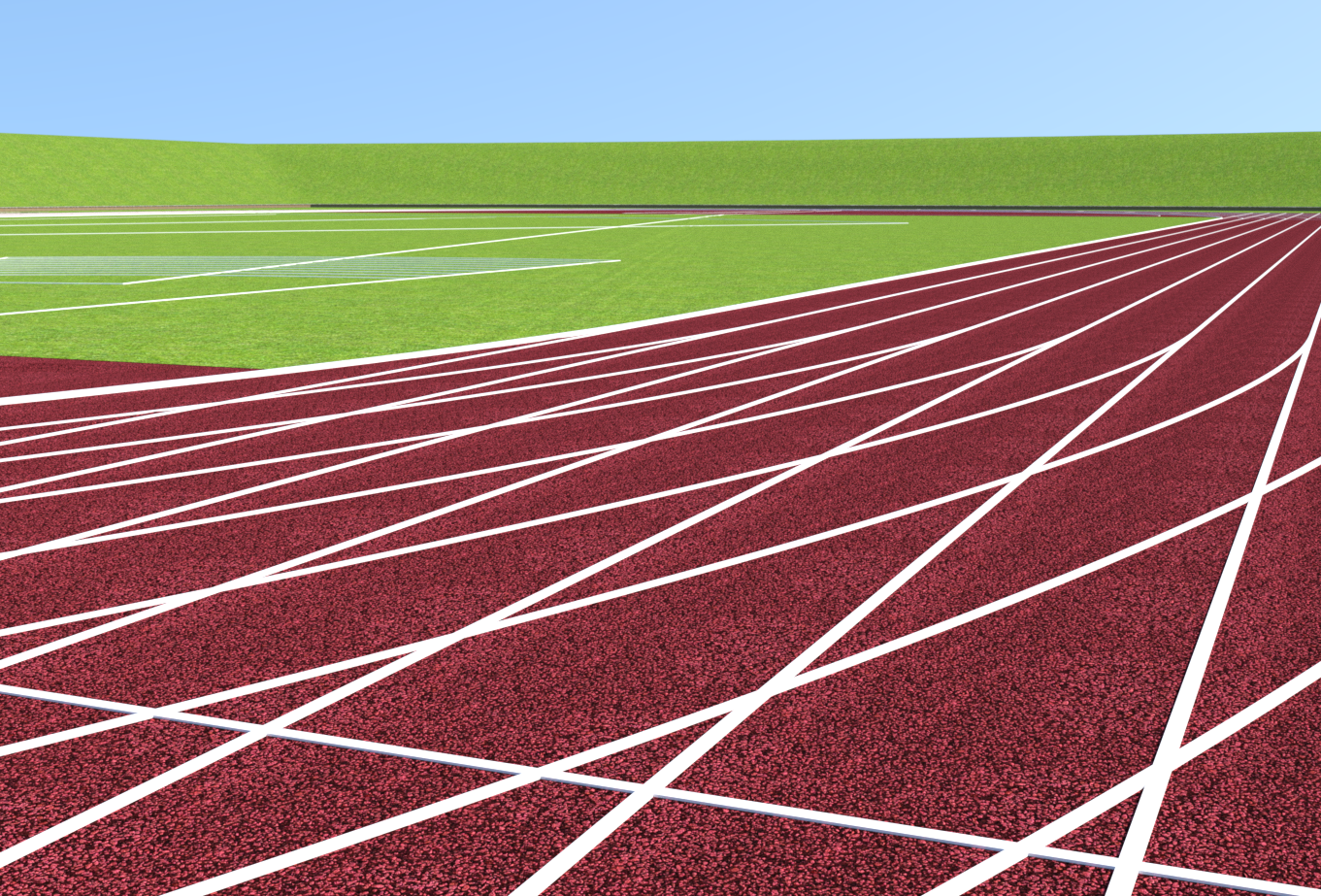
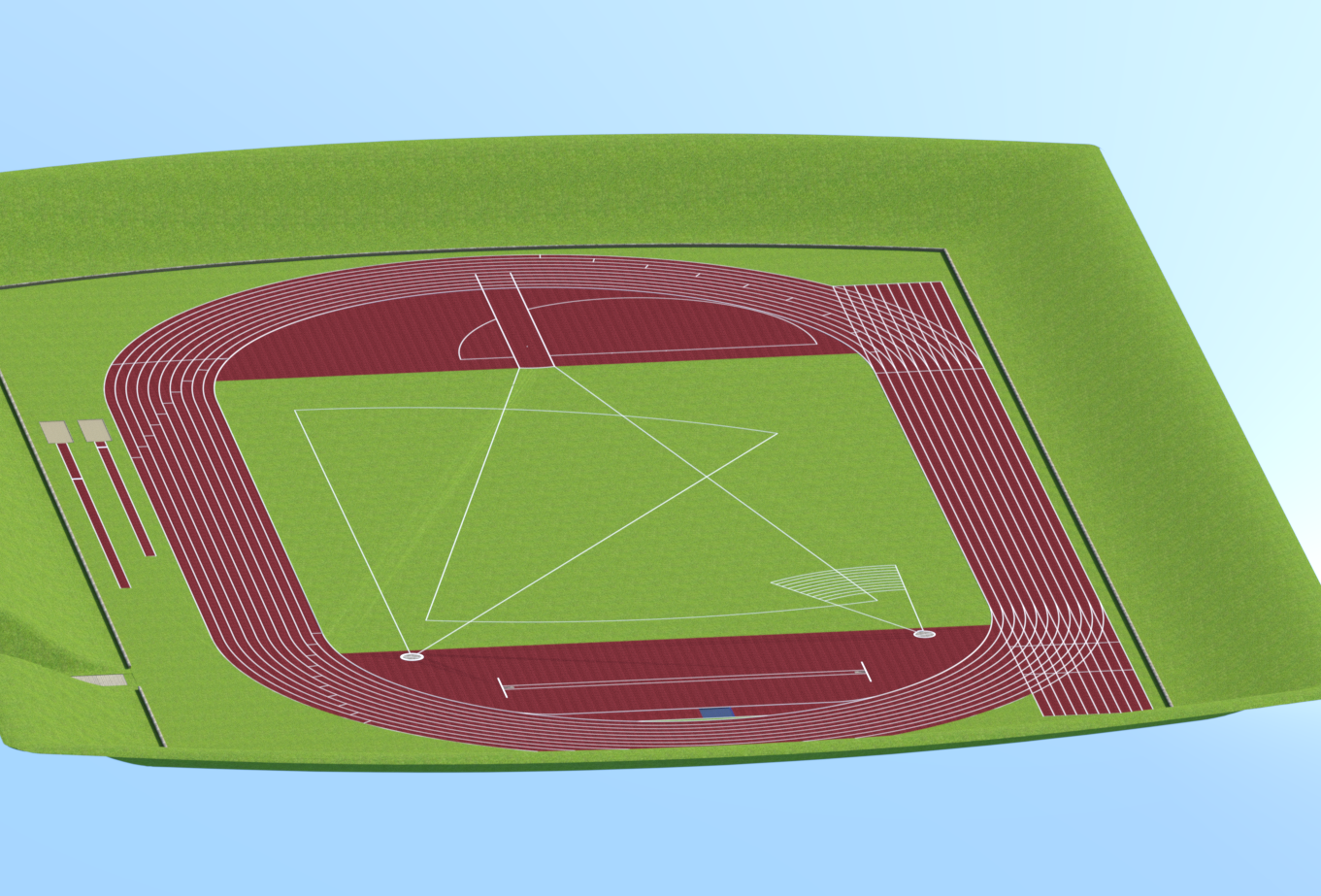
Progress with Running Track Freebie (Hurdles + G8F Hurdles Poses)Did a bit more towards getting the model into DS. It seems I'm going to have to re-model the central grass in my modeller because in the third render, you can see sharp triangle artefacts marking the grass going from the end of the Javelin Runway to the corner by the 200m start in the bottom left of the image. Irritating as it's a fairly complex shape with those clipped corners due to the running track and the 800cm radius at the end of the Javelin thowing runway. Going to take a fair bit to correctly model that again.
I've got the water in the steeplechase water jump, and need to create a tartan cover for it. The pole vault, shot and discus/hammer features are there along with most lines needed. There are 8000+ facets in each of the sand pits for long & triple jumps (5cm square) ready to apply impact morphs. Getting there, but still a bit of work to do. I have an idea for the sand morphs - pose a figure and animate an impact with the sand with dForce dynamic surface for the sand and no gravity. Then save as an obj & re-import as a morph. Do it with several poses & that should give a reasonable range of dialable morphs.
Plan view:

From the 100m start at competitor eye level:
From a 300m altitude:
Regards,
Richard
Diffeomorphic DAZ Importer Version 1.5.1jeff_someone said:
I can import a character with a simple dress on, merge rigs, but when I pose it, the simple dress does not deform the same way it does in Daz.
The deformations will not be the same if you don't import jcms too. Then some outfits may have custom morphs too.
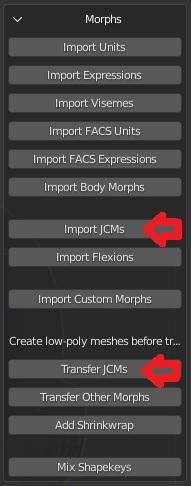
steps
- import the figure
- merge armatures
- import jcms
- transfer jcms to the outfit
 How long does it take you to load G8F?
Christoph7891 said:
Taoz said:
5 minutes exactly, with 712 G8F characters and a lot of morph packages installed, DS 4.15. Hardware 10+ years old - first gen Core 2 Quad 6600, DDR2 RAM and only HDDs. An i5-4690 CPU is over 4 times faster, so you have to take CPU speed into account too.
Dont forget, it's about single-threaded performance, not overall CPU performance. So you can have a CPU that's 100 cores and it's 100 times faster, but it won't make a difference as loading a character is single-threaded. For faster load times on the hardware front, the key seems to be a CPU with strong single-thread performance. Fortunatly there are lots of good benchmarks for this.
True, but those CPUs I talk about are both 4 cores / 4 threads so in that case an overall performance comparison will also give a good hint about about single thread performance. I did get the numbers wrong though I can see as I was looking at the wrong test, the 4690 is actually about 2.3 times faster single threaded and 3 times faster multithreaded than the Q6600, in CBMarks :
https://www.techspot.com/article/1039-ten-years-intel-cpu-compared/page2.html
In any case, my point was just that there are different variables at play here so a simple load time test among users doesn't say much about what is causing the huge differences.
G3 EyelashesOh wait, I found under the Shaping tab a morph slider for "FW_Lashes", whatever that is. And it does exactly that, makes the lashes longer or shorter. And if you de-select the "Use Limits" them lashes can be made REAL long. So maybe it's both. You can morph and you can apply alpha masks.
How long does it take you to load G8F?algovincian said:
Wonderland said:
7 minutes and 38 seconds. I usually go make coffee or something to eat...
Wow . . . that would be enough to drive me to drink - hope you put a little Bailey's in there ;)
There was a time a while back (when I had less content) that G8F was taking 8+ minutes to load for me. Drove me crazy and I stopped using DS altogether because of it. Turned out to be one morph package that was the culprit. Never did find out exactly what the issue was, but un-installing it did the trick and got my load times back down to around 30 seconds.
- Greg
Which morph package? I own all of them. The problem is, I use all of them. I rarely use a character as is and do my own morphs. I also own a ton of characters so I can mix morphs. I still get that duplicate formula warning and Zilpha loads with every G8 character and tech support is aware of it and still won't fix it. I'm wondering if that's slowing things down.
How long does it take you to load G8F?Making comparisons is quite useless if the total number of morphfiles is not included. Someone with less that 100 "characters", small amount of other morphfiles and expressions can have the figure load in seconds, when someone having 1000+ "characters", a lot of morph files and a ton of expressions may expect loading times to be several minutes if not several tens of minutes.
The warnings and errors recorded in the logfile can make loading take considerably longer in both cases.
Genesis 8.1 / Victoria 8.1
PowerLoader did that. You fire up V4.2 and it asks you which ExP morph sets to load, and more. http://docs.daz3d.com/doku.php/artzone/pub/software/powerloader/start The ExP tech was a blessing and a curse. A blessing because it overrode the morph channel number limitations (only so many used to be available in a figure by default back then). But if you save a scene with a V4-based character and later add a new ExP morph package to V4, your character in the scene saved prior to adding those won't be able to use them.algovincian said:Unless I'm not understanding something, the whole ExP/INJ system didn't really function like what I'm suggesting at all - there would be no selective injecting or anything like that at runtime.
How long does it take you to load G8F?barbult said:
Greg, what morph package caused your very long load times? I'm sure other people might want to experiment with removing just that one.
It was a while back and I can't remember (my memory is garbage). I'll try to dig up an old post or something.
- Greg
How long does it take you to load G8F?Taoz said:
5 minutes exactly, with 712 G8F characters and a lot of morph packages installed, DS 4.15. Hardware 10+ years old - first gen Core 2 Quad 6600, DDR2 RAM and only HDDs. An i5-4690 CPU is over 4 times faster, so you have to take CPU speed into account too.
Dont forget, it's about single-threaded performance, not overall CPU performance. So you can have a CPU that's 100 cores and it's 100 times faster, but it won't make a difference as loading a character is single-threaded. For faster load times on the hardware front, the key seems to be a CPU with strong single-thread performance. Fortunatly there are lots of good benchmarks for this.
Getting Hands Dial Up poses for G3 to work on G8certaintree38 said:
That didn't work either. I would at least like to know why these poses don't want to transfer. Does anyone have a guess?
The problem is that those poses are activated via dial controls, and whilst the pose converters will move the pose files (ie the duf files) they do not move the files under data that are needed to activate those poses.
New! Novica & Forum Members Tips & Product Reviews Pt 14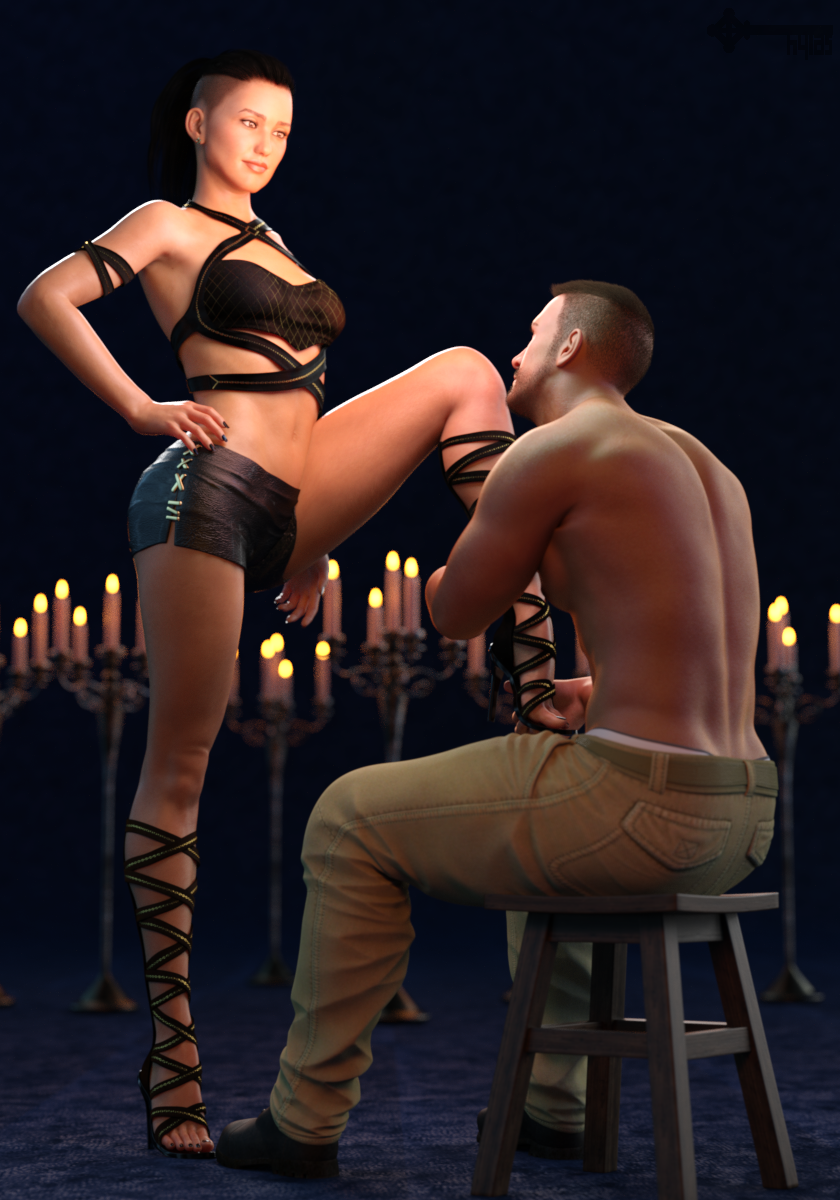
Some stuff I bought recently...
Rayne by Pixeluna
She has a gorgeous, slightly darker (possibly Arab?) complexion with cool undertones. (Then again, you don´t really see her undertones in my render because of all the warm lights I used... *facepalm*)
I think the horizontal width of her eyes is too small, making her eyes look a little beady. But when I add a little in the width she becomes a really beautiful woman.
I find her body morph unremarkable but she comes with an HD morph than can be dialled in separately. My render shows the body of V8 and the HD morphs of Rayne, plus some minor tweaks.Beloved Poses 2 by Mattymanx
Yes, the area around her left thigh/stomach is "clippy". Don´t feel like dealing with it :pAwerie Outfit by 4blueyes & bucketload3d
Bought it mostly for those Glamazon boots. The top is nice, too. Don´t care for the skirt so I replaced it.Tactical Pants by Smay
A little trickier than expected regarding pokethrough, smoothing modifier, and such. But you can make it work.Tenebroso Lighting by Marshian
One of those emissive "eggs" is hovering between them, I clone-stamped it out in post. A 2nd one is somewhere off panel.Mystical Wisps by Orestes Graphics
Only provides ambient and rim light here but those HDRIs are top notch and can bring the drama.Daz Studio Pro BETA - version 4.15.0.30! (*UPDATED*)it may be another issue, I was saving the same outfit as a support asset for Genesis 8 M & F and looking in Data it appears one overwrites the other
the is a 1KB dsf morph file for male and female but only one clothing dsf
I am now not saving support assets just scene subsets with autoadapted data files which are waaaaay bigger but work
I may not keep them after using the Unreal Bridge (already exported FBX for iClone)
I just have to accept autofitting on the fly in future I guess and saving scenes or subsets for use in DAZ studio
Radical distortion during morph or poseSo I just read the below post and saw it was posted a while ago....where are these settings in the new Daz3d? I am having issues with my figures stomaches wrinkling during poses such as sitting or squatting or kneeling, etc and have no idea how to fix it.
niccipb said:
Hi nowefg...
by default the Draw Manipulation subdivision is set to Delayed and the Skin Binding is set to Optimized... this is what causes that effect that you are seeing.
In the Tool Settings pane select the Universal Manipulator
Change the Subdivision to Persistent (On) and the Skin Binding to Full
This will now change the draw for all Manipulators and morph sliders
Now when you adjust the pose or a morph the transition will be smooth and accurate, but this does use more memory and if your OGL video card is slow, it could also cause lag in the viewport.
Hope this helps... :)
Daz 3D is part of

Connect
DAZ Productions, Inc.
7533 S Center View Ct #4664
West Jordan, UT 84084Licensing Agreement | Terms of Service | Privacy Policy | EULA
© 2026 Daz Productions Inc. All Rights Reserved.