-
How long does it take you to load G8F?
9 seconds.
20 - 30 characters and half a dozen morph packages. Bog standard 650mbs SATA ssd.
Dial Fusion for Genesis 2 to 8.1 (Commercial)Zev0 said:
It's by design. You can use any morphs but the zbrush morphs need to be moved. Promo 2 shows viable paths. No morph folder located in root will be picked up except for the Morphs folder and any sub folders inside there. That is the only exception outside of Actor or Pose Controls. Just move the morphs under ZBrush to the Morphs folder and they will be detected. Technically no morphs should remain in the ZBrush folder or any other folder in root. So instead of having their paths as Path:ZBrush it needs to be Path:Morphs/ZBrush. Also they need to be defined as either a shape or pose modifier.T
Thanks for the info, yeah I have to move my ZBrush morphs under the "TZO Morphs" Property group, to the People/Real world property group... I figured I needed to move the morphs but I did not know where they'd be picked up, now I know; thanks again!
EDIT: I now see my second mistake, a ZBrushed morph was in my Genesis 8.1 morphs folder and not my Genesis 8...
Daz Studio 4.16[.0.x] Pro, General Release! (*UPDATED*)s_j_gregory said:
RayDAnt said:
jbowler said:
What these tests show is that some products, animations, the various converter/script products and props (weapons etc) have next to no effect on character load time. Products that morph the characters - poses, expressions and raw morph packages as well as, curiously, wardrobe items have a significant effect on load times, but the really big issue is characters. My "figures-in-use" set has been dervied over the last month or so by starting with no figures visible ("G8 no figures" - no figures but everything else is visible) and adding figures as I opened scenes and encountered the "you need to install this product" dialog.
In fact I have a total of 636 G8 figure products (i.e. separate DIM packages) of which 78 are in my "Genesis 8/Figures in use" content directory. So I have only one eighth of my purchased G8 figures visible in my standard content set ("G8 figures-in-use" above).
So my current approach is to accept a 7.5x slow down and I could reduce this to a 4.2x slow down (the "G8 no figures" row) by using a scene specific set of G8 figures - only the ones I actually use in that scene.
Been following (and advocating for others to follow as well) the practice of limiting currently installed content to just core Daz Studio components, universally useful things like plugins, and stuff used in scenes/projects actively being worked upon for at least 5 years for the exact reasons your tests indicate.
Fun fact - Daz Install Manager has functionality built into it to enable just this sort of operation (and has had it for at least all the years I've been paying attention to such things) If you go to the DIM Install tab, hit the checkboxes next to some of the items listed and then right click anywhere, you will see that the last option available is called "Export Selected as CSV..." This allows you to preserve a list (in CSV format) of all the content packages needed to eg. load your most recently completed scene/project. Thereby freeing you to uninstall those items in DIM (to enable speedy development of the next scene/project on your docket) without having to resort to time-consuming detective work to determine which no-longer-installed packages are needed to get that scene open once again at some later date. Just make sure to keep all your not-currently-installed DIM install zip files in your DIM downloads folder. Then right click in the "ready to Install" DIM tab, select "Select Package(s) > From CSV File..." and point it towards your saved CSV ffile. You will get a recreation of those item selections (minus anything already currentlyinstalled) ready for one-click reinstallation.
A coule of questions to confirm. Please confirm this will work offline, I am assuming, because the not installed content is in your downloads folder, this is the case; but, I would like to confirm because my DAZ Studio system is not usually connected.
Yes, absolutely no internet connectivity required (just check work offline when you first start DIM.
(I think I am also assuming that DIM's Ready to Install tab reflects content in your Downloads folder not already installed.
Yes.
I've not noticed but when I uninstall content, that it is still in Downloads, does it repopulate as Ready to Install.)
Yes, that's exactly how it works.
I also think you are saying that after you make a scene, you go to your installed content, identify everything in the scene from the installed content list (checking them off) and then export as a .csv. I assume you are naming the .csv similarly to the scene and saving it with the scene or some other regularized location.
Yes. I'm a digital media professional, and every project I work on eventually ends up filed away in a separate folders on a large NAS/remote site backup service(s) I have setup for just that purpose. It's the smart way to operate especially if what you make makes you money.
Then, prior to opening a scene, you go to DIM, select the Ready to Install tab, rmb click anywhere, ... select your .csv that is associated with your scene and DIM will identify anything not already installed that is used in the scene.
Yeah, that's it exactly.
I have a lot of non-DAZ content (and have manually installed almost everything I could over the years) so anticipate that as limitation one for me. And, I have had a number of hardware and operator meltdowns (including regular deleting the contents of the Download folder as a Disc Mgmt Strat) over the years. I don't think my UI, with the DIM, in any way reflects what I own or where it might be; so, I anticipate this as limitation two for me.
To many a person's shock and surprise (certainly mine when I first realized this), Daz designed DIM to be completely compatible with content originating from other stores/homegrown assets. And even went through the trouble of thoroughly documenting the steps required to make a non-Daz-store native collection of content DIM friendly.
The short explanation is that your content needs to be saved in a normal .zip file with specific naming/directory tree layout convention in play (again, all explained in the documentation) and a relatively simple to generate metadata file or two in the root folder. For quite some time there has been a pigeon industry of no-frills paid/freeware apps that automate almost all of this process for you (eg. this one on the Daz store itself) maknig it virtually a breeze to make any (and I really do mean any) non-DIM native content fully compatible.
Speaking for myself, the very first thing I do after I acquire/make/etc a new set of file assets for use in Daz Studio is to generate a DIM formatted install file and keep that permanently archived in a folder along with all the other orginal attribution/documentation/content payload files belonging to the collection. Disk space is cheap. And being able to instantly call re-call up content without too much technical monkeying about is essential to having a productive creative process going.
Facial Transfer Render issues,No lips? Red body skin textures- it's not right.Hi,
I'm attempting to do a face transfer, but when I load the figure textures for the skin, the facial features I want to keep go away. Are there face transfer tutorials other than the one morphing into a gorilla and troll? That didn't help me. I'm currently using the free version.
When I render using the 3delight, my figure doesn't have lips. They show up as pure white. His eyes should be a darker brown, but they kinda glow wierd. When I render using the Lray everything shows up, but the skin has a redish unnatural texture to it. When I render using the viewport, the figure looks exactly the way I want it to. So, what step am I missing to get everythng to render like I created it to be? Are there skin textures I should be looking for? Lighting?
Why is this so important you may ask? I'm trying to render figures to use in a book of adventures I am putting together for my grandchildren. It's about their grandfather who passed away before they were born, so I need to get it as close to reality as I can. Once I get the figure completed, I'll purchase the other accessories, but if this can't be done then I'll have to go back to the drawing board, literally. I don't have the extra cash to throw into something that may not work by purchasing the Frace Transfer software at this time, but if I can get it figured out, I probably will.
Any tips. tricks or tutorials you know of would be greatly appreciated!
Thanks in advance!
Lisa
ps, are we allowed to post pictures that show the issues?
Import and export DAZ figures in Character Creator 3hansolocambo said:
the original shape belongs to
If the shape is made within Character Creator (CC3) because for some reason someone prefers to build patiently from head to toes his body shape using this app, and then the Genesis 8 wireframe is wrapped around that CC3 shape and brought as a morph into DAZ, there's 0 shape that belongs to nobody else than the one who made it. An umpteenth Genesis 8 body morph, done with ZBrush, Character Creator, or DAZ is just and umpteenth morph made by a user who owns and therefore has the right to use all those apps to reach his artistic aim.
Whether someone makes a DAZ custom morph with ZBrush (which also provides already made human bodies that G8 could be wrapped around), CC3, Poser, etc. doesn't matter. At the end it will just be a Genesis 8 with a shape done thanks to a third party tool. If all those marvelous 3D apps available export as fbx, obj, etc. it's pretty much because developpers want to be a part of every artist's workflow. An application that would be too exclusive and would refuse to offer export formats compatible with the rest of the 3D world would be doomed to disappear.
The shape of the base mesh once customized does not "belong" to reallusion, it belongs to the artist who makes it. Reallusion did not develop a tool, 3D real-time oriented, to prevent people from using their morphs anywhere else than inside CC3. The very purpose of such human shape apps, is for people to export their custom humans and do whatever they want with them : a game, an anatomy course, a short film, a DAZ morph, anything.
There's not always a copyright on every step of our workflows ;)
It depends on how the shape is created - sculpting on the base in ZBrush or the like is fine, as is sculpting on some combination of existing morphs and using reverse deformations on import to separate out the artist's work (which si theirs for distribution as a Genesis # morph) and the other morphs (which are not and can be shared only as settings to aply the original morphs). If the CC3 character was created usign the equialent of morphs then it is derivative of those morphs and, unless the CC3 license says otherwise, is not the artist's to do with as desired.
Dial Fusion for Genesis 2 to 8.1 (Commercial)It's by design. You can use any morphs but the zbrush morphs need to be moved. Promo 2 shows viable paths. No morph folder located in root will be picked up except for the Morphs folder and any sub folders inside there. That is the only exception outside of Actor or Pose Controls. Just move the morphs under ZBrush to the Morphs folder and they will be detected. Technically no morphs should remain in the ZBrush folder or any other folder in root. So instead of having their paths as Path:ZBrush it needs to be Path:Morphs/ZBrush. Also they need to be defined as either a shape or pose modifier.
Aniblock reorienting animationsIf you go in the Blender forum, look through the show us your blender renders thread, there's lots of great stuff in there! And with every update to the Diffeomorphic tool and the Daz to Blender Bridge, it's getting better and better to the point where sometimes I transfer a character over and they look better in Blender than they did in Daz (I've found that happening the most with skins from Daz Original characters). Check out that thread, there's a lot of great stuff in it!
Daz Studio 4.16[.0.x] Pro, General Release! (*UPDATED*)RayDAnt said:
jbowler said:
What these tests show is that some products, animations, the various converter/script products and props (weapons etc) have next to no effect on character load time. Products that morph the characters - poses, expressions and raw morph packages as well as, curiously, wardrobe items have a significant effect on load times, but the really big issue is characters. My "figures-in-use" set has been dervied over the last month or so by starting with no figures visible ("G8 no figures" - no figures but everything else is visible) and adding figures as I opened scenes and encountered the "you need to install this product" dialog.
In fact I have a total of 636 G8 figure products (i.e. separate DIM packages) of which 78 are in my "Genesis 8/Figures in use" content directory. So I have only one eighth of my purchased G8 figures visible in my standard content set ("G8 figures-in-use" above).
So my current approach is to accept a 7.5x slow down and I could reduce this to a 4.2x slow down (the "G8 no figures" row) by using a scene specific set of G8 figures - only the ones I actually use in that scene.
Been following (and advocating for others to follow as well) the practice of limiting currently installed content to just core Daz Studio components, universally useful things like plugins, and stuff used in scenes/projects actively being worked upon for at least 5 years for the exact reasons your tests indicate.
Fun fact - Daz Install Manager has functionality built into it to enable just this sort of operation (and has had it for at least all the years I've been paying attention to such things) If you go to the DIM Install tab, hit the checkboxes next to some of the items listed and then right click anywhere, you will see that the last option available is called "Export Selected as CSV..." This allows you to preserve a list (in CSV format) of all the content packages needed to eg. load your most recently completed scene/project. Thereby freeing you to uninstall those items in DIM (to enable speedy development of the next scene/project on your docket) without having to resort to time-consuming detective work to determine which no-longer-installed packages are needed to get that scene open once again at some later date. Just make sure to keep all your not-currently-installed DIM install zip files in your DIM downloads folder. Then right click in the "ready to Install" DIM tab, select "Select Package(s) > From CSV File..." and point it towards your saved CSV ffile. You will get a recreation of those item selections (minus anything already currentlyinstalled) ready for one-click reinstallation.
A coule of questions to confirm. Please confirm this will work offline, I am assuming, because the not installed content is in your downloads folder, this is the case; but, I would like to confirm because my DAZ Studio system is not usually connected. (I think I am also assuming that DIM's Ready to Install tab reflects content in your Downloads folder not already installed. I've not noticed but when I uninstall content, that it is still in Downloads, does it repopulate as Ready to Install.) I also think you are saying that after you make a scene, you go to your installed content, identify everything in the scene from the installed content list (checking them off) and then export as a .csv. I assume you are naming the .csv similarly to the scene and saving it with the scene or some other regularized location. Then, prior to opening a scene, you go to DIM, select the Ready to Install tab, rmb click anywhere, ... select your .csv that is associated with your scene and DIM will identify anything not already installed that is used in the scene.
I have a lot of non-DAZ content (and have manually installed almost everything I could over the years) so anticipate that as limitation one for me. And, I have had a number of hardware and operator meltdowns (including regular deleting the contents of the Download folder as a Disc Mgmt Strat) over the years. I don't think my UI, with the DIM, in any way reflects what I own or where it might be; so, I anticipate this as limitation two for me.
Let me know if I have followed your approach correctly and if these are accurate limitations as I might attempt to implement it, Thanks.
X-transfer vs Character ConverterNoah LGP said:
XTransfer create morphs and Character Converter create character preset.
XTransfer is perfect if you want to transfer 1 morph instead of a full character. Not all the morphs are characters (For example Shimuzu head morphs)
Character Converter also creates morphs. It puts them in the first content path it finds in data/Daz 3D/Genesis 8/Female/Morphs/... .XTransfer let's you choose what content path to use and let's you choos which morphs to convert.
Import and export DAZ figures in Character Creator 3the original shape belongs to
If the shape is made within Character Creator (CC3) because for some reason someone prefers to build patiently from head to toes his body shape using this app, and then the Genesis 8 wireframe is wrapped around that CC3 shape and brought as a morph into DAZ, there's 0 shape that belongs to nobody else than the one who made it. An umpteenth Genesis 8 body morph, done with ZBrush, Character Creator, or DAZ is just and umpteenth morph made by a user who owns and therefore has the right to use all those apps to reach his artistic aim.
Whether someone makes a DAZ custom morph with ZBrush (which also provides already made human bodies that G8 could be wrapped around), CC3, Poser, etc. doesn't matter. At the end it will just be a Genesis 8 with a shape done thanks to a third party tool. If all those marvelous 3D apps available export as fbx, obj, etc. it's pretty much because developpers want to be a part of every artist's workflow. An application that would be too exclusive and would refuse to offer export formats compatible with the rest of the 3D world would be doomed to disappear.
The shape of the base mesh once customized does not "belong" to reallusion, it belongs to the artist who makes it. Reallusion did not develop a tool, 3D real-time oriented, to prevent people from using their morphs anywhere else than inside CC3. The very purpose of such human shape apps, is for people to export their custom humans and do whatever they want with them : a game, an anatomy course, a short film, a DAZ morph, anything.
There's not always a copyright on every step of our workflows ;)
Daz Studio 4.16[.0.x] Pro, General Release! (*UPDATED*)jbowler said:
What these tests show is that some products, animations, the various converter/script products and props (weapons etc) have next to no effect on character load time. Products that morph the characters - poses, expressions and raw morph packages as well as, curiously, wardrobe items have a significant effect on load times, but the really big issue is characters. My "figures-in-use" set has been dervied over the last month or so by starting with no figures visible ("G8 no figures" - no figures but everything else is visible) and adding figures as I opened scenes and encountered the "you need to install this product" dialog.
In fact I have a total of 636 G8 figure products (i.e. separate DIM packages) of which 78 are in my "Genesis 8/Figures in use" content directory. So I have only one eighth of my purchased G8 figures visible in my standard content set ("G8 figures-in-use" above).
So my current approach is to accept a 7.5x slow down and I could reduce this to a 4.2x slow down (the "G8 no figures" row) by using a scene specific set of G8 figures - only the ones I actually use in that scene.
Been following (and advocating for others to follow as well) the practice of limiting currently installed content to just core Daz Studio components, universally useful things like plugins, and stuff used in scenes/projects actively being worked upon for at least 5 years for the exact reasons your tests indicate.
Fun fact - Daz Install Manager has functionality built into it to enable just this sort of operation (and has had it for at least all the years I've been paying attention to such things) If you go to the DIM Install tab, hit the checkboxes next to some of the items listed and then right click anywhere, you will see that the last option available is called "Export Selected as CSV..." This allows you to preserve a list (in CSV format) of all the content packages needed to eg. load your most recently completed scene/project. Thereby freeing you to uninstall those items in DIM (to enable speedy development of the next scene/project on your docket) without having to resort to time-consuming detective work to determine which no-longer-installed packages are needed to get that scene open once again at some later date. Just make sure to keep all your not-currently-installed DIM install zip files in your DIM downloads folder. Then right click in the "ready to Install" DIM tab, select "Select Package(s) > From CSV File..." and point it towards your saved CSV ffile. You will get a recreation of those item selections (minus anything already currentlyinstalled) ready for one-click reinstallation.
Diffeomorphic DAZ Importer Version 1.5.1Padone said:
jeff_someone said:
I can import a character with a simple dress on, merge rigs, but when I pose it, the simple dress does not deform the same way it does in Daz.
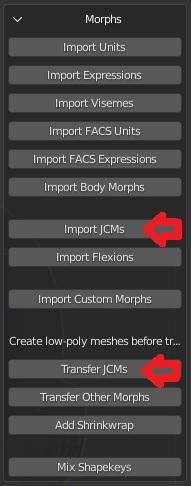
The deformations will not be the same if you don't import jcms too. Then some outfits may have custom morphs too.
steps
- import the figure
- merge armatures
- import jcms
- transfer jcms to the outfit
Thanks much, I'll give that a shot!
MimicMolly's Renders & WIPslol In my previous post, I was transferring Kayla to G8M, but I was also transferring Fane too and got carried away with my result. Daz Galleries link [x].
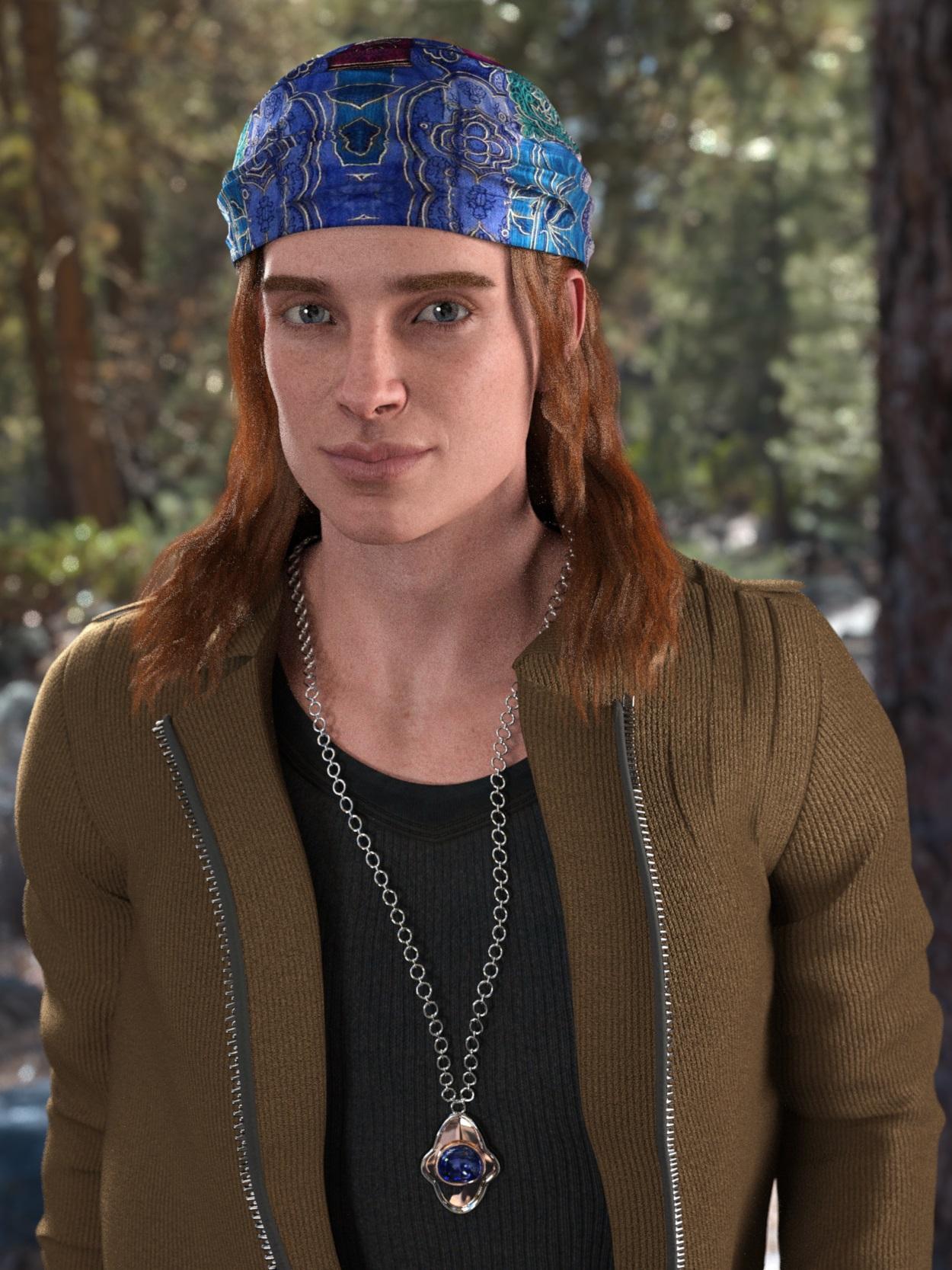
To me, he looks like a mix of Cillian Murphy and Tom Welling. I was gonna use a different hair, but this was where I realized that the only male AprilYSH hair I have currently installed on this laptop is Orson Hair. Not that it mattered, since it actually fit whatever I was going for.
I know y'all are probably curious about how I transferred him. But what I did was using the Cross-Figure kit, I shaped G8M like G8F and exported that as an .obj file. Then, I loaded G8F and the G8F-shaped G8M .obj on G8F as if it were a bodysuit. I then dialed in Fane's head, and used the Cross-Figure kit to shape G8F like G8M. This helped masculinize the head a bit. But I used other shaping morphs I had to tweak it further. I made G8F invisible, and exported the G8M bodysuit as an .obj file. Finally, I used Morph Loader Pro and imported the male!Fane file as if it were just another head shape. With this setup, I personally don't need any converter system because I can, more or less, do it myself.
For most other "genderbends", I have enough morphs where I could just line up the models and then shape whichever one to the opposite gender version. But Fane Guy and Kayla Boy, have unique shapes, so I decided to go about it this way.
Diffeomorphic DAZ Importer Version 1.5.1marble said:
Paintbox said:
Hey DAZ/Diffeo users, I spent quite a lot of time on this, so hopefully this will be the start of something beautiful ;-) , I am in progress of making a tutorial site. In the first installment I cover all the basics. It is written from the standpoint of the noob (which I am when it comes to Diffeomorphic, haha) , so it forgoes all the technicalities of Thomas (excellent) explanations in favour of a more guided and focused approach.
You can find it here :
https://roadvsmap.neocities.org/diffeo/diffeo_mainindex.html
I am looking into what the next step will be, so input is surely welcome, my own thoughts are probably something on lighting, textures or posing. Hope there is some use for it! I also don't mind constructive criticism, especially if my english is not clear enough.
Wow, so glad that you are taking on this task. I would echo everything that Krampus said and also Donald's comment about a nice HTML template. I might add that these are the things I find difficult to grasp and I assume that others who are not at the level of expertise of say, Padone, might find difficult.
- How to drape clothing (or is it even possible)?
- How and where to find the material surface adjustments - perhaps links to more information on how to tweak them.
- The differences between Eevee and Cycles.
- Maybe a little about viewport navigation because Blender is not like DAZ Studio. In Blender, we don't view through the camera like we do in DAZ Studio so this can be confusing to noobs (and still is for me even though I've watched the tutorials).
- How to pose. Whether to pose in DAZ Studio and import the pose (how to do that) or whether to pose in Blender. Of course, we are then back to the clothing drape issue.
- Rigging (maybe this should be at the top of the list). Differences between rig options and which is suited to which purpose.
- Morphs - I am utterly in the dark when it comes to all the different types of morph (custom, JCM, etc.) and how to import and apply them and how to manipulate the imported custom morphs (Shape Keys in Blender).
- Geografts and Geoshells - do they work? Should we merge the geometry? If so, how and what does that mean? Will the geograft morphs still work in Blender?
- Hair. A subject in itself due to all the different hair types and the fact that there are other import/conversion tools. I know nothing about hair technology.
Many of the things on that list have resulted in me abandoning all hope of ever understanding how to work with my DAZ content in Blender. I hope you have some success in simplifying the process for us.
I would also concur that many of the things on that list have tutorials online already but very few address working with imported DAZ content in mind. Thomas has done an incredible job of doing a lot of the work for us but many will not grasp how to take advantage of the tools provided.
Hi Marble, that's exactly my goal, to make DAZ content practical within Blender. On the templates, I probably move over to blogspot as well. When it comes to the tutorial I'll probably try different approaches that are goal oriented and above all be practical, or have FAQs were applicable. You make some good points to tackle! Thanks!
Diffeomorphic DAZ Importer Version 1.5.1Paintbox said:
Hey DAZ/Diffeo users, I spent quite a lot of time on this, so hopefully this will be the start of something beautiful ;-) , I am in progress of making a tutorial site. In the first installment I cover all the basics. It is written from the standpoint of the noob (which I am when it comes to Diffeomorphic, haha) , so it forgoes all the technicalities of Thomas (excellent) explanations in favour of a more guided and focused approach.
You can find it here :
https://roadvsmap.neocities.org/diffeo/diffeo_mainindex.html
I am looking into what the next step will be, so input is surely welcome, my own thoughts are probably something on lighting, textures or posing. Hope there is some use for it! I also don't mind constructive criticism, especially if my english is not clear enough.
Wow, so glad that you are taking on this task. I would echo everything that Krampus said and also Donald's comment about a nice HTML template. I might add that these are the things I find difficult to grasp and I assume that others who are not at the level of expertise of say, Padone, might find difficult.
- How to drape clothing (or is it even possible)?
- How and where to find the material surface adjustments - perhaps links to more information on how to tweak them.
- The differences between Eevee and Cycles.
- Maybe a little about viewport navigation because Blender is not like DAZ Studio. In Blender, we don't view through the camera like we do in DAZ Studio so this can be confusing to noobs (and still is for me even though I've watched the tutorials).
- How to pose. Whether to pose in DAZ Studio and import the pose (how to do that) or whether to pose in Blender. Of course, we are then back to the clothing drape issue.
- Rigging (maybe this should be at the top of the list). Differences between rig options and which is suited to which purpose.
- Morphs - I am utterly in the dark when it comes to all the different types of morph (custom, JCM, etc.) and how to import and apply them and how to manipulate the imported custom morphs (Shape Keys in Blender).
- Geografts and Geoshells - do they work? Should we merge the geometry? If so, how and what does that mean? Will the geograft morphs still work in Blender?
- Hair. A subject in itself due to all the different hair types and the fact that there are other import/conversion tools. I know nothing about hair technology.
Many of the things on that list have resulted in me abandoning all hope of ever understanding how to work with my DAZ content in Blender. I hope you have some success in simplifying the process for us.
I would also concur that many of the things on that list have tutorials online already but very few address working with imported DAZ content in mind. Thomas has done an incredible job of doing a lot of the work for us but many will not grasp how to take advantage of the tools provided.
How long does it take you to load G8F?Interesting results here.
I tried a scene with a G8F character, another character (G3M) and a set of props etc. and the scene took 45 seconds to load. Then I tried the base G8F alone and she loaded in less than 10 seconds.
I have a 6 core Ryzen 5 5600X with 64GB RAM and my content is stored on an SSD.
Compared to several others in this thread, I have very few G8F characters (I count 22) but I do buy morph packs like the Zev0 sets and Muscularity morphs, Not so big on expression packs though - I like to pose the face myself.
Back after some months, found out about G 8.1Gordig said:
You don't need to convert morphs or textures. I'm less certain about grafts, but since the geometry hasn't changed, I suspect those will work without issue, too. G8.1 does have a new UV, so if you wanted to convert them, you could load a G8 texture onto G8.1 and then Map Transfer to the new UV, but you wouldn't get the benefit of textures which were made for the new UV.
how do i map transfer uvs?
Daz Studio 4.16[.0.x] Pro, General Release! (*UPDATED*)The issue of character load times - the time to add a new character to a scene or, indeed, the time to load a scene file with one or more characters in it - has been around for some time. It's not specific to the the 4.15 release but it is present in this release. It has been discussed multiple times in multiple places; it seems as though a new thread in "The Commons" or elsewhere gets started every couple of weeks and the issue is frequently raised on general threads. Recently the discussion started anew on the Genesis 8.1 thread with this comment.
The issue is really simple; it takes me over 92 seconds to merge the "Genesis 8 Basic Female" into an empty scene if DAZ Studio can see all the content I've purchased, but if I hide most of that content the merge takes under 2.65 seconds. As we buy more content the product actually slows down, and it slows down a lot; by a factor over over 34 in my case.
Explantions have been posted in multiple places, but they are rarely clear; users with a detailed knowledge of DAZStudio will explain it in terms that depend on knowledge of how a character actually works. The work rounds are not obvious and the benefits not clear. For me it became so annoying that I ended up figuring I had to work out what was going on in terms I could understand and then come up with something that would at least get back to the speed I had a year or so ago. The work round I came up with gives me a time of about 20 seconds to insert a new character.
To get to this time I have divided my DAZ content installation into separate directories according to the type of the product. New characters go in one installation directory, conversion scripts, character specific props, animations, wardrobe items, poses, expressions and general morphs each have their own root. DAZStudio can see all of these as separate directories in the DAZStudio "Content Directory Manager", and DIM sees them as possibilities for the "Advanced Settings/Installation" pane "Content Path Shortcut". Because I can de-select ("remove") individual directories from the DAZStudio Content Directory Manager I have been able to perform simple tests of the load time of a character and establish where the time goes; hard numbers rather than speculation about exactly what is going wrong.
These load time tests produced the following results; obviously they are specific to me but they show how different products affect the character load time:
CMS/DSON Core Conversions Props Animation Wardrobe Figures-in-use Poses Poses 8.1 Expressions Morphs Figures Non-G8 content NO CACHE NO CACHE ÷ Everything +CACHE +CACHE ÷ Everything Extra time over G8 core (seconds) SIZE SIZE ÷ G8 core +CACHE ÷ NO CACHE +CACHE ÷ SIZE (ns per byte) G8 core ✔ 4.169 4.1% 2.649 2.9% 100% 23,344,247 6.7% 64% 113 G8 ->Animations ✔ ✔ ✔ ✔ 4.161 4.0% 2.618 2.8% 99% 23,355,954 6.7% 63% 112 G8 ->Props ✔ ✔ ✔ 4.208 4.1% 2.622 2.8% 99% 23,350,794 6.7% 62% 112 G8A +Poses 8.1 ✔ ✔ ✔ ✔ ✔ 4.230 4.1% 2.678 2.9% 101% 23,721,052 6.8% 63% 113 G8 ->Conversions ✔ ✔ 4.159 4.0% 2.834 3.1% 107% 23,344,247 6.7% 68% 121 G8A +Wardrobe ✔ ✔ ✔ ✔ ✔ 6.191 6.0% 3.028 3.3% 114% 25,156,870 7.2% 49% 120 G8A +Poses ✔ ✔ ✔ ✔ ✔ 6.719 6.5% 3.482 3.8% 131% 25,683,560 7.3% 52% 136 G8A +Expressions ✔ ✔ ✔ ✔ ✔ 6.993 6.8% 4.293 4.7% 162% 42,866,817 12.2% 61% 100 G8A +Morphs ✔ ✔ ✔ ✔ ✔ 10.973 10.7% 6.658 7.2% 251% 42,866,817 12.2% 61% 155 G8 select ✔ ✔ ✔ ✔ ✔ 12.618 12.3% 7.142 7.7% 270% 62,444,103 17.8% 57% 114 G8 no figures ✔ ✔ ✔ ✔ ✔ ✔ ✔ ✔ ✔ 17.075 16.6% 10.919 11.8% 412% 84,652,830 24.2% 64% 129 G8 figures-in-use ✔ ✔ ✔ ✔ ✔ ✔ ✔ ✔ ✔ ✔ 25.903 25.2% 19.910 21.6% 752% 118,300,912 33.8% 77% 168 G8 All ✔ ✔ ✔ ✔ ✔ ✔ ✔ ✔ ✔ ✔ ✔ 100.807 98.1% 91.726 99.5% 3463% 350,263,611 100.0% 91% 262 Everything ✔ ✔ ✔ ✔ ✔ ✔ ✔ ✔ ✔ ✔ ✔ ✔ 102.795 92.176 3480% 350,263,611 90% 263 Times are in seconds to load the "Genesis 8 Basic Female". The basic time is in the "+CACHE" column, the "NO CACHE" column lists the time after the DSON cache directory is completely deleted and the "SIZE" column is the size, in bytes, of the Female8.cache.dsf file in the cache. The left columns indicate what combination of products I made visible to DAZStudio before performing the timing test, I restarted DAZStudio before each test. The column headers above the check marks should explain exactly what was in the CMS; the left column is a little cryptic.
What these tests show is that some products, animations, the various converter/script products and props (weapons etc) have next to no effect on character load time. Products that morph the characters - poses, expressions and raw morph packages as well as, curiously, wardrobe items have a significant effect on load times, but the really big issue is characters. My "figures-in-use" set has been dervied over the last month or so by starting with no figures visible ("G8 no figures" - no figures but everything else is visible) and adding figures as I opened scenes and encountered the "you need to install this product" dialog.
In fact I have a total of 636 G8 figure products (i.e. separate DIM packages) of which 78 are in my "Genesis 8/Figures in use" content directory. So I have only one eighth of my purchased G8 figures visible in my standard content set ("G8 figures-in-use" above).
So my current approach is to accept a 7.5x slow down and I could reduce this to a 4.2x slow down (the "G8 no figures" row) by using a scene specific set of G8 figures - only the ones I actually use in that scene.
Most of the CMS changes I made have a relatively small effect on load time. The take-away here is that hiding individual character products and only making visible those that are actually used in the scene is a sure way o substantially improving scene load time. Of course that really doesn't work in practice - it takes longer to set that up within DAZStudio that it takes to load the character or the scene, but it may make sense to have "character groups" or characters typically used together and it certainly makes sense for me to hide most - seven eighths - of the character products I own!
Back after some months, found out about G 8.1You don't need to convert morphs or textures. I'm less certain about grafts, but since the geometry hasn't changed, I suspect those will work without issue, too. G8.1 does have a new UV, so if you wanted to convert them, you could load a G8 texture onto G8.1 and then Map Transfer to the new UV, but you wouldn't get the benefit of textures which were made for the new UV.
How long does it take you to load G8F?Wonderland said:
algovincian said:
Wonderland said:
7 minutes and 38 seconds. I usually go make coffee or something to eat...
Wow . . . that would be enough to drive me to drink - hope you put a little Bailey's in there ;)
There was a time a while back (when I had less content) that G8F was taking 8+ minutes to load for me. Drove me crazy and I stopped using DS altogether because of it. Turned out to be one morph package that was the culprit. Never did find out exactly what the issue was, but un-installing it did the trick and got my load times back down to around 30 seconds.
- Greg
Which morph package? I own all of them. The problem is, I use all of them. I rarely use a character as is and do my own morphs. I also own a ton of characters so I can mix morphs. I still get that duplicate formula warning and Zilpha loads with every G8 character and tech support is aware of it and still won't fix it. I'm wondering if that's slowing things down.
Barbult asked the same thing and unfortunately I just can't remember. I've gone back to try to find any posts I may have made about it, but so far haven't had any luck.
- Greg
Daz 3D is part of

Connect
DAZ Productions, Inc.
7533 S Center View Ct #4664
West Jordan, UT 84084Licensing Agreement | Terms of Service | Privacy Policy | EULA
© 2026 Daz Productions Inc. All Rights Reserved.