-
zilpha invades DAZ -
PerttiA said:
No need to manually edit the *.duf files.
To fix any ill-behaving morphs (non-zero default value), do as follows;
1. Load your base figure or the developer version.
2. Select "Show Hidden properties" in the Parameters-Tab, drop down menu (right-click) <---------- Did this see nothing but other morphs and can't tell if their used or unused!!
3. Zero the figure (Found in Parameters-Tab, drop down menu) <-------------------------------- I don't see in the menu or drop down one!!! 2020 Version Daz Studio!!!
4. Memorize the figure (Found in Parameters-Tab, drop down menu)
5. File->Save As->Support Asset->Save Modified AssetsThis procedure will zero the default value in the ill-behaving morph/morphs, and while saving DS also shows you a list of the morphs it is changing.
I tried that and did not see anything for Sero the Figure under Hidden tab!!!
even typed in search Zero the Figure and it could not find anything!!!
here's my "PRoof"!!!
Smooth animation in viewport ?I'm making tons of animations and it would help me a lot to visualize them smoothtly in viewport before rendering to make sure they look natural. Currently my 50 fps animations are more about 1fps when playing the timeline, whatever I choose filament or hidden line preview modes. Is it even possible to get a smooth animation with the best hardware ever ? Otherwise, how should I do ?
I add any morph is playing smoothly, but things get laggy as soon as a movement is involved.
Eyes Open Close Michael 8.1Did you remove the files from both folders (or 4 folders counting the female versions)?
The dummy/placeholder files are located in;
...\Data\DAZ 3D\Genesis 8\Female 8_1\Morphs\Daz 3D\Base Pose Head\ (255 files)
...\Data\DAZ 3D\Genesis 8\Female 8_1\Morphs\Daz 3D\Expressions\ (24 files)
...\Data\DAZ 3D\Genesis 8\Male 8_1\Morphs\Daz 3D\Base Pose Head\ (255 files)
...\Data\DAZ 3D\Genesis 8\Male 8_1\Morphs\Daz 3D\Expressions\ (24 files)Please make sure you are removing the files from G8.1 morph folders and not G8 morph folders, where the functioning ones are stored.
Domino HD for G3 & G8 Load errorsCheri Lasota said:
Lyoness said:
Updates have gone out. This problem should now be completely resolved
Hi Lyoness,
I purchased the Domino product awhile back but I'm seeing some issues with it that I can't seem to resolve with a reinstall of the product. When I load up Either Domino or Thora GF8, no G8 clothing loads properly onto her. It seems to think I've actually loaded the G3 version and autofit gets confused and says it's not a supported product. Strange things seem to happen and I often can't load other products onto her such as makeup, etc. And clothing that I am able to get onto her doesn't act like normal (things like I can't unparent things like hats from her and move them independently within the scene.
Is this a problem others have encountered? Should I submit a support ticket? I love her and often want to use her, but she's become such an issue that lately I can only just use her morph shapes.
Please submit a ticket.
RIP in peace hivewireLeana said:
For those who may not have seen it: you can ask for a transfer for your HW3D purchases which moved to Rendo.
Ooooo, thank you for the link, Done.
Cherubit's grace not working correctlyRichard Haseltine said:
Do you have the required Head and Body morph sets?
I don't believe those were listed, actually, and I have never recieved any errors upon applying the morph or dropping the figure into the scene.
If it's not any trouble, could you elaborate?Bluejaunte appreciationbluejaunte said:
Good news, the next girl is submitted. Usually still a few weeks before anything is in the store but there you go

As for Genesis 8.1, I like it but I also share some of the mixed feelings. I'm not fully using the new UV yet, or might never even, because the problem it fixes with the horrible change in texel density between face and skull is mostly negated by a new and almost as bad transition between skull and torso. Logically I just have to conclude that face to skull is usually hidden by hair, probably 99% of cases especially for females that just aren't rendered bald very often. It just doesn't seem to be worth it to waste VRAM for another set of 4k textures just to then have the same problem in an even more visible place. I do use the new eye UV though, that is just a no brainer.
Don't get me wrong, I absolutely hate that the UV patches have varying texel densities. It makes my life so much harder. I was advocating for new UVs with completely unified patches. That would mean like 4 patches for the torso alone. It would be drastic and neither Daz nor (probably) the world is ready for that. But just to let you know I'm actually all for new UVs but go all in and fix everything.
As for morph compatibility, well this is a bit of a dumb issue. As I'm working on G8.1 and saving out morphs, they are saved out in G8.1 specific folders and format and then they aren't visible on older G8 figures. Seeing as the morph data is exactly the same I gotta say I'm a bit baffled by this move but it's probably because of conflicts with the new expressions. I can hack the .duf file of my G8.1 morphs and make them G8 morphs with some effort, could maybe create a script of sorts that does this automatically, but just the logistics of that would be highly annoying. For now I've left them as G8.1 morphs and we will see what happens. I mean it makes sense to just use G8.1 from now on so why bother right? With that alias folder remove hack that I saw mentioned around here you can even get the old expression dials back. Ultimately it likely makes more sense to hack that kind of stuff rather than to try and keep new morphs work on an outdated figure.
If you want to use the new material on a G8 that wouldn't work anyway because the new UV isn't available on it, not that I've seen at least. Or maybe this could be hacked again but just... why. Use G8.1 instead. Hack that to get everything working rather than going the other way. It's so backwards compatible, that's why it's 8.1 and not 9.
Very happy to know that your new creation will be ready to meet my computer at some point in the future.
Thanks a lot for the explaining, what's going on behind the scenes with Genesis 8.1.
Frankly speaking, Genesis 8.1 figures released so far, did not impressed me so much.
That's why I am waiting for your Genesis 8.1 girl with great expectation.
Bluejaunte appreciationGood news, the next girl is submitted. Usually still a few weeks before anything is in the store but there you go
As for Genesis 8.1, I like it but I also share some of the mixed feelings. I'm not fully using the new UV yet, or might never even, because the problem it fixes with the horrible change in texel density between face and skull is mostly negated by a new and almost as bad transition between skull and torso. Logically I just have to conclude that face to skull is usually hidden by hair, probably 99% of cases especially for females that just aren't rendered bald very often. It just doesn't seem to be worth it to waste VRAM for another set of 4k textures just to then have the same problem in an even more visible place. I do use the new eye UV though, that is just a no brainer.
Don't get me wrong, I absolutely hate that the UV patches have varying texel densities. It makes my life so much harder. I was advocating for new UVs with completely unified patches. That would mean like 4 patches for the torso alone. It would be drastic and neither Daz nor (probably) the world is ready for that. But just to let you know I'm actually all for new UVs but go all in and fix everything.
As for morph compatibility, well this is a bit of a dumb issue. As I'm working on G8.1 and saving out morphs, they are saved out in G8.1 specific folders and format and then they aren't visible on older G8 figures. Seeing as the morph data is exactly the same I gotta say I'm a bit baffled by this move but it's probably because of conflicts with the new expressions. I can hack the .duf file of my G8.1 morphs and make them G8 morphs with some effort, could maybe create a script of sorts that does this automatically, but just the logistics of that would be highly annoying. For now I've left them as G8.1 morphs and we will see what happens. I mean it makes sense to just use G8.1 from now on so why bother right? With that alias folder remove hack that I saw mentioned around here you can even get the old expression dials back. Ultimately it likely makes more sense to hack that kind of stuff rather than to try and keep new morphs work on an outdated figure.
If you want to use the new material on a G8 that wouldn't work anyway because the new UV isn't available on it, not that I've seen at least. Or maybe this could be hacked again but just... why. Use G8.1 instead. Hack that to get everything working rather than going the other way. It's so backwards compatible, that's why it's 8.1 and not 9.
E.V.E Enhanced Virtual Entity Hd For Genesis 8 Female Glitch? --- FIXEDAfter loading Leisa, I checked the log and it is showing two files referring to EVE. So, it looks like EVE is the problem. Any clues how to fix this?
2021-03-09 15:21:33.843 Begin Loading Character Addons...
2021-03-09 15:21:34.077 File loaded in 0 min 0.2 sec.
2021-03-09 15:21:34.082 Loaded Morph Deltas in 0 min 0.0 sec.
2021-03-09 15:21:34.082 Loaded file: FHMLeisa8HD_div4.dsf
2021-03-09 15:21:34.197 Loaded Morph Deltas in 0 min 0.0 sec.
2021-03-09 15:21:34.197 Loaded file: FHMLeisa8HD_div4_proj.dsf
2021-03-09 15:21:34.211 Loaded Morph Deltas in 0 min 0.0 sec.
2021-03-09 15:21:34.211 Loaded file: FHMLeisa8.dsf
2021-03-09 15:21:34.221 Loaded Morph Deltas in 0 min 0.0 sec.
2021-03-09 15:21:34.221 Loaded file: FBMLeisa8HD_div4.dsf
2021-03-09 15:21:34.484 Loaded Morph Deltas in 0 min 0.0 sec.
2021-03-09 15:21:34.484 Loaded file: FBMLeisa8HD_div4_proj.dsf
2021-03-09 15:21:34.499 Loaded Morph Deltas in 0 min 0.0 sec.
2021-03-09 15:21:34.499 Loaded file: FBMLeisa8.dsf
2021-03-09 15:21:34.513 Loaded Morph Deltas in 0 min 0.0 sec.
2021-03-09 15:21:34.513 Loaded file: EVE Final L4 FHM.dsf
2021-03-09 15:21:34.590 Loaded Morph Deltas in 0 min 0.0 sec.
2021-03-09 15:21:34.590 Loaded file: EVE Final L4 FBM.dsf
2021-03-09 15:21:34.750 Loaded file: Genesis 8 Female Eyelashes.duf
2021-03-09 15:21:34.772 Loaded Morph Deltas in 0 min 0.0 sec.
2021-03-09 15:21:34.772 Loaded file: PHMMouthRealism_HD_div2.dsf
2021-03-09 15:21:34.783 Loaded Morph Deltas in 0 min 0.0 sec.
2021-03-09 15:21:34.783 Loaded file: PBMNavel.dsf
2021-03-09 15:21:34.783 Loaded Morph Deltas in 0 min 0.0 sec.
2021-03-09 15:21:34.784 Loaded file: PHMEyelashesLengthUpper.dsf
2021-03-09 15:21:34.784 Loaded Morph Deltas in 0 min 0.0 sec.
2021-03-09 15:21:34.784 Loaded file: PHMEyelashesLengthLower.dsf
2021-03-09 15:21:34.785 Loaded Morph Deltas in 0 min 0.0 sec.
2021-03-09 15:21:34.785 Loaded file: PHMEyelashesCurl.dsf
2021-03-09 15:21:34.828 Loaded Morph Deltas in 0 min 0.0 sec.
2021-03-09 15:21:34.829 Loaded file: PHMEyelashesLengthUpper.dsf
2021-03-09 15:21:34.831 Loaded Morph Deltas in 0 min 0.0 sec.
2021-03-09 15:21:34.832 Loaded file: PHMEyelashesLengthLower.dsf
2021-03-09 15:21:34.835 Loaded Morph Deltas in 0 min 0.0 sec.
2021-03-09 15:21:34.835 Loaded file: PHMEyelashesCurl.dsf
2021-03-09 15:21:34.838 Loaded Morph Deltas in 0 min 0.0 sec.
2021-03-09 15:21:34.839 Loaded file: PHMEyelashesExpand.dsf
2021-03-09 15:21:35.012 File loaded in 0 min 0.0 sec.
2021-03-09 15:21:35.012 Loaded file: Leisa 8 Eyelashes.duf
2021-03-09 15:21:35.014 Finished Loading Character Addons
2021-03-09 15:21:35.098 File loaded in 0 min 47.7 sec.
2021-03-09 15:21:35.098 Loaded file: Leisa 8 HD.duf
2021-03-09 15:21:37.591 Loaded image Leisa8LegsD_1003.jpg
2021-03-09 15:21:37.657 Loaded image Leisa8Eyes02D_1006.jpg
2021-03-09 15:21:37.856 Loaded image Leisa8ArmsD_1004.jpg
2021-03-09 15:21:37.919 Loaded image Leisa8MouthD_1005.jpg
2021-03-09 15:21:38.143 Loaded image Leisa8FaceD01_1001.jpg
2021-03-09 15:21:38.340 Loaded image Leisa8TorsoD_1004.jpg
2021-03-09 15:21:38.406 Loaded image Leisa8Eyelashes.jpgCherubit's grace not working correctlyDo you have the required Head and Body morph sets?
Just-In-Time Morph Loading?CO3DR said:
I've been away from DAZ (both using and purchasing content) for a few months because of the problem I reported at:
benchmark load of Genesis 8 Female; asset load times worsen with larger content sets - Daz 3D Forums
I'm wondering if anyone knows where in the priority list Just-In-Time morph loading might be? Has it already been implemented?
Basically, I'm looking for the LIST of morphs to load at character loading, but the morphs themselves don't load until you use one.
The list is useless, if you mean just the names. if you include the links to other properties then it is on the list at - however many years DS 4 has been around*, since that is how the system works now - the deltas that define the shape are not loaded until needed.
* in fact I think older versiosn did the same once content was loaded into a scene and saved out in native format.
AIUTO...CHI CONOSCE L’ITALIANO? PARTE TREDICICrios said:
Muscleman said:
Crios said:
No, infatti, mi ricordavo che le vecchie versioni del DAZ, per ogni scena, salvavano tutto, solo che a furia di salvare 2 GB vuoti mi farebbero comodo. Vedrò cosa posso cancellare in base ai nomi.
Una domanda, devo creare un character in cui devono esserci 2 Morph:
Il primo è un mio character, però invece di morpharlo al 100% devo farlo arrivare al 60%
L'altro morph è un merchant resources, che dovrei mettere nascosto.
Ora, posso creare una slide, che mi setti i valori dei due morph?
Insieme in un unica slide? Dovresti applicarli entrambi esportare il modello così modificato in OBJ , rimportarlo su base pulita cosi che creda che sai un unico morph, ma sta attento, non sempre i morphs esterni sono compatibili con la figura di base ( se parliamo di DAZ figures) e a volte funzionano solo da "soli"
Scusami, quando creano i cosidetti "Character for" come fanno?
Partono dalla figura di base, la aprono per esempio in Zbrush e da li creano il morph, rispettando i poligono della figura. Se ne aggiungono di nuovi, o cmq va rompere la vecchia geometria, diventa spesso un pezzo geographato ( ma si può dire?)
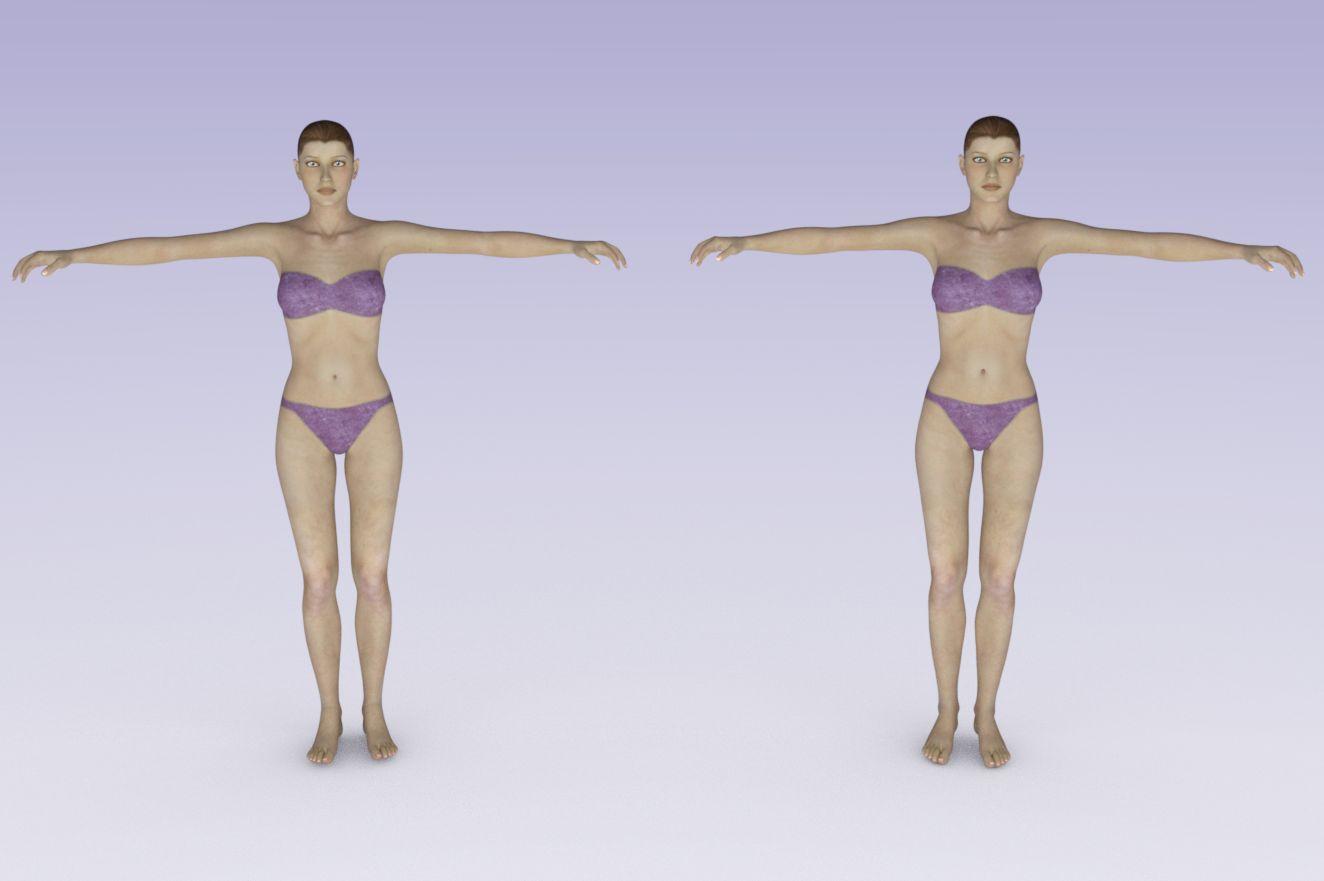
V4 for Genesis 8 Female?There is no product that I am aware of that gives you V4 shape onto G8F, however you can transfer it yourself using some of the tools available here.
To move the morph to G3F you need Generation X Version 2 and the Genesis 2 and 3 add ons. There are a couple of products available to transfer the G3F morph to G8F, I used XTransfer (https://www.daz3d.com/xtransfer--genesis-3-to-genesis-8-converter);
To use V4 skins on G8F you need this product: https://www.daz3d.com/legacy-uvs-for-genesis-8-victoria-4
Below is the result. I posed G8F into the default V4 pose. G8F on the left, V4 on the right. Very similar, but not identical.
 AIUTO...CHI CONOSCE L’ITALIANO? PARTE TREDICI
Muscleman said:
Crios said:
No, infatti, mi ricordavo che le vecchie versioni del DAZ, per ogni scena, salvavano tutto, solo che a furia di salvare 2 GB vuoti mi farebbero comodo. Vedrò cosa posso cancellare in base ai nomi.
Una domanda, devo creare un character in cui devono esserci 2 Morph:
Il primo è un mio character, però invece di morpharlo al 100% devo farlo arrivare al 60%
L'altro morph è un merchant resources, che dovrei mettere nascosto.
Ora, posso creare una slide, che mi setti i valori dei due morph?
Insieme in un unica slide? Dovresti applicarli entrambi esportare il modello così modificato in OBJ , rimportarlo su base pulita cosi che creda che sai un unico morph, ma sta attento, non sempre i morphs esterni sono compatibili con la figura di base ( se parliamo di DAZ figures) e a volte funzionano solo da "soli"
Scusami, quando creano i cosidetti "Character for" come fanno?
[Released] RSSY Hair Converter from Victoria 4 to Genesis 8 Female [Commercial]Hm. For V4 to G8 and then G8-G3 you might be able to, I don't think we overwrite the whole rig in that case. As long as the V4-G8 morph is intact, changing the bone positions and updating the rigging space shouldn't ruin it. I'm not sure how good the fit would be with two layers of transference, but it's doable.
Sculpting new character morphs and using lip-syncSure thing Mate!!
I still have copies of the Classic mimic pro3 installed on two of my old Laptops and used it & DAZ mimic live, in the production of my feature length Film "Galactus Rising".
It is a shame Mimic was effectively abandoned before the era of Genesis as it was ahead of its time.
But Alas I had to move on
User Tim Vining "Auroratrek" recently migrated to an CC3/FBX- to Maxon C4D based pipeline, after years of being stuck using Vicky 3/4 with mimic pro 3.He might be able to offer more specific info on the C4D based pipeline, as I no longer use the Maxon software myself.
Just remember you only need the basic $199 USD version of Iclone. however you must get the stand alone version of CC3 pipeline
for full FBX export capability, Daz genesis character conversion to native CC3, and the Zbrush I/O workflow of course.I create all of my own content (clothing and props) in Blender
and some nice fellow just released a free Auto-set up Addon for Blender that perfectly auto creates the CC3 skin & hair materials in Blender upon import and has a Zrush style I/O transfer between CC3 & Blender for CHaracter custom morphing .
This will greatly speed up the production of my current youtube mini-series "HALO Reclaimer"Cheers.
 Just-In-Time Morph Loading?
I've been away from DAZ (both using and purchasing content) for a few months because of the problem I reported at:
benchmark load of Genesis 8 Female; asset load times worsen with larger content sets - Daz 3D Forums
I'm wondering if anyone knows where in the priority list Just-In-Time morph loading might be? Has it already been implemented?
Basically, I'm looking for the LIST of morphs to load at character loading, but the morphs themselves don't load until you use one.
MRB outfitchungdan said:
Hi i am chungdan.
Sorry
I don't speak english
This is through Google Translator..
The "smooth morph" figure is the shape variation of Genesis' legs and feet.
Protects from distortion of the costume.And there is a morph in the actor/adjustment.
This is a simple morph (mesh is low poly)The mrb costume (simulation costume) in the lower layer is middle polygon, and a little more
There are delicate morphs ("actor/adjustment").The "smooth morph" figure comprehensively controls the costumes underneath.
All garments must be loaded from the "wearable" item.
These are the ones that I have set in advance.
Material only applies to garments loaded from the "wearable" item (this is a Hierarchy material)
***Cloaks come in several types of morphs.(mrb dress actor/adjustment)
Try loading a different type of morph if it crashes during simulationIts not that it explodes but the thing is not laying flat. It just hovers in the air
This is the cloak after a full simulation. Also, in the description under adjustments it says hit has "Cloak rotate" which it clearly does not. It only has cloak push top
And like the orginal poster asked what is the purpose of the other models? You cant color them with the material presets, and they simulate and have the same exact adjustments of the other pieces. So what is the point?
This really shouldnt have gotten to this point. Dont you test what you put up forsale? I am pretty sure you do.
How long does it take you to load G8F?System = Ryzen 9 3900x 32mb 3600Ram NvMe 4.0 1TB System Drive, loading from a NVmE 3.0 2TB Data Drive
Well over 400 Characters and a Ton of Morphs
6.23 Load time
I've have culled my G8s twice to get it down near 300... and when they are around that #, my load time is usally around 1.20 or so. I've kinda stopped buying characters though, because of that, but I am a sucker for a good morph/alt package.
Sculpting new character morphs and using lip-syncwolf359 said:
Hi Adam
Although I have left the Daz/Genesis/C4D eco system for Blender/Reallusion,
I do remember that the mimic DMC files for Genesis 1,2,3,8 are written to describe the basic phonemes that the old 32 bit mimic basic function (in 32 bit Daz studio )will look for when parsing an audio file for lipsynch.
these basic Phonemes are buit into genesis 3
Obviously there have been many third party commerical face expression morphs and stylized head shapes for those figures that (in my many years of usage ) never interfered with the basic mimic phonemes.But understand this old friend,
Any NEW custom Phonemes you might create for a bespoke Character would have to be hand animated as the ability to generate a new custom DMC file for mimic Disappeared years ago along with the venerable mimic pro 3 softwareHey fella,
Thanks for commenting. Currently I suspect I will be able to do as I was mentioning above, and simply create a new character shape using a base figure (Gen 3/8), and import as a morph, and still retain all of the existing lipsync functionality, which would be ideal.
I have been looking into the Reallusion stuff as well though, and am trialing both Character Creator 3 and iClone 7. I don't see me having much use for the latter tbh, other than utilising it's own lip-sync functionality. Having tried this yesterday, Idespite having the intensity controls, and the various live input methods (via iphone), I can't say I am finding the lip-sync as reliable or accurate as the Daz3D 32 bit one, which has surpised me. The workflow possibilities between ZBrush and CC3 are superb, with the ability to send posed figures back and forth, and reimport with custom sculpted clothing that is automatically conformed to the base model! - thats fantasticly useful! - Is there any decent resource for learning about the best use of the lip-sync in iClone?
Adam ;)
Daz 3D is part of

Connect
DAZ Productions, Inc.
7533 S Center View Ct #4664
West Jordan, UT 84084Licensing Agreement | Terms of Service | Privacy Policy | EULA
© 2026 Daz Productions Inc. All Rights Reserved.