-
Trouble with Dresses Moved Over from Rendo
crosswind said:
As Richard said, Products section is under the management of Content Library... but you can see it shows an icon of "Database" which means it reads products' metadata from cms database. Because those products you bought have no metadata (in fact Daz didn't make metadata for them), so you have no way to find these 3 products under Products section.
For instance, if you locate the IM package of one of them in your Package Archive folder, open it and drill down into "Runtime\Support" folder, you'll find no metadata files (even you won't find the support folder...), which means DIM has no metadata to import into cms database when installing the product.
So you may have options of: 1) install the products with Content Wizard (if you own it); 2) install the products manually by using the function "Create a Product from..." in Content Library, and add Content Type / Categories accordingly. Then send a ticket as you wish (though I don't think you'll get any response) ~~~
Finally, suggest you install a browser add-on "Daz-Deals", then you can see the link of Readme on the product page (ss1). Click it... if it brings you to "Page Not Found" (ss2), it means that this product 99.9%+ has no metadata as well as support info. (risky products...IMHO ~~)
So, under such circumstances, normally there's a no-go for me to buy the product(s) unless I really need them.
When installing content with no supplied metadata, DIM will create a basic version in the Runtime/Support folder (.dsx only) that includes all of the user-facing files in a valid Product entry in the database. It is a stripped-down version that does not have any Content Type, Default Categories or Compatibilities. Most of the older Poser products are processed that way, and they all show up in the Products view. The products in question will have a Supplement file in the root folder, with the Product name used inside it. There might be some quirk in parsing the Product name from the entry, like the way "A", "An" and "The" are skipped over and the next word used to alphabetize the entry.
Trouble with Dresses Moved Over from RendoAs Richard said, Products section is under the management of Content Library... but you can see it shows an icon of "Database" which means it reads products' metadata from cms database. Because those products you bought have no metadata (in fact Daz didn't make metadata for them), so you have no way to find these 3 products under Products section.
For instance, if you locate the IM package of one of them in your Package Archive folder, open it and drill down into "Runtime\Support" folder, you'll find no metadata files (even you won't find the support folder...), which means DIM has no metadata to import into cms database when installing the product.
So you may have options of: 1) install the products with Content Wizard (if you own it); 2) install the products manually by using the function "Create a Product from..." in Content Library, and add Content Type / Categories accordingly. Then send a ticket as you wish (though I don't think you'll get any response) ~~~
Finally, suggest you install a browser add-on "Daz-Deals", then you can see the link of Readme on the product page (ss1). Click it... if it brings you to "Page Not Found" (ss2), it means that this product 99.9%+ has no metadata as well as support info. (risky products...IMHO ~~)
So, under such circumstances, normally there's a no-go for me to buy the product(s) unless I really need them.
GoZ not working when trying to send models back from Zbrush 2021.6.2- First of all, if you use both DS General Release and Public Build, do not open them both otherwise there'll be conflict when using GoZ
- So... you could send figure / prop to ZB in DS by clicking "Send to ZBrush" but could not send it back from ZB to DS, correct ? If so, you may try:
1) Close DS/ZB, Go to ZB application folder, there's a sub-folders "Troubleshoot Help", reinstall "GoZ_for_ZBrush_Installer_WIN.exe"
2) Launch ZB, Preferences > GoZ > Clear cache files, then Force reinstall.
3) Retry GoZ.
- As for "geometry did not match" issue, before exporting figure to OBJ file, select the figure in DS, Parameters pane, set Resolution Level to Base... because users are not able to import OBJ with High Res. as morphs with Morph Loader Pro.
- When exporting to OBJ, use the options in screenshot 3.Diffeomorphic clarification, please: Poses vs MorphsYes it is complicated, because daz morphs are unfortunately very complicated and don't fit to the way blender works. So it depends how the morph is done. In general however, we only export to blender the morphs we need for animation, if you can go with bone controls instead of morphs then there's no need to export the morphs.
Usually you just set the morphs you want in daz favorites, then import with daz favorites and the morphs are listed in the control panel. If this doesn't work then it means either that the morph is very complicated, or that blender can't find it for some reason. As another way you can import by hand as custom morphs, where you locate the morph file yourself, this usually always work if you select the correct morphs. Another case is presets, where the daz dial drives a group of morphs with different values, in this case daz favorites tend to break and for custom morphs to work you have to be sure to select all the needed morphs.
Ultimately, if nothing works, you can always save the figure/prop as obj and import as a shapekey in blender. I do this for some very complicated daz morphs where I don't want to import a gazillion ERCs in blender.
Clothing item ignores "Memorised Pose" when simulatingI'm having an issue with a clothing item which every time I attempt to simulate from Memorised Pose instead attempts to simulate from the posed shape.
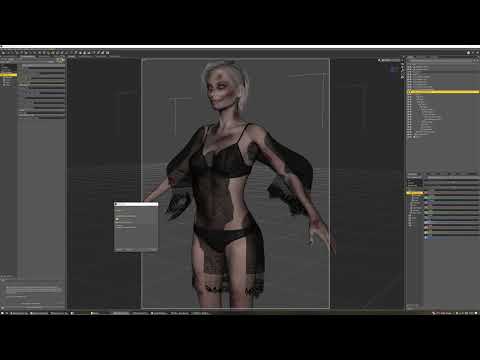
And while I've had it happen before, I cannot for the life of me remember what I have to smack to fix it.
I've checked all the parameters I can think of for the G9 version above, but none of them seem to differ from my earlier and entirely behaving G8F version:
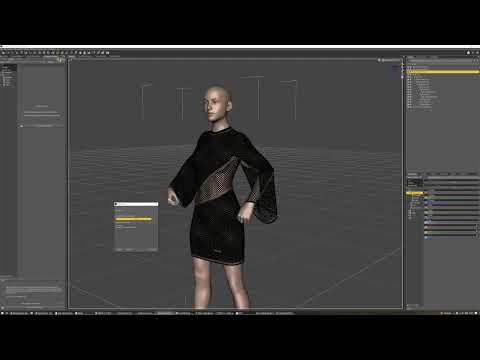
And the only difference in how I set these up is that for the G9 version I started by taking the G8F version and updating its shape (to keep things like rigidity maps) before using transfer utility, rather than starting with a completely fresh OBJ import.
~~~~~
EDIT: In this case, restarting DS has resolved the issue, but I have had it in other cases where a restart has *not* solved it, so if anyone knows an answer, I'd appreciate it.
Diffeomorphic clarification, please: Poses vs MorphsMost of the content I want to get from Daz into Blender are props with pose controls: a handle or lever can move, a door can open or close, a wheel can turn. Usually in Daz, there are custom pose controls that are essentially renamed Transform controls that may or may not drive multiple transform dials, like the clamp on a vise that rotates while it moves in and out.
No matter how many times I've favorited those controls in Daz and then tried to find them in Blender after importing using every "Import pose" or "import morph" button available in Diffeomorphic, I can't ever find them. However, If the geometry has imported correctly, I can go into Pose Mode in Blender, drill down into the Outliner tree to find the Bone name that matches the Bone name in Daz, select the Bone properties in the Properties Editor, and manipulate the transform controls there. If the Daz PA has put constraints on the Daz custom dials, then I can find those same constraints in the Constraints Property for the selected Bone. But I can’t find any drivers or shape key sliders for those Bones..
Am I missing anything here? Are custom pose dials in Daz only ever available as transform properties in Blender? Or are there sliders that will carry over and I just need to find out how to get them into Blender?
Thanks!
Duf files won't find Dsf filesOK, I can se the problem - if you look at the folder tree on the left you will see that the data and Runtime folders are visible, in a string of parent folders ending in Content. These need to be in the root of the content directory, the My Library folder, or the files linked in the .duf files will not be found*. You can keep the user-facing files in the subfolders if you like, but the assets (Data, with the native geometry, rigging, and morphs and Runtime with the textures and any metadata) must be unpacked to merge with the existing Data and Runtime folders in the content directory (that is, My Library here). Don't try fixing this by nesting content directories (that is, selecting the Content folder in this case as well as the My Library folder) because that will potentially confuse Daz Studio when it saves your scenes, and you will end up with files that won't work on another system.
* the way this works is that .duf files store relative paths, starting with Data and Runtime mostly, for the required files and DS sticks each of your content directories in front of those relative paths until it finds the file or runs out of content directories to check.
Duf files won't find Dsf filestitle says it all. i try to import(see file) and there is a proper dsf file, but Daz just WILL NOT find it. help!
models from unreal to DazHi there.
I'm looking to take some rigged character models from unreal back into Daz but I'm having a lot of trouble. It seems that if I just export an FBX, the whole thing explodes when I import it back into Daz and I'm not sure how to proceed from here. Could anyone point me in the right direction?
Need a simple bar, scalable with soft edges - Primitive cube not really workingYou cannot make it in DS which is not a modeling tool. If you know Blender or Hexagon, you can easily make round edges / corners by adding Bevels. Then import OBJ into DS as a Prop.
[Released] Bone Minion for DAZ Horse 2 Poses [Commercial]RiverSoft Art said:
MelanieL said:
I've got a problem which noone else seems to be getting.
I installed the Horse Bone Minion using DIM. I loaded a Lorez horse and added the Horse 2 bone minion. I get error messages about missing files. (The same thing happens with a Horse 3 also, but these screenshots were with Lorez horse).
...
ETA: By the way the ReadMe file list (part attached) shows the names that I have, so why is something looking for a longer file name?
It looks like it is not finding the DazHorse2Metadata.dsa file (the metadata files are what tells the script the abbreviations, e.g., DH2). Is E:\Daz Data\Daz Studio Master Content\Base Animals one of the directories listed in the Daz Studio Formats section of the Content Directory Manager?
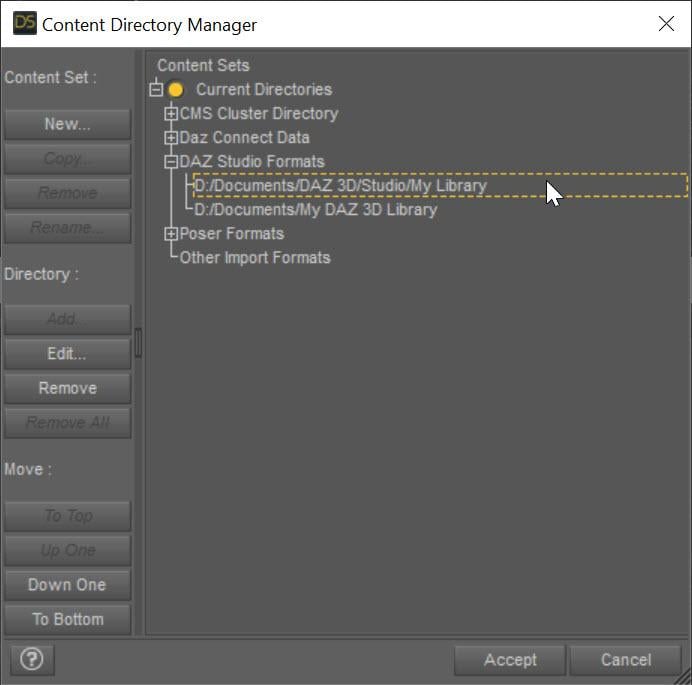
Yes, that directory is listed in CDM under Daz Formats. I will take a look at that DazHorse2Metadata.dsa file and check that it contains something sensible-looking re abbreviations.
The only other thing I can think of is that I have other Bone Minion sets installed in a different directory (I keep my People and my Animals in separate ones) - could this be having any effect?
I plan to switch my desktop PC a little later today, so I'll try removing the "People" directory temporarily and see what happens.
[Released] Bone Minion for DAZ Horse 2 Poses [Commercial]barbult said:
Is it possible that some people's problems are caused by the metadata compatibility base error? I corrected that right away, so maybe that is why it is working OK for me.
I would not think so. That just affects what shows up in Smart Content.
[Released] Bone Minion for DAZ Horse 2 Poses [Commercial]Is it possible that some people's problems are caused by the metadata compatibility base error? I corrected that right away, so maybe that is why it is working OK for me.[Released] Bone Minion for DAZ Horse 2 Poses [Commercial]MelanieL said:
I've got a problem which noone else seems to be getting.
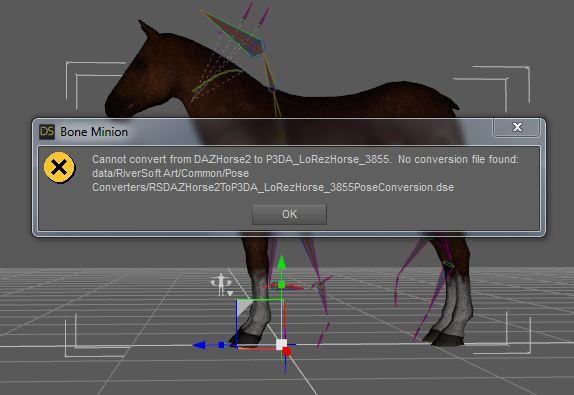
I installed the Horse Bone Minion using DIM. I loaded a Lorez horse and added the Horse 2 bone minion. I get error messages about missing files. (The same thing happens with a Horse 3 also, but these screenshots were with Lorez horse).
Attachment 1 shows a missing file error for a constants file. I went to where DIM said this file should be and it has a different name. I copied to the name the error message is showing and got past that step.
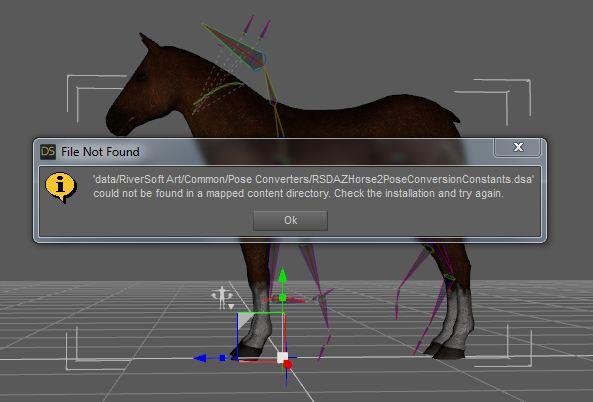
Attachment 2 shows the next error message (after I copied the first file). Again the file installed through DIM has a different name. Copying the .dse file to the name the message shows gets me through that error and the whole thing works fine.
Attachment 3 shows the files that were actually installed. How have I got the wrong file names when people in earlier posts are apparently using it without problems?
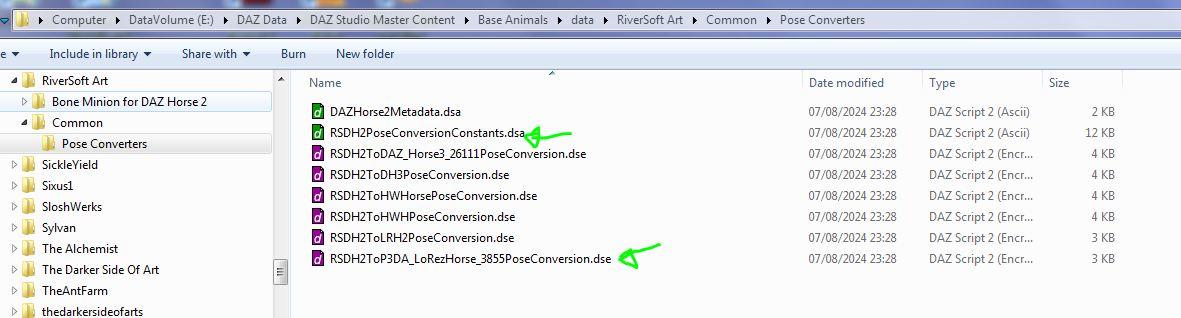
ETA: By the way the ReadMe file list (part attached) shows the names that I have, so why is something looking for a longer file name?
It looks like it is not finding the DazHorse2Metadata.dsa file (the metadata files are what tells the script the abbreviations, e.g., DH2). Is E:\Daz Data\Daz Studio Master Content\Base Animals one of the directories listed in the Daz Studio Formats section of the Content Directory Manager?
UDIM Seam Genesis 8 in Substance 3d PainterI need help, i have exported Genesis 8 Female with format .obj and i choose this option to export.
Until i import to Subtance 3d Painter, it show the UDIM, i want to test the material and it show the seam between 1001 and 1002 and i see the 'face', 'ear' clearly shows the color of the material, but 'torso' it's the opposite, the color of the material appears faintly, not very clearly visible.
I don't know how to fix this problem, i spend a lot of time to find the solution, but the resuilts is not good.
Pls help !!! :(((( Can't import by using DiffeomorphicPls help!! i don't know whats wrong with my file to export to Blender
[Released] Bone Minion for DAZ Horse 2 Poses [Commercial]barbult said:
This product (Bone Minion for DAZ Horse 2 Poses) is confusing me. When I look at the user manual included in the product, it is copyright 2022 and it doesn't mention anything about horses. When I run the script to install custom actions, it only show options for people, not horses (I also own the bone minion bundle for G9).
After installing the product with DIM, it seemed to change the compatibility base of Daz Horse 2 to the minion. That means when Daz Horse 2 is loaded, none of its compatible items show up in Smart Content anymore. I think this is a Daz QA metadata error. I think it should have been the other way around. The Minion compatibility base should be Daz Horse 2, right?The same manual is used for all Bone Minion products.
Doh! You are correct about the install script. It only installs the figure bone minions. I should have pulled that script and included a horse specific one.
Yes, the Minion Compatibility should be the Daz Horse 2, not the other way around.
[Released] Bone Minion for DAZ Horse 2 Poses [Commercial]This product (Bone Minion for DAZ Horse 2 Poses) is confusing me. When I look at the user manual included in the product, it is copyright 2022 and it doesn't mention anything about horses. When I run the script to install custom actions, it only show options for people, not horses (I also own the bone minion bundle for G9).
After installing the product with DIM, it seemed to change the compatibility base of Daz Horse 2 to the minion. That means when Daz Horse 2 is loaded, none of its compatible items show up in Smart Content anymore. I think this is a Daz QA metadata error. I think it should have been the other way around. The Minion compatibility base should be Daz Horse 2, right?Bought The Product-How to install in Studio?bbelvedere0 If you are new to Daz Studio, you need to have patience, and learn how to use it.
Daz Install Manager (DIM) can install the content purchased from the store.
There is no need to import anything, you double click DAZ Studio 4.22 (64-bit) shortcut in Windows and after the program is started, at the left hand there is a panel with most of the content installed.
I don't know what you are after, Characters, Clothing, Environments and so.
In that left pane, you should locate what you want, when you click Characters per example, there is a down arrow, from there you can select more options for the desired character.
Same procedure for other assets you may have installed.
Make sure you double click what you want to use.
Now, look for this topic "Daz Tutorial: Getting Started", also there are built-in tutorials which are a great help to a better understanding how to use Daz Studio.
If not sure, come back and ask a question, someone here at the forum will help you, good luck!
Converting Studio Keyframes to Aniblock causing translationsWhen I import a mixamo fbx using this methodology, the animation is fine. However, when converting it to aniblock using "Convert AniBlock from Studio Keyframes' option, suddenly the animation has massive foot sliding translations.
In the attached, red is the animation after converting to aniBlock.
Is there a way to make Aniblocks without this happening?Daz 3D is part of

Connect
DAZ Productions, Inc.
7533 S Center View Ct #4664
West Jordan, UT 84084Licensing Agreement | Terms of Service | Privacy Policy | EULA
© 2026 Daz Productions Inc. All Rights Reserved.