-
PostgreSQL Error
Thanks Richard. I don't see any message from the Norton 360 about anything being blocked. I use the latest update of Daz install manager and have never had any issues in the many years of using it. I did, ages ago, download Daz Central, but never used it because DIM works fine. I have uninstalled Postgre and re-installed (using DIM) and still get the same error message.
What is the install path supposed to be for Daz to Blender?Daz3D is not recognizing the Daz to Blender bridge, and when I try and install it in Daz Central its saying I need to set a "path" for it.
Orphaned references in Content LibraryThose are not the Products tab of Smart Content. If the icon isn't there - and judging by the second screen shot I'm pretty sure it won't be - then the system has them down as being installed through Daz Studio, which uses a different location and will lead to the DIM or Daz Central files being ignored.
PostgreSQL ErrorCan you see what your firewall is blocking when you start Daz Studio or Daz central/Install Manager?
Iray not renderingPerttiA said:
So, the character is G2F and you are rendering in Iray... Does the character have 3DL or Iray materials?
There was a reference to Metadata update, do you log in/sign in to DS?
Do you use Iray or Texture shaded viewport?
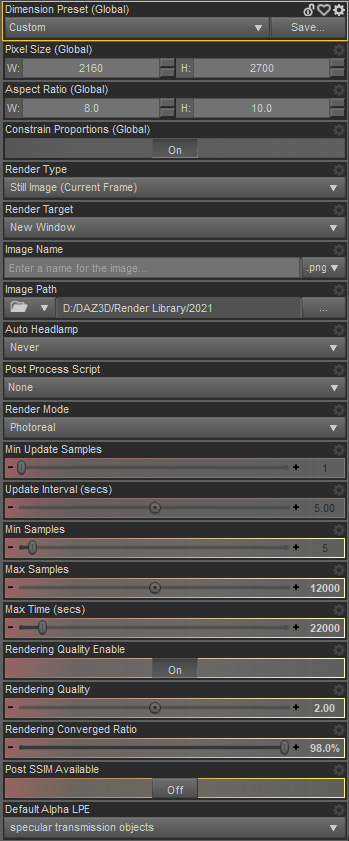
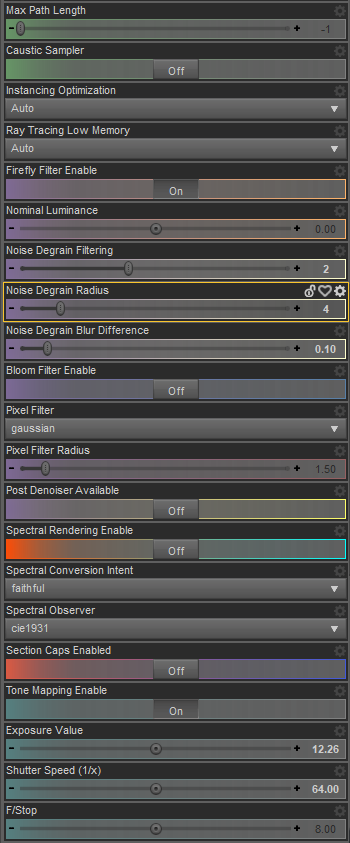
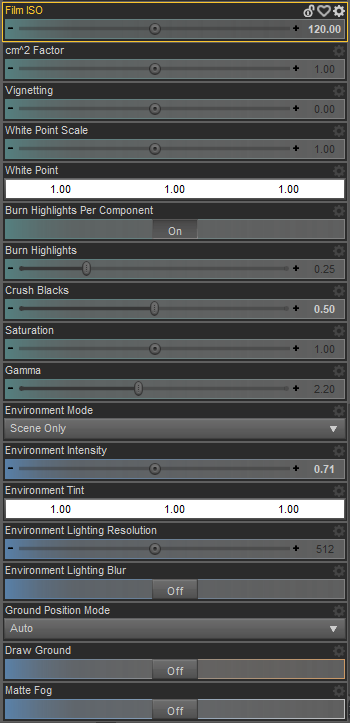
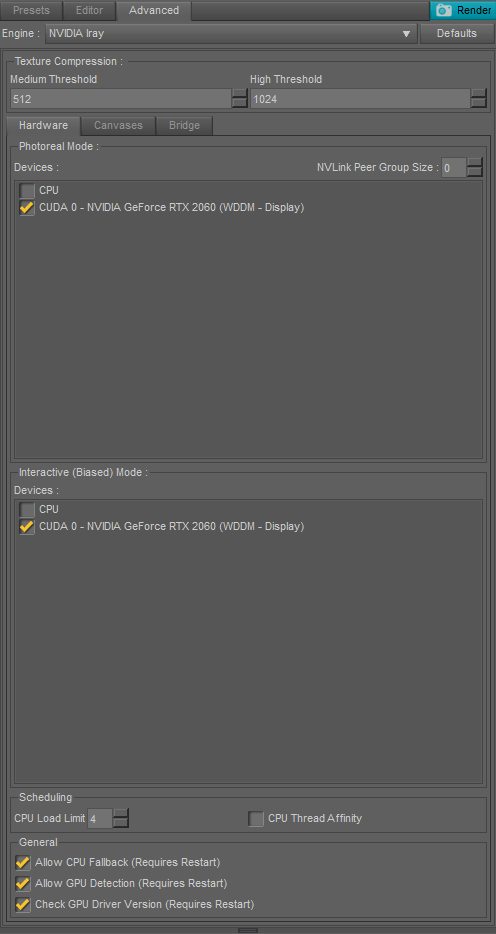
What are your rendering settings?I have no idea what these are, but they don't sound good:
Failed to create modifier: Iray Handle!
Failed to create modifier: Enable Iray Matte!Pretty sure the character has Iray materials. I logged into Daz Central, now looks like I have DS 4.16 :/ I use texture shaded viewport when rendering. I've included my render settings.
 **Updated- Help with switching from Daz Central to IM and not messing things up.
Richard Haseltine said:
Yes, that is the correct setting and yes, your existing saved cotnent will still work - the system is designed to not care where the content directory is, otherwise no one would be able to make add on content for sale. You will have to update the paths in DS - you can do this after making the chnage in Daz Central by downloading this script (link is above the code) and dragging the file into the Daz Studio viewport http://docs.daz3d.com/doku.php/public/software/dazstudio/4/referenceguide/scripting/api_reference/samples/file_io/install_manager_config_import/start
Thank you Richard. I appreciate your quick response. Once my downloads into my external hard drive finish I will use that script.
Thank you again for your help!!
**Updated- Help with switching from Daz Central to IM and not messing things up.Yes, that is the correct setting and yes, your existing saved cotnent will still work - the system is designed to not care where the content directory is, otherwise no one would be able to make add on content for sale. You will have to update the paths in DS - you can do this after making the chnage in Daz Central by downloading this script (link is above the code) and dragging the file into the Daz Studio viewport http://docs.daz3d.com/doku.php/public/software/dazstudio/4/referenceguide/scripting/api_reference/samples/file_io/install_manager_config_import/start
MetaMixerMelissaGT said:
nonesuch00 said:
MelissaGT said:
nonesuch00 said:
MelissaGT said:
Glad some of ya'll are excited for this to use as a new tool, but as I have no interest in trying to re-create a real-world person from a photograph, I'm honestly not seeing anything here that I couldn't do with a few minutes of dial-spinning or just selecting a couple base characters and mixing them 50/50 or 60/40 etc. And the fact that you have to re-purchase the base character add-on to use in the tool...even if it is only a few $$$...LOL.
Uh, because it's easier and more accessible for folk then a list of sliders with tiny writing in the parameters or shaping tab even if you aren't trying to sculpt what a person looks like in a photograph. It's also more intuitively clear on what you are editing using the GUI approach taken by Faux2D than the "traditional DAZ Studio GUI". It's a great bit of software that Faux2D designed.
I use a lot more than base characters to do my custom sculpts. I have multiple morph packs that would be lost on this, some of which are merchant resources. And again...having to repurchase anything having to do with a character I already own just leaves a bad taste in my mouth. But like I said, if you like it, fine. I don't have to use it. ;)
Those shaping sliders of non-DO characters are still available to apply to the central MM base DAZ Original character currently loaded into the MM but you can't apply those morphs to the MM preset characters loaded into slots A, B, or C respectively. So it's possible to have the best of both worlds. I've re-purchased many DAZ products over the years that are just re-fits or another take on the same theme. If something does the same thing better, easier, or both, I will pay for it if I can afford it, whether it's DAZ MM presets at $3.59 or a new car or home with all the latest safety technology (don't I wish
 ).
).So if I had a character that was a mix of 2 DO base characters, 4 PA characters, and then quite a few additional merchant resource morphs...that wouldn't work with MM, correct?
Not if you wanted to load that "custom after the fact character" into one of the MM A, B, or C slots but if the character was based on a base G8 or G8.1 as it's core with the rest of the morphs you mentioned, yes it would work as the central "non-slot A, B, C" character you are manipulating with the A, B, & C MM compatible addon slots. MM is just going to get you there faster. In learning to be good with it though it's probably helpful to start with the unmorphed base G8 or G8.1 characters but once you learn how to use it you're just wasting time if you don't need to use G8.1 or G8 base as your starting point.
The "MM morphs" are installed into the G8 or G8.1 data so that MM data winds up being available for all characters, DO or not DO, that use the base G8 or base G8.1 to morph onto.
However, the results might not look very pretty but that's the case when you mix some morphs together using the old fashioned parameters or shaping tab.
**Updated- Help with switching from Daz Central to IM and not messing things up.In the past I have been using daz central to install assets using its default location my C drive. Most of my assets now have been uninstalled because of space issues on my c drive and would like to use daz central install my assets on my external drive. Not the program, just the assets. I'm nervous making changes because of a prior instance (unrelated to this) where I thought I knew what I was doing and ended up messing something up so I am asking first.
I see the cog wheel where I can change base path location and daz studio install location. Is Base Path the correct one to change? I have read that I need to go into Daz Studio after and point it in the direction of the new drive and that seems simple enough.
I plan on copying MyLibrary to the external hardrive too. Will my character presets, saved scenes and such still work? What is the safest way to not break those connections?
MetaMixernonesuch00 said:
MelissaGT said:
nonesuch00 said:
MelissaGT said:
Glad some of ya'll are excited for this to use as a new tool, but as I have no interest in trying to re-create a real-world person from a photograph, I'm honestly not seeing anything here that I couldn't do with a few minutes of dial-spinning or just selecting a couple base characters and mixing them 50/50 or 60/40 etc. And the fact that you have to re-purchase the base character add-on to use in the tool...even if it is only a few $$$...LOL.
Uh, because it's easier and more accessible for folk then a list of sliders with tiny writing in the parameters or shaping tab even if you aren't trying to sculpt what a person looks like in a photograph. It's also more intuitively clear on what you are editing using the GUI approach taken by Faux2D than the "traditional DAZ Studio GUI". It's a great bit of software that Faux2D designed.
I use a lot more than base characters to do my custom sculpts. I have multiple morph packs that would be lost on this, some of which are merchant resources. And again...having to repurchase anything having to do with a character I already own just leaves a bad taste in my mouth. But like I said, if you like it, fine. I don't have to use it. ;)
Those shaping sliders of non-DO characters are still available to apply to the central MM base DAZ Original character currently loaded into the MM but you can't apply those morphs to the MM preset characters loaded into slots A, B, or C respectively. So it's possible to have the best of both worlds. I've re-purchased many DAZ products over the years that are just re-fits or another take on the same theme. If something does the same thing better, easier, or both, I will pay for it if I can afford it, whether it's DAZ MM presets at $3.59 or a new car or home with all the latest safety technology (don't I wish
).So if I had a character that was a mix of 2 DO base characters, 4 PA characters, and then quite a few additional merchant resource morphs...that wouldn't work with MM, correct?
MetaMixerMelissaGT said:
nonesuch00 said:
MelissaGT said:
Glad some of ya'll are excited for this to use as a new tool, but as I have no interest in trying to re-create a real-world person from a photograph, I'm honestly not seeing anything here that I couldn't do with a few minutes of dial-spinning or just selecting a couple base characters and mixing them 50/50 or 60/40 etc. And the fact that you have to re-purchase the base character add-on to use in the tool...even if it is only a few $$$...LOL.
Uh, because it's easier and more accessible for folk then a list of sliders with tiny writing in the parameters or shaping tab even if you aren't trying to sculpt what a person looks like in a photograph. It's also more intuitively clear on what you are editing using the GUI approach taken by Faux2D than the "traditional DAZ Studio GUI". It's a great bit of software that Faux2D designed.
I use a lot more than base characters to do my custom sculpts. I have multiple morph packs that would be lost on this, some of which are merchant resources. And again...having to repurchase anything having to do with a character I already own just leaves a bad taste in my mouth. But like I said, if you like it, fine. I don't have to use it. ;)
Those shaping sliders of non-DO characters are still available to apply to the central MM base DAZ Original character currently loaded into the MM but you can't apply those morphs to the MM preset characters loaded into slots A, B, or C respectively. So it's possible to have the best of both worlds. I've re-purchased many DAZ products over the years that are just re-fits or another take on the same theme. If something does the same thing better, easier, or both, I will pay for it if I can afford it, whether it's DAZ MM presets at $3.59 or a new car or home with all the latest safety technology (don't I wish
).Trying to Improve Renders with Zero Artistic Ability@livepassioneveryday well done for studying and playing with lighting. I recommend looking into 3 point lighting rigs. They are simple to set up and if focussed on your central character allow them to stand out against a back drop. Used in conjuction with HDRI lighting (I buy up any offers on HDRS all the time), then you will get the best of both worlds (the scene lighting the figure), and the shaders on the character + clothes reacting to the lighting rig. For example (just a quick WIP to demonstrate, not a great example but an example).
Here is Bonnie against an HDRI backdrop. Now I haven't matched up the scenes lighting with the rig accurately, but you can see the character stands out and the rigs lighiting plays with the metal on her costume, her hair and skin. The HDRI is also lighting the figure. The combination plus choice of duller backdrop, plus a bit of depth of field on the camera, gives me a range of lighting and display options.
By the way, I create to animate so if that is where you are heading as well, then you might be interested to know this "cheap/quick" ligthing set up rendered out in just 15-17 seconds per frame!
Daz Studio 4.16Ok, another odd wrinkle. I installed Central as a last ditch effort (it did not work either), but it reset the download directory in DIM. With an empty download directory, rather than reusing my existing zip files downloaded through DIM, everything seems to be installing correctly now, and Smart Content is even responding. It's been downloading and installing since last night, and thus far there have been no failures. I'll update the thread again when it finishes in a couple of days with how it went overall.
Help i cant use daz studioI am having the same issue but I don't see where on the site I should download Daz Studio. The only thing I see is Daz Central.
DAZ Studio Installation Guide MacSince I couldn't get DAZ to work on Big Sur (constant, unrelenting PostGre sign in issues, I decided "What the heck" and installed Mac Monterey. After re-installing DAZ Central twice, it hangs up while I'm trying to sign in to that.
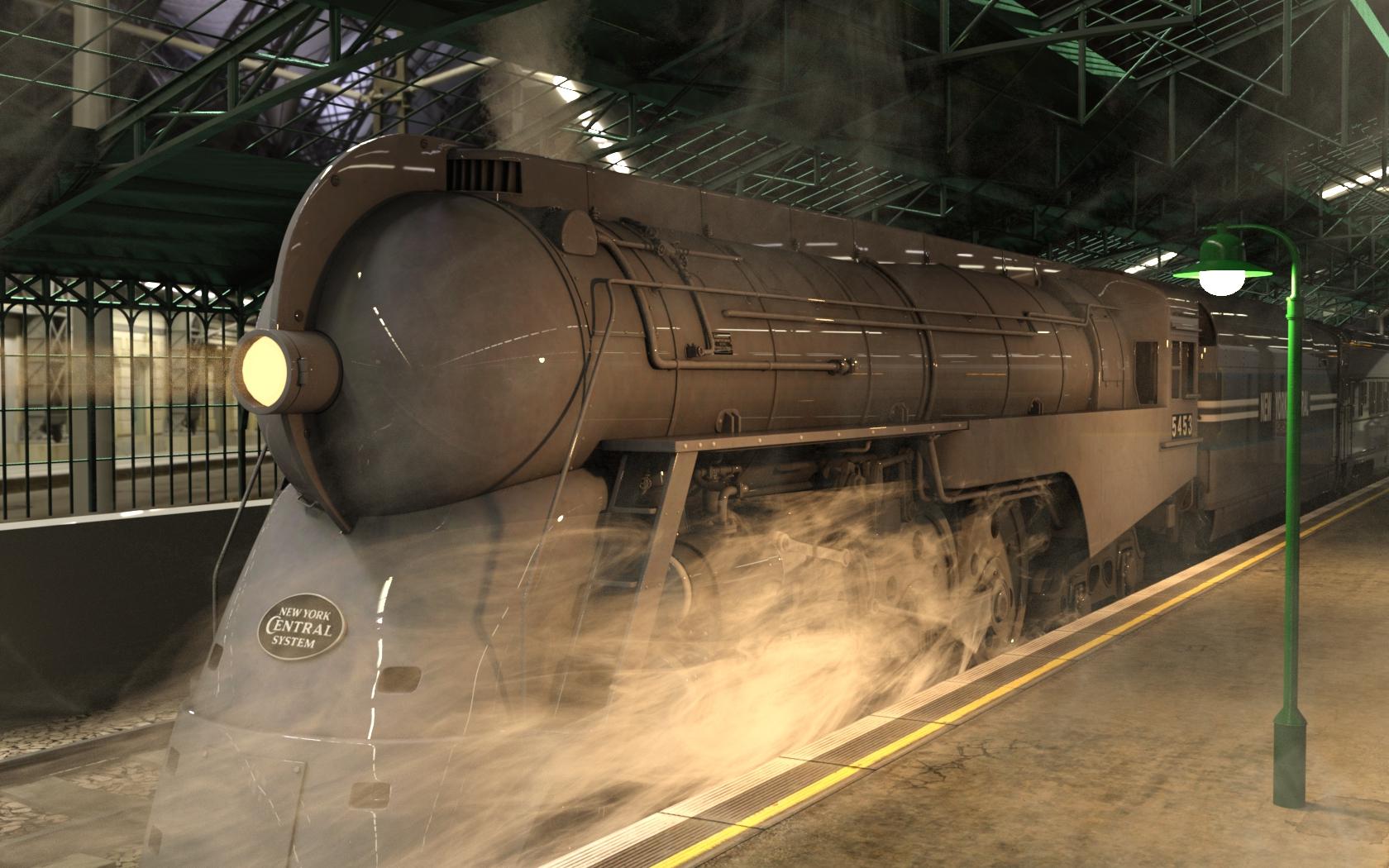
Would love to get to my library of stuff.CAR AND BIKE LOVERS THREAD - MARK VOk.. so its not a car - but its got wheels... New York Central Dryefuss Hudson, as seen on the 20th Century Limited.
 Missing Iray Default HDR
Richard Haseltine said:
Try uninstaling and reinstalling DS - it's certainly there for me.
Honestly: what's the best way to do that? There's a "Download Studio" link on the Daz3D homepage but when you click it it tries to download Daz Central. I use DIM for content installation. Do I need to use Daz Central to re-install Daz Studio? "Daz Studio" doesn't even appear in Windows Add or Remove Programs list for some reason. When I try to open Daz Central it forces me to "Install Selected Applications" (which is Daz Studio) before it goes even a step further... and of course I already have Daz Studio installed. Pretty confusing.
Daz Studio Pro BETA - version 4.20.0.17! (*UPDATED*)strezoiualexandru said:
Richard Haseltine said:
strezoiualexandru said:
Hey everyone,
I've made the mistake to update Daz to 4.16 before checking here( on the forum ) and now, most of my hair has no transparency, glass shaders the same, etc...
How could I go back to 4.15.30?
I've tried looking into Daz Central, but it won't let me see any other versions, just the 4.16 one.That's 4.16.0.2? If so the rendering shouldn't be any differnt as it has exactly the same version of Iray as 4.15.0.30. The Public Build, 4.16.1.08(?), does have a newer version of Iray, and that does have soem issues (which is why it isn't in the new general release).
So, my version is 4.16.0.3 and my Out of Touch hair's are broken. The skull mesh has no transparency
So, there still is something wrong with the render in this version.
I have ben able to fix ( relatively speacking ) it somehow, by applying a diferent hair material ( from a diferent product ) but still this is broken, as most of my hair props are like this now.That looks to be a preview, not a render. this si what i get with the Super Messy Updo in 4.16.0.3 after applying the Apply First and base Colour 1 presets:
Face Transfer UnlimitedI got a new PC and I've been busy re-installing things. I own this product. I have a serail number. But the product does not appear in Connect or DIM. I see that this product is part of the current sale. It says that it is a manual install. It appears it can also be installed with Daz Central, which I don't have. If I go to my product page, I find the product. But the only manual download is for the product manual. If I open DS, and check the plug-ins, I find face transfer, but there is no box to enter the serial number. I thought maybe things changed and it was now included in DS, But then I saw it for sale today so it must not be included.
So how or where do I enter the serial number? I checked the pane, but I don't see a place to enter it there either.
Thanks.
PhilW - Please convert the English Village to DAZ formatHaha! I have just seen this so sorry for the delay in responding. I did look at it a long time ago but it uses so much replication in Carrara that it proved impossible in Daz Studio. But now with tools such as UltraScatter, it might be possible, even if I just concentrated on the central area, or maybe make it modular so that you load only the areas that you need. It really is a huge set! So no promises, but I might look at giving it a go - but maybe not for at least a few months as I have other projects planned.
P.S. Did you know it is based on Linton in North Yorkshire! That pub does some great meals!
Daz 3D is part of

Connect
DAZ Productions, Inc.
7533 S Center View Ct #4664
West Jordan, UT 84084Licensing Agreement | Terms of Service | Privacy Policy | EULA
© 2026 Daz Productions Inc. All Rights Reserved.