-
Has Face Transfer become more tolerant?
To tell the truth they looked like pugs before I applied Face Transfer Shapes for Genesis 8. If you're going to play with Face Transfer I'd say this product is an absolute necessity. The promo images for it don't do it justice.
 Genesis 8.1 Voice Morphs
Making the visemes and G8 base expressions (and any expressions that are using them) work on G8.1 requires removing dummy/placeholder expressions that are installed to G8.1 morph folders - These dummy/placeholder expression files have no other function than to prevent the base G8 expressions from loading.
The dummy/placeholder files are located in;
...\Data\DAZ 3D\Genesis 8\Female 8_1\Morphs\Daz 3D\Base Pose Head\ (255 files)
...\Data\DAZ 3D\Genesis 8\Female 8_1\Morphs\Daz 3D\Expressions\ (24 files)
...\Data\DAZ 3D\Genesis 8\Male 8_1\Morphs\Daz 3D\Base Pose Head\ (255 files)
...\Data\DAZ 3D\Genesis 8\Male 8_1\Morphs\Daz 3D\Expressions\ (24 files)Please make sure you are removing the files from G8.1 morph folders and not G8 morph folders.
Has Face Transfer become more tolerant?I used to get lots of images rejected by FT but now with DS 4.15 it seems that it's become more tolerant of face images used. I used these non-human based pictures with FT and it didn't complain. Anyone else noticed a difference with FT in the latest version? Maybe I'm imagining it.
 Daz Studio 4.16[.0.x] Pro, General Release! (*UPDATED*)
Hi All. Hope everyone is healthy!
I want to say thanks and great work to DAZ on this latest v4.15.0.2 General Release. I really like DS (and DAZ) but just cannot handle 'experiment-ware'. To have a stable version with the latest generation rendering power is very well received. Cheers, Don
Been on v4.10.0.123 forever now since it has been extremely robust. For ArchVis work in UE4 I purchased a new computer and DAZ gets to tag along for the ride. =) I am posting with some info in regards to DS Pro v15.0.2 (General Release). Hope this helps others as well.
Firstly: v4.12.0.86 (and a couple v4.11.#) worked but they had strange bugs with the fitting tools. I mainly use DS for the nifty fitting tools to help save time in Blender. v4.10.0.123 was amazing in both the mesh tools as well as putting out solid renders via IRAY. I am not using any DS version for animation so I cannot really comment.
TLDR: DS v4.15.0.2 is very stable and I have had zero crashes and have opened up my v4.10 dufs with no issues. As far as I can tell I am on board with this.
Computer (the new one)
- Windows 10 (Latest), AMD Ryzen 5 3600X, 16GB RAM, RTX 3070 (Driver v460.79)
- In my opinion I think AMD Ryzen and nVidia GTX/RTX is a very robust combination. Great work machines but also handle real time rendering (ie UE4/Unity/Games) very well. This includes working with DS. My Ryzen 5 1600 with a GTX 1060 6GB worked flawlessly for years and kept DS nice and happy.
Installation that worked perfectly:
Back Up your DAZ directories. (I use and highly recommend GoodSync for this)
- Note: I have everything DAZ related in one folder except for some of the DS required pathes.....my install is => E:\DAZ 3D
- In DS Right Click on Content Library....Content DB Maintenence....Export User Data....when done clear out scene and exit DS.
- Back Up => C:\Users\<USER>\AppData\Roaming\DAZ 3D
- Back Up => E:\DAZ 3D\cms <= Note: There is another cms folder in the AppData location. It keeps appearing there so I back up both. This is my real location I set in DS.
- Back Up => E:\DAZ 3D\DAZ3DIM1\ManifestFiles (all of your dsx files) (I purposely set this location in DIM. I think the default is in Public Documents....not a good location. You should change it if it is there!)
- For DAZ Connect Users you will need to find out how to back up your installed 'dsx' data.
- Back Up => E:\DAZ 3D\My Library
- Back Up => E:\DAZ 3D\Render Library (Optional) (Your location my be in My Documents or somewhere)
- Back Up => E:\DAZ 3D\Downloads (Optional) (I don't keep downloads since I can just download again from DS. I keep .exe installers on my back up drive.)
- Now you are Backed Up....I do this once each week with GoodSync. Never have had an issue.
Download and Install DS v4.X:
- Don't use DIM or DAZ Connect
- Go to Account, Product Library and filter for 4.x....click on => Daz Studio 4.X Pro <= Download one of the options that has the .exe in the description matching your system.
- Download and install DS4_Decimator_1.12.0.2_Win64.exe (if you have this)
- Let the installer on each of the above uninstall the previous version and install the next. Obviously install Decimator after DS.
- Once complete....open up your new DS v4.X and then open a scene you know was reliable in your previous version.
- That's it. Super easy and works.
DS v4.15.0.2 Details for folks who want to know what I tested:
- I attached two renders of my custom character based upon the G2 Base Female UV maps. This is the base model I use in UE4 for my ArchVis customers. Essentially she is 'clothing' on the G2 Female and how I use DS for the awesome fitting/mesh tools to save Blender work. The same results for G1/2/3/8 can be assumed.
- HDRI backgrounds are from DAZ Marketplace. They worked exactly the same in both v4.10 and v4.15....see details below.
- Performance noted.
- IRAY Active Viewport Rendering is now actually a functional thing. In v4.10 I had to use Textured Mode to make morph and pose adjustments then switch back to IRAY to see the results. Now with v4.15 the active viewport is a very workable thing. I only switch to Textured Mode when fitting clothing. Very impressive and stable rendering speed!
- To Note: v4.10 had some issues with the RTX 3070 so I had to use CPU only in the rendering advanced tab. v4.10 was extremely stable after that.
- v4.15 was able to use the GPU so I ticked GPU unticked CPU to run on GPU only.
- Rendering for both v4.10 and v4.15 I cannot tell the difference between them at 1080p and 1440p. I have nice rendering setups saved from playing around but the DS Defaults work well with minor tweaks. I work in 1080p and 1440p exclusively for real time rendering so I try to keep DS at the same level of rendering for static pics.
- Renders Made: 25 in each version (v4.10 and 4.15)
- v4.10 Rendering Speed: 1920x1080 :: Less than 3 minutes. This varies a bit by things in the scene. As shown in both pics they are between ~130 to 180 seconds
- v4.15 Rendering Speed: 1920x1080 :: Less than 30 seconds. Over multiple test runs it was consistently 20 to 30 seconds. Really fast!
- Stability: Zero crashes in both versions.
- Okay....so I am really impressed and happy!
- Little note: my Ryzen 5 1600 and GTX 1060 with v4.10 takes roughly 360 seconds to render these same PNGs. So big improvements with the Ryzen 3600X.
- IRAY Active Viewport Rendering is now actually a functional thing. In v4.10 I had to use Textured Mode to make morph and pose adjustments then switch back to IRAY to see the results. Now with v4.15 the active viewport is a very workable thing. I only switch to Textured Mode when fitting clothing. Very impressive and stable rendering speed!
Hope that is good information and helps others that want to know if this latest version is stable with the latest gen CPUs and RTX 3000 series GPUs. I understand there are many variables but I certainly had many strange issues with 4.11/12/14 versions. In my opinion this latest release is a winner!
Blender to Daz?Ah, thank you very much. I know Daz figures can be exported to Character Creator, but do they become CC characters then? (in other words, is there a way to morph them in CC3, and then move them back to Daz?)
Blender to Daz?If you export a base character from DS to Blender, then in blender you can resculpt that - without changing vertex order or adding or deleting vertexes - and then reimport that into DS as a morph.
MimicMolly's Renders & WIPsI randomly decided to go back and revisit my G8F La Femme with Hacker cosplay. Updated DAZ Galleries link, which includes the old one [x].
For these renders, I used G8.1F, which I've been using for renders. (Still use the regular 8 for whenever I'm making a morph.) This one is with some random snarling expression.

Here is a full body one, that seems a bit pointless because the outfit covers up most of her body. But it's always good to see a nice clear user render of an outfit, even if it's free.
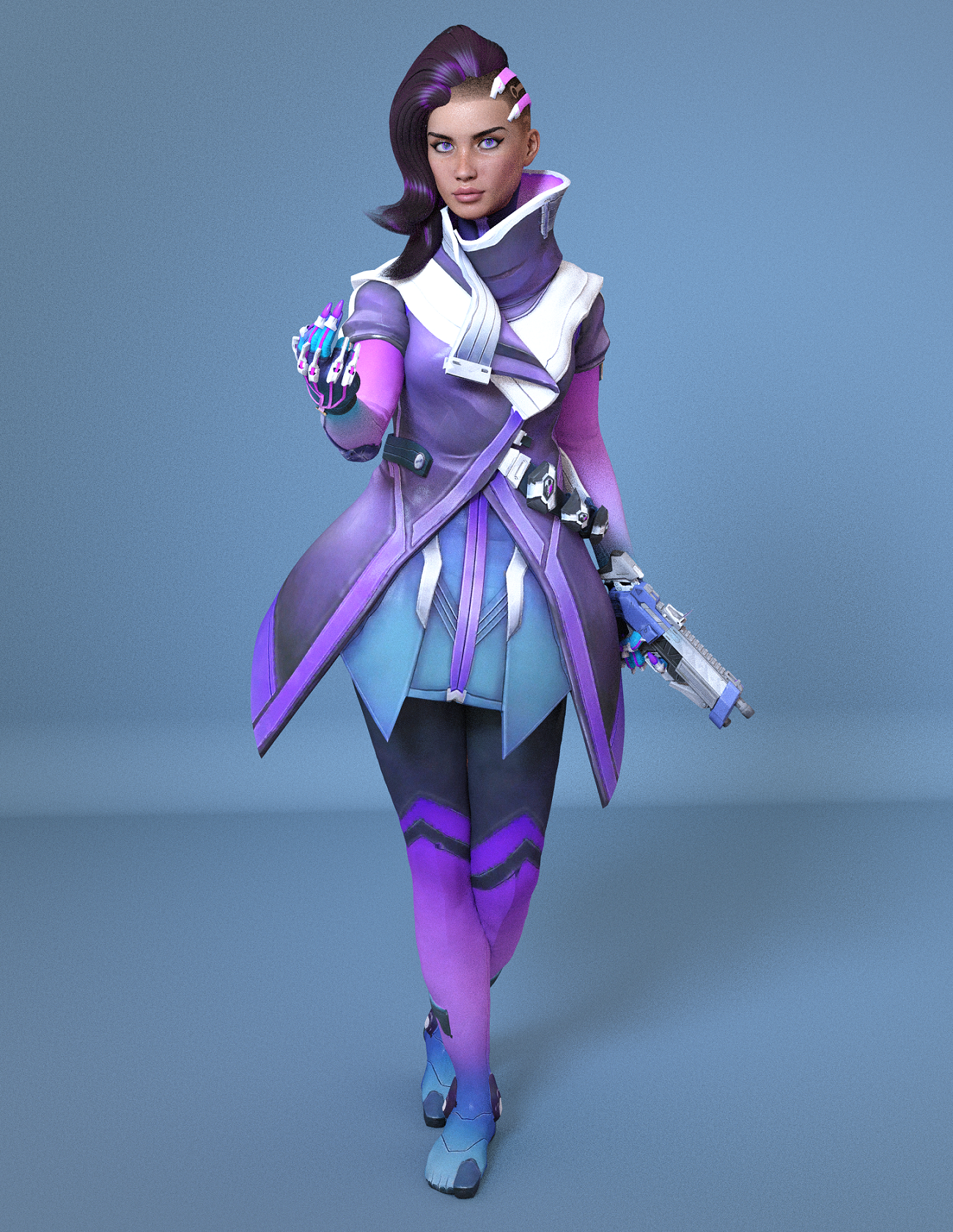
In case you want to read about my conversion attempt, which was from January 2020, how time flies!
How long does it take you to load G8F?Zev0 said:
Robert Freise said:
Zev0 said:
Loading default genesis 8 base is relatively quick but for some reason it takes way longer loading in a character preset. Like nearly twice as long for me...
How are you loading just the default base?
When I load it it also loads every morph and character preset I own into the figure, they load at 0% but are all there and function
I'd love to be able to load just the base so that I could then load just morphs and or presets that I want.
When I mentioned that in another thread I was screamed at with the comment of Oh God No!!! if you want that go use Poser
By base I mean clicking on the Genesis 8 icon. By character I mean clicking on something like victoriaMy experience is worse than that - 2-3 minutes to load the base, 20-30 minutes to load a character preset (which is why I use shaping and materials presets instead).
How long does it take you to load G8F?Zev0 said:
Robert Freise said:
Zev0 said:
Loading default genesis 8 base is relatively quick but for some reason it takes way longer loading in a character preset. Like nearly twice as long for me...
How are you loading just the default base?
When I load it it also loads every morph and character preset I own into the figure, they load at 0% but are all there and function
I'd love to be able to load just the base so that I could then load just morphs and or presets that I want.
When I mentioned that in another thread I was screamed at with the comment of Oh God No!!! if you want that go use Poser
By base I mean clicking on the Genesis 8 icon. By character I mean clicking on something like victoria 8.Those load with every morph and preset that I own
Nothing loads without all of them
How long does it take you to load G8F?
By base I mean clicking on the Genesis 8 icon. By character I mean clicking on something like victoria 8.Robert Freise said:Zev0 said:
Loading default genesis 8 base is relatively quick but for some reason it takes way longer loading in a character preset. Like nearly twice as long for me...
How are you loading just the default base?
When I load it it also loads every morph and character preset I own into the figure, they load at 0% but are all there and function
I'd love to be able to load just the base so that I could then load just morphs and or presets that I want.
When I mentioned that in another thread I was screamed at with the comment of Oh God No!!! if you want that go use Poser
Is there a way to convert G8F/M clothes for Daz Dog 8?Not automatically, but if you reshape them in Blender you should be able to use the Transfer Utility to make them fit the dog (Edit>Figure>Transfer Utility, set the Dog as source and the imported clothing item as Target)
How long does it take you to load G8F?TheKD said:
I'd love to be able to load just the base so that I could then load just morphs and or presets that I want.When I mentioned that in another thread I was screamed at with the comment of Oh God No!!! if you want that go use Poser
I understand their point of view lol. I like to experimint a lot, never use any premade character sets out of the box. I mix and match, dial in something I think might look good, see if it does, usually it doesn't so I zero the dial and try somethin else. The injection method would be a nightmare to my workflow lol.
You misunderstand
I like to experiment but it gets rather hard to do when you have three or four hundred morphs all with the same name such as eye left open , brest big, clevage wider or narrower mouth round etc etc etc
What I wanted was to be able to load specific morphs to work and experment with not spend days srolling through every morph I own looking for the right one
It gets ridiculus if Im not doing an alien or fantasy figure I don't need the several thousand creature and alien morphs in the figure
Saving a preset with limits off?mmoch25 said:
Is it possible to save a morph that turns limits off for specific dials. I know I can turn limits off manually, and then apply the shaping preset, but is it possible to save a preset with limits off. I've tried the shaping preset and the properties preset, and niether worked. I think I know the answer, just confirming.
When applying the shaping preset hold down Command/Control, it will bring up a dialogue box with the option to turn off limits.
Saving a preset with limits off?mmoch25 said:
Is it possible to save a morph that turns limits off for specific dials. I know I can turn limits off manually, and then apply the shaping preset, but is it possible to save a preset with limits off. I've tried the shaping preset and the properties preset, and niether worked. I think I know the answer, just confirming.
When applying the shaping preset hold down Command/Control, it will bring up a dialogue box with the option to turn off limits.
How long does it take you to load G8F?Zev0 said:
Loading default genesis 8 base is relatively quick but for some reason it takes way longer loading in a character preset. Like nearly twice as long for me...
How are you loading just the default base?
When I load it it also loads every morph and character preset I own into the figure, they load at 0% but are all there and function
I'd love to be able to load just the base so that I could then load just morphs and or presets that I want.
When I mentioned that in another thread I was screamed at with the comment of Oh God No!!! if you want that go use Poser
White Priestess 8.1 discussionFinally had a chance to try the character.
Really interesting morph, and the makeup options are just gorgeous!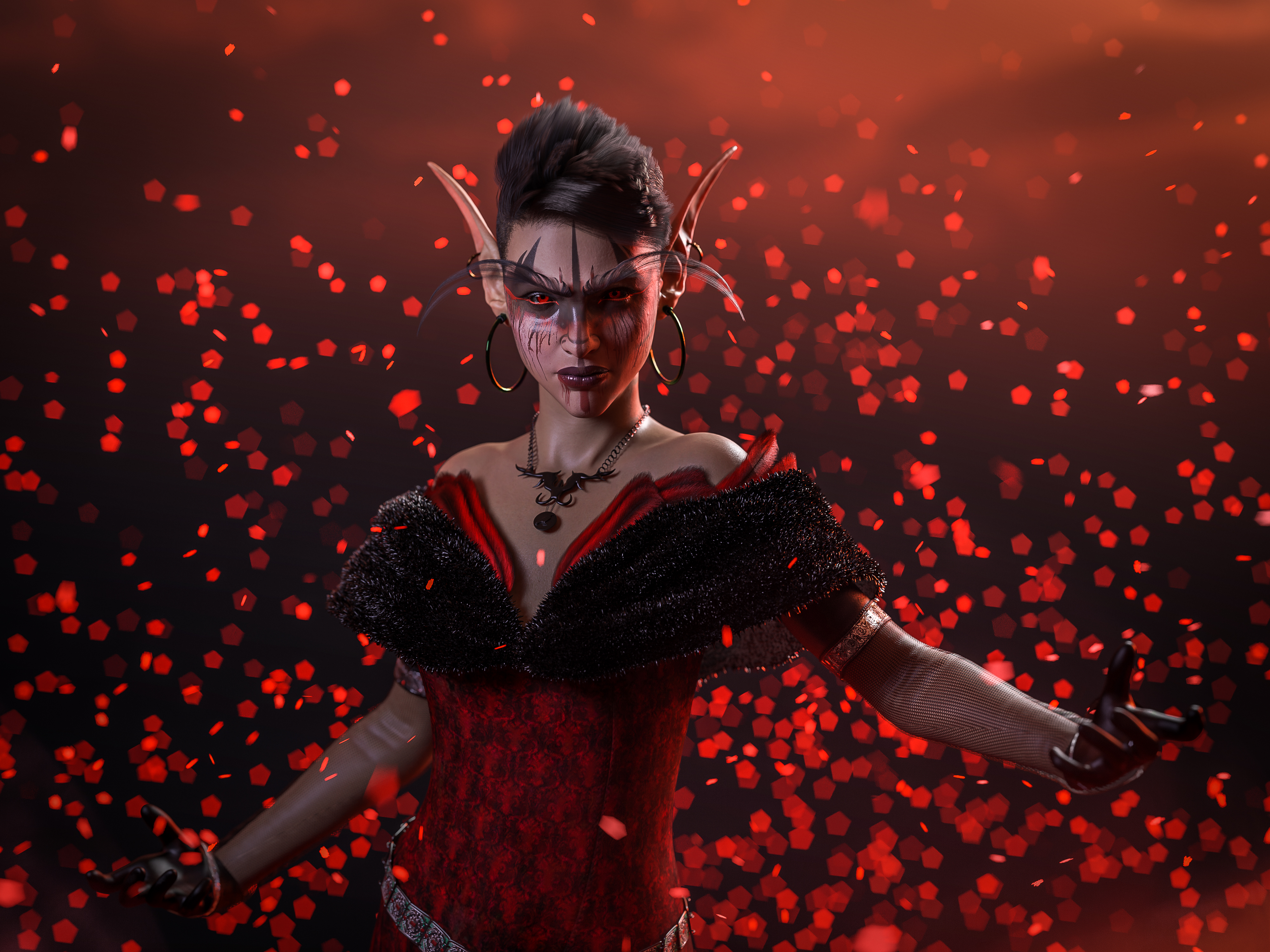
Algovincian Non-Photorealistic Rendering (NPR) 2019/2020algovincian said:
Every time I see a new piece from you, Algovincian, it makes me long for the day when this process will be something available to the rest of us lowly paeons. Incredible work!
Thanks @Xandyr78. It's always nice to hear that people enjoy the images rendered by the algos - much appreciated!
Been kind of MIA for a while, so figured it might be fun to play around a bit today using Spidey to test a lithe/spry custom morph made for g8m a while back. It's a rather extreme morph, so it seemed like a good idea to test it with some challenging poses after rigging with @Zev0 and @Discobob's excellent Shape Rigger Plus (https://www.daz3d.com/shape-rigger-plus):
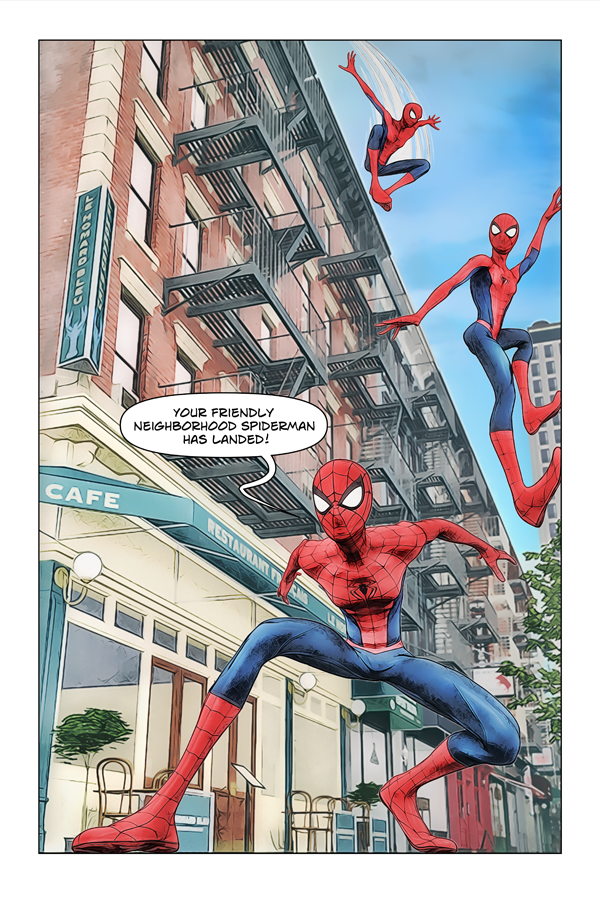
Still working on depicting figures at different distances/levels of detail, paying particular attention to how their line weights compare with each other as well as with the balloon/text. Also working on the way the figures are rendered compared to the background (trying to create enough separation while maintaining some overall continuity).
- Greg
Wow !! this is very impressive style , really hope your tools will be in store someday or at least you can run web services for people who want NPR render with their scenes
[Released] RSSY Hair Converter from Victoria 4 to Genesis 8 Female [Commercial]amysparkles said:
SickleYield said:
Hm. For V4 to G8 and then G8-G3 you might be able to, I don't think we overwrite the whole rig in that case. As long as the V4-G8 morph is intact, changing the bone positions and updating the rigging space shouldn't ruin it. I'm not sure how good the fit would be with two layers of transference, but it's doable.
Thank you for replying. Sounds like there's not much to lose by trying things out. If it works, great. If it doesn't, well, at least I tried. x.D The G8 to G3 hair converter is in my wishlist, so I'll add it to my cart on my next Daz shopping spree. :)
At least 80% of my renders feature children that I have dialled in using the Growing Up Youth Morph bundles. Finding hair that I feel is right for my characters is difficult. First I have to find a hairstyle, then I have to hope it fits the figure without distorting too much. Being able to properly convert hairs between figure generations is a really great asset for me. I use G3 figures as much, and possibly more, than G8, so the extra functionality of converting hair from any generation into G3 and G8, and between G3 and G8 is a must.
I find a lot of hairstyles for sale here at Daz and other places such as Renderosity tend to look too supermodel for my tastes. I generally prefer simple, everyday styles - especially for my child characters. Again, the ability to convert between generations widens my search.
I have since tried converting several V4 hairs to G8 and all those with morphs in 'neck' are immediately hidden. Unhiding them lists the morphs as either '1_Neck, 2_Neck, ...' etc without any kind of identification. Or the morphs are listed something like 1_Neck_All_Back ...., so at least they are identifiable. However, due to the name changes, shaping presets that come with the hair model no longer work. As an example: I bought Sensual Hair when it was recently on sale, and that hair exhibited this behavior.
I did notice some V4 hairstyles were originally designed for Poser. Could that be a factor in why the shaping morph names are lost?
For now, I have to write down the morphs in number order so I can find them after conversion.
However, I also encountered a couple of additional issues:
Long hair does not always follow the breast shapes - particularly with the Youth Morph. A flat chested character has hair that bulges out as if following large breasts.
Some converted hairstyles are not properly following the character's pose. No amount of morph shaping fixes it. In this situation, the hair tends to act as one solid object - like a hair-shaped hat - that only follows the position of the head. Unfortunately as of yet I do not know enough about DForce to convert them to DForce hair.
I am not sure why the names are being lost but coming from poser might be the problem.
I would change the conformer used and see if that helps with your additional issues. Double-Click on the conformer value you want to change and use the dialog to change.
I bought all the things! I'm an artist now...carrie58 said:
@Hylas who is the character you are using?
That´s Bernat by Sithlordsims, who sells on Renderosity.
Skin and head morph out of the box, I tweaked the body morph.
Saving a preset with limits off?Short answer:Sorta
To achieve it on a shape/properites, you'd need to have a preset that exceeds the default limits. You can't save it in a 0(zero) position and it work.
If this is going to be something you need regularly, just turn off the limits on the morph dials, and then save as a modified asset.
File>Save as>Support asset>Save modified asset. Make sure to only select the asset's associated with the morph dials you want to mod in the popup.
It'll "break the rig", so to speak, but you'll only have to worrry about it changing if there's an update to the particular DSF. If that happens, you'll have to repeat the process again.
Daz 3D is part of

Connect
DAZ Productions, Inc.
7533 S Center View Ct #4664
West Jordan, UT 84084Licensing Agreement | Terms of Service | Privacy Policy | EULA
© 2026 Daz Productions Inc. All Rights Reserved.