-
Pivot Point export prob
I'm actually having trouble finding a door where the pivot isn't at center for testing. A lot of them have the mesh pivot at center, then use a bone to offset them. What you want to do is move the door in Daz Studio so the origin in the viewport is at the pivot point you want, then it should transfer over with the correct pivot.
Frustrated Rantthe clothes have to exactly fit the base figure on import in the exact position no translating or rotating, scaling etc
if they do you need to look if your base has become corrupted somehow by saving a dialed in morph or character over it
this can happen if you accidently save the character instead of the clothes as a support asset
look under used in parameters for your base figure, if something is dialed in uninstall that and reinstall it and uninstall and reinstall your starter essentials
Frustrated RantLast week and even just a few days ago - the base genesis figure could have clothes made in MD applied with the transfer utility and it worked.
And I could apply a different figure - a customized version of Chase or Peter or Donovan to that base figure and the clothes conformed even if I had to reapply a figure with the morphs.
(Ranty bit deleted)
Using G8 shape and material on G8.1?Expressions between G8 and G8.1 are problamatic, as discussed in other threads here. But applying G8 shapes to G8.1 seems OK. I've saved G8M body shapes (including head) and applied them to 8.1 with no problems. The G8 head shape was actually a transfer from G3M and it still worked.
Can't find "Daz to Blender" Add on in blendernonesuch00 said:
Oh the newest DAZToBlender plugin you just downloadf & install via DIM & it's 99% of the way there but you need to before you do that:
1) Upgrade Blender to the latest if you care too.
2) If you didn't do 1 but have the DAZToBlender plugin addon installed open Blender Preference, search for DAZ in the addons, & install the DAZToBlender addon (don't confuse it with Diffeomorphic & such). Exit Blender
3) In DIM, download the newest update of DAZToBlender & install.
4) Start Blender, go to Edit - Preferences to the addons, search for DAZ & you'll see the new plugin listed but unchecked. Check it to activate it & exit Blender.
5) Start DAZ Studio & the script to create the Menu in Scripts Menu for the new DAZToBlender plugin should run once, if not try Window - Workspace - Update and Merge Menus (and hmmm, that didn't update to what is claimed to be the new menu)
Help Please:
I've upgraded the D2B plugin via DIM & started DAZ (as in step 5) but the menu is not matching the menu on this tutorial image from the DAZ Store for the product.
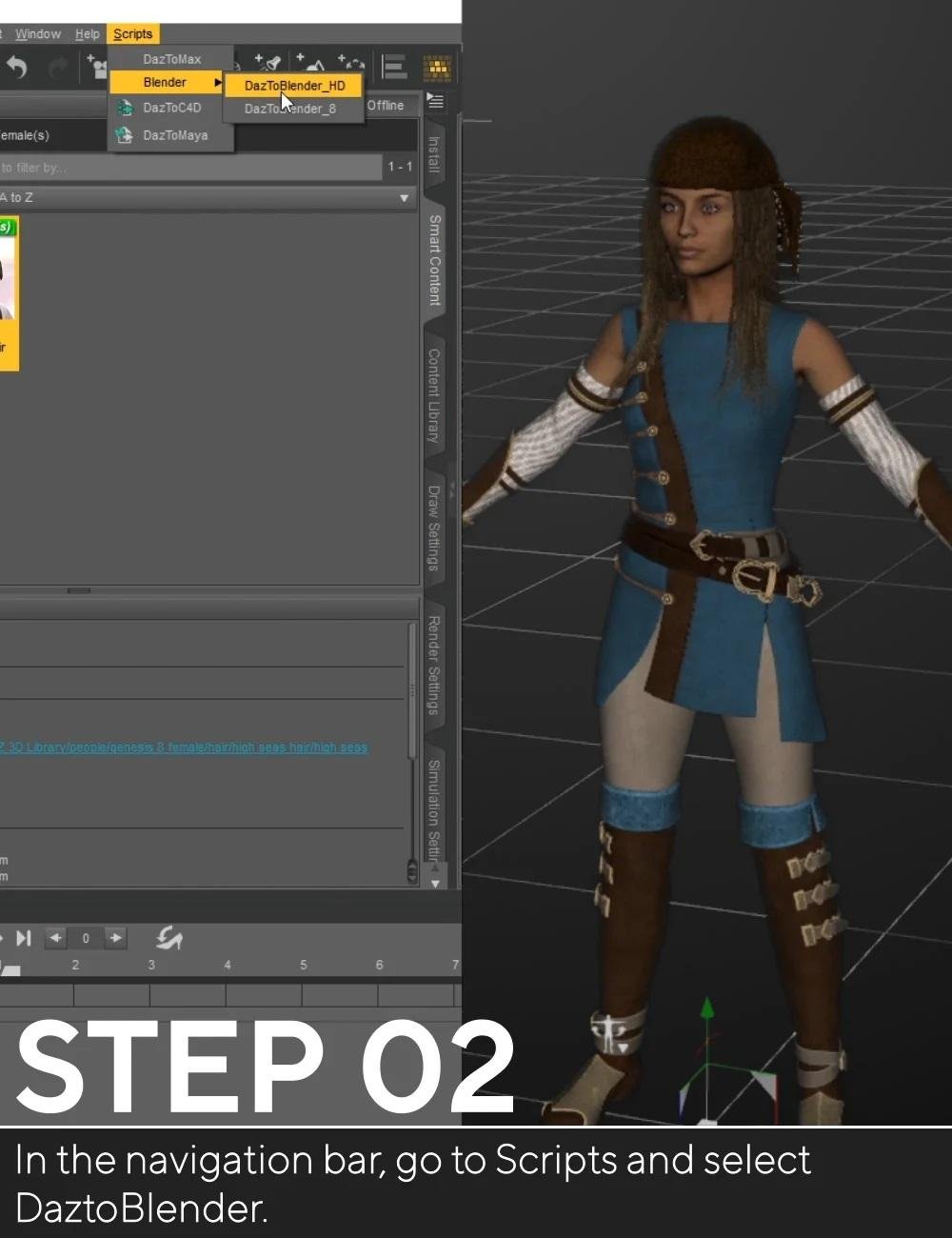
Mine says: Scripts - Bridges - DAZ to Blender
DAZ to Blender : Genital
DAZ to Blender : Morph Exporter
So how do I know that the menu in DS I have is the correct for the latest DAZToBlender plugin?
Sorry about that looks like we need to update the info on our site I will let the team in charge of that know!
You have the correct names DazToBlender_8 and DaztoBlenderHD were combined to one script named DaztoBlender you would need to use that one.Biguana 8.1 Rumor MillShocked and amazed at Poser support. For a minute there I got all excited, thinking I might finally have a reason to dust off Poser 11 or maybe even upgrade to version 12. But then I noticed there's no unflatable morph listed. Sorry, Daz_Whomever, no matter how good it looks, if it doesn't unflat I'm gonna have to pass.
 Biguana 8.1 Rumor Mill
After more than ten years of development, multiple unverified sources are reporting the alleged imminent arrival of the much anticipated Biguana 8.1
The figure includes out-of-box support for the following platforms:
-
DAZ Studio
-
Blender
-
Unreal
-
Unity
-
Maya
-
3DS Max
-
IRAY
-
3Delight
-
Poser
-
Minecraft
-
Pac-Man
-
Frogger
-
Damn well does not support Carrera.
Standard Features Include:
-
Individual 4K textures for each scale
-
Discrete tear material to produce the most realistic eyes of any DAZ reptile
-
4500 Poses plus mirrors
-
Low memory version with only 1.5 million polygons
-
Face rigged for ultimate adorability
The product is expected to be released in the following packages:
-
Standalone Figure
-
Starter bundle including Biguana HD morphs, additional Biguana textures, Biguana vellus hair… and Lilguana HD
-
Pro bundle including Biguana HD morphs, additional Biguana textures, Biguana vellus hair, Lilguana HD, Mediumguana HD, Cyberguana 2077 HDRI set, Guanalulu Hawaii Vacation set, and skinny G8 female character inexplicably included
Add-on products will include:
-
Guana Make You Sweat 90’s hip hop soundtrack
-
Two more skinny female characters inexplicably included
-
Face morph expansion pack for ultimate adorability in HD
The release date is expected to be DAZ soon.
Are there any actually good face cloning tools out there? (E.g. not Facegen or Headshop)i understand its genesis female 8.1 is new, but i can get the free face transfer to work with 8.1. i wonder will headshop support genesis 8.1? so far i only use headshop and face transfer free for cloning. i think headshop is good as it gets but the textures can screw up, so i just reskin with other character mats
Selling and/or sharing charactersjestmart said:
You can save as a Shape or Character preset and sell that with notice that buyer needs to own/have all the morph packages you used to dial in the character.
What would be the point? I don't think you can copyright something like that for yourself as it would amount to forbidding anyone owning all of the products from using that specific combination of those products if they don't purchase your character recipe. Once the recipe gets sold and gets out in the "wild", its out there free of charge with no copyright, so its not something I would be expecting to sell for enough $$ for very long to make it worth the time. If someone is going to bother with that, they should at least make some unique components for the character that can be copyrighted and would actually encourage customers to buy it(i.e. particularly skin and/or hair).
Scene now switches to mesh at every alterationdo anything in scene and it switches to mesh view making it damn near impossible to manipulate characters with any acuracy add makeup touch a morph select in the scene all switch it to mesh view.
can't seem to find any setting which stops this behavior
Daz3D to Unreal Engine 4.26 Issue with Genesis 8Tsuba said:
Where did you get the Daz to Unreal 4.26 plugin ?
My Real Question is how in the worl did you get the 4.26 update to work at all unless you are useing the one from unreal marketplace?
The update:
1. Environment Support -Daz to Unreal Environment Transfer
2. Added a new animation blueprint to deal with conversion from Quaternion to Euler rotations.
3. Fix Bone Rotations -Daz to 4. Unreal Fix Bone Rotations
5. Basic Support for Genesis 8.1
6. Basic PBRSkin Material
7. Fixed the morph list when exporting clothing items separate from the character. This is done by generating the morph list from the character down, rather than just from the clothing item.
8. Support for 4.26
9. Fix morph preset in Daz Exporter
10. Allow morph curves to be exported in animationsbridge does not work anymoreSame here after installing with daz central the plugin does not show up in Unreal 4.26 which the update was intended....
I also installed with install Manager and also does not show up in unreal.
UPDATE
in the daz central i had the correct directory mapped ( IE - Unreal 4.26 ) however the plug in did not go to the plugin folder - it went to the root folder I did not think it had to specificially map to the plugin folder.( because in the past it was not a problem and it got installed correctly ) so after moving the files to the correct folder it is now showing up in Unreal 4.26
OK after much confusion daz central shows a new version 4 which is supposed to be compatable with 4.26 but daz central is still installing the 4.25 version so I am not sure what is correct anymore - I am just going to buy the version on the unreal market place that currently supports 4.26 and let daz play catchup when and if they do
This is from the daz plugin update page:
Daz to Unreal Update
- Environment Support
- Fix Bone Rotations
- Basic Support for Genesis 8.1
- Basic PBRSkin Material
- Fixed the morph list when exporting clothing items separate from the character. This is done by generating the morph list from the character down, rather than just from the clothing item.
- Support for 4.26
- View full list in FAQ
- FAQ:
- 1. Environment Support -Daz to Unreal Environment Transfer
2. Added a new animation blueprint to deal with conversion from Quaternion to Euler rotations.
3. Fix Bone Rotations -Daz to 4. Unreal Fix Bone Rotations
5. Basic Support for Genesis 8.1
6. Basic PBRSkin Material
7. Fixed the morph list when exporting clothing items separate from the character. This is done by generating the morph list from the character down, rather than just from the clothing item.
8. Support for 4.26
9. Fix morph preset in Daz Exporter
10. Allow morph curves to be exported in animations
AIUTO...CHI CONOSCE L’ITALIANO? PARTE TREDICIImago said:
Tiziano said:
Mi sapete dire come si può rimediare al disallineamento delle bones nei capelli messi su personaggi non supportati?
Puoi annullare uno dei morph "Hidden" che lo causano, ma di solito deforma anche il resto, devi fare una prova. Seleziona i capelli e poi vai nelle impostazioni del tab Parameters e attiva la visualizzazione degli elementi nascosti, poi spulcia un poco e vedi quale è la causa, se il risultato è soddisfacente per te, hai risolto.

Se non va ci sono un pò di tecniche un pò più avanzate per risolvere, facci sapere.
No, non riesco ad ottenere risultati soddisfacenti ^_^;
Can't find "Daz to Blender" Add on in blenderOh the newest DAZToBlender plugin you just download & install via DIM & it's 99% of the way there but you need to before you do that:
1) Upgrade Blender to the latest if you care too.
2) If you didn't do 1 but have the DAZToBlender plugin addon installed open Blender, select Edit - Preferences, search for DAZ in the addons, & deinstall the DAZToBlender addon (don't confuse it with Diffeomorphic & such). Exit Blender
3) In DIM, download the newest update of DAZToBlender & install.
4) Start Blender, go to Edit - Preferences to the addons, search for DAZ & you'll see the new plugin listed but unchecked. Check it to activate it & exit Blender.
5) Start DAZ Studio & the script to create the Menu in Scripts Menu for the new DAZToBlender plugin should run once (by DAZ Studio startup process, you need not do anything), if not try Window - Workspace - Update and Merge Menus
a) Your DAZ Studio Menu for the plugin can be seen as below now, verified by DAZ_Sam (the menu below is correct):
Scripts - Bridges - DAZ to Blender
DAZ to Blender : Genital
DAZ to Blender : Morph Exporter
Notice: the attached image copied from the DAZ Store for this plugin is incorrect!
Michael 8.1Out of the box the skin & morph renders nicely. Of course there's always room to tweak the shader for max realism, but color me impressed.
 The new animation export feature with the D2B Bridge
So I downloaded the new update for the D2B plug-in last night to try out the new exporting animation feature. I had just forty frames and it was at two hours of exporting and only got to frame 17. Then I wanted to just bring a character over to see the updates on the Blender side and it started to go through the timeline again and I realized you have to set the timeline to one frame if you just want the character. I'm wondering if anyone else is finding it's taking forever to export, or is it just on my system? It looks like I was able to get the shape keys to show up in the export box for the Face Motion plug-in I use, so I really wanted to see if those would in fact transfer over as the animation on my timeline to continue animating in Blender, but I also didn't want to wait another two hours or so for the other twenty frames to export as I sometimes have shots that are 300 frames and there's no way I could wait that long for shots to export to animate in Blender if I ever want to finish this film, so I didn't continue with the test.
More than anything though, I wanted to see if the feature was the same in the update to the Maya plug-in where you can animate in Maya and bring the animation back into Daz to utilize dForce and render it. I got the free trial of Maya and it totally worked, and sure Maya Indie is only like 285 a year or something and to be able to animate a character without feet and arms moving when they shouldn't is worth every penny, I was like if this is a feature that's coming to the Blender plug-in, I won't bother with Maya and stick with Blender as I love that program. So if anyone who works at Daz with this plug-in knows if that's in the works, I don't need a date or anything, I just need a hey, give us some time as we're working on it, then I will save that 285 on Maya and gladly use that to buy stuff on the Daz site instead.
AIUTO...CHI CONOSCE L’ITALIANO? PARTE TREDICITiziano said:
Mi sapete dire come si può rimediare al disallineamento delle bones nei capelli messi su personaggi non supportati?
Puoi annullare uno dei morph "Hidden" che lo causano, ma di solito deforma anche il resto, devi fare una prova. Seleziona i capelli e poi vai nelle impostazioni del tab Parameters e attiva la visualizzazione degli elementi nascosti, poi spulcia un poco e vedi quale è la causa, se il risultato è soddisfacente per te, hai risolto.
Se non va ci sono un pò di tecniche un pò più avanzate per risolvere, facci sapere.
Genesis 8.1 / Victoria 8.1jbowler said:
s_j_gregory said:
Maybe a simplistic question. I think I have noticed that almost always I need to adjust toe spread morph on both feet to get shoes to look nice. All? the G8 figures seem to load with it set to -50. This has persisted in G8.1. Is this a problem for anyone else. (I think I have also noticed that some odd finger nail aboration that plagued my G8 figures is gone for G8.1 and for that I am thankful . . . .
Sounds like you have a built in morph which autoloads on everything. The default G8.1F load comes with two "Mouth Realism" settings and Render SubD set to 3 (which, I guess, is interesting in it's own right but clearly unrelated). The right and left "Toes Spread" morphs are set to 0. Most real world heels crush the toes of the wearer; I remember my mother's toes, it does cause a permanent deformity. -50% seems about right to me. Standard foot poses for G8F heels often do this (though not always) and it definately looks, well:
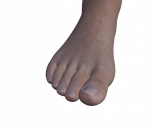
I think it is another example of an auto-loading morph from some, as yet unidentified, product.
Thanks for your thoughts. It caused me to look at this more carefully - should have done that first I know. . . .Some corrections are in order. First, my G8.1 default figure does not load with any toe spread morphs. They are set to zero. (To be clear - negative values spread the toes while positive values squish them - which intuitively for me is backward to the naming but that's clearly just me.) I find, with delicate shoes, I almost always get a better result applying the morph. The reason I thought the negative settings persisted into G8.1 for me is beacuse I noticed it when I migrated my own character morph (settings) onto G8.1 - I think. This is another example of where I, or products, or both, have corrupted my G8 base. I have undertaken lengthy shadow chasing exercises in the past, now pleasantly almost forgotten, that resulted in only partial improvement and me confused. (I had somehow managed to corrupt my G8 base with a FBM and a variety of other things: something in the fingernail area (morphs being in conflict I fear) and this toe setting remain unresolved.) Given these efforts, and the number of times updates have been applied and runtimes rebuilt, I am surprised; but, there is something lurking in the long lists of 'data' that is annoying though not a show stopper.
Thanks again. Hope I didn't cause anyone too much angst
Daz Studio 4.16[.0.x] Pro, General Release! (*UPDATED*)DoctorJellybean said:
You can also do what I do; I save the scene file first by hand then select everything in the scene and delete it before closing DAZStudio. The delete just takes a few seconds but DAZStudio shuts down way, way faster afterward. It's still pretty slow.An even quicker (and safest) way is to select File - New after saving and then closing DS.
File>New can still take a while for me if I've had a morph-heavy figure loaded. There are obviously system-specific variables at play with all of this.
Star Trek Builders Unite 8: THE REBOOT
Well I have z brush now but when I built those morphs it was all using the morph building tool in poserrandym77 said:bluto said:
oh i dont know , i find morph building verry easy to do , its all about how you aproach it, low intensity brush strokes and controled smoothing can produce some amazing morphs .
one just needs to be ready to take some time and not rush through it
You use Poser to make your morphs? I figured you must use Zbrush or something.
Daz 3D is part of

Connect
DAZ Productions, Inc.
7533 S Center View Ct #4664
West Jordan, UT 84084Licensing Agreement | Terms of Service | Privacy Policy | EULA
© 2026 Daz Productions Inc. All Rights Reserved.