-
Genesis 8.1 / Victoria 8.1
PerttiA said:
Hylas said:
So, I did the thing where I deleted the two folders to get 8.0 expressions to work on 8.1. buuuuuuuuut... is there a way to keep the 8.0 and 8.1 sliders apart? Now they're all jumbled together and I don't love it.
Was this the reason for disabling them in the first place?...

I'm pretty confident you're spot on with this - there are a bunch of new expressions that replace the old functionality but are slightly different - keeping around 2 sets of mouth open dials, 2 sets of eye close, 2 sets of cheeks puff etc etc etc would be quite messy, I would find it confusing, let alone some poor new user coming in.
unfortunately some expression poses and dials use those building blocks so those stop working (this is why some expressions still work fine - ones that only move bones and don't rely on anything else work just fine)
aaaand to answer the initial question on ways to seperate old from new - you definitely should be able to! DS lets you reorganize morphs and pose controls - the fastest way is probably to use something like notepad++ to edit all the relevant expression dsfs (theyre found in \Content\data\Daz 3D\Genesis 8\Female\Morphs\DAZ 3D\Base Pose Head)
- open any of these and you'll be able to find a line that says "group" : "/Pose Controls/Head/Mouth/Tongue"
- if you edit this to say something like "group" : "/Pose Controls/Head/Genesis 8/Mouth/Tongue" all the dials will now be categorized that way and thus seperate from the new ones - because its just changing where they show in DS it won't break any dependencies.
- to make this all super fast you can open all the dsfs in the folder and do a search and replace in all open documents and replace /Pose Controls/Head/ with /Pose Controls/Head/Genesis 8/ and then save all
you can also recategorize morphs and pose controlls in DS itself - but I find editing the files both faster and easier
for completeness in DS:
- right click on a morph or pose and turn on edit mode
- right click the set of morphs you want to move and go set > property group
- move them where you want them
- if when you are editing the group you have selected have a ? for the curent location the files you are trying to move are currently in multiple locations and if you move them somewhere they will be combined
- this means you need to do this for every category - you can move all the mouth controlls together but not the mouth and tongue controlss together without combining them
- go to file>save as>support assets>save modified assets (make sure you are working on a otherwise unmodified genesis 8 or 8.1 if you have loaded genesis via an actor preset, when you hit save modified assets those morps will auto load with the base genesis)
worth noting I have not done this specifically but I batch edit and reorder morphs etc all the time
also back up before doing this I always back up my dsfs in a rar in the same folder before editing them
is there a Face Transfer threadAnyone get Face Transfer to work with Genesis 8.1? FaceGen morphs work but Face Transfer do not show in morphs or as an option. My Avatar is a combination of Face Transfer and Character Creator 3 from iClone.
Can't find "Daz to Blender" Add on in blenderDAZ_sam said:
nonesuch00 said:
Oh the newest DAZToBlender plugin you just downloadf & install via DIM & it's 99% of the way there but you need to before you do that:
1) Upgrade Blender to the latest if you care too.
2) If you didn't do 1 but have the DAZToBlender plugin addon installed open Blender Preference, search for DAZ in the addons, & install the DAZToBlender addon (don't confuse it with Diffeomorphic & such). Exit Blender
3) In DIM, download the newest update of DAZToBlender & install.
4) Start Blender, go to Edit - Preferences to the addons, search for DAZ & you'll see the new plugin listed but unchecked. Check it to activate it & exit Blender.
5) Start DAZ Studio & the script to create the Menu in Scripts Menu for the new DAZToBlender plugin should run once, if not try Window - Workspace - Update and Merge Menus (and hmmm, that didn't update to what is claimed to be the new menu)
Help Please:
I've upgraded the D2B plugin via DIM & started DAZ (as in step 5) but the menu is not matching the menu on this tutorial image from the DAZ Store for the product.
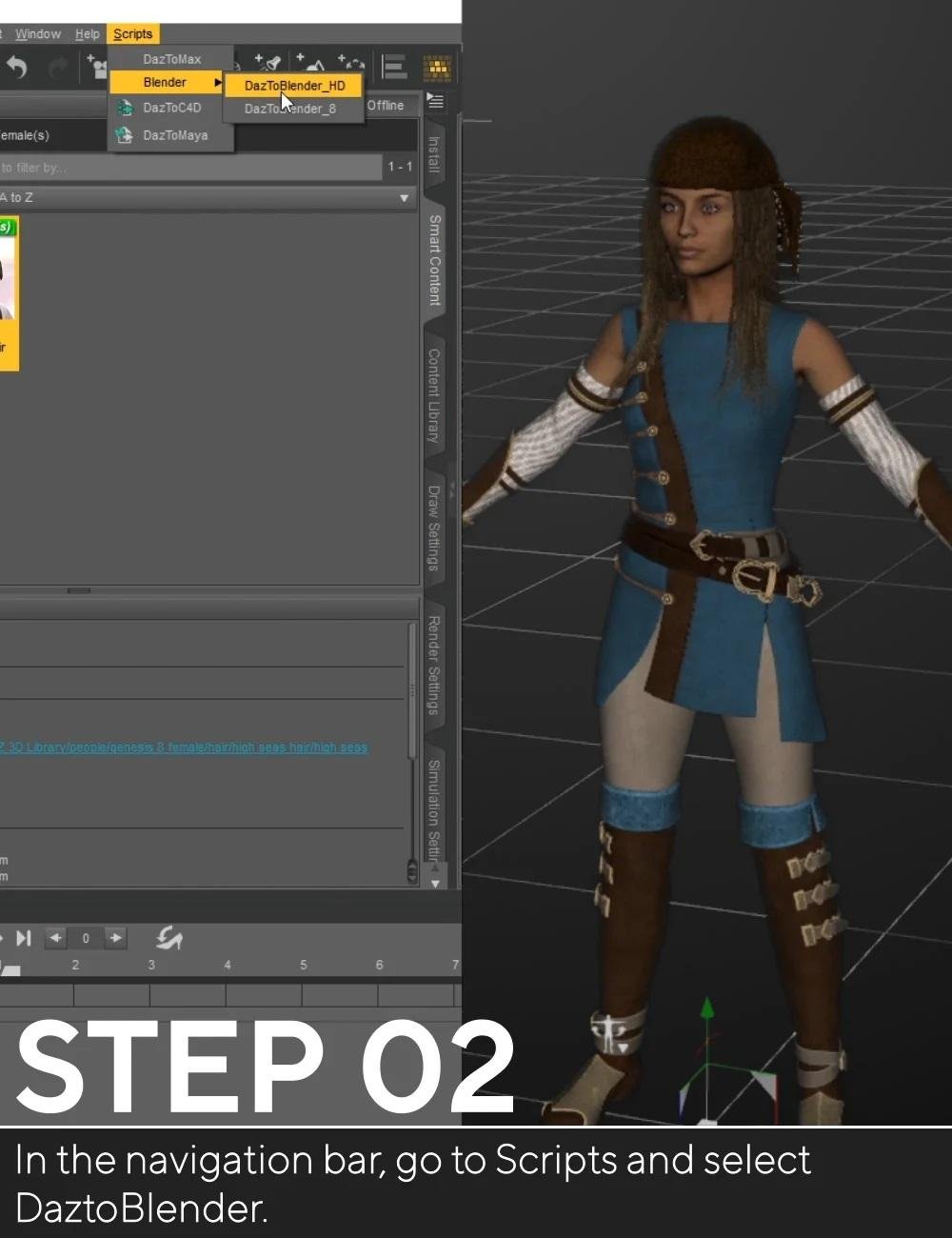
Mine says: Scripts - Bridges - DAZ to Blender
DAZ to Blender : Genital
DAZ to Blender : Morph Exporter
So how do I know that the menu in DS I have is the correct for the latest DAZToBlender plugin?
Sorry about that looks like we need to update the info on our site I will let the team in charge of that know!
You have the correct names DazToBlender_8 and DaztoBlenderHD were combined to one script named DaztoBlender you would need to use that one.OK, thank you. That is what I have now, DaztoBlender.
Genesis 8.1 / Victoria 8.1ChallyII said:
Daventaki said:
-snip-Thanks- that isn't what I was asking. I can load Genesis 8.1, apply the morphs and matts from a Genesis 8 character, and they appear identical side-by-side as far as I can tell. What I wanted to know, is if there's a way to load a character from the characters tab, and have it load in with Genesis 8.1 morphs instead of Genesis8. The answer, apparently is no.
I guess my next question is 'Why?'
If you load a G8 character, it doesn't see the G8.1 morphs as they are located in G8.1 morph folders, which no G8 knows anything about.
On the other hand if the Character is G8.1, DS 4.15 has been instructed the show both the G8 and G8.1 morph folders to it, so it load morphs for both generations.
Genesis 8.1 / Victoria 8.1Hylas said:
PerttiA said:
Hylas said:
Matt_Castle said:
(Also, as noted, there is a minor conflict between the sets, as both sets have controls labelled "Mouth Smile" and "Mouth Frown" that will merge into one slider on default DS settings, although that is not fundamentally something that had to be an issue and can be resolved by editing the files to change the labels, which should not affect presets, as those use the internal naming to set their values).
Can someone give me a step-by-step for dummies on how to rename the old frown and smile? Thank you!
There are two ways to do this;
1. Find the "Mouth Smile" and "Mouth Frown" morphfiles in Genesis 8 Male/Female morph folders, open the files in Notepad++ and change the "Label" from "Mouth Smile" to "Mouth_Smile" and save, same with the Frown.
2. Open DS, clear the scene if you have anything loading by default, Load the "Genesis 8 Base Female" or "Genesis 8 Female Dev Load", in parameters tab navigate to the "Mouth Smile" dial, and open the properties (with the gogwheel), change the Label from "Mouth Smile" to "Mouth_Smile" and press "Ok". Do the same with the Frown-dial, then perform File->Save As->Support Asset->Save Modified Assets, which will do essentially the same as option no1. - Repeat the process with the male figure.
Thanks!

Method 1 didn't work...
Method 2 did work. But one has to make 4 adjustments per figure. Select the figure, adjust Mouth Smile and Mouth Frown; then select the figure's head, and make both adjustments again.
Now that I think about it, the reason why method 1 didn't work probably was because I only adjusted 2 morph files per figure instead of 4.
Ok, I forgot the Alias-files for the head.
Frustrated RantRufus Coppertop said:
Richard Haseltine said:
Try selecting the Rigidity Group in Tool Settings, then right-click on it and select Remove Group. That works on a quick test with primitives.
Actually after trying that I now realize that NO. In fact it doesn't have a Rigidity Group as such. I made the mistake of seeing the word Rigidity and assuming it was a group. When I right click it offers me the chance to make a rigidity group but it seems that there isn't actually one.
Also - after trying again with different morphs I realize that something I said above was not quite accurate.
Morphs are working. The garment conforms to every morph I've tried except for lengthening the abdomen in the Shape Shifter Morphs menu. I can lengthen the whole torso, widen it, whatever. It's just lengthening the abdomen that causes the shoulders to explode through the garment.
One thing to try, if you find the Fit To cotnrols in the parameetrs pane there is a second button in the last few releases of DS labelled Fit to Mode - try changing the setting and see if that helps.
Frustrated RantRichard Haseltine said:
Try selecting the Rigidity Group in Tool Settings, then right-click on it and select Remove Group. That works on a quick test with primitives.
Actually after trying that I now realize that NO. In fact it doesn't have a Rigidity Group as such. I made the mistake of seeing the word Rigidity and assuming it was a group. When I right click it offers me the chance to make a rigidity group but it seems that there isn't actually one.
Also - after trying again with different morphs I realize that something I said above was not quite accurate.
Morphs are working. The garment conforms to every morph I've tried except for lengthening the abdomen in the Shape Shifter Morphs menu. I can lengthen the whole torso, widen it, whatever. It's just lengthening the abdomen that causes the shoulders to explode through the garment.
Frustrated RantI jusdt ran a quick test with an OBJ exported from a piece of clothing and didn't see a Rigidity Group added, and there isn't an option I can see in Transfer utility which would do it (I'm not, however, sure what would happen if the source figure had a Rigidity Group itself).
Genesis 8.1 / Victoria 8.1PerttiA said:
Hylas said:
Matt_Castle said:
(Also, as noted, there is a minor conflict between the sets, as both sets have controls labelled "Mouth Smile" and "Mouth Frown" that will merge into one slider on default DS settings, although that is not fundamentally something that had to be an issue and can be resolved by editing the files to change the labels, which should not affect presets, as those use the internal naming to set their values).
Can someone give me a step-by-step for dummies on how to rename the old frown and smile? Thank you!
There are two ways to do this;
1. Find the "Mouth Smile" and "Mouth Frown" morphfiles in Genesis 8 Male/Female morph folders, open the files in Notepad++ and change the "Label" from "Mouth Smile" to "Mouth_Smile" and save, same with the Frown.
2. Open DS, clear the scene if you have anything loading by default, Load the "Genesis 8 Base Female" or "Genesis 8 Female Dev Load", in parameters tab navigate to the "Mouth Smile" dial, and open the properties (with the gogwheel), change the Label from "Mouth Smile" to "Mouth_Smile" and press "Ok". Do the same with the Frown-dial, then perform File->Save As->Support Asset->Save Modified Assets, which will do essentially the same as option no1. - Repeat the process with the male figure.
Thanks!
Method 1 didn't work...
Method 2 did work. But one has to make 4 adjustments per figure. Select the figure, adjust Mouth Smile and Mouth Frown; then select the figure's head, and make both adjustments again.
Now that I think about it, the reason why method 1 didn't work probably was because I only adjusted 2 morph files per figure instead of 4.
Selling and/or sharing charactersmagog_a4eb71ab said:
jestmart said:
You can save as a Shape or Character preset and sell that with notice that buyer needs to own/have all the morph packages you used to dial in the character.
What would be the point? I don't think you can copyright something like that for yourself as it would amount to forbidding anyone owning all of the products from using that specific combination of those products if they don't purchase your character recipe. Once the recipe gets sold and gets out in the "wild", its out there free of charge with no copyright, so its not something I would be expecting to sell for enough $$ for very long to make it worth the time. If someone is going to bother with that, they should at least make some unique components for the character that can be copyrighted and would actually encourage customers to buy it(i.e. particularly skin and/or hair).
The EULA asserts ownership, if you want to challenge it you would need to hire a lawyer and have them cotnact Daz' lawyers.
Daz to 3ds Max Update 1.1This week Daz released an update to the Daz to Cinema 4D Update update. Here are the items in the update. Enjoy!
- Fix export issue when for face morphs with changes to Daz Studio in 4.14
- Genesis 8.1 Facs Morph Support. Please note that characters must be selected to export the morphs.
- Now Supports 8.1 Characters
Daz to Cinema 4D Update 1.1This week Daz released an update to the Daz to Cinema 4D Update update. Here are the items in the update. Enjoy!
- Now Supports Cinema 4D Version R23
- Fix export issue when for face morphs with changes to Daz Studio in 4.14
- Genesis 8.1 Facs Morph Support. Please note that characters must be selected to export the morphs.
- Now Supports 8.1 Characters
Daz to Maya Update 1.7This week Daz released an update to the Daz to Maya update. Here are the items in the update. Enjoy!
- Fix export issue when for face morphs with changes to Daz Studio in 4.14
- Genesis 8.1 Facs Morph Support. Please note that characters must be selected to export the morphs.
- Now Supports 8.1 Characters
Daz to Unreal Update 4.0This week Daz released an update to the Daz to Unreal update, done by David. Here are the items in the update. Enjoy!
- Now Supports Environments (http://davidvodhanel.com/daz-to-unreal-environment-transfer/)
- Basic Support for Genesis 8.1
- Basic PBRSkin Material
- Fixed the morph list when exporting clothing items separate from the character. This is done by generating the morph list from the character down, rather than just from the clothing item.
- Support for 4.25
- Fix morph preset in Daz Exporter
- Allow morph curves to be exported in animations
- Added a new animation blueprint to deal with the conversion from Quaternion to Euler rotations.
- Fix Bone Rotations (http://davidvodhanel.com/daz-to-unreal-fix-bone-rotations-option/)
Daz to Blender Update 2.0This week Daz released an update to the Daz to Blender Bridges. Here are the items in the update. Enjoy!
- Animations will now export out of Daz to Blender
- Fix import issues of the skeleton from Daz to Blender
- Rotations
- Rotation Order
- Updated Morph Exporting Setup
- Now Has Presets
- All Morphs for the characters can be chosen
- Can Choose Morphs from Window
- Support for Blender Versions 2.90 and 2.91
Genesis 8.1 / Victoria 8.1Hylas said:
Matt_Castle said:
(Also, as noted, there is a minor conflict between the sets, as both sets have controls labelled "Mouth Smile" and "Mouth Frown" that will merge into one slider on default DS settings, although that is not fundamentally something that had to be an issue and can be resolved by editing the files to change the labels, which should not affect presets, as those use the internal naming to set their values).
Can someone give me a step-by-step for dummies on how to rename the old frown and smile? Thank you!
There are two ways to do this;
1. Find the "Mouth Smile" and "Mouth Frown" morphfiles in Genesis 8 Male/Female morph folders, open the files in Notepad++ and change the "Label" from "Mouth Smile" to "Mouth_Smile" and save, same with the Frown.
2. Open DS, clear the scene if you have anything loading by default, Load the "Genesis 8 Base Female" or "Genesis 8 Female Dev Load", in parameters tab navigate to the "Mouth Smile" dial, and open the properties (with the gogwheel), change the Label from "Mouth Smile" to "Mouth_Smile" and press "Ok". Do the same with the Frown-dial, then perform File->Save As->Support Asset->Save Modified Assets, which will do essentially the same as option no1. - Repeat the process with the male figure.
AIUTO...CHI CONOSCE L’ITALIANO? PARTE TREDICITiziano said:
Imago said:
Tiziano said:
Mi sapete dire come si può rimediare al disallineamento delle bones nei capelli messi su personaggi non supportati?
Puoi annullare uno dei morph "Hidden" che lo causano, ma di solito deforma anche il resto, devi fare una prova. Seleziona i capelli e poi vai nelle impostazioni del tab Parameters e attiva la visualizzazione degli elementi nascosti, poi spulcia un poco e vedi quale è la causa, se il risultato è soddisfacente per te, hai risolto.

Se non va ci sono un pò di tecniche un pò più avanzate per risolvere, facci sapere.
No, non riesco ad ottenere risultati soddisfacenti ^_^;
Beh, allora un'altra soluzione "veloce" è usare il Mesh Grabber e correggere i poligoni spostati.
 Genesis female smile problem
waltage80 said:
when a closed smile the lower lip rises strongly, which contradicts the anatomy and creates a monster
compare with a mirror This problem is quite old - when will you fix it?
Epressions always look horrible on custom characters. That is in the nature of things, for epressions are made for the base G8Female only.
There is no other way, than creating your own custom expressions for each and every character seperatly, you are going to use. So consider those pre-set expressions as resources.
BTW: are you using "Auto Face Enhancer"? The morph targets coming with it, are sometimes dialing in with your expressions and exaggerating those.
Biguana 8.1 Rumor MillWendyLuvsCatz said:
looks as uncomfortable to ride as a spikey dragon
Which is why it came with:
- Conforming Saddle (CR2 and OBJ)
- Blanket and straps that hug the Biguana
- Metal frame provides stability for the rider
- Biguana Spines (CR2 and OBJ)
- Morph Fit for saddle
- Biguana Fin (CR2 and OBJ)
- Morph Fit for saddle
[Released] Character Converter from Genesis 3 Female to Genesis 8 Female(Now Conv JCMs) [Commercial]maraich said:
Hi! Is there anything else I need to delete besides the clone to avoid getting the stretched neck issue? I deleted the clone and then loaded a fresh character without moving them and then loaded a G8. It had me run the initial step again to create the clone. Everyting appeared to be running properly. During my previous failed attempts the G3 and G8 were standing next to each other after a time until the conclusion when the new G8 with the applied morphs showed up all weird. This time they stayed completely together and I thought I was home free. But then it finished and the newly created version had a crazy neck again. I feel I'm making progress, but I must still be missing something.
You need to delete the clone and then identify and delete previously converted morph that is causing the neck stretching issue.
Daz 3D is part of

Connect
DAZ Productions, Inc.
7533 S Center View Ct #4664
West Jordan, UT 84084Licensing Agreement | Terms of Service | Privacy Policy | EULA
© 2026 Daz Productions Inc. All Rights Reserved.











