-
Items disappearing from product library
memcneil70 said:
Okay, serious weirdness. I have been on my Win 11 using its browser Edge. But to answer @Taoz' question I had turned to my old iMac and using Google Chrome I typed in 'stage' in that Product Line and the product showed up! I had bought Royal Post Line for the RHS Stagecoach in Oct 2020. The iMac is my primary computer that I review the store, purchase, have my DAZ+ setup and also my records of promo files. It was just that this morning I was focused on adding metadata on files on the Win 11. That includes the PA names as I like to recognize their talents.
Thank you to everyone who tried to help me. Like I said, totally weird that Win 11 and Edge failed this time.
Mary
Try clearing your site cookies. Another user reported success with this sort of problem by clearing them. Since it seems to browser instance dependent, they probably go stale and don't get refreshed properly.
Trouble with Dresses Moved Over from Rendorcourtri_789f4b1c6b said:
Richard Haseltine said:
crosswind said:
So being short-staffed on Daz side sounds like a truth ~~ ...
Unless a company is grossly overstaffed, or very large, coping with a sudden flood of activity is going to be challenging at best.
Sudden? So which is the case? Daz was surprised by a large amount of content which it had no choice but to release as soon as possible, or Daz planned and chose to release content on its own schedule? Of course, the PAs didn't want to go for an extended time with those products not being available for sale until the metadata matters were squared away, but that concern needed to be weighed against some customer dissatisfaction, some completely avoidable refunds, and some PAs ending up on some customers' "Avoid Their Content" lists.
A number of PAs wanted to move a large number of items across in a very limited timeframe, Daz wanted to acept, the metadata could not be fitted in to that and they certainly couldn't ask the PAs to wait for months for the releases.
We understand this was a one-time initiative. I'm fine with Daz releasing content that doesn't have Smart Content functionality, but that is something that could've been easily brought to the attention of customers. Just a matter of applying some boilerplate: Note--This product does not currently have full Smart Content functionality. It would not have been a major effort to include a note in the product descriptions.
Items disappearing from product libraryOkay, serious weirdness. I have been on my Win 11 using its browser Edge. But to answer @Taoz' question I had turned to my old iMac and using Google Chrome I typed in 'stage' in that Product Line and the product showed up! I had bought Royal Post Line for the RHS Stagecoach in Oct 2020. The iMac is my primary computer that I review the store, purchase, have my DAZ+ setup and also my records of promo files. It was just that this morning I was focused on adding metadata on files on the Win 11. That includes the PA names as I like to recognize their talents.
Thank you to everyone who tried to help me. Like I said, totally weird that Win 11 and Edge failed this time.
Mary
Search feature in Content Database menusI've already submitted a request feature, but does anybody know a plugin or something that adds this to the process que or re-import metadata menus. I'm surprised something like this just doesn't naturally exist. It becomes a pain everytime having to search through xx number of products. Though I'm sure not everybody needs to do this as often as I do as i frequently re-arrange libraries and have multiple libraries to keep everything nice an ogranized in content library as some products even with Content Wizard and Content Package Assist, don't play nice with the smart content.
Trouble with Dresses Moved Over from RendoRichard Haseltine said:
crosswind said:
So being short-staffed on Daz side sounds like a truth ~~ ...
Unless a company is grossly overstaffed, or very large, coping with a sudden flood of activity is going to be challenging at best.
Sudden? So which is the case? Daz was surprised by a large amount of content which it had no choice but to release as soon as possible, or Daz planned and chose to release content on its own schedule? Of course, the PAs didn't want to go for an extended time with those products not being available for sale until the metadata matters were squared away, but that concern needed to be weighed against some customer dissatisfaction, some completely avoidable refunds, and some PAs ending up on some customers' "Avoid Their Content" lists.
We understand this was a one-time initiative. I'm fine with Daz releasing content that doesn't have Smart Content functionality, but that is something that could've been easily brought to the attention of customers. Just a matter of applying some boilerplate: Note--This product does not currently have full Smart Content functionality. It would not have been a major effort to include a note in the product descriptions.
Trouble with Dresses Moved Over from RendoI buy from other stores, and I don't care about metadata. I do like a populated readme page and especially included files list. Then again, readme doesn't give download size. That's a bother! Been getting some comically large downloads lately.
Trouble with Dresses Moved Over from Rendojoanna said:
I can not remember 100% but I THINK it was mentioned that eventually they would be adding meta data to the migrated products, again I can't remember so please don't hold me to that lol.
I can't remember either, but in a thread back in May we were told (one of the mods, but since I don't remember who, and don't care enough to try to dig it out, I'm not naming any names) that these products will not get metadata. I think the reasoning was "too much work", but again, that would require digging through the forum and finding the exact wording.
If you were promised updated metadata, there's hope, but from my perspective, the damage is done. I hope you got some sales from people who care less about the metadata.
In practice, we were told not to expect metadata for the migrated products due to the huge volume of those products.
Vertices vs Faces?Exporting by ticking "Removed Unused..." won't help as unused vertecis are still on the Prop in DS... so there'll be always geometry mismatch when importing OBJ back with MLP. Try deleting them with Geometry Editor firstly.
As for Diffeo, you may check this thread if needed https://www.daz3d.com/forums/discussion/692276/import-problem-from-blender#latest
Vertices vs Faces?Thanks.
I did try the export settings with "Remove Unused" but that didn't help. I didn't know I could do it with the Geometry editor.
I have wondered about using Diffeo to export but I'm clueless about how to import just the morphs doing it like that.
Vertices vs Faces?TRY delete unused vertecis With Geometry Editor in DS first. Blender always remove unused vertecis. If it doesn't help, import your Scene with that Prop into Blender by using Diffeomorphic Daz Importer. That should always does the trick.Trouble with Dresses Moved Over from Rendo3DLoki said:
just wanted to say, any new product released in the store (that releases the normal way as in featured in a daily email, shown in one of the daily promos OR that appears in "New Arrivials" WILL have the meta data included, stuff that I and other vendors brought over were just copy/pastes from our other stores so to speak, and no other marketplace does / includes meta data. so none of our migrated products had it.
Sorry to be blunt, but that copy/paste shown and shown badly.
Most people here know that the new releases do have metadata. Most migrated products weren't new releases, though.
I can not remember 100% but I THINK it was mentioned that eventually they would be adding meta data to the migrated products, again I can't remember so please don't hold me to that lol.
I can't remember either, but in a thread back in May we were told (one of the mods, but since I don't remember who, and don't care enough to try to dig it out, I'm not naming any names) that these products will not get metadata. I think the reasoning was "too much work", but again, that would require digging through the forum and finding the exact wording.
If you were promised updated metadata, there's hope, but from my perspective, the damage is done. I hope you got some sales from people who care less about the metadata.
So like take me for example, Blossom for Genesis 9 DOES have meta data but anything prior to her in my catalog will not have it at this time.
For people saying they won't buy anything that was brought over because of no meta data I will again say only Daz sells products with meta data included, so if you buy from other marketplaces there's really no reason to skip the migrated products ;)
And that's why I shop only at Daz. Because Daz sells products with metadata. They also have products with (mostly) proper descriptions containing detailed information about the product like morphs, maps (so many of the migrated products didn't, that I stoppped checking if any live up to that standard; as I said, the "copy paste" did show in a bad way) and promotional images that feel more professional or at least clear/visible. So, to me, the rushed migration left very bad first impression. I'm not saying that I'll never buy anything from the "migrated artists", but after the faux pas of the migration, they'll really have to step up their game to match the standards shopping Daz has gotten me used to. Lack of metadata and one line descriptions are not it.
Would someone PLEASE make G9 a police uniform?Damsel said:
Thanks, folks:
https://www.daz3d.com/dforce-police-officer-outfit-for-genesis-8-females
is the uniform I tried to convert. I have the G3 uniform similar to the one in Felis's image. I also have the Sheriff's uniform Nonsuch discusses, but I was specifically looking for police blues.
I did this conversion, but I ended up having to do a lot of Photoshop on it to get it looking okay. The collar is twisted, and the tie doesn't lie well. I had to take the badge from another figure and parent by hand. It was generally a hassle.
We tend to see a lot of the same outfits in the store, but police uniforms would be the kind of product that would sell well for those making comics, etc.
Yea, G8 > G9 conversion is not like G2/G3 > G8 conversion 'cause G9 has quite a different size as well as a "unique shape"... Auto-Fit-Only will just bring you distorted result. So there're some tricks for the case of G8 > G9 conversion ~~
If you know at least one modeling/sculpting software, like Blender or Hexagon, you can quickly make a perfect conversion and fit. Like this case you're manipulating, I would simply make a FixBase morph for it in Blender:
- Load the Police Uniform into the scene and export it ( with Base Resolution ) + G9 Base ( or the Character you're using ) to an OBJ file.
- Import OBJ into Blender. Drag it down, turn on Symmetry,then make it a good fit on G9 by using Draw and Grab brushes. It may just take a couple of minutes even for a newbie sculptor by using Blender. (ss 1)
- Export Uniform to an OBJ file from Blender. AutoFit Uniform to G9 in DS. Import the above OBJ file to Uniform by using Morph Loader Pro as a FixBase morph. Dial it. (ss 2)
- Make fix morph for Shoes in almost the same way ~~ Other wearables are just Smart Props, it's very easy to tweak them by moving and scaling.In the above way, you won't get any distortion since the base is fixed. And all the existing morphs on Uniform work well on A-Pose or with Poses + dForce (ss 3) Unfortunately the vendor didn't make any pJCM corrective morph on the uniform... otherwise we can also convert them to cbs for the Uniform on G9 ~~
Pls be noted, there's a defect in the Uniform, an unused vertex. You have to delete it by using Geometry Editor before using MLP otherwise you'll get geometry mismatch....
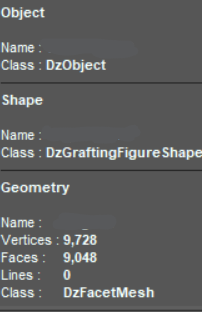
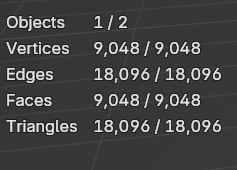
Vertices vs Faces?I have a prop which I export to blender in order to make a morph. This is something I do often but this prop gives me the dreaded Geometry Mismatch error when I try to import it back from Blender using Morph Loader Pro,
I have tried just exporting and importing without going to Blender and that works. Then I tried exporting to Blender, doing nothing and exporting again. Morph Loader gives me the error.
I checked the vertex cound and (see attached screenshots), it seems that there is a difference between the vertex count and the number of faces. Blender does not recognise the vertex count and sets the number of vertices to the number of faces. I can't see where the extra vertices are located, even in the Geometry Editor.
Any ideas?
 Trouble with Dresses Moved Over from Rendo
protosynthetic said:
Don't doubt your diligence at all. I'm exactly the same way, if I think there's going to be yet another stupid caveat to my purchase beyond just the fuzzy math, I won't even bother to go to the product page unless I REALLY want it. I was more addressing the public as a whole with that statement, general knowledge since no one else has suggested checking the readmes in this thread. So far, if I've bought it and it should have meta and doesn't, I've promptly refunded it. In general, I find myself shopping less here because of stuff like that, my trust is eroded. If I didn't already have so much money wrapped up in this hobby, I'd abandon it completely.
Personally, with the amount of products I already have, I could probably stop shopping here and not shop anywhere else and still enjoy rendering for a long while.
And yes, I agree on shopping less when it becomes inconvenient (between frustrating editorial license products, no meta data for migrated products, and the usual and frequent sales glitches with bad wording/rules changing, there's enough to make me less enthusiastic about shopping). But this also allows me to sit out all the sales and wait for better deals or for something that I really want or that gets me excited about shopping. Good for my wallet and my time, but not so good for people who are trying to get my money. On the other hand, when the other day Daz honored Daz+ releases being included in the new releases for buy-ins (rather than remove them), I was happy to go an spend money with the deals being just "good" to me (vs. some crazy 95% off). I felt valued as a customer then. I don't feel valued when I have to do my own metadata.
 How to properly reduce the number of fingers and toes in the Daz Dragon 3
Firstly, probably we better work on Dragon 3's Pinky finger(s).
1) Select Left Pinky joints, set Scale values to 0. Export Dragon3 to an OBJ file with Base Resolution. Reset Pinky joints Scale value to 100%. Import OBJ file into Blender or the modeling / sculpting software you use. (ss1)
2) Sculpt ! Using Draw + Smooth + Grab brushes will mostly do. Especially adjust the palm size (side) and ring finger's shape (ss2)
3) Export Dragon3 from Blender to an OBJ file. (ss3)
4) Import OBJ file in DS with Morph Loader Pro with the settings in (ss4). Dial the imported Morph, you'll get 4 fingers on its "both hands" (ss5)
Then make 4 toes in almost the same way.
Daz Studio 4.22[.0.x] Pro, General Release!A "trick" is to simple rename the CMS database, i.e. rename "CMS" to "CMS.saved", and start DAZStudio; it recreates the database. Then it is possible to all the "reimport metadata" stuff and see if the result fixes the problem sufficiently. If it doesn't the old state can be recovered by deleting the "new" CMS and reverting the name of the saved one, or, if you are like me, copying "CMS.saved" back to "CMS" and trying something different :-) The database isn't that big.
Most of us don't hack the metadata. Losing the user additions seems just to mean losing the metadata for saved scenes/subsets/presets etc. That will be a big deal for some users but they are all advanced (well, more advanced than me). It would be nice if DAZ could implement something that simply recreated the database from the metadata without requiring a DIM rebuild. Personally I would be happy (perhaps very happy) if that could be done from DIM itself; it has all the metadata I've got installed but the manual process involves de/re-installing by CMS directory (otherwise things get moved between CMS directories.)
After using the ERC freeze, issues arose with bending the calf.I attempted to scale down a G8.1 character (a product persona model) by 50%, export it as an OBJ file, and then import it into a default G8.1 character using the ERC freeze method.
Upon doing so, I noticed that the character's calves exhibited the issue depicted in the image when bending.
the island of lost and foundIf user-facing files (*.duf) from a product have no Category data, they'll be automatically assigned to the category of Lost and Found. Well, there're quite a lot of store products having such issue... and Daz rarely fixes them.
Usually you have two options:
1) Assign Categories to the files in Lost and Found... product by product; (ss1) . Then export updated metadata to DSX file in runtime\support folder by using the function of Edit Metadata (Content DB Editor) (ss2)
2) Brutally delete the category of Lost and Found in Content Library > Categories > Default > Lost and Found... (ss3). There'll be no harm to any user-facing files... only some of them have no Category. When you see them anytime, you can assign Category to them. But if you install any other products having the same "no Category" issue, Lost and Found will be back again...
Diffeomorphic import. Can't remove glossy from face (SOLVED)I'm having a bit of a problem removing shiny/glossy from the face. I found the "face" texture, played around with the dual-lobe, roughness, and some other settings. Nothing seems to work. When previewing just the material with Blender material preview, the glossyness seems disapear (which is what I want). But during actual rendering, the glossines on the face seems to be back (but just on the face texture itself). Other skin settings like "torso" texture seems to work just fine (i.e. I could remove the glossiness). I'm pretty sure it's not the lighting. Any advice where else to look/change ? Thanks. I'm using Blender 4.1 Cycles.
Trouble with Dresses Moved Over from RendoNorthOf45 said:
Note that the vendors are not responsible for creating the metadata, so they have nothing to do with the functionality of the Smart content, that is up to DAZ
While I understand, I'd ask: did vendors also have no choice but had to upload and make available all the items at once? Did Daz forced them to? Because all actual new releases do get metadata, so if they were uploaded gradually, perhaps they would have gotten it? So while I understand that metadata is on Daz's side of responsibility, those items came en masse back in May, and there seems to be another wave now, so I can't help but asking whether it's Daz ditching the process to put products in the store ASAP, or it's the PAs wanting those items in the store ASAP knowing that it would cause no metadata being created.
Either way, from my perspective as a customer, this process hurts the PAs, because I'm pretty much uninterested in their products from the get go and bad first impressions do not create trust into future products, and ultimately, as a customer, I don't care whose fault it is. If I was buying a new car and it came without a steering wheel (but hey, I can buy one and install it myself!), I wouldn't care whether it's the manufacturer or the dealer who's at fault. I just don't want a car without a steering wheel.
Daz 3D is part of

Connect
DAZ Productions, Inc.
7533 S Center View Ct #4664
West Jordan, UT 84084Licensing Agreement | Terms of Service | Privacy Policy | EULA
© 2026 Daz Productions Inc. All Rights Reserved.












