-
What's the one thing you've always wanted to see sold at daz but never have?
...Tyorne's looks more natural. Unfortunately I primarily work with G3 which uses a different Mat zones structure (and it's even more difficult to transfer between male and female UVs even with conversion scripts).
Did quite a bit of study on albinism to try and recreate the skin tone with SBP In a "photo studio" setting it looks fine but in natural sunlight it comes out sort of grey instead of having a slight pinkish tint).
Some of the images I've used as examples followed by one of the characters I've designed. :
Daz Studio 4.16[.0.x] Pro, General Release! (*UPDATED*)jbowler said:
s_j_gregory said:
I've not graduated to saved scenes yet; still dealing with saved characters. So far I have re packaged 86 G8F characters and (re) installed them using DIM. I am working out my (Content) directory structure and Downloads and ManifestFiles folders so as to have something manageable: I was noticing DIM (and I) was having problems with too much content in one folder. At this stage, having gotten through the 86 above, I am at the point now where I am dealing with characters I like. So far, thirty-five of these have versions I have customized. (about more 100 still to go!!) Sometimes my customized versions load without problems; sometimes they load missing files because I have shared a MAT or something. Those I understand. I'll try to explain what I don't understand. When I load one of my custom characters and it missing morphs, I zero pose and clean the timeline as suggested, resave - it reloads without missing anything. But after I have done a bunch, if I go back, reinstall one that was not missing files and reload it, it will be missing files again, from the more recently uninstalled content. It might be too early to say but I think the upside of all of this is that when I am complete I will have much lower system load. For instance reduced RAM consumption - so far a G8F character is using about 500 MB less RAM than when I started. I am not sure I can say load times are improving. The down side looks like, when I am all done uninstalling content, that I will have to reload all of my custom characters (and scenes) one at a time to be sure to eliminate the missing (morph) file annoyance - or just get used to it.
I find the whole thing completely weird. I've loaded recent scenes where characters turned into blocks; Christy Turlingon converted into Marvin the Android sort-of-thing. I just loaded a scence I'd saved on 12/4/2017, the only character was Akame. DAZStudio warned me about all the missing textures, I went to DIM, de-installed Akame from "G8Figures-Unused" and reinstalled to "G8Figures-Core" (the latteer being in the set that DAZStudio can see) and everything, but everything, was hunky dory. Then I loaded a more advanced version of the scene from 2/5/2018 and I got four missing .dsfs, a few Victorias and some nails; I ignored those and everything looks fine (I guess I may have lost Akame her nails). I also guess I didn't have that much content in 2017, but I'm not sure; it's all weird.
Well. This might be a blinding glimpse of the obvious. I am seeing a pattern of finger nail morph issues - I suspect I had a favourite for a while but oddly as you have suggested the character scene subset does not appear to be missing the nails. I have had the occasional brow issue resulting from using a mesh brow and brow remover - if I am not careful my folder with the generated images heads off to parts unknown leaving me with white face. You are likely familier with these situations. Oddly, I have had an instance where Content Package Assist would NOT package the content for DIM but surprisingly the CGShare free tool came through. I have also had instances (more than one so it is not just an odd coincidence or misappreciation) where characters have warned of many/all MAT images missing only to load perfectly - less the warning. But this is my new news. It perhaps goes without saying, as I am in this situation, that I am perhaps not as disciplined as I should be. While making a scene or playing with a new clothing item or pose set, I might decide that I particularly like how a character looks - AND DECIDE TO SAVE IT AS A SCENE SUBSET. I am thinking that, at times, DAZ Studio is saving the morphs (and maybe MATs in some cases) of not just the selected character from the scene in the scene subset. Then, when I reload that character, it reports some (sometimes a lot) missing content when, in all honesty, the majority of cases, there is nothing whatsoever wrong with my loaded character. Talk about things that make you go, Hmmm.
Point of clarification. I don't think it has anything to do with other characters in the scene but rather how I originally created the character(s) I am saving as scene subset(s). My theory is -I have character Anna, Betty, Claira and Doris; all are installed separately via DIM; over years and hundresds of characters My Betty (custom based on Betty) was built but on top of Anna, My Claira (based on Claira) was built but on top of My Betty and My Doris (based on Doris) was built but on top Claira. When my characters are saved, even though they have nothing evident related to their lineage, e_ctrl morphs associated with their origins are being saved with the scene subset. So when I remove Anna, Betty and Claira from my content, Doris loads missing those files and when ignored loads just fine without them.MimicMolly's Renders & WIPsFinally got around to creating a separate head morph and a "foot neutralizing" morph for Rawart's Sphinx G8F. For the head morph, I created it with ITF Dev Kit for G8F. As for the foot neutralizing morph it was a mix of going back and forth with the geometry editor until I got it right. Here is an example with the separate head morph at -100% and with RN Kayla head at 100%. In other words I can turn any of my G8F's into a sphinx girl.
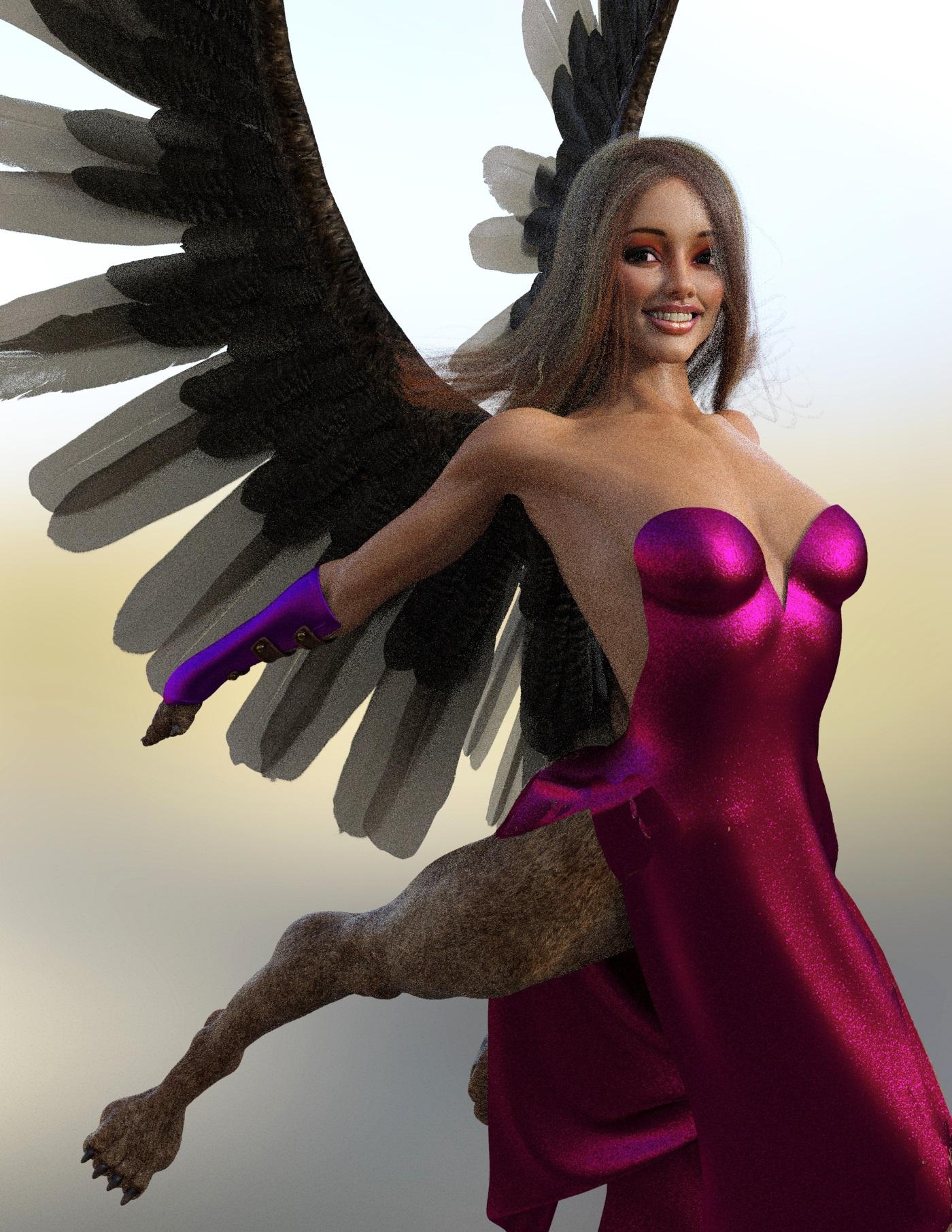
Since I'm not planning on posting this particular render in the DAZ Galleries, I only did a rough clean up of the dress it had some of the fur clipping through. I had tried to use a wind node for this render, but I couldn't make it work. Instead I tilted her, so the dress could move where I want it to.
DazStudio using cross overI want to move my mac to the next OS which the DS will be supporting later. I primarily want to use the DazStudio to Blender bridge as I have 1000+ items I want to use. I could use one of the over tranwports mccasuals or defmorphic or the other one on gumroad. I am not goiug to be doing rendering per se as I want to pose, place texture, load morphs and then transfer to blender to tweek and render. Has anyone tried DS with Cross Over?
Progress with Running Track Freebie (Hurdles + G8F Hurdles Poses)The lights use Sun/Sky which can be a little erratic for some. I do like lighting with HDRI's for this, but it's not something I can make myself, so avoided using any in the distribution file.
It may be possible to reduce the protrusion of the lines from the track. I included a morph in the main body to do this. Think it's called 'Less-More Prominent'. The lines are raised to avoid rounding errors hiding them under the track surface and disappearing, and it's sometimes not needed at full strength. Can't use a texture for the lines as the texture would need to be 51200 x 25600 pixels to get the same resolution in the track surface graininess without texture tiling.
Regards,
Richard.
Sell me on Blender animation over Studio'sI was a C4D user for over ten years and made a feature length animated film
with it.I was part of the Mass exodus ,in the C4D community, over to Blender after 2.8 was released and Maxon subscription(or $3800 USD perpetual with a very limited upgrade path)
The Xrefs system was legndary, in the major online C4D forums, for being useless and I beleive they have some new "Team collab/render"feature to replace it.
But this is not a thread to compare C4D to Blender particualry since C4D
Effectively requires VFX artists to buy a third party Xparticles subscription
from Insyduim to be even close to parity with Blenders/Maya's native unified
Dynamics/VFX capabilities.
I agree that Maya has the best collaboration system for large team projects
but that is why Autodesk prevails in the industry ,yes??
I am sure you were just being facetious comparing Blenders content managment
to the Daz Data system.For a team project we would literally need to every member maintain an identical
Runtime& Data folder locally on his/her machine as one missing morph file
from that brodignagian, hard path dependent Data folder would disable some apsect
of your Genesis figures.And frankly a 200 megabyte Blender scene file is a joy compared to the 6-19 gigabyte
Files reported By C4D users bringing over a single naked G8 female(and her morph Data),into C4D
Via the Daz bridge.And with Blender I can safely invest in third party plugins Like hard ops/box cutter,Decal machine, etc with litte fear of a loss of that added functionalty
By an incompatible core application update, because I can safely& easily acquire and run previous versions of blender on the same workstation.With Daz studio....not so much
 How do I unlock more shaping options for Genesis 3 female?
https://www.daz3d.com/fantasy-creature-creator-hd-morph-pack-for-genesis-3-female
for a more monstrous look.
How long does it take you to load G8F?The new beta (4.15.0.14) contains modified timing messages in the log file for morph loading (and some of the ones messages present before, I think in .12, have gone.
EDIT: I removed the timing figures I had posed. I suspect I've broken something by rebuilding the CMS and, maybe, not properly cleaning the DSON cache.
Where's the real Judy Love?Frinkky said:
tsroemi said:
Cool, thanks for letting us know! Your test pic just disappeared, by the way. - Oh, now it's back, great!
I neglected to save it as sRGB so it looked a bit flat in-browser.
I see, sure looks very nice now. The morph also looks much better to me like this.
Where's the real Judy Love?I bit the bullet - figured it'd be useful as a blending shape, quick test below, but doubt the skin will be used. I do wish either an update includes the older version or it's released as a separate character - I mean, after 25 iterations, you've pretty much created a whole new character by then?
For those looking to reduce the overall effect of the lips, there are two hidden dials that can be set to zero: "RN Judy Face Structure Adjust II" and "RN Judy Lips Shape".
Edit: Judy's head morph is only applied 36% - blended with a custom morph.
How long does it take you to load G8F?1. Have you uninstalled content that you've paid for because G8F takes so long to load?
Yes... a bunch.2. Have you slowed down, or even stopped, buying G8F characters because G8F takes so long to load?
I wanna say yes, there are a lot of PAs whos characters (to my eyes anyway) are basically the same... so I don't buy any from them anymore.... and culled the ones from those PAs down to just one or two.
Regardless, I am a sucker for characters that "add something to the G8 gene pool", and aren't just your standard Playmate type of character.
If Daz could support/make use of multi-core/multi thread processors to speed up the morph loading process, that would be awesome.JCMs is gone from Blender!Question 1.
In the Blender 2.90 compatible bridge, JCMs was exported and could be controlled manually in Blender.https://www.youtube.com/watch?v=TEXzmUSzX30&t=1127s (18 : 33 ~)
However, in the bridge updated after 2.91, JCMs are not exported, so manual control is not possible.
I added the morphs to be exported in the bridge popup and checked 'Minimal Morphs', but it was useless.
How do I properly export JCMs like in the old version?Question 2.
What is a 'Morph Exporter' in the bridge option?
Could this be used to export morphs to a blender?Question 3.
As you can see in the last image, when posing, many parts are transformed differently from Daz.
How do I fix this?
I hope it doesn't work differently from Daz.Where's the real Judy Love?tsroemi said:
Sevrin said:
tsroemi said:
Ascania said:
tsroemi said:
I've done a real quick test with her head morph dialed down to 80%, it's much more natural I think, and still pretty unique. Here's the result, render very much unfinished obviously (am on the laptop atm).
I'm having trouble with the hair though, it's pretty but it doesn't let me render another color than the standard dark brown it comes with. I can change the color alright, and the preview window (textured preview) shows the new one, but Iray preview and Iray render give me the dark brown again. Is anybody experiencing the same thing? I've checked the surfaces, they all sport the new texture. Kind of strange ...
Select the hair and the hair surface and it works for me.
Thanks, must have clicked beside the surface panel instead of in - hair colors are working now for me too!
That's weird. Just double-checked here and having the hair selected without selecting surfaces worked fine for me. Tried all colours. Current Public Build.
That IS strange! Maybe it's because I'm on 4.14? Everything is working properly though. - Come to think about it, I've had a feeling since a few weeks that I did have to select surfaces more often than before to apply new shaders ... I just never paid that much attention. Maybe it's really due to version 4.14 being somehow different in that respect.
Yeah, if you're planning to use 8.1 stuff, I can't suggest using anything before DS 4.15. The current public build has the latest version of Iray.
Where's the real Judy Love?Sevrin said:
tsroemi said:
Ascania said:
tsroemi said:
I've done a real quick test with her head morph dialed down to 80%, it's much more natural I think, and still pretty unique. Here's the result, render very much unfinished obviously (am on the laptop atm).
I'm having trouble with the hair though, it's pretty but it doesn't let me render another color than the standard dark brown it comes with. I can change the color alright, and the preview window (textured preview) shows the new one, but Iray preview and Iray render give me the dark brown again. Is anybody experiencing the same thing? I've checked the surfaces, they all sport the new texture. Kind of strange ...
Select the hair and the hair surface and it works for me.
Thanks, must have clicked beside the surface panel instead of in - hair colors are working now for me too!
That's weird. Just double-checked here and having the hair selected without selecting surfaces worked fine for me. Tried all colours. Current Public Build.
That IS strange! Maybe it's because I'm on 4.14? Everything is working properly though. - Come to think about it, I've had a feeling since a few weeks that I did have to select surfaces more often than before to apply new shaders ... I just never paid that much attention. Maybe it's really due to version 4.14 being somehow different in that respect.
Where's the real Judy Love?Sevrin said:
tsroemi said:
Ascania said:
tsroemi said:
I've done a real quick test with her head morph dialed down to 80%, it's much more natural I think, and still pretty unique. Here's the result, render very much unfinished obviously (am on the laptop atm).
I'm having trouble with the hair though, it's pretty but it doesn't let me render another color than the standard dark brown it comes with. I can change the color alright, and the preview window (textured preview) shows the new one, but Iray preview and Iray render give me the dark brown again. Is anybody experiencing the same thing? I've checked the surfaces, they all sport the new texture. Kind of strange ...
Select the hair and the hair surface and it works for me.
Thanks, must have clicked beside the surface panel instead of in - hair colors are working now for me too!
That's weird. Just double-checked here and having the hair selected without selecting surfaces worked fine for me. Tried all colours. Current Public Build.
I'm using 12. Just having the hair selected without the surfaces didn't work while a full select did.
Where's the real Judy Love?tsroemi said:
Ascania said:
tsroemi said:
I've done a real quick test with her head morph dialed down to 80%, it's much more natural I think, and still pretty unique. Here's the result, render very much unfinished obviously (am on the laptop atm).
I'm having trouble with the hair though, it's pretty but it doesn't let me render another color than the standard dark brown it comes with. I can change the color alright, and the preview window (textured preview) shows the new one, but Iray preview and Iray render give me the dark brown again. Is anybody experiencing the same thing? I've checked the surfaces, they all sport the new texture. Kind of strange ...
Select the hair and the hair surface and it works for me.
Thanks, must have clicked beside the surface panel instead of in - hair colors are working now for me too!
That's weird. Just double-checked here and having the hair selected without selecting surfaces worked fine for me. Tried all colours. Current Public Build.
Do head morphs need re-rigging?N_R Arts said:
Matt_Castle said:
Yes, as the head also has bones. Things like the eyes and jaw will have the wrong rotation centres if it's not done.
Brilliant! Thank you ^^
(I've got a lot of work to do ^^' )
apply the morph -> Joint Editor -> right click -> Edit -> Adjust Rigging to Shape
Takes seconds. You might still have to readjust the bone for the eyes. While this feature is fantastic it is not 100% perfect. More like 97%.
New! Novica & Forum Members Tips & Product Reviews Pt 14@Novica, the spreadsheet started so I could track my characters, morph packs, and hair and I make notes on the characters there. I am pretty 'anal retentive' about things and even for my fun things I have to have charts, files, and all ways to cross-check stuff. The Google doc charts are one. File folders are another. Each time I buy a product, I download the promo pages as a .pdf and file them in folders consistent with their purpose or how I want to use them. For example props that are actually environments, all get put there under the PAs name, or Daz Originals, or by type if a one-off by that PA. A material texture set is kept with its primary set.
For new purchases I have a folder that has subfolders with purchase date and includes the shopping cart printout, the confirmation email, and the .pfns. As I make sure everything has downloaded correctly and it works, I then move the .pfn to the category folder where it is further filed. If there is an issue with a product, That sub-folder stays open, and copies of all reports to Customer Service are printed and kept. My oldest one goes back to 26 Feb 2020. The same for utilities/scripts I want to study before filing them away. That is a challenge for me because my 'free' time is generally in the early evening when I am mentally tired. But when all is done, the sales documents are filed in a folder for 'Orders' separated by years & months.
But when the store goes crazy or after that User Data base reset I did on Drake happened and messed up Smart Content so badly, I rely on my external tools so much. Also my online Product Library to locate something I know I have, but can't seem to find anymore.
On the character chart I list the name, generation, sex, height, SKU, PAs, Notes (Briefly what is included, but also ethnicity (so I can find skin materials for projects), and what I liked or what I need to be careful about. The hair it is much the same, except I have columns for all Generations and tick the box if it can use that hair, even if not designed for it originally; simple hair length; 3DL or Iray mats; comments where I give more details.
My tutorials are also listed. I looked at them as whether they are basic, advanced, post-work, or creation-advanced.
I gave up on wardrobe, environment, props, and the rest. Just too much. And I have about half of what you have.
What I found that I really appreciate about the folders, is when a product has been removed from the store and you can no longer find a promo page for it and your Product Library page does not tell you what the product was designed to work with: eg, it is a texture set for an outfit, set or prop. I have the printout that I made when I bought the item. (That is if I can remember what the item was originally attached to!)
I think what everyone has to deal with is we are all individuals and what works for one, may not work for another. That's okay. We all have other things we have to do besides artwork in DS. Arranging our 'tools' so we can sit down and get to work when we have a moment to do so, is what this is all about. We just have to share out ideas and pick the ones that can work for us.
Where's the real Judy Love?Ascania said:
tsroemi said:
I've done a real quick test with her head morph dialed down to 80%, it's much more natural I think, and still pretty unique. Here's the result, render very much unfinished obviously (am on the laptop atm).
I'm having trouble with the hair though, it's pretty but it doesn't let me render another color than the standard dark brown it comes with. I can change the color alright, and the preview window (textured preview) shows the new one, but Iray preview and Iray render give me the dark brown again. Is anybody experiencing the same thing? I've checked the surfaces, they all sport the new texture. Kind of strange ...
Select the hair and the hair surface and it works for me.
Thanks, must have clicked beside the surface panel instead of in - hair colors are working now for me too!
Where's the real Judy Love?tsroemi said:
I've done a real quick test with her head morph dialed down to 80%, it's much more natural I think, and still pretty unique. Here's the result, render very much unfinished obviously (am on the laptop atm).
I'm having trouble with the hair though, it's pretty but it doesn't let me render another color than the standard dark brown it comes with. I can change the color alright, and the preview window (textured preview) shows the new one, but Iray preview and Iray render give me the dark brown again. Is anybody experiencing the same thing? I've checked the surfaces, they all sport the new texture. Kind of strange ...
Select the hair and the hair surface and it works for me.
Daz 3D is part of

Connect
DAZ Productions, Inc.
7533 S Center View Ct #4664
West Jordan, UT 84084Licensing Agreement | Terms of Service | Privacy Policy | EULA
© 2026 Daz Productions Inc. All Rights Reserved.