-
Figures with custom Nipples are not exported through the bridge.
@acdum1857 Well jcms do work with diffeo, you have to load them and eventually transfer them though, as explained in the docs. The new 1.6 version also gets a easy import that does it for you.
Any way to reduce size of overall Daz library without just uninstalling content?Brettnuckles - in so far as documentation all I know of with this script is what the author put on Sharecg. I take scenes to this other computer and they load up fine using the duf file it makes. Normally I use the exe version.
As the scenes have the same data structure as my content library I sometimes copy them over my content library on the second machine such that products I have not installed there get the bits and pieces used in any scenes I take over to that machine.
Another thing I do to avoid being stifled by slow loads is Multitask. I have Beta Daz and Release Daz running normally as well as Gimp and Hexagon. My content manager on one version of Daz3D is very blinkered so it loads fast. While I am rendering or doing anything with a wait I tab to the other Daz to look for assets I want or make a morph I will need etc. Basically anytime I need to wait I just flip to the other and do something.
CM152335 - as per what you say yes I pretty much abandon Smart Content and just use Content Library as I am also hiding content when not used by my present phase of work.
Having a mcm on the g8 figure controlled by a morph on a geograftwouldn't you need to save the G8 dial as a morph asset, and redistribute that file along with your geograph? assuming you want to share this out?
e: if you're importing the morph, it will be present on the current figure you imported it on, but it won't be present on any other copies of the figure you load, it sounds like you need to save a morph asset including your new dials
[Released] Character Converter from Genesis 3 Female to Genesis 8 Female(Now Conv JCMs) [Commercial]misterchristianx_7061d8fce6 said:
I purchased the two g3 to g8 character converters (which are really slick!). Sadly I've already run into an issue more technical than my current know-how.
Say I convert Kimo. It creates the head and body dials but does not create the Kimo character dial (one dial for both). Instead if creates Unknown Genesis 3 Male. The next character converted does the same thing and overrides the previous unknown male morph.
I know I need to rename the moprh but I also have to update the newly created actor. I'd assume the converter should be doing this, but isn't. This occurs on both g3m and g3f.
Is there a secret to making it do the work for me? ;)
18:37:53 GMT-0600 (Mountain Daylight Time): Adding Files...
18:37:53 GMT-0600 (Mountain Daylight Time): Adding "character" file: E:/Daz3d/People/Genesis 3 Male/Characters/Kimo 7.duf
18:38:23 GMT-0600 (Mountain Daylight Time): Executing Script
18:38:23 GMT-0600 (Mountain Daylight Time): Selecting Preset: E:/Daz3d/People/Genesis 3 Male/Characters/Kimo 7.duf
18:38:23 GMT-0600 (Mountain Daylight Time): Converting character from E:/Daz3d/People/Genesis 3 Male/Characters/Kimo 7.duf to E:/Daz3d/People/Genesis 8 Male/Characters/Kimo 7.duf
18:38:32 GMT-0600 (Mountain Daylight Time): Kimo 7 is of type Actor/Character
18:39:59 GMT-0600 (Mountain Daylight Time): Copy Icons from E:/Daz3d/People/Genesis 3 Male/Characters/Kimo 7.duf to E:/Daz3d/People/Genesis 8 Male/Characters/Kimo 7 Genesis 8.duf
18:39:59 GMT-0600 (Mountain Daylight Time): Copy Categories from E:/Daz3d/People/Genesis 3 Male/Characters/Kimo 7.duf to E:/Daz3d/People/Genesis 8 Male/Characters/Kimo 7 Genesis 8.duf
18:39:59 GMT-0600 (Mountain Daylight Time): Cannot find assets for old preset /People/Genesis 3 Male/Characters/Kimo 7.duf
18:39:59 GMT-0600 (Mountain Daylight Time): Execution Complete.I need the full Daz log but I am pretty sure what is happening is that the script cannot get the right metadata for the vendor and character name. It defaults to Unknown Genesis 3 Male. Unfortunately, DS for some users starts doing this and screws things up. You can get around this using the Custom Character script as you input the vendor and character name. Load Kimo 7 in and then convert it. (Make sure to delete your old morphs first)
Having a mcm on the g8 figure controlled by a morph on a geograftQuestion, is it possible to have a morph on the g8 figure be controlled by a morph on a figure that's geografted to the g8 figure?
I'm cleaning up a geograft rig, I created an mcm on the g8m figure that that is connected to a morph on the geograft. If the user dials in the morph on the geograft, it's suppose to trigger a morph on the g8m figure to lift some of the polys around the geograft ( but on the g8m figure) up to give the geograft more room.
I can rig this up fine, and I can save it okay and when I look at the g8m morph file, it's showing its controller is on the geograft. However, when I load the g8m figure and look at the morph, it has lost the controller. I checked the log file and I don't see any errors when it loaded the morph on g8m.
Am I missing something?
[Released] Character Converter from Genesis 3 Female to Genesis 8 Female(Now Conv JCMs) [Commercial]I purchased the two g3 to g8 character converters (which are really slick!). Sadly I've already run into an issue more technical than my current know-how.
Say I convert Kimo. It creates the head and body dials but does not create the Kimo character dial (one dial for both). Instead if creates Unknown Genesis 3 Male. The next character converted does the same thing and overrides the previous unknown male morph.
I know I need to rename the moprh but I also have to update the newly created actor. I'd assume the converter should be doing this, but isn't. This occurs on both g3m and g3f.
Is there a secret to making it do the work for me? ;)
18:37:53 GMT-0600 (Mountain Daylight Time): Adding Files...
18:37:53 GMT-0600 (Mountain Daylight Time): Adding "character" file: E:/Daz3d/People/Genesis 3 Male/Characters/Kimo 7.duf
18:38:23 GMT-0600 (Mountain Daylight Time): Executing Script
18:38:23 GMT-0600 (Mountain Daylight Time): Selecting Preset: E:/Daz3d/People/Genesis 3 Male/Characters/Kimo 7.duf
18:38:23 GMT-0600 (Mountain Daylight Time): Converting character from E:/Daz3d/People/Genesis 3 Male/Characters/Kimo 7.duf to E:/Daz3d/People/Genesis 8 Male/Characters/Kimo 7.duf
18:38:32 GMT-0600 (Mountain Daylight Time): Kimo 7 is of type Actor/Character
18:39:59 GMT-0600 (Mountain Daylight Time): Copy Icons from E:/Daz3d/People/Genesis 3 Male/Characters/Kimo 7.duf to E:/Daz3d/People/Genesis 8 Male/Characters/Kimo 7 Genesis 8.duf
18:39:59 GMT-0600 (Mountain Daylight Time): Copy Categories from E:/Daz3d/People/Genesis 3 Male/Characters/Kimo 7.duf to E:/Daz3d/People/Genesis 8 Male/Characters/Kimo 7 Genesis 8.duf
18:39:59 GMT-0600 (Mountain Daylight Time): Cannot find assets for old preset /People/Genesis 3 Male/Characters/Kimo 7.duf
18:39:59 GMT-0600 (Mountain Daylight Time): Execution Complete.SereneNight’s Sci-Fi Fun Thread 3One thing to note about Tjark is that, depending on what else is going on in your scene, it may throw an impressive render time hit into the mix. I did one render with it -- which, to be sure, had three other characters and their hair as well -- and it took 40 minutes. (Dropped to CPU, but I expected that, with all that going on.) I swapped that out for Laticis Imagery's Crew Cut Hair, and render time dropped from 40 minutes to 5 minutes, and that was literally the only thing that changed about the image.
Sitric Hair is dForce strand hair. It really is not at all similar to Tjark in shaping or type, since it's got all sort of mohawk variations, and Tjark is pouffier than Nick, for the most part, although that's a bit closer. Sitric does have a fair number of shaping morph, mostly but not entirely along the lines of variations in mohawks.
Help! How can I solve this problemImages duly removed. As SimonJM says this is most likely to be a corrective morph kicking in when it shouldn't. Check, via Install manager/Daz central if you isntalled through them or via the Updates installatate filter at the bottom of the products tab of Smart Content if you installed through DS, that you are not missing any product updates, then do the check through Parameters with the figure selected and only the leg bend that causes the issue applied.
"Coming Soon" Diigitals timer on main Daz page?"There are approximately 2.2 billion individuals with access to the Internet or mobile phones who don’t currently have access to traditional exchange, these people are primed for the Cryptocurrency market. Kenya’s M-PESA system, a mobile phone-based money transfer, and microfinancing service recently announced a bitcoin device, with one in three Kenyans now owning a bitcoin wallet. (Let me repeat that again. 1/3)....
"The future appeal of cryptocurrencies lies in allowing you ultimate control over your money, with fast secure global transactions, and lower transaction fees when compared to all existing currencies.
"When used properly and fully understood it would be the initiator of many emerging systems that will fundamentally change our global economic system."
https://www.huffpost.com/entry/7-incredible-benefits-of-_1_b_13160110
(emphasis mine)
(I still think NFTs are stupid.)
Celebrity Look-a-Likes for 3D figures part 3Wow, excellent work with this thread!

Please, allow me to contribute:
1)- LyHeather, by Lyoness: has got to be at least inspired by actress Dianna Agron. Although her angles seem slightly softened up (nose, jaw…), it’s a very close match.

Also, by Mousso: (not 100% likeness, but some inspo I reckon)
- Ginny: Megan Fox (+“Ginny” = Jennifer’s Body movie.
- Pandora: hints of Selma Blair.
- Mysti: Elizabeth Olsen (+”Mysti” = Scarlet Witch in Avengers.
- Chanel: Milla Jojovich (Lost Lagoon Bundle = her character in Return to the Blue Lagoon.
- Rhogue: Daisy Ridley ("Rhogue" may be referencing Rogue One, part of the Star Wars franchise).
Now, for a small request:
Anyone knows of a good Sharon Stone (circa Basic Instinct) morph? I’ve looked about everywhere and came up with nothing.
Reference pics:
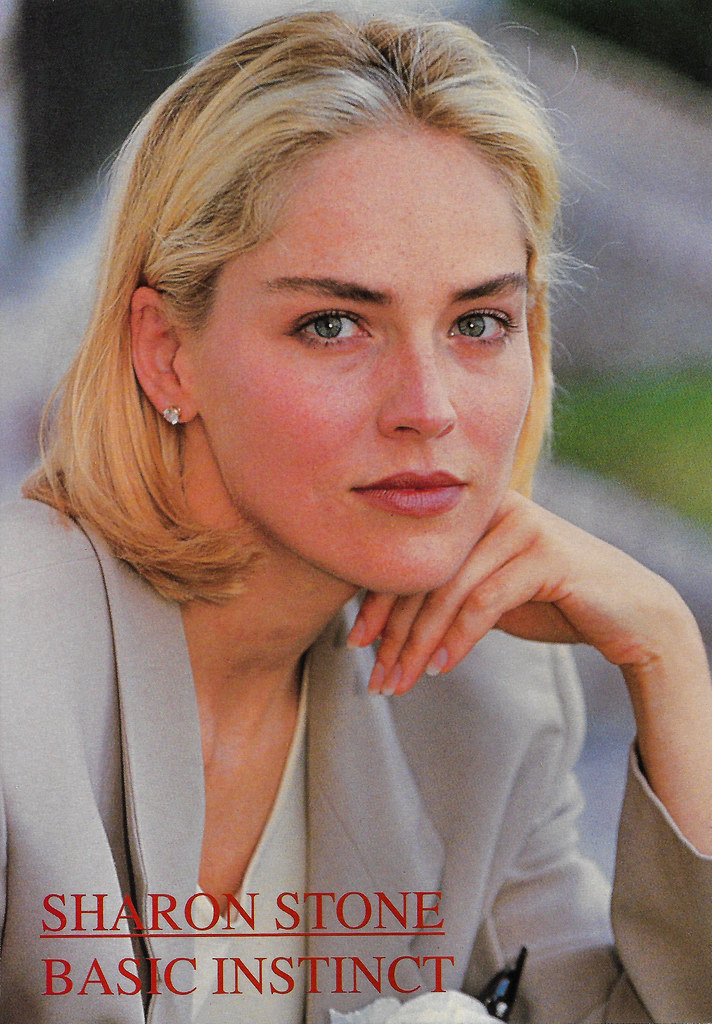
Plus: supermodel Doutzen Kroes would be awesome, too!

Thanks in advance! :)
Eyeslashes won't follow when have facial animationAs for diffeo you have to merge rigs then transfer morphs to the eyelashes. This can also be done with the easy import option that does it for you.
What's the one thing you've always wanted to see sold at daz but never have?I think the most important item I would love to see instore is a utility that will make any hair fit properly with the Growing Up Youth Morphs. This utility could inject a series of morphs into the hair that we can adjust to make the hair 'look' better on child characters. As it stands, hair often distorts and shrinks below the Upper Neck and around the fringe and hairline. Some hairs seem to exhibit this behavior worse than others.
I am surprised no one has made one yet. I think a utility to make hair fit properly with the Youth Morphs will sell incredibly well. At least, for those of us who enjoy creating and rendering child characters.
Other items I long to see in the Daz store include:
1. Child appropriate and everyday simple hairstyles (for girls and boys). A lot of hairstyles are too supermodel for my tastes. The hair should be made for both G3 and G8 since I use both generations equally.
2. I think someone already mentioned hairs with changable bangs/fringes and other styling options, so I will second that. I would also like to see hair with partings that can be moved to the left or right. Hairstyles with clip-on braids. Hairstyles with hairbands. Hairstyles with slides and pins.
3. Hair content creators should make their hair more compatible with the Youth Morph. Especially if no one is going to create the universal utility I already mentioned.
4. Greater support for 3Delight. I feel 3Delight is being sadly neglected. I find I am using 3Delight a lot more than Iray recently. 3DL just seems to be less of a resource hog on my computer than Iray. At the moment I am using the RSSY Iray to 3DL converter on a lot of my purchases.
5. Real historical clothing, not historical fantasy. What I mean by this, is clothing that would be worn by normal, everyday people in history. In particular, Ancient Persian, Ancient Greek, Ancient Mesopotamian, Nabataean and Phoenician. I've seen some Ancient Egyptian clothing instore, but the vast majority of it is Historical Fantasy and/or for the royal characters.
6. Real historical hairstyles. This I think fits in with my wish for more everyday, simple hairstyles since there's quite a lot of overlap here.
7. Temples. Especially ancient temples. Perhaps a replica of the Sanctuary of Artemis at Brauron. Ancient Sassanid and Achaemenid Persian fire temples. Nabataean High Places. A Greek Temple of Apollo...
8. Interacting figure pose presets featuring children and parents/adults, and between younger and older siblings. Currently I either search for presets that are a close fit to what I want and adjust them, or I build my poses from scratch. But then, all pose presets require adjusting anyway depending on the characters and their relative sizes. I think this would really help newer users who are still learning how to adjust and pose their characters. I remember the frustration I had in posing characters that actually looked like they were interacting with each other when I first used Daz Studio.
In addtion, please make sure poses do not change the eyes, scale and expressions. I have found a lot of pose presets also do strange things with the eyes and expressions out of the box, and some even change the character's scale! My workaround so far has been to load the pose and resave it again without the changes.
Resources for performing basic Daz tasks in Blender?Sharing poses and animations depends on two characters having the same skeleton with the same bones names. You would basically need to delete the CC3 skeleton, take the skeleton from a Daz character, and reskin the CC3 character. Basically, any generic tutorial on rigging should do; just skip the part where you create a skeleton and focus on the part where you create the armature modifier and weight-paint it so the deformations match. I find Grant Abbitt is quite beginner friendly:
In theory, if you convert both the Daz and CC3 skeletons to Rigify, you can swap poses because I believe Rigify uses a standardized skeleton. But in another thread one of the Daz bridge devs said the Rigify converter wasn't working properly and needed a complete overhaul, so there might be issues.
As for conforming clothes, AFAIK the Data Transfer modifier works just like Daz's Transfer Utility:
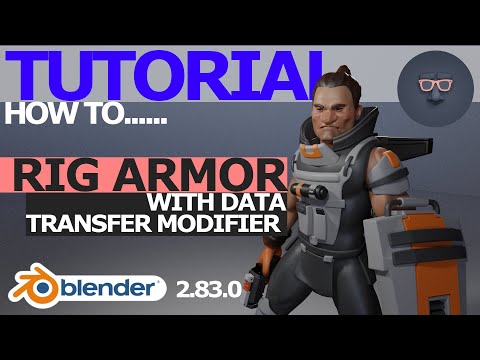
Once you have the armature and the character set-up properly, in theory you should be able to just copy the rigging to the clothing.
What's the one thing you've always wanted to see sold at daz but never have?I'm not going to knock morph grabber because I waited so long for a DS tool like this, but a more advanced one like the Poser Morph Brush would be great. The Poser one creates dials in the Parameters Tab so you can later make adjustments. With clothing it also recognises there's a figure benieth the clothes so you can't push morphs inside (below the skin) the character wearing it. And a good set of functions like smooth, flatten, tighten and loosen clothes or parts of clothes.
ConvertingHello, I bought this https://www.daz3d.com/cartoon-parrot-for-daz-studio Cartoon Parrot, and I was trying to transfer him to iClone through 3dxchange. However, after watching all the tutorials in the world, I still can only just get the bird barely into iclone, and his mouth doesn't open or close. I've tried to remap bones, I've tried all the Daz3d T-pose things C-Pose things, converting, etc. basically everything you can find on the net.
I'm just curious, can this birds mouth be properly imported into iclone so i can use the Realtime stuff I've also purchased for iclone? I simply want this bird to move around with my movements and talk when I talk.
Any help would be appreciated.
Best,
Mano
Not-so-pretty fingernails and handshttps://www.daz3d.com/cosmetics-and-poses--nails has some chipped and dirty nail stuff. I guess you could transfer the morphs to a male G8 since there's no mention of it being HD. I don't know how well nail textures transfer between genders though. Never tried it. But dirty nail options made for men would be very nice.
Daz Studio to Unrealmarcuskotarski said:
Hey everyone, I'm fairly new to Daz3D and 3D modeling in general, so bare with me. I'm sure I'm asking a question that has been asked over and over but I'm not seeing a definite answer and so I figure I'll ask anyways.
I'm trying to export a 3D model gorilla that I've purchased from the Daz Store to my UE Project and have a couple morph target parameters. Goal being using the Unreal Live Link Face App to control the Gorilla's face. It's a Gen 8 Male so it should be able to export. However when I try to export any morph parameters Unreal crashes.
I am using the Daz to Unreal Plugin and it works just fine with everything else, but as soon as I add a Morph. It crashes. Is there something I'm missing or a process I can do to do this more effectively? Any input is appreciated.
My version of Daz studio is 4.15 Pro
My Version of Unreal Is 4.26.1if it have the "dforce hair" remove it, it can be what is crashing it, dforce hair is a "daz only system" which can't be used outside daz, then you must remove it from the character to be able to export it, also others stuffs like "fibermesh or strand based(too much high poly hairs) can also make it crash or have huge perfomance issues, then avoid it too.
Exporting a custom morph so it can be used. Helppjzanca said:
I'll try to explain again based on what you've said. I'm going to assume you have a prop/figure in a state where you have morph dials working the way you want them to work and go from there. Converting it to weight mapping or not has nothing at all to do with morph targets so I'm not going to touch that at all.
Select the object that has the morph dials working the way you want them to work (i.e. the one you showed 3 posts up)
File -> Save As -> Support Asset -> Figure/Prop Asset
Pick a directory and assign a name
Now your object is saved into the library with morphs embedded into it. You can open a new scene and load your object from the library (don't import, don't merge any other scene files, just load it from the library). If this doesn't work for you repeatably I don't know what to tell you, maybe contact DAZ support directly.
Ah I getcha now. Thanks
Exporting a custom morph so it can be used. HelpI'll try to explain again based on what you've said. I'm going to assume you have a prop/figure in a state where you have morph dials working the way you want them to work and go from there. Converting it to weight mapping or not has nothing at all to do with morph targets so I'm not going to touch that at all.
Select the object that has the morph dials working the way you want them to work (i.e. the one you showed 3 posts up)
File -> Save As -> Support Asset -> Figure/Prop Asset
Pick a directory and assign a name
Now your object is saved into the library with morphs embedded into it. You can open a new scene and load your object from the library (don't import, don't merge any other scene files, just load it from the library). If this doesn't work for you repeatably I don't know what to tell you, maybe contact DAZ support directly.
G8 - Basic v Dev Load v Real WorldThe Real World section that you are looking at is not a different version of the character. It's just the classification assigned to the character by the creator, and where the morph dials are stored. Essentially, those sections in the Parameters tab are a way of organizing different types of morphs so they can be found more easily there. Character morphs are set up so that their various shaping dials appear under the appropriate category. As MimicMolly said, the "realistic" morphs go under Real World, whereas an elf or troll morph would be found under Fantasy Sci-Fi, and toonlike character would go under Stylized. The same goes for any other sort of morph like noses, teeth, ears, and so on.
I don't have the character to confirm, but if it follows the usual pattern, Aurora's head morph (just the head shape), should be found under Head>People>Real World, because it's a head shape, she's a specific character with a name, and is classified as realistic. Her body morph will be under Full Body>People>Real World, and her full morph (the head and body and sometimes scaling values) will be in People>Real World. It's a filing system for the shaping morphs, basically, so you can view only the things that fit into the selected category instead of looking at every morph you've got installed in one huge list all the time.
The Actor preset that you show in your screenshot is essentially a shortcut. Instead of you loading the base G8F character, going to Parameters and dialing in Aurora's shape, then finding and loading her materials, using the Actor preset loads G8F with the Aurora shape and materials already applied.
Daz 3D is part of

Connect
DAZ Productions, Inc.
7533 S Center View Ct #4664
West Jordan, UT 84084Licensing Agreement | Terms of Service | Privacy Policy | EULA
© 2026 Daz Productions Inc. All Rights Reserved.