-
Genesis Breathing Expansions
Shhh. You & I know this is a potentially saleable item... Don't let pjzanca know too. To be honest other morphs available on sharecg by Squishy (aka pjzanca) are up to saleable standard too.
The tummy breathing morph is perfect to my eyes.
Regards,
Richard
August 8.1Sevrin said:certaintree38 said:
Torment is non binary too, though people tend to misgender them because it was less overt and only mentioned in the description. I <3 Torment. (https://www.daz3d.com/torment-8-1)
Not sure human/demon is non-binary. JK. Torment is fine, but it's a different concept, and better executed.
lol. Yeah, the new character's body morph options are definitely interesting and something I haven't seen before.
Bake to Transforms does not workCris Palomino said:
No. The figure with the nodes that have the transform properties with which to bake their respective values into, is the figure that should be selected when the "Bake to Transforms..." action is triggered. The recipient of the values.
Thank you for clearing that out for me. Unfortunately it still doesn't work. I tried it on linking a morph from the controling figure to a bone's rotation on the controlled figure. This works. Linking two morphs however doesn't work.
NEW 2021 Sales thread: Report Issues Here "There's Always Another Sale™"There's a problem with August 8.1 promos.
They show the same morph combinations with different results. For the less observant, in one image 60%-August Female/60%-Base results in a female-presenting character, and in the other the same combination of morphs leads to a male-presenting character. Had to copy/paste, as one of the images refused to open in a new tab and downloaded instead. It doesn't matter to me whose fault it is, but it should be fixed.


Edit: The same issue exists on the Male side
Subdragon Expansion Not Working in D|S 4.12I think they mean the "DzCreateExPFiles-SDrgn.bat" file, which you would have used on the original SubDragon to initialize the morph injection sites.
3D Art Freebie Challenge-March 2021-Winners Up "Chasing Your Golden Dreams" -Entries Thread OnlyIt appears my dreams have shrunk a bit recently.. Had hoped to be able to do an image with a couple of sprinters taking off on the athletics track, but that didn't quite work out due to re-modelling of parts of the track taking longer than I'd hoped - I ended up having to do programming to add features to my modeller to make the modelling easier. So, here is my little offering.
Golden Tan on Golden Sands
Balmy days are here (well, until Thursday..!) and it's now legal in England to take a day out on the beach, so what could be better to do than pop to the beach & do some socially distanced sunbathing while doing a little people watching?
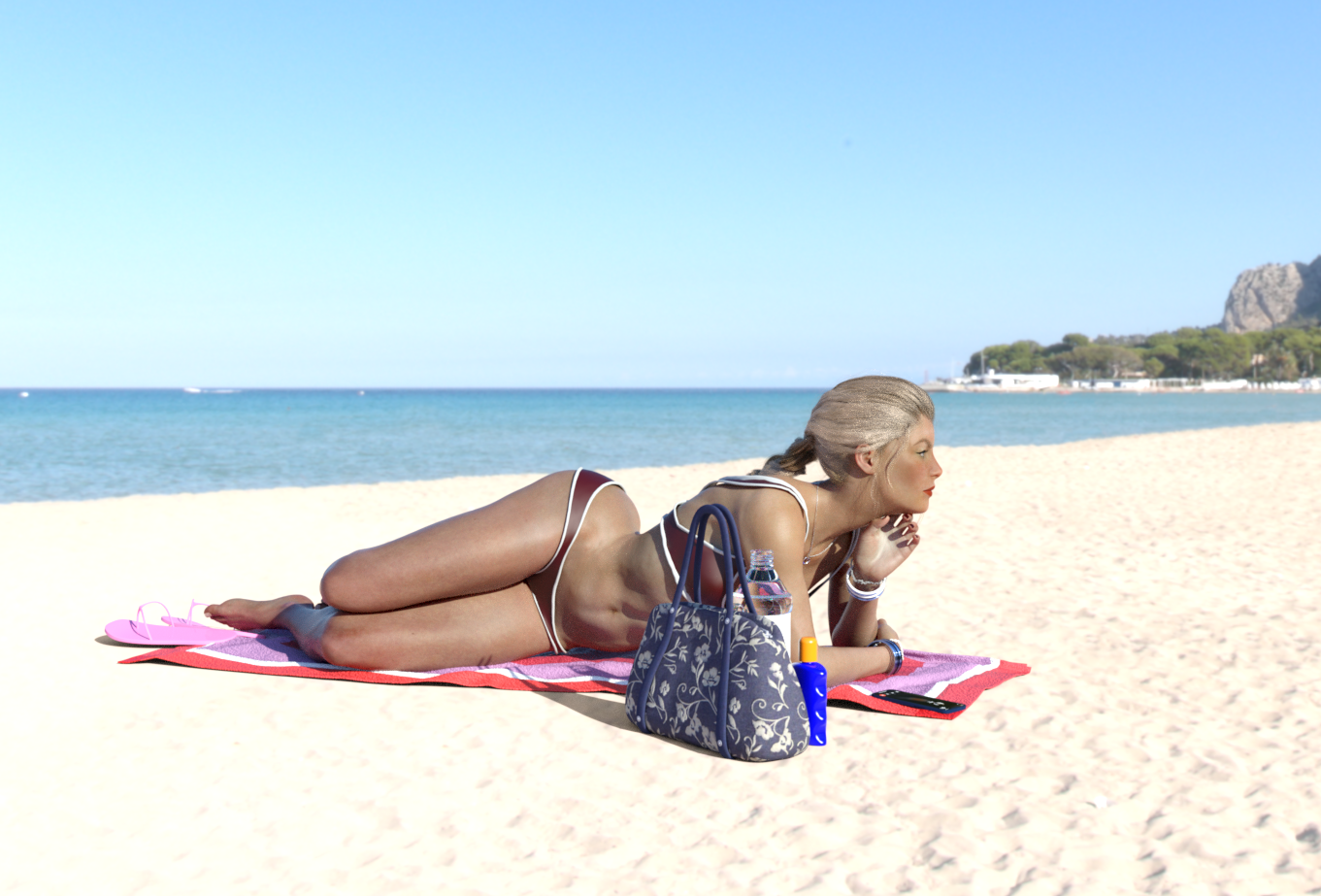
Bracelets
Jewelry Set by Leilana
https://www.renderosity.com/rr/mod/freestuff/jewelry-set/78314Towel
Ildanach
https://www.daz3d.com/forums/discussion/206316/free-beach-towel-updated-with-morphs-and-materials/p1Suntan Lotion Bottle (not sure if it counts, as it wasn't available all month)
richardandtracy
https://www.daz3d.com/forums/discussion/483081/suntan-lotion-bottle/p1Pose
bbarbs Just Reclining Pose 03 (modified)
https://www.renderosity.com/rr/mod/freestuff/genesis-8-female-just-reclining-pose-03/86900Hair
zoro_d Candy Braids Hair.
https://www.renderosity.com/rr/mod/freestuff/candy-braids-hair-for-genesis-8-female-s-/88062Bikini
mostdigitalcreations
https://www.most-digital-creations.com/g8f_bikini_2.htmLeather Shaders for Bikini.
Car related shaders by Tom2099. Dark Red leather shaders used.
https://www.deviantart.com/tom2099/art/Iray-car-related-shader-presets-megapack-539622361
Flip-Flops
iceboy FlipFlops for M4
https://www.renderosity.com/rr/mod/freestuff/flip-flops/62168Handbag
Wilmap's Handbag for any figure
https://www.wilmapsdigitalcreations.co.uk/view_product.php?id=183Water Bottle
mostdigitalcreations
https://www.renderosity.com/rr/mod/freestuff/water-bottle-prop/58597Mobile Phone
Smartphone Prop by Foxclaw
https://www.renderosity.com/rr/mod/freestuff/smartphone-prop/87343HDRI background
HDRIHaven Spiaggia del Mondello
https://hdrihaven.com/hdri/?c=outdoor&h=spiaggia_di_mondello
I tried HDRIHaven Secluded Beach ( https://hdrihaven.com/hdri/?c=outdoor&h=secluded_beach ) but the photo was taken in the wrong place in the end.Paid For Items
Custom Character Morph by TritiumCG
Lightness modified CB Guillia texture.
Mousso Romina Fibremesh Eyebrows.No count Items
G8F Base.Chain bracelets. They are freebies, but I can't remember where they came from. Maybe DA but simply can't find them again. I do know I didn't pay for them.
IRay DAZ Uber clear glass shader used on water bottle plastic. Original Poser shader looked like white polythene in DS. DS Uber Shader used on FlipFlops & diffuse colour turned pink-ish from cowpat brown.
Possibly Suntan Lotion as it wasn't available all month.
I think every item needs free registration prior to download. There was zero post work, as post work is the best way I know for me to wreck an image.
Regards,
Richard.
RIP in peace hivewireMiss Bad Wolfie said:
I emailed renderosity but didn't get a reply.
Most people didn't get a reply ...
Watch this thread:
Making JCMs but can't get them to work properlyI figured the shoulder bend JCMs out!
However now I am encountering a new problem where I can't seem to save an MCM. The figure I am working on works flawlessly and the MCMs work. However, when I save the MCM as a morph asset similar to how I save a JCM, it will not work on a new figure. It's being saved to the same directory where I saved the JCMs for the shoulder bends. I create a new figure and the morphs are still listed like they should be, they just don't work wlike they should. In this case, it's getting the eyes to close fully. I am able to get the eyes to close fully on one figure because the MCM is working, but on another I will try to close the eyes and that doesn't happen.
Genesis Breathing ExpansionsIt should, it will be a morph like any other morph. I'll see what I can do about belly breathing. How does this look?
 Genesis Breathing Expansions
pjzanca said:
actually I can probably make a reasonable morph for this myself - not what you're asking for and I agree it should be "officially" addressed but on the other hand this would take me like 2 minutes.
That would be cool. Will it attach to keyframes in animation properly?
Genesis Breathing Expansionsactually I can probably make a reasonable morph for this myself - not what you're asking for and I agree it should be "officially" addressed but on the other hand this would take me like 2 minutes.
Genesis Breathing ExpansionsYeah there isn't a very good existing morph/bone scale that looks like breathing, the Chest Depth/Width are fine to adjust shape but they don't look like breathing at all.
Values of actor settings is saved into keyframes but it isn't exposed to you in the UI, which is pretty silly tbh and should be improved.
 Mesh Grabber Morph Editor - not behaving as expected. probable user error.
thanks. it seems like things just got a lot more complicated.
"The combined "Load" and "Save" features also provide you with a complete morph editor." - "Finally, it also enables you to easily use your Mesh Grabber work in animations, and to make it available for other scenes and users!"
if i need to do import/export elsewhere, then these statements are more than a little misleading. it might be easier to just do this stuff in 3ds max, or do the mesh grab by hand each time i want it in a scene.
Mesh Grabber Morph Editor - not behaving as expected. probable user error.You didn't export the model and reimport back in with morph loader pro. You can find threads here in tech and in freebies on how to do this. You can not save morphs without morph loader pro, it's part of the program, so not something you have to go and buy.
Mesh Grabber Morph Editor - not behaving as expected. probable user error.hello, i bought the Morph Ed add-on thinking that it would e.g. let me save out a morph i applied to a base G8F and apply that morph to any other G8F-based figure (a Face-Transfer figure in this case)
for my first test i tried widening the eyes. i did my adjustments to the eyes on a vanilla G8F, repeated the adjustments to the eyelashes and saved them out, marked them as favorites. i got two little sliders that i can dial up/down the intensity. so far so good. i saved them both out as shaping presets, with everything unchecked except for the Mesh Grabber box. also saved them as a Morph Support Asset too.
now i thought that i would somehow be able to apply these morphs to my Annika_2 G8F FT figure, but i get the message: "No morphs in the Annika_2 scene node have been marked as favorites" - well of course they haven't, i want to add them in.
clicking the Shaping Preset does nothing. no idea where the Morph Support Assets got to, they don't appear anywhere.
however, with the original G8F figure i can import and save without any issues, everything is there and it works.
long story short - can my MG morphs only be applied to the figure that they were saved from? can they not be used on other similar figures?
Creating morphs for the clothesHello everyone! So my point is that, if I want to create a custom morph for an existing clothes resource, specifically the undressed morph, should I use Blender as the tool? Thanks a lot!
Blender Equivalent to "Adjust Rigging To Shape"I was wondering if there is an equivalent to the "Adjust Rigging to Shape" in Blender (maybe using an addon).
What I mean is, let's suppose that we have an already rigged character and that we create a rather extreme Shape Key that changes severely the proportions of the character. Is there an automatic option inside of Blender that allows to reposition the bones similarly to what the "Adjust Rigging to Shape" does inside of Daz Studio?I was also wondering if the Diffeomorphic addon can do something similar. Let's suppose that we have already exported a character from Daz to Blender using Diffeomorphic. If we now import an extreme morph does Diffeomophic allows the possibility to adjust the bones and the rigging automatically?
3D Art Freebie Challenge-March 2021-Winners Up "Chasing Your Golden Dreams" -Entries Thread OnlyCatch Me If You Can....
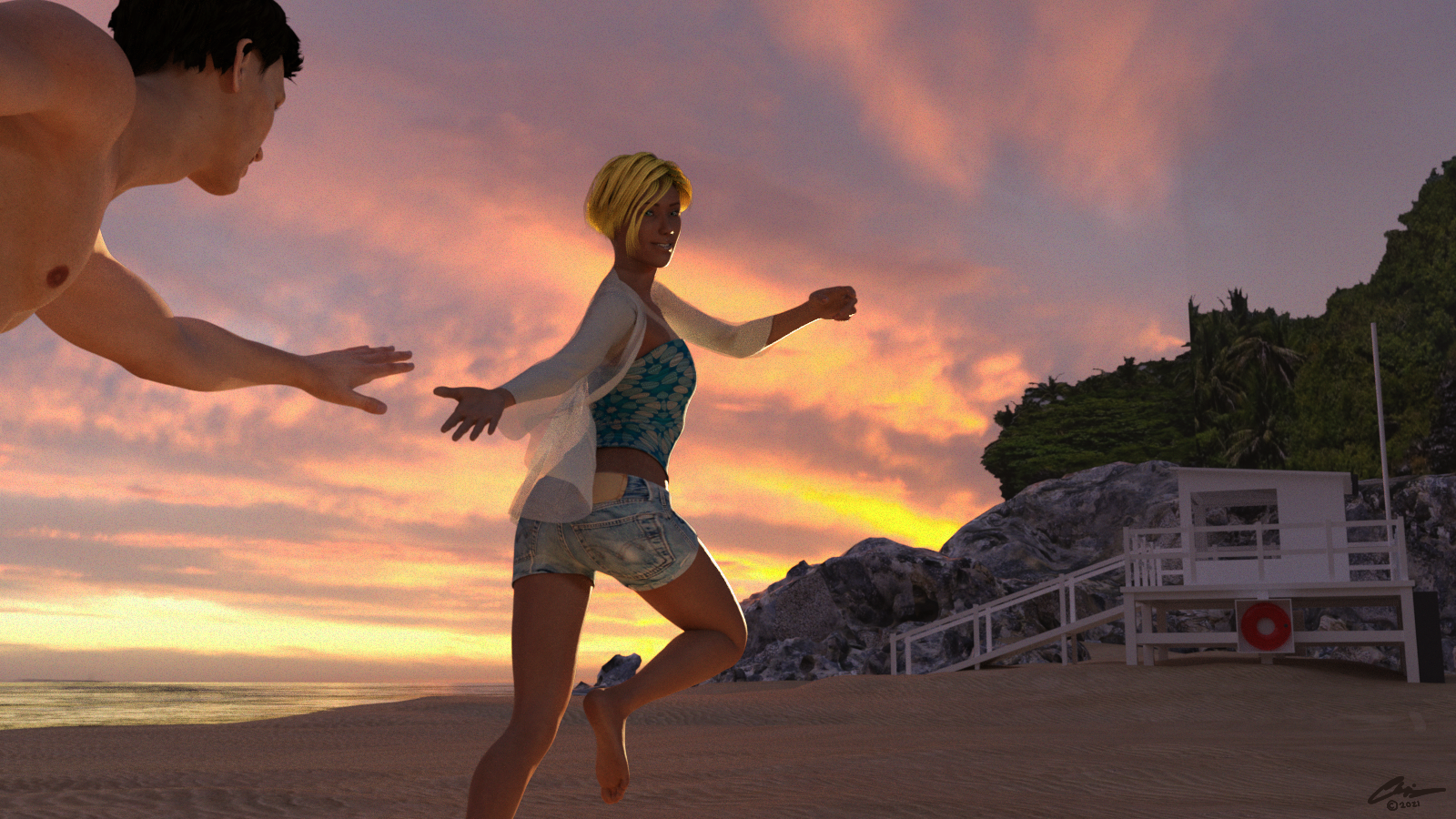
This image has been resized to fit in the page. Click to enlarge.
Used:
G8F
https://www.renderosity.com/rr/mod/freestuff/ella-for-g8f/77903 Ella by Cherubit (morph)
https://www.renderosity.com/rr/mod/freestuff/makayla-for-g8f/84012 Makayla by Felldude (texture only)
https://www.most-digital-creations.com/g8f_open_shirt.htm Open shirt (with Dforce modifier added)
https://www.most-digital-creations.com/g8f_tankini.php Tankini (top)
https://www.most-digital-creations.com/g8f_denim_shorts.htm Denim shorts
https://sharecg.com/v/97167/browse/21/DAZ-Studio/Bobbi-Hair-G8F Bobbi Hair
https://www.renderosity.com/rr/mod/freestuff/pairadimes-lie-tan-lines-for-g8f-basic-wear/86129 PairADimes Tan Lines
https://sharecg.com/v/75399/browse/21/DAZ-Studio/Mostly-Universal-Hair-Shader-Bright-Colors Mostly Universal hair shader - Bright Colors
G8M
https://www.renderosity.com/rr/mod/freestuff/wkd3d-g8m-face-01/87669 Face01
https://sharecg.com/v/97276/view/21/DAZ-Studio/G8M-Walther-2.0 Walther 2.0 (texture)
https://sharecg.com/v/92380/gallery/21/DAZ-Studio/Celebrity-Look-Alike-02 RE5 Chris (hair)
Scene:
https://sharecg.com/v/50722/browse/11/Poser/BEACH-HOUSE Beach House (Life guard station)
https://sharecg.com/v/97113/browse/21/DAZ-Studio/Tropical-Beach Tropical Beach
https://hdrihaven.com/hdri/?c=sunrise-sunset&h=the_sky_is_on_fire Sky HDRI
No purchased items
Rendered in multiple stages and postworked in Paintshop Pro to combine into final image, add noise, and add signature.
Daz to Blender/Zbrush work flowYou're right but you could try to use the Transfer Utility Tool with the original figure as source and rearrange the rigging then. Just an idea, never tried out.
Alistair HD morphsAny Genesis 8 male figure loads wit Alistair morphs at 100%
This happened with a couple of G8f morphs, so I went into the data files and adjusted them, but Alistair's morph files look like this:
‹ ì½]%Gr¦yMý
‚ƒ½kfÇ÷‡nuÏhGµVzWÀ‘ÍÊ&JVÕfÕêæ¿ïóšÅÉ8ä@›Ç-ÛŽ„Ña¥»‡»¹½öíîÿþgŸ}ñû·_ýëÃÓÇ·ïß}ñùŸþEs7Ý5wÍ¿à÷?>|úêí»ß¿×ŸþýÏ>ûì‹·o¬Õ/ßܺÿåþËÿþtMÿŸù>¼{øøö#ÿ±üò7÷¿üÍû§ß~üåß=¼yzÿWß?}ºóþ/Ÿ>}üå_>¾ýøéþíÓóºüêý›?Þ½ùø{}ò³/>ýñÃ}â»÷oÞþþíÓÿó×ïß}zzû»ï?½ºÌ…ù}ÿé[ÿï/Ž_²^Ÿ}ñðÝýÛGnû‡?<üîãÛOþ…/øÞÿ´>=üëÛg
´¾úϾØfà+îšvý²¿l§ß¶ëŸó¿Cóß@ý/
Ÿ¾z|û»§û§?êƒÿÄà¢Ø3Éþóûï´Òmïî¿óI\(òùÕ?Ü?=¼ûdÓþ½Q~ÕEÄÿôÍÃûï>1-ì³/><=|d¬ûOÛþÚ”®¨ü›Ê¿ü‡oï!¼uúì‹Çûß=\“í³/Þ<|üúéí‡Ë0_\Z¾ec¾z¼úÆWóM÷Å|ñáÝ7—O}ýþñýÓG£íçÿôyû‹Ï›»¹§a¶ŸÝ¸,]?~þÏ¿àÍ];¬lؤFýÜê_S;NËÔþÏŸÿ³ˆc{ÿÙ_{ÿî/w£ÎÆäÿzÿøý3Ižùò÷ïï?]æô¼ÿÏuÛ|?²»Æ¶ï¿úýûÇÇ÷Ðj>=}ÿ°ÑÝ¿È¿5Û?|÷ÖPùüŸ÷ÿ¦íöׯï¿ûð`üy5È›·?<Þÿñ«û_}xxúz㤫?=|øêãÛÿa[ÖÛ+b<=|s‘ùµÀfŸú⛧÷ßp†ü«ïYA÷û`ýïî?ÿÇ÷Oo¶Æ¿ÿôÝ÷÷¾UÛ 7¾ÿþӇﱿ}ûáÏÿ#nùsÓé/´ ‡§¯>¼ûîÓ/ÿmÛ†fÆåWŸåßó›÷‡ï?~ûÅ/>ÿâû'gìë±ÿü?màü‹mœ34ñô§…ÆûRt—fjçϤ5ëg™ÿÓÿ™1ÛÆm¯GŠ
ñ¢òŸ–ÈËaYÇ“á$rÄÐ÷H6ïÞd\4Ý4õËœÈ;QÑöóÒ÷g`†LL´SÓ.}WM†Øh/WÞïLZciסYNED”4ý:/õ:4’=2áÒ/ý²õ*¤’» M³°¤H¦nš>+;5Ò!Hç‘"%Í8,C \ûíÛo¾}¹Vñ~'Ñ*x»ë:ÎíTS"É‘•b˜Ÿ‘ÔÈDAfžëuJ%=v)š¦SðÚû±Ÿ§iȆÊNŒ4œ»qëý´0ÆÈDIÛý:ÖûkNŒßþ@÷zÅ:ŸD¹ ¢;m?Ô›¯C™Lüc3tQ²$šeRÁÔÎí8Ö{ýa,³ËÛLå3·Ã¸®QvZ ÃìdIƒá㩧(ó$”(i"µEô°›dË?|ûöÝ
ŠHÝΣ‚Ƶ]Ú&@ž„Q#/$=—.@ˆ„Ñ"&Sß®sŸ“]Šf*—ašZÂ"õžM
_ì¤HkÛô¢ÅYH‘ˆa^ £Pâ¯Þ¿¿ÅŸQ·ó¨‘a$œÜž‰™(i–v#<Þ0ÞHÊ4ô-Q²z‘QCŒ]zf*’~ÁI׳"
"d ÆunûÃiøhïà‰n
œ¿y ñþéãýã
ÉüÇ«Þ'Ò*Ë´ìÕênðØ®z—´IŠä–©Ö1À[¹Z^$qÒ Eø]ùí.@åÄ‘æ
h njò¯A˜44&Ò5í?|
¤!©»›×™âˆzƒå·ïn-ô*n¦ñ66ØôKD+†ip‘ò¡.¢¥à4Œ‘
The G8f morphs were written in English. Can anyone tell me what this is (apart from gibberish)?
Daz 3D is part of

Connect
DAZ Productions, Inc.
7533 S Center View Ct #4664
West Jordan, UT 84084Licensing Agreement | Terms of Service | Privacy Policy | EULA
© 2026 Daz Productions Inc. All Rights Reserved.