-
NFT and the Future of Digital Content
margrave said:
Ippotamus said:
Does TaFi own Daz?
It's spectacularly unclear. Wikipedia says Tafi was spun off from Daz3D. However, as I did some research, I found Daz, Tafi, and some defunct company called Morph3D all share the same CEO, James Thornton. So I guess there was some kind of restructuring.There was morph3D/MCS system for unity
succceded by Morph ID
succeeded by "The Oasis"
succeeded by "Make tafi" now active in the Unity store.
The ratings are unanimous
https://assetstore.unity.com/publishers/51491
August 8.1chest dformation on clothing is a hard thing to work with actually... i did my best with my transgender shapes and my character DD Blake to minimize //try to balance the areas that were being distorted... even tried to include a fix clothes push morph. But the reason for two shapes is really quite valid, the chest distortion shape affects clothing a LOT. It's not easy. Regardless of the route one takes, it's extra work.
Daz to Blender - New Bridge Update Ready for TestingPadone said:
As for 2.3.0.3 it seems jcms don't work. That is, I can export them and I see the driven morphs in blender, but they have no effect when I pose the figure. Below an example with G8F. I see other people at github reporting similar issues but I'm not sure how much they understand it, I mean, I see confused comments.
edit. jcms work fine in 1.9.9
Test scene included it's G8F with basic wear.
steps:
- export the test scene with forearm jcms
- import in blender
- pose the forearm
Thank you for checking in.
So the JCMs are working as intended, for now. The example you shared right now is a type of driver in Daz we haven't support yet. "ERCKeyed" In the UI you will get controls for any morphs that can be controlled. So for example in my export, I chose all the Base JCM morphs and I still have access to these morphs since it is ERCKeyed.
We are looking to support it in the near future. Benefit with this new approach any morph in Daz will be connected if you export out its connected morphs as well.
Help restoring Genesis 8 to completely zero morphs. All my characters have deformed stomachsflipdarkfuture_d975e74177 said:
Two of the DSFs are in characters I saved as morphs, which I think is part of the problem. I deleted them, but the issue is still there.
Looking at the log I can imagine what happened here. Possibly you saved your character not as actor but morphs without creating a dedicated combined slider and just ticking this. In that case DAZ creates duplicates of all used .dsf. files under vendor/product name (usually username/product) and it is not suficient to delete that one poarticular custom character but all of that folder to a location somehere outside the "morph". This will also get rid of all the Duplicate Formula errrors.
You might get a list of missed files when loading a custom character created with these files in place (for some reason DAZ prefers to refer to the user values rather the originals) The only proper solution I have found beside dsicarding the work and start over is to note and hunt the original location down one by one, then edit the character files with notepad+ replacing all references to the user/product path with the original referrers. (I wish there was a script to allow for redirecting duplicated formulas to the original source). The beauty of notepad+ is that you can edit and replace mutliple files at once. In the future, when creating a morph, do cobined morph slider adjust rig to shape and ERC freeze befor saving as new morph asset. The advantage of just saving a character preset is that a morph slider will play much better along with auto following assets. It strikes me that DAZ has made this apparent workflow not more intuitive.
Another pitfall is that DAZ by default creates a library in the public user documents library. So, check there, too. Key is to get a basic character looking normal without any morph values applied and then saving it as changed morph asset on which you should see a warning that there will be permanent changes to the character which is exactly what you want.
Z Expecting Pregnancy Preset and poses for Genesis 3 and 8Have you bought the required products?
https://www.daz3d.com/genesis-3-female-body-morphs
https://www.daz3d.com/genesis-8-female-body-morphsThe actual pregnant morph is not included in "Pregnancy Morph Preset"
Genesis Breathing ExpansionsCinema 4D but it wasn't really a big trick, it's just a little vertex modeling and import/export. Blender could absolutely do the same job. The belly morph was done with a sculpting tool called "inflate" (very standard) and the chest morph was mostly done with just selecting a set of points and scaling or rotating them with soft selection, with some care to avoid things like inappropriately scaling the boobs e.g.
Working on the face is very hard, working on parts of the torso like this is much easier.
No facial expression when export to C4DFound a possible answer on youtube;
Morph Slider using Auto-IK1. Auto-Import Daz Character2. Save with Textures3. Auto-IK4. Layers tab then click on the lock on the IKM_Lock line which will unlock everything5. Click on the joint icon from the Objects tab6. Click on the Attributes tab then Animate7. You will see all your sliders (make sure you are on the Tag and not Basic) Hope that helpedBlender Equivalent to "Adjust Rigging To Shape"gerster said:
margrave said:
@Padone Well, Daz Studio is just fundamentally different from Blender, architectually. Everything is an outside file that's loaded in and applied to a standardized mesh with a rest pose literally baked into the software. Blender needs its rest pose to remain constant because it doesn't have a frame of reference for how the armature should be. You can't just "reset" the figure back to the default rest pose because that is the default rest pose.
Blender's Pose Library works great for storing default poses. If you need to animate a human and a werewolf, just create a Human_RestPose and a Werewolf_RestPose and apply it whenever you need it.
Not sure if I'm missing some basics, but if I pose a figure in Blender and want to reset the pose, I just need to select the bones and with alt + r all rotations will be resetet and I'm back to the rest pose.
Yes, that is correct. Padone is talking about having the ability to morph/blend between two different rest poses, which AFAIK isn't possible. There's just the one rest pose for an armature, and every other pose is recorded as an offset from that.
Where are the G8 morphs?Partly, it's a structural difference between lightwave and DS.
Many things are "Hidden" in DS that appear in lightwave.
Additionally, the Shaping tab, only shows morphs that are defined as "Shapes", not anything else. Switch to the Parameter's tab, and you'll see all the morph dials in there.
If you switch on "Show hidden" in the tab menu.
I love the Invisible ChairI am waiting for the "Unflatable" morph ...
What's the one thing you've always wanted to see sold at daz but never have?A wombat.
Also jumping back on the hockey train yet again since there's interest, and in case anyone's lurking with intent to create. Rink/arena with all the goodies I've mentioned before, a Zamboni Stromboli, and dear god please a new outfit and accessories for G8M. The M4 set does not convert well at all (nor I imagine would anything that involves items that are supposed to be relatively thick and/or rigid). Would like to see a helmet that has both a clear visor option, for those who own a dental morph package, and an option with a full cage, for those of us who don't.
And poses. Wheel, snipe, celly, boys!
A dForce octopus.
Measure Metrics Accuracy Issuespoorman_65 said:
It might be that the GHD Height morph is doing something odd. I just noticed that it makes a "Y Translation" change, even though the feet are staying in the same place.
Update - Just confirmed this by comparing the measurements agains the MWall that Sevrin recommended. Measure Metrics works great with normal Height changer, but doesn't reflect the changes from GHD Height. I will have to check some of the other Morph packages that I have to see how they do with Measure Metrics.
One thing I have noticed about height morphs, is that some of them are taking the easy way out and just scaling the length of the bones, which in turn may make it difficult to fit hair and clothes on the figure.
Genesis Breathing ExpansionsReally annoying that D|S can't import morphs directly from FBX, nor does the transfer utility seem to be able to do it. Also the viewport won't show you the subdivided mesh in animation preview, this is on the base mesh but it works fine subdivided too.

 Measure Metrics Accuracy Issues
It might be that the GHD Height morph is doing something odd. I just noticed that it makes a "Y Translation" change, even though the feet are staying in the same place.
Update - Just confirmed this by comparing the measurements agains the MWall that Sevrin recommended. Measure Metrics works great with normal Height changer, but doesn't reflect the changes from GHD Height. I will have to check some of the other Morph packages that I have to see how they do with Measure Metrics.
August 8.1GiGi_7 said:
Xenomorphine said:
So, does this finally mean Genesis 9 will go back to being unisex? Because the release of this character totally destroys the excuse used to seperate the figure down gender lines and effectively proves it really was more of a marketing decision.
Unisex involves a unique mesh. Here we still have two meshes, each with a different chest geometry that have morphs that allow to reach the shape of the opposite sex. When the problem of differences in chest geometry between male and female will be solved, perhaps will see a new unisex figure.
The technical problem that led to the separation of figures is real and not a marketing excuse. It is one of the reasons why I try to avoid converting female’s clothing through the genesis mesh, because a significant amount of female’s clothing chest are destroyed in the processes.
On the artist’s side this meant a nightmare where his/her product had to be very simple or have enough corrections to work alternating between male and female. I'm sorry to say that several products didn't succeed with this goal, and if the artist gave the advice that it only worked well in one of the sexes, then the ability of unisex lost its grace (I have one of those products specified for male that does not follow the female breast of genesis, and I didn't return it because I liked it a lot, and worth all work in hexagon to fix it).
Yeah Genesis 1 was fun to morph. Waaaaaaaaaaaaaay less fun to make clothes
For for one example:
you either modelled on the base shape, which meant a lot of guestimating where things would actually fall on the finished item, or modelling on a morphed shape and then reverse engineering it to the base shape
MetaHuman Creator - an Insane Level of Competition...Very nice.. Wendy thanks
Faux2D's morph system is nice
but no different from character customiztion systems
found in may Video game titles like Eve online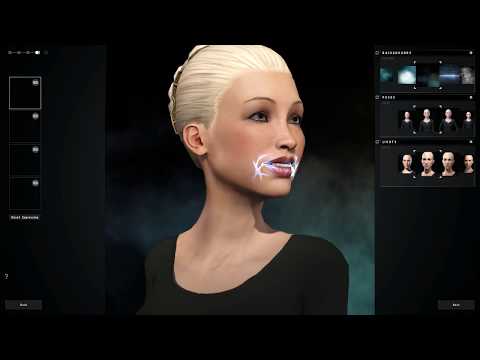
or the more recent
Cyberpunk 2077
There really is no comparision to the Epic Metahumans because the metahumans exist in a platform system that focuses on realtime
final quality visualization without having to wait for renders Like with Daz studio.
Genesis Breathing ExpansionsTake 3 - I'm probably not going to tweak this a lot more, the more drastic any morph is the less well it will mix with other morphs, plus I don't really want to spend a month on this.
 Genesis Breathing Expansions
Chumly said:
Pjzanca
I think this would be a neat purchase-able Daz asset... as there would probably be a market for it.
Would it work for a character laying on their side... like sleeping? Or is it just a standing thing now? Also, would you think there would be a way increase/decrease the breathing rate... so a sleeping character's breathing wouldn't be as fast (or as "heavy") as somebody who just stopped sprinting.I'm not interested in running a store so whatever I produce will be free. This is a simple morph so the pose of the character (or to a very large extend, other morphs) won't matter, it should work in a large variety of situations.
Measure Metrics Accuracy IssuesI am trying to measure the height of a character using Measure Metrics, but the value seems arbitrary. In the image attached, the height of the character is modified by adjusting two morph values. Even though the height appears to be the same with the modified slider values, Measure Metrics shows a significant height decrease. I have also had it where the character increased in size visually, but the height measure showed a decrease.
This tells me that Measure Metrics isn't really providing a useful height value at all.
Help restoring Genesis 8 to completely zero morphs. All my characters have deformed stomachsReinstalling Genesis 8 Starter essentials never helps in these cases because the problem is not in those files, neither does reinstallation of DS and/or the OS help.
To fix any ill-behaving morphs (has a non-zero default value), do as follows;
1. Open DS and load "Genesis 8 Basic Female/Male" (to an empty scene)
2. Help->Troubleshooting->View Log File (clear the log, close it and select "Save" when asked)
3. Left Click at "Active Pane Options" tab->Preferences->Choose "Show Hidden Properties" (part 4 zeroes only 'visible' dials)
4. Right Click at Parameters Tab->Zero->Zero Figure (Zeroes the value of all the 'visible' dials) - Does the figure look 'right' now?
5. Right Click at Parameters Tab->Memorize->Memorize Figure (Sets the current value of all the dials as their default value)
6. Edit->Save As->Support Asset->Save Modified Assets (Writes the changed default value to the morph files that were changed)When saving "Modified Assets" DS shows a dialog and asks for confirmation;
"The following file(s) will be permanently modified:" - "Accept/Cancel" - Choose "Accept"Close DS and wait -> Open DS again and load "Genesis 8 Basic Female/Male"
Help->Troubleshooting->View Log File (Save the logfile somewhere you can easily find it)
If the figure still doesn't look fixed, attach the saved log to your post with the "Attach a file" under the "Leave a Comment" window, that way we can have a look at it.
Daz 3D is part of

Connect
DAZ Productions, Inc.
7533 S Center View Ct #4664
West Jordan, UT 84084Licensing Agreement | Terms of Service | Privacy Policy | EULA
© 2026 Daz Productions Inc. All Rights Reserved.