-
Auto Muscle Enhancer HD [Commercial]
Lonesome Cowboy said:
inquire said:
@Lonesome Cowboy: Is this image one of your creations: Computers are sneaky and mean? Also, what is TOF? Is this an artist like Frank Frazetta or Boris Vallejo?
yes it is one of mine and it is also in my gallery. https://www.daz3d.com/gallery/user/4732842999283712#gallery=newest&page=1
TOF = Tom of Finnland
Boris Vallejo and Frank Frazetta have been one of the first ones that inspired me to do graphic works.
"Computers are sneaky and mean" is a bad translation for "Computer sind hinterhältig und gemein" i did with google translate and it is a sentence of experiences of my life as a php coder and MS-DOS and windows-fighter and so on ;-)
Best working product relaying the "closed" chest for me is currently: https://www.daz3d.com/leading-male-morph-collection-2-for-genesis-8-males ; -> LM_Nino
Attached figures to show what was possible with older and newer figures:
- Apollo Maximus
- David3
- David3
- M4 with Olympian morph
- G8M (very very good, but other kind of structure and muscles)This link actually does not produce a product. It's sort of an OOPS! page. Could it be that the product is no longer sold? The message on the page kind of implies that. I see that you like really well-rounded pecs.
Is there any advantage to bridge if you only want to import your own models from Blender?@ j cade :
I have never tried bringing in instances, but it is great that millighost added that feature for those who want to use it.
And, I know what you mean with getting used to 2.8x and going back to open 2.79 -- Feels all foreign and strange now...
@ marble :
Those are two different projects -- I started by updating his/her morph import/export scripts, and was going to update the DSF prop export script as well, but abandoned them for now to work on the GoBlender_Daz Studio morph creator bridge.
Yes, I am still hard at work with it, and am making progress, but I still have many months of work ahead of me.
I moved on to an all-in-one script utilizing tabs with dynamic switching between Exports/Imports and the individual object types. I started with a tab per object approach, but changed it to a single tab for both exports/imports with dynamic type selection for active parameters.
I have my mock-ups set up for multiple exports/imports as we previously discussed, but have yet to lay down the code necessary for that to work with both Blender and DS -- On my TODO list...
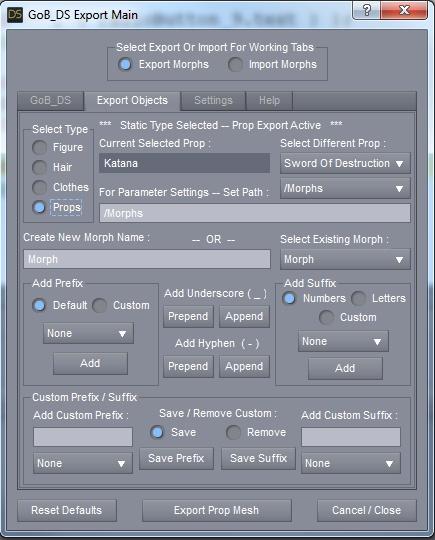
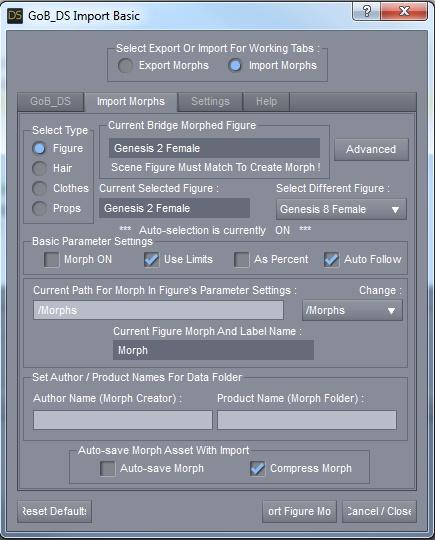
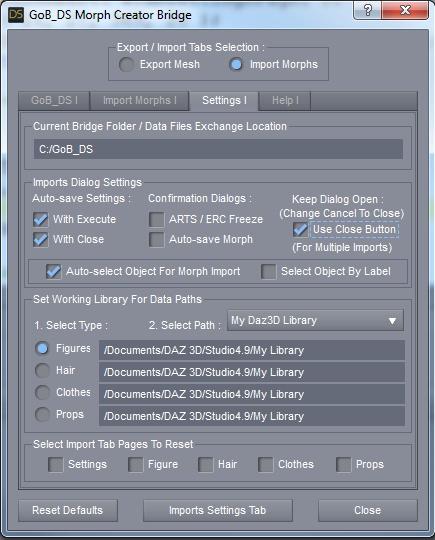
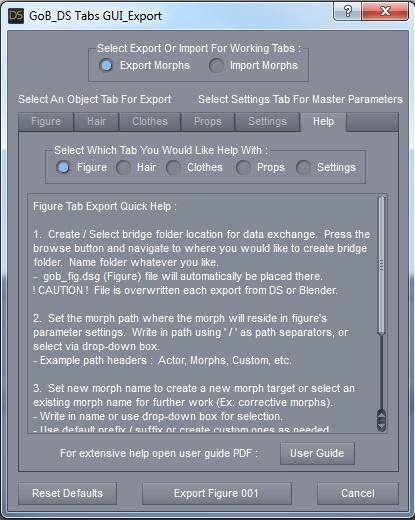
Here are some current WIP images of the current tabs script (all subject to change) :
* Exports Tab :
* Imports Tab :
* Imports Settings Tab :
* ( Old ) Help Tab -- From first multi-tab script :
 Casual Outfit Issue with shoulder
Sevrin said:
Honestly, you'll have better luck fitting your character to the shirt than the shirt to your character.
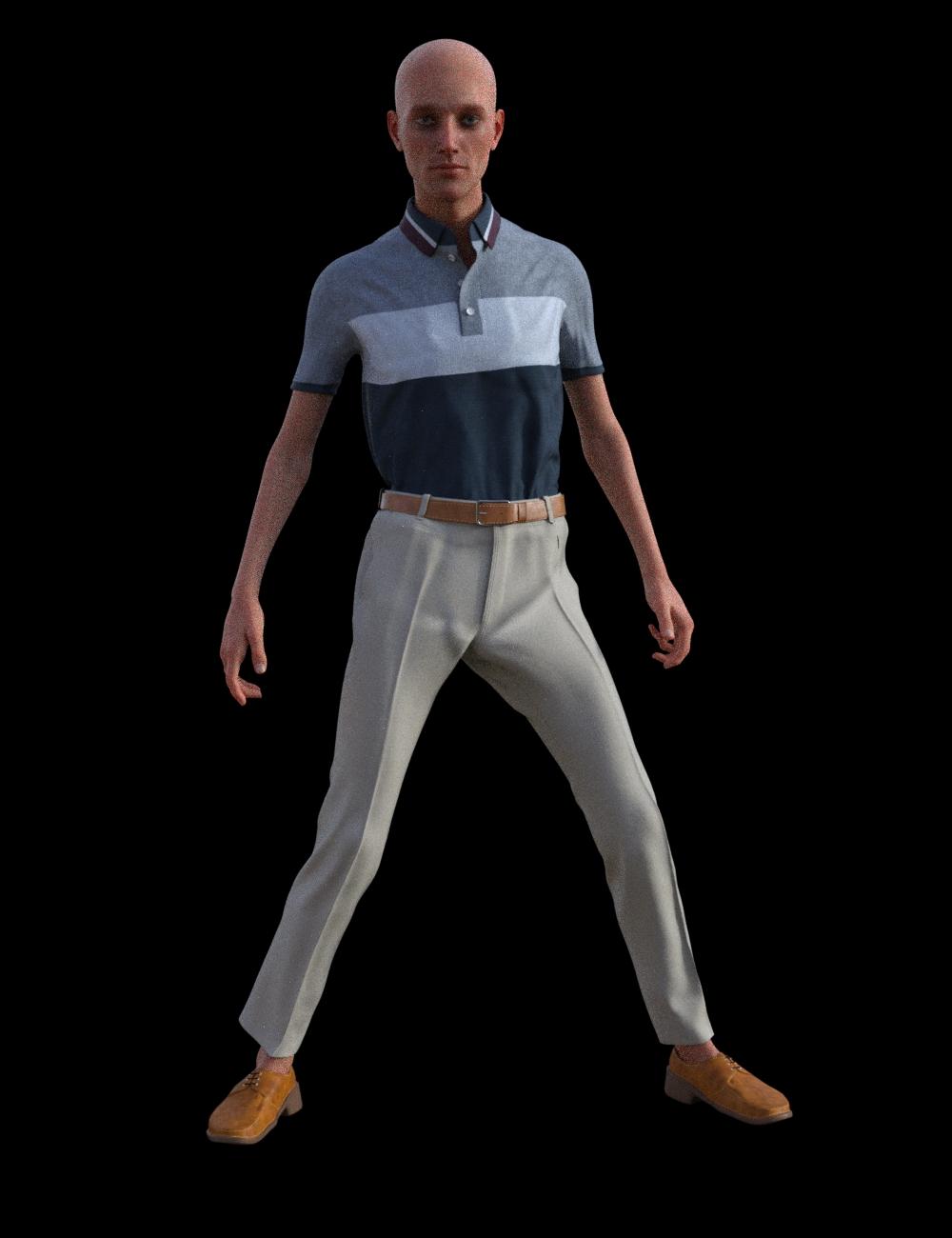
You'd think so, putting it on a raw character like Owen, it works until I add the Thin morph, and shoulder pads start showing up. On a character like Mr. Wu, it shows up immediately. And I want my character even thinner.
I have been contacted by the creator of this outfit, so hopefully, he can figure it out.
Casual Outfit Issue with shoulderHey there @TheMageWilliam
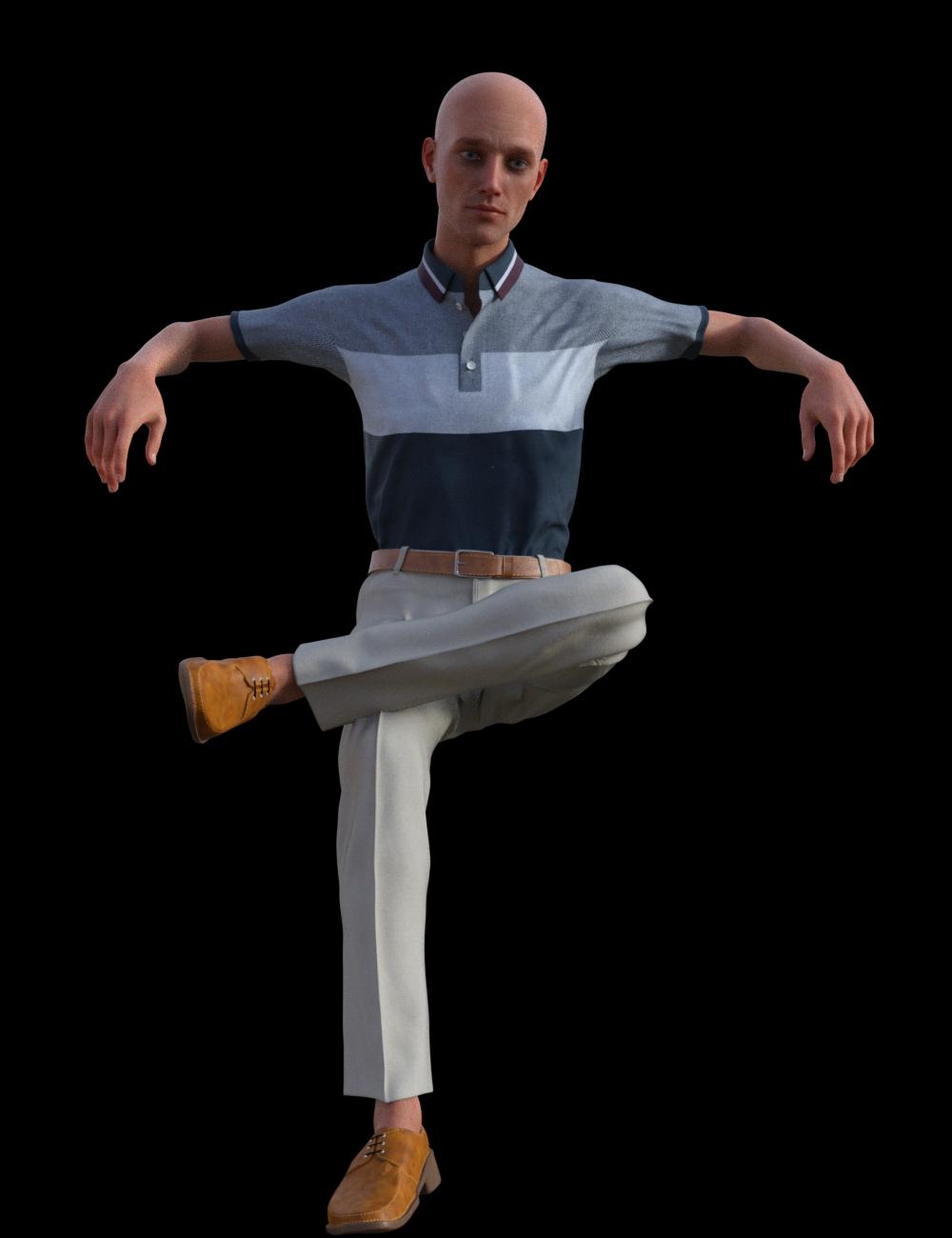
I'm very sorry that you're having issues with my product. Like Richard said Rigidity is causing the weird issue that you are seeing in your posted pic. I see the flaws in my first product and had made those changes in regards to the problematic shoulder and the waist area. The problem should be no more after the fix is applied. See the below for reference. I will try and get the change applied as soon as possible as I been busy with IRL and trying to get my next product out. I'm sorry for the inconvenience this has caused you.
Not sure what thin character you used, but I posted an example below with: Body Size -100%, Weight -100%, Emaciated 100%
No dForce used. Some minor adjustment will still need to be in use as per Rigidity's nature.
Dwarf Morph 100%
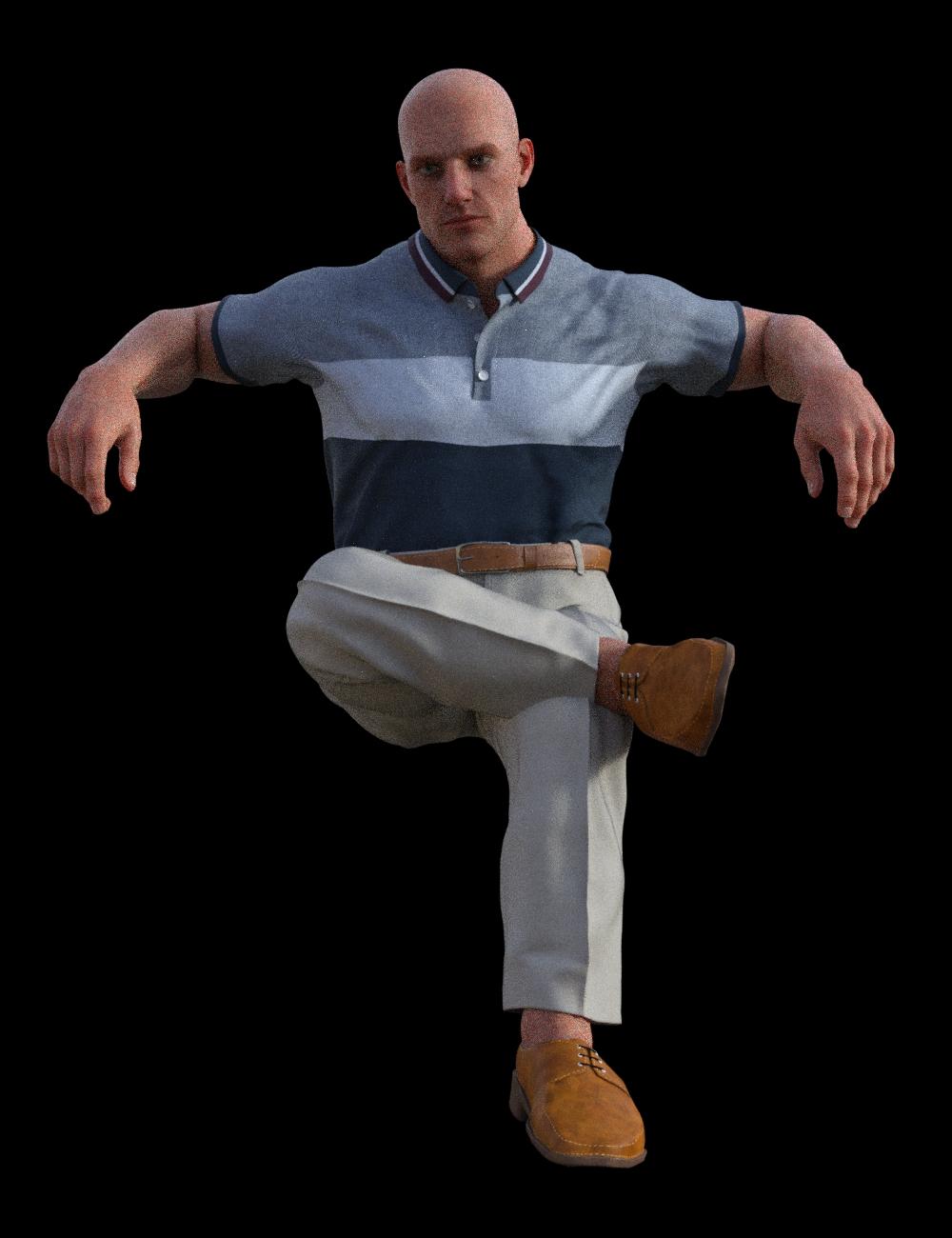

Body Size 100%
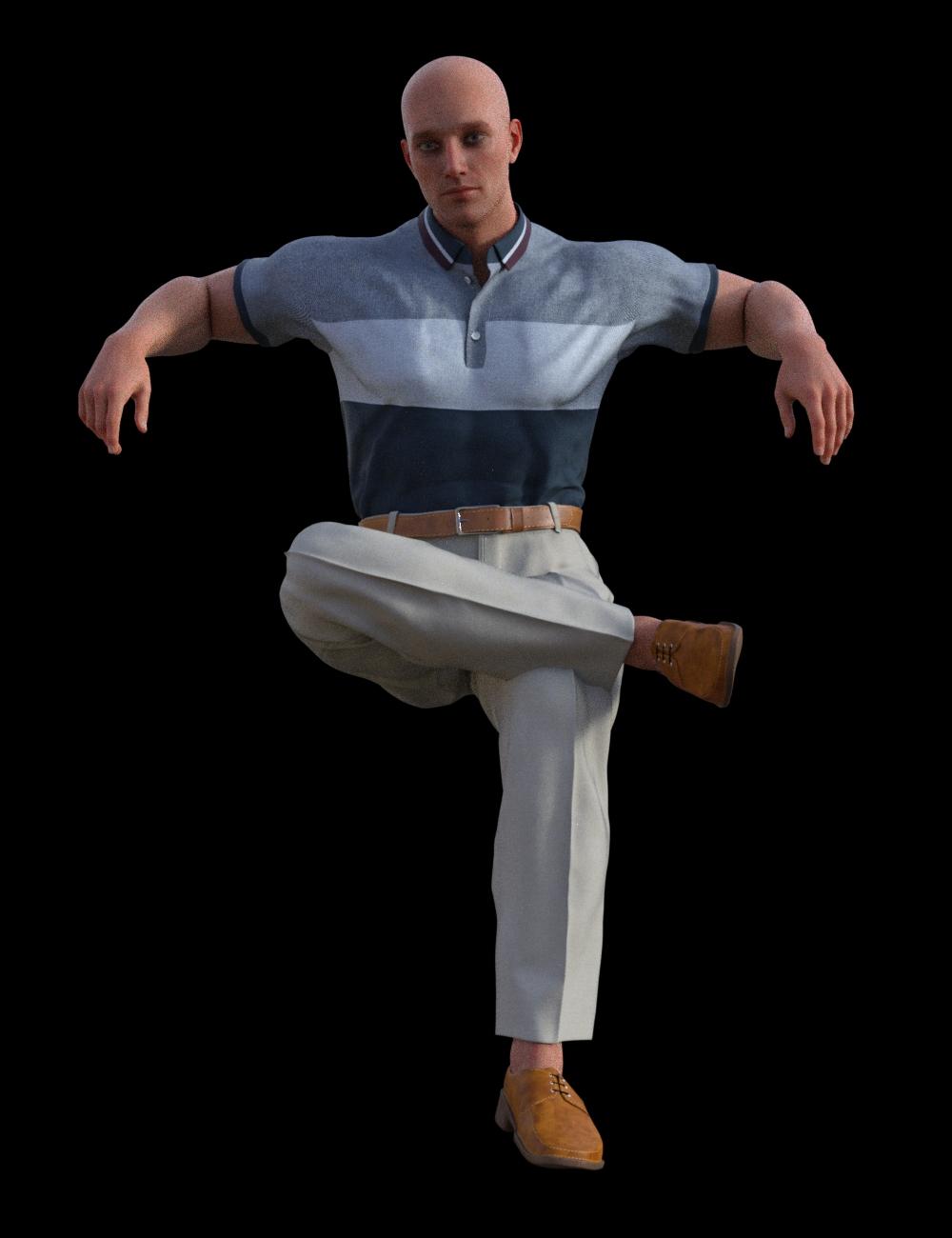
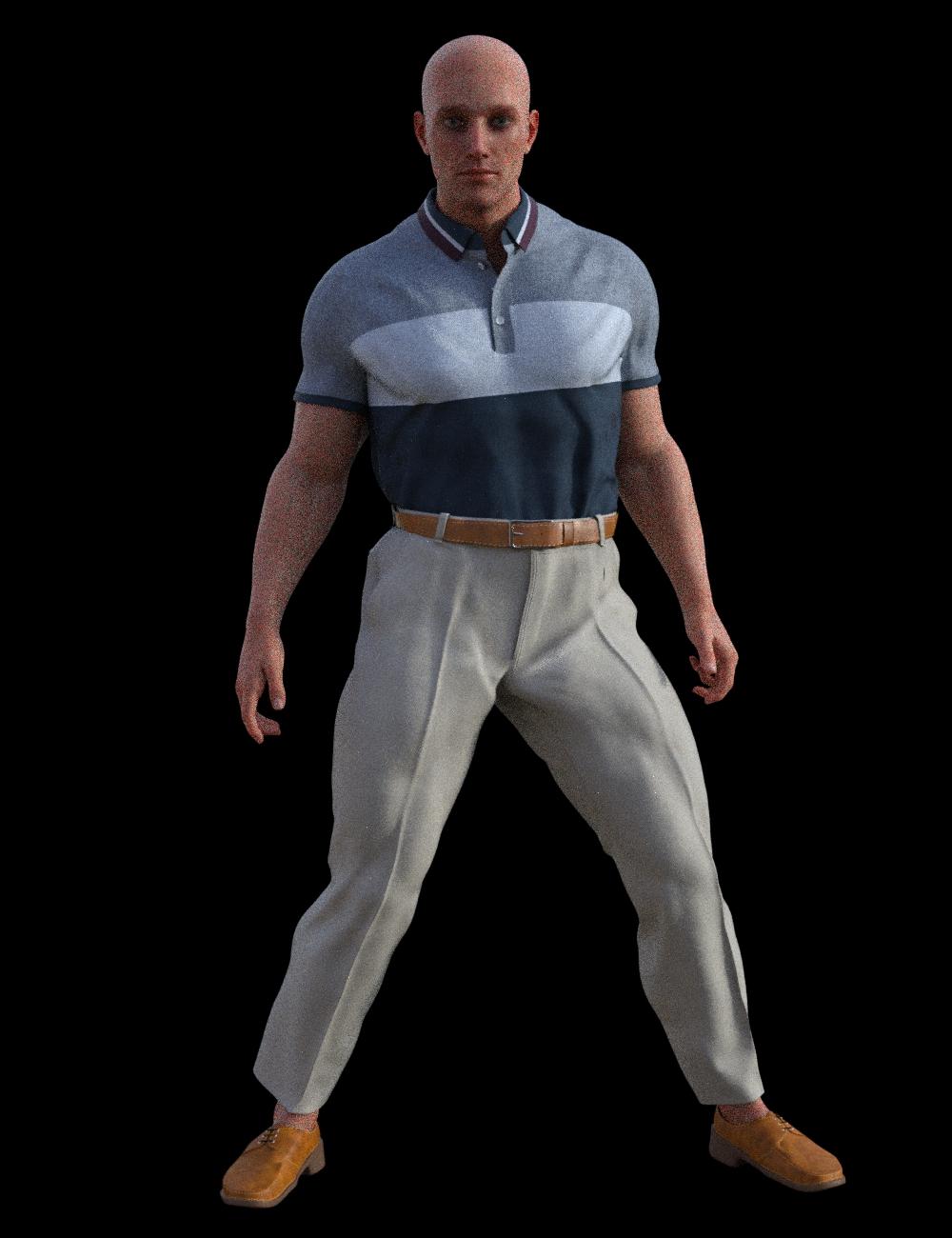
Body Size -100%, Weight -100%, Emaciated 100%
 Daz to Blender - Morph update - “Spring Cleaning Update” (2.3.1)
blenderhells said:
Thank you pose and morph option screens! I'm having issues importing into blender specifically when I use 'legs length' and 'torso length.' The bones and rig always don't match the new height, is there a way to fix it?
https://github.com/daz3d/DazToBlender/issues/37
It was missed in our fixes this month. But, someone already brought it to my attention you can find the link to the develop branch there you can download as zip and grab the blender side and daz studio side.Marvelous Designer Fitting ProblemPlease attach the images - .docx files can carry malware.
It's best not to work on a morphed figure if possible, and you should definitely zero any scaling (or rather, set it to 100%). If you do need to work with morphs, in the Transfer Utility set the Source Shape to the morph used (or Current, assuming the moprhing is still in effect) and enable the Reverse Source Shape from Target option.
offering a 100GC for a convert rigging script in carraraPhilemo_Carrara said:
You can find it on ShareCG : https://sharecg.com/v/92883/browse/9/Plug-in/Genesis-Morphs-Eraser
SileneUK said:
Morph Stripper? I vaguely recall this... where can I find it? (Sorry, not doing much, waiting on cataract op).
 Silene
Merci!!!
 And I made a donation. Sileneoffering a 100GC for a convert rigging script in carrara
You can find it on ShareCG : https://sharecg.com/v/92883/browse/9/Plug-in/Genesis-Morphs-Eraser
SileneUK said:
Morph Stripper? I vaguely recall this... where can I find it? (Sorry, not doing much, waiting on cataract op).
Sileneoffering a 100GC for a convert rigging script in carraraSileneUK said:
Morph Stripper? I vaguely recall this... where can I find it? (Sorry, not doing much, waiting on cataract op).
Silenecan sommiserate the vision problems.

i'm playing with the hdr light domes,
i can see only big contrasts, not seeing the subtleties
cant see light fonts on light backgroundoffering a 100GC for a convert rigging script in carraraMorph Stripper? I vaguely recall this... where can I find it? (Sorry, not doing much, waiting on cataract op).
Sileneoffering a 100GC for a convert rigging script in carrarathank you. gave me a lil gleam of hope.
before the rigging convesion, the daz studio json script.
the general rig has 1 array of verts and weight numbers.
after, the script is run
there are 5 arrays of verts and numbers. identical numbersi experimented with rounding off the 4 point decimal places to see if it speeds up anything.
didnt seem to make a difference.
the parameter for the skinning type changes. dual quat, general
the blended weight has an additional array.
the arrays are boken down under each bone.
its 5 arrays times the number of bones.autofit is a nice feature.
when i save the clothing item to carrara,
it embeds all the morphs. a 20mb shirt for genesis becomes over 200mbsthe morph stripper is invaluable.
Hair Cap ErrorFound a solution:
1. Add a smoothing mesh - keep standard low values
2. Unhide the scale property and increase as needed.
In my case a 0.5% increase in scale did the trick... I was lucky this time, usually the smoothing and scaling doesn't work so nice.
If anyone knows a universal hiar morph, I would love to hear of it.
Thank you
"Anatomy of Facial Expression": A Genesis 8.1 Companion Guide?margrave said:
Masterstroke said:
Surprise and Rage turned out to be great, Smile not so much. Smile seems to be the most difficult, for I have not seen any convincing smile morph for G3 or G8 yet. Neither in the stores or free sections.
I am afraid there won't be any one dial solution for that.
Maybe you can make your smile dial a control dial and add keyed sub-parameters to it, in order to improve its look at any single parameter value.
edit:
Even worse with smiles, what ever smile looks most perfect for one character, might look aweful on another.
You might have to go through all this for every single character again and again.
I think you're overcomplicating this. All three expressions were just the result of moving the controls on the 8.1 face rig. There weren't any morphs or JCMs. But some of those controls, especially around the mouth, are mislabeled, so it involves guesswork to figure out which ones to move. That's why I think the mouth in Smile seems off.Sorry, I do have that bloody perfectionist-syndrome ;-)
I just can't keep my mouth shut..."Anatomy of Facial Expression": A Genesis 8.1 Companion Guide?
I think you're overcomplicating this. All three expressions were just the result of moving the controls on the 8.1 face rig. There weren't any morphs or JCMs. But some of those controls, especially around the mouth, are mislabeled, so it involves guesswork to figure out which ones to move. That's why I think the mouth in Smile seems off.Masterstroke said:Surprise and Rage turned out to be great, Smile not so much. Smile seems to be the most difficult, for I have not seen any convincing smile morph for G3 or G8 yet. Neither in the stores or free sections.
I am afraid there won't be any one dial solution for that.
Maybe you can make your smile dial a control dial and add keyed sub-parameters to it, in order to improve its look at any single parameter value.
edit:
Even worse with smiles, what ever smile looks most perfect for one character, might look aweful on another.
You might have to go through all this for every single character again and again.
Daz to Blender - Morph update - “Spring Cleaning Update” (2.3.1)Thank you pose and morph option screens! I'm having issues importing into blender specifically when I use 'legs length' and 'torso length.' The bones and rig always don't match the new height, is there a way to fix it?
Bluejaunte appreciationBig fan of Bluejaunte's characters.
Until Daz can come up with a way to speed up character load time (I have a ton of characters/morphs), I have curtailed my new character purchases... unless something really adds to the gene pool of character kitbash dial spinning. I have had to cull a lot of characters out to keep my load times under what I consider reasonable, but I Never cull any of BJ's because they just seem to offer so much.
All that being said, I think it would be awesome if Bluejaunte could do an 8.1 character based off of an Amala body type. Again, these more "extreme" ends of the character-scape add a lot to the gene pool and fill a niche all on their own as stand alone.
oh, yeah, and try to sneak a genital morph through again ;)Tanlines from image editor?marble said:
PerttiA said:
marble said:
I don't use G8M (only G3M) and I have a requirement to add tinlines but can't figure out how. I have the G3F version of SkinBuilder but can't use it with the males. So I am wondering if anyone has done this with an image editor. I have Affinity Photo and Gimp (but not Photoshop). I'm guessing I would have to create a mask of the skin area - perhaps I could use a template from some shorts or underwear? But I'm not sure how to apply the shading to the skin.
Any ideas welcome.
Apply the G3M skin to a G3F, do the tanlines in SkinBuilder and save.
I had tried that - I also thought it should work. I have the UV transfer utility between G3F and G3M. But, sadly, it tears at some (not all) of the seams on G3F.
Just using the G3M UVs on G3F so she can wear the skin won't work as the overlays are meant for textures using G3F UVs.
What you would need to do is first to use Map Transfer to transform the G3M textures into ones using the G3F UVs, then use Skin Builder over the “G3F version” of the skin.
But even then there's no guarantee it would look ok on G3M.
Tanlines from image editor?marble said:
PerttiA said:
marble said:
I don't use G8M (only G3M) and I have a requirement to add tinlines but can't figure out how. I have the G3F version of SkinBuilder but can't use it with the males. So I am wondering if anyone has done this with an image editor. I have Affinity Photo and Gimp (but not Photoshop). I'm guessing I would have to create a mask of the skin area - perhaps I could use a template from some shorts or underwear? But I'm not sure how to apply the shading to the skin.
Any ideas welcome.
Apply the G3M skin to a G3F, do the tanlines in SkinBuilder and save.
I had tried that - I also thought it should work. I have the UV transfer utility between G3F and G3M. But, sadly, it tears at some (not all) of the seams on G3F.
What if you just load the G3M textures into respective slots on G3F, never minding if there are some seams while they are on G3F - Use skinbuilder to do the tanlines and again load the textures as they are into G3M
Tanlines from image editor?PerttiA said:
marble said:
I don't use G8M (only G3M) and I have a requirement to add tinlines but can't figure out how. I have the G3F version of SkinBuilder but can't use it with the males. So I am wondering if anyone has done this with an image editor. I have Affinity Photo and Gimp (but not Photoshop). I'm guessing I would have to create a mask of the skin area - perhaps I could use a template from some shorts or underwear? But I'm not sure how to apply the shading to the skin.
Any ideas welcome.
Apply the G3M skin to a G3F, do the tanlines in SkinBuilder and save.
I had tried that - I also thought it should work. I have the UV transfer utility between G3F and G3M. But, sadly, it tears at some (not all) of the seams on G3F.
"Anatomy of Facial Expression": A Genesis 8.1 Companion Guide?Surprise and Rage turned out to be great, Smile not so much. Smile seems to be the most difficult, for I have not seen any convincing smile morph for G3 or G8 yet. Neither in the stores or free sections.
I am afraid there won't be any one dial solution for that.
Maybe you can make your smile dial a control dial and add keyed sub-parameters to it, in order to improve its look at any single parameter value.
edit:
Even worse with smiles, what ever smile looks most perfect for one character, might look aweful on another.
You might have to go through all this for every single character again and again.
Daz 3D is part of

Connect
DAZ Productions, Inc.
7533 S Center View Ct #4664
West Jordan, UT 84084Licensing Agreement | Terms of Service | Privacy Policy | EULA
© 2026 Daz Productions Inc. All Rights Reserved.