-
Why there are not genesis9 female soldier modern outfits out there
FirstBastion said:
felis said:
https://www.daz3d.com/recon-outfit-for-genesis-9
This is a really nice looking outfit. Thanks for mentioning it.
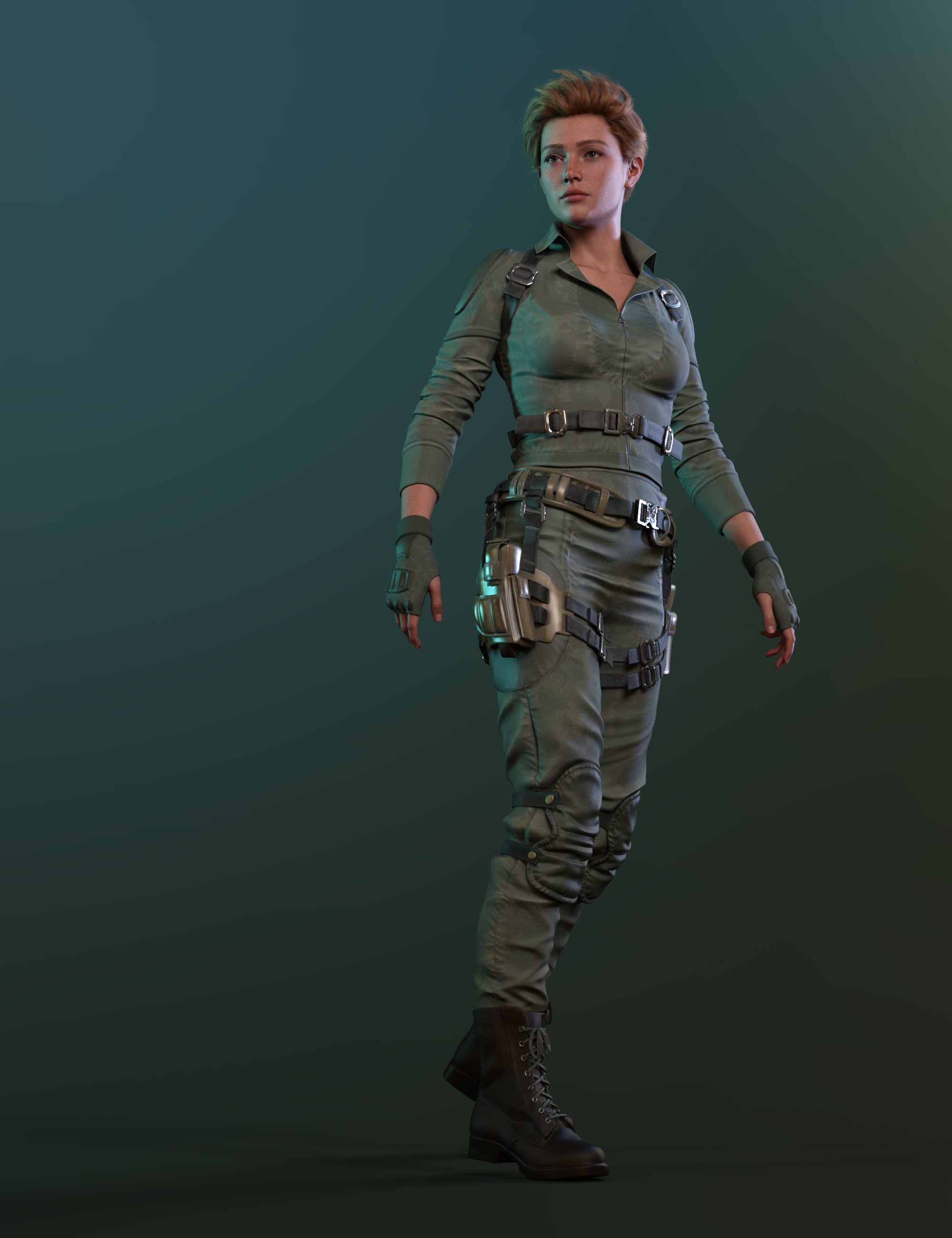
Recon is nice, but:
The top rig doesn't hold anything.
The pistol holster is not with a gun; the holster seems to be bending too much in the pictures.
(3+2) *2 horizontal folds at the crotch might be too much for some people.
It's missing an add-on + morph pack.
ps: lighter, more army office lady options:
https://www.daz3d.com/blitz-girl-uniform-for-genesis-8-females
https://www.daz3d.com/dforce-military-nurse-outfit-bundle-for-genesis-9-8-81-female
add-ons/belts, harnesses
https://www.daz3d.com/colonial-forces-add-on-for-tactical-assault-outfit-for-genesis-8-females ; + https://www.daz3d.com/tactical-assault-outfit-for-genesis-8-males-and-females
https://www.daz3d.com/modern-military-outfit-props-and-accessories
https://www.daz3d.com/rogue-lynx-outfit-for-genesis-8-females
https://www.daz3d.com/evil-shadow-outfit-for-genesis-3-female-s ;
Or just picking a base and adding belts and harnesses could work very well.
Pricing Madness!Cybersox said:
Torquinox said:
@Cybersox Funny thing is, Tima at Rendo (the erstwhile vendor 3D Sublime, and generally a nice person, from the limited contact I've had with her) tried to pass off the deluge of rendo vendors and products that migrated here as a few vendors and some of their products.
We've been flooded, and a some of the products are add-ons for products still at rendo, and there are a few I found for products that don't even exist any more. Or if they do exist, I've no idea where they went. It's a mess!
It's really hard to say how many Vendors were "new" to DAZ in that wave, as 3D artists are rather like hobos and tend to wander from place to place, and many of the ones who were part of that surge had technically been vendors here once before.. even though it may have been years since many of those had last been active here. However, many definitely were new and, more importantly, the absolute number of older product that were previously sold at Rendo was easily the second biggest infusion of catalog items into the store at once since RuntimeDNA shut down. Heck, Anagord alone added over a thousand skus, Valkyrie over 800, and there were qute a few more who each dropped several hundred. That said, as messed up as this transfer of assets was, it's nothing compared to the mess that was the RDNA merging, where there were bundles that included otherrandom bundles, bundles that included items that weren't in the store seperately, and artists who were here at DAZ only long enough to sell off a bunch of items that became D.O., many of which still don't have accurate documentation to this day.
I hear you, @Cybersox . I think a lot of items are going to have inaccurate documentation from now 'til the end of time. Nothing we can do about it. We also have decade-old products with surprisingly recent product numbers, no metadata, etc. Oh well. On we go!
Help, I want to disable the automatic adjustment of the clothing model to a body modelIn Geometry editor.
First select the verteces you want to stay rigid, and create a rigidity group
Next select some faces the rigidity group will follow.
Then when you dial a morph the rigidity group will move as one, determined the the reference faces.
Help, I want to disable the automatic adjustment of the clothing model to a body modelRichard Haseltine said:
You can block a single morph entirely by crating a new property on the clothing with exactly the same name (name, not label - click the gear icon on the slider>Parameter Settings to get the name; right-click>Edit Mode then right-click>Create New Property to add a property to the clothing). You can also create a custom morph with the shape you want and give it the same name as the figure morph.
Another option is a Ridigity Group on the clothing which can block or restrict all morph transfer, but that may do more than you want.
Another option is Mesh Smoothing which may help to remove some kinds of cling.
Where can I find “Ridigity Group,” or what do I need to do to be able to use that option?
Where can I get pants like these?Formal wear for women, by Outoftouch:
https://www.daz3d.com/dforce-formal-wardrobe-mega-pack-for-genesis-9
It a suit for men, but it has a very nice tie, with dForce activated and it is an independant item, fully modeled:
https://www.daz3d.com/dforce-mode-sauvage-for-genesis-9
Using both of them togeter will need morphs at least for the tie to get it around the neck of the format wardrobe shirt, and likely for the shirt too.
For Genesis 3, with an open shirt though:
https://www.daz3d.com/satine-detective-outfit-for-genesis-3-female-s
For the Sexy suspender, @Barbult shared a wearable preset with a morph to get a closed shirt:
https://www.daz3d.com/forums/discussion/comment/8253486/#Comment_8253486
Help, I want to disable the automatic adjustment of the clothing model to a body modelYou can block a single morph entirely by crating a new property on the clothing with exactly the same name (name, not label - click the gear icon on the slider>Parameter Settings to get the name; right-click>Edit Mode then right-click>Create New Property to add a property to the clothing). You can also create a custom morph with the shape you want and give it the same name as the figure morph.
Another option is a Ridigity Group on the clothing which can block or restrict all morph transfer, but that may do more than you want.
Another option is Mesh Smoothing which may help to remove some kinds of cling.
Genesis 2 - a compilation of freebiesA great many of these links are "404 not found" now:
Kamion99's Genesis head morph for Gen2
DreamyFarlea's Gen2 Guy Morph
Atrion666's diffuse skin tones for Genesis and Gen2
Atrion666's Fantasy Races for Gen2 (dwarves, elves, fairies, giants and hobbits)
Atrion666's Dwarves for Gen2
Atrion666's Giants for Gen2 Update
Atrion666's Giants for Gen2
Atrion666's Fairies for Gen2
Atrion666's Elves for Gen2
Atrion666's diffuse skins for Genesis and Gen2
Atrion666's Black and White Eyes for Genesis and Gen2
RAMWolff's morph pack for Gen2
RAMWolff's Enhancement Morphs for Gen2 (first part)
RAMWolff's Enhancement Morphs for Gen2 (second part)Jabba's Decadence Morphs for Gen2
Jabba's Ethnic 1 for Gen2
Cauri Blackthorne's Autofit of Gen2/V6 stuff for Genesis
Ghastly's Flat Chest for Gen2
Ghastly's androgynous morph for Gen2
Ghastly's anime morph for Gen2
Ghastly's male morph for Gen2
Ghastly's natural nipples for Gen2
Ghastly's pubic mons for Gen2
FireFlightt's Female Teen 1 Morph for Gen2
FireFlightt's Female Teen 2 Morph for Gen2
FireFlightt's Little Toddler Morph for Gen2
ThespiSis' Teen Missy Morph for Gen2WendyVainity's Gen2 Mimic-compatible
Nmizu's beachwear for Gen2
Nmizu's sailor uniform for Gen2Wilmap's Evening Dress for Gen2
Wilmap's Negligee Nightgown for Gen2
Wilmap's Off-Shoulder Dress for Gen2
Wilmap's V Bodice Dress for Genesis and Gen2
Wilmap's Summer Dress for Gen2
Wilmap's Figure-Hugging Dress for Gen2
Wilmap's Swimwear for Gen2
Wilmap's Children's Dress for Gen2
Wilmap's Hipster Pants and Top for Gen2
Eblank's textures for Wilmap's V Bodice Dress for Gen2
Eblank's textures for Wilmap's Summer Dress for Gen2
Eblank's textures for Wilmap's Off-Shoulder Dress for Gen2
Ak73D's Shorts and Shirt for Genesis and Gen2
Ak73D's Shoulder Mini Dress for Genesis and Gen2
Ak73D's Summer Dress for Genesis and Gen2
Ak73D's textures for his Shorts and Shirt for Genesis and Gen2
Ak73D's Lace Dress for Genesis and Gen2
Atrion666's Batgirl textures for Superherosuit
Atrion666's Horned Batgirl textures for Superherosuit
Atrion666's Sue Storm textures for Superherosuit
Atrion666's Black Cat textures for Superherosuit
Atrion666's Captain America textures for Superherosuit
Atrion666's BloodRayne outfit refitted for Genesis and Gen2
Smay's Power Girl textures for Superherosuit
Amy-Aimei's sandals for Genesis and Gen2
Amy-Aimei's Pointy Toe Flat Shoes for A3 and Gen2
Karth's White Dot Heels for Gen2
Skelch's transmaps for Superherosuit
Skelch's Baroness textures for Superherosuit
Skelch's Greatest American Heroes textures for Superherosuit
Skelch's Black Canary textures for SuperherosuitBlackFeather1973's Genesis surfaces for Gen2 (DS script)
All of the above were dead when I tried them 01/16/2026
Pricing Madness!Torquinox said:
@Cybersox Funny thing is, Tima at Rendo (the erstwhile vendor 3D Sublime, and generally a nice person, from the limited contact I've had with her) tried to pass off the deluge of rendo vendors and products that migrated here as a few vendors and some of their products.
We've been flooded, and a some of the products are add-ons for products still at rendo, and there are a few I found for products that don't even exist any more. Or if they do exist, I've no idea where they went. It's a mess!
It's really hard to say how many Vendors were "new" to DAZ in that wave, as 3D artists are rather like hobos and tend to wander from place to place, and many of the ones who were part of that surge had technically been vendors here once before.. even though it may have been years since many of those had last been active here. However, many definitely were new and, more importantly, the absolute number of older product that were previously sold at Rendo was easily the second biggest infusion of catalog items into the store at once since RuntimeDNA shut down. Heck, Anagord alone added over a thousand skus, Valkyrie over 800, and there were qute a few more who each dropped several hundred. That said, as messed up as this transfer of assets was, it's nothing compared to the mess that was the RDNA merging, where there were bundles that included otherrandom bundles, bundles that included items that weren't in the store seperately, and artists who were here at DAZ only long enough to sell off a bunch of items that became D.O., many of which still don't have accurate documentation to this day.
Will we ever get "The Girl 9" ?Thanks for the makeup recomendation, It's on my whishlist now.
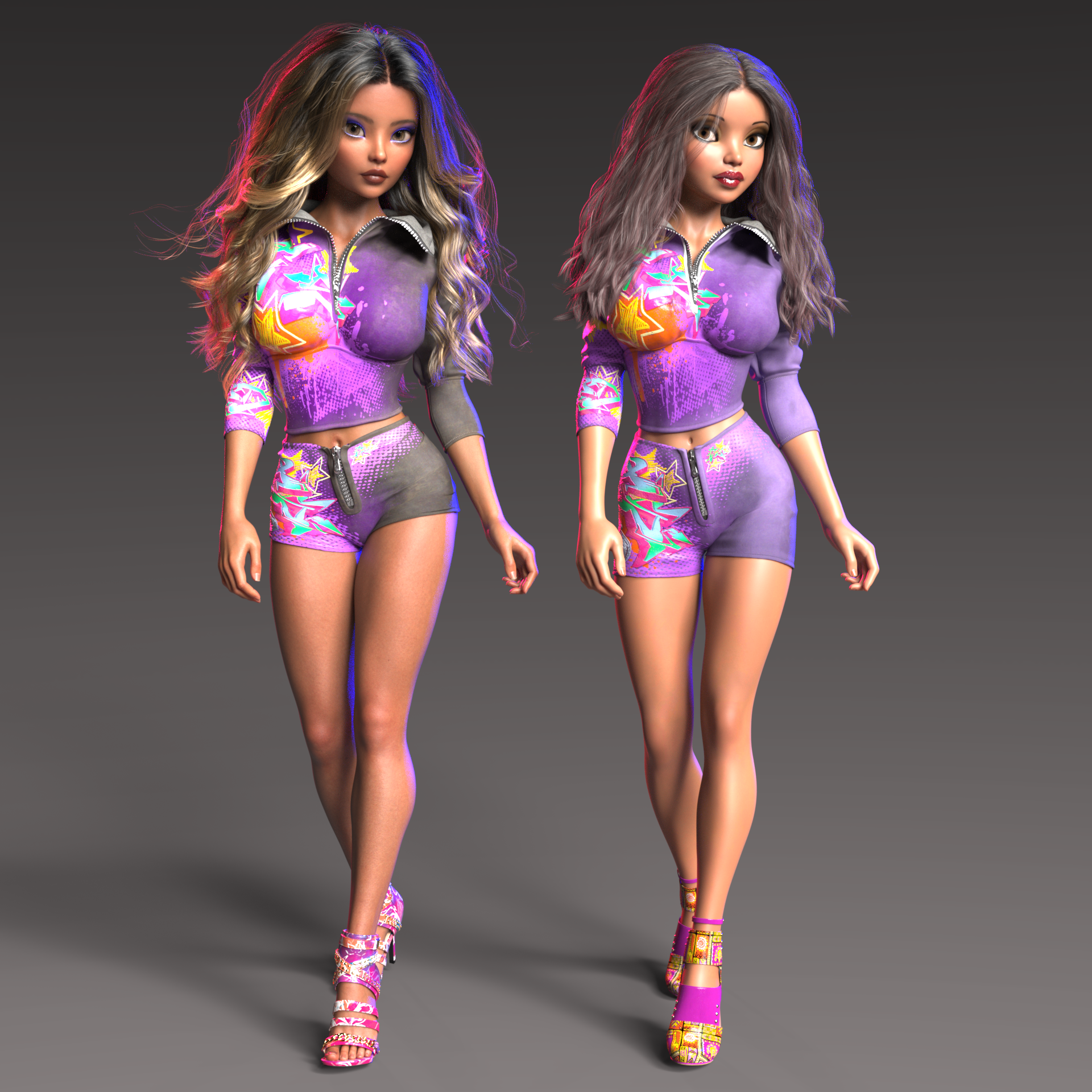
This is the best I've been able to come up with for G9 so far. I think I like the original version better, she just isn't The Girl, but that's OK.
Wow, I knew there were morphs missing in the "official" G9 morph set from DAZ, but I kind of forgot about it since I hadn't really tried to go full on and try to copy a character. There are so many basic morphs missing it's really hard to do much of anything serious. Something as basic as mouth width just isn't there (unless I completely missed it). I seems like tthere are a lot of things missing to create unique faces that were always there with G8 and earlier. I couldn't find anything to create more distance beween the nose and mouth, to make the distance between the chin and mouth greater, etc., etc.
Without taking her into Hex or Blender, I think this may be the best I can do. I don't have anything to make her eyes larger in the right areas (I have lots of eye morphs, just nothing the seems to work the way I want, where I want). Oh well, enough complaining. I changed the body morphs quite a bit because I noticed the shoulder bends looked pretty much like bent noodles. As a result, her legs, especially the thighs got thicker. So I used thigh morphs to thin them a bit, but stopped where she was more like the original Girl.
I guess the moral of the story here is if I really want Girl 7 with G9 I'll have to do the manual work to complete the full conversion (I probably would have been done with it if I did that instead of trying to make my own from morph dials
 ).
).Here is the new version on the left, with the G8F version of the Girl 7 on the right.
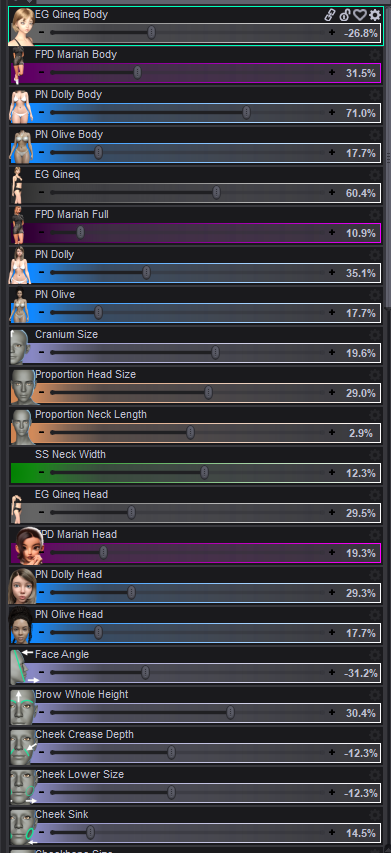
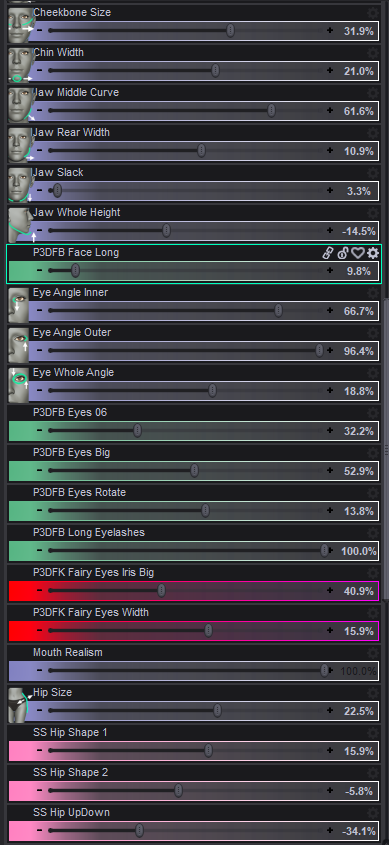
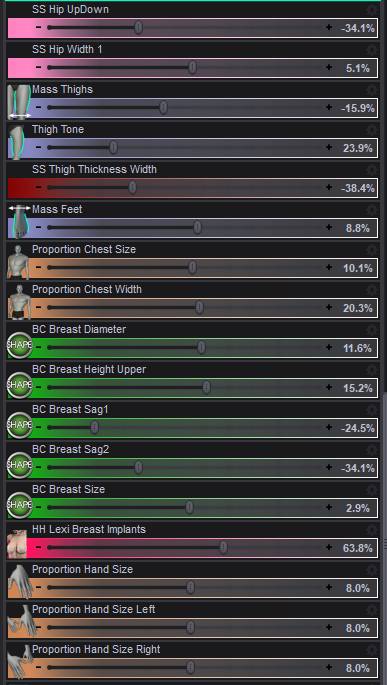
Here is the morph list for anyone whose interested. - Yeah, I kind of went crazy
 [Released] RSSY Character And Material Conversion Bundle Genesis 8 to Genesis 9 [Commercial]
DaveTheVoice said:
I don't know if my issue or question was resolved.
I continually try to convert mu OC to G8 and I still get the origami G9 (see attachment). Maybe a link to step by step review of what I did wrong would help.
From the manual:
The Converted Character’s Body is wrinkled. Because of the way that morphs must be converted, a morph that on Genesis 8 appears to only touch a small part of the head can affect the whole body on Genesis 9. You need to show Currently Used parameters to show all morphs on the converted character. Then, one by one, dial in the morphs to find the offending morph(s). Once you find them, delete the morphs from your HD (click the Gear icon, Parameter Settings, and look at File Path for the asset to figure out where the morph is and what it is called). You should also resave the character with the offending morph(s) dialed out (set to 0).
In order to transfer morphs from one generation to another, you need the two characters to match in shape, height, and pose as closely as possible. The script modifies G9's shape to the default G8 shape (using the included "Genesis 8 Female" or "Genesis 8 Male" clone morphs), and poses G9 to the default G8 pose. Once they match, the transfer utility transfers over the morphs and you can save them. However, what transferring means is that the changes between the current G9 shape/height/pose and the morph's shape/height/pose on G8 are what are transferred over as a morph. Because G9 has been changed, the converted morph will "remember" the change in shape, height, and pose as well as the shape changes of the original morph, which can cause problems. This is why, even if the original morph only changed fingernail length or something like that, a converted morph changes the whole body on G9. The script is smart enough to only save the head of a head morph but saves the whole body or figure for all other morphs. This is why small, benign morphs on G8 can cause problems on G9.
That said, you can transfer over your custom character by combining all your morphs into one morph on the G8 character first. Load your G8 character in DS at the default position. Export the entire figure as an obj (making sure you have resolution level is base and subD is 0). Clear out all of its old morphs so it is a generic G8 shape and import the obj using morph loader. Save as a character and then convert that.
Anyone flip a hair product (left to right)This is how I do it (works for dForce hair):
- Load the hair into Daz Studio
- Select the Geometry Editor tool
- Export the hair to OBJ with Remove Unused Vertices and Write Polylines selected, as well as your normal export settings
- Open Blender (I have version 5)
- Import the exported hair OBJ into Blender.
- In Blender Object Mode, select the imported hair object.
- In Blender, Right click and select Mirror, X Global
- In Blender, Export the selected hair to OBJ
- Back in Daz Studio, with the Geometry Editor tool still selected, select Morph Loader Pro and import the Blender-exported-mirrored OBJ as a morph
- Wait and be patient. It takes my computer several minutes to import the OBJ
- Dial the created morph to 100% to verify that it works correctly.
- Set the min and max morph limits to 0% and 100% with Set Limits checked. Be sure default is 0%.
- Save the morph that is created as a Modifier Asset
Now you have a mirroring morph saved to the hair, and you can use it now and when you load the hair in the future.
I don't have Side Swept Glam Hair. Here is an example with Bixie Cut Hair (I only loaded and mirrored the Main hair, and didn't bother with the strays, but they can be mirrored with the same technique).
You can use this same technique to create morphs for dForce hair, by moving vertices around in edit or sculpt mode in Blender, instead of mirroring the whole hair.
Off Topic Thread #2Steve K said:
WendyLuvsCatz said:
Congratulations to Wendy for making it to the front page of the store !!!
I wish I had that morph shape
I looked at the store front page, not sure what this is about. I'm old, from the last century ...

there is a young fit attractive DAZ original character called Wendy9
other than the first name, we have nothing in common
Off Topic Thread #2WendyLuvsCatz said:
Congratulations to Wendy for making it to the front page of the store !!!
I wish I had that morph shape
I looked at the store front page, not sure what this is about. I'm old, from the last century ...
Off Topic Thread #2Bunyip02 said:
WendyLuvsCatz said:
why would your man eat bullants? don't you make him a sandwich?
Congratulations to Wendy for making it to the front page of the store !!!
I wish I had that morph shape
Celebrity Look-a-Likes for 3D figures Part 4mikeha_ca said:
as good as all these celebrity lookalikes are, why would I buy any of them seeing as they are most likely to end up as editorial license if one of these actor's lawyers sends a letter to Daz about it?
Some folk like creating fan art, I guess.
For my use - visual novels - I like celebrity morphs because they're based on real people with real features. I don't use them as is, but I do blend them into my characters to make them a little more distinctive. Many custom characters are incredibly same-y and many of the morph packs, while allowing you to add in more distinctive features, are pretty limiting in that you can begin to pick out repetition when used across characters. Morphs based on real people, on the other hand, can often have distinctive features all over their faces, and they can work very well - at least for me - to quickly create a distinctive character by mixing a few morphs. I mix in a lot of m/v4 characters into my G9 characters for much the same reason.
Shrink WrapSounds like a Scaling issue rather than a real distortion ~~
If you use Blender 4.x or 5.x, you may try following this post : https://www.daz3d.com/forums/discussion/comment/9393956/#Comment_9393956
Or, if you exported objects from DS to Blender with DTB or Diffeomorphic, then brought them back to DS with Morph Loader Pro, follow the short video in this post : https://www.daz3d.com/forums/discussion/comment/9413716/#Comment_9413716
If you use Blender 3.6+, just export to OBJ with File > Export > Wavefront (*.obj) rather than File > Export > Wavefront (*.obj) (Legacy).
Shrink WrapWhat sort of distortion? If the mesh is jagged like a bale of broken glass within the outlines of the desired shape then yes, it probably is vertex order. If it's a mayyer of scale or oreintationthen you might have had the preset used on import changed. If it is a morph on a posed or shaped figure then you might not be selecting Reverse Deformations in the moprh loader options for the morph.
Shrink WrapCan anyone help me with a problem I'm currently trying to solve with DAZ Support? Since the last update (DAZ Studio), my OBJs created with Blender can no longer be loaded with the Morph Loader. Everything seems to be okay, no warning/error message, but when you move the slider to 100%, everything suddenly becomes completely distorted. I received the following response from DAZ Support. "Old objects might be a problem, but newly exported objects shouldn't be. Are you trying to use old objects exported from Blender as morphs? I also know Blender has a function to fix vertex orders when something like this happens. I believe it might be Sort Elements? I'm not really certain. It also has a shrink wrap function so if you have the old shapes as objects, you can export a new figure from DS and shrink wrap it to the old object to create a new one to import into Daz Studio. Are all your shapes saved as morphs or objects" Can anyone also explain to me what the current workflow is from DAZ to Blender and Blender to DAZ? Maybe I'm doing something wrong after all.Let's appreciate/discuss today's new releases - more ongoinger threadmikeha_ca said:
Lyrra Madril said:
Well I tried my best at making the clothes hangers logical to use - there are 3 versions: regular props and then two versions with g8 rigging and g9 rigging, Then you get options on which way to load things (becasue pants needs a pose to hang over the thing).
Any rate for most regular clothing like dresses and shirts it is click, load, simulate, then figure out what the original maker did that isn't making them drape nicely. You might need to adjust teh dforce settings, or adjust the dforce weightmap. It may take some fiddling with. That's not a part I can really control.
The two props for pants hangers with clips dont have a figure rigged option - becasue the pants need to be flat to go into the clips and I cant make that happen on load. But the clips do open so you can get flat pants in there, once you get them flat. So you have the hangers anyhow for static use, and the people who really want to do the work can get there :)
I do suggest if you are draping several items you convert the simulation to a morph and then hang the next thing.
LM
Speaking of the clothes hangers, how do I make sense of what it shows me in the content browser? Why are there 4 duplicates of each step? I suspect sub-folders but those do not show in Smart Content nor in the Content Browser. So I can't see what the differences are
According to the readme there should indeed be sub-categories:
https://docs.daz3d.com/public/read_me/index/113000_113999/113490/start
Let's appreciate/discuss today's new releases - more ongoinger threadLyrra Madril said:
Well I tried my best at making the clothes hangers logical to use - there are 3 versions: regular props and then two versions with g8 rigging and g9 rigging, Then you get options on which way to load things (becasue pants needs a pose to hang over the thing).
Any rate for most regular clothing like dresses and shirts it is click, load, simulate, then figure out what the original maker did that isn't making them drape nicely. You might need to adjust teh dforce settings, or adjust the dforce weightmap. It may take some fiddling with. That's not a part I can really control.
The two props for pants hangers with clips dont have a figure rigged option - becasue the pants need to be flat to go into the clips and I cant make that happen on load. But the clips do open so you can get flat pants in there, once you get them flat. So you have the hangers anyhow for static use, and the people who really want to do the work can get there :)
I do suggest if you are draping several items you convert the simulation to a morph and then hang the next thing.
LM
Speaking of the clothes hangers, how do I make sense of what it shows me in the content browser? Why are there 4 duplicates of each step? I suspect sub-folders but those do not show in Smart Content nor in the Content Browser. So I can't see what the differences are
Daz 3D is part of

Connect
DAZ Productions, Inc.
7533 S Center View Ct #4664
West Jordan, UT 84084Licensing Agreement | Terms of Service | Privacy Policy | EULA
© 2026 Daz Productions Inc. All Rights Reserved.