-
More Non-photorealistic Renders (NPR III)
juvesatriani said:
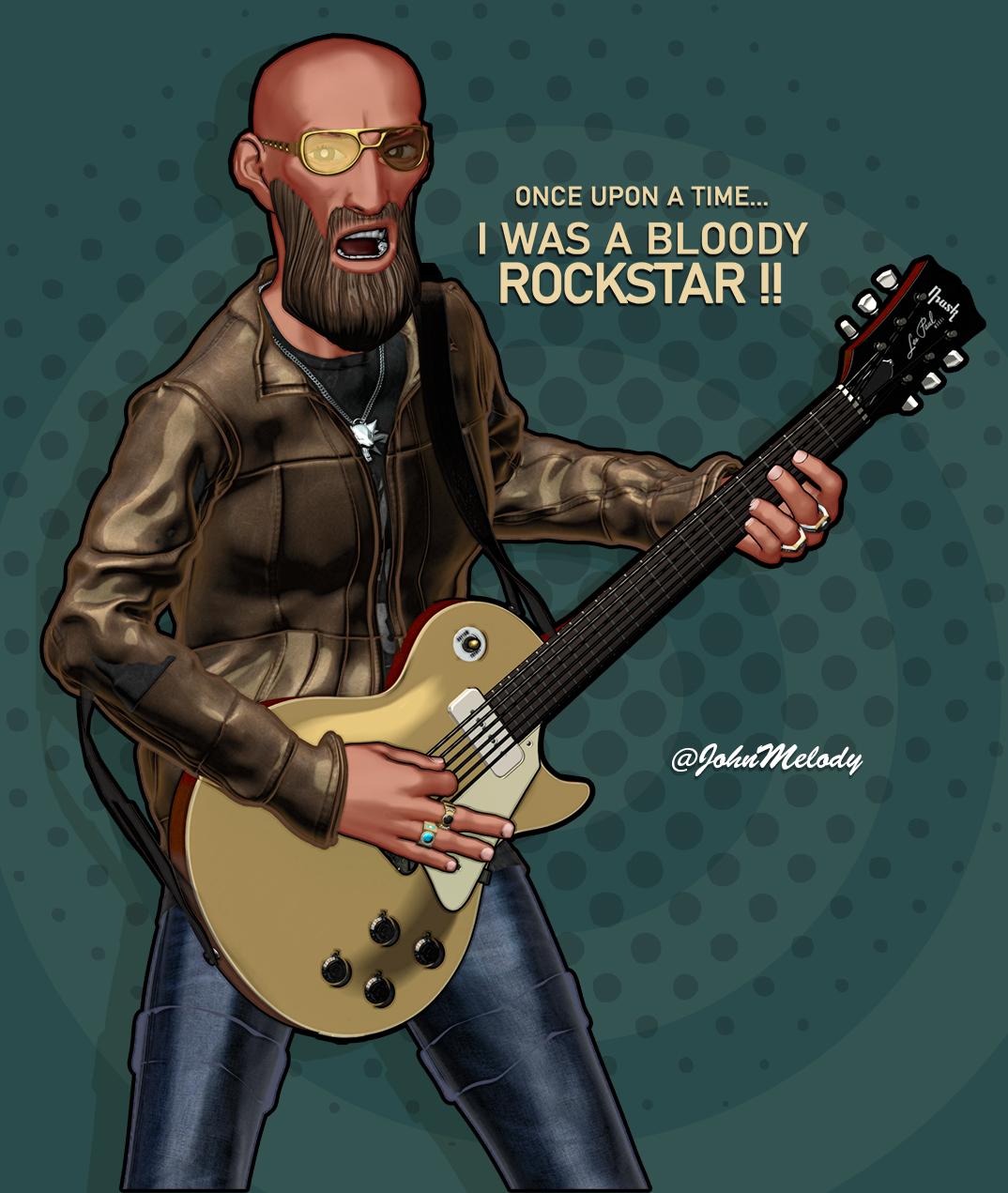
Toon FX created using my freebie JS Stylized ( pwToon Preset) . Then Bring to PShop to overlay the Strap + BG and Texts
Second Image pwToon render and get total treatment in Photoshop
Very impressive.
More Non-photorealistic Renders (NPR III)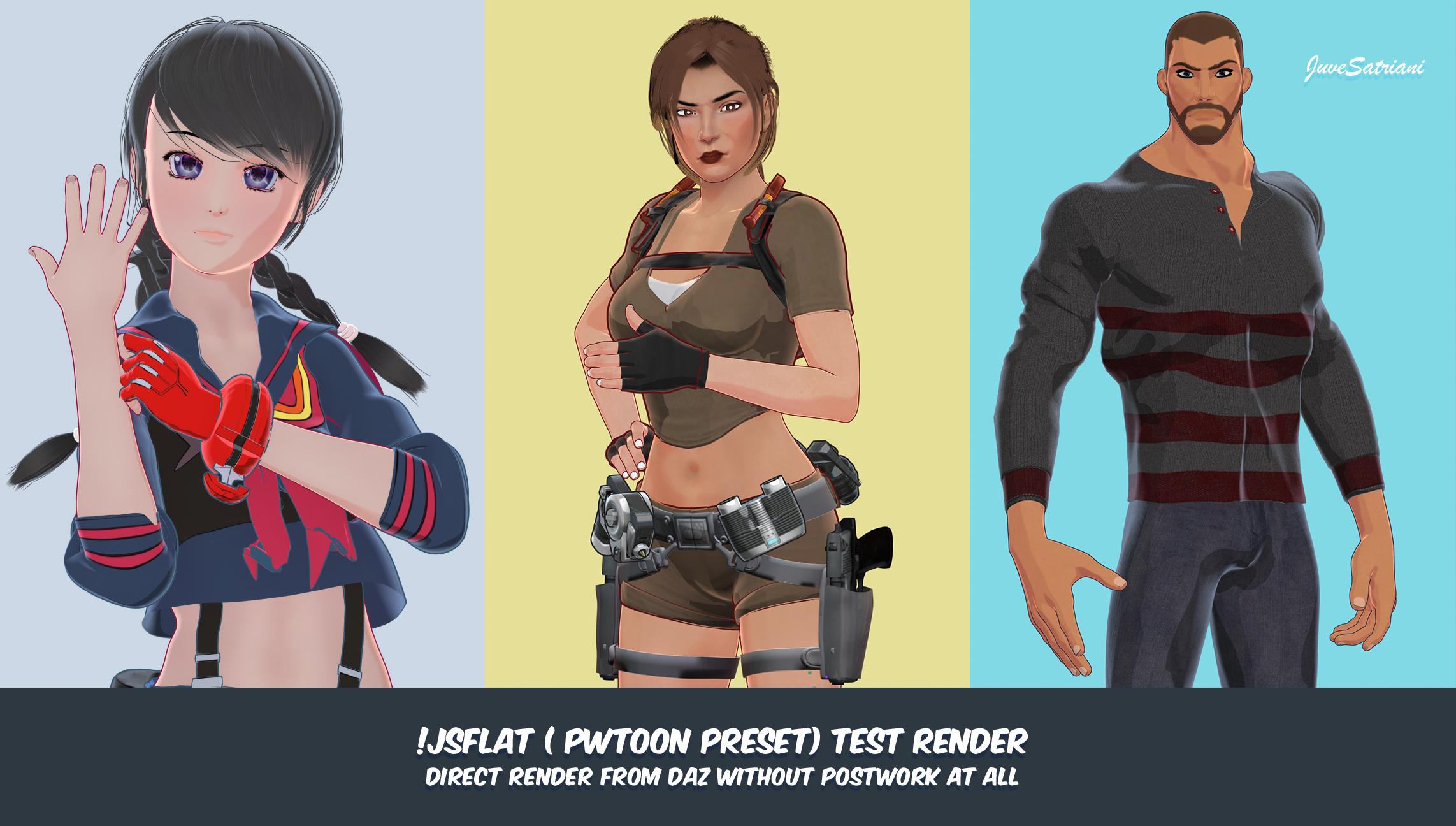
Test render for my upcoming pwToon Freebie . Hope I can finish the guide tommorow so you can play with it
More Non-photorealistic Renders (NPR III)Bravo! Looking forward to what folks will create using it.
Cheers!
juvesatriani said:
Guys , right now I`m building new preset for pwToon as alternative for my complicated Multipass technique . That will be for anime or cel shading style . And since this only one pass ,thats possible to make Video or animation with it . I`ll be releasing next week after ironing some quirk and make sure to finish the guide .
More Non-photorealistic Renders (NPR III)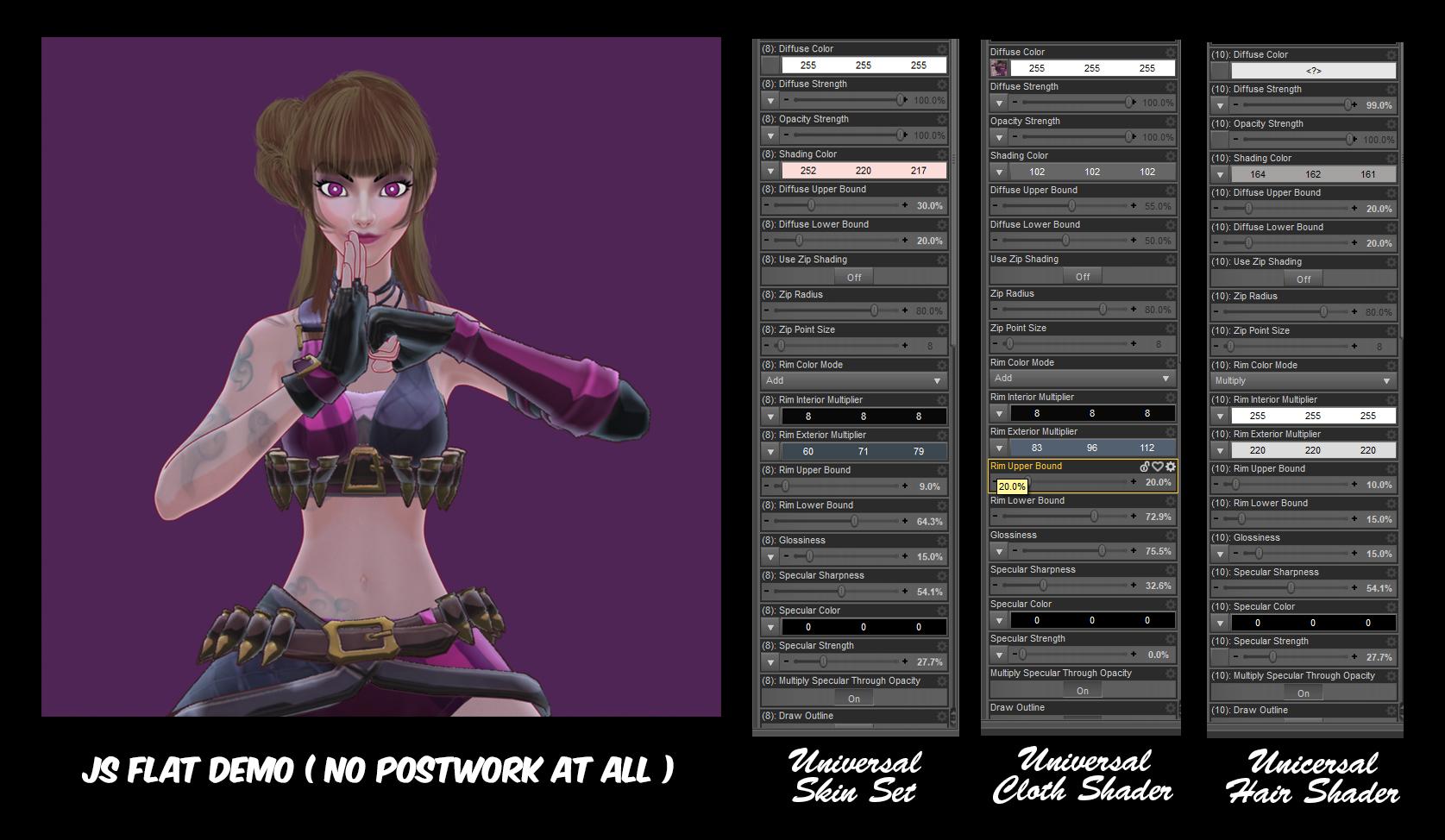
Guys , right now I`m building new preset for pwToon as alternative for my complicated Multipass technique . That will be for anime or cel shading style . And since this only one pass ,thats possible to make Video or animation with it . I`ll be releasing next week after ironing some quirk and make sure to finish the guide .
For Now , check this setting if you wanna get same style . This is same style I`ve been used in this Looping video
EDIT: In sample image All line created using free GEOSHELL Outline
Have fun
More Non-photorealistic Renders (NPR III)juvesatriani said:
I know I`m not 3D Shader or Material and Lighting expert in term of technical stand point , so getting ideas from outside of 3D world and try to mimicking those steps into 3D is what I mostly did.
Sometimes it will break the rules but since NPR is About Breaking almost standard 3D rules , so I have no problem with that LOL . My Blender EEVEE Multipass method also one of samples how I Breaking the rules as long I can get result just like I want :
There's something to be said about different approaches to NPR. All rivers lead to the same ocean, the saying goes. Somehow there's a common visual grammar we all follow. We all combine the same building blocks such as line, color, lighting, etc to communicate our intent. But because each one has a unique perspective -- the result of different experiences and cultural background -- we communicate the same idea, feeling, situation or symbol differently. It's certainly useful, as you say, to tap into other art fields for inspiration. After all, the tools we use (PWToon, Blender, etc.) are just tools. Without a motivating vision, these tools, sophisticated as they are, can't produce the outcome we aim for. To this end other genres are a great source for nurturing our unique vision.
Cheers!
More Non-photorealistic Renders (NPR III)Thanks for nice words guys ! Thats encourage me to explore further .
@csaa love it what you`re doing with your style , especially the last one . Remind me about Minimalism Trend in web design . Maybe you find your market in there ;)
@vrba79 , yeah I think thats one of many pwToon perks .Those RIM LIGHT workaround idea actually came after I`ve seen lots of Digital Comic Coloring Tutorials .
The way how they`d created nice overlay/secondary color FX in top of simple shading object inspire me to experiment with those RIM setting . Same goes happen with the light presets
I know I`m not 3D Shader or Material and Lighting expert in term of technical stand point , so getting ideas from outside of 3D world and try to mimicking those steps into 3D is what I mostly did.
Sometimes it will break the rules but since NPR is About Breaking almost standard 3D rules , so I have no problem with that LOL . My Blender EEVEE Multipass method also one of samples how I Breaking the rules as long I can get result just like I want :)
Thanks again guys for nice words. Keep your NPR`s soul Happy !
More Non-photorealistic Renders (NPR III)Great work! The shader captured the texture and the lighting quite nicely. Thanks for sharing.
Cheers!
juvesatriani said:
Toon FX created using my freebie JS Stylized ( pwToon Preset) . Then Bring to PShop to overlay the Strap + BG and Texts
Second Image pwToon render and get total treatment in Photoshop
More Non-photorealistic Renders (NPR III)juvesatriani said:
Toon FX created using my freebie JS Stylized ( pwToon Preset) . Then Bring to PShop to overlay the Strap + BG and Texts
Second Image pwToon render and get total treatment in Photoshop
Really love how that turned out. Gonna have to break down and give your presets a try. I love trying to figure out stuff myself, but these are just too good not to try. Probably gonna be tomorrow evening before I get a chance to play with it though. Work and all that other boring IRL stuff to contend with and all.
More Non-photorealistic Renders (NPR III)Nice work. Really solid!
juvesatriani said:
Toon FX created using my freebie JS Stylized ( pwToon Preset) . Then Bring to PShop to overlay the Strap + BG and Texts
Second Image pwToon render and get total treatment in Photoshop
More Non-photorealistic Renders (NPR III)Toon FX created using my freebie JS Stylized ( pwToon Preset) . Then Bring to PShop to overlay the Strap + BG and Texts
Second Image pwToon render and get total treatment in Photoshop
More Non-photorealistic Renders (NPR III)juvesatriani said:
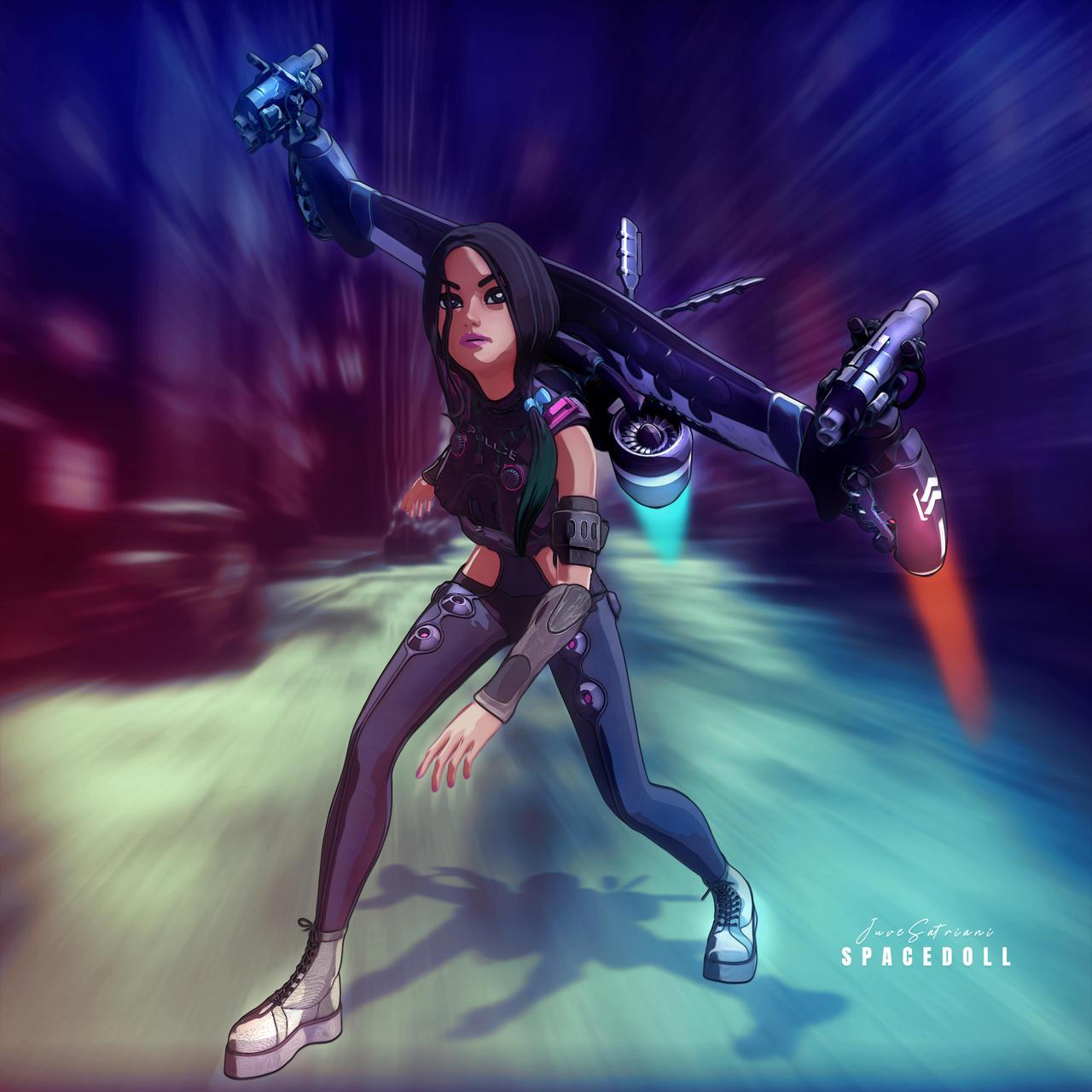
Just wondering , if possible to animate motion FX in Photoshop ? Meanwhile here my pwToon Multipass edit in Photoshop
Very cool!
More Non-photorealistic Renders (NPR III)csaa said:
Interesting image! You may have to use After Effects - https://photography.tutsplus.com/tutorials/how-to-add-motion-blur-effects-to-cartoon-animation-using-after-effects--cms-38034 - for the animated motion blur that you want.
Cheers!
juvesatriani said:
Just wondering , if possible to animate motion FX in Photoshop ? Meanwhile here my pwToon Multipass edit in Photoshop
Thanks for the link , Actually I `ve already familiar with AE because my daily job for last 5 years is/in ARCHVIZ . Dont know why ? but lately I seem just wanna simple solution with everything LOL
More Non-photorealistic Renders (NPR III)Interesting image! You may have to use After Effects - https://photography.tutsplus.com/tutorials/how-to-add-motion-blur-effects-to-cartoon-animation-using-after-effects--cms-38034 - for the animated motion blur that you want.
Cheers!
juvesatriani said:
Just wondering , if possible to animate motion FX in Photoshop ? Meanwhile here my pwToon Multipass edit in Photoshop
More Non-photorealistic Renders (NPR III)Just wondering , if possible to animate motion FX in Photoshop ? Meanwhile here my pwToon Multipass edit in Photoshop
rendering cartoon modejuvesatriani said:
Thats cool if you wanna work only in DAZ Studio . The best tool is the one that you feel most comfortable with .
In Daz Studio or other 3d software, as long as an object has a texture (not procedural), it is possible to convert them to be used in special shaders such as Toon Shaders or other rendering engines .So in theory, most objects which including texture maps in store should be Ok to use for Toon Render . Some toon styles even doesnt need to use Texture at all .
It's just that sometimes we have to do the conversion manually or with the help of several tools that can do it automatically or in batches , Check this freebie to make auto conversion from IRAY materials into 3Delight . Please be aware that that tools only working great if your IRAY Materials using IRAY UBER SHADER , Not custom ones like OOT HAIR SHADERS - 4 LAYER IRAY etc . IF your object use other than IRAY UBER SHADER your option will be doing conversion by hand or use another obejcts . Visit link above for further informations . You need to understand doing in 3delight means you can only use CPU for rendering .
Something you need also keep in mind , after conversion you still need to use proper or right shader if you wanna get Toon Render . You can try default Toon Shader which included in DAZ Studio instalation or Visual Style Shaders and Manga Shaders
Actually My go to toon shader for 3delight is pwToon , I have several freebie presets which came with tutorial how to use it . But it seem DAZ not sell it anymore , But you can ask DAZ support if possible for you to get copy of it .
Check this Youtube Video for step by step about Visual Styles Shader
ask to @vrba79 in this thread ,because he have experiences with DAZ Default Toon Shader
Thank you again and will read + research as i bought all sorts of shaders and iray shaders cartoon shaders etc on daz store... now time to learn practice and see how it all works :)
rendering cartoon modeThats cool if you wanna work only in DAZ Studio . The best tool is the one that you feel most comfortable with .
In Daz Studio or other 3d software, as long as an object has a texture (not procedural), it is possible to convert them to be used in special shaders such as Toon Shaders or other rendering engines .So in theory, most objects which including texture maps in store should be Ok to use for Toon Render . Some toon styles even doesnt need to use Texture at all .
It's just that sometimes we have to do the conversion manually or with the help of several tools that can do it automatically or in batches , Check this freebie to make auto conversion from IRAY materials into 3Delight . Please be aware that that tools only working great if your IRAY Materials using IRAY UBER SHADER , Not custom ones like OOT HAIR SHADERS - 4 LAYER IRAY etc . IF your object use other than IRAY UBER SHADER your option will be doing conversion by hand or use another obejcts . Visit link above for further informations . You need to understand doing in 3delight means you can only use CPU for rendering .
Something you need also keep in mind , after conversion you still need to use proper or right shader if you wanna get Toon Render . You can try default Toon Shader which included in DAZ Studio instalation or Visual Style Shaders and Manga Shaders
Actually My go to toon shader for 3delight is pwToon , I have several freebie presets which came with tutorial how to use it . But it seem DAZ not sell it anymore , But you can ask DAZ support if possible for you to get copy of it .
Check this Youtube Video for step by step about Visual Styles Shader
ask to @vrba79 in this thread ,because he have experiences with DAZ Default Toon Shader
rendering cartoon modeA richard said ,3Delight use CPU and your machine specs seem very capable to render your sample in lesser time than 10 hours . Unless you have so many transparency material against Lighting setup with raytrace shadow
Would you share screenshot of lighting parameter and scene tab ?
Several method I`ve used to speed up 3Delight for Toon render are
- Render Setting Tab > set MAX RAYTRACE DEPTH to 1
- Set Shading rate to 3 or 5
- If I must use shadow and there are lots material with opacity map/Transparency . I`ll use shadow map than Raytrace
- . Use AoA Light and utlizing Flag option to make lighting ignore those material
optional : find in freebie forum my !JS Stylized thread if you have pwtoon
More Non-photorealistic Renders (NPR III)kyleprometheus_d1f25abfdd said:
I'm looking at Cel Shading options. (Sketch is the one in my immediate sights.)
PW Toon? No longer on the store? Pity. The results looked impressive.
Will it be updated for Iray?
Kyle.
The two alternatives to PWToon for 3DL are the DazDefault toon shaders, which come pre-installed, and Visual Style Shaders.
Sketchy for Iray is so poorly documented, that it very well COULD do proper cell shading, but you'd never know it because the author couldn't even be bothered to explain how the example pics were done. The only other cell shader type solution for Iray is the OSO Toon Shader, but it requires you to make several renders, which you must then tweak and sandwich in Photoshop or its equivalent. Not a quick workflow friendly product from what I've seen.
Addendum: I've had SOME limited success getting Sketchy renders to look more cartoonish, but the lighting must be PERFECTLY tailored to the skintone of the subject. Its a headache compared to the likes of its 3DL counter parts where one good old distance light works fine for all. Also the outlines turn grey for whatever reason with my method, despite the color being set to flat black.
More Non-photorealistic Renders (NPR III)Hylas said:
@vrba79: I'll give the default toon shaders a try, just to see. I actually already bought Visual Style Shaders when I had a chance to get them for a good price a few days ago.
I'll just try out some stuff, maybe look up some tutorials, see how it goes. But if anybody happens to know of a 3DL primer for IRAY-heads, I'm all ears :)
Welcome to the club !!
About 3DL ,I would say you dont really have to know everything about it ,if your goals is creating Toon or Non Photo Realistic Images . Because most 3DL custom shaders written/build from scratch by those PA . Every paramater and setting in each shaders behave and react differently with other shaders although you can use to get similiar style or outcome . In short , your knowledges about pwToon not really transferable if you choose to use Visual Shaders - Manga Shaders and even DAZ default toon shader or the awesome omUberSurface and AWE shading kit . Those shaders even react different against same light set or settings .
IRAY in other hand, I believe designed to have streamlined or global approach just like BSDF shader in Blender .Yeah we have custom IRAY shader like DAZ uber - OOT hair - Multi Layer etc but those are works based on same settings or at least same approach . If you already mastered DAZ Uber , you can use those knowledge for tweaking another shaders to get result you want . In 3delight you need to master each shaders , thats why most people choose straight to IRAY
More Non-photorealistic Renders (NPR III)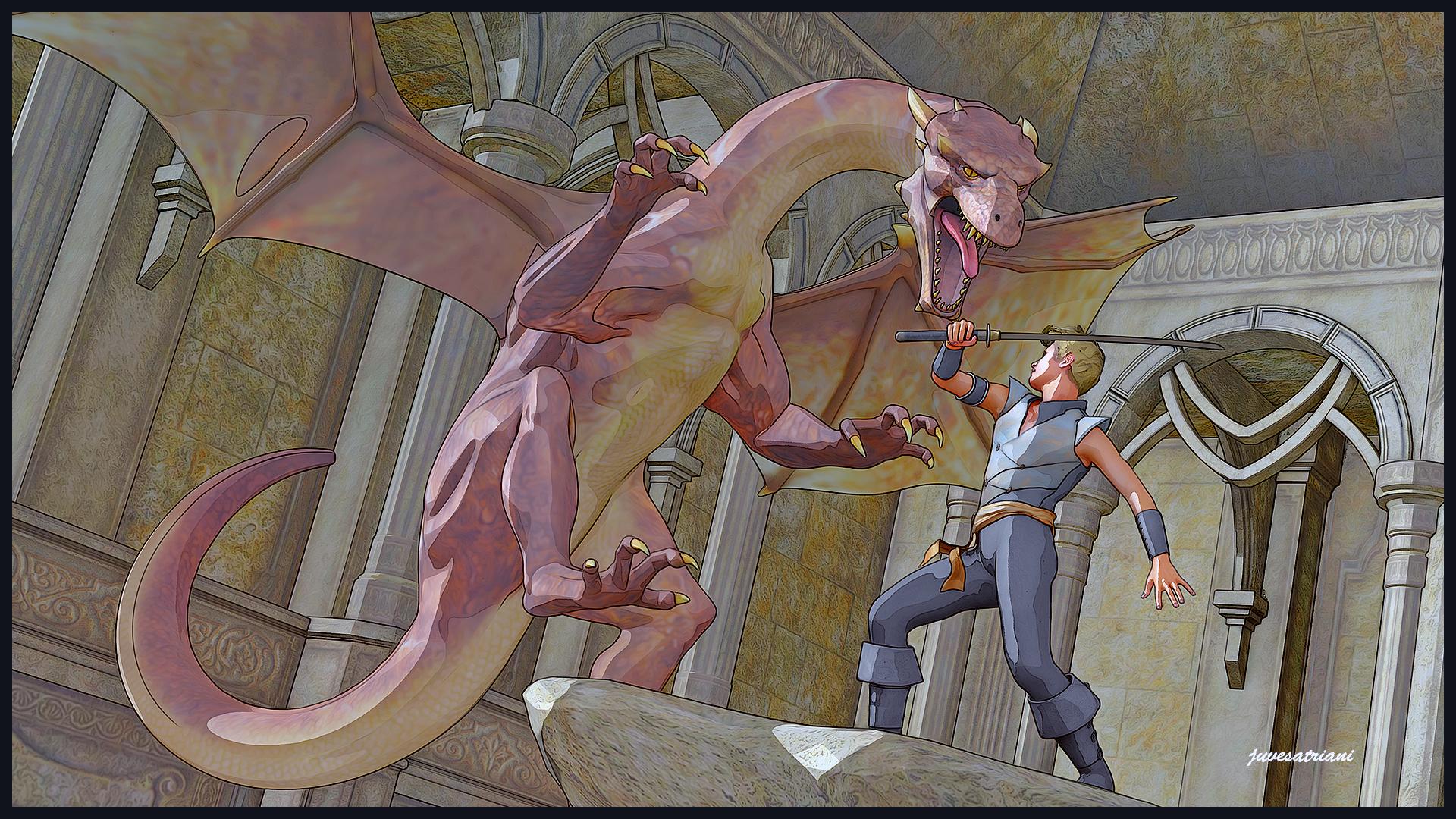
Another pwToon Multipass + Photoshop experiment
Daz 3D is part of

Connect
DAZ Productions, Inc.
7533 S Center View Ct #4664
West Jordan, UT 84084Licensing Agreement | Terms of Service | Privacy Policy | EULA
© 2026 Daz Productions Inc. All Rights Reserved.