-
Missing File Problem G8 Male
lcattus_9716520438 said:
vwrangler said:
........
Ignoring the difference between \ and / and the capitalization: There's a space in the first directory path ( "/ genesis 8" vs "\Genesis 8" ) that doesn't exist in the second.
Have you installed any G8M morphs or characters recently? Especially any freebies? If that is a cut-and-paste, it looks like there may be a mistyped path in something you've recently installed.
Hi vwrangler, thanks - I'd noticed the space but for example when I load an unmodified Edward 8 the log file shows the problem as soon as the .duf file loads
2021-04-20 19:24:45.640 Loaded file: edward 8.duf
2021-04-20 19:24:47.056 Could not resolve : "/data/DAZ 3D/ Genesis 8/Male/Genesis8Male.dsf"So I'd assumed that the problem was associated with that file (which has previously loaded OK), but maybe you're suggesting that some other file could be involved. Any idea what type of file I should be looking for?
Any G8M character/morph package that you installed just before the error started appearing.
The issue likely isn't with the main G8M starter essentials themselves. The issue is with something else. However, because Genesis 8 has to load each and every installed morph file when you put him into a scene (or call him from a saved scene), it has to read all of those files, so the error will appear every time you load any G8M character.
What G8M character or morphs did you instal right before the issue started appearing?
Natural breasts Shape is no operating.I bought this one last year.
These morphs are not activted or deactivated by clicking files in the library.
Select your character in the scene.
You will find the morph sliders on the Parameters pane under "Pose Controls>Chest"
If you still can't find them, just click "All" at the top of the left column and type
Z NBS
into the search box on top of the right column.
Nothing else will show except for those morph sliders.
Clear the search to continue as normal.
AIUTO...CHI CONOSCE L’ITALIANO? PARTE TREDICICiao ragazzi, è da un po' che manco da queste parti :-) Come ve la passate?
TritiumCG lo conosco anche io, gli ho commissionato un morph e devo dire che è molto bravo. Poi la effettiva somiglianza al personaggio originale dipende da tantissimi fattori, i capelli, le texture della pelle... a volte capita che una persona in una foto sia quasi irriconoscibile, figuriamoci un modello 3D
The Newest Evolution Is Here: The Daz Season Pass!Wonderland said:
xyer0 said:
Genesis Core Figures / base characters (and most of their HD Add-Ons) imo offer the most consistently reliable source of high-quality male and female skins and morphs. Yes, there are several exceptions. It's no secret that bundle quality has plummeted while their prices have almost doubled (and that with little to no enticing promotions or deals). Consequently, the Season Pass seemed like a great way to get HD characters that I was going to buy anyway for $30 each instead of the $41.61 ($22.03 + $19.58) I might have to spend due to Daz's current trend of not discounting the HD.
Where did you get $30? Brooke is $22. ETA, I see you added the HD morph, However, every DO HD morph I own, (which is most by now) were either free or on sale at under $5.00 and I don’t even use them. I do use Mousso’s HD morphs quite often and they work with most morphs and skins and the DazO Mousso characters are often on deep sale for under $5.00 and IMO, soooo much, better than Daz0’s. Actually if Mousso had a Season Pass, I’d possibly consider that lol. Or not, I’m not really a gambler...
I strongly disagree that Daz core characters have the best morphs and skins. I think MANY PA’s products are WAY better and I rarely, if ever, use Daz characters at all and only buy them if I like the bundle they are in or the deal, or freebies that come with it. Remember Stephanie 8? Ugh. Has anyone actually ever used her? The makeup is usually awful on Daz0’s and I don’t even like the sculpting on most. Actually there are only about three or four Daz G8 core characters that I actually liked and I think I own them all (purchased in bundles) except some of the last few where the bundle deals were bad.. But I only have one G8,1,which I purchased because I liked the bundle, NOT the character. (Another trend I don’t like are the release of only G8.1s from now on.)
If the Brooke bundle deal had been good, I might have purchased it, not for Brooke, but for everything else. When the bundle eventually goes on deep sale or maybe free if they ever get back to those offers, I will probably get it, but definitely not for Brooke (although I’ve discovered she can make a cute toon.)
The truth is, the thing that bothers me most about all this, is that I’m losing orange banners. I used to get all of them and as things have progressed, I’m getting less and less so purchasing less and less, which, when I think of it, may actually be a GOOD thing. I need to start taking time to test and if necessary, return products I DO have.
I got the $30 by dividing the $150 for the season pass by 5 characters/HD. The $41.61 (22.03 character + 19.58 HD Add-On) is what I expected I would pay under the new Genesis 8.1 scheme that has seen less discounts. Actually, I think I got one of the 8.1 HD Add-Ons for $12, but I suspected Daz might stop giving them away and keep the prices high as a rationale for the season pass. So far, so good. There haven't been any loyalty orange banners for new bundles, only for owning retread product(s) that's been stuck in, so you're not missing out.
I love Mousso (74 out of 112) and Raiya (whole store and have rendered each one), but their skins have rarely risen to the level of detail in the BEST base characters, imo. I like skin detail, since I have to do closeups, and the spec maps on characters like Dain, Nix, Babina, Zelara, Kala, Millawa, Floyd, Kwan, Dasan, Alawa---just off the top of my head---leave most others looking too smooth for my tastes. bluejaunte, of course, has to be considered separately in fairness to everyone else, imo. My preferences are based on my own illustrative rendering needs. If I did beauty or style shots mostly, then I could pass on most of the base characters too, for there are plenty of prettier girls than that lot.
Transfer Face helpAfter I transfer a face onto my Genesis 8.1 character from a photo, is there a way to adjust the facial features and expressions? I have the latest version of DAZ, but I can't seem to find any dials that allow for it. Thanks! -SKI
Lindays Soft Classic hair and morph savingthe shape i am after isnt possible by using any combination of the morphs the hair comes with - you have to use gravity in dforce to get the hair massed like that so I think only a morph save would work?
Daz3d Mesh clipping through the dress.hmm it's the old pockthrought issue it happens not only with daz but any other character, it's because in order to a "outfit" proper deforms perfect with a skin inside it, you must really work as crazy fixing a lot of influence which would take even days to fix, daz also have it, the thing is which they have some internal tools which in most of the cases can somehow make a work around by adjusting the morphed outfit to body, while it work in many cases some extreme body cases it not gonna work, you would need some extra "tools" like those ones:
https://www.daz3d.com/sy-universal-breast-helpers-genesis-genesis-2-and-genesis-3-female-s
https://www.daz3d.com/sy-clothing-fit-helper-genesis-8-male
https://www.daz3d.com/sy-clothing-breast-helper-genesis-8-female
https://www.daz3d.com/sy-clothing-fit-helper-genesis-8-female
those are just some exemples
another way is just "delete the mesh inside he outift which is the "most common used". or create multiple versions of the character, breaking it into parts or as we love to say the "modular character, well going back to unreal
you have the same 3 ways to fixe it
1 - when still inside daz you have use some of those tools to "adjust the outfit to make it "big" or less close to the body mesh on those parts, some outftis come with adjust morphs but in some cases they not enough to fix then you would need some "extra" tools anyway, then using those tools you adjust the outfit until it's proper worked (in the case of the shoes something really looks wrong it's seens which you did not proper retarget the right pose i gonna explain it later.
2 - deleting the "skin inside the cloth" unless you gonna do a animation where the character will "undress" and need to have a "skin inside"(which also can be worked with some little extra work but let's leave it for now), you really don't need this "extra inside the outfit skin" then inside daz you gonna enable the geometry editor, to remove the not needed skin, making the character only have skin where it's need.
3 - modular character or "pieces" this is almost the same of 2 just the difference is if you want the character to have multiple outfits, then you gonna inside unreal break the character in parts
here a link for me proper explain how to do that:
https://www.daz3d.com/forums/discussion/comment/5174496/#Comment_5174496
to assemble the meshes you must use a master pose component
also on this topíc you can find more usefull helps, take in mind which those stuffs where posted before the daz to unreal pluging become common and you had to export the characters manually, then some stuffs could be outdated, but about the parts still valid.
for the skin inside, unreal does have a option to "hidden" a mesh in game( or when running the animation) where you can make a full naked body character then make the pieces and keep the full naked body "hidden" to only appear when the character is striping or full naked, then whe wearing cloths this full naked body will be hidden, its a extra mesh but if you keep it hidden then it not will be a "big deal" for perfomances.
to assemble the parts inside unreal you would need to do in the bueprint using it's proper node.
about the "shoes this is a issue more about the "pose used to retarget the animations, the "feet pose need to be on the same angle as the high heels when retargeting, otherwise you would need or to manually adjust the pose editing the animation, or export a high heels morph target for the high heels to use it inside the animation to adjust the feet angle.
The Newest Evolution Is Here: The Daz Season Pass!xyer0 said:
Genesis Core Figures / base characters (and most of their HD Add-Ons) imo offer the most consistently reliable source of high-quality male and female skins and morphs. Yes, there are several exceptions. It's no secret that bundle quality has plummeted while their prices have almost doubled (and that with little to no enticing promotions or deals). Consequently, the Season Pass seemed like a great way to get HD characters that I was going to buy anyway for $30 each instead of the $41.61 ($22.03 + $19.58) I might have to spend due to Daz's current trend of not discounting the HD.
If this trend holds, I will have saved $58.05 by purchasing the Season Pass. This only partially diminishes for me if one of the five base characters is toonish or a Thorne doll. It didn't matter to me and others like me that we couldn't see the characters; so far, the base characters are still trustworthy, although Brooke requires more forethought than any I've worked with.
Sometimes people with different opinions than ours have legitimate reasons for those opinions. And at least for now, we all are allowed to hold and act upon our differing opinions. There are usually factors at play that are known only to those with their hands in the dirt.
Oh, and if Daz could be bothered to update the link that contains their flagship product, then I could've just pointed people there.
Where did you get $30? Brooke is $22. ETA, I see you added the HD morph, However, every DO HD morph I own, (which is most by now) were either free or on sale at under $5.00 and I don’t even use them. I do use Mousso’s HD morphs quite often and they work with most morphs and skins and the DazO Mousso characters are often on deep sale for under $5.00 and IMO, soooo much, better than Daz0’s. Actually if Mousso had a Season Pass, I’d possibly consider that lol. Or not, I’m not really a gambler...
I strongly disagree that Daz core characters have the best morphs and skins. I think MANY PA’s products are WAY better and I rarely, if ever, use Daz characters at all and only buy them if I like the bundle they are in or the deal, or freebies that come with it. Remember Stephanie 8? Ugh. Has anyone actually ever used her? The makeup is usually awful on Daz0’s and I don’t even like the sculpting on most. Actually there are only about three or four Daz G8 core characters that I actually liked and I think I own them all (purchased in bundles) except some of the last few where the bundle deals were bad.. But I only have one G8,1,which I purchased because I liked the bundle, NOT the character. (Another trend I don’t like are the release of only G8.1s from now on.)
If the Brooke bundle deal had been good, I might have purchased it, not for Brooke, but for everything else. When the bundle eventually goes on deep sale or maybe free if they ever get back to those offers, I will probably get it, but definitely not for Brooke (although I’ve discovered she can make a cute toon.)
The truth is, the thing that bothers me most about all this, is that I’m losing orange banners. I used to get all of them and as things have progressed, I’m getting less and less so purchasing less and less, which, when I think of it, may actually be a GOOD thing. I need to start taking time to test and if necessary, return products I DO have.
Genesis 8, 3 and 2 in Carrara Alt MethodI have purchased Misty's Genesis 3 presets for Carrara and have her Genesis 8 versions as well, and in my opinion these are Great!
They can use any morphs collected for the main base figure and, aside from a few minor obstacles work very well as a Carrara version of the official release versions.
I'd like to illustrate an alternate method as well.
For me, it's always been beneficial to stick with earlier versions of Daz figure since it can be problematic for me to invest in replacing everything I've already collected for a newer base figure - like clothing, hair and animations for example. The later being my biggest obstacle.
Genesis Generation X2 has been my new tool for converting Genesis 1 (which works very well with Carrara and previous generation figure addons and animations) into shapes of the newer and older generations alike. In fact, it allows us to mix and match to a certain degree as well - but it does not have an addon to include Genesis 8 figures.
I bought Riversoft Art's Character Convertor from Genesis 8 Female to Genesis 3 Female and it works really well and is quite powerful in its use. It does have a problem with eyes for stylized shapes that enlarge the eyes, so for those types of characters. we need to pick a face shape from a different generation or use other morphs to enlarge the eyes and shape the face - but it does work great for bringing Genesis 8 Female figure shapes over to Genesis 3 Female.
So we can use that to convert Genesis 8 shapes to Genesis 3, then use GenX2 to add those new morphs to Genesis 1, and it works great!
We don't get the added bones and such, but the shapes come over well and Genesis 1 is incredibly compatible with Carrara, aniBlock Importer for Carrara, and Carrara's Fit-To for clothing items of previous generations.
Riversoft Art also has a convertor for the males as well: Character Convertor from Genesis 8 Male to Genesis 3 Male
For newer generations of clothing (Genesis 2 and newer) I have purchased all of SickleYield's clones that I need for these conversion processes. I don't worry about something that can convert all the way down to Genesis 1 since I can convert clothes that I have already converted.
We use Daz Studio to convert the clothing and store the conversions in our library
SickleYield offers some great advice on this stuff, so it's good to read through anything and everything that she includes. It's all very good to know.
Here are some helpfuls:
- Using auto-fit works fine for one-off use. But if we want to add a converted item to our library, use the Transfer Utility instead.
- Never attempt to work with a freshly converted item. Save it as a figure asset to your library first. Delete it and load it from the library.
- I save my converted assets under the appropriate name for the item in the appropriate generations library
So let's run a full example of converting a clothing item from Genesis 8 Female to Genesis:
- The clothing is made for G8F already, so we don't need to have her in the scene. Let's begin by loading in Genesis 3 Female, then deselecting her and load in Genesis as we'll need both of those for the Transfer Utility
- With both figures deselected, load in the G8F garment item
- start the transfer utlity
- The upper left set of options (Source) are where we load the target Figure - so use the drop-down to select Genesis 3 Female
- Next option down, use the drop-down to select Clone > Genesis 8 Female
- On the right set of options (Target) choose the garment
- Expand the dialog to show advanced options
- Put a check in "Reverse Source Shape from Target"
- At the very bottom, confirm that "Fit to Target" is checked, but I like to uncheck "Parent To" (easier to save afterward)
- Run the Transfer
Use the eyeball icons on the left of both Genesis and Genesis 3 Female to hide them both
We'll now see a converted garment
Before doing anything else, go File > Save As > Figure Asset
Save under People > Genesis 3 Female > Clothing > "________________"
Delete the garment from the scene
Find the new garment just saved in the library (People > Genesis 3 Female > Clothing > "________________") and load into the scene
- start the transfer utlity
- The upper left set of options (Source) are where we load the target Figure - so use the drop-down to select Genesis
- Next option down, use the drop-down to select Clone > Genesis 3 Female
- On the right set of options (Target) choose the garment
- Expand the dialog to show advanced options
- Put a check in "Reverse Source Shape from Target"
- At the very bottom, confirm that "Fit to Target" is checked, but I like to uncheck "Parent To" (easier to save afterward)
- Run the Transfer
Before doing anything else, go File > Save As > Figure Asset
Save under People > Genesis> Clothing > "________________"
We'll now have a G3F and a Genesis version of the clothing.
Daz to Blender Bridge - Meet the TeamHello Bridge Team! I'm having trouble with clothing poke through, hair and prop placement once I import into Blender using Bridge.
I'm using the latest version of Daz, Daz to Blender Bridge and Blender. Everything looks great in Daz but when I import the model into Blender using Bridge, the clothing has some poke through, as well as the hair and some of the props are not in the correct position.
The props are not a big deal but I can't figure out how to fix the clothing poke throughs in Blender. In the case of 'dForce clothing, is there a way to "apply" the 'dForce in Daz before exporting so that the clothing is a solid mesh that will not change shape? I'm new to the 3D world so exuse my ignornace if I'm not framing the question correctly.
I'm having trouble finding discussions where others are having the same issue.
__________________
I found a solution:
In Blender sculpt mode I used the grab brush and smoothing brush to fix all of the clothing poke throughs. I haven't done a lot of sculpting but I found it fairly easy. I still wish I knew what caused the shape of the clothes to change in the transfer from DAZ to Blender, if the team has any insight.
200 Plus Puppeteer Interface for Genesis 8 & 8.1 (Commercial)Is this for realistic character's faces only? I am going to get the product regardless, but I have needed brow morphs for Sci-Fi characters that I have not been able to find in morph kits or characters created by PAs.
This looks like a fun product and hopefully it can be used by those who can't use 4.15 for whatever reason they are facing now.
Celebrity Look-a-Likes for 3D figures part 3jedijudd said:
RayDAnt here it is https://www.renderosity.com/freestuff/items/88248/v4-zoe-saldana-zbrush-morph-for-poser usually have no problems with v4 morphs in daz but this one does not work
Looking at the files included in the zip, it uses PMD injection. That doesn't work in DS.
3D Art Freebie Challenge-April 2021-Winners Announced "Spring Forward" -Entries Thread OnlyThe image is called
The First Annual 'Springing Forward' Race
[Report extract from the local paper] 'The race was to see who was the fastest person to use the 'Spring Things' (for want of a better name) to cover 100m. This is the first time the event has been run, so it was not as popular as the organisers hoped, and there were only four entrants. Maybe next year's event will be better attended, as all competitors and audience enjoyed the event enormously. At the start of the race there was not a lot of agreement over how to use the 'Spring Things', and one competitor thought that bouncing backwards would be the best way. However instant disqualification awaited her - it was the 'Springing Forward' race, after all, and the clue was in the name.. Standing on the 'Spring Things' took care and co-ordination (even with the competitor's shoes were glued to the spring board) which didn't come easily to any competitor. After a shaky start Alysha in lane 4 took a commanding lead and won by a good 20 metres, with Ki in lane 6 coming in fractionally ahead of Vicky in lane 5 after abandoning her novel rabbit hop method 5 metres from the start line and catching Vicky up at the 90 metre point. All competitors fell over at least twice and were helped onto their springs by members of the audience. Alysha's prize was a small replica of the strange obilisk that appeared in the woods this January, and she goes home secure in the knowledge she won the daftest race in the sporting calendar.'
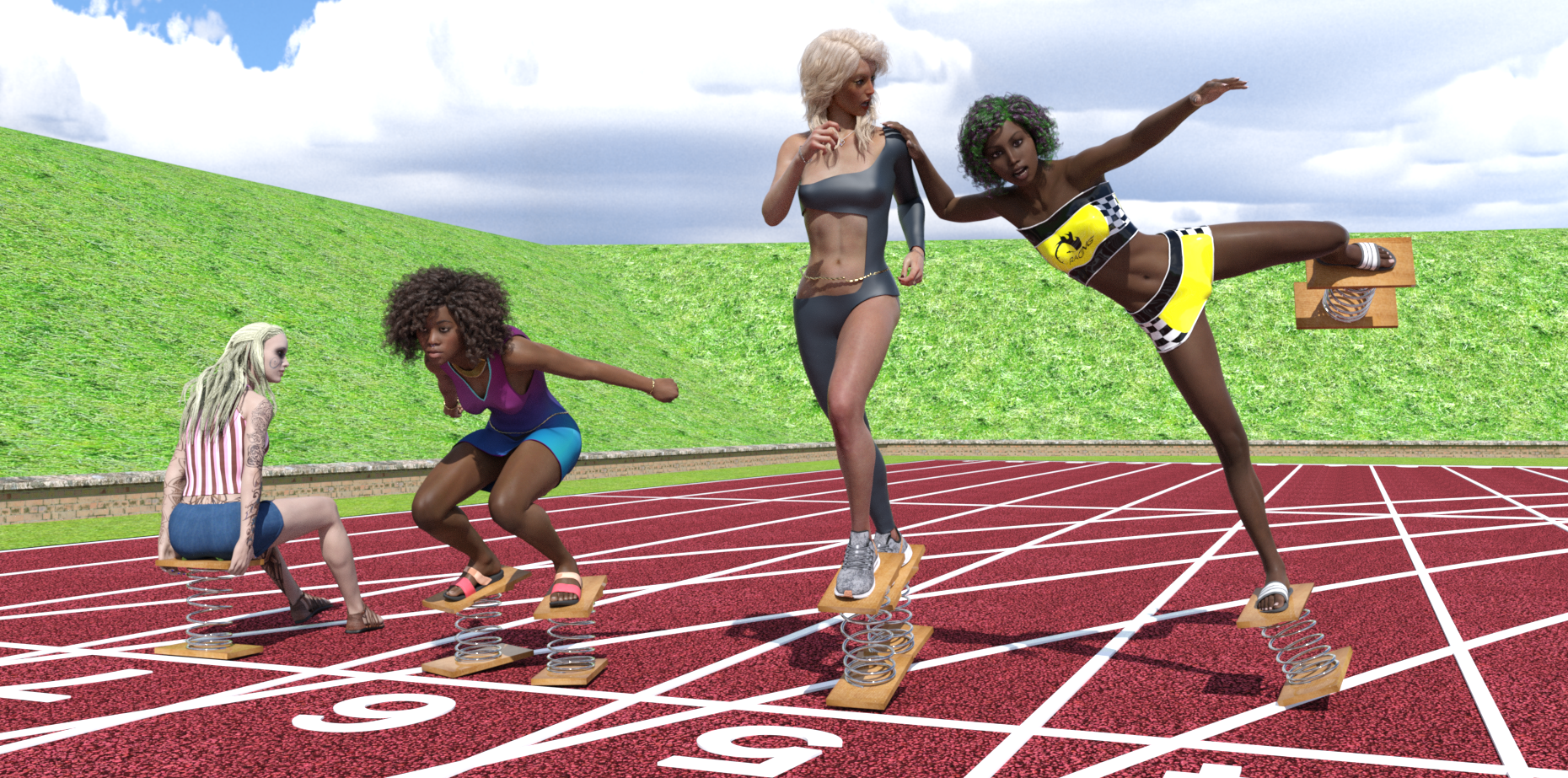
Free Items, from Background first, then figures Left to Right
HDRI: https://hdri-skies.com/shop/hdri-sky-024/
Athletic Ground: https://www.renderosity.com/freestuff/items/88078/athletics-ground
Spring Things: Not available all month so may not count, see forum thread: https://www.daz3d.com/forums/discussion/488846/freebie-spring-thing
Left Figure in Lane 7:
G3 character: Aeion the Pict Warrior https://www.renderosity.com/freestuff/items/76611/aeron-the-pict-warrior-character-for-v7-with-bonus-hair (Came with hair, shoes & texture)
Left figure top & shorts: https://www.wilmapsdigitalcreations.co.uk/view_product.php?id=393
Centre Left Figure in Lane 6:
Character: https://www.renderosity.com/freestuff/items/85911/ki-for-genesis-8-female Modified by no-count G8 body morphs (https://www.daz3d.com/genesis-8-female-body-morphs) and paid for Aniyah skin texture (https://www.daz3d.com/aniyah-for-darcy-8)
Clothing: Dress by valmont59 https://www.renderosity.com/freestuff/items/86688/free-dress-for-g8f
Shoes: Amy_Aimee https://www.deviantart.com/amyaimei/art/Sandals-01-and-02-for-G8F-758862757
Wrist & Waist ropes: https://www.deviantart.com/noone102000/art/Odalisque-Dress-FREEBIE-TO-DOWNLOAD-822900201 (Warning mature content)
Eyebrow piercings: https://www.renderosity.com/freestuff/items/83703/piercing-gaze-for-genesis-8-females (Barely visible even at full size)
Necklace: Aiy_Aimee https://www.deviantart.com/amyaimei/art/My-Heart-Necklace-for-Genesis-8-Female-729010047
Pose: Started out as Stretch Pose 11 from: https://www.renderosity.com/freestuff/items/87700/g8f-athletic-stretching-11-to-15
Nose ring: Freebie by prefoX on Renderosity. Unfortunately it seems to be unavailable now.
Centre Right Figure in Lane 5
Wrist & Waist Ropes: https://www.deviantart.com/noone102000/art/Odalisque-Dress-FREEBIE-TO-DOWNLOAD-822900201 (Warning mature content, already mentioned for Ki)
Necklace: https://www.deviantart.com/amyaimei/art/My-Heart-Necklace-for-Genesis-8-Female-729010047
Clothing: Dance by MostDigitalCreations: (Free Subscription Download) https://www.most-digital-creations.com/g8f_dance.php
Clothing leather shader: https://www.deviantart.com/tom2099/art/Iray-car-related-shader-presets-megapack-539622361
Shoes: Genesis Nike Airzoom https://sharecg.com/v/97066/browse/21/DAZ-Studio/Nike-Air-Zoom-for-G1
Pose: Started out as Warm-Up 02 from: https://www.renderosity.com/freestuff/items/87721/g8f-warm-up-1-5
Engagement ring: https://www.renderosity.com/freestuff/items/73938/diamond-heart-ring-obj-version with DAZ Uber glass, silver & gold shaders applied, turned into a prop (barely visible).
Tummy button piercing: https://www.renderosity.com/freestuff/items/82573/alternative-sig-suit-piercings-for-g8f (barely visible at this resolution)
Right Figure in Lane 4
Character: https://www.renderosity.com/freestuff/items/83613/alysha-for-genesis-8-female modified by G8F body morphs a little. Texture included in freebie.
Clothing: Racer Girl by MostDigitalCreations (Free Subscription Download) https://www.most-digital-creations.com/g8f_racer_girl.php
Shoes: Amy_Aimee https://www.deviantart.com/amyaimei/art/Sandals-01-and-02-for-G8F-758862757 (already mentioned for Ki, both pairs of sandals come in the same freebie)
Pose: Started out as one of the kicking poses from https://www.renderosity.com/freestuff/items/82812/poses-morphs-props-heavy-hitters-for-g8f, but I modified it so much I can't even recognise the original any more.
Paid For Items
Miranda Hair (centre-left and right characters) https://www.daz3d.com/miranda-hair-for-genesis-3-8-female-s
Aniyah for Darcy 8 Texture (centre left character) https://www.daz3d.com/aniyah-for-darcy-8
TritiumCG Custom Character Morph (centre right character)
CB Guilia texture hue & lightness modified (centre right character) https://www.daz3d.com/cb-giulia-hd-for-genesis-8-female
Robin Hair (centre right chatacter) https://www.daz3d.com/robin-hair-for-genesis-8-females
No Count Items
G3F & G8F Base.
G8F Female Body Morphs https://www.daz3d.com/genesis-8-female-body-morphs
Unseen Obalisk prize given to Alysha: https://www.renderosity.com/freestuff/items/87671/obalisk
Possibly the 'Spring Thing' due to not being available all month: https://www.daz3d.com/forums/discussion/488846/freebie-spring-thing .
Ki's nose ring by prefoX. Shame that.
Regards,
Richard.
Freebie 'Spring Thing'It's a pleasure to see you again Catherine.
Thank you all for your comments. But please be aware that when I say "Quick and Dirty" for the morphs, I do mean it. For the compression morph I scaled the spring by 90% in the Y axis, making the wire cross section a little oval, then moved the top board down to meet the spring.
The rotation morphs were made by selecting the vertices in the top board, spring and top face of the lower board and rotating 2.5° about the origin, meaning the lower board distorts a bit rather than the spring. Nothing more sophisticated than that.
Anyway, I do hope they are useful for daft little jobs.
Regards
Richard.
Celebrity Look-a-Likes for 3D figures part 3RayDAnt here it is https://www.renderosity.com/freestuff/items/88248/v4-zoe-saldana-zbrush-morph-for-poser usually have no problems with v4 morphs in daz but this one does not work
Brooke 8.1... Yes, finally ! ! !It has to with her shape not following the generic G8F shape down there. Just like with any morph, when a clothing item auto follows the surrounding mesh gets distorted. With Brooke, it's just more noticable because of how her belly and hips are shaped.
The best way to avoid the issue would be to use dForce cloths, so that things are draped more realisticaly.
Brooke 8.1... Yes, finally ! ! !So in a lot of images of Brooke her panties fit weirdly. I am just wondering if it is the clothing or something, going on with her groin, but they bulge out or cling in a weird way.
This is not a criticism, but I am wondering if the morph is not playing well with the underwear or if there is a cause for this.
Brooke 8.1... Yes, finally ! ! !ziatonic said:
phatmartino said:
@ziatonic Pretty sure it's this: https://www.daz3d.com/long-wet-hair-with-dforce-for-genesis-8
Thanks. Though hers looks a bit shorter, perhaps they used a morph. You would think a premier character would have the "Assets Used" at the bottom.
They never do
Digital Clothing into Real Life PicturesPlease put the Viewport into Smooth Shaded drawstyle if you are going to show a nude figure (even without its anatomical elements).
In order to use the Transfer Utility the target item has to line up with the Source figure, as loaded. It looks as if the jacket is loading at ground level. Use the tools in DS to place the jacket correctly on the zeroed figure, then hide everything but the jacket, export as OBJ, and reimport the OBJ (making sure you use the same preset in the options dialogue) - that will bake the adjustments in, after which the transfer utility should work as expected.
Brooke 8.1... Yes, finally ! ! !phatmartino said:
@ziatonic Pretty sure it's this: https://www.daz3d.com/long-wet-hair-with-dforce-for-genesis-8
Thanks. Though hers looks a bit shorter, perhaps they used a morph. You would think a premier character would have the "Assets Used" at the bottom.
Daz 3D is part of

Connect
DAZ Productions, Inc.
7533 S Center View Ct #4664
West Jordan, UT 84084Licensing Agreement | Terms of Service | Privacy Policy | EULA
© 2026 Daz Productions Inc. All Rights Reserved.