-
Daz to Blender Bridge - Meet the Team
endlessloving said:
DAZ_sam said:
endlessloving said:
HI there,
it's great to know that there is a bridge now. I tried it and after the "transfer" blender showed the hands of my G8M figure totally messed up, with fingers about a meter long.I used power pose to adjust the hands and fingers before I used the bridge and it seems that there is an issue with rigging.
Is there any way to make sure that the rigging works properly when using the bridge? I only need one pose and not an animation.
I don't actually need the rigging in blender, I just want to make sure that I can import an exactly posed figure into blender, including the materials from DAZ.Is there maybe a tutorial on how to use the bridge? I guess to make this work a figure needs to be prepared in a certain way or just in a default posture?
Right now there isn't a simple way of doing this in the bridge. But, it is a great idea for a tutorial. As the bridge team is small I will add to a list of many things we need to do. We will look into power pose though, and see why this is occurring thanks!
Thanks for considering to make a tutorial.
I have continued to try to get a pose from Daz to Blender but simply failed.
The Bridge does not really work for me at this point.
Skin textures are broken, cloths are overlapping and the pose is always just the default pose.
I also tried to use colada and obj and fbx and there is always something that goes really wrong.
I am wondering how other people get their figures from Daz into Blender or is it just not really a common thing?
DAZ and Blender on their own are really amazing and if there is a way to make them more compatible, that would be so aweome!
If I can support this project by testing particular things, please let me know.DAZ_sam I am having this exact same problem right now. Atempting to import a character that imported fine before. Now the hands and fingers are overscaled and warped. It looks like a result of the mesh and rig not being aligned. Frustrating because the same figure imported fine with the last version.
Daz to Blender - Morph update - “Spring Cleaning Update” (2.3.1)surody said:
DAZ_vish said:
We cannot reproduce it. The Morph export window shows up when the 'Include Morphs' is checked for both 8.1 and 8 figures. Can you share specific details to reproduce it?
Thank you.
I know that it works for other people but apparently not for me. I tried reinstalling the scripts and even Daz and I tried the beta and released version of Daz. There's not much to it to reproduce it though. When I load a normal G8 base into the scene and open the DaztoBlender bridge and check morphs included, it just immediatly starts exporting all morphs for me without any window popping up. I don't have this issue with any 8.1 character.
I've am having the same issue. Updated both sides of the bridge but when I "include morphs" I don't see a selection window it just goes staright to trying to export all morphs with the figure and crashes. I can export without morphs, which I was hoping that option would at least include the basic expressions and vismes but there are no shape keys included.
Look at my Hair (LAMH) Official Thread: update 1.6.0.2 releasedDark45 said:
Hey Guys,
Figured this would be a good spot to put this. Picked up LAMH a few weeks ago and love it, but I have an issue. LAMH creates a prop for us to use and I've been using it like that. Although, anytime I pose my figure I always have to redo the prop which takes a great deal of time. I would prefer to make the fur assets I create with LAMH a conforming figure to make posing and animation much quicker.
To do this I have been trying to use the Transfer Utility, which does indeed make it to when I change the arms position the fur follows BUT it's not shaped or "fitted to" the model appropriately. I think it maybe something to do with weight maps but I'm not really sure. I think I'm in over my head and really need some help.
Another thing I noticed is that in my Transfer Utility, I have very few projection templates and none are for the arms. Not sure if that is needed for what I am doing.
I've attached a photo of what happens after I do the Transfer Utility.
Thanks in advance for any assistance.
Hi, I think you might want to take a look at the tutorial playlist here: https://www.youtube.com/playlist?list=PL_JdHHW5yFwbqeq6aJzKtfEdbpt9k4HY6
and in particular this one:
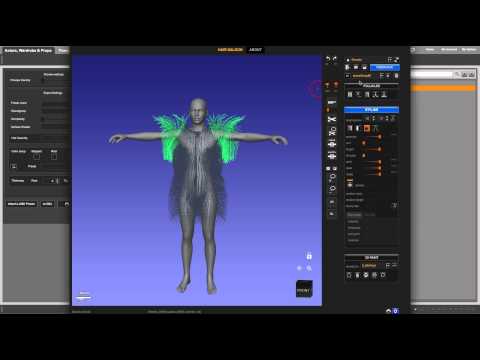
which shows how to save to a wearable preset so that you can load it back attached to the figure.
NFT and the Future of Digital Contentchris-2599934 said:
One of the things about NFTs is that the sales of them are public - you can go to the NFT marketplace and see what sold to whom, and for how much.
So I've just been through the Daz items and, as of today, they've sold 11 NFTs altogether (to 9 different people), 7 Shudu ones and 4 or their own, for a grand total of 1.195 credits, allegedly equivalant to $2733.68.
So that's a gross income just south of three grand (before you take out diigital's cut, the cost of minting and everything else). Hardly seems worth it for the trouble its caused.
Whoa – here, someone hold my beer (because this math stuff can be hard in me current state of mind!)
Way back when this thread started there was something about if you didn’t mine the crypto-coin yourself it would cost you north of $150 to buy enough c-coin for a NFT. Then if you managed to sell the silly thing it was just over another $100 in c-coin for the transfer fee.
So over $250 per sold NFT that didn’t go into the DAZ pocket on this. $250 times 11 is $2750 – which last time I was sober was greater than $2733.68. This of course doesn’t count any of the $150 NFTs that they might not have been able to unload as yet.
So unless DAZ was their own NFT seller and transfer agent in all this they did not ‘make’ any money on selling those NFTs.
I for one thank DAZ for showing me some of the values – and pitfalls – of investing in NFTs.
Figure look alike for Charlize Theron wanted.Paintbox said:
Sevrin said:
Matt_Castle said:
To offer an opposed viewpoint, I've not been very impressed with any of the Sangriart morphs I've bought. The initial likenesses are good, but I find the morphs seldom work well with expressions - something about the way in which they're morphed that makes the overlayed expressions look unnatural.
Not saying that you're wrong, but expressions can be tricky with most sculpted characters.
Adding to what Sevrin says, everyone has different expressions and muscle use changing the way you "know" the celebrity. It's not a Sangriart problem, it's trying to find the correct expressiveness to make it convincing. You can't do "default smile morph" and expect it to be the smile you know from the celebrity, you have to tweak and fine tune.
This is case with Daz made figures. Some expressions, especially smiling faces, if taken too far, make the character look hysterical or derpy. I find it could be the expression itself as some i have are meant for a particular figure. I just use the standard smile settings for Daz as it is more generalized. Then, like with makeup, I just follow the rule of less is more and don't go crazy. With some characters, a mere smirk is enough to get the point across.
Look at my Hair (LAMH) Official Thread: update 1.6.0.2 releasedHey Guys,
Figured this would be a good spot to put this. Picked up LAMH a few weeks ago and love it, but I have an issue. LAMH creates a prop for us to use and I've been using it like that. Although, anytime I pose my figure I always have to redo the prop which takes a great deal of time. I would prefer to make the fur assets I create with LAMH a conforming figure to make posing and animation much quicker.
To do this I have been trying to use the Transfer Utility, which does indeed make it to when I change the arms position the fur follows BUT it's not shaped or "fitted to" the model appropriately. I think it maybe something to do with weight maps but I'm not really sure. I think I'm in over my head and really need some help.
Another thing I noticed is that in my Transfer Utility, I have very few projection templates and none are for the arms. Not sure if that is needed for what I am doing.
I've attached a photo of what happens after I do the Transfer Utility.
Thanks in advance for any assistance.
New User needing general helpI saw a conversation on here the other day about character load times and how adding morphs affects them, and I was just wondering; (1) is there anyway to save out a character clone with just specific morphs applied (Victoria 8 as example) and (2) is there any advantage (specifically being able to load more characters into a single scene/would there be a pc resource usage difference and would it be slight, mild, or vast)?
Just to clarify, I want to keep my morphable Genesis 8 Female (intact and) as is (with all newly purchased morphs added to the base): untouched. My question is about creating a secondary clone, with (for example) only Victoria 8's morphs (with no need to be able to morph her any further). I wonder if export/importing her as an .obj would do it or if there is a better method (and if it's worth doing)?
Thanks
all my genesis models loads with a bad morphs (body and face)To fix any ill-behaving morphs, do as follows;
1. Open DS and load "Genesis 8 Basic Female" (to an empty scene)
2. Help->Troubleshooting->View Log File (clear the log, close it and select "Save" when asked)
3. Left Click at "Active Pane Options" tab->Preferences->Choose "Show Hidden Properties" (part 4 zeroes only 'visible' dials)
4. Right Click at Parameters Tab->Zero->Zero Figure (Zeroes the value of all the 'visible' dials)
5. Right Click at Parameters Tab->Memorize->Memorize Figure (Sets the current value of all the dials as their default value)
6. Edit->Save As->Support Asset->Save Modified Assets (Writes the changed default value to the morph files that were changed)When saving "Modified Assets" DS shows a dialog and asks for confirmation;
"The following file(s) will be permanently modified:" - "Accept/Cancel" - Choose "Accept"Close DS and wait -> Open DS again and load "Genesis 8 Basic Female"
Help->Troubleshooting->View Log File (Save the logfile somewhere you can easily find it)
If the above didn't help, attach the log to your post with the "Attach a file" under the "Leave a Comment" window, that way we can have a look at it.
all my genesis models loads with a bad morphs (body and face)Hello,
I will try my best to explain my problem :
Due to a heavy hard drive crash, I had to reinstall my DS, (last version, via DIM), on a brand new hard drive, copied my libraries in the right folder, and it launches perfectly, (just a bit slower than before but, this not the problem), I have to say that everything worked fine on the previous install, but now,everytime I load a genesis model, (at least a genesis 8 model, even the base genesis 8.0 victoria, I haven't tried genesis 3 yet) it comes with a general morph (body and face) and the model is just litterally awfull, no matter witch genesis 8 model I load even a new project from scratch, it has the same morph...
is there a way to remove this damn morph, or at least reset the base figure to recover the right genesis 8 model at loading ? (please don't tell me to reinstall, I have a slow internet connection and it took me days to finish this install...please...please...please)
any ideas or help will be appreciated, thanks in advance for your help.
I'll post a picture of the bad morph tonight if you want.
Natural breasts Shape is no operating.Hi IceCrMn,
Thanks for your comments. I managed to find the morph sliders. Advertised in the package is a breast "shape". There is a corresponding shape dial, which is what I'm referring to, this does not seem to work in the slightest. Is that your experience with it?
Cheers
Exporting anatomical elements morphsDamn, I just realized I was the original poster and encountered the exact same issue after resuming work on my project this year.
Merging geograft worked fine back then, I still had the Unity project with the morphs working. However, now using Daz 4.15, the merge fucks up the genitalia morphs and they just stop working after merging. Impressive to see this bug is still there after more than 2 years...
I've opened a ticket to get more info.
In the meantime, I wanted a working solution, since I know merging bugs starting 4.12, the idea was to find a version 4.11 or earlier. After 2 hours of fake links and virus, I found a working 4.10 and tried merging in it, and guess what? It worked without issue using the steps explained in the reddit post. So Daz 4.12+ did fuck up the merging, still bugging in the latest 4.15 as of today...
I'll make sure to keep this earlier version because I'll have to export my models again with different morph rules in future games and since I'm using Daz only for Unity, I don't really need all the features offered by the new Daz versions.
Hope that'll help somebody else!
HELP - custom morphs causes mesh explosionHello, I have the following problem :
I have a posed charackter (genesis 8) that I ported to zBrush.
in zBrush I have sculped some pressure points, etc..
Again in DS I applied the zBrush model as morph on the character - the problem is that the whole mesh explodes.
i think it's a double transformation because zbrush wants to apply the morph to the character in A pose, but the character already has a pose.
is there a way to freeze the positions of the bones or maybe unbind the skeleton ?
or is there another easy way to create pressure point morphs for posed characters ?thanks !
Translated with www.DeepL.com/Translator (free version)
Michael 5 Is All Grown Up But His Pants Aren'tJust a tidbit more, while we're on the subject:
PokeAway! works great for fine tuning (or massively distorting) the fit of the clothing using morph dials on Genesis.
I haven't used the actual PokeAway! for Genesis for quite some time because I prefer the modernized version made for Genesis 2 Female, and just add those to Genesis using GenX2.
Just food for thought since it allows me to, as a small example:
Using PokeAway 2! for Genesis 2 Females if we dial an x away morph up, we shrink a specific portion (according to the morph name) of the actual figure, not the clothes. If we dial that same morph down the clothing expands in that specific region without altering the shape of the underlying actor (the character).
I don't remember the differences between PokeAway 1 and 2, but I do remember liking 2 much more - hence the modification.
If you like the idea of using Genesis, perhaps you'd like my Genesis Rocks! page for even more of my rambling thoughts and workflows. I love Genesis 1 and get a lot of mileage from it - I've even been collecting a whole bunch of earlier generation clothing and items to work with Genesis because of how it can really take advantage of all of the added morphs they used to include with most clothing back then.
Anyway... I'm babbling again!
Transfer Face helpThese are the basic morphs for Genesis 8+. They're among the first things to buy when starting to modify Genesis characters.
Genesis 8 Male Head Morphs | Daz 3D
Genesis 8 Female Head Morphs | Daz 3D
Genesis 8 Male Body Morphs | Daz 3D
Genesis 8 Female Body Morphs | Daz 3D
This is designed specifically to help reshape heads created with Face Transfer
Face Transfer Shapes for Genesis 8 | Daz 3D
They all go on sale pretty often.
Missing File Problem G8 MaleGuys I got it.
 I had a projection morph from a friend who'd adapted it for M8 (badly) - it had the extra space typo in a dsf file. Thanks for the support! - LuciaMissing File Problem G8 Male
lcattus_9716520438 said:
vwrangler said:
........
Ignoring the difference between \ and / and the capitalization: There's a space in the first directory path ( "/ genesis 8" vs "\Genesis 8" ) that doesn't exist in the second.
Have you installed any G8M morphs or characters recently? Especially any freebies? If that is a cut-and-paste, it looks like there may be a mistyped path in something you've recently installed.
Hi vwrangler, thanks - I'd noticed the space but for example when I load an unmodified Edward 8 the log file shows the problem as soon as the .duf file loads
2021-04-20 19:24:45.640 Loaded file: edward 8.duf
2021-04-20 19:24:47.056 Could not resolve : "/data/DAZ 3D/ Genesis 8/Male/Genesis8Male.dsf"So I'd assumed that the problem was associated with that file (which has previously loaded OK), but maybe you're suggesting that some other file could be involved. Any idea what type of file I should be looking for?
Any G8M character/morph package that you installed just before the error started appearing.
The issue likely isn't with the main G8M starter essentials themselves. The issue is with something else. However, because Genesis 8 has to load each and every installed morph file when you put him into a scene (or call him from a saved scene), it has to read all of those files, so the error will appear every time you load any G8M character.
What G8M character or morphs did you instal right before the issue started appearing?
Natural breasts Shape is no operating.I bought this one last year.
These morphs are not activted or deactivated by clicking files in the library.
Select your character in the scene.
You will find the morph sliders on the Parameters pane under "Pose Controls>Chest"
If you still can't find them, just click "All" at the top of the left column and type
Z NBS
into the search box on top of the right column.
Nothing else will show except for those morph sliders.
Clear the search to continue as normal.
AIUTO...CHI CONOSCE L’ITALIANO? PARTE TREDICICiao ragazzi, è da un po' che manco da queste parti :-) Come ve la passate?
TritiumCG lo conosco anche io, gli ho commissionato un morph e devo dire che è molto bravo. Poi la effettiva somiglianza al personaggio originale dipende da tantissimi fattori, i capelli, le texture della pelle... a volte capita che una persona in una foto sia quasi irriconoscibile, figuriamoci un modello 3D
The Newest Evolution Is Here: The Daz Season Pass!Wonderland said:
xyer0 said:
Genesis Core Figures / base characters (and most of their HD Add-Ons) imo offer the most consistently reliable source of high-quality male and female skins and morphs. Yes, there are several exceptions. It's no secret that bundle quality has plummeted while their prices have almost doubled (and that with little to no enticing promotions or deals). Consequently, the Season Pass seemed like a great way to get HD characters that I was going to buy anyway for $30 each instead of the $41.61 ($22.03 + $19.58) I might have to spend due to Daz's current trend of not discounting the HD.
Where did you get $30? Brooke is $22. ETA, I see you added the HD morph, However, every DO HD morph I own, (which is most by now) were either free or on sale at under $5.00 and I don’t even use them. I do use Mousso’s HD morphs quite often and they work with most morphs and skins and the DazO Mousso characters are often on deep sale for under $5.00 and IMO, soooo much, better than Daz0’s. Actually if Mousso had a Season Pass, I’d possibly consider that lol. Or not, I’m not really a gambler...
I strongly disagree that Daz core characters have the best morphs and skins. I think MANY PA’s products are WAY better and I rarely, if ever, use Daz characters at all and only buy them if I like the bundle they are in or the deal, or freebies that come with it. Remember Stephanie 8? Ugh. Has anyone actually ever used her? The makeup is usually awful on Daz0’s and I don’t even like the sculpting on most. Actually there are only about three or four Daz G8 core characters that I actually liked and I think I own them all (purchased in bundles) except some of the last few where the bundle deals were bad.. But I only have one G8,1,which I purchased because I liked the bundle, NOT the character. (Another trend I don’t like are the release of only G8.1s from now on.)
If the Brooke bundle deal had been good, I might have purchased it, not for Brooke, but for everything else. When the bundle eventually goes on deep sale or maybe free if they ever get back to those offers, I will probably get it, but definitely not for Brooke (although I’ve discovered she can make a cute toon.)
The truth is, the thing that bothers me most about all this, is that I’m losing orange banners. I used to get all of them and as things have progressed, I’m getting less and less so purchasing less and less, which, when I think of it, may actually be a GOOD thing. I need to start taking time to test and if necessary, return products I DO have.
I got the $30 by dividing the $150 for the season pass by 5 characters/HD. The $41.61 (22.03 character + 19.58 HD Add-On) is what I expected I would pay under the new Genesis 8.1 scheme that has seen less discounts. Actually, I think I got one of the 8.1 HD Add-Ons for $12, but I suspected Daz might stop giving them away and keep the prices high as a rationale for the season pass. So far, so good. There haven't been any loyalty orange banners for new bundles, only for owning retread product(s) that's been stuck in, so you're not missing out.
I love Mousso (74 out of 112) and Raiya (whole store and have rendered each one), but their skins have rarely risen to the level of detail in the BEST base characters, imo. I like skin detail, since I have to do closeups, and the spec maps on characters like Dain, Nix, Babina, Zelara, Kala, Millawa, Floyd, Kwan, Dasan, Alawa---just off the top of my head---leave most others looking too smooth for my tastes. bluejaunte, of course, has to be considered separately in fairness to everyone else, imo. My preferences are based on my own illustrative rendering needs. If I did beauty or style shots mostly, then I could pass on most of the base characters too, for there are plenty of prettier girls than that lot.
Transfer Face helpAfter I transfer a face onto my Genesis 8.1 character from a photo, is there a way to adjust the facial features and expressions? I have the latest version of DAZ, but I can't seem to find any dials that allow for it. Thanks! -SKI
Daz 3D is part of

Connect
DAZ Productions, Inc.
7533 S Center View Ct #4664
West Jordan, UT 84084Licensing Agreement | Terms of Service | Privacy Policy | EULA
© 2026 Daz Productions Inc. All Rights Reserved.