-
Adventures of Lorenzo & LoRez Figures in Carrara
Let's turn this double post into something, shall we?
Back on the topic of LowRez Adventures, the author of Lorenzo and Loretta (The Amazing Predatron!) has a lot more to offer in the LR world beyond just those two and their many individually sold variations, like Monk, 14MU, Police, etc.,
His LR Animals are amazing additions to the library! The horse comes with everything you need a horse to have, the dog can be a lot of different types of dog (without having to buy addons!)...
and his earlier work on creatures like Droid, Demoncornuto, Troglodytes, Goblins, Angor (Beastman), Giant Spider, etc., etc., are also high quality in nature, but have also given rise to having joint-controlling morph dials built right into the main actor! This is especially useful for using poses and animations made for something else, as we can use those extra dials to crank the joints rotation back into submission!
Questions about daz to ZbrushTry parenting the second figure to the first - it's not something I've done, but it certainly works with clothing and other fitted items (but of course you presumably don't want to fit the second figure to then first). If that still fails try exporting each as OBJ (make sure it's at base resolution, no attachments such as the lashes) and you shoudl be able to import them as separate sub-tools in ZBrush, then export each as OBJ and use Morph Loader in DS.
Deepsea Appreciation!I'm taking the recent release of Deepsea's hare (https://www.daz3d.com/caesar-the-hare-for-daz-dog-8) as an opportunity to start this appreciation thread as I couldn't find any on Deepsea yet. I really admire this vendor's work so much, I love the characters, their beautifully soft skins, and especially the animals. I have the deer, the falcon, the eagle, the elephant, the cows of course, and now the hare - finally, the first hare / rabbit creature to hit the store since Noggin's poor little creature! Yay!
It simply amazes me what Deepsea's able to create just with morphs, with Tane the old deer from DAZ horse before and now with Caesar, from DAZ dog. And they always put so much thought into the little details, like fluffy ear hairs and these things. While the hare has quite a strong comic touch which I personally wouldn't have needed, I think it's easy enough to morph out and/or just not use the toony smile expression. I will probably put on more visible whiskers, like from AM's mouse. The fur is quite realistic in its coloring, we see a lot of hares like that out in the country (Europe) where I live. The only thing I'm not so much a fan of with Caesar are the poses, they are basically dog ones. Hares simply don't run, or sit, or sleep like that. I was a bit disappointed about them, because they made me feel as if research had maybe been lacking a bit. But they can probably be adapted easily enough, so I don't really mind much. Apart from the poses, I think it's a very, very satisfying hare, just like all the other Deepsea animals. Will try to post a test render for those on the fence soonish.Of the characters, I'm most in love with the toddler twins, they're the sweetest and most realistic kids for that age group in the store I think. Again, they have such adorable little details built in, like how they are really much alike and still have completely different expressions, just from subtle nuances in their face morphs. You don't see such levels of detail work often I feel. With all of Deepsea's characters and animals, I always get the feeling they really enjoyed creating them and have like, emotionals bonds with them, you know. Like virtual children. One just feels all the caring that went into them.
Thanks Deepsea!
HELP - custom morphs causes mesh explosionHow are you working? GoZ should automatically reverse out any adjustments, if instead you are using OBJ export/import then make sure you use Morph Loader Pro and enable the Reverse Transforms option. Also, if using OBJ, make sure that you use the same preset in the OBJ export and Moprh Loader options so that the scaling is correct.
Look at my Hair (LAMH) Official Thread: update 1.6.0.2 releasedAlessandro Mastronardi said:
Dark45 said:
Hey Guys,
Figured this would be a good spot to put this. Picked up LAMH a few weeks ago and love it, but I have an issue. LAMH creates a prop for us to use and I've been using it like that. Although, anytime I pose my figure I always have to redo the prop which takes a great deal of time. I would prefer to make the fur assets I create with LAMH a conforming figure to make posing and animation much quicker.
To do this I have been trying to use the Transfer Utility, which does indeed make it to when I change the arms position the fur follows BUT it's not shaped or "fitted to" the model appropriately. I think it maybe something to do with weight maps but I'm not really sure. I think I'm in over my head and really need some help.
Another thing I noticed is that in my Transfer Utility, I have very few projection templates and none are for the arms. Not sure if that is needed for what I am doing.
I've attached a photo of what happens after I do the Transfer Utility.
Thanks in advance for any assistance.
Hi, I think you might want to take a look at the tutorial playlist here: https://www.youtube.com/playlist?list=PL_JdHHW5yFwbqeq6aJzKtfEdbpt9k4HY6
and in particular this one:
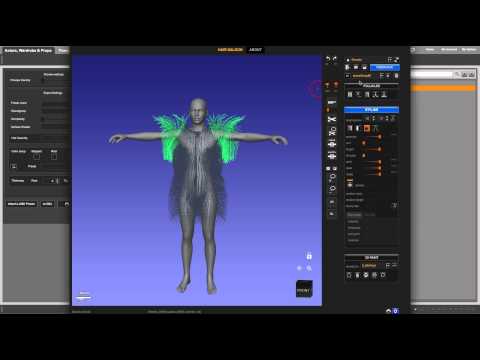
which shows how to save to a wearable preset so that you can load it back attached to the figure.
This does help the workflow some. The reason I am trying to transfer the Gen 8 male rigging to the LAMH .obj fur assets is for animation reasons mainly. That's why I was trying to use the transfer utility and have been having issues with it.
Daz to Blender Bridge - Meet the Teamendlessloving said:
DAZ_sam said:
endlessloving said:
HI there,
it's great to know that there is a bridge now. I tried it and after the "transfer" blender showed the hands of my G8M figure totally messed up, with fingers about a meter long.I used power pose to adjust the hands and fingers before I used the bridge and it seems that there is an issue with rigging.
Is there any way to make sure that the rigging works properly when using the bridge? I only need one pose and not an animation.
I don't actually need the rigging in blender, I just want to make sure that I can import an exactly posed figure into blender, including the materials from DAZ.Is there maybe a tutorial on how to use the bridge? I guess to make this work a figure needs to be prepared in a certain way or just in a default posture?
Right now there isn't a simple way of doing this in the bridge. But, it is a great idea for a tutorial. As the bridge team is small I will add to a list of many things we need to do. We will look into power pose though, and see why this is occurring thanks!
Thanks for considering to make a tutorial.
I have continued to try to get a pose from Daz to Blender but simply failed.
The Bridge does not really work for me at this point.
Skin textures are broken, cloths are overlapping and the pose is always just the default pose.
I also tried to use colada and obj and fbx and there is always something that goes really wrong.
I am wondering how other people get their figures from Daz into Blender or is it just not really a common thing?
DAZ and Blender on their own are really amazing and if there is a way to make them more compatible, that would be so aweome!
If I can support this project by testing particular things, please let me know.DAZ_sam I am having this exact same problem right now. Atempting to import a character that imported fine before. Now the hands and fingers are overscaled and warped. It looks like a result of the mesh and rig not being aligned. Frustrating because the same figure imported fine with the last version.
Daz to Blender - Morph update - “Spring Cleaning Update” (2.3.1)surody said:
DAZ_vish said:
We cannot reproduce it. The Morph export window shows up when the 'Include Morphs' is checked for both 8.1 and 8 figures. Can you share specific details to reproduce it?
Thank you.
I know that it works for other people but apparently not for me. I tried reinstalling the scripts and even Daz and I tried the beta and released version of Daz. There's not much to it to reproduce it though. When I load a normal G8 base into the scene and open the DaztoBlender bridge and check morphs included, it just immediatly starts exporting all morphs for me without any window popping up. I don't have this issue with any 8.1 character.
I've am having the same issue. Updated both sides of the bridge but when I "include morphs" I don't see a selection window it just goes staright to trying to export all morphs with the figure and crashes. I can export without morphs, which I was hoping that option would at least include the basic expressions and vismes but there are no shape keys included.
Look at my Hair (LAMH) Official Thread: update 1.6.0.2 releasedDark45 said:
Hey Guys,
Figured this would be a good spot to put this. Picked up LAMH a few weeks ago and love it, but I have an issue. LAMH creates a prop for us to use and I've been using it like that. Although, anytime I pose my figure I always have to redo the prop which takes a great deal of time. I would prefer to make the fur assets I create with LAMH a conforming figure to make posing and animation much quicker.
To do this I have been trying to use the Transfer Utility, which does indeed make it to when I change the arms position the fur follows BUT it's not shaped or "fitted to" the model appropriately. I think it maybe something to do with weight maps but I'm not really sure. I think I'm in over my head and really need some help.
Another thing I noticed is that in my Transfer Utility, I have very few projection templates and none are for the arms. Not sure if that is needed for what I am doing.
I've attached a photo of what happens after I do the Transfer Utility.
Thanks in advance for any assistance.
Hi, I think you might want to take a look at the tutorial playlist here: https://www.youtube.com/playlist?list=PL_JdHHW5yFwbqeq6aJzKtfEdbpt9k4HY6
and in particular this one:
which shows how to save to a wearable preset so that you can load it back attached to the figure.
NFT and the Future of Digital Contentchris-2599934 said:
One of the things about NFTs is that the sales of them are public - you can go to the NFT marketplace and see what sold to whom, and for how much.
So I've just been through the Daz items and, as of today, they've sold 11 NFTs altogether (to 9 different people), 7 Shudu ones and 4 or their own, for a grand total of 1.195 credits, allegedly equivalant to $2733.68.
So that's a gross income just south of three grand (before you take out diigital's cut, the cost of minting and everything else). Hardly seems worth it for the trouble its caused.
Whoa – here, someone hold my beer (because this math stuff can be hard in me current state of mind!)
Way back when this thread started there was something about if you didn’t mine the crypto-coin yourself it would cost you north of $150 to buy enough c-coin for a NFT. Then if you managed to sell the silly thing it was just over another $100 in c-coin for the transfer fee.
So over $250 per sold NFT that didn’t go into the DAZ pocket on this. $250 times 11 is $2750 – which last time I was sober was greater than $2733.68. This of course doesn’t count any of the $150 NFTs that they might not have been able to unload as yet.
So unless DAZ was their own NFT seller and transfer agent in all this they did not ‘make’ any money on selling those NFTs.
I for one thank DAZ for showing me some of the values – and pitfalls – of investing in NFTs.
Figure look alike for Charlize Theron wanted.Paintbox said:
Sevrin said:
Matt_Castle said:
To offer an opposed viewpoint, I've not been very impressed with any of the Sangriart morphs I've bought. The initial likenesses are good, but I find the morphs seldom work well with expressions - something about the way in which they're morphed that makes the overlayed expressions look unnatural.
Not saying that you're wrong, but expressions can be tricky with most sculpted characters.
Adding to what Sevrin says, everyone has different expressions and muscle use changing the way you "know" the celebrity. It's not a Sangriart problem, it's trying to find the correct expressiveness to make it convincing. You can't do "default smile morph" and expect it to be the smile you know from the celebrity, you have to tweak and fine tune.
This is case with Daz made figures. Some expressions, especially smiling faces, if taken too far, make the character look hysterical or derpy. I find it could be the expression itself as some i have are meant for a particular figure. I just use the standard smile settings for Daz as it is more generalized. Then, like with makeup, I just follow the rule of less is more and don't go crazy. With some characters, a mere smirk is enough to get the point across.
Look at my Hair (LAMH) Official Thread: update 1.6.0.2 releasedHey Guys,
Figured this would be a good spot to put this. Picked up LAMH a few weeks ago and love it, but I have an issue. LAMH creates a prop for us to use and I've been using it like that. Although, anytime I pose my figure I always have to redo the prop which takes a great deal of time. I would prefer to make the fur assets I create with LAMH a conforming figure to make posing and animation much quicker.
To do this I have been trying to use the Transfer Utility, which does indeed make it to when I change the arms position the fur follows BUT it's not shaped or "fitted to" the model appropriately. I think it maybe something to do with weight maps but I'm not really sure. I think I'm in over my head and really need some help.
Another thing I noticed is that in my Transfer Utility, I have very few projection templates and none are for the arms. Not sure if that is needed for what I am doing.
I've attached a photo of what happens after I do the Transfer Utility.
Thanks in advance for any assistance.
New User needing general helpI saw a conversation on here the other day about character load times and how adding morphs affects them, and I was just wondering; (1) is there anyway to save out a character clone with just specific morphs applied (Victoria 8 as example) and (2) is there any advantage (specifically being able to load more characters into a single scene/would there be a pc resource usage difference and would it be slight, mild, or vast)?
Just to clarify, I want to keep my morphable Genesis 8 Female (intact and) as is (with all newly purchased morphs added to the base): untouched. My question is about creating a secondary clone, with (for example) only Victoria 8's morphs (with no need to be able to morph her any further). I wonder if export/importing her as an .obj would do it or if there is a better method (and if it's worth doing)?
Thanks
all my genesis models loads with a bad morphs (body and face)To fix any ill-behaving morphs, do as follows;
1. Open DS and load "Genesis 8 Basic Female" (to an empty scene)
2. Help->Troubleshooting->View Log File (clear the log, close it and select "Save" when asked)
3. Left Click at "Active Pane Options" tab->Preferences->Choose "Show Hidden Properties" (part 4 zeroes only 'visible' dials)
4. Right Click at Parameters Tab->Zero->Zero Figure (Zeroes the value of all the 'visible' dials)
5. Right Click at Parameters Tab->Memorize->Memorize Figure (Sets the current value of all the dials as their default value)
6. Edit->Save As->Support Asset->Save Modified Assets (Writes the changed default value to the morph files that were changed)When saving "Modified Assets" DS shows a dialog and asks for confirmation;
"The following file(s) will be permanently modified:" - "Accept/Cancel" - Choose "Accept"Close DS and wait -> Open DS again and load "Genesis 8 Basic Female"
Help->Troubleshooting->View Log File (Save the logfile somewhere you can easily find it)
If the above didn't help, attach the log to your post with the "Attach a file" under the "Leave a Comment" window, that way we can have a look at it.
all my genesis models loads with a bad morphs (body and face)Hello,
I will try my best to explain my problem :
Due to a heavy hard drive crash, I had to reinstall my DS, (last version, via DIM), on a brand new hard drive, copied my libraries in the right folder, and it launches perfectly, (just a bit slower than before but, this not the problem), I have to say that everything worked fine on the previous install, but now,everytime I load a genesis model, (at least a genesis 8 model, even the base genesis 8.0 victoria, I haven't tried genesis 3 yet) it comes with a general morph (body and face) and the model is just litterally awfull, no matter witch genesis 8 model I load even a new project from scratch, it has the same morph...
is there a way to remove this damn morph, or at least reset the base figure to recover the right genesis 8 model at loading ? (please don't tell me to reinstall, I have a slow internet connection and it took me days to finish this install...please...please...please)
any ideas or help will be appreciated, thanks in advance for your help.
I'll post a picture of the bad morph tonight if you want.
Natural breasts Shape is no operating.Hi IceCrMn,
Thanks for your comments. I managed to find the morph sliders. Advertised in the package is a breast "shape". There is a corresponding shape dial, which is what I'm referring to, this does not seem to work in the slightest. Is that your experience with it?
Cheers
Exporting anatomical elements morphsDamn, I just realized I was the original poster and encountered the exact same issue after resuming work on my project this year.
Merging geograft worked fine back then, I still had the Unity project with the morphs working. However, now using Daz 4.15, the merge fucks up the genitalia morphs and they just stop working after merging. Impressive to see this bug is still there after more than 2 years...
I've opened a ticket to get more info.
In the meantime, I wanted a working solution, since I know merging bugs starting 4.12, the idea was to find a version 4.11 or earlier. After 2 hours of fake links and virus, I found a working 4.10 and tried merging in it, and guess what? It worked without issue using the steps explained in the reddit post. So Daz 4.12+ did fuck up the merging, still bugging in the latest 4.15 as of today...
I'll make sure to keep this earlier version because I'll have to export my models again with different morph rules in future games and since I'm using Daz only for Unity, I don't really need all the features offered by the new Daz versions.
Hope that'll help somebody else!
HELP - custom morphs causes mesh explosionHello, I have the following problem :
I have a posed charackter (genesis 8) that I ported to zBrush.
in zBrush I have sculped some pressure points, etc..
Again in DS I applied the zBrush model as morph on the character - the problem is that the whole mesh explodes.
i think it's a double transformation because zbrush wants to apply the morph to the character in A pose, but the character already has a pose.
is there a way to freeze the positions of the bones or maybe unbind the skeleton ?
or is there another easy way to create pressure point morphs for posed characters ?thanks !
Translated with www.DeepL.com/Translator (free version)
Michael 5 Is All Grown Up But His Pants Aren'tJust a tidbit more, while we're on the subject:
PokeAway! works great for fine tuning (or massively distorting) the fit of the clothing using morph dials on Genesis.
I haven't used the actual PokeAway! for Genesis for quite some time because I prefer the modernized version made for Genesis 2 Female, and just add those to Genesis using GenX2.
Just food for thought since it allows me to, as a small example:
Using PokeAway 2! for Genesis 2 Females if we dial an x away morph up, we shrink a specific portion (according to the morph name) of the actual figure, not the clothes. If we dial that same morph down the clothing expands in that specific region without altering the shape of the underlying actor (the character).
I don't remember the differences between PokeAway 1 and 2, but I do remember liking 2 much more - hence the modification.
If you like the idea of using Genesis, perhaps you'd like my Genesis Rocks! page for even more of my rambling thoughts and workflows. I love Genesis 1 and get a lot of mileage from it - I've even been collecting a whole bunch of earlier generation clothing and items to work with Genesis because of how it can really take advantage of all of the added morphs they used to include with most clothing back then.
Anyway... I'm babbling again!
Transfer Face helpThese are the basic morphs for Genesis 8+. They're among the first things to buy when starting to modify Genesis characters.
Genesis 8 Male Head Morphs | Daz 3D
Genesis 8 Female Head Morphs | Daz 3D
Genesis 8 Male Body Morphs | Daz 3D
Genesis 8 Female Body Morphs | Daz 3D
This is designed specifically to help reshape heads created with Face Transfer
Face Transfer Shapes for Genesis 8 | Daz 3D
They all go on sale pretty often.
Missing File Problem G8 MaleGuys I got it.
 I had a projection morph from a friend who'd adapted it for M8 (badly) - it had the extra space typo in a dsf file. Thanks for the support! - Lucia
Daz 3D is part of

Connect
DAZ Productions, Inc.
7533 S Center View Ct #4664
West Jordan, UT 84084Licensing Agreement | Terms of Service | Privacy Policy | EULA
© 2026 Daz Productions Inc. All Rights Reserved.