-
AIUTO...CHI CONOSCE L’ITALIANO? PARTE TREDICI
Sì, ogni tanto DAZ Studio fa le bizze con qualche comportamento imprevedibile. A me adesso capita che quando applico una morph al viso di G8 si deformano i capelli, che fino a l'altro giorno funzionavano perfettamente. L'unico sistema è di parentare (ma si dice così?) i capelli alla testa... mo va a sapere che che si è rotto. A voi succede? Non so se è il caso di aprire un ticket con l'assistenza
The My Bucket's Got a Hole In It Complaint threadSubtropic Pixel said:
My microwave is a tool that makes all other things go more smoothly and safely in my kitchen.
Yup, a lot of people use it as a default... but that's like using a pair of pliers as your sole tool... to hammer a nail, remove a screw or lightly tighten a nut... only one of those three things it will do effectively... yeah, you can drive a nail, but not well... yeah, you can dig a screw out if you mangle the surface in the process... and if you are lightly tightening a nut, it's great... that's probably it's best application...
Most people don't bother to understand how a microwave works, the best ways to use it or what it's limitations are... but that's probably mostly due to societal assumptions and expectations which pinned on it the implication of it being a "miracle instant cooking device".
Not necessarily on topic, but still disturbing is how much microwave cookware is plastic... noooooooooo!... its incredibly inconvenient to transfer stuff to glass or ceramic cookware, but it's so much safer and healthier... especially with oily foods... heating plastics and oils together is so bad, there is so much potential for chemicals to leech out... directly into your food... and it really doesn't matter if it's "microwave safe"... plastic steamer bag, plastic lined cardboard, microwaveable PETE tray, styrofoam microwave cup, RONCO Miracle Egg Cooker 2000 or whatever... if it's got plastic it's bad for you... yes, cumulatively, but still bad.
Daz Suddenly Crashes When Loading G8FRichard Haseltine said:
Sounds as if there may be a character with a non-zero default, and perhaps corrupt data that is causing the crash (or it may be unrelated to the crash). That isn't a Daz character so you will probably need to find the files and manually remove them, then see if DS will load the base figure.
The Chen Ting character has worked fine plenty of times in the past so I don't think that's the problem. Still I have removed them from my library and crashes remain.
The only thing I can think of is I may have used X-Transfer to transfer the G3F Chen Ting figure to G8F but didn't realise there was already a G8F figure, but I don't know how to remove the X-Transfered version which I'm assuming is causing the problems. I uninstalled X Transfer but the crashes still occur.
Edit: Found the XTransfer files and deleted all of them, at least I think so anyway. Everything seems to be working again now as far as I can tell. Big relief and big thanks to everyone who helped.
Genesis 8 in CarraraSileneUK said:
ProPose said:
Mystiarra said:
thanks
 .
.next trick, a doozie. welding on those pro bits so there seemless
My workaround for this issue is to asemble my character in studio with the pro bits attatched, pose the figure the way I need, then export the figure as an obj using the Carrara preset in the obj export options, to be rendered in Carrara using Octane or Carrara native renderer. If I need a poseable figure then I will export as fbx
If I export an fbx of eg, Misty's G3, I get skin and scale errors and figure is not visible. I can only export as object.How do you do it?
 Silene
work around for the pro bits, use a proxy. load a underwear, conform to g3, load the pro bit, conform it to the underwear. make the underwear invisible. if the underwear has the support morph, it should flow down. if not manually dial the morph on the pro bit. you might have to create the morph asset from ds. the underwear doesnt need the actual morph, it needs a file name of the morph in the data folder.
another way is to open the geometry file of the pro bit and edit the text out for the geograft. its in the geometry section. without the geograft verts it turns into a regular conforming body part.
i tried conforming the g3m man bit to g8m, seemed to work, but i didnt try any morphs.
the base proglem is getting the geografts to weld to the target figure.
Daz Suddenly Crashes When Loading G8FRichard Haseltine said:
The relevant errors would be at the end of the log, assuming you open it just after DS has crashed and before restarting the application.
No error after the warnings but there was this even though I was just opening a base G8F figure.
"2021-04-22 22:34:49.266 Begin Loading Character Addons...
2021-04-22 22:34:49.291 Loaded Morph Deltas in 0 min 0.0 sec.
2021-04-22 22:34:49.291 Loaded file: XT_Chen Ting Head.dsf
2021-04-22 22:34:49.308 Loaded Morph Deltas in 0 min 0.0 sec.
2021-04-22 22:34:49.308 Loaded file: XT_Chen Ting Body.dsf"Carrara Challenge #57 - Album Cover (WIP thread)A new cover inspired by souvenirs
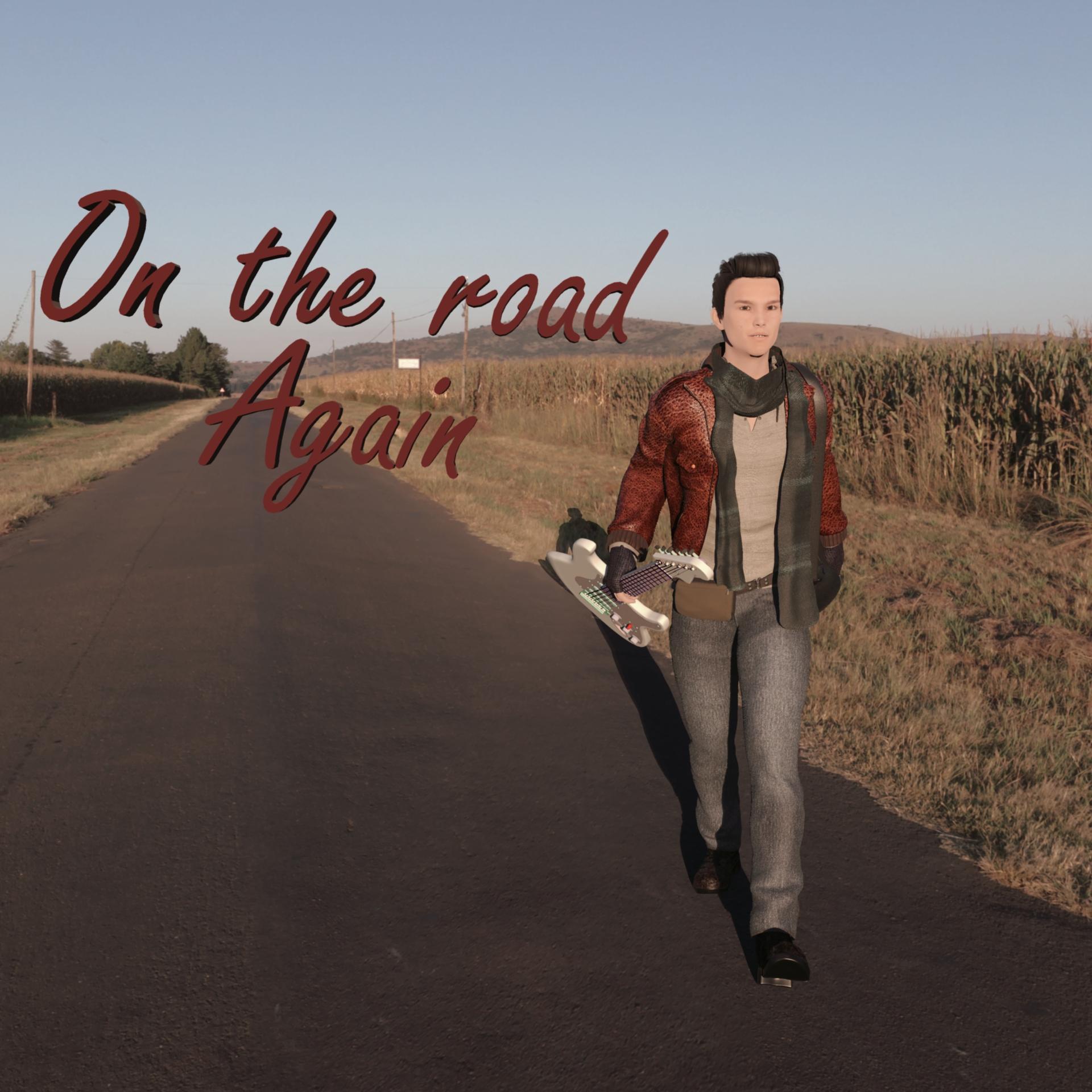
. A youngster faking being "on the road". I can't pinpoint who did that, but it seems to me it was done many times.Nothing special on this render, a figure, some clothes and a HDRI background, a light dome to match the HDRI. Could have been done in Studio I'm afraid

Figure is M7 with Ayden morph (Thank you Misty)
Cloth is Traveller for G3
Background is Mealie road from HDRI Haeven
Text is Carrara text primitive
Scene setup:
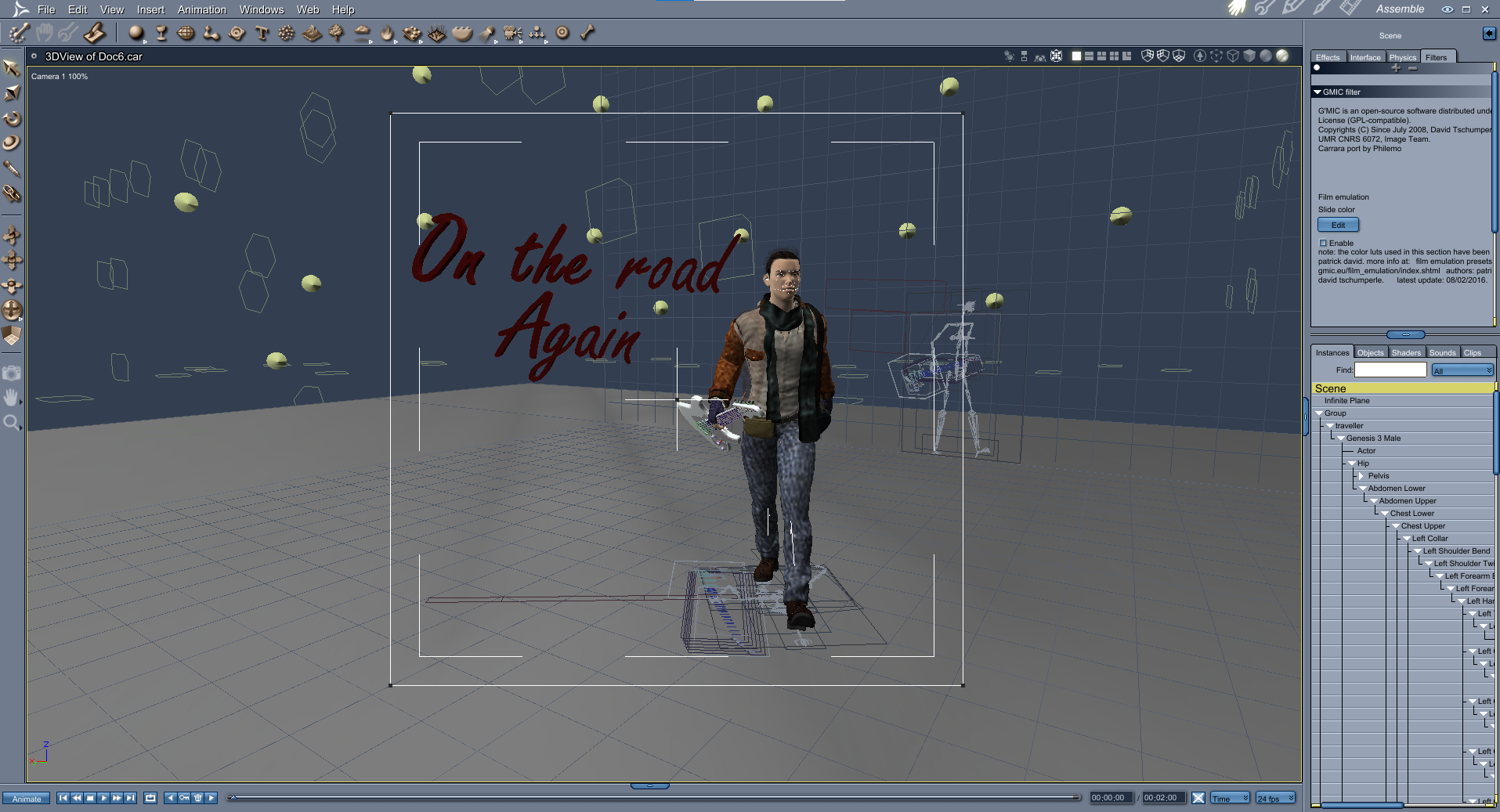
Render is native Carrara

Post is a GMIC film emulation Kodachrome 200 to give a more 60s look
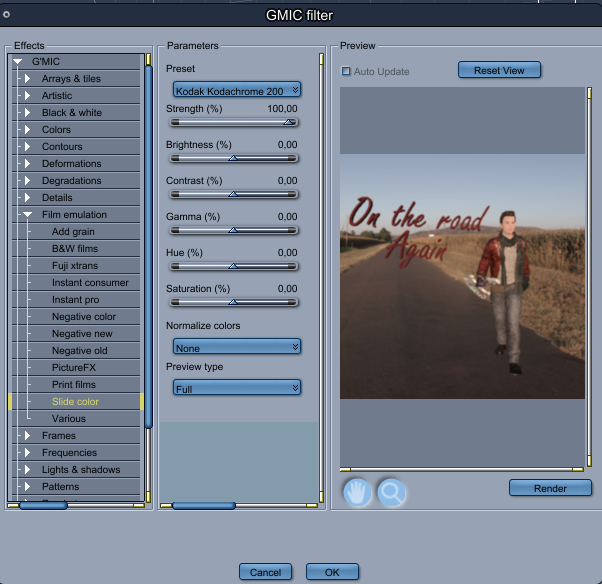
Image after post is:
 UV UNWRAP KEENTOOL (blender) - SHAPE GENERATOR (daz)
Good morning,
I am trying to reproduce perfectly a face from a real person that needs then to be applied to it body and to apply a pose and expression afterward to it.
For this i downdoad the face transfer tool for DAZ to generate the basic shape and apply details (hair/ beard/ teeth..) and on the other side i used the blender add on Keentools to have a way more define texture for the face.
I want to transfer the texture and the morph of the face create in blender to DAZ but the unwrap settings are not the same for both software. For the blender addon i can have the butterfly/ MAxface/ spherical or Legacy and for the Daz i can only access the round one.
1. Is there a way to unwrap the DAZ face texture with a different setting?
2. Or to apply dirrectly the blender unwrap texture and morph to daz?
Thanks !
Lydia HD for Victoria 7 Remake for Genesis 8.1Richard John S said:
Currently, loading her textures on G8 or G8.1 causes texture issues on her right arm.
Lydia uses V7 UVs, not G3F base UVs, which is why the texture won't work properly on G8F.
This product will give you V7 UVs for G8F: https://www.daz3d.com/genesis-3-character-uvs-for-genesis-8-female
Another option is to use Map Transfer to create a version of her textures using G3F base UVs, which should then work on G8F. There's a tutorial here: https://www.daz3d.com/forums/discussion/184696/tutorial-from-map-transfer-to-material-presets/p1
Bluejaunte appreciationWarning! The downgrade for Gaia is already live. Don't download it if you haven't made a backup for the BJ Genitals morph.
HELP - custom morphs causes mesh explosionA mesh explosion is usually caused by the winding order of the morph being different to the winding order of the mesh, as a result each vertex in the mesh has the wrong morph delta applied to it.
AIUTO...CHI CONOSCE L’ITALIANO? PARTE TREDICIMuscleman said:
menghienrico said:
Ciao a tutti!
Secondo voi su Daz è possibile eseguire il morphing/shaping del volto o del corpo, agendo direttamente con il mouse sulla mesh e senza quindi utilizzare gli appositi cursori?
Se ho capito bene...Dentro DS no.
Certo che puo!
Basta usare il Mesh Grabber con tutti i plugin, può perfino spawnare i morph una volta finito.

Lo può fare perfino con il semplice DFormer e i Weight Mapping e poi esportare in OBJ per reimpotare come morph.
Gente, bisogna leggere le istruzioni ogni tanto!
 Daz Suddenly Crashes When Loading G8F
Leana said:
h said:
Richard Haseltine said:
Have you checked the log (%AppData%/daz 3d/studio4/log.txt) after the crash to see if there are any errors 9it's quite possible there won't be)? Have you tried using a different version (the beta if this is in the General Release)?
There is hundreds of lines similar to this one:
WARNING: ..\..\..\..\..\src\sdksource\fileinput\dzassetdaz.cpp(6843): Could not find target property for formula: Genesis8Female:/data/DAZ%203D/Genesis%208/Female/Morphs/DAZ%203D/Expressions/eCTRLHappy_HD.dsf#eCTRLHappy?value in file : /data/DAZ%203D/Genesis%208/Female/Morphs/DAZ%203D/Teen%20Raven%208/eJCMTeenRaven8_Happy_HDLv2.dsf
Those are warnings, not errors. They mean you have some characters including correction morphs for other morphs you don't have installed (in your example, Teen Raven including a correction morph for a HD smile morph).
Are there actual errors in the log?
I'm not sure. Ctrl=F "error" brings up the following though:
2021-04-22 07:33:39.290 Error writing author data.
2021-04-22 07:33:39.308 WARNING: ..\..\..\..\..\src\pluginsource\DzIrayRender\dzneuraymgr.cpp(480): Could not add path: "C:/Users/User/AppData/Roaming/DAZ 3D/Studio4/shaders/iray". Due to unknown error -2
2021-04-22 07:33:39.308 WARNING: ..\..\..\..\..\src\pluginsource\DzIrayRender\dzneuraymgr.cpp(480): Could not add path: "C:/Users/User/AppData/Roaming/DAZ 3D/Studio4/temp/shaders/iray". Due to unknown error -2
WARNING: 3DConnexion Plug-in Error: Could not create Device, CoCreateInstance failedEdit: Searching through the CloudLog I found these as well:
2021-01-07T14:29:28Z Startup
2021-01-07T14:29:28Z Query (SELECT * FROM "customer") failed with exception: ERROR: relation "customer" does not exist
LINE 1: SELECT * FROM "customer"Error in metadata for product 'Armchair Poses and Prop for Genesis 8' (68631), metadata for file 'people/genesis 8 male/poses/atgl/armchair poses and prop/app 024.dse' has no corresponding file
2021-01-29T02:42:59Z Error in metadata for product 'Claudia Hair for Genesis 3 and 8 Female(s)' (56911), metadata for file 'people/genesis 3 female/hair/oot claudia hair/mats/claudia hair base xp color 01.duf' has no corresponding file
Daz Suddenly Crashes When Loading G8Fh said:
Richard Haseltine said:
Have you checked the log (%AppData%/daz 3d/studio4/log.txt) after the crash to see if there are any errors 9it's quite possible there won't be)? Have you tried using a different version (the beta if this is in the General Release)?
There is hundreds of lines similar to this one:
WARNING: ..\..\..\..\..\src\sdksource\fileinput\dzassetdaz.cpp(6843): Could not find target property for formula: Genesis8Female:/data/DAZ%203D/Genesis%208/Female/Morphs/DAZ%203D/Expressions/eCTRLHappy_HD.dsf#eCTRLHappy?value in file : /data/DAZ%203D/Genesis%208/Female/Morphs/DAZ%203D/Teen%20Raven%208/eJCMTeenRaven8_Happy_HDLv2.dsf
Those are warnings, not errors. They mean you have some characters including correction morphs for other morphs you don't have installed (in your example, Teen Raven including a correction morph for a HD smile morph).
Are there actual errors in the log?
face transfer -- can one get an accurate profile of a face, not just frontal view?Hi, have been using face transfer, but I notice that sometimes even though the frontal view of the face is pretty accurate, the profile comes out wrong. Is there a way to transfer 360 degree accuracy, not just frontal?
Thanks for any assistance.
Adventures of Lorenzo & LoRez Figures in CarraraLet's turn this double post into something, shall we?
Back on the topic of LowRez Adventures, the author of Lorenzo and Loretta (The Amazing Predatron!) has a lot more to offer in the LR world beyond just those two and their many individually sold variations, like Monk, 14MU, Police, etc.,
His LR Animals are amazing additions to the library! The horse comes with everything you need a horse to have, the dog can be a lot of different types of dog (without having to buy addons!)...
and his earlier work on creatures like Droid, Demoncornuto, Troglodytes, Goblins, Angor (Beastman), Giant Spider, etc., etc., are also high quality in nature, but have also given rise to having joint-controlling morph dials built right into the main actor! This is especially useful for using poses and animations made for something else, as we can use those extra dials to crank the joints rotation back into submission!
Questions about daz to ZbrushTry parenting the second figure to the first - it's not something I've done, but it certainly works with clothing and other fitted items (but of course you presumably don't want to fit the second figure to then first). If that still fails try exporting each as OBJ (make sure it's at base resolution, no attachments such as the lashes) and you shoudl be able to import them as separate sub-tools in ZBrush, then export each as OBJ and use Morph Loader in DS.
Deepsea Appreciation!I'm taking the recent release of Deepsea's hare (https://www.daz3d.com/caesar-the-hare-for-daz-dog-8) as an opportunity to start this appreciation thread as I couldn't find any on Deepsea yet. I really admire this vendor's work so much, I love the characters, their beautifully soft skins, and especially the animals. I have the deer, the falcon, the eagle, the elephant, the cows of course, and now the hare - finally, the first hare / rabbit creature to hit the store since Noggin's poor little creature! Yay!
It simply amazes me what Deepsea's able to create just with morphs, with Tane the old deer from DAZ horse before and now with Caesar, from DAZ dog. And they always put so much thought into the little details, like fluffy ear hairs and these things. While the hare has quite a strong comic touch which I personally wouldn't have needed, I think it's easy enough to morph out and/or just not use the toony smile expression. I will probably put on more visible whiskers, like from AM's mouse. The fur is quite realistic in its coloring, we see a lot of hares like that out in the country (Europe) where I live. The only thing I'm not so much a fan of with Caesar are the poses, they are basically dog ones. Hares simply don't run, or sit, or sleep like that. I was a bit disappointed about them, because they made me feel as if research had maybe been lacking a bit. But they can probably be adapted easily enough, so I don't really mind much. Apart from the poses, I think it's a very, very satisfying hare, just like all the other Deepsea animals. Will try to post a test render for those on the fence soonish.Of the characters, I'm most in love with the toddler twins, they're the sweetest and most realistic kids for that age group in the store I think. Again, they have such adorable little details built in, like how they are really much alike and still have completely different expressions, just from subtle nuances in their face morphs. You don't see such levels of detail work often I feel. With all of Deepsea's characters and animals, I always get the feeling they really enjoyed creating them and have like, emotionals bonds with them, you know. Like virtual children. One just feels all the caring that went into them.
Thanks Deepsea!
HELP - custom morphs causes mesh explosionHow are you working? GoZ should automatically reverse out any adjustments, if instead you are using OBJ export/import then make sure you use Morph Loader Pro and enable the Reverse Transforms option. Also, if using OBJ, make sure that you use the same preset in the OBJ export and Moprh Loader options so that the scaling is correct.
Look at my Hair (LAMH) Official Thread: update 1.6.0.2 releasedAlessandro Mastronardi said:
Dark45 said:
Hey Guys,
Figured this would be a good spot to put this. Picked up LAMH a few weeks ago and love it, but I have an issue. LAMH creates a prop for us to use and I've been using it like that. Although, anytime I pose my figure I always have to redo the prop which takes a great deal of time. I would prefer to make the fur assets I create with LAMH a conforming figure to make posing and animation much quicker.
To do this I have been trying to use the Transfer Utility, which does indeed make it to when I change the arms position the fur follows BUT it's not shaped or "fitted to" the model appropriately. I think it maybe something to do with weight maps but I'm not really sure. I think I'm in over my head and really need some help.
Another thing I noticed is that in my Transfer Utility, I have very few projection templates and none are for the arms. Not sure if that is needed for what I am doing.
I've attached a photo of what happens after I do the Transfer Utility.
Thanks in advance for any assistance.
Hi, I think you might want to take a look at the tutorial playlist here: https://www.youtube.com/playlist?list=PL_JdHHW5yFwbqeq6aJzKtfEdbpt9k4HY6
and in particular this one:
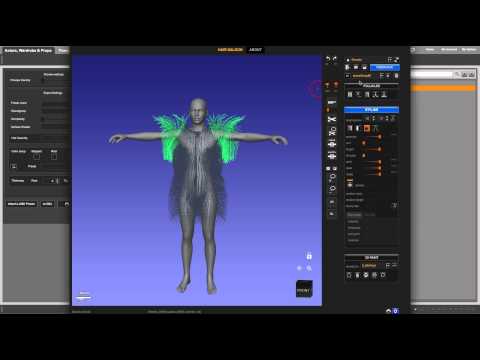
which shows how to save to a wearable preset so that you can load it back attached to the figure.
This does help the workflow some. The reason I am trying to transfer the Gen 8 male rigging to the LAMH .obj fur assets is for animation reasons mainly. That's why I was trying to use the transfer utility and have been having issues with it.
Daz to Blender Bridge - Meet the Teamendlessloving said:
DAZ_sam said:
endlessloving said:
HI there,
it's great to know that there is a bridge now. I tried it and after the "transfer" blender showed the hands of my G8M figure totally messed up, with fingers about a meter long.I used power pose to adjust the hands and fingers before I used the bridge and it seems that there is an issue with rigging.
Is there any way to make sure that the rigging works properly when using the bridge? I only need one pose and not an animation.
I don't actually need the rigging in blender, I just want to make sure that I can import an exactly posed figure into blender, including the materials from DAZ.Is there maybe a tutorial on how to use the bridge? I guess to make this work a figure needs to be prepared in a certain way or just in a default posture?
Right now there isn't a simple way of doing this in the bridge. But, it is a great idea for a tutorial. As the bridge team is small I will add to a list of many things we need to do. We will look into power pose though, and see why this is occurring thanks!
Thanks for considering to make a tutorial.
I have continued to try to get a pose from Daz to Blender but simply failed.
The Bridge does not really work for me at this point.
Skin textures are broken, cloths are overlapping and the pose is always just the default pose.
I also tried to use colada and obj and fbx and there is always something that goes really wrong.
I am wondering how other people get their figures from Daz into Blender or is it just not really a common thing?
DAZ and Blender on their own are really amazing and if there is a way to make them more compatible, that would be so aweome!
If I can support this project by testing particular things, please let me know.DAZ_sam I am having this exact same problem right now. Atempting to import a character that imported fine before. Now the hands and fingers are overscaled and warped. It looks like a result of the mesh and rig not being aligned. Frustrating because the same figure imported fine with the last version.
Daz 3D is part of

Connect
DAZ Productions, Inc.
7533 S Center View Ct #4664
West Jordan, UT 84084Licensing Agreement | Terms of Service | Privacy Policy | EULA
© 2026 Daz Productions Inc. All Rights Reserved.