-
Shape Splitter - Divide, Combine and Save (The new version is already available. 1.2.1)[Commercial]
Sevrin said:
ShadowSkillz said:
gerster said:
ShadowSkillz said:
Good day,
Hope this thread is still alive, I tried to use this tool on this new figure : https://www.daz3d.com/the-gobbler-hd-for-genesis-8-male , but when I tried to preview the results of applying the morph nothing happens/changes on the genesis 8 figure, no matter which body part I choose. Is there something special about this figure, any help is appreciated.
Looks like that the shape of the Gobbler depends heavily on HD. DAZ restricted the HD edit tools to PAs so that HD shapes can only be sold in the DAZ store. That's why this tool doesn't support HD, only base shapes can be splitted.
But I thought this tutorial was a work around that allowed it to somewhat work :
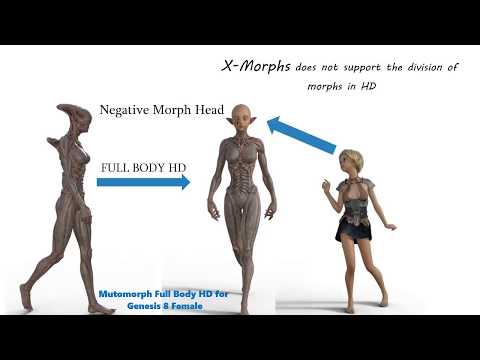 or am I mistaken?
 You can apply non-HD morphs to HD characters, but you can't apply HD morphs to other characters.
Thats fine, but the steps outlined in the video did show them creating a morph that they used to reverse the HD morph on the main figure and then applying another face morph after. I was able to do what the video mentioned for that figure but I was not able to do the similar steps for the Gobbler figure, not sure why since they are both HD figures. The Gobbler figure won't even load on the Genesis 8 male figure from within the Shape Splitter tool.
My Gen 8.1 male body disappears on reopening fileWere you using morphs that came with sliders, or were you using custom morphs (spawned from a dForm or imported with one of the Morph Loaders)? Which version of Daz Studio?
a brother for KtaryaI like the outfit, but have a twinge about the character. Have attended enough safeguarding courses to be a bit nervous about the uses to which the character could be put. It looks young while having older features. I'll stop there. There is a lot similar said about many of Thorne's characters & I am unlikely to say anything new or that you don't already know.
As the base figures between G8 and G3 are so similar and as so many transfer scripts between the two generations exist, I'd have thought it would be personal choice that determines whether you use G8 or G3. Personally I prefer the way the bend & twist controls for the arm bones occur in all the arm bones on G8, but I could live with using only the G3 version. G8 has fewer polys, so should be lighter on the system for the same level of sub-D, which may be of importance wuth a heavy scene.
Beyond that... I tend to regard G3F as being almost as similar to G8F as G8.1 is.
To be honest, not a lot in it to help make a choice beyond personal preference.
Plz help ! Any one have same issue like this after export from fbxAt a guess, a joint correction morph is applied in DS but not in C4D.
It may be that it wasn't included in the morphs you exported in your FBX.
Shape Splitter - Divide, Combine and Save (The new version is already available. 1.2.1)[Commercial]ShadowSkillz said:
gerster said:
ShadowSkillz said:
Good day,
Hope this thread is still alive, I tried to use this tool on this new figure : https://www.daz3d.com/the-gobbler-hd-for-genesis-8-male , but when I tried to preview the results of applying the morph nothing happens/changes on the genesis 8 figure, no matter which body part I choose. Is there something special about this figure, any help is appreciated.
Looks like that the shape of the Gobbler depends heavily on HD. DAZ restricted the HD edit tools to PAs so that HD shapes can only be sold in the DAZ store. That's why this tool doesn't support HD, only base shapes can be splitted.
But I thought this tutorial was a work around that allowed it to somewhat work :
or am I mistaken? You can apply non-HD morphs to HD characters, but you can't apply HD morphs to other characters.
Elora for G8F by Kooki99 triggers duplicate formulaAs a game modder avoiding code conflicts is a must, if you don't it tends to bite you on the ass, same goes for software developers and game developers.
Sadly nobody told the vendors that they have to think like coders, as a result their simple morph naming systems are starting to bite everybody on the ass.
It doesn't matter what the files are called, it's the internal asset ID that's important, using FBM<character name> for the ID doesn't cut it, too many other vendors can use the same name, using something like FBM_<vendor name>_<character name> should stop that from happening.
While renaming can be done to the assets after they have been saved, it's a lot less work to do it in DS before you get anywhere near "ERC Freeze".
Shape Splitter - Divide, Combine and Save (The new version is already available. 1.2.1)[Commercial]gerster said:
ShadowSkillz said:
Good day,
Hope this thread is still alive, I tried to use this tool on this new figure : https://www.daz3d.com/the-gobbler-hd-for-genesis-8-male , but when I tried to preview the results of applying the morph nothing happens/changes on the genesis 8 figure, no matter which body part I choose. Is there something special about this figure, any help is appreciated.
Looks like that the shape of the Gobbler depends heavily on HD. DAZ restricted the HD edit tools to PAs so that HD shapes can only be sold in the DAZ store. That's why this tool doesn't support HD, only base shapes can be splitted.
But I thought this tutorial was a work around that allowed it to somewhat work :
or am I mistaken? Elora for G8F by Kooki99 triggers duplicate formulaJason Galterio said:
Shut down DS. Uninstalled Rin (as wel as Tara & Sachra). Installed Elora. Started DS and brought in a Base G8F. Got 968 Duplicate Formula Errors. See attached text file.
In my case Elora for Genesis 8 Female appears to be conflicting with Whimsical Teens for Genesis 8 Female. When I uninstalled Whimsical Teens, G8F loaded with no duplicate formulas.
With the number of characters and DS auto loading all morphs, this should be something simple to check before characters are released. It just so happened that I had Whimsical Teens installed from a previous project. Or else I would have never found the conflict. This doesn't mean that this is the only conflict though. There might be other "Elora" in the store.
Edit to add:
The Whimsical Teens product includes an "Elora."/data/DAZ 3D/Genesis 8/Female/Morphs/PS/Whimsical_Teens/CtrlElora.dsf
/data/DAZ 3D/Genesis 8/Female/Morphs/PS/Whimsical_Teens/eJCM_Elora_EyesClosedL.dsf
/data/DAZ 3D/Genesis 8/Female/Morphs/PS/Whimsical_Teens/eJCM_Elora_EyesClosedR.dsf
/data/DAZ 3D/Genesis 8/Female/Morphs/PS/Whimsical_Teens/FBMElora.dsf
/data/DAZ 3D/Genesis 8/Female/Morphs/PS/Whimsical_Teens/PBMBreastsGoneElora.dsf/data/DAZ 3D/Genesis 8/Female/Morphs/Kooki99/Elora/Body Morph Elora_fbm.png
/data/DAZ 3D/Genesis 8/Female/Morphs/Kooki99/Elora/Character Control Elora_ctrl.png
/data/DAZ 3D/Genesis 8/Female/Morphs/Kooki99/Elora/Elora Body.dsf
/data/DAZ 3D/Genesis 8/Female/Morphs/Kooki99/Elora/Elora Head.dsf
/data/DAZ 3D/Genesis 8/Female/Morphs/Kooki99/Elora/Elora.dsf
/data/DAZ 3D/Genesis 8/Female/Morphs/Kooki99/Elora/Head Morph Elora_fhm.png
/data/DAZ 3D/Genesis 8/Female/Morphs/Kooki99/Elora/JCMEloraClosed Eyes.dsfThanks for the info. I did purchase Elora as PFAD and the Whimsical Teens just recently with April Showers. So installing the later after Elora produced the errors. Good to know. But as this error is caused by two products sold here which don't play nice together (and we had many more errors like that in the past), I really suggest that DAZ starts to setup a QA machine with all available DAZ content installed. And it would also show all the bad/missing metadata and the wrong directory paths if QA would take a look in explorer/finder every now and then.
Can't be that hard. Guess I own more than 1/3 of the stores products (homepage has 22.084 of 38.176 products available for me) and don't want to continue playing guinea pig.
Elora for G8F by Kooki99 triggers duplicate formulaTackling the issues after they happen is not very fantastic for the customers who have to deal with them. In the long run this comes back to hurt Daz more than it is worth, as these frustrations can be what pushes the customer away. I don't know about you, but unhappy customers are usually not good for business.
We also have the secondary issue of how installing lots of morphs causes load times to increase. I think this issue is even more serious, because it can effect everybody. And it effects the most loyal customers most, which kind of feels insulting when you think about it. That Genesis 8 has had a long run is not even a point. Victoria 4 STILL has new products being created for it, years after Daz stopped selling new content. You can still find new content for Genesis 3 as well. The damage is done and is on going. We can see the posts here in the forums, as numerous people have openly said they cut back on buying new characters because of the growing load times. No matter how you try to paint it, this issue effects Daz's bottom line, and even worse, it effects their most loyal customers. That is the worst part of all this, it is the loyal customer who is more likely to get burned. Besides, cycling a new Genesis every 2 years was not going to be sustanable, either. That is very likely why 8 has lasted so long. Many customers were growing tired of new generations and this is a direct result of Daz listening to that feedback. It also takes a lot of money to develop a new figure base, so developing a new base just for the sake of doing so isn't so great. So Daz put themselves in a bind either way.
The only other thing possible is for DS to check vendor names in duplicate ID situations, and use the vendor to seperate the morphs by automatically adding a vendor sig to the morph. This vendor sig would be hidden to the customer unless they select an option to unhide them. But this would probably be time consuming as well, and it may not even be possible with DS code. But the vendor is listed in every data file. The vendor name is listed at the top of the data file, so at least scanning this information might not take too long if needed. For the cherry on top this process is permenant, so that next time the customer loads the characters they do not get duplicate IDs at all. Why DS does not already check the vendor name is beyond me.
However this solution does not address the growing load times.
Elora for G8F by Kooki99 triggers duplicate formulacertaintree38 said:
xyer0 said:
I don't get it. The tester won't be twiddling his/her thumbs while the character loads; they'll be doing another task until it loads, like the rest of us do. Once it loads, they'll test it. No time or labour lost.
The Victoria / Michael 4 setup used the morph checklist idea. People hated it. What we have now is the solution for that. If Genesis 8 only had a 2-year run, then we (most of us) would not have discovered the long load times of having too many morphs.
Ok, yes, that's true. I just don't see it happening. There are new characters released every day, so each day the load times would be getting incrementally longer. At the very least, the total length of time to get those characters tested would be much longer. When before you could get things through the QA process in a few minutes, each item would now take maybe an hour or longer. If you only have one computer for this process, this would mean multiple hours added to the QA workflow. You can do things while you wait, but it's still going to be a lot longer before you can get all the products through the process each day. I just can't imagine Daz slowing down their process to that degree. I guess if you had more people doing QA, and more computers set up for it, it wouldn't be so bad.
Not to forget, that DAZ store is not the only source of assets/products.
Even if DAZ had a computer with all of the (currently available) 38166 items installed, the conflicts would still be there due to all the freebies and other assets from 3rd party sources.
Carrara Tips Tricks and Tutorials siteI have created a website to collate Carrara knowledge (http://carrara.wikidot.com/). This is a bit of an experiment now, so I am using the 'free version' just to see how things go.
My main motivation was the fact that a lot of stuff gets buried in posts. I plan to make the site very basic with some drop down lists organizing different categories.
My original concept was to actually transfer tutorials from here and put the actual content on the site, though the free version gives only 300M which is quite a lot, but, I began to think of the ridiculous amount of work that would be. BTW I shall always seek your permission to use/link to your content.
Due to limitation of resources and time I decided for now just to link to tutorials etc from this forum, or youtube or wherever you know stuff exists.
The free version only allows up to five 'members' that can edit posts etc. so for now I will take it upon myself to do the updating. Perhaps one day if all goes well I can apply to be a 'community server' which is free and has unlimited members and storage then you could all eventually become members and add your own content at will (I think lol). You would then require some HTML programming knowledge but I am making it very basic. (I believe there are adds, but i guess they have to pay the bills somehow)
So if you would like me to link to a certain post you have in this forum that you think is valuable Tip Trick or Tutorial, just submit it here and I will add it to the site.
Just supply a short description of what it is and supply the link and I will do the rest.
Any comments also welcome.
Shape Splitter - Divide, Combine and Save (The new version is already available. 1.2.1)[Commercial]ShadowSkillz said:
Good day,
Hope this thread is still alive, I tried to use this tool on this new figure : https://www.daz3d.com/the-gobbler-hd-for-genesis-8-male , but when I tried to preview the results of applying the morph nothing happens/changes on the genesis 8 figure, no matter which body part I choose. Is there something special about this figure, any help is appreciated.
Looks like that the shape of the Gobbler depends heavily on HD. DAZ restricted the HD edit tools to PAs so that HD shapes can only be sold in the DAZ store. That's why this tool doesn't support HD, only base shapes can be splitted.
Elora for G8F by Kooki99 triggers duplicate formulaxyer0 said:
I don't get it. The tester won't be twiddling his/her thumbs while the character loads; they'll be doing another task until it loads, like the rest of us do. Once it loads, they'll test it. No time or labour lost.
The Victoria / Michael 4 setup used the morph checklist idea. People hated it. What we have now is the solution for that. If Genesis 8 only had a 2-year run, then we (most of us) would not have discovered the long load times of having too many morphs.
Ok, yes, that's true. I just don't see it happening. There are new characters released every day, so each day the load times would be getting incrementally longer. At the very least, the total length of time to get those characters tested would be much longer. When before you could get things through the QA process in a few minutes, each item would now take maybe an hour or longer. If you only have one computer for this process, this would mean multiple hours added to the QA workflow. You can do things while you wait, but it's still going to be a lot longer before you can get all the products through the process each day. I just can't imagine Daz slowing down their process to that degree. I guess if you had more people doing QA, and more computers set up for it, it wouldn't be so bad.
Elora for G8F by Kooki99 triggers duplicate formulaI don't get it. The tester won't be twiddling his/her thumbs while the character loads; they'll be doing another task until it loads, like the rest of us do. Once it loads, they'll test it. No time or labour lost.
The Victoria / Michael 4 setup used the morph checklist idea. People hated it. What we have now is the solution for that. If Genesis 8 only had a 2-year run, then we (most of us) would not have discovered the long load times of having too many morphs.
Why does my Genesis 8 female look like this now?OK...I have found the culpit! It is a freebie character by Dream Escape called Erika! God knows where I got her from...lol. Her head and body morph dials are there and set to 100. When I slide them to zero I get Gen 8 back to normal. I tried to delete the morph dials and they came back when I reopened Gen 8 basic character. So I went after the character itself. Characters come in three parts. Data,People and runtime. I went to people first and found the character folder which has the .duf file and deleted the folder. I couldn't see going after the runtime folder because it contains only the textures for her and they do not come into play here. So, I went after the Data files. I found her under data>Daz 3D>Genesis 8>Female>morphs>Dream Escape>Erika. I deleted that folder so it could not find her morphs anymore. It worked!!!!!!!!!!!!!!!!! The dials are gone and the morphs are gone. Any of you out there who want to make note of this proceedure, you can because you may need it someday. Get rid of the morph data and it will fix Genesis 8 female basic. I went through all kinds of editing of paremeter dial settings first and it always came back. Then I realized I needed to go after the "cause" of the problem....morphs...data! Here she is back to normal.
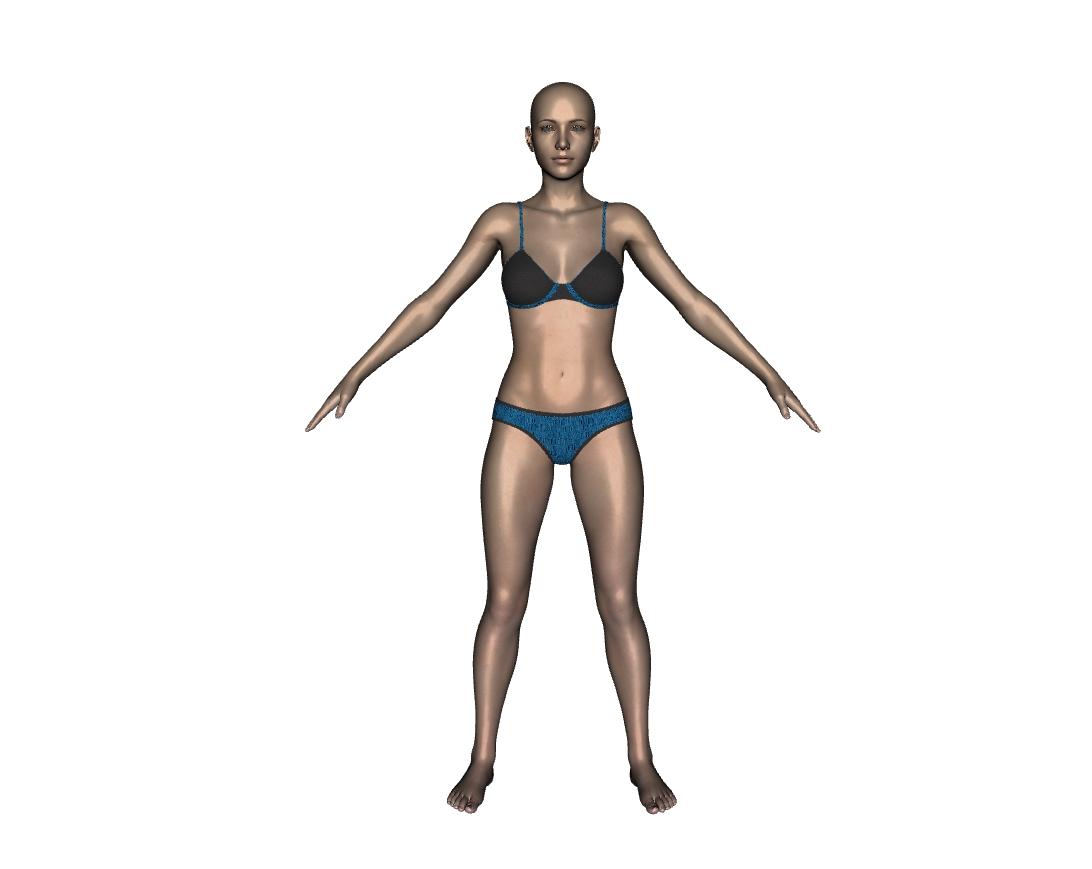
WELCOME HOME GENESIS 8 AND 8.1.....
Shape Splitter - Divide, Combine and Save (The new version is already available. 1.2.1)[Commercial]Good day,
Hope this thread is still alive, I tried to use this tool on this new figure : https://www.daz3d.com/the-gobbler-hd-for-genesis-8-male , but when I tried to preview the results of applying the morph nothing happens/changes on the genesis 8 figure, no matter which body part I choose. Is there something special about this figure, any help is appreciated.
Animation in Carrara - Let's Animate - Q&A - Come One & AllI used to use NLA clips, but I prefer to just do it all by hand for each animation now - since each of my characters requires their own, individual treatment anyways.
I even animate the strenomastoids in the neck, so yeah... I agree with what you just said and more.
After observing folks, I also notice that people rarely 'stare' people down as they talk. The eyes come back and lock for at least a portion of a second, but then the eyes either roll to the side, up or down, depending on the individual.
My sister always rolls her eyes to the side and up every single time she makes conversation.
I tried performing eye-lock on someone while I was talking to them, just to prove to myself how much I never do that. It made the recipient feel a bit uncomforatble too - I could tell.
I like to move Rosie's nostrils, sink that lower center oart of the throat (whatever the hell that's called) and accentuate one of the sternomastoids that run up and down the throat on either side of that part.
For breathing, I made my own Torso Scrunch controller morph that I use in conjunction with the Inhale morph from V4 Morphs ++ (now called Shapes ++? Not sure it's still the same). So I added Chest Bend, Abdomen Bend, Abdomen 2 Bend, Neck Bend and Arms Twist and made a freebie: Genesis 1 MorphForms +
It works great!
I do find that it's more difficult (less simple?) for me to animate the fingers on Genesis than what I've grown so accusomed to with generation 4. Probably because Rosie 5 is so vastly different in shape and size from the base, unlike Rosie 4. So I'm already planning some additions to that product.
Blinks I do by hand as well. With Rosie 4, I simply used the Blink and Blink Twice aniBlocks from Victoria Alive. I have just picked up Genesis Alive, but keep forgetting to try it. I actually enjoy just doing these things by hand.
All I've been doing these days is animating and then running simulations on cloth and hair. What a freaking Blast!!!
Elora for G8F by Kooki99 triggers duplicate formulaxyer0 said:
A dedicated PC with a hard drive containing all Daz G8 characters and morphs will not "cost a crap ton of money." Load the character, check the log. If there are no errors, you're done. If there are, you know exactly what to fix. Daz does not have to be concerned about other stores' characters, but they have regularly had duplicate formula errors and morph mixtures upon release for Daz Originals characters that have always been Daz Originals characters.
I have zero hope of it changing, but there are no excuses, only justifications for failures.
I was actually talking about the load times, which would impact the time spent testing every character and morph package. Making a database would also take a great deal of time. Labor costs money.
Elora for G8F by Kooki99 triggers duplicate formulacertaintree38 said:
There is the world of ideals, and the world of practical application. Ideally, Daz wouldn't be in this situation. They would have foreseen the problem and/or be doing something to fix it this very moment. But as a business, Daz has to think about the bottom line. It would take so much time to test these things ahead of time with a fully loaded G8, or to build a database, that it would cost a crap ton of money. It's far, far, far cheaper to fix things as they come and maybe get a little proactive about naming. And they do need to think about that overhead. Also, they can't account for all the products from all the other stores and websites, so the problem would still exist with, say, similar characters from Rendo. A different idea might be more practical.
A dedicated PC with a hard drive containing all Daz G8 characters and morphs will not "cost a crap ton of money." Load the character, check the log. If there are no errors, you're done. If there are, you know exactly what to fix. Daz does not have to be concerned about other stores' characters, but they have regularly had duplicate formula errors and morph mixtures upon release for Daz Originals characters that have always been Daz Originals characters.
I have zero hope of it changing, but there are no excuses, only justifications for failures.
Body morph is doin' a flipPlease put the Viewport in Smooth Shaded Drawstype if you need to show a nude figure.
The flip is lamost certainly down to mis-matched axes - the bst way to avoid this is to make sure that the preset in the OBJ export dialogue is the same as the preset in Morph Loader, and to not allow Blender to make any adjustments on import and export.
That may well fix the distortion when posing; if not you will need to use Edit>Figure>Rigging>Adjust Rigging to Shape, then use ERC Freeze to link the morph to the adjustments (right-click in the parametrs pane and put it in Edit mode, if it isn't, then right-click on the slider for your morph and select ERC Freeze - check the list of Sub Components to make sure it isn't including anything it shouldn't).
Daz 3D is part of

Connect
DAZ Productions, Inc.
7533 S Center View Ct #4664
West Jordan, UT 84084Licensing Agreement | Terms of Service | Privacy Policy | EULA
© 2026 Daz Productions Inc. All Rights Reserved.