-
What are Face Groups for?
Galactic Wind said:
Richard Haseltine said:
Face groups can be used to aid selection when rigging, they also provide the means (as Selection Groups) to make a bone selectable by clicking in the Viewport and allow the emsh to be hidden by turning the associated bone's visbility off. It is, however, perfectly possible to have a rigged item without face groups.
So the Face Groups are just some means of selection and nothing more. Thank you, Richard!
They are also useful for a stand-alone figure (one not rigged with the Transfer Utility) as the bones are created in the middle of the associated group's bounding box, aligned along the twist axis.
Early Access to Jacqueline 8.1?Description:
Meet Jacqueline 8.1, the free-spirited individual on a journey of self-discovery and awareness. The expectations of others don't dictate her life — in fact, she wants to break free from it all and find what makes her soul sing.
Jaqueline 8.1 is a character who will go wherever life takes her, so add this versatile, freedom-loving female to your library!
For additional savings, check out Jacqueline 8.1 Undercover Retro Bundle.
What is Genesis 8? Click here to find out more.
Jacqueline 8.1 measurements courtesy of Measure Metrics for Daz Studio:
Height: 5' 9" (175.5 cm)
Bust Circumference: 34.7" (88.2 cm)
Waist Circumference: 26.9" (68.2 cm)
Low Hip Circumference: 37.7" (95.7 cm)
This product requires installation of either Genesis 8 Starter Essentials through Daz Connect or both Genesis 8 Female Starter Essentials and Genesis 8 Female PowerPose Templates through Daz Install Manager. Product Library, DIM or Daz Connect.
What's Included:
Jacqueline 8.1 (.DUF):
Jacqueline 8.1 Character Preset
Jacqueline Eyebrows
Morph Dials:
Jacqueline 8.1 Full Body Shape
Jacqueline 8.1 Head Shape
Jacqueline 8.1 Materials:
Utilizing the Improved Iray Uber Shader
01 Jacqueline 8.1 All Maps
02 Eyelash Material Presets
04 Eye Color Options
02 Eyebrows On/Off
05 Make-up Options with Eyebrows
05 Make-up Options without Eyebrows
02 Iris Depth On/Off
03 Anatomical Elements Material Presets
02 Sub-Surface Scatter Level Presets
01 Tear Material Preset
10 Eyebrow Presets
Textures Include:
89 Texture, Bump, Displacement, Specular, Reflection, Sub-Surface Scatter, Transparency and Normal Maps (50 x 250 to 4096 x 4096)
Daz Studio Iray Material Presets (.DUF)Easy way to Upgrade Existing Characters from Genesis 8 to Genesis 8.1?I found working with a character preset transfers easily shape and materials of a genesis 8 character to a genesis 8.1 figure of same gender, thus creating the base for the desired genesis 8.1 character.
Otherwise hair and genitals were not transformed - and of course neither clothing and accessoirs. To transfer this items I save the genesis 8 character as scene subset. After creating the base for the desired genesis 8.1 character, I reload the scene subset and fit the missing items to the new genesis 8,1 character.
Face Transfer...could be worsekoshnika said:
nonesuch00 said:
You can see how the process whittles down and makes smaller the original geometry of the artwork on the left in your example.
Yes, it has to be as the models don't have as much geometry available as the photogrammetry can actually map from the source photo.
did it? Ich saved it as an morph an loaded it to a new figuren. You think it's reduced?
Create a head morph from a separate obj head mesh.Not in Daz Studio, you would - if the game license permits - need to use an external modelling application to mould the face of an exported Genesis 8 OBJ to the shape of the target head, then load that as a morph.
Create a head morph from a separate obj head mesh.Hello members of the forum! Can you please tell me if it is possible to convert character heads from OBJ to DAZ Studio?
I explain what I want to do: I selected a 3D model of a character from the game, deleted all body parts except the head (I only need the head morph) and exported the head to OBJ. I have uploaded this OBJ to DAZ and I need to convert the OBJ face to head morph. This can be done?
Face Morphs working with Male NOT FemaleI exported Male and Female G8 with Face Expression Morph Animation to FBX 2012.
Opened it with C4D R19 and R21
Its working fine with the Males but not with Female Characters.
DazStudio 4.15 Pro
Windows 10dForce Slime and Goo props losing depthOkay, got this a while ago, but haven't played with it yet, so this is as good a time as any. Maybe others can expand on this.
In the General Parameters section, you will see that the Simulation Object Type is set to Dynamic Surface, so, yes, it is dForce-ready. A cube primitive isn't set to anything, so just to make sure, Edit -> Object -> Geometry -> Add dForce Surface Modifier: Static Surface. Also, the number of subdivisions could influence the simulation depending on which collision mode you use. Sharp edges are not friendly, and I get numerous sharp un-goo-like bulges along those edges as a result. A very narrow band of the mesh is being bent at a sharp angle, so it is probably not going to be smooth. Subdividing the goo mesh smooths out those sharp edges.
You would need to use Best collision mode, bump up the subframes, iterations (per subframe), collision iterations (per subframe) and probably simulation and stabilization time. Something with a more rounded or beveled edge would probably be easier to work with.
There is still some thickness after simulating, but it is nowhere near what it started with. You could tweak some of the simulation parameters in the surface tab, but I'm sure they have been well tuned. There is also a "Fatten" morph that you can use to make the goo physically thicker after simulation. You can do it before, too, but you would lose most of the effect during simulation. Note that the Fatten morph works only in the object's Y-axis direction, so if parts of it are hanging over the edge, it will only "fatten" upwards, not out from the surface. You would need to rotate the goo object relative to the surfaces it will touch (or rotate the surface under it for the purpose of simulation and rotate it back to its original position) so that there is a Y-component to "fatten" after it settles.
Muscularity Normal/Bump Maps for G3/G8 Females?Are there any Muscularity Normal/Bump Maps I can apply to any character? I would like to use it for a game engine using Genesis 3 figures so a normal map would add nice muscle definition that is harder to get with an actual morph given the decimation.
Thanks
Need help using a G8F morph on G8MThe process is not simple. Morphs are figure specific. [i.e. G8F morphs are solely for G8F]
Basic concept: [if I didn't miss a step] To make a morph from G8M to G8F, load G8M - base resolution, no eyelashes, dial in G8F shape [hidden clone] export out mesh [no groups]; load G8F, import in clothing mesh, make clothing, dial in foot morph. Dial in G8M shape. Export out .obj [no groups]. On G8M, dial out G8F, bring in clothing mesh to make the morph [using morph loader pro] [reverse deformations]. Hopefully the morph takes and you now have the foot morph on G8M. Save it: dial it to zero, File > save as .... morph asset.
n.b. when exporting .obj from D/S "always" either remove or hide all other figures so only the one item is included in the mesh. When exporting out the mesh to be returned to make the morph, hide the G8F figure [so the clothing keeps its shape].
Classic long hair (dforce) questionDoes the character have a 'Height' slider activated. I find some hairs and clothing don't play nice when a Height morph is applied to Genesis 8, rarely Genesis 3. I usually just dial it out and lengthen the legs and torso slightly to give me the desired height of the character.
Classic long hair (dforce) questionUm is there any way to make the part not quite so wide? See how wide it is? and it is not consistant, the front bit seems about right almost, but then it gets WAY wide, what is going on with that? and is there something I am missing somewhere that will fix it? I have looked through the tabs looking for a morph or something, but I haven't found one yet.
[Tutorial]How to create LoDs inside unrealhello guys i'm here with another "tutorial" but this time it's time for the "lod" which for games is something really important to work, let's start ty learning what is lod and why he is important, then let's start:
LoD in practical means, "Level of Details" which means how detailed is the mesh in game, to make things a little more easy for daz new comers take lods as a sort of "high resolution idea in daz when you want the mesh to be on the highest detailed possible, well lod is something like that however in a reverse way, let's keep the explanation, as we know real time render unlike still renders need "fast render" which means "low polys" and somethimes low resolution compared with still renders, then while in daz have a character alone having like 1 million polygons is not a big deal, for real time render it is a big deal, you need to adjust the polygons and sometimes adjust the resolution too, specially when you are seeing the things "from too afar". for exemple this image:

i've exported him at level 1 detail which is big than level 0 currently he have 130k tris and 69.333 vertices which is a little above average for many unreal charaters which normally already countig stuffs like "outfits ending being around 80k to 130k for triple AAA games and around 40 to 80 for A to B and around 40k for indies, again this is also counting stuffs like outfits and weapons, well it's means which this is a really high detailed character.
ok While ca be awesome to have a really high detailed character in the scene, it also can be a little "processor consuming, you must remember you are also dealing with stuffs like, landscapes props and others stuffs which can make a huge impact in perfomances for your system, then you can't go just droping million polygons stuffs like it's nothing, which is only part the isse lods try to adress.
The big issue and the reason lods are made is for "when those "high detailed stuffs" are being seeying from "too far away" like a 130k character 8k textures(let's drop the textures for now and focus only on the polygons to make things easy), he will still have the same weight or even more, the most afar you get from him, like for exemple you camera is like too far away to the point of the character being almost a "pixel" in your image, well while for your "human vision" this "pixel character" have a weight on it of a pixel" in your computer it's still have the same weight as if you are doing a closup, this is where "LoDs come, they are "generated low resolutions" of the mesh which are applied as far the camera get from the mesh, for exemple let's use a range from 0 to 80 where 0 is a super closeup and 80 is almost invisible far away, then for the 0 number you would need to use the "regular high resolution" of the character, then as the camera get away, for now let's use as a base 5 lods to make more easy), you will make this model be changed to a "less polygon" then when the camera goes to 20 it will change from the 130k model to let's say a 65k model(unreal default setup use the base model as base number for reduction which means all the lods are generated from him not from each other to make then more accurace), then when you go "more afar like 40 now the model fall to 32.5k, if you go more far away it go to 16.750 at 60 then at 80 it go down to 8.335, because at this point wil be impossible for the human eyes notice how low poly the model is at this level specially because of the materials which will have stuffs like normal map, Ao and others which helps hidden the "sharps of the model when needed and the engineer itself.
here again the orc, here his lods:


if you pay attention to the numbers at the top you can see the numbers being small on each image but the character still looks fine from far away, because of all the stuffs unreal try to keep the character the less buggy as it can
here the lowest poly count i've used in a close up:

as you can see the character have a lot of sharps it's only still looking good because of unreal effect which helps make's him looks more organic.
now which we learned about lods, now the next step:
How we create LoDs??
normally you do that yourself using programs like maya, blender, zbrush and even daz using the pluging decimator he have a option to create lods, however i would high and strong advice to only use it on "static meshes" or meshes without a "skeletal mesh" because of the bad/poor optmization and updates the decimator have can break bones and influence it's just a nightmare i'm really strong advice to not use it, use something else, whatever tool you choose i really can't help since i never tried to do that my best thing which i did was bake high resolutions details into normal make by using the bake process, which is something different but have a very look like type of work which means give to low poly models as much details is possibl as the high poly have.
however if you want to work "only inside unreal the "good news is which is possible to create direct inside unreal and this is what i gonna show, now let's begin,
1 first open daz and choose the character you want to export in my case i did it with the orc, then in the daz to unreal window, nothing really special you can choose to use the base resolution in this case 0 or export the level 1 which is 4 times the base 0 polygons, not really special, i would advice you if you want to export the level 1, do that only for the base character if you are exporting a character with outfits, hair and others stuffs, only set to the main mesh body to be level 1, the others leave then at 0, because normally outfits, hairs and those others stuffs already are good enough polycount and don't need those "extra" numbers and only do that if the character total number still under 100k or near it, if it's above keep the level 0, stuffs like normal maps. ambient occlusion and others stuffs will help to "round the character", now after all the process to export it get finished, open the mesh inside unreal by double clicking on it:

then the character mesh will be open something like that(unless you make some changes than mine window they will be very close in look)

then in asset details panel you will scroll down until you find this:

if it's minimized for some reason just click on the arrow before the name lod setting and the panel will be open the since i've already generated lods for the character mine is displaying 5, but the default value if you don't generated any lod and just exported the character will be 1, where it's say number of lods, then on that option you will choose the numbers you feel better for you, for exemple if you exported the character in base mesh or 0 then i feel which would be good enough or even less, you can adjust the number as much as you want, it's just i feel having a good ammount of lods can make the transitions more "smooth" than for exemple a character going let's say 60k to 10k, it can be a huge change than go from 60 to 30 then 15 or 10 but you are free to make your own choices.
then after choose the ammount of lods you want click in the apply changes buttom(after that it will change the name to regenerate), it will automatically generate all the lods for you it can take a little time based on the ammount of lods and how detailed is character and others stuffs but it not gonna go more than maybe 10s in worst case i feel(for me take like 5s), now your character have lods a good way to check it is go to the character render panel and look at where it's saying "lod" make sure it's marked auto, now you can scroll down on that scene to go far way from the character, as the camera get away the character you will notice the numbers droping an all will be fine.
now next step is configuring" your lods, for a optimal process can be good you configure each lod to set things like the "camera distance to make the lod pop up or the ammount of polygons or make sure morphs are being used and others stuffs to do that you will go back to the asset settings panel and scroll up a little until you are there:

here is where you configure all the stuffs, to be clear i'm also not tested everything on here then i will just talk about what i know any other configuration is for yourself to try, just make sure to have a proper backup of the character or use a "dummy character" before you can start to play here, here the options which i'm using now
1 - screen size: here is where you say to unreal "how far from the camera the character must be for the lods to work, to change this you need go back to the render screen character panel and change the lod from auto to the lod you want to configure in your case will be the 1
here the level 0 and 1


small numbers in size means more far away, big numbers means more close like face closup and all, then you can adjust to numbers even big than 1, for exemple if you want to to lod 0 to be only on closup then you make a number big than 1 like 1.2 or 1.5 or 2, more than 3 would means starting to pass away the character. for each lod you set how much the camera must be away to kick the lod you must set it for each lod and the numbers must be set to "small" for each lod above 0 and above each other, in mine exemple i did, 1, 0.8, 0.6, 0.4, 0.2, any number under 0.2 will be aways the lod 5, if you want more you can go furter and make even more low poly lods it's up to you.
now the next option is(it's not exactly in perfect order or each option just to make things more right)
2 - percent of triangles: here you say how much of the "base mesh" you want each lod use, for exemple the lod 0 is 1.0 which means 100% which means the 130k, for lod 1 i've used .5 which means 50% which is the 65k and so, here you set how much triangle it gonna have from the main base it can be changed but i would advise to use the main body and not the "generated lod to make sure all influences would work right.(whe you select any lod than the lod 0 it will display a option with "base lod" is on this option where you choose which "lod you want to generate the new lod" the default value is 0 since lod 0 is the first lod, its optional and only do that again if you already know what you are doing
3 - remap morph target: this option you use in case you export the mesh with morph targets and want to apply those morphs to the lods too otherwise when 'change lods" it now will be applied and for exemple you add a "morph to children, if this option is not marked when generating the lod, it will automatically go back to the original body without the morph, like in lod 0 you apply the children morph then when it change to lod 1 if this option is not applied the model go back being a adult
some extra options which i do know
bones to prioritize or bones to remove : the first one is the option you want to make sure when generate the new lod it work almost perfect as much as the base lod and the bones to remove is when you want to remove bones from the lod which don't make too much of a difference, for exemple face expression bones, in really low and far away lods where is impossible to see a character face you can choose the face bones to not be exported to the low model making it don't have any expression, it not gonna bug the animaton or anything it just prevent the animation on those bones to happens it will reduce the processor usage for those not needed bones.
well you have a really lot of others options which i myself never tested so far then it's up to you test each one and learn what they do on the modeal and how to use it in your favor.
well after you finish to setup all the lods with all the options you want now is just time to "regenerate the lods" you have 2 optons or regenerate each lod appart selecting again each lod in the scene screen then in the lod info you go back to the base lod then under that option you will see options like regenerate, remove or reimport this lod then click on that it will regenerate the current lod you are working in case you want it to regenerate all lods in one go then in the lod setting under the number of lods option click on regenerate, it will regenerate all the lods again using the current setting you changed for each lod, remember you must setup each lod to make sure all the options where proper worked otherwise you end with only the lods you really did some changes to have changes, because if you change stuffs for one lod it not gonna automatically passed to the next one you have to select again the options for each lod.
hope it help peoples.
any question beyond that like questions about the others options have a really high chance for me to "not know the asnwers for you", not trying to be a bad person or anything like that it's just i'm really not that skilled yet, i've just learned those days about that option to generate lods and almost as the others here i'm still pretty "new on this" to be answering any question, then have fun.
Shape Splitter - Divide, Combine and Save (The new version is already available. 1.2.1)[Commercial]If the morph is not visible, you would have to create a new morph for the Gobbler
1.- You load the base figure of Genesis 8.
2.- You apply the preset of your character (Gobbler), it is in shaping of your product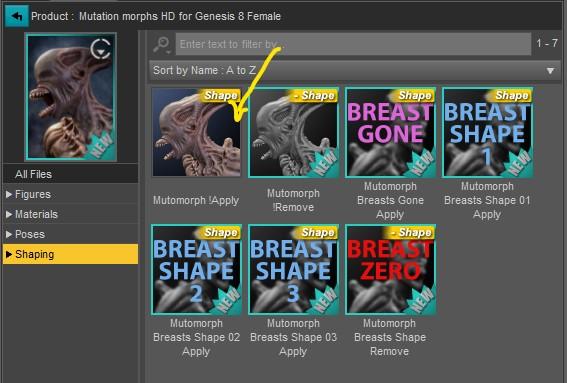
3.- Optional: You remove any scale that the character has (they make it bigger or smaller)
4.- You execute Shape Splitter, and perform the "Spawn Morph", and give it a new name, ex. New_Gobbler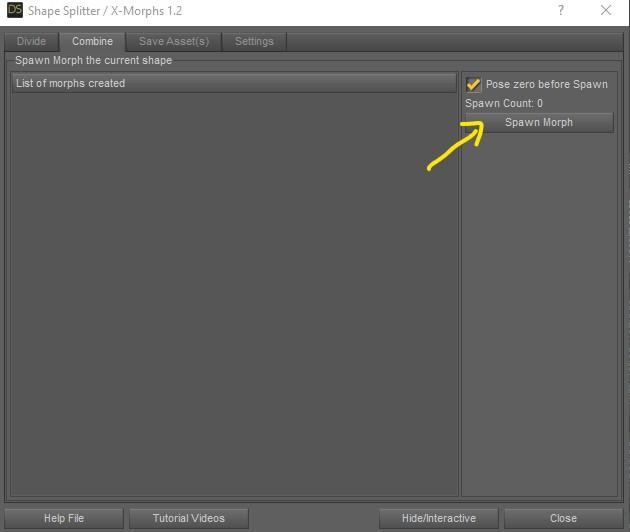
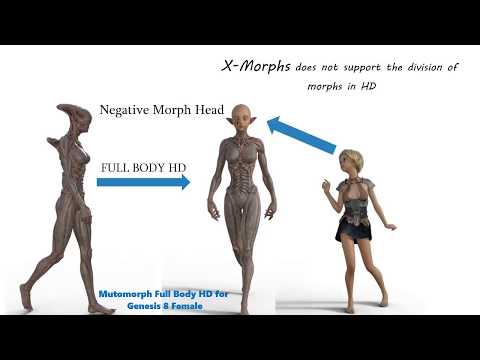
And with this new morph you could already divide it as shown in the video.
 New or Returning Anime Models for Genesis 8
richardandtracy said:
TritiumCG has done an Aiko3 pretty-much-alike morph for G8F. Can I suggest you look in the freebie forum, as there is a thread about it.
https://www.daz3d.com/forums/discussion/451151/aiko-3-reimagined-for-g8f#latest
It's a start even if it's just Aiko 3. Now for a Hiro clone, hopefully.
Need help using a G8F morph on G8MHello,
I'm in need of using a G8F foot morph on G8M. I found some posts about it, but are a bit old and some are for the face which is more complex.
Is there any tool, script or process out there to help me use a simple foot morph across this figures?
Thanks!
Plz help ! Any one have same issue like this after export from fbxBut when I export with morph than the strange things is happened, the model not showing normally
Why hasnt the ancient Daz Studio got Soft Body Physics like Blender?Hi,
From what I have read so far, currently Daz Studio doesn't include a soft body physic engine. If I don't mind the learning curve, what is the best way to have soft-body-enable render inside Daz Studio ?
I know I can export figure to blender and do the soft-body physic there, but can it be imported back to daz (as morph) so I can render with iray?
Thanks.
New or Returning Anime Models for Genesis 8TritiumCG has done an Aiko3 pretty-much-alike morph for G8F. Can I suggest you look in the freebie forum, as there is a thread about it.
https://www.daz3d.com/forums/discussion/451151/aiko-3-reimagined-for-g8f#latest
How to turn Brady Hair G3F into ~check the post~MimicMolly said:
It is possible that, that is a custom morph for the hair made by the artist. Using something like Zbrush. Only the artist would know for sure.
If that is the case, it's a tad Lame.
For promotional art, everything should be made with actual product you can buy, otherwise it becomes art for portfolio.
Daz 3D is part of

Connect
DAZ Productions, Inc.
7533 S Center View Ct #4664
West Jordan, UT 84084Licensing Agreement | Terms of Service | Privacy Policy | EULA
© 2026 Daz Productions Inc. All Rights Reserved.