-
rigging problem
I made a capefor Genesis8female in Marvelous designer ,
after import in daz3d i try to use transver utilitys with the template syut ,but it dont wery well. i show it in the images .
so o need tip to fix that .
Thanks for any answer.
Andreas
version of Genesis characterLook at the name (rather than the label) or, better, the asset details (e.g look at the methods used in http://docs.daz3d.com/doku.php/public/software/dazstudio/4/referenceguide/scripting/api_reference/samples/metadata/list_products_used/start )
I Miss Carrara!sadly no, just Andrew Finnie humour

I still use Carrara as well as many other tools but most things just don't do enough by themselves
I need to use 5 or more programs to do some of what Carrara does
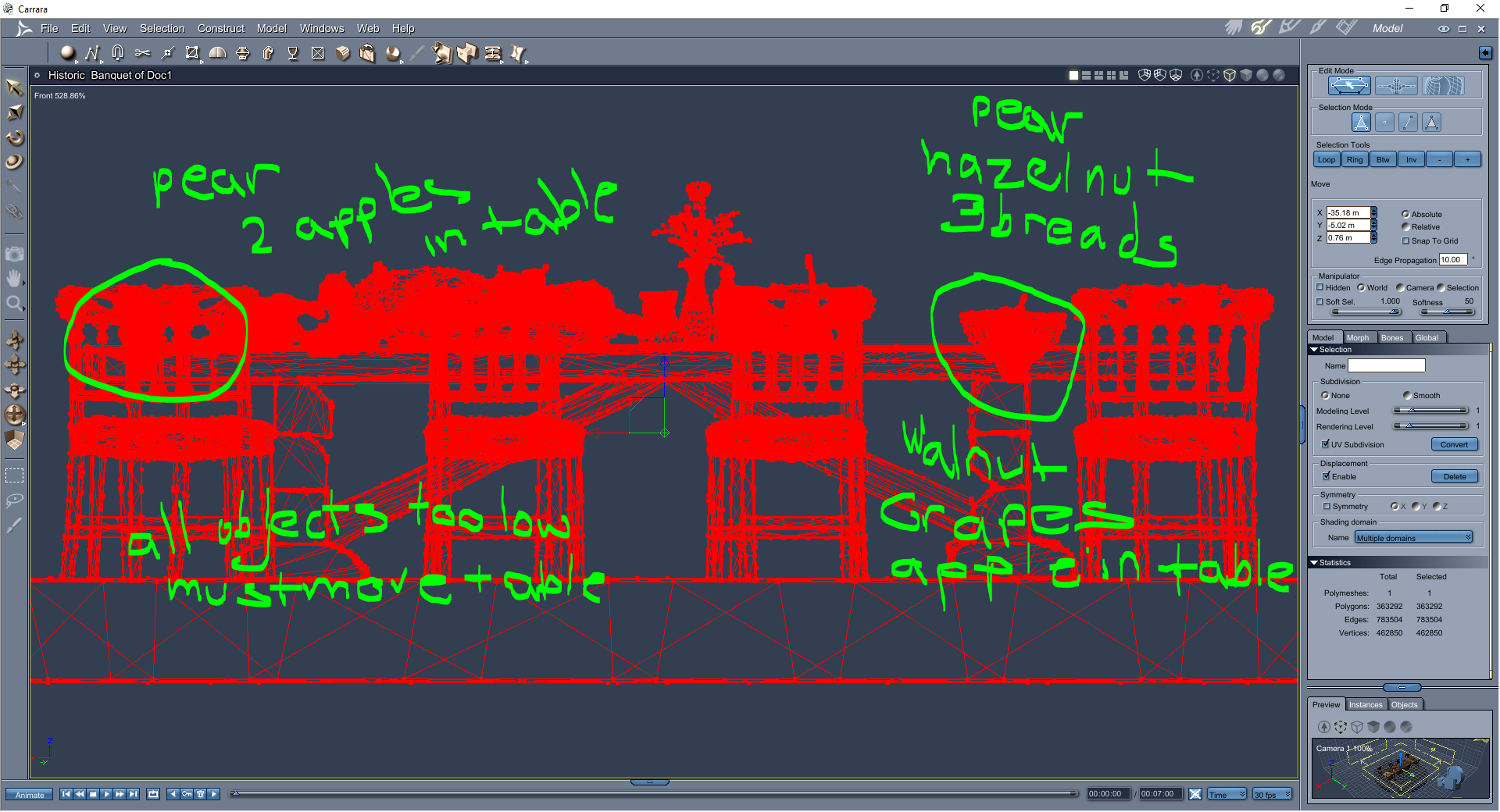
it has it's annoying quirks though, an entire imported model I was editing hiding parts in the vertex room just disappeared and it saved with 0 vertices
I was getting further in minutes than I had been trying to using the geometry editor and rigging tools in DAZ studio to move the bits around but at least that doesn't disappear forever
it was an Unreal Asset import which one has to rename every surface or Carrara will truncate the names and not differentiate between them
that bit I actually did in DAZ studio as faster with geometry editor and tool setting dialogue there (then saved as a duf for Carrara)
many fruits and breads were embeded in the table and I was pulling them out
in DAZ studio that involves converting to figure, adding a bone and filling the object with weightpainting on that bone
Carrara you can work on the object in wireframe and hide part and use softselect and pull them out ... until it all vanished and an error occured

decided downloading the Quixel megascan object collection version and setting up my own banquet is probably faster


if you feel sadistic
https://www.fab.com/listings/d422ac6c-ce50-4273-8d4a-2ac594a3a2b2
still free until next Tuesday

"gameplay video"
Daz to Unreal Transparencyopen your browser and drag and drop (or import) the cutout opacity maps into the Unreal content folder where the diffuse textures are, open the material editor and drop in the map in and set your material type to masked and join it up with the little cord from the opacity mask mask to the RGB node
oh and save it
Lashes Utilities for Genesis 2, 3 and 8 [Commercial]I know that this is thread for the older product but I could not find a thread for "Lashes Utilities Merchant Resource for Genesis 9" which I just bought today.
It works great for scene characters, BUT.....................
Has anyone gotten the G9 version to work as a merchant resource?
I have followed the directions as best as I could but could not get it to work. The directions aren`t as specific as to make it easy for me to follow. I mean I`ve used Chevybabe25`s Lash Master to create lashes following her detailed merchant resource instruction and got it in the first shot. I even did her Beautiful Brows with no problem. Her very detailed step by steps and images are exactly what I needed.
These are the instructions and what I did to follow them.
1) After shaping lashes as desired, export them as OBJ as base resolution. - Export what? Both the Lashes Utility Genesis 9 root and Lashes Utility Genesis 9 or just Lashes Utility Genesis 9? The no merchant resource instructions say not to mess with Lashes Utilities Genesis 9 Root. (I`ve tried both ways)
2) Import back the OBJ and use the transfer to rig it to Lashes Utility Genesis 9 Root (not directly to Genesis 9) - I clicked on import, then in the Source window I selected Lashes Utility Genesis 9 Root. And in the Target window I selected the renamed Lashes Utility Genesis 9 OBJ file that I imported. I clecked accept.
3) Convert to SubD.- OK now there are more files.... Lashes Utilities Genesis 9 parented under Lashes Utilities Genesis 9 Root, Lashes Utilities Genesis 9 Obj, and Lashes Utilities Genesis 9 not parented to anything. Which to I convert to SubD? (I tried multiple combinations).
4) Change the material. OK? I guess on the thing I just converted to SubD right? LOL
5) Save both your customized lashes and the root to your product folder as Figure/Prop Assets. - I did that in multiple combinations.
6. Make sure to delete morph dials of Lashes Utilities Genesis 9 Root from your final product - Did not get this far as the prop did not fit.
7) With the pieces properly conformed, select Genesis 9 and save as a Wearable Preset. - Did not comform properly.
Have I missed anything or did something wrong?
As stated, I tried multiple combinations multiple times.
Any help would be appreciated :)
Thank you
HD leg, Arm, Torso pressure morphs G8M/F, G9Richard Haseltine said:
crosswind said:
Dareshiranu said:
crosswind said:
Without multi-resoltuion morph support plugin for MLP (exclusive for PA...), any way of making HD morphs with dhdm files is again TOS of Daz3D ~~
Well, that makes the sort of sense that isn't. Some clarification might just be useful. Since I don't fathom what a multi-resolution morph support plugin for MLP is (spelling corrected). Nor do I have any knowledge of what a dhdm file might be. 1: Multi-Resolution morph support plugin 2: MLP 3: dhdm file... Please interpret 1, 2, and 3 so that I can at least understand what is exclusive for PAs or against Daz TOS. Thanks. All I know for certain is that there are many items sold on this platform as well as alternatives (gasp!) that contain pressure morphs. It beggars the imagination that all of the sellers on other platforms are PAs here using alternative names, given that the style of the items is quite divergent from what might be found here. Though I can accept the possibility that I could be wrong, I don't claim to be an expert in the field. I can simply recognize stylistic commonalities.
Okay ~
0: With Multi-Resolution Morph Support plugin (exclusive to PAs, "HD plugin"), one can import morphs with SubD, aka HD morphs by using Morph Loader Pro (MLP). As users, we only can import morphs with Base Resolution.
1: After saving Morph Asset of imported HD morph, a *.dhdm file (Daz HD Morph file) is generated and saved in the data folder where the Morph Asset file (*.dsf) locates.
2: There're two types of "pressure morphs", HD and non-HD. If you can find a dhdm file in the data folder of the pressure morph dsf file, it's the former otherwise it's the latter.My PA friends told me they signed NDA with Daz3D for using HD plugin and they can only sell products with HD morphs in this store rather than other 3rd-party stores. If you see there're dhdm files in some products from those sites, the vendors might've use DS 4.6 + HD plugin... because someone ever leaked HD plugin years ago... but only for DS 4.6 version...
Then some guy developed plugins for Blender / ZBrush by using techs. of reverse engineering. The plugins can import HD morphs and generate dhdm files. Using the plugins is against TOS in here, AFAIK.
It is against the Daz Studio license.
Right ! DS EULA ~
HD leg, Arm, Torso pressure morphs G8M/F, G9crosswind said:
Dareshiranu said:
crosswind said:
Without multi-resoltuion morph support plugin for MLP (exclusive for PA...), any way of making HD morphs with dhdm files is again TOS of Daz3D ~~
Well, that makes the sort of sense that isn't. Some clarification might just be useful. Since I don't fathom what a multi-resolution morph support plugin for MLP is (spelling corrected). Nor do I have any knowledge of what a dhdm file might be. 1: Multi-Resolution morph support plugin 2: MLP 3: dhdm file... Please interpret 1, 2, and 3 so that I can at least understand what is exclusive for PAs or against Daz TOS. Thanks. All I know for certain is that there are many items sold on this platform as well as alternatives (gasp!) that contain pressure morphs. It beggars the imagination that all of the sellers on other platforms are PAs here using alternative names, given that the style of the items is quite divergent from what might be found here. Though I can accept the possibility that I could be wrong, I don't claim to be an expert in the field. I can simply recognize stylistic commonalities.
Okay ~
0: With Multi-Resolution Morph Support plugin (exclusive to PAs, "HD plugin"), one can import morphs with SubD, aka HD morphs by using Morph Loader Pro (MLP). As users, we only can import morphs with Base Resolution.
1: After saving Morph Asset of imported HD morph, a *.dhdm file (Daz HD Morph file) is generated and saved in the data folder where the Morph Asset file (*.dsf) locates.
2: There're two types of "pressure morphs", HD and non-HD. If you can find a dhdm file in the data folder of the pressure morph dsf file, it's the former otherwise it's the latter.My PA friends told me they signed NDA with Daz3D for using HD plugin and they can only sell products with HD morphs in this store rather than other 3rd-party stores. If you see there're dhdm files in some products from those sites, the vendors might've use DS 4.6 + HD plugin... because someone ever leaked HD plugin years ago... but only for DS 4.6 version...
Then some guy developed plugins for Blender / ZBrush by using techs. of reverse engineering. The plugins can import HD morphs and generate dhdm files. Using the plugins is against TOS in here, AFAIK.
It is against the Daz Studio license.
HD leg, Arm, Torso pressure morphs G8M/F, G9Dareshiranu said:
crosswind said:
Without multi-resoltuion morph support plugin for MLP (exclusive for PA...), any way of making HD morphs with dhdm files is again TOS of Daz3D ~~
Well, that makes the sort of sense that isn't. Some clarification might just be useful. Since I don't fathom what a multi-resolution morph support plugin for MLP is (spelling corrected). Nor do I have any knowledge of what a dhdm file might be. 1: Multi-Resolution morph support plugin 2: MLP 3: dhdm file... Please interpret 1, 2, and 3 so that I can at least understand what is exclusive for PAs or against Daz TOS. Thanks. All I know for certain is that there are many items sold on this platform as well as alternatives (gasp!) that contain pressure morphs. It beggars the imagination that all of the sellers on other platforms are PAs here using alternative names, given that the style of the items is quite divergent from what might be found here. Though I can accept the possibility that I could be wrong, I don't claim to be an expert in the field. I can simply recognize stylistic commonalities.
Okay ~
0: With Multi-Resolution Morph Support plugin (exclusive to PAs, "HD plugin"), one can import morphs with SubD, aka HD morphs by using Morph Loader Pro (MLP). As users, we only can import morphs with Base Resolution.
1: After saving Morph Asset of imported HD morph, a *.dhdm file (Daz HD Morph file) is generated and saved in the data folder where the Morph Asset file (*.dsf) locates.
2: There're two types of "pressure morphs", HD and non-HD. If you can find a dhdm file in the data folder of the pressure morph dsf file, it's the former otherwise it's the latter.My PA friends told me they signed NDA with Daz3D for using HD plugin and they can only sell products with HD morphs in this store rather than other 3rd-party stores. If you see there're dhdm files in some products from those sites, the vendors might've use DS 4.6 + HD plugin... because someone ever leaked HD plugin years ago... but only for DS 4.6 version...
Then some guy developed plugins for Blender / ZBrush by using techs. of reverse engineering. The plugins can import HD morphs and generate dhdm files. Using the plugins is against TOS DAZ STUDIO License (EULA) in here, AFAIK.
Bake Filatoon shader for blendermchacon said:
I downloaded the diffeomorphic add-on--but it fails when I try to import a Genesis 9 character.
I just saved the character as a scene--do I need to export just the character or something?
any ideas?
Using Filatoon? Please post the image as an attachment, the forum doesn't properly support pasting images into the text box (you can post a lick to the attachemnt, once you have that).
Bake Filatoon shader for blenderI downloaded the diffeomorphic add-on--but it fails when I try to import a Genesis 9 character.
I just saved the character as a scene--do I need to export just the character or something?
any ideas?
Strand-Based Hair is shown as Figure in scene listMichal P. said:
Just a question from regular user: If I understand right, vendors can import polylines (e.g. from Blender)
Just to note that anyone can do this part.
and convert them into strand-based hair (generate PS and PR Hairs can bee seen in parameters tab and adequate settings in surface tab) but regular user cannot. Am I right?
If your definition of "Strand-based Hair" is hair that has all those features, then yes, your assessment is correct.
Strand-Based Hair is shown as Figure in scene listJust a question from regular user: If I understand right, vendors can import polylines (e.g. from Blender) and convert them into strand-based hair (generate PS and PR Hairs can bee seen in parameters tab and adequate settings in surface tab) but regular user cannot. Am I right?
Strand-Based Hair is shown as Figure in scene listGordig said:
UncannyValet said:
One is the SBH that is created in the SBH Editor and appears as an SBH object in the Scene list.
The other is what is in your screenshot. These are imported polylines with the dForce Hair Modifier applied. This is something only vendors can do. They can import polylines and convert them into something that has all the SBH functionality and the adjustable parameters you see in Surfaces tab. It has the features and properties of SBH but cannot be opened in SBH Editor.
I'm not sure that's entirely accurate. I get the impression that at least a fair number of the dForce hairs for sale in the Daz store were created in DS using the SBH editor, but then have dForce applied to them, which only PAs can do, and which makes them out of our reach to edit.
The method I had witnessed involved a PA applying the dHair Modifier to curves/poylines. This is not incompatible with what you are saying. Obviously they could use SBH Editor, just like they could use xgen or blender or ornatrix as their hair creation tool. If what you are saying is that there is a method to go directly from SBH object to dForce SBH, then I cannot comment on that as im only aware of the indirect process i described.
Strand-Based Hair is shown as Figure in scene listUncannyValet said:
One is the SBH that is created in the SBH Editor and appears as an SBH object in the Scene list.
The other is what is in your screenshot. These are imported polylines with the dForce Hair Modifier applied. This is something only vendors can do. They can import polylines and convert them into something that has all the SBH functionality and the adjustable parameters you see in Surfaces tab. It has the features and properties of SBH but cannot be opened in SBH Editor.
I'm not sure that's entirely accurate. I get the impression that at least a fair number of the dForce hairs for sale in the Daz store were created in DS using the SBH editor, but then have dForce applied to them, which only PAs can do, and which makes them out of our reach to edit.
What's the single most annoying issue about Daz prevent you from using it more often?Richard Haseltine said:
Alley Rat said:
There are no real showstoppers for me, but as well-documented as the 3DS and DXF file formats are, it is odd that you cannot import or export those. I work a lot with vintage computer graphics programs on the Amiga, and it would be cool to be able to render that stuff with Iray or even Filament.
The FBX Importer could be used - we are pointed to https://github.com/daz3d/StudioFbxImporter/blob/6bb9172dcc605d6ade1363e57946fc323d4154c2/FBX Importer/DzFbxImporter.cpp#L243 - though I think that is a some-assembly-required answer.
My confusion, sorry - this is in the current build, selecting FBX or all as the import format will also enable the import of the others.
What's the single most annoying issue about Daz prevent you from using it more often?You know what does a cracking good job of 3ds import? Carrara! It's true!
What's the single most annoying issue about Daz prevent you from using it more often?Alley Rat said:
There are no real showstoppers for me, but as well-documented as the 3DS and DXF file formats are, it is odd that you cannot import or export those. I work a lot with vintage computer graphics programs on the Amiga, and it would be cool to be able to render that stuff with Iray or even Filament.
The FBX Importer could be used - we are pointed to https://github.com/daz3d/StudioFbxImporter/blob/6bb9172dcc605d6ade1363e57946fc323d4154c2/FBX Importer/DzFbxImporter.cpp#L243 - though I think that is a some-assembly-required answer.
What's the single most annoying issue about Daz prevent you from using it more often?Alley Rat said:
There are no real showstoppers for me, but as well-documented as the 3DS and DXF file formats are, it is odd that you cannot import or export those. I work a lot with vintage computer graphics programs on the Amiga, and it would be cool to be able to render that stuff with Iray or even Filament.
there are plenty of other softwares that can convert them
PW Environments IssueI am an old Poser user, so I never learned to rely on smart content, so I find it more of a hand holding nuisance. I don’t fault anyone that uses it, I was merely stating I had no information on whether the way I set up my content folder would break smart content or not.
Elor said:
Smart content is really useful to find a pose, a material preset or a shader or a prop / accessories, etc.
It's not without its faults of course (wrong metadata or like for the Content Library, rules not followed or who changed through time I suppose), but it's a great tool to have alongside the Content Library.
Strand-Based Hair is shown as Figure in scene listMichal P. said:
Some hair uses strand based hair in DAZ Studio, but it is shown as Figure not as Strand-Based Hair item in the Scene list (for example dForce AK Curly Long Hair). Why? When I select the Figure which is hair I see Generate PS and PR Hairs in Parameters tab. Can I edit this hair in Strand-Based Hair editor? When I select the Figure, which is actually strand-based hair items, and when I want to open the Strand-Based Hair Editor, I get an error message saying that Strand-Based Hair node must be selected to continue. How to open the Strand-Based Hair Editor?
There are (at least) two types of 'Strand Based Hair'.
One is the SBH that is created in the SBH Editor and appears as an SBH object in the Scene list.
The other is what is in your screenshot. These are imported polylines with the dForce Hair Modifier applied. This is something only vendors can do. They can import polylines and convert them into something that has all the SBH functionality and the adjustable parameters you see in Surfaces tab. It has the features and properties of SBH but cannot be opened in SBH Editor.
Daz 3D is part of

Connect
DAZ Productions, Inc.
7533 S Center View Ct #4664
West Jordan, UT 84084Licensing Agreement | Terms of Service | Privacy Policy | EULA
© 2026 Daz Productions Inc. All Rights Reserved.